1
Ifthe Anti-Jacking option has been programmed (askyour dealerifyou would like
to have this option)and the Ignition-Kill has beeninstalled , the Panic Mode works
as Anti-Jacking ifthe keyis in the ignition. IfAnti-Jacking mode is activated while key
is in the ignition, a) the siren will go off for 1.5 minutes, and b) the Ignition-Kill
will be activated after the first 30 seconds. This is to give a 30 second warning to the hijacker, then to disconnect the ignition to stop the vehicle.
Safety Shut Down Features
The NUSTART Nu2000R system has several shut down safety features.
The following actions will shut down the engine or prevent the car from auto-starting
: Opening the hood, pressing the brake, or if valet mode is turned on.
OPTIONAL PROGRAMMABLE FEATURES
Valet Mode
While the vehicle is in valet mode, the only features that will function willbe the keyless
entry and optionalauxiliary functions.
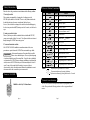
In order to enter Valet mode, press the
buttons sim ultaneously for a 1/2
second. In order to manually enter Valet Mode, insert your key into the ignition and turn
the ignition on and off (between ACC and ON) five times within 7 seconds
You can exit Valet Mode only by pressing buttons
simultaneously for 1/2 second.
These additional features may be programmed to the NUSTART system by your
authorized NUSTART dealer.
Ign ition Lock
Automatic Transmission Vehicles:
This progammable option wi ll automatically lock the vehicle door s once the key is i n the
ignition and the brake pedal is pr essed. The doors willunlock as soon as the key is
r emoved from the ignition.
Manual Transmission vehicle:
Thi s progamm able opti on will automatically l ock the vehicle door s once the key is in the
ignition and the brake pedal is pressed. The doors wi llautomatically unl ock when the
emergency brake i s set while the vehicle is running with the key.
Timer Start Mode
Pass ive Locking
In Timer Start Mode, your car automaticall ystarts every 1.5 or 3.0 hours, depending on
preset options during the time of installation, for a 24-hour period. This mode is cancell ed
automatically after 24 hour s or once you start your vehicl e with the key or remote. In order
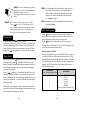
to enter Timer Start Mode, press the
buttons simultaneously
for a 1/2 second.
Please note : Timer Star t Mode becomes Cold Start Mode once an optional
temperature sensor is installed.
Timer Start Mode should be used only in open areas.
Important! Never start and run the vehicle in an enclosed space such as
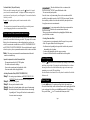
You can tur n this function on or off by pressi ng the
buttons for a 1/2
second. When set to passive locking, your system willlock automatically, 30 seconds
after all the doors/ hatch have been closed.
Turbo Mode
If this optional Turbo Mode has been programmed at the time of installation, you can turn
this feature on and off by pressing Buttons
a garage or carport.
Page 10
Page 11
for a 1/2 second .