1
ADMINISTRATION
GUIDE
Cisco SPA232D Mobility Enhanced Phone Adapter
Cisco and the Cisco logo are trademarks or registered trademarks of Cisco and/or its affiliates in the U.S. and other countries. To view a list of Cisco trademarks,
go to this URL: www.cisco.com/go/trademarks. Third-party trademarks mentioned are the property of their respective owners. The use of the word partner
does not imply a partnership relationship between Cisco and any other company. (1110R)
© 2012 Cisco Systems, Inc. All rights reserved.
78-20305-01
Contents
Chapter 1: Getting Started
Feature Overview
7
7
Understanding Voice Service Operations
8
ATA Voice Features
8
Before You Begin
14
Product Features
14
Connecting the Equipment
17
Configuration and Management of the ATA
18
Registering a Cisco SPA302D Handset
19
Additional Information
20
Using the IVR for Administration
20
Mounting the ATA
24
Elements of the User Interface
26
Chapter 2: Quick Setup for Voice over IP Service
28
Chapter 3: Configuring the Network
31
Basic Setup
31
Network Service
31
Internet Settings
33
Network Settings for the LAN and DHCP Server
36
Time Settings
39
Advanced Settings
41
Port Setting
41
MAC Address Clone
42
VPN Passthrough
43
VLAN
44
CDP & LLDP
45
Application
46
Quality of Service (QoS)
46
Port Forwarding
47
Cisco SPA232D Administration Guide
3
Contents
Manually Adding Port Forwarding
48
DMZ
50
Chapter 4: Configuring the Voice Settings
51
Information
52
System
62
SIP
65
Provisioning
75
Regional
81
Line 1 Settings (PHONE Port)
99
PSTN (LINE Port)
118
User 1
139
PSTN User
144
DECT Line 1 - DECT Line 10
146
DECT User
166
Chapter 5: Administration Settings
Management
168
168
Web Access Management
169
TR-069
171
SNMP
173
User List (Password Management)
175
Bonjour
176
Reset Button
176
Logging
176
Log Module
177
Log Setting
179
Log Viewer
181
Diagnostics
182
Ping Test
182
Traceroute Test
182
Cisco SPA232D Administration Guide
4
Contents
Factory Defaults
183
Firmware Upgrade
183
Configuration Management
184
Backup Configuration
184
Restore Configuration
184
Reboot
185
Chapter 6: Viewing the Status and Statistics
186
System Information
186
Interface Information
187
Internet Status
188
Port Statistics
189
DHCP Server Information
190
Appendix A: Frequently Asked Questions
192
Appendix B: Using the IVR for Administration
195
Appendix C: Advanced Options for Voice Services
200
Optimizing Fax Completion Rates
200
VoIP-to-PSTN and PSTN-to-VoIP Calling
203
How VoIP-To-PSTN Calls Work
203
How PSTN-To-VoIP Calls Work
205
Terminating Gateway Calls
206
VoIP Outbound Call Routing
206
Configuring VoIP Failover to PSTN
207
Sharing One VoIP Account Between the PHONE and LINE Ports
208
PSTN Call to Ring Line 1
209
Symmetric RTP
209
Call Progress Tones
209
Call Scenarios
PSTN to VoIP Call with and Without Ring-Thru
Cisco SPA232D Administration Guide
210
210
5
Contents
VoIP to PSTN Call With and Without Authentication
210
Call Forwarding to PSTN Gateway
212
Configuring Dial Plans
213
Digit Sequences
214
Acceptance and Transmission of the Dialed Digits
218
Dial Plan Timer (Off-Hook Timer)
219
Interdigit Long Timer (Incomplete Entry Timer)
220
Interdigit Short Timer (Complete Entry Timer)
221
Resetting the Control Timers
221
Appendix D: Where to Go From Here
Cisco SPA232D Administration Guide
223
6
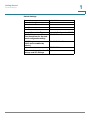
1
Getting Started
Thank you for choosing the Cisco SPA232D Mobility Enhanced Analog Telephone
Adapter (ATA). This chapter provides more information about the features of the
product and provides instructions about connecting the equipment and getting
started in the web-based configuration utility.
Feature Overview
With the Cisco SPA232D Mobility Enhanced ATA, you can provide your analog
phone and Cisco SPA302D cordless handsets with access to analog and Internet
phone services through a standard RJ-11 phone port and a built-in DECT base
station. The ATA supports up to five Cisco SPA302D handsets. The ATA connects
to the Internet through a broadband (DSL or cable) modem or router. The ATA can
be used with an on-site call-control system or an Internet-based call-control
system.
The ATA is an intelligent low-density Voice over IP (VoIP) gateway that enables
carrier-class residential and business IP Telephony services delivered over
broadband or high-speed Internet connections. An ATA maintains the state of each
call it terminates and reacts appropriately to user input events (such as on/off hook
or hook flash). The ATAs use the Session Initiation Protocol (SIP) open standard so
there is little or no involvement by a “middle-man” server or media gateway
controller. SIP allows inter-operation with all ITSPs that support SIP.
The system supports four simultaneous calls, including “active” calls and “on-hold”
calls. A phone or DECT handset can handle one on-hold call and one active call
simultaneously.
Cisco SPA232D Administration Guide
7
1
Getting Started
Feature Overview
Understanding Voice Service Operations
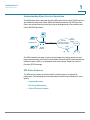
The ATA allows calls to be made by using SIP-based Voice-over-IP (VoIP) services
and traditional telephone Public Switched Telephone Network (PSTN) services.
Calls can be placed and received by using an analog phone or fax machine and
Cisco SPA302D handsets.
VV
Ethernet
Services
Ready
Platform
Voice
gateway
V
PSTN
IP
SIP proxy
Phone
236741
Telephone/fax
Internet
Service Provider
VoIP Infrastructure
The ATA maintains the state of each call and makes the proper reaction to user
input events (such as on/off hook or hook flash). Because the ATA uses the Session
Initiation Protocol (SIP), it is compatible with most Internet Telephony Service
Provider (ITSP) offerings.
ATA Voice Features
The ATA can be custom provisioned within a wide range of configuration
parameters. The following sections describe the factors that contribute to voice
quality:
•
Supported Codecs
•
SIP Proxy Redundancy
•
Other ATA Voice Features
Cisco SPA232D Administration Guide
8
1
Getting Started
Feature Overview
Supported Codecs
The ATA supports the codecs listed below. You can use the default settings or
configure the codec settings in the Audio Configuration section of these pages:
Line 1 Settings (PHONE Port), PSTN (LINE Port), and DECT Line 1 - DECT Line
10.
Codec
Description
G.711 (A-law and mu-law)
Very low complexity codecs that support
uncompressed 64 kbps digitized voice
transmissions at one through ten 5 ms voice frames
per packet. These codecs provide the highest
narrow-band voice quality and uses the most
bandwidth of any of the available codecs.
G.726-32
Low complexity codec that supports compressed
32 kbps digitized voice transmission at one through
ten 10 ms voice frames per packet. This codec
provides high voice quality.
G.729a
ITU G.729 voice coding algorithm used to
compress digitized speech. G.729a is a reduced
complexity version of G.729 requiring about half
the processing power of G.729. The G.729 and
G.729a bit streams are compatible and
interoperable, but not identical.
Cisco SPA232D Administration Guide
9
1
Getting Started
Feature Overview
SIP Proxy Redundancy
In typical commercial IP Telephony deployments, all calls are established through
a SIP proxy server. A typical SIP proxy server can handle thousands of
subscribers. It is important that a backup server be available so that an active
server can be temporarily switched out for maintenance. The ATA supports the
use of backup SIP proxy servers (through DNS SRV) so that service disruption is
minimized.
An easy way to support proxy redundancy is to configure your DNS server with a
list of SIP proxy addresses. The ATA can be instructed to contact a SIP proxy
server in a domain named in the SIP message. The ATA consults the DNS server to
get a list of hosts in the given domain that provide SIP services. If an entry exists,
the DNS server returns an SRV record that contains a list of SIP proxy servers for
the domain, with their host names, priority, listening ports, and so on. The ATA tries
to contact the list of hosts in the order of their stated priority.
If the ATA is currently using a lower priority proxy server, it periodically probes the
higher priority proxy to see whether it is online, and switches back to the higher
priority proxy when possible. You can use the default settings or configure the
Proxy Redundancy Method in the Proxy and Registration section of the Line 1
Settings (PHONE Port) page and the DECT Line 1 - DECT Line 10 pages.
Other ATA Voice Features
•
Silence Suppression and Comfort Noise Generation
Voice Activity Detection (VAD) with Silence Suppression is a means of
increasing the number of calls supported by the network by reducing the
average bandwidth required for a single call. VAD distinguishes between
speech and non-speech signals, and Silence Suppression removes the
natural silences that occur in a conversation. Therefore the IP bandwidth is
used only to transmit speech. Comfort Noise Generation provides
artificially-generated background white noise (sounds) to reassure callers
that their calls are still connected during the silent periods. You can enable
this feature in the Audio Configuration section of these pages: Line 1
Settings (PHONE Port), PSTN (LINE Port), and DECT Line 1 - DECT Line
10.
•
Modem and Fax Pass-Through
-
Cisco SPA232D Administration Guide
Modem pass-through mode can be triggered by predialing the Vertical
Service Activation Code for the Modem Line Toggle Code. You can
configure this setting in the Vertical Service Activation Codes section
of the Regional page.
10
1
Getting Started
Feature Overview
-
FAX pass-through mode is triggered by the detection of a CED/CNG
tone or an NSE event.
-
Echo canceller is automatically disabled for Modem passthrough mode.
-
Echo canceller is disabled for FAX pass-through if the parameter FAX
Disable ECAN (Line 1 or 2 tab) is set to “yes” for that line (in that case
FAX pass-through is the same as Modem pass-through)
-
Call waiting and silence suppression are automatically disabled for both
FAX and Modem pass-through. In addition, out-of-band DTMF
transmission is disabled during modem or fax passthrough.
•
Adaptive Jitter Buffer
The ATA can buffer incoming voice packets to minimize the impact of
variable network delays. This process is known as jitter buffering. The size
of the jitter buffer adjusts to changing network conditions. The ATA has a
Network Jitter Level control setting for each line of service. The jitter level
determines how aggressively the ATA tries to shrink the jitter buffer over
time to achieve a lower overall delay. If the jitter level is higher, it shrinks
more gradually. If jitter level is lower, it shrinks more quickly. You can use the
default settings or configure this feature in the Network Settings section of
these pages: Line 1 Settings (PHONE Port), PSTN (LINE Port), and DECT
Line 1 - DECT Line 10.
•
Secure Calls
When secure calling is enabled on a line interface, a user can make an
outbound call secure by entering a star code. When this feature is activated,
the audio packets in both directions are encrypted. This service is enabled
by default in the Supplementary Service Subscription section of the Line 1
Settings (PHONE Port) page and the DECT Line 1 - DECT Line 10 pages.
You can allow a user to make secure calls without requiring a star code, by
enabling Secure Call Setting in the Supplementary Service Settings
section of the User 1 page.
•
Adjustable Audio Frames Per Packet
This feature allows the user to set the number of audio frames contained in
one RTP packet. Packets can be adjusted to contain from 1–10 audio
frames. Increasing the number of packets decreases the bandwidth utilized,
but it also increases delay and may affect voice quality. You can configure
this setting in the RTP Parameters section of the SIP page.
•
DTMF Relay
The ATA may relay DTMF digits as out-of-band events to preserve the
fidelity of the digits. This can enhance the reliability of DTMF transmission
required by many IVR applications such as dial-up banking and airline
Cisco SPA232D Administration Guide
11
1
Getting Started
Feature Overview
information. You can configure this setting in the RTP Parameters section of
the SIP page.
•
Call Progress Tones
The ATA has configurable call progress tones. Call progress tones are
generated locally on the ATA so that an end user is advised of status (such
as ringback) Parameters for each type of tone (for instance a dial tone
played back to an end user) may include frequency and amplitude of each
component, and cadence information. You can keep the default settings or
configure these tones in the Call Progress Tones section of the Regional
page.
•
Call Progress Tone Pass Through
This feature allows the user to hear the call progress tones (such as ringing)
that are generated from the far-end network.
•
Echo Cancellation
Impedance mismatch between the telephone and the IP Telephony
gateway phone port can lead to near-end echo. The ATA has a near-end
echo canceller that compensates for impedance mismatch. The ATA also
implements an echo suppressor with Comfort Noise Generator (CNG) so
that any residual echo is not noticeable. This feature is enabled by default.
You can configure this setting in the Audio Configuration of these pages:
Line 1 Settings (PHONE Port), PSTN (LINE Port), and DECT Line 1 DECT Line 10.
•
Hook Flash Events
The ATA can signal hook flash events to the proxy during a connected call.
This feature can be used to provide advanced mid-call services with thirdparty-call control.
•
Cisco SPA232D Administration Guide
-
Depending on the features that the service provider offers using thirdparty-call-control, you may need to disable Call Waiting Service, Three
Way Conference Service, or Three Way Call Service to correctly signal a
hook flash event to the softswitch. You can configure these settings in
the Supplementary Service Subscription section of the Line 1 Settings
(PHONE Port) page and the DECT Line 1 - DECT Line 10 pages.
-
You can configure the length of time allowed for detection of a hook flash
by adjusting the Hook Flash Timer parameter in the Control Timer
Values section of the SIP page.
Configurable Dial Plan with Interdigit Timers
The ATA has three configurable interdigit timers: an initial timeout signaling
that a phone is taken off hook, a long timeout signaling the end of a dialed
12
1
Getting Started
Feature Overview
string, and a short timeout, signaling that more digits are expected. For more
information, see Configuring Dial Plans, page 213.
•
Polarity Control
The ATA allows the polarity to be set when a call is connected and when a
call is disconnected. This feature is required to support some pay phone
system and answering machines. You can configure these settings in the
FXS Port Polarity Configuration section of the Line 1 Settings (PHONE
Port) page.
•
Calling Party Control
Calling Party Control (CPC) signals to the called party equipment that the
calling party has hung up during a connected call by momentarily removing
the voltage between the tip and the ring. This feature is useful for
auto-answer equipment. You can configure these settings in the Control
Timer Values section of the Regional page.
•
Event Logging
You can enable logging and select the relative priority of events to be
logged. The information can be sent to a Syslog Server. You can configure
the syslog and debug settings in the Miscellaneous Settings section of the
System page.
•
SIP over TLS
The ATA allows the use of SIP over Transport Layer Security (TLS) SIP over
TLS is designed to eliminate the possibility of malicious activity by
encrypting the SIP messages between the service provider and the end
user. SIP over TLS relies on the widely-deployed and standardized TLS
protocol. SIP over TLS encrypts only the signaling messages and not the
media. A separate secure protocol such as Secure Real-Time Transport
Protocol (SRTP) can be used to encrypt voice packets. You can configure
the SIP Transport parameter in the SIP Settings section of these pages:
Line 1 Settings (PHONE Port), PSTN (LINE Port), and DECT Line 1 DECT Line 10.
Cisco SPA232D Administration Guide
13
1
Getting Started
Before You Begin
Before You Begin
Before you begin the installation, make sure that you have the following equipment
and services:
•
An active Internet account and Voice over IP account
•
Ethernet cable to connect to your broadband network device
•
Phone to connect to your ATA
•
Phone cable to connect your phone
•
Optional: Uninterruptible Power Supply (UPS) to provide backup power
•
Optional: Cisco SPA302D Mobility Enhanced Cordless Handsets
Product Features
Top Panel
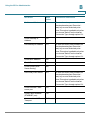
Feature
Description
Steady green—One or more handsets is
registered.
Fast flashing green—The base is in registration
mode. To activate registration mode, press the
Page/
Registration button for at least 7 seconds.
Slow flashing green—The base is in paging mode
or a handset is off hook. To activate paging mode to
locate a handset, press the button for a few
seconds; handsets ring.
Off—No handset is registered to the base.
Steady green—The line is off hook and connected
to the local telephone system.
Slow flashing green—The line is off hook.
Off—The port is not ready.
LINE
Steady green—The device is on hook and
registered to a SIP proxy.
Slow flashing green—The device is off hook.
PHONE
Off—The port is not ready.
Flashing green—Transmitting or receiving data
through the WAN port.
Off—No link.
INTERNET
Cisco SPA232D Administration Guide
14
1
Getting Started
Product Features
Feature
SYSTEM
Description
Steady green—The system is ready.
Slow flashing green—Acquiring an IP address, if
applicable. (DHCP is used by default.)
Fast flashing green—Upgrading the firmware.
Off—There is no power or the system cannot boot
up.
Back Panel
Feature
Description
RESET
Performs two functions:
Restart the ATA: Press quickly (less than a second)
with a paperclip or similar object.
Restore the factory default settings: Press and
hold for 5 to s6 seconds.
LINE (Green)
Connects to an analog phone line, using an RJ11 phone cable.
PHONE (Gray)
Connects to an analog phone, using an RJ-11 phone
cable.
ETHERNET
(Yellow)
Connects to a device on your local area network
(LAN), such as a computer by using an Ethernet
cable.
INTERNET
(Blue)
Connects to a broadband network device (DSL or
cable modem) or a network router by using an
Ethernet cable.
POWER
Connects to a power by using the provided adapter.
Cisco SPA232D Administration Guide
15
1
Getting Started
Product Features
Default Settings
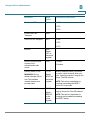
Parameter
Administrator Username
Administrator Password
User Username
User Password
Internet Connection Type
LAN IP Address
(Also the address for the webbased configuration utility.)
DHCP Range
(DHCP server enabled by
default.)
Netmask
PIN for handset registration, IP
settings, and SIP settings
Cisco SPA232D Administration Guide
Default Value
admin
admin
cisco
cisco
Automatic Configuration - DHCP
192.168.15.1
192.168.15.100-149
255.255.255.0
Blank
16
1
Getting Started
Connecting the Equipment
Connecting the Equipment
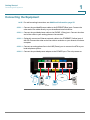
NOTE For wall-mounting instructions, see Additional Information, page 20.
STEP 1 Connect the provided Ethernet cable to the INTERNET (Blue) port. Connect the
other end of the cable directly to your broadband network device.
STEP 2 Connect the provided phone cable to the PHONE 1 (Gray) port. Connect the other
end of the cable to your analog phone or fax machine.
STEP 3 Optionally, connect an Ethernet network cable to the ETHERNET (Yellow) port of
the ATA. Connect the other end of the cable to a device on your network, such as a
computer.
STEP 4 Connect an analog phone line to the LINE (Green) port to connect the ATA to your
local telephone system.
239756
STEP 5 Connect the provided power adapter to the POWER port. The unit powers on.
WAN
Cisco SPA232D Administration Guide
17
Getting Started
Configuration and Management of the ATA
1
Configuration and Management of the ATA
You can use the web-based configuration utility to set up your ATA. You also can
use the built-in Interactive Voice Response (IVR) system. (See Using the IVR for
Administration, page 20.)
STEP 1 Connect the provided Ethernet network cable to the ETHERNET (Yellow) port of
the ATA. Connect the other end of the cable to the Ethernet port of your PC.
STEP 2 Power on your computer.
NOTE: Make sure your computer’s Ethernet adapter is set to obtain an IP address
automatically (DHCP). For more information, refer to the Help for your operating
system.
STEP 3 Start a web browser on your computer.
STEP 4 In the Address bar, enter: 192.168.15.1
Note: 192.168.15.1 is the default local IP address of the ATA.
STEP 5 To log in for the first time, enter the default username, admin, and the default
password, admin. The password is case sensitive.
NOTE: A user account allows access to limited settings and status pages. To log in
as a user, enter cisco as the username and the password.
STEP 6 Use the Quick Setup page as needed to register your VoIP accounts in the fields
for Line 1 and DECT Line1.
Your VoIP service may require only a few basic parameters to successfully
register the Cisco SPA232D. The Quick Setup page offers a shortcut to enter the
basic parameters. For a more comprehensive listing of parameters, choose the
Voice menu, and then use the links in the navigation tree.
•
Enter Proxy: Enter the domain name or URL of the service provider’s proxy
server.
•
Display Name: Enter the name of the business. This name typically is used
for the Caller ID.
•
User ID: Enter the user ID for your Internet account with this service provider.
•
Password: Enter the password for your Internet account.
•
Dial Plan (Line 1 only): Keep the default settings (recommended). Detailed
information about the dial plan settings is available in the online Help and the
administration guide.
Cisco SPA232D Administration Guide
18
Getting Started
Registering a Cisco SPA302D Handset
1
Note: The Cisco SPA232D assigns DECT Line1 as the default line for outgoing
calls from Cisco SPA302D handsets. If needed, you can configure additional VoIP
accounts as separate “DECT Lines.” To do so, choose the Voice menu, and then
use the DECT Line 1~10 links in the navigation tree. Use the check boxes on the
Quick Setup page to associate the DECT Line(s) to each handset.
STEP 7 Click Submit to save your settings.
STEP 8 If you wish to change the PIN for handset registration, open the Voice > System
page, and then enter up to four digits in the IVR Admin Password field. Click
Submit to save your settings.
Registering a Cisco SPA302D Handset
You can register Cisco SPA302D handsets to the integrated DECT base station.
These handsets can be purchased separately.
STEP 1 On the Cisco SPA302D handset, press the center Select button on the 4-way
navigation keypad.
STEP 2 Select Register.
STEP 3 Using the navigation arrows, scroll to the Settings icon and press the
center navigation button to select it.
STEP 4 Select Handset Registration.
STEP 5 On the Cisco SPA232D, press the Page/Registration button and hold it down for
at least seven seconds until the green status light flashes quickly.
TIP: If you press the button for fewer than seven seconds, the green status light
flashes slowly, indicating the unit is in “paging” mode and is not in registration
mode. Registration will not work if the unit is in paging mode.
STEP 6 The default PIN is blank, so do not enter a PIN. Press the left softkey to confirm that
you want to register the handset. The “registering” message appears.
STEP 7 To verify that the handset registered to the base station, confirm that the wireless
status icon is solid and that the handset ID, such as DECT1 or DECT 2, appears
near the top right corner of the display screen.
Cisco SPA232D Administration Guide
19
1
Getting Started
Additional Information
Additional Information
Using the IVR for Administration
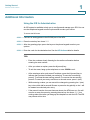
An IVR system is available to help you to configure and manage your ATA. You can
use the telephone keypad to select options and to make your entries.
To access the IVR menu:
STEP 1 Connect an analog phone to the PHONE port of the ATA.
STEP 2 Press the star key four times: ****
STEP 3 After the greeting plays, press the keys on the phone keypad to select your
options.
STEP 4 Enter the code for the desired action. See the IVR Actions table for details.
TIPS:
•
Enter the numbers slowly, listening for the audio confirmation before
entering the next number.
•
After you select an option, press the # (pound) key.
•
To exit the menu, hang up the telephone or enter 3948# to exit.
•
After entering a value, such as an IP address, press the # (pound) key to
indicate that you have finished your selection. To save the new setting,
press 1. To review the new setting, press 2. To re-enter the new setting,
press 3. To cancel your entry and return to the main menu, press * (star).
•
While entering a value, you can cancel the changes by pressing the * (star)
key twice within half a second. Be sure to press the key quickly, or the * will
be treated as a decimal point entry.
•
If the menu is inactive for more than one minute, the ATA times out. You will
need to re-enter the menu by pressing the star key four times: ****. Your
settings take effect after you hang up the telephone or exit the IVR. The ATA
may reboot at this time.
Cisco SPA232D Administration Guide
20
1
Getting Started
Additional Information
•
To enter the decimal points in an IP address, press the * (star) key. For
example, to enter the IP address 191.168.1.105, perform the following tasks:
–Press these keys: 191*168*1*105.
–Press the # (pound) key to indicate that you have finished entering the
IP address.
–Press 1 to save the IP address or press the * (star) key to cancel your
entry and return to the main menu.
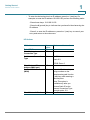
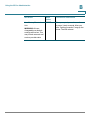
IVR Actions
IVR Action
Enter IVR Menu
Check Internet
Connection Type
Set Internet Connection
Type
Menu
Option
****
100
Choices and Instructions
101
DHCP: 0
Static IP: 1
PPPoE: Press 2
Check Internet IP
Address (WAN port)
Set Static IP Address
(WAN)
110
111
Enter the IP address by
using numbers on the
telephone key pad. Use the
* (star) key when entering a
decimal point.
Note: This option is
available only after you
choose Static IP as the
Internet Connection Type,
through option 101.
Check Network Mask
Cisco SPA232D Administration Guide
120
21
1
Getting Started
Additional Information
IVR Action
Set Network Mask
Menu
Option
121
Choices and Instructions
To enter the value, press
numbers on the telephone
key pad. Press the * (star)
key to enter a decimal
point.
Note: This option is
available only after you
choose Static IP as the
Internet Connection Type,
through option 101.
Check Gateway IP
Address
Set Gateway IP Address
130
131
To enter the value, press
numbers on the telephone
key pad. Press the * (star)
key to enter a decimal
point.
Note: This option is
available only after you
choose Static IP as the
Internet Connection Type,
through option 101.
Check MAC Address
Check Firmware Version
Check Primary DNS
Server Setting
Set Primary DNS Server
140
150
160
161
To enter the value, press
numbers on the telephone
key pad. Press the * (star)
key to enter a decimal
point.
Note: This option is
available only after you
choose Static IP as the
Internet Connection Type,
through option 101.
Check Internet web
server port
Cisco SPA232D Administration Guide
170
22
1
Getting Started
Additional Information
IVR Action
Menu
Option
SPA122 only: Check LAN 210
IP address (Ethernet port)
Announce Line 1 SIP
1910
Transport
Set Line 1 SIP Transport 1911
Check Line 2 SIP
Transport
Set Line 2 SIP Transport
1920
Exit IVR
Allow or prevent WAN
access to the
administration web
server
3948
7932
1921
The system will allow
WAN access only if the
default admin username
and password have been
changed in the
Configuration Utility.
Factory Reset of Unit
73738
WARNING: All nondefault settings will be
lost. This includes
network and service
provider data.
Reboot of Voice System
Cisco SPA232D Administration Guide
“RESET”
Choices and Instructions
0: UDP
1: TCP
2: TLS
0: UDP
1: TCP
2: TLS
1: Enable
0: Disable
When prompted, press 1 to
confirm, or press * (star) to
cancel. After you hear
“Option successful,” hang
up the phone. The ATA
reboots.
732668
After you hear “Option
successful,” hang up the
“REBOOT phone. The ATA reboots.
”
23
1
Getting Started
Additional Information
Mounting the ATA
You can place the ATA on a desktop or mount it on a wall.
!
CAUTION To prevent the ATA from overheating, do not operate it in an area that exceeds an
ambient temperature of 104°F (40°C).
Desktop Placement
Place the ATA on a flat surface near an electrical outlet.
WARNING Do not place anything on top of the ATA; excessive weight could damage it.
Wall Mounting
The ATA has two wall-mount slots on the bottom panel. To mount the ATA on a wall,
you need mounting hardware (not included). Suggested hardware is illustrated
(not true to scale).
Recommended hardware (not included): Two number-six pan-head tapping
screws, 5/8-in. length, with anchors for sheet rock installation.
15,8 mm
WARNING
Insecure mounting might damage the ATA or cause injury. Cisco is not responsible
for damages incurred by insecure wall-mounting.
Cisco SPA232D Administration Guide
24
1
Getting Started
Additional Information
To mount the unit to the wall:
STEP 1 Determine where you want to mount the unit. Verify that the surface is smooth, flat,
dry, and sturdy.
STEP 2 Drill two pilot holes into the surface 58 mm apart (about 2.28 in.). Make sure that
the holes are at the same height above the floor so that the unit is level and secure
in either of its two safety-certified orientations.
STEP 3 Insert a screw into each hole, leaving a gap of 5 mm (0.1968 in.) between the
underside of each screw head and the surface of the wall.
STEP 4 Place the unit wall-mount slots over the screws and slide the unit down until the
screws fit snugly into the wall-mount slots.
Cisco SPA232D Administration Guide
25
1
Getting Started
Elements of the User Interface
Elements of the User Interface
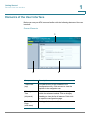
Before you use your ATA, become familiar with the following features of the user
interface.
Screen Elements
1
3
2
Component
Description
1. Menu Bar
(top)
Provides access to the modules of the
configuration utility. Click a menu to view the
options in the navigation tree.
2. Navigation
Tree
(left panel)
Provides access to the configuration pages
within the selected module. Click a category
heading to view the list of features. Click a link
to open the configuration page.
3. Configuration
Page
(main area)
Settings for the selected feature.
Cisco SPA232D Administration Guide
26
1
Getting Started
Elements of the User Interface
Configuration Utility Icons
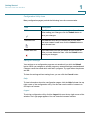
Many configuration pages provide the following icons for common tasks.
Icon
Description
Edit Icon
The Edit icon lets you edit an existing item from a list.
After making your changes, click the Submit button to
save your changes.
Add Item Icon
The Add Item icon lets you add an item to a list. After
you have created a new item, click the Submit button to
save the new item.
Delete Item Icon
The Delete Item icon lets you delete an item from a list.
After you have deleted an item, click the Submit button
to save your changes.
Saving the Settings
Your settings on a configuration page are not saved until you click the Submit
button. When you navigate to another page, any unsaved settings are abandoned.
Changes cannot be saved while calls are in progress. Try again when the phones
are idle.
To clear the settings without saving them, you can click the Cancel button.
Help
To view information about the configuration pages, click the Help link near the top
right corner of the configuration utility. You can then use the table of contents to
find topics of interest.
Logout
To exit the configuration utility, click the Logout link near the top right corner of the
window. The Login page appears. You can close the browser window.
Cisco SPA232D Administration Guide
27
2
Quick Setup for Voice over IP Service
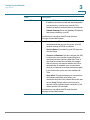
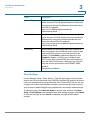
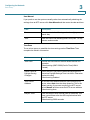
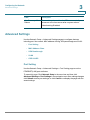
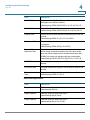
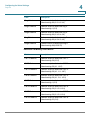
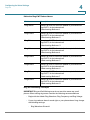
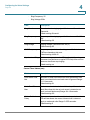
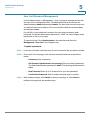
The Quick Setup page is displayed automatically when you first log on ATA. You
can use this page to quickly configure connectivity to your provider’s Voice over IP
network for your analog phone and Cisco SPA302D handsets.
NOTE Connecting to your service provider’s network requires Internet connectivity. With
the default network settings, your ATA should have Internet connectivity when you
connect a cable from the WAN port of the ATA to a port on your router or broadband
network device. For more information, see Internet Settings, page 33.
To open this page: Click Quick Setup in the menu bar.
STEP 1 Specify the settings for the phone service to be used by each type of device or
line. Follow the requirements and recommendations of your service provider. The
options are described below.
Device/line types:
•
Line 1: The phone service used by an analog (FXS) phone or fax machine
that is connected to the PHONE port.
•
PSTN: The phone service used by a phone line that is connected from the
LINE port to the PSTN.
•
DECT Line 1: The phone service used by all connected Cisco SPA302D
cordless handsets (when using the default settings in DECT Handset
Outgoing Line Selection and DECT Line Contact List sections). You can add
additional phone services for these handsets on the Voice > DECT Line 2 to
DECT Line 10 pages.
Settings:
•
Proxy: Enter the domain name or URL of the service provider’s proxy server.
•
Display Name: Enter the name that you want to use to identify your account.
This name typically is used as your Caller ID name.
•
User ID: Enter the user ID that is required to log in to your Internet account.
Cisco SPA232D Administration Guide
28
Quick Setup for Voice over IP Service
2
•
Password: Enter the password that is required to log in to your Internet
account.
•
Dial Plan in (Line section only): Keep the default settings (recommended) or
edit the dial plan to suit your site. For more information, see Configuring Dial
Plans, page 213.
STEP 2 DECT Handset Outgoing Line Selection: For each DECT Handset, check the
boxes to choose the DECT Lines for outgoing calls. Uncheck the boxes for the lines
that you do not want to use.
•
If you are using only one phone service for all Cisco SPA302D handsets,
simply configure the DECT Line 1 settings above and keep the default
settings in this section.
•
If you have multiple lines, you can select multiple lines for each handset.
Alternatively, check the All Lines box to make all lines. The enabled options
will be listed on the phone screen when the user displays the call options or
holds down the green call button.
•
Choose a Default line, which will be selected automatically for a call when
the user presses the green call button.
•
Optionally, if you enabled multiple lines, enable Failover by selecting yes.
When this feature is enabled and a call fails through the selected line, the ATA
automatically attempts to place the call over another enabled DECT line.
STEP 3 DECT Line Contact List: For each line, check the boxes to choose the handsets
that ring when an incoming call is received. Uncheck the boxes for the handsets
that you do not want to ring. Check the All Handsets box to ring all handsets for
the specified line.
STEP 4 Click Submit to save your settings. The voice service will restart.
STEP 5 To verify your progress, perform the following tasks:
a. Click Voice in the menu bar, and then click Info in the navigation tree. Verify that
the Registration State is Registered for all configured lines (Line 1 Status,
PSTN Line Status, and DECT 1 Status ~ DECT 10 Status).
If the line is not registered, you may need to refresh the browser several times
because it can take a few seconds for the registration to complete. Also verify
that your Internet Settings, including DNS server settings, are configured
according to the information from your ISP. For more information, see Internet
Settings, page 33.
Cisco SPA232D Administration Guide
29
Quick Setup for Voice over IP Service
2
b. Use an external phone to place an inbound call to the telephone number that
was assigned by your ITSP. Verify that the phone rings and you have two-way
audio on the call.
Cisco SPA232D Administration Guide
30
3
Configuring the Network
This chapter describes how to configure the network settings for your ATA. It
includes the following sections:
•
Basic Setup
•
Advanced Settings
•
Application
Basic Setup
Use the Network Setup > Basic Setup pages to configure your Internet
connection, local network settings, and your time settings.
•
Network Service
•
Internet Settings
•
Network Settings for the LAN and DHCP Server
•
Time Settings
Network Service
Use the Network Setup > Basic Setup > Network Service page to configure the
operating mode of the ATA.
To open this page: Click Network Setup in the menu bar, and then click Basic
Setup > Network Service in the navigation tree. After making changes, click
Submit to save your settings, or click Cancel to redisplay the page with the saved
settings.
Cisco SPA232D Administration Guide
31
3
Configuring the Network
Basic Setup
You can configure the ATA to operate in one of the following modes:
•
NAT: Network Address Translation (NAT) is a function that allows multiple
devices on a private network to share a public, routable IP address to
establish connections over the Internet. To enable Voice over IP service to
co-exist with NAT, some form of NAT traversal is required, either on the ATA
or another network device. Use this option if your ATA connects to one
network on the WAN port (10.0.0.0 for example) and to another network on
the LAN port (192.168.0.0 for example). This option is selected by default
and is suitable for most deployments.
•
Bridge: Bridged mode is used if the ATA is acting as a bridge device to
another router. Choose this option if your ATA bridges a network (10.0.0.0 for
example) to its LAN port (with connected devices also in the 10.0.0x range).
Cisco SPA232D Administration Guide
32
3
Configuring the Network
Basic Setup
Internet Settings
Use the Network Setup > Basic Setup > Internet Settings page to set up your
Internet connection.
To open this page: Click Network in the menu bar, and then click Basic
Setup > Internet Settings in the navigation tree.
Enter the settings as described in the table. After making changes, click Submit to
save your settings, or click Cancel to redisplay the page with the saved settings.
Internet Connection Type
Field
Description
Connection Type
Specify the Internet addressing method that your ISP
requires. Default setting: Automatic Configuration DHCP
Cisco SPA232D Administration Guide
•
Automatic Configuration - DHCP: Use this
setting if your ISP dynamically provides an IP
address. No additional settings are required on
this page.
•
Static IP: Use this setting if your ISP assigned a
static/permanent IP address. Complete the fields
that appear. See more information below.
•
PPPoE (DSL service): Some DSL-based ISPs
use PPPoE (Point-to-Point Protocol over Ethernet)
to establish Internet connections. If you are
connected to the Internet through a DSL line,
check with your ISP to see if they use PPPoE.
Complete the fields that appear. See more
information below.
33
3
Configuring the Network
Basic Setup
Field
Static IP Settings
Description
•
Internet IP Address and Subnet Mask: Enter the
IP address and subnet mask that was assigned to
your account by your service provider. This
address is seen by external users on the Internet.
•
Default Gateway: Enter the Gateway IP Address
that was provided by your ISP.
If needed, you can adjust the MTU and Optional
Settings, as described below.
PPPoE Settings
•
User Name and Password: Enter the user name
and password that you use to log into your ISP
network through a PPPoE connection.
•
Service Name: If provided by your ISP, enter the
Service Name.
•
Connect on Demand: You can configure the ATA
to disconnect your Internet connection after a
specified period of inactivity (Max Idle Time). If
your Internet connection has been terminated
due to inactivity, this feature enables the ATA to
automatically re-establish your connection as
soon as you attempt to access the Internet again.
If you choose this option, also set the Max Idle
Time.
•
Keep Alive: This option keeps you connected to
the Internet indefinitely, even when your
connection sits idle. If you choose this option, also
set the Redial Period, which is the interval at
which the ATA verified Internet connectivity. The
default period is 30 seconds.
If needed, you can adjust the MTU and Optional
Settings, as described below.
Cisco SPA232D Administration Guide
34
3
Configuring the Network
Basic Setup
Field
Description
MTU
The Maximum Transmission Unit (MTU) setting specifies
the largest protocol data unit (in bytes) permitted for
network transmission. Generally, a larger MTU means
greater efficiency. However, a larger packet may cause
delays for other traffic and is more likely to become
corrupted. In most cases, you should keep the default
setting, Auto, to allow the ATA to choose the appropriate
MTU. To specify the MTU, select Manual, and then enter
the number of bytes.
Optional Settings
Feature
Description
Host Name
The name of the ATA. The default value is the model
number. Your ISP may specify a host name to use.
Domain Name
The domain name, if specified by your ISP. Otherwise,
leave the field blank.
DNS Server Order
Choose the preferred method for choosing a DNS server.
Primary DNS
Cisco SPA232D Administration Guide
•
DHCP-Manual—The DNS server settings from
the network server will take precedence, and your
entries in the DNS fields below will be used only
as a backup.
•
Manual-DHCP—Your entries in the DNS fields
below will take precedence, and the DNS server
settings from the network server will be used as a
backup.
•
Manual—Your entries in the DNS fields below will
be used to choose a DNS server.
Enter the IP address of the primary Domain Name
Service (DNS) server to use for domain name resolution.
Keep the default entry, 0.0.0.0, to use the primary DNS
server that is specified for the WAN connection.
35
3
Configuring the Network
Basic Setup
Feature
Description
Secondary DNS
Enter the IP address of the secondary Domain Name
Service (DNS) server to use for domain name resolution.
Keep the default entry, 0.0.0.0, to use the secondary DNS
server that is specified for the WAN connection.
Network Settings for the LAN and DHCP Server
Use the Network Setup > Basic Setup > Network Settings page to set the IP
address and subnet mask for your local network. Also configure the settings for
the built-in DHCP server.
To open this page: Click Network Setup in the menu bar, and then click Basic
Setup > Network Settings in the navigation tree.
Enter the settings as described below. After making changes, click Submit to save
your settings, or click Cancel to redisplay the page with the saved settings.
Router IP
Enter the Local IP Address and Subnet Mask for your local network. The default
setting is 192.168.15.1 with a subnet mask of 255.255.255.0.
DHCP Server Setting
Field
Description
DHCP Server
The ATA can use the built-in DHCP server to dynamically
assign IP addresses to connected devices. Click
Enabled to enable the DHCP server, or click Disabled to
disable this feature.
Default setting: Enabled
Cisco SPA232D Administration Guide
36
3
Configuring the Network
Basic Setup
Field
Description
IP Reservation:
Click the Show DHCP Reservation button to view and
manage the DHCP client list. Click the Hide DHCP
Reservation button to hide the list. When the list is
displayed, you can perform the following tasks:
•
To reserve a static IP address for a current
DHCP client: Check the box for the client in the
Select Clients from DHCP Tables list. Click Add
Clients. The selected clients are added to the
Clients Already Reserved list. These clients have
static IP addresses that do not change.
•
To add a client that is not in the Select Clients
from DHCP Tables list: Type a name for the
client in the Enter Client Name box. Enter an IP
address for this client in the Assign IP Address
box. Enter the MAC address in the following
format: 00:00:00:00:00:00. Click Add.
•
To remove a client from the Clients Already
Reserved list: Check the box for the client. Click
Remove.
Default Gateway
Enter the IP address of the default gateway to be used
by the DHCP clients.
Default setting: 192.168.15.1 (the IP address of the
ETHERNET (LAN) interface)
Starting IP Address
Enter the first address in the range of addresses to be
assigned dynamically by the DHCP server.
Default setting: 192.168.15.100
Maximum DHCP
Users
Enter the maximum number of devices that can
dynamically receive, or “lease,” DHCP addresses from
the DHCP server.
Default setting: 50
IMPORTANT: Typically, the ATA can support up to five
connected computers for business-related tasks such
as web browsing and viewing email. The ATA is not
designed to support streaming music, video, games, or
other network traffic-intensive tasks.
Cisco SPA232D Administration Guide
37
3
Configuring the Network
Basic Setup
Field
Description
Client Lease Time
Enter the number of minutes that a dynamically
assigned IP address can be in use, or “leased.” After this
time elapses, a client device has to request a DHCP
lease renewal. Use 0 to represent 1 day, 9999 never
expire.
Default setting: 0
Option 66
Provides provisioning server address information to
hosts that request this option. Server information can be
defined in one of three ways:
•
None: The ATA uses its own TFTP server to
source provisioning files, so it returns its own
local IP address to the client.
•
Remote TFTP Server: The ATA was configured
by using this method, and received server
information through Option 66 on its WAN
interface. In response to client requests, it
provides the remote TFTP server information.
•
Manual TFTP Server: Allows the manual
configuration of a configuration server address.
While this option is typically used to provide
either an IP address or a fully qualified hostname,
the ATA will also accept and offer a full URL
including protocol, path and filename to meet to
requirements of specific clients.
Default setting: None
TFTP Server
If you chose Manual TFTP Server for Option 66, enter
the IP address, hostname, or URL of the TFTP server
that is used to configure the ATA.
Default setting: blank
Option 67
Provides a configuration/bootstrap filename to hosts
that request this option. This option is used in
conjunction with option 66 to allow a client to form an
appropriate TFTP request for the file.
Default setting: blank
Cisco SPA232D Administration Guide
38
3
Configuring the Network
Basic Setup
Field
Description
Option 159
Provides a configuration URL to clients that request this
option. An option 159 URL defines the protocol and path
information by using an IP address for clients that cannot
use DNS. For example:
https://10.1.1.1:888/configs/bootstrap.cfg
Default setting: blank
Option 160
Provides a configuration URL to clients that request this
option. An option 160 URL defines the protocol and path
information by using a fully qualified domain name for
clients that can use DNS. For example:
https://myconfigs.cisco.com:888/configs/bootstrap.cfg
Default setting: blank
DNS Proxy
When enabled, the DNS proxy relays DNS requests to
the current public network DNS server for the proxy, and
replies as a DNS resolver to the client device on the
network. Click Enabled to enable this feature, or click
Disabled to disable it. If DNS proxy is disabled, then
DHCP clients will be offered DNS server information by
using the Static DNS servers, if defined, or by using the
using the servers specified for the INTERNET (WAN)
interface.
Default setting: Enabled
Time Settings
Use the Network Setup > Basic Setup > Time Settings page to set the system
time for the ATA and connected Cisco SPA302D handsets. By default, the system
time is set automatically by using a Network Time Protocol (NTP) server. You can
configure the system time manually. In addition, you can use this page to specify
your time zone, enable Daylight Saving adjustments, and modify related settings.
To open this page: Click Network Setup in the menu bar, and then click Basic
Setup > Time Settings in the navigation tree. After making changes, click Submit
to save your settings, or click Cancel to redisplay the page with the saved
settings.
Cisco SPA232D Administration Guide
39
3
Configuring the Network
Basic Setup
User Manual
If you prefer to set the system manually rather than automatically obtaining the
settings from an NTP server, click User Manual and then enter the date and time.
Field
Description
Date
Enter the date in the following order: four-digit year,
month, day.
Time
Enter the time in the following order: hour (from 1 to 24),
minutes, and seconds.
Time Zone
To use a time server to establish the time settings, select Time Zone. Then
complete the fields in this section.
Field
Description
Time Zone
Choose the time zone for the site where the ATA is in
operation.
Default setting: (GMT-08:00) Pacific Time (USA &
Canada)
Adjust Clock for
Daylight Saving
Changes
Check the box if you want to automatically adjust the
time when Daylight Savings Time is in effect. Otherwise,
uncheck the box.
Default setting: Enabled
Time Server
Address
To use the ATA’s default Network Time Protocol (NTP)
server, select Auto from the drop-down list. This is the
default setting. If you want to specify the NTP server,
select Manual, and then enter the NTP server address.
Default setting: Auto
Resync Timer
Enter the Resync timer interval value (in seconds). This
timer controls how often the ATA resynchronizes with
the NTP server.
Default setting: 3600 seconds
Cisco SPA232D Administration Guide
40
3
Configuring the Network
Advanced Settings
Field
Description
Auto Recovery After
Reboot
Choose this option to allow the ATA to automatically
reconnect to the time server after a system reboot.
Default setting: Disabled
Advanced Settings
Use the Network Setup > Advanced Settings pages to configure features
including port flow control, MAC address cloning, VPN passthrough, and VLAN.
•
Port Setting
•
MAC Address Clone
•
VPN Passthrough
•
VLAN
•
CDP & LLDP
Port Setting
Use the Network Setup > Advanced Settings > Port Setting page to set the
ETHERNET (LAN) port attributes.
To open this page: Click Network Setup in the menu bar, and then click
Advanced Settings > Port Settings in the navigation tree. After making changes,
click Submit to save your settings, or click Cancel to redisplay the page with the
saved settings.
Cisco SPA232D Administration Guide
41
3
Configuring the Network
Advanced Settings
Field
Description
Flow Control
Flow control is a mechanism that temporarily stops the
transmission of data on a port. For example, a situation
might arise where a sending station (computer) is
transmitting data faster than some other part of the
network (including the receiving station) can accept.
The overwhelmed network element will halt the
transmission of the sender for a specified period of time.
Choose Enabled to enable this feature, or choose
Disabled to disable this feature.
Default setting: Enabled
Speed Duplex
Choose the duplex mode. You can select from Autonegotiate, 10 Half, 10 Full, 100 Half and 100 Full. Cisco
recommends choosing Auto-negotiate to automatically
select the appropriate mode for the traffic. Use caution
with other settings. Problems can result if you choose a
setting that is not appropriate for the network devices.
Default setting: Auto-negotiate
MAC Address Clone
A MAC address is a 12-digit code assigned to a unique piece of hardware for
identification purposes. Some ISPs require that you register a MAC address in
order to access the Internet. If you previously registered your account with
another MAC address, it may be convenient to assign that MAC address to your
ATA. You can use the Network Setup > Advanced Settings > MAC Address
Clone page to assign a MAC address that you previously registered with your
Service Provider.
To open this page: Click Network Setup in the menu bar, and then click
Advanced Settings > MAC Address Clone in the navigation tree. After making
changes, click Submit to save your settings, or click Cancel to redisplay the page
with the saved settings.
Cisco SPA232D Administration Guide
42
3
Configuring the Network
Advanced Settings
Field
Description
MAC Clone
Click Enabled to enable MAC address cloning, or click
Disabled to disable this feature.
Default setting: Disabled.
MAC Address
Enter the MAC address that you want to assign to your
ATA. If your computer’s MAC address is the address that
you previously registered for your ISP account, click
Clone Your PC’s MAC. Your computer’s MAC address
appears in the MAC Address field.
Default setting: the current MAC address of your ATA
VPN Passthrough
Use the Network Setup > Advanced Settings > VPN Passthrough page to
configure VPN passthrough for IPsec, PPTP, and L2TP protocols. Use this feature if
there are devices behind the ATA that need to set up IPsec tunnels independently.
For example, a device may need to use a VPN tunnel to connect to another router
on the WAN.
By default, VPN Passthrough is enabled for IPsec, PPTP, and L2TP.
To open this page: Click Network Setup in the menu bar, and then click
Advanced Settings > VPN Passthrough in the navigation tree. After making
changes, click Submit to save your settings, or click Cancel to redisplay the page
with the saved settings.
Field
Description
IPsec Passthrough
Internet Protocol Security (IPsec) is a suite of protocols
used to implement secure exchange of packets at the IP
layer. Click Enabled to enable this feature, or click
Disabled to disable it. Default setting: Enabled
PPTP Passthrough
Point-to-Point Tunneling Protocol (PPTP) allows the
Point-to-Point Protocol (PPP) to be tunneled through an
IP network. To disable PPTP Passthrough, select
Disabled. Default setting: Enabled
Cisco SPA232D Administration Guide
43
3
Configuring the Network
Advanced Settings
Field
Description
L2TP Passthrough
Layer 2 Tunneling Protocol is the method used to enable
Point-to-Point sessions via the Internet on the Layer 2
level. Click Enabled to enable this feature, or click
Disabled to disable it. Default setting: Enabled
VLAN
Use the Network Setup > Advanced Settings > VLAN page to assign a VLAN ID
to your network. For example, your call control system may require a particular
voice VLAN ID.
To open this page: Click Network Setup in the menu bar, and then click
Advanced Settings > VLAN in the navigation tree. After making changes, click
Submit to save your settings, or click Cancel to redisplay the page with the saved
settings.
Field
Description
Enable VLAN
Click Enabled to enable a VLAN, or click Disabled to
disable this feature. Default setting: Disabled
VLAN ID
The VLAN ID can be any numeral from 1 through 4094.
When VLAN is enabled, the default setting is 1.
Cisco SPA232D Administration Guide
44
3
Configuring the Network
Advanced Settings
CDP & LLDP
Device discovery protocols enable directly connected devices to discover
information about each other. You may wish to enable these protocols to allow
your network management system to learn about your ATA and endpoints. Use the
Network Setup > Advanced Settings > CDP & LLDP page to specify the settings
for Cisco Discovery Protocol (CDP) and the Link Layer Discovery Protocol (LLDP).
When a discovery protocol is enabled, the ATA sends periodic messages to a
multicast address and also listens to the periodic messages sent by other devices
that use that protocol.
To open this page: Click Network Setup in the menu bar, and then click
Advanced Settings > CDP & LLDP in the navigation tree. After making changes,
click Submit to save your settings, or click Cancel to redisplay the page with the
saved settings.
Field
Description
Enable CDP
CDP may be enabled on Cisco devices. Click Enabled
to enable CDP, or click Disabled to disable this feature.
Default setting: Disabled
Enable LLDP-MED
LLDP is a vendor-neutral device discovery protocol that
may be enabled on other manufacturers’ equipment.
LLDP-MED is specifically for Media Endpoint Devices.
Click Enabled to enable CDP, or click Disabled to
disable this feature.
Default setting: Disabled
Layer 2 Logging
Click Enabled to enable Layer 2 Logging, or click
Disabled to disable this feature. L2 Logging is used by
CDP/LLDP for debugging purpose.
Default setting: Disabled
Cisco SPA232D Administration Guide
45
3
Configuring the Network
Application
Application
Use the Network Setup > Application pages to support voice service and any
servers that you host for public access.
•
Quality of Service (QoS)
•
Port Forwarding
•
DMZ
Quality of Service (QoS)
Use the Network Setup > Application > QoS page to set the upstream bandwidth
to suit your broadband service. This feature is enabled by default and helps to
ensure that voice is prioritized during periods of heavy network traffic.
To open this page: Click Network Setup in the menu bar, and then click
Application > QoS in the navigation tree.
Enter the settings as described below. After making changes, click Submit to save
your settings, or click Cancel to redisplay the page with the saved settings.
Field
Description
QoS Policy
Click Always On to enable QoS settings at all times, or
click On When Phone In Use to enable it only when
there is voice traffic.
Default setting: On When Phone In Use
Upstream
Bandwidth
Enter the maximum available upstream bandwidth value
specified by your Internet Service Provider.
Default setting: 10000 kbps
IMPORTANT: Do not overstate the upstream bandwidth
that you receive from your service provider. Setting this
value higher than the available service bandwidth can
result in traffic being dropped arbitrarily in the service
provider's network.
Cisco SPA232D Administration Guide
46
3
Configuring the Network
Application
Port Forwarding
Use the Network Setup > Application > Port Forwarding page if you need to
explicitly allow access to specific ports from external devices.
To open this page: Click Network Setup in the menu bar, and then click
Application > Port Forwarding in the navigation tree.
List of Port Forwarding
To add a port forwarding rule, click Add Entry. To edit a port forwarding rule, select
it in the list and then click the pencil icon. To remove a port forwarding rule, click
the delete icon. For more information, see Manually Adding Port Forwarding,
page 48.
Field
Description
Number
An identification number for the port forwarding rule.
Type
The type of rule: Single Port Forwarding or Port Range
Forwarding.
Status
The status of the rule: Enabled or Disabled.
Application
The application that uses this rule to access a network
resource.
Port Forwarding Details
To display the details, click an entry in the List of Port Forwarding.
Field
Description
External Port
The port that external clients will use to set up this connection.
Internal Port
The port that the ATA uses when forwarding traffic to the
internal server.
Protocol
The protocol that is used: TCP or UDP.
IP Address
The IP address of the internal server that is accessed by this
rule.
Cisco SPA232D Administration Guide
47
3
Configuring the Network
Application
Manually Adding Port Forwarding
Use this page to enter the port forwarding settings for an application.
To open this page: On the Network Setup > Application > Port Forwarding page,
click the Add Entry button or the pencil icon.
Enter the settings as described below. After making changes, click Submit to save
your settings, or click Cancel to redisplay the page with the saved settings.
Field
Description
Port Forwarding
Type
Choose the type of port forwarding:
Application Name
•
Single Port Forwarding: Forwards traffic for a
specified port to the same or an alternative port
on the target server in the LAN.
•
Port Range Forwarding: Forwards traffic to a
range of ports to the same ports on the target
server in the LAN. see the Internet application’s
documentation for the required ports or ranges.
For single port forwarding, choose a common
application from the drop-down list (such as Telnet, or
DNS).
To add an application that is not on the list, choose Add
a new name, and then enter the name in the Enter a
Name field.
Enter a Name
Cisco SPA232D Administration Guide
If you chose Port Range Forwarding, or if you chose Add
a new name in the Application Name list for Single Port
Forwarding, enter a name to identify the application.
48
3
Configuring the Network
Application
Field
Description
External Port,
Internal Port
For Single Port Forwarding, specify the ports to use. For
simplicity, the internal and external port numbers will
often be the same. However, different external port
numbers could be used to differentiate traffic of the
same application type intended for different internal
servers, or to promote privacy through the use of nonstandard ports.
•
External port: For single port forwarding, enter
the port number that external clients will use to
set up a connection with the internal server.
•
Internal port: For single port forwarding, enter
the port number that the ATA uses when
forwarding traffic to the internal server.
The correct entries appear automatically if you choose
a standard application from the Application Name list
for Single Port Forwarding.
Start - End Port
For Port Range Forwarding, specify the range of ports to
use. Valid values are from 1 to 65535.
Protocol
Select the protocol(s) that can be forwarded: TCP, UDP,
or TCP and UDP.
IP Address
Enter the IP address of the local server that will receive
forwarded traffic.
To ensure correct forwarding of traffic, local servers
must either be configured with a static IP address, or be
assigned a reserved IP address through DHCP. Use the
Interface Setup > LAN > DHCP Server page to
reserve IP addresses. See Network Settings for the
LAN and DHCP Server, page 36.
Enabled
Cisco SPA232D Administration Guide
Check the box to enable this port forwarding rule, or
uncheck the box to disable it. Default setting: Disabled
49
3
Configuring the Network
Application
DMZ
Use the Network Setup > Application > DMZ page if you need to allow a local
device to be exposed to the Internet for a special-purpose service.
The specified network device must have its DHCP client function disabled and
must have a reserved IP address (also known as a static IP address) to ensure that
it is reachable at the specified IP address. To reserve an IP address for a device,
see Network Settings for the LAN and DHCP Server, page 36.
NOTE A Demilitarized Zone (DMZ) is similar to Port Range Forwarding. Both features allow
Internet traffic to access a resource on your private network. However, Port Range
Forwarding is more secure because it only opens the ports that you specify for an
application. DMZ hosting opens all the ports of one device, exposing it to the
Internet.
To open this page: Click Network Setup on the menu bar, and then click
Application > DMZ in the navigation tree.
Enter the settings as described below. After making changes, click Submit to save
your settings, or click Cancel to redisplay the page with the saved settings.
Field
Description
Status
Click Enabled to enable this feature, or click Disabled to
disable it. Default setting: Disabled
Private IP
Specify the local IP address of the device that can be
accessed through the DMZ.
Cisco SPA232D Administration Guide
50
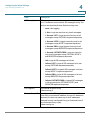
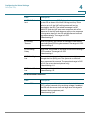
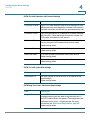
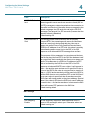
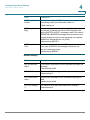
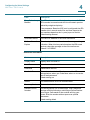
4
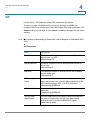
Configuring the Voice Settings
This chapter describes how to configure the voice settings and voice services for
the ATA. It includes the following sections:
•
Information
•
System
•
SIP
•
Provisioning
•
Regional
•
Line 1 Settings (PHONE Port)
•
PSTN (LINE Port)
•
User 1
•
PSTN User
•
DECT Line 1 - DECT Line 10
•
DECT User
NOTE For additional information, see Appendix C, “Advanced Options for Voice
Services.”
Cisco SPA232D Administration Guide
51
4
Configuring the Voice Settings
Information
Information
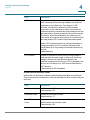
Use the Voice > Information page to view information about the ATA voice
application.
To open this page: Click Voice on the menu bar, and then click Information in the
navigation tree. Enter the settings as described below. After making changes, click
Submit to save your settings, or click Cancel to redisplay the page with the saved
settings.
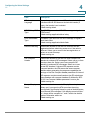
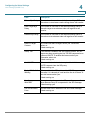
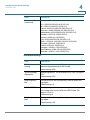
Product Information
Field
Description
Product Name
Model number/name.
Serial Number
Product serial number.
Software Version
Software version number.
Hardware Version
Hardware version number.
MAC Address
MAC Address. For example: 8843E1657936.
Client Certificate
Status of the client certificate, which can indicate if the
ATA was authorized by your ITSP.
Customization
Used for Remote Configuration by service providers who
deploy the ATA to their customers.
•
Open: Not a Remote Configuration unit. This ATA
can be configured by using the configuration utility.
•
Pending: This Remote Configuration unit has not
yet connected to the server to get its profile.
•
Customized: This Remote Configuration unit has
received its profile from the server.
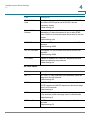
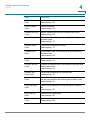
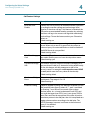
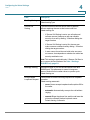
System Status
Field
Description
Current Time
Current date and time of the system; for example, 10/3/
2003 16:43:00. Set the system time by using the Network
Setup > Time Settings page.
Cisco SPA232D Administration Guide
52
4
Configuring the Voice Settings
Information
Field
Description
Elapsed Time
Total time elapsed since the last reboot of the system; for
example, 25 days and 18:12:36.
RTP Packets Sent
Total number of RTP packets sent (including redundant
packets)
RTP Bytes Sent
Total number of RTP bytes sent.
RTP Packets Recv
Total number of RTP packets received (including
redundant packets)
RTP Bytes Recv
Total number of RTP bytes received.
SIP Messages
Sent
Total number of SIP messages sent (including
retransmissions)
SIP Bytes Sent
Total number of bytes of SIP messages sent (including
retransmissions)
SIP Messages
Recv
Total number of SIP messages received (including
retransmissions)
SIP Bytes Recv
Total number of bytes of SIP messages received
(including retransmissions)
External IP
The External IP address used for NAT mapping.
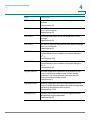
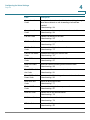
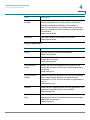
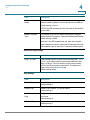
Line 1 Status
Field
Description
Hook State
The hook state of the port: On or Off.
Registration State
Indicates if the line has registered with the SIP proxy.
Last Registration
At
Last date and time the line was registered.
Next Registration
In
The number of seconds before the next registration
renewal. Indicates whether you have new voice mail
waiting.
Message Waiting
Indicates Yes when a message is received.
Mapped SIP Port
Port number of the SIP port mapped by NAT.
Cisco SPA232D Administration Guide
53
4
Configuring the Voice Settings
Information
Field
Description
Call Back Active
Indicates whether or not a call back request is in progress.
Options are either yes or no.
Last Called
Number
The phone number that was most recently called through
this port.
Last Caller
Number
The originating phone number of the call that was most
recently received through this port.
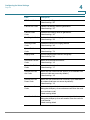
Call 1 and 2 State
Indicates the state of calls, if any:
•
Idle
•
Collecting PSTN PIN
•
Invalid PSTN PIN
•
PSTN Caller Accepted
•
Connected to PSTN
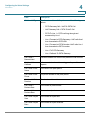
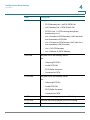
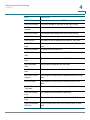
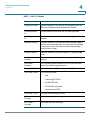
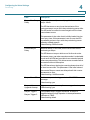
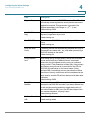
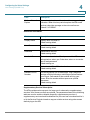
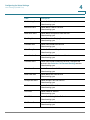
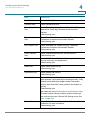
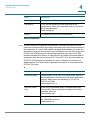
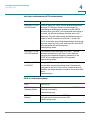
Call 1 and 2 Tone
The type of tone used by the call.
Call 1 and 2
Encoder
The codec used for encoding.
Call 1 and 2
Decoder
The codec used for decoding.
Call 1 and 2 FAX
The status of the fax passthrough mode.
Cisco SPA232D Administration Guide
54
4
Configuring the Voice Settings
Information
Field
Description
Call 1 and 2 Type
The direction of the call. May take one of the following
values:
•
PSTN Gateway Call = VoIP-To-PSTN Call
•
VoIP Gateway Call = PSTN-To-VoIP Call
•
PSTN To Line 1 = PSTN call ring through and
answered by Line 1
•
Line 1 Forward to PSTN Gateway = VoIP calls Line 1
then forwarded to PSTN GW
•
Line 1 Forward to PSTN Number =VoIP calls Line 1
then forwarded to PSTN number
•
Line 1 To PSTN Gateway
•
Line 1 Fallback To PSTN Gateway
Call 1 and 2
Remote Hold
Indicates whether the far end has placed the call on hold.
Call 1 and 2
Callback
Indicates whether the call was triggered by a call back
request.
Call 1 and 2 Peer
Name
The name of the peer phone.
Call 1 and 2 Peer
Phone
The phone number of the peer phone.
Call 1 and 2 Call
Duration
The duration of the call.
Call 1 and 2
Packets Sent
The number of packets sent
Call 1 and 2
Packets Recv
The number of packets received.
Call 1 and 2 Bytes
Sent
The number of bytes sent.
Call 1 and 2 Bytes
Recv
The number of bytes received.
Cisco SPA232D Administration Guide
55
4
Configuring the Voice Settings
Information
Field
Description
Call 1 and 2
Decode Latency
The number of milliseconds for decoder latency.
Call 1 and 2 Jitter
The number of milliseconds for receiver jitter
Call 1 and 2 Round
Trip Delay
The number of milliseconds for delay.
Call 1 and 2
Packets Lost
The number of packets lost.
Call 1 and 2 Packet
Error
The number of invalid packets received.
Custom CA Status
Field
Description
Custom CA Provisioning
Status
The status of the latest custom CA (Certificate
Authority) certificate download.
Custom CA Info
The successfully downloaded CA information, or
“Not Installed” if no custom CA certificate was
installed.
Default setting: Not Installed
PSTN Line Status
Field
Description
Hook State
The hook state of the LINE port: On or Off.
Line Voltage
The voltage existing on the PSTN line.
Loop Current
The current (milliamperes) existing on the local loop.
Registration State
Indicates if the line has registered with the SIP proxy.
Last Registration
At
The last date and time when the line was registered.
Next Registration
In
The number of seconds before the next registration
renewal.
Cisco SPA232D Administration Guide
56
4
Configuring the Voice Settings
Information
Field
Description
Last Called VoIP
Number
The VoIP phone number that was most recently called
through this port.
Last Called PSTN
Number
The PSTN phone number that was most recently called
through the LINE port
Last VoIP Caller
The originating phone number of the VoIP call that was
most recently received through the LINE port.
Last PSTN Caller
The originating phone number of the PSTN call that was
most recently received through the LINE port.
Last PSTN
Disconnect
Reason
The reason for the ATA hanging up the LINE port:
•
PSTN Disconnect Tone
•
PSTN Activity Timeout
•
CPC Signal
•
Polarity Reversal
•
VoIP Call Failed
•
VoIP Call Ended
•
Invalid VoIP Destination
•
Invalid PIN
•
PIN Digit Timeout
•
VoIP Dialing Timeout
•
PSTN Gateway Call Timeout
•
VoIP Gateway Call Timeout
PSTN Activity
Timer
The time in milliseconds (ms) before the ATA disconnects
the current gateway unless the PSTN side has some audio
activity.
Mapped SIP Port
The port number of the SIP port mapped by NAT.
Cisco SPA232D Administration Guide
57
4
Configuring the Voice Settings
Information
Field
Description
Call Type
The type of call:
VoIP State
•
PSTN Gateway Call = VoIP-To-PSTN Call
•
VoIP Gateway Call = PSTN-To-VoIP Call
•
PSTN To Line 1 = PSTN call ring through and
answered by Line 1
•
Line 1 Forward to PSTN Gateway = VoIP calls Line 1
then forwarded to PSTN GW
•
Line 1 Forward to PSTN Number =VoIP calls Line 1
then forwarded to PSTN number
•
Line 1 To PSTN Gateway
•
Line 1 Fallback To PSTN Gateway
May take one of the following values:
Idle
PSTN State
•
Collecting PSTN Pin
•
Invalid PSTN PIN
•
PSTN Caller Accepted
•
Connected to PSTN
May take one of the following values:
Idle
•
Collecting PSTN Pin
•
Invalid PSTN PIN
•
PSTN Caller Accepted
•
Connected to PSTN
VoIP Tone
The tone that is being played to the VoIP call leg.
PSTN Tone
The tone that is being played to the PSTN call leg.
VoIP Peer Name
The of the party at the VoIP call leg.
Cisco SPA232D Administration Guide
58
4
Configuring the Voice Settings
Information
Field
Description
PSTN Peer Name
The name of the party at the PSTN call leg.
VoIP Peer Number
The phone number of the party at the VoIP call leg.
PSTN Peer
Number
The phone number of the party at the PSTN call leg.
VoIP Call Encoder
The audio encoder being used for the VoIP call leg.
VoIP Call Decoder
The audio decoder being used for the VoIP call leg.
VoIP Call FAX
The status of the fax passthrough mode for VoIP calls.
VoIP Call Remote
Hold
Indicates whether the far end has placed the VoIP call on
hold.
VoIP Call Duration
The duration of the VoIP call.
VoIP Call Packets
Sent
The number of packets sent for VoIP calls.
VoIP Call Packets
Recv
The number of packets received for VoIP calls.
VoIP Call Bytes
Sent
The number of bytes sent for VoIP calls.
VoIP Call Bytes
Recv
The number of bytes received for VoIP calls.
VoIP Call Decode
Latency
The number of milliseconds for decoder latency for VoIP
calls.
VoIP Call Jitter
The number of milliseconds for receiver jitter for VoIP
calls.
VoIP Call Round
Trip Delay
The number of milliseconds for delay for VoIP calls.
VoIP Call Packets
Lost
The number of packets lost for VoIP calls.
VoIP Call Packet
Error
The number of invalid packets received for VoIP calls.
VoIP Call Mapped
RTP Port
The port mapped for Real Time Protocol traffic for VoIP
calls.
Cisco SPA232D Administration Guide
59
4
Configuring the Voice Settings
Information
DECT 1 ~ DECT 10 Status
Field
Description
Registration State
Indicates whether or not the line has registered with the
SIP proxy: Registered, Not Registered, or Failed.
Last Registration
At
The last date and time when the line was registered.
Next Registration
In
The number of seconds before the next registration
renewal.
Message Waiting
Indicates whether or not there are new messages: yes or
no. The value automatically is set to yes when a message
is received. You also can clear or set the flag manually
from the User 1 page.
Call Back Active
Indicates whether a call back request is in progress: yes
or no.
Last Called
Number
The phone number that was most recently called through
this port.
Last Caller
Number
The originating phone number of the call that was most
recently received through this port.
Mapped SIP Port
Port number of the SIP port mapped by NAT.
Call 1 and 2 State
The current call state:
•
Idle
•
Collecting PSTN Pin
•
Invalid PSTN PIN
•
PSTN Caller Accepted
•
Connected to PSTN
Call 1 and 2 Tone
The type of tone used by the call.
Call 1 and 2
Encoder
The codec used for encoding.
Call 1 and 2
Decoder
The codec used for decoding.
Cisco SPA232D Administration Guide
60
4
Configuring the Voice Settings
Information
Field
Description
Call 1 and 2 FAX
The status of the fax passthrough mode.
Call 1 and 2 Type
The direction of the call:
•
PSTN Gateway Call = VoIP-To-PSTN Call
•
VoIP Gateway Call = PSTN-To-VoIP Call
•
PSTN To Line 1 = PSTN call ring through and
answered by Line 1
•
Line 1 Forward to PSTN Gateway = VoIP calls Line 1
then forwarded to PSTN GW
•
Line 1 Forward to PSTN Number =VoIP calls Line 1
then forwarded to PSTN number
•
Line 1 To PSTN Gateway
•
Line 1 Fallback To PSTN Gateway
Call 1 and 2
Remote Hold
Indicates whether the far end has placed the call on hold.
Call 1 and 2
Callback
Indicates whether the call was triggered by a call back
request.
Call 1 and 2 Peer
Name
The name of the peer phone.
Call 1 and 2 Peer
Phone
The phone number of the peer phone.
Call 1 and 2 Call
Duration
The duration of the call.
Call 1 and 2
Packets Sent
The number of packets sent.
Call 1 and 2
Packets Recv
The number of packets received.
Call 1 and 2 Bytes
Sent
The number of bytes sent.
Call 1 and 2 Bytes
Recv
The number of bytes received.
Cisco SPA232D Administration Guide
61
4
Configuring the Voice Settings
System
Field
Description
Call 1 and 2
Decode Latency
The number of milliseconds for decoder latency.
Call 1 and 2 Jitter
The number of milliseconds for receiver jitter
Call 1 and 2 Round
Trip Delay
The number of milliseconds for delay.
Call 1 and 2
Packets Lost
The number of packets lost.
Call 1 and 2 Packet
Error
The number of invalid packets received.
Call 1 and 2
Mapped RTP Port
The port mapped for Real Time Protocol traffic for Call 1/2.
DECT Handset 1 ~ DECT Handset 10 Status
Field
Description
Handset IPEI
The unique hardware identifier of the unit, comparable to a
MAC address.
Model Number
The Cisco model number of the unit.
System
Use the Voice > System page to configure general voice system settings and to
enable logging by using a syslog server. (Logging also can be configured in the
Administration > Logging pages. For more information, see Logging, page 176.)
To open this page: Click Voice on the menu bar, and then click System in the
navigation tree. Enter the settings as described below. After making changes, click
Submit to save your settings, or click Cancel to redisplay the page with the saved
settings.
Requirements for Logging
•
Cisco SPA232D Administration Guide
You need a computer that is on the same subnetwork as the ATA, to capture
the log files. This computer needs to be running a syslog daemon. Enter the
IP address of this computer in the Syslog Server and Debug Server fields.
62
4
Configuring the Voice Settings
System
•
You can deploy a syslog server to receive syslog messages from the ATA,
which acts as a syslog client. The syslog client device uses the syslog
protocol to send messages, based on its configuration, to a syslog server.
The syslog messages can be accessed by reviewing the "syslog.514.log"
file which resides in the same directory as the slogsrv.exe syslog server
application.
•
Partners can download the Syslog Server for SPA Devices by using the link
below (login required):
www.cisco.com/en/US/partner/prod/collateral/voicesw/ps6788/phones/
ps10499/syslog_server_for_spa_devices.zip
Enter the settings as described below. After making changes, click Submit to save
your settings, or click Cancel to redisplay the page with the saved settings.
System Configuration
Field
Description
Restricted Access
Domains
This feature is not currently used.
IVR Admin
Password
Password for the administrator to manage the ATA by
using the built-in IVR through a connected phone.
Network Startup
Delay
The number of seconds of delay between restarting the
voice module and initializing network interface.
Default setting: 3
Miscellaneous Settings
Field
Description
DNS Query TTL
Ignore
In DNS packages, the server will suggest a TTL value to
the client; if this parameter is set to yes, the value from the
server will be ignored.
Default setting: yes
Syslog Server
Specify the syslog server name and port. This feature
specifies the server for logging ATA system information
and critical events. If both Debug Server and Syslog
Server are specified, Syslog messages are also logged to
the Debug Server.
Default setting: blank
Cisco SPA232D Administration Guide
63
4
Configuring the Voice Settings
System
Field
Description
Debug Server
The debug server name and port. This feature specifies
the server for logging debug information. The level of
detailed output depends on the debug level parameter
setting.
Default setting: blank
Debug Level
Determines the level of debug information that will be
generated. Select 0, 1, 2, 3 or 3+Router from the dropdown list. The higher the debug level, the more debug
information will be generated. Level 0 means that no
information will be collected. Levels 1, 2 & 3 generate
messages related to the voice ports only. Level 3+Router
generates debug content for both voice and router
components.
Default setting: 3
Cisco SPA232D Administration Guide
64
4
Configuring the Voice Settings
SIP
SIP
Use the Voice > SIP page to configure SIP parameters and values.
To open this page: Click Voice on the menu bar, and then click SIP in the
navigation tree. Enter the settings as described below. After making changes, click
Submit to save your settings, or click Cancel to redisplay the page with the saved
settings.
NOTE For a deeper understanding of these fields, refer to Request for Comments (RFC)
3261.
SIP Parameters
Field
Description
Max Forward
The maximum times a call can be forwarded. The valid
range is from 1 to 255.
Default setting: 70
Max Redirection
Number of times an invite can be redirected to avoid an
infinite loop.
Default setting: 5.
Max Auth
The maximum number of times (from 0 to 255) a request
may be challenged.
Default setting: 2
SIP User Agent
Name
The User-Agent header used in outbound requests. If
empty, the header is not included. Macro expansion of $A
to $D corresponding to GPP_A to GPP_D allowed.
Default setting: $VERSION
SIP Server Name
The server header used in responses to inbound
responses.
Default setting: $VERSION
SIP Reg User
Agent Name
The User-Agent name to be used in a REGISTER request. If
this value is not specified, the SIP User Agent Name
parameter is also used for the REGISTER request.
Default setting: blank
Cisco SPA232D Administration Guide
65
4
Configuring the Voice Settings
SIP
Field
Description
SIP Accept
Language
Accept-Language header used. There is no default (this
indicates that the ATA does not include this header) If
empty, the header is not included.
Default setting: blank
DTMF Relay MIME
Type
The MIME Type used in a SIP INFO message to signal a
DTMF event.
Default setting: application/dtmf-relay.
Hook Flash MIME
Type
The MIME Type used in a SIP INFO message to signal a
hook flash event.
Default setting: application/hook-flash
Remove Last Reg
Determines whether or not the ATA removes the last
registration before submitting a new one, if the value is
different. Select yes to remove the last registration, or
select no to omit this step.
Default setting: no
Use Compact
Header
Determines whether or not the ATA uses compact SIP
headers in outbound SIP messages. Select yes or no from
the drop-down list. Select yes to use compact SIP
headers in outbound SIP messages. Select no to use
normal SIP headers. If inbound SIP requests contain
compact headers, the ATA reuses the same compact
headers when generating the response regardless the
settings of the Use Compact Header parameter. If inbound
SIP requests contain normal headers, the ATA substitutes
those headers with compact headers (if defined by RFC
261) if Use Compact Header parameter is set to yes.
Default setting: no
Escape Display
Name
Determines whether or not the Display Name is private.
Select yes if you want the ATA to enclose the string
(configured in the Display Name) in a pair of double quotes
for outbound SIP messages. If the display name includes "
or \, these will be escaped to \" and \\ within the double
quotes. Otherwise, select no.
Default setting: no
Cisco SPA232D Administration Guide
66
4
Configuring the Voice Settings
SIP
Field
Description
RFC 2543 Call
Hold
Configures the type of call hold: a:sendonly or 0.0.0.0. Do
not use the 0.0.0.0 syntax in a HOLD SDP; use the
a:sendonly syntax.
Default setting: no
Mark all AVT
Packets
Select yes if you want all AVT tone packets (encoded for
redundancy) to have the marker bit set for each DTMF
event. Select no to have the marker bit set only for the first
packet.
Default setting: yes
SIP TCP Port Min
The lowest TCP port number that can be used for SIP
sessions.
Default setting: 5060
SIP TCP Port Max
The highest TCP port number that can be used for SIP
sessions.
Default setting: 5080
CTI Enable
Enables or disables the Computer Telephone Interface
feature provided by some servers.
Default setting: no
SIP Timer Values
Field
Description
SIP T1
RFC 3261 T1 value (round-trip time estimate), which can
range from 0 to 64 seconds.
Default setting: 0.5
SIP T2
RFC 3261 T2 value (maximum retransmit interval for nonINVITE requests and INVITE responses), which can range
from 0 to 64 seconds.
Default setting: 4
SIP T4
RFC 3261 T4 value (maximum duration a message remains
in the network), which can range from 0 to 64 seconds.
Default setting: 5
SIP Timer B
INVITE time-out value, which can range from 0 to 64
seconds.
Default setting: 32
Cisco SPA232D Administration Guide
67
4
Configuring the Voice Settings
SIP
Field
Description
SIP Timer F
Non-INVITE time-out value, which can range from 0 to 64
seconds.
Default setting: 32
SIP Timer H
H INVITE final response, time-out value, which can range
from 0 to 64 seconds.
Default setting: 32
SIP Timer D
ACK hang-around time, which can range from 0 to 64
seconds.
Default setting: 32
SIP Timer J
Non-INVITE response hang-around time, which can range
from 0 to 64 seconds.
Default setting: 32
INVITE Expires
INVITE request Expires header value. If you enter 0, the
Expires header is not included in the request. Range: 0–
(231–1)
Default setting: 240
ReINVITE Expires
ReINVITE request Expires header value. If you enter 0, the
Expires header is not included in the request. Range: 0–
(231–1)
Default setting: 30
Reg Min Expires
Minimum registration expiration time allowed from the
proxy in the Expires header or as a Contact header
parameter. If the proxy returns a value less than this
setting, the minimum value is used.
Default setting: 1
Reg Max Expires
Maximum registration expiration time allowed from the
proxy in the Min-Expires header. If the value is larger than
this setting, the maximum value is used.
Default setting: 7200
Reg Retry Intvl
Interval to wait before the ATA retries registration after
failing during the last registration.
Default setting: 30
Cisco SPA232D Administration Guide
68
4
Configuring the Voice Settings
SIP
Field
Description
Reg Retry Long
Intvl
When registration fails with a SIP response code that
does not match Retry Reg RSC, the ATA waits for the
specified length of time before retrying. If this interval is 0,
the ATA stops trying. This value should be much larger
than the Reg Retry Intvl value, which should not be 0.
Default setting: 1200
Reg Retry Random
Delay
Random delay range (in seconds) to add to Register Retry
Intvl when retrying REGISTER after a failure.
Default setting: 0 (disabled)
Reg Retry Long
Random Delay
Random delay range (in seconds) to add to Register Retry
Long Intvl when retrying REGISTER after a failure.
Default setting: 0 (disabled)
Reg Retry Intvl
Cap
The maximum value to cap the exponential back-off retry
delay (which starts at Register Retry Intvl and doubles on
every REGISTER retry after a failure) In other words, the
retry interval is always at Register Retry Intvl seconds
after a failure. If this feature is enabled, Reg Retry Random
Delay is added on top of the exponential back-off adjusted
delay value.
Default setting: 0, which disables the exponential backoff
feature.
Response Status Code Handling
Field
Description
SIT1 RSC
SIP response status code for the appropriate Special
Information Tone (SIT) For example, if you set the SIT1
RSC to 404, when the user makes a call and a failure code
of 404 is returned, the SIT1 tone is played. Reorder or
Busy tone is played by default for all unsuccessful
response status code for SIT 1 RSC through SIT 4 RSC.
Default setting: blank
SIT2 RSC
SIP response status code to INVITE on which to play the
SIT2 Tone.
Default setting: blank
Cisco SPA232D Administration Guide
69
4
Configuring the Voice Settings
SIP
Field
Description
SIT3 RSC
SIP response status code to INVITE on which to play the
SIT3 Tone.
Default setting: blank
SIT4 RSC
SIP response status code to INVITE on which to play the
SIT4 Tone.
Default setting: blank
Try Backup RSC
SIP response code that retries a backup server for the
current request.
Default setting: blank
Retry Reg RSC
Interval to wait before the ATA retries registration after
failing during the last registration.
Default setting: blank
RTP Parameters
Field
Description
RTP Port Min
Minimum port number for RTP transmission and reception.
The RTP Port Min and RTP Port Max parameters should
define a range that contains at least 4 even number ports,
such as 100 –106.
Default setting: 16384.
RTP Port Max
Maximum port number for RTP transmission and
reception.
Default setting: 16482.
RTP Packet Size
Packet size in seconds, which can range from 0.01 to 0.16.
Valid values must be a multiple of 0.01 seconds.
Default setting: 0.030
Max RTP ICMP Err
Number of successive ICMP errors allowed when
transmitting RTP packets to the peer before the ATA
terminates the call. If value is set to 0, the ATA ignores the
limit on ICMP errors.
Default setting: 0
Cisco SPA232D Administration Guide
70
4
Configuring the Voice Settings
SIP
Field
Description
RTCP Tx Interval
Interval for sending out RTCP sender reports on an active
connection. It can range from 0 to 255 seconds. During an
active connection, the ATA can be programmed to send
out compound RTCP packet on the connection. Each
compound RTP packet except the last one contains a SR
(Sender Report) and a SDES (Source Description) The last
RTCP packet contains an additional BYE packet. Each SR
except the last one contains exactly 1 RR (Receiver
Report); the last SR carries no RR. The SDES contains
CNAME, NAME, and TOOL identifiers. The CNAME is set to
<User ID>@<Proxy>, NAME is set to <Display Name> (or
Anonymous if user blocks caller ID), and TOOL is set to the
Vendor/Hardware-platform-software-version. The NTP
timestamp used in the SR is a snapshot of the local time
for the ATA, not the time reported by an NTP server. If the
ATA receives a RR from the peer, it attempts to compute
the round trip delay and show it as the Call Round Trip
Delay value (ms) on the Information page.
Default setting: 0
No UDP Checksum
Select yes if you want the ATA to calculate the UDP
header checksum for SIP messages. Otherwise, select no.
Default setting: no
Stats In BYE
Determines whether the ATA includes the P-RTP-Stat
header or response in a BYE message. The header
contains the RTP statistics of the current call. Select yes or
no from the drop-down list.
Default setting: yes
The format of the P-RTP-Stat header is:
P-RTP-State: PS=<packets sent>,OS=<octets
sent>,PR=<packets received>,OR=<octets
received>,PL=<packets lost>,JI=<jitter in ms>,LA=<delay
in ms>,DU=<call duration
ins>,EN=<encoder>,DE=<decoder>.
Cisco SPA232D Administration Guide
71
4
Configuring the Voice Settings
SIP
SDP Payload Types
Field
Description
NSE Dynamic
Payload
NSE dynamic payload type. The valid range is 96-127.
Default setting: 100
AVT Dynamic
Payload
AVT dynamic payload type. The valid range is 96-127.
Default setting: 101
INFOREQ Dynamic
Payload
INFOREQ dynamic payload type.
Default setting: blank
G726r32 Dynamic
Payload
G726r32 dynamic payload type.
Default setting: 2
G729b Dynamic
Payload
G.729b dynamic payload type. The valid range is 96-127.
Default setting: 99
EncapRTP
Dynamic Payload
EncapRTP Dynamic Payload type.
Default setting: 112
RTP-StartLoopback
Dynamic Payload
RTP-Start-Loopback Dynamic Payload type.
Default setting: 113
RTP-StartLoopback Codec
RTP-Start-Loopback Codec. Select one of the following:
G711u, G711a, G726-32, G729a.
Default setting: G711u
NSE Codec Name
NSE codec name used in SDP.
Default setting: NSE
AVT Codec Name
AVT codec name used in SDP.
Default setting: telephone-event
G711u Codec
Name
G.711u codec name used in SDP.
Default setting: PCMU
G711a Codec
Name
G.711a codec name used in SDP.
Default setting: PCMA
G726r32 Codec
Name
G.726-32 codec name used in SDP.
Default setting: G726-32
G729a Codec
Name
G.729a codec name used in SDP.
Default setting: G729a
Cisco SPA232D Administration Guide
72
4
Configuring the Voice Settings
SIP
Field
Description
G729b Codec
Name
G.729b codec name used in SDP.
Default setting: G729ab
EncapRTP Codec
Name
EncapRTP codec name used in SDP.
Default setting: encaprtp
NAT Support Parameters
Field
Description
Handle VIA
received
If you select yes, the ATA processes the received
parameter in the VIA header (this value is inserted by the
server in a response to any one of its requests) If you
select no, the parameter is ignored. Select yes or no from
the drop-down menu.
Default setting: no
Handle VIA rport
If you select yes, the ATA processes the rport parameter
in the VIA header (this value is inserted by the server in a
response to any one of its requests) If you select no, the
parameter is ignored. Select yes or no from the dropdown menu.
Default setting: no
Insert VIA
received
Inserts the received parameter into the VIA header of SIP
responses if the received-from IP and VIA sent-by IP
values differ. Select yes or no from the drop-down menu.
Default setting: no
Insert VIA rport
Inserts the parameter into the VIA header of SIP
responses if the received-from IP and VIA sent-by IP
values differ. Select yes or no from the drop-down menu.
Default setting: no
Substitute VIA
Addr
Lets you use NAT-mapped IP:port values in the VIA header.
Select yes or no from the drop-down menu.
Default setting: no
Send Resp To Src
Port
Sends responses to the request source port instead of the
VIA sent-by port. Select yes or no from the drop-down
menu.
Default setting: no
Cisco SPA232D Administration Guide
73
4
Configuring the Voice Settings
SIP
Field
Description
STUN Enable
Enables the use of STUN to discover NAT mapping. Select
yes or no from the drop-down menu.
Default setting: no
STUN Test Enable
If the STUN Enable feature is enabled and a valid STUN
server is available, the ATA can perform a NAT-type
discovery operation when it powers on. It contacts the
configured STUN server, and the result of the discovery is
reported in a Warning header in all subsequent REGISTER
requests. If the ATA detects symmetric NAT or a
symmetric firewall, NAT mapping is disabled.
Default setting: no
STUN Server
IP address or fully-qualified domain name of the STUN
server to contact for NAT mapping discovery.
Default setting: blank
EXT IP
External IP address to substitute for the actual IP address
of the ATA in all outgoing SIP messages. If 0.0.0.0 is
specified, no IP address substitution is performed.
If this parameter is specified, the ATA assumes this IP
address when generating SIP messages and SDP (if NAT
Mapping is enabled for that line) However, the results of
STUN and VIA received parameter processing, if available,
supersede this statically configured value.
This option requires that you have (1) a static IP address
from your Internet Service Provider and (2) an edge device
with a symmetric NAT mechanism. If the ATA is the edge
device, the second requirement is met.
Default setting: blank
EXT RTP Port Min
External port mapping number of the RTP Port Min.
number. If this value is not zero, the RTP port number in all
outgoing SIP messages is substituted for the
corresponding port value in the external RTP port range.
Default setting: blank
NAT Keep Alive
Intvl
Interval between NAT-mapping keep alive messages.
Default setting: 15
Redirect Keep
Alive
Interval between NAT Redirect keep alive messages.
Default setting: 15
Cisco SPA232D Administration Guide
74
4
Configuring the Voice Settings
Provisioning
Linksys Key System Parameters
Field
Description
Linksys Key
System
To enable operation with the Cisco SPA9000, choose yes.
Otherwise, choose no.
Default setting: no
Multicast Address
The multicast address for devices in the Cisco SPA9000
voice network.
Default setting: 224.168.168.168:6061
Key System Auto
Discovery
To enable auto-discovery of the Cisco SPA9000 voice
system, choose yes. Otherwise, choose no.
Default setting: yes
Key System IP
Address
The IP address of the Cisco SPA9000.
Default setting: blank
Force LAN Codec
If needed, specify a voice codec.
Default setting: none
Provisioning
Use the Voice > Provisioning page to configure profiles and parameters to
provision the ATA from a remote server.
To open this page: Click Voice on the menu bar, and then click Provisioning in the
navigation tree. Enter the settings as described below. After making changes, click
Submit to save your settings, or click Cancel to redisplay the page with the saved
settings.
Configuration Profile
Field
Description
Provision Enable
Controls all resync actions independently of firmware
upgrade actions. Set to yes to enable remote provisioning.
Default setting: yes
Cisco SPA232D Administration Guide
75
4
Configuring the Voice Settings
Provisioning
Field
Description
Resync On Reset
Triggers a resync after every reboot except for reboots
caused by parameter updates and firmware upgrades.
Default setting: yes
Resync Random
Delay
The maximum value for a random time interval that the ATA
waits before making its initial contact with the provisioning
server. This delay is effective only on the initial
configuration attempt following power-on or reset. The
delay is a pseudo-random number between zero and this
value.
This parameter is in units of 20 seconds; the default value
of 2 represents 40 seconds. This feature is disabled when
this parameter is set to zero.
This feature can be used to prevent an overload of the
provisioning server when a large number of devices
power-on simultaneously.
Default setting: 2 (40 seconds)
Resync At (HHmm)
The time of day when the device tries to resync. The
resync is performed each day. Used in conjunction with
the Resync At Random Delay.
Default setting: blank
Resync At Random
Delay
Used in conjunction with the Resync At (HHmm) setting,
this parameter sets a range of possible values for the
resync delay. The system randomly chooses a value from
this range and waits the specified number of seconds
before attempting to resync. This feature is intended to
prevent the network jam that would occur if all
resynchronizing devices began the resync at the exact
same time of day.
Default setting: 600
Resync Periodic
The time interval between periodic resyncs with the
provisioning server. The associated resync timer is active
only after the first successful synchronization with the
server. Setting this parameter to zero disables periodic
resynchronization.
Default setting: 3600 seconds
Cisco SPA232D Administration Guide
76
4
Configuring the Voice Settings
Provisioning
Field
Description
Resync Error Retry
Delay
Resync retry interval (in seconds) applied in case of
resync failure.
The ATA has an error retry timer that activates if the
previous attempt to sync with the provisioning server fails.
The ATA waits to contact the server again until the timer
counts down to zero.
This parameter is the value that is initially loaded into the
error retry timer. If this parameter is set to zero, the ATA
immediately retries to sync with the provisioning server
following a failed attempt.
Default setting: 3600 seconds
Forced Resync
Delay
Maximum delay (in seconds) that the ATA waits before
performing a resync.
The ATA does not resync while one of its lines is active.
Because a resync can take several seconds, it is desirable
to wait until the ATA has been idle for an extended period
before resynchronizing. This allows a user to make calls in
succession without interruption.
The ATA has a timer that begins counting down when all of
its lines become idle. This parameter is the initial value of
the counter. Resync events are delayed until this counter
decrements to zero.
Default setting: 14400 seconds
Resync From SIP
Enables a resync to be triggered via a SIP NOTIFY
message.
Default setting: yes
Resync After
Upgrade Attempt
Triggers a resync after every firmware upgrade attempt.
Default setting: yes
Resync Trigger 1
Configurable resync trigger conditions. A resync is
triggered when the logic equation in these parameters
evaluates to TRUE.
Default setting: blank
Resync Trigger 2
Cisco SPA232D Administration Guide
77
4
Configuring the Voice Settings
Provisioning
Field
Description
Resync Fails On
FNF
Determines whether a file-not-found response from the
provisioning server constitutes a successful or a failed
resync. A failed resync activates the error resync timer.
Default setting: yes
Profile Rule
This parameter is a profile script that evaluates to the
provisioning resync command. The command is a TCP/IP
operation and an associated URL. The TCP/IP operation
can be TFTP, HTTP, or HTTPS.
If the command is not specified, TFTP is assumed, and the
address of the TFTP server is obtained through DHCP
option 66. In the URL, either the IP address or the FQDN of
the server can be specified. The file name can have
macros, such as $MA, which expands to the ATA MAC
address.
Default setting: /spa$PSN.cfg
Profile Rule B:
Profile Rule C:
Profile Rule D
Defines second, third, and fourth resync commands and
associated profile URLs. These profile scripts are
executed sequentially after the primary Profile Rule
resync operation has completed. If a resync is triggered
and Profile Rule is blank, Profile Rule B, C, and D are still
evaluated and executed.
Default setting: blank
Log Resync
Request Msg
This parameter contains the message that is sent to the
Syslog server at the start of a resync attempt.
Default setting: $PN $MAC -- Requesting resync
$SCHEME://$SERVIP:$PORT$PATH
Log Resync
Success Msg
Syslog message issued upon successful completion of a
resync attempt.
Default setting: $PN $MAC -- Successful resync
$SCHEME://$SERVIP:$PORT$PATH
Log Resync Failure
Msg
Syslog message issued after a failed resync attempt.
Default setting: $PN $MAC -- Resync failed: $ERR
Cisco SPA232D Administration Guide
78
4
Configuring the Voice Settings
Provisioning
Field
Description
Report Rule
The target URL to which configuration reports are sent.
This parameter has the same syntax as the Profile_Rule
parameter, and resolves to a TCP/IP command with an
associated URL.
A configuration report is generated in response to an
authenticated SIP NOTIFY message, with Event: report.
The report is an XML file containing the name and value of
all the device parameters.
This parameter may optionally contain an encryption key.
For example:
[ --key $K ] tftp://ps.callhome.net/$MA/rep.xml.enc
Default setting: blank
Firmware Upgrade
Field
Description
Upgrade Enable
Determines whether or not firmware upgrade operations
can occur independently of resync actions.
Default setting: yes
Upgrade Error
Retry Delay
The upgrade retry interval (in seconds) applied in case of
upgrade failure. The ATA has a firmware upgrade error
timer that activates after a failed firmware upgrade
attempt. The timer is initialized with the value in this
parameter. The next firmware upgrade attempt occurs
when this timer counts down to zero.
Default setting: 3600 seconds
Downgrade Rev
Limit
Enforces a lower limit on the acceptable version number
during a firmware upgrade or downgrade. The ATA does
not complete a firmware upgrade operation unless the
firmware version is greater than or equal to this parameter.
Default setting: blank
Upgrade Rule
This parameter is a firmware upgrade script with the
same syntax as Profile_Rule. Defines upgrade conditions
and associated firmware URLs.
Default setting: blank
Cisco SPA232D Administration Guide
79
4
Configuring the Voice Settings
Provisioning
Field
Description
Log Upgrade
Request Msg
Syslog message issued at the start of a firmware upgrade
attempt.
Default setting: $PN $MAC -- Requesting upgrade
$SCHEME://$SERVIP:$PORT$PATH
Log Upgrade
Success Msg
Syslog message issued after a firmware upgrade attempt
completes successfully.
Default setting: $PN $MAC -- Successful upgrade
$SCHEME://$SERVIP:$PORT$PATH -- $ERR
Log Upgrade
Failure Msg
Syslog message issued after a failed firmware upgrade
attempt.
Default setting: $PN $MAC -- Upgrade failed: $ERR
License Keys
This field is not currently used.
CA Settings
Field
Description
Custom CA URL
The URL of a file location for a custom Certificate
Authority (CA) certificate. Either the IP address or the
FQDN of the server can be specified. The file name can
have macros, such as $MA, which expands to the ATA
MAC address.
Default setting: null
General Purpose Parameters
Field
Description
GPP A to GPP P
General purpose provisioning parameters. These
parameters can be used as variables in provisioning and
upgrade rules. They are referenced by prepending the
variable name with a ‘$’ character, such as $GPP_A.
Default setting: blank
Cisco SPA232D Administration Guide
80
Configuring the Voice Settings
Regional
4
Regional
Use the Voice > Regional page to localize your system with the appropriate
regional settings.
To open this page: Click Voice on the menu bar, and then click Region in the
navigation tree. Enter the settings as described below. After making changes, click
Submit to save your settings, or click Cancel to redisplay the page with the saved
settings.
Defining Ring and Cadence and Tone Scripts
To define ring and tone patterns, the ATA uses the concept of scripts. Below is
information about creating Cadence Scripts (CadScripts), Frequency Scripts
(FreqScripts), and Tone Scripts (ToneScripts).
NOTE Total tone length is not configurable.
CadScript
A mini-script of up to 127 characters that specifies the cadence parameters of a
signal.
Syntax: S1[;S2], where:
Si=Di(oni,1/offi,1[,oni,2/offi,2[,oni,3/offi,3[,oni,4/offi,4[,oni,5/offi,5,oni,6/offi,6]]]]]) and is
known as a section, oni,j and offi,j are the on/off duration in seconds of a segment
and i = 1 or 2, and j = 1 to 6. Di is the total duration of the section in seconds. All
durations can have up to three decimal places to provide 1 ms resolution. The
wildcard character “*” represents infinite duration. The segments within a section
are played in order and repeated until the total duration is played.
Example 1: 60(2/4)
Number of Cadence Sections = 1
Cadence Section 1: Section Length = 60 s
Number of Segments = 1
Segment 1: On=2s, Off=4s
Total Ring Length = 60s
Example 2—Distinctive ring (short,short,short,long): 60(.2/.2,.2/.2,.2/.2,1/4)
Number of Cadence Sections = 1
Cadence Section 1: Section Length = 60s
Number of Segments = 4
Segment 1: On=0.2s, Off=0.2s
Segment 2: On=0.2s, Off=0.2s
Cisco SPA232D Administration Guide
81
Configuring the Voice Settings
Regional
4
Segment 3: On=0.2s, Off=0.2s
Segment 4: On=1.0s, Off=4.0s
Total Ring Length = 60s
FreqScript
A mini-script of up to 127 characters that specifics the frequency and level
parameters of a tone.
Syntax: F1@L1[,F2@L2[,F3@L3[,F4@L4[,F5@L5[,F6@L6]]]]
Where F1–F6 are frequency in Hz (unsigned integers only) and L1–L6 are
corresponding levels in dBm (with up to 1 decimal places) White spaces before
and after the comma are allowed (but not recommended)
Example 1—Call Waiting Tone: 440@-10
Number of Frequencies = 1
Frequency 1 = 440 Hz at –10 dBm
Example 2—Dial Tone: 350@-19,440@-19
Number of Frequencies = 2
Frequency 1 = 350 Hz at –19 dBm
Frequency 2 = 440 Hz at –19 dBm
ToneScript
A mini-script of up to 127 characters that specifies the frequency, level and
cadence parameters of a call progress tone. May contain up to 127 characters.
Syntax: FreqScript;Z1[;Z2].
The section Z1 is similar to the S1 section in a CadScript except that each on/off
segment is followed by a frequency components parameter: Z1 = D1(oni,1/offi,1/
fi,1[,oni,2/offi,2/fi,2 [,oni,3/offi,3/fi,3[,oni,4/offi,4/fi,4[,oni,5/offi,5/fi,5[,oni,6/offi,6/fi,6]]]]]), where fi,j
= n1[+n2]+n3[+n4[+n5[+n6]]]]] and 1 < nk < 6 indicates which of the frequency
components given in the FreqScript are used in that segment; if more than one
frequency component is used in a segment, the components are summed
together.
Example 1—Dial tone: 350@-19,440@-19;10(*/0/1+2)
Number of Frequencies = 2
Frequency 1 = 350 Hz at –19 dBm
Frequency 2 = 440 Hz at –19 dBm
Number of Cadence Sections = 1
Cadence Section 1: Section Length = 10 s
Number of Segments = 1
Segment 1: On=forever, with Frequencies 1 and 2
Total Tone Length = 10s
Example 2—Stutter tone: 350@-19,440@-19;2(.1/.1/1+2);10(*/0/1+2)
Cisco SPA232D Administration Guide
82
4
Configuring the Voice Settings
Regional
Number of Frequencies = 2
Frequency 1 = 350 Hz at –19 dBm
Frequency 2 = 440 Hz at –19 dBm
Number of Cadence Sections = 2
Cadence Section 1: Section Length = 2s
Number of Segments = 1
Segment 1: On=0.1s, Off=0.1s with Frequencies 1 and 2
Cadence Section 2: Section Length = 10s
Number of Segments = 1
Segment 1: On=forever, with Frequencies 1 and 2
Total Tone Length = 12s
Enter the settings as described below. After making changes, click Submit to save
your settings, or click Cancel to redisplay the page with the saved settings.
Call ProgressTones
Field
Description
Dial Tone
Prompts the user to enter a phone number. Reorder Tone
is played automatically when Dial Tone or any of its
alternatives times out.
Default setting: 350@-5,440@-5;10(*/0/1+2)
Second Dial Tone
Alternative to the Dial Tone when the user dials a threeway call.
Default setting: 420@-5,520@-5;10(*/0/1+2)
Outside Dial Tone
Alternative to the Dial Tone. It prompts the user to enter an
external phone number, as opposed to an internal
extension. It is triggered by a comma character
encountered in the dial plan.
Default setting: 420@-4;10(*/0/1)
Prompt Tone
Prompts the user to enter a call forwarding phone number.
Default setting: 520@-5,620@-5;10(*/0/1+2)
Busy Tone
Played when a 486 RSC is received for an outbound call.
Default setting: 480@-5,620@-5;10(.5/.5/1+2)
Reorder Tone
Played when an outbound call has failed, or after the far
end hangs up during an established call. Reorder Tone is
played automatically when Dial Tone or any of its
alternatives times out.
Default setting: 480@-5,620@-5;10(.25/.25/1+2)
Cisco SPA232D Administration Guide
83
4
Configuring the Voice Settings
Regional
Field
Description
Off Hook Warning
Tone
Played when the caller has not properly placed the
handset on the cradle. Off Hook Warning Tone is played
when the Reorder Tone times out.
Default setting: 480@-3,620@3;10(.125/.125/1+2)
Ring Back Tone
Played during an outbound call when the far end is ringing.
Default setting: 440@-5,480@-5;*(2/4/1+2)
Ring Back 2 Tone
Your ATA plays this ringback tone instead of Ring Back
Tone if the called party replies with a SIP 182 response
without SDP to its outbound INVITE request.
Default setting: the same as Ring Back Tone, except the
cadence is 1s on and 1s off.
Default setting: 440@-5,480@-5;*(1/1/1+2)
Confirm Tone
Brief tone to notify the user that the last input value has
been accepted.
Default setting: 600@-4;1(.25/.25/1)
SIT1 Tone
Alternative to the Reorder Tone played when an error
occurs as a caller makes an outbound call. The RSC to
trigger this tone is configurable on the SIP screen.
Default setting: 985@-4,1428@-4,1777@-4;20(.380/0/
1,.380/0/2,.380/0/3,0/4/0)
SIT2 Tone
Alternative to the Reorder Tone played when an error
occurs as a caller makes an outbound call. The RSC to
trigger this tone is configurable on the SIP screen.
Default setting: 914@-4,1371@-4,1777@-4;20(.274/0/
1,.274/0/2,.380/0/3,0/4/0)
SIT3 Tone
Alternative to the Reorder Tone played when an error
occurs as a caller makes an outbound call. The RSC to
trigger this tone is configurable on the SIP screen.
Default setting: 914@-4,1371@-4,1777@-4;20(.380/0/
1,.380/0/2,.380/0/3,0/4/0)
SIT4 Tone
Alternative to the Reorder Tone played when an error
occurs as a caller makes an outbound call. The RSC to
trigger this tone is configurable on the SIP screen.
Default setting: 985@-4,1371@-4,1777@-4;20(.380/0/
1,.274/0/2,.380/0/3,0/4/0)
Cisco SPA232D Administration Guide
84
4
Configuring the Voice Settings
Regional
Field
Description
MWI Dial Tone
Played instead of the Dial Tone when there are unheard
messages in the caller’s mailbox.
Default setting: 350@-5,440@-5;2(.1/.1/1+2);10(*/0/1+2)
Cfwd Dial Tone
Played when all calls are forwarded.
Default setting: 350@-5,440@-5;2(.2/.2/1+2);10(*/0/1+2)
Holding Tone
Informs the local caller that the far end has placed the call
on hold.
Default setting: 600@-5;*(.1/.1/1,.1/.1/1,.1/9.5/1)
Conference Tone
Played to all parties when a three-way conference call is
in progress.
Default setting: 350@-5;20(.1/.1/1,.1/9.7/1)
Secure Call
Indication Tone
Played when a call has been successfully switched to
secure mode. It should be played only for a short while
(less than 30 seconds) and at a reduced level (less than 19 dBm) so it does not interfere with the conversation.
Default setting: 397@-5,507@-5;15(0/2/0,.2/.1/1,.1/2.1/2)
VoIP PIN Tone
This tone is played to prompt a VoIP caller to enter a PIN
number.
PSTN PIN Tone
This tone is played to prompt a PSTN caller to enter a PIN
number.
Feature Invocation
Tone
Played when a feature is implemented.
Default setting: 350@-4;*(.1/.1/1)
Distinctive Ring Patterns
Field
Description
Ring1 Cadence
Cadence script for distinctive ring 1.
Default setting: 60(2/4)
Ring2 Cadence
Cadence script for distinctive ring 2.
Default setting: 60(.8/.4,.8/4)
Ring3 Cadence
Cadence script for distinctive ring 3.
Default setting: 60(.4/.2,.4/.2,.8/4)
Cisco SPA232D Administration Guide
85
4
Configuring the Voice Settings
Regional
Field
Description
Ring4 Cadence
Cadence script for distinctive ring 4.
Default setting: 60(.3/.2,1/.2,.3/4)
Ring5 Cadence
Cadence script for distinctive ring 5.
Default setting: 1(.5/.5)
Ring6 Cadence
Cadence script for distinctive ring 6.
Default setting: 60(.2/.4,.2/.4,.2/4)
Ring7 Cadence
Cadence script for distinctive ring 7.
Default setting: 60(.4/.2,.4/.2,.4/4)
Ring8 Cadence
Cadence script for distinctive ring 8.
Default setting: 60(0.25/9.75)
Distinctive Call Waiting Tone Patterns
Field
Description
CWT1 Cadence
Cadence script for distinctive CWT 1.
Default setting: 30(.3/9.7)
CWT2 Cadence
Cadence script for distinctive CWT 2.
Default setting: 30(.1/.1, .1/9.7)
CWT3 Cadence
Cadence script for distinctive CWT 3.
Default setting: 30(.1/.1, .1/.1, .1/9.7)
CWT4 Cadence
Cadence script for distinctive CWT 4.
Default setting: 30(.1/.1, .3/.1, .1/9.3)
CWT5 Cadence
Cadence script for distinctive CWT 5.
Default setting: 1(.5/.5)
CWT6 Cadence
Cadence script for distinctive CWT 6.
Default setting: 30(.3/.1,.3/.1,.1/9.1)
CWT7 Cadence
Cadence script for distinctive CWT 7.
Default setting: 30(.3/.1,.3/.1,.1/9.1)
CWT8 Cadence
Cadence script for distinctive CWT 8.
Default setting: 2.3(.3/2)
Cisco SPA232D Administration Guide
86
4
Configuring the Voice Settings
Regional
Distinctive Ring/CWT Pattern Names
Field
Description
Ring1 Name
Name in an INVITE’s Alert-Info Header to pick distinctive
ring/CWT 1 for the inbound call.
Default setting: Bellcore-r1
Ring2 Name
Name in an INVITE’s Alert-Info Header to pick distinctive
ring/CWT 2 for the inbound call.
Default setting: Bellcore-r2
Ring3 Name
Name in an INVITE’s Alert-Info Header to pick distinctive
ring/CWT 3 for the inbound call.
Default setting: Bellcore-r3
Ring4 Name
Name in an INVITE’s Alert-Info Header to pick distinctive
ring/CWT 4 for the inbound call.
Default setting: Bellcore-r4
Ring5 Name
Name in an INVITE’s Alert-Info Header to pick distinctive
ring/CWT 5 for the inbound call.
Default setting: Bellcore-r5
Ring6 Name
Name in an INVITE’s Alert-Info Header to pick distinctive
ring/CWT 6 for the inbound call.
Default setting: Bellcore-r6
Ring7 Name
Name in an INVITE’s Alert-Info Header to pick distinctive
ring/CWT 7 for the inbound call.
Default setting: Bellcore-r7
Ring8 Name
Name in an INVITE’s Alert-Info Header to pick distinctive
ring/CWT 8 for the inbound call.
Default setting: Bellcore-r8
Ring and Call Waiting Tone Spec
IMPORTANT: Ring and Call Waiting tones do not work the same way on all
phones. When setting ring tones, consider the following recommendations:
•
Begin with the default Ring Waveform, Ring Frequency, and Ring Voltage.
•
If your ring cadence doesn’t sound right, or your phone doesn’t ring, change
the following settings:
-
Cisco SPA232D Administration Guide
Ring Waveform: Sinusoid
87
4
Configuring the Voice Settings
Regional
-
Ring Frequency: 25
-
Ring Voltage: 80Vc
Field
Description
Ring Waveform
Waveform for the ringing signal. Choices are Sinusoid or
Trapezoid.
Default setting: Sinusoid
Ring Frequency
Frequency of the ringing signal. Valid values are 10–100
(Hz)
Default setting: 20
Ring Voltage
Ringing voltage. Choices are 60–90 (V)
Default setting: 85
CWT Frequency
Frequency script of the call waiting tone. All distinctive
CWTs are based on this tone.
Default setting: 440@-10
Synchronized Ring
If this is set to yes, when the ATA is called, all lines ring at
the same time (similar to a regular PSTN line) After one line
answers, the others stop ringing.
Default setting: no
Control Timer Values (sec)
Field
Description
Hook Flash Timer
Min
Minimum on-hook time before off-hook qualifies as hook
flash. Less than this the on-hook event is ignored. Range:
0.1–0.4 seconds.
Default setting: 0.1
Hook Flash Timer
Max
Maximum on-hook time before off-hook qualifies as hook
flash. More than this the on-hook event is treated as on
hook (no hook-flash event) Range: 0.4–1.6 seconds.
Default setting: 0.9
Callee On Hook
Delay
Phone must be on-hook for at this time in sec. before the
ATA will tear down the current inbound call. It does not
apply to outbound calls. Range: 0–255 seconds.
Default setting: 0
Cisco SPA232D Administration Guide
88
4
Configuring the Voice Settings
Regional
Field
Description
Reorder Delay
Delay after far end hangs up before reorder tone is played.
0 = plays immediately, inf = never plays. Range: 0–255
seconds.
Default setting: 5.
Call Back Expires
Expiration time in seconds of a call back activation. Range:
0–65535 seconds.
Default setting: 1800
Call Back Retry
Intvl
Call back retry interval in seconds. Range: 0–255
seconds.
Default setting: 30
Call Back Delay
Delay after receiving the first SIP 18x response before
declaring the remote end is ringing. If a busy response is
received during this time, the ATA still considers the call as
failed and keeps on retrying.
Default setting: 0.5
VMWI Refresh Intvl
Interval between VMWI refresh to the device.
Default setting: 0
Interdigit Long
Timer
Long timeout between entering digits when dialing. The
interdigit timer values are used as defaults when dialing.
The Interdigit_Long_Timer is used after any one digit, if all
valid matching sequences in the dial plan are incomplete
as dialed. Range: 0–64 seconds.
Default setting: 10
Interdigit Short
Timer
Short timeout between entering digits when dialing. The
Interdigit_Short_Timer is used after any one digit, if at least
one matching sequence is complete as dialed, but more
dialed digits would match other as yet incomplete
sequences. Range: 0–64 seconds.
Default setting: 3
Cisco SPA232D Administration Guide
89
4
Configuring the Voice Settings
Regional
Field
Description
CPC Delay
Delay in seconds after caller hangs up when the ATA
starts removing the tip-and-ring voltage to the attached
equipment of the called party. The range is 0–255
seconds. This feature is generally used for answer
supervision on the caller side to signal to the attached
equipment when the call has been connected (remote end
has answered) or disconnected (remote end has hung up)
This feature should be disabled for the called party (in
other words, by using the same polarity for connected and
idle state) and the CPC feature should be used instead.
Without CPC enabled, reorder tone will is played after a
configurable delay. If CPC is enabled, dial tone will be
played when tip-to-ring voltage is restored. Resolution is 1
second.
Default setting: 2
CPC Duration
Duration in seconds for which the tip-to-ring voltage is
removed after the caller hangs up. After that, tip-to-ring
voltage is restored and the dial tone applies if the
attached equipment is still off-hook. CPC is disabled if this
value is set to 0. Range: 0 to 1.000 second. Resolution is
0.001 second.
Default setting: 0 (CPC disabled)
Vertical Service Activation Codes
Vertical Service Activation Codes are automatically appended to the dial-plan.
There is no need to include them in dial-plan, although no harm is done if they are
inclu`ded.
Field
Description
Call Return Code
Call Return Code This code calls the last caller.
Default setting: *69
Call Redial Code
Redials the last number called.
Default setting: *07
Blind Transfer
Code
Begins a blind transfer of the current call to the extension
specified after the activation code.
Default setting: *98
Cisco SPA232D Administration Guide
90
4
Configuring the Voice Settings
Regional
Field
Description
Call Back Act
Code
Starts a callback when the last outbound call is not busy.
Default setting: *66
Call Back Deact
Code
Cancels a callback.
Default setting: *86
Call Back Busy Act
Code
Starts a callback when the last outbound call is busy.
Default setting: *05
Cfwd All Act Code
Forwards all calls to the extension specified after the
activation code.
Default setting: *72
Cfwd All Deact
Code
Cancels call forwarding of all calls.
Default setting: *73
Cfwd Busy Act
Code
Forwards busy calls to the extension specified after the
activation code.
Default setting: *90
Cfwd Busy Deact
Code
Cancels call forwarding of busy calls.
Default setting: *91
Cfwd No Ans Act
Code
Forwards no-answer calls to the extension specified after
the activation code.
Default setting: *92
Cfwd No Ans
Deact Code
Cancels call forwarding of no-answer calls.
Default setting: *93
Cfwd Last Act
Code
Forwards the last inbound or outbound call to the number
that the user specifies after entering the activation code.
Default setting: *63
Cfwd Last Deact
Code
Cancels call forwarding of the last inbound or outbound
call.
Default setting: *83
Block Last Act
Code
Blocks the last inbound call.
Default setting: *60
Block Last Deact
Code
Cancels blocking of the last inbound call.
Default setting: *80
Cisco SPA232D Administration Guide
91
4
Configuring the Voice Settings
Regional
Field
Description
Accept Last Act
Code
Accepts the last outbound call. It lets the call ring through
when do not disturb or call forwarding of all calls are
enabled.
Default setting: *64
Accept Last Deact
Code
Cancels the code to accept the last outbound call.
Default setting: *84
CW Act Code
Enables call waiting on all calls.
Default setting: *56
CW Deact Code
Disables call waiting on all calls.
Default setting: *57
CW Per Call Act
Code
Enables call waiting for the next call.
Default setting: *71
CW Per Call Deact
Code
Disables call waiting for the next call.
Default setting: *70
Block CID Act
Code
Blocks caller ID on all outbound calls.
Default setting: *67
Block CID Deact
Code
Removes caller ID blocking on all outbound calls.
Default setting: *68
Block CID Per Call
Act Code
Blocks caller ID on the next outbound call.
Default setting: *81
Block CID Per Call
Deact Code
Removes caller ID blocking on the next inbound call.
Default setting: *82
Block ANC Act
Code
Blocks all anonymous calls.
Default setting: *77
Block ANC Deact
Code
Removes blocking of all anonymous calls.
Default setting: *87
DND Act Code
Enables the do not disturb feature.
Default setting: *78
DND Deact Code
Disables the do not disturb feature.
Default setting: *79
CID Act Code
Enables caller ID generation.
Default setting: *65
Cisco SPA232D Administration Guide
92
4
Configuring the Voice Settings
Regional
Field
Description
CID Deact Code
Disables caller ID generation.
Default setting: *85
CWCID Act Code
Enables call waiting, caller ID generation.
Default setting: *25
CWCID Deact
Code
Disables call waiting, caller ID generation.
Default setting: *45
Dist Ring Act Code
Enables the distinctive ringing feature.
Default setting: *26
Dist Ring Deact
Code
Disables the distinctive ringing feature.
Default setting: *46
Speed Dial Act
Code
Assigns a speed dial number.
Default setting: *74
Paging Code
Used for paging other clients in the group.
Default setting: *96
Secure All Call Act
Code
Makes all outbound calls secure.
Default setting: *16
Secure No Call Act
Code
Makes all outbound calls not secure.
Default setting: *17
Secure One Call
Act Code
Makes the next outbound call secure. (It is redundant if all
outbound calls are secure by default.)
Default setting: *18
Secure One Call
Deact Code
Makes the next outbound call not secure. (It is redundant if
all outbound calls are not secure by default.)
Default setting: *19
Conference Act
Code
If this code is specified, the user must enter it before
dialing the third party for a conference call. Enter the code
for a conference call.
Default setting: blank
Attn-Xfer Act Code
If the code is specified, the user must enter it before
dialing the third party for a call transfer. Enter the code for
a call transfer.
Default setting: blank
Cisco SPA232D Administration Guide
93
4
Configuring the Voice Settings
Regional
Field
Description
Modem Line
Toggle Code
Toggles the line to a modem. Modem passthrough mode
can be triggered only by pre-dialing this code.
Default setting: *99
FAX Line Toggle
Code
Toggles the line to a fax machine.
Default setting: #99
Media Loopback
Code
Use for media loopback.
Default setting: *03
Referral Services
Codes
These codes tell the ATA what to do when the user places
the current call on hold and is listening to the second dial
tone.
One or more *codes can be configured into this parameter,
such as *98, or *97|*98|*123, etc. The maximum length is
79 characters. This parameter applies when the user
places the current call on hold by pressing the hook flash
button. Each *code (and the following valid target number
according to current dial plan) triggers the ATA to perform
a blind transfer to a target number that is prepended by
the service *code.
For example, after the user dials *98, the ATA plays a
special dial tone called the Prompt Tone while waiting for
the user the enter a target number (which is checked
according to dial plan as in normal dialing). When a
complete number is entered, the ATA sends a blind REFER
to the holding party with the Refer-To target equal to *98
target_number. This feature allows the ATA to hand off a
call to an application server to perform further processing,
such as call park.
The *codes should not conflict with any of the other
vertical service codes internally processed by the ATA.
You can empty the corresponding *code that you do not
want the ATA to process.
Default setting: blank
Cisco SPA232D Administration Guide
94
4
Configuring the Voice Settings
Regional
Field
Description
Feature Dial
Services Codes
These codes tell the ATA what to do when the user is
listening to the first or second dial tone.
One or more *codes can be configured into this parameter,
such as *72, or *72|*74|*67|*82, etc. The maximum length is
79 characters. This parameter applies when the user has
a dial tone (first or second dial tone) After receiving dial
tone, a user enters the *code and the target number
according to current dial plan. For example, after user dials
*72, the ATA plays a special tone called a Prompt tone
while awaiting the user to enter a valid target number.
When a complete number is entered, the ATA sends a
INVITE to *72 target_number as in a normal call. This
feature allows the proxy to process features like call
forward (*72) or Block Caller ID (*67)
The *codes should not conflict with any of the other
vertical service codes internally processed by the ATA.
You can remove a corresponding *code that you do not
want to the ATA to process.
You can add a parameter to indicate which tone plays
after the *code is entered, such as *72‘c‘|*67‘p‘. Below is a
list of allowed tone parameters (note the use of open
quotes surrounding the parameter, without spaces)
‘c‘ = <Cfwd Dial Tone>
‘d‘ = <Dial Tone>
‘m‘ = <MWI Dial Tone>
‘o‘ = <Outside Dial Tone>
‘p‘ = <Prompt Dial Tone>
‘s‘ = <Second Dial Tone>
‘x‘ = No tones are place, x is any digit not used above
If no tone parameter is specified, the ATA plays Prompt
tone by default. If the *code is not to be followed by a
phone number, such as *73 to cancel call forwarding, do
not include this parameter. Instead, add the *code in the
dial plan and the ATA send INVITE *73@..... as usual when
user dials *73.
Default setting: blank
Cisco SPA232D Administration Guide
95
4
Configuring the Voice Settings
Regional
Vertical Service Announcement Codes
Field
Description
Service Annc Base
Number
Base number for service announcements.
Default setting: blank
Service Annc
Extension Codes
Extension codes for service announcements.
Default setting: blank
Outbound Call Codec Selection Codes
Field
Description
Prefer G711u
Code
Dial prefix to make G.711u the preferred codec for the call.
Default setting: *017110
Force G711u Code
Dial prefix to make G.711u the only codec that can be
used for the call.
Default setting: *027110
Prefer G711a
Code
Dial prefix to make G.711a the preferred codec for the call.
Default setting: *017111
Force G711a Code
Dial prefix to make G.711a the only codec that can be
used for the call.
Default setting: *027111
Prefer G726r32
Code
Dial prefix to make G.726r32 the preferred codec for the
call.
Default setting: *0172632
Force G726r32
Code
Dial prefix to make G.726r32 the only codec that can be
used for the call.
Default setting: *0272632
Prefer G729a
Code
Dial prefix to make G.729a the preferred codec for the call.
Default setting: *01729
Force G729a Code
Dial prefix to make G.729a the only codec that can be
used for the call.
Default setting: *02729
Prefer G722 Code
Dial prefix to make G.722 the preferred codec for the call.
Default setting: *01722
Cisco SPA232D Administration Guide
96
4
Configuring the Voice Settings
Regional
Field
Description
Force G722 Code
Dial prefix to make G.722 the only codec that can be used
for the call.
Default setting: *02722
Miscellaneous
Field
Description
FXS Port
Impedance
Sets the electrical impedance of the PHONE port. Choices
are:
600, 900, 600+2.16uF, 900+2.16uF, 270+750||150nF,
220+850||120nF, 220+820||115nF, or 200+600||100nF.
Default setting: 600.
NOTE For New Zealand impedance (370+620||310nF), use
270+750||150nF.
FXS Port Input
Gain
Input gain in dB, up to three decimal places. The range is
6.000 to -12.000.
Default setting: -3.
FXS Port Output
Gain
Output gain in dB, up to three decimal places. The range is
6.000 to -12.000. The Call Progress Tones and DTMF
playback level are not affected by the FXS Port Output
Gain parameter.
Default setting: -3.
DTMF Playback
Level
Local DTMF playback level in dBm, up to one decimal
place.
Default setting: -16.0.
DTMF Playback
Length
Local DTMF playback duration in milliseconds.
Default setting: .1.
Detect ABCD
To enable local detection of DTMF ABCD, select yes.
Otherwise, select no.
Default setting: yes
This setting has no effect if DTMF Tx Method is INFO;
ABCD is always sent OOB regardless in this setting.
Cisco SPA232D Administration Guide
97
4
Configuring the Voice Settings
Regional
Field
Description
Playback ABCD
To enable local playback of OOB DTMF ABCD, select yes.
Otherwise, select no.
Default setting: yes
Caller ID Method
The choices are described below.
Default setting: Bellcore(N.Amer, China)
•
Bellcore (N.Amer,China): CID, CIDCW, and VMWI.
FSK sent after first ring (same as ETSI FSK sent
after first ring) (no polarity reversal or DTAS)
•
DTMF (Finland, Sweden): CID only. DTMF sent
after polarity reversal (and no DTAS) and before
first ring.
•
DTMF (Denmark): CID only. DTMF sent before first
ring with no polarity reversal and no DTAS.
•
ETSI DTMF: CID only. DTMF sent after DTAS (and
no polarity reversal) and before first ring.
•
ETSI DTMF With PR: CID only. DTMF sent after
polarity reversal and DTAS and before first ring.
•
ETSI DTMF After Ring: CID only. DTMF sent after
first ring (no polarity reversal or DTAS)
•
ETSI FSK: CID, CIDCW, and VMWI. FSK sent after
DTAS (but no polarity reversal) and before first ring.
Waits for ACK from a device after DTAS for CIDCW.
•
ETSI FSK With PR (UK): CID, CIDCW, and VMWI.
FSK is sent after polarity reversal and DTAS and
before first ring. Waits for ACK from a device after
DTAS for CIDCW. Polarity reversal is applied only if
equipment is on hook.
•
DTMF (Denmark) with PR: CID only. DTMF sent
after polarity reversal (and no DTAS) and before first
ring.
Default setting: Bellcore(N.Amer, China)
FXS Port Power
Limit
Cisco SPA232D Administration Guide
The choices are from 1 to 8.
Default setting: 3
98
4
Configuring the Voice Settings
Line 1 Settings (PHONE Port)
Field
Description
Caller ID FSK
Standard
The ATA supports bell 202 and v.23 standards for caller ID
generation.
Default setting: bell 202
Feature Invocation
Method
Select the method you want to use, Default or Sweden
default.
Default setting: Default
Line 1 Settings (PHONE Port)
Use the Voice > Line 1 page to configure the settings for calls through the PHONE
port.
To open this page: Click Voice on the menu bar, and then click Line 1 in the
navigation tree. Enter the settings as described below. After making changes, click
Submit to save your settings, or click Cancel to redisplay the page with the saved
settings.
NOTE In a configuration profile, the FXS parameters must be appended with the
appropriate numeral (for example, [1] or [2]) to identify the port to which the setting
applies.
Line Enable
Field
Description
Line Enable
To enable this line for service, select yes. Otherwise,
select no.
Default setting: yes
Cisco SPA232D Administration Guide
99
4
Configuring the Voice Settings
Line 1 Settings (PHONE Port)
Streaming Audio Server (SAS)
Field
Description
SAS Enable
To enable the use of the line as a streaming audio source,
select yes. Otherwise, select no. If enabled, the line cannot
be used for outgoing calls. Instead, it auto-answers
incoming calls and streams audio RTP packets to the
caller.
Default setting: no
SAS DLG Refresh
Intvl
If this value is not zero, it is the interval at which the
streaming audio server sends out session refresh (SIP reINVITE) messages to determine whether the connection to
the caller is still active. If the caller does not respond to the
refresh message, the ATA ends this call with a SIP BYE
message. The range is 0 to 255 seconds (0 means that the
session refresh is disabled)
Default setting: 30
SAS Inbound RTP
Sink
The purpose of this parameter is to work around devices
that do not play inbound RTP if the SAS line declares itself
as a send-only device and tells the client not to stream out
audio. This parameter is an FQDN or IP address of an RTP
sink to be used by the SAS line in the SDP of its 200
response to inbound INVITE from a client. It will appear in
the c = line and the port number, if specified, will appear in
the m = line of the SDP. If this value is not specified or is
equal to 0, then c = 0.0.0.0 and a=sendonly will be used in
the SDP to tell the SAS client to not to send any RTP to this
SAS line. If a non-zero value is specified, then a=sendrecv
and the SAS client will stream audio to the given address.
Special case: If the value is $IP, then the SAS line’s own IP
address is used in the c = line and a=sendrecv. In that case
the SAS client will stream RTP packets to the SAS line.
Default setting: blank
Cisco SPA232D Administration Guide
100
4
Configuring the Voice Settings
Line 1 Settings (PHONE Port)
NAT Settings
Field
Description
NAT Mapping
Enable
To use externally mapped IP addresses and SIP/RTP
ports in SIP messages, select yes. Otherwise, select no.
Default setting: no
NAT Keep Alive
Enable
To send the configured NAT keep alive message
periodically, select yes. Otherwise, select no.
Default setting: no
NAT Keep Alive
Msg
Enter the keep alive message that should be sent
periodically to maintain the current NAT mapping. If the
value is $NOTIFY, a NOTIFY message is sent. If the value is
$REGISTER, a REGISTER message without contact is sent.
Default setting: $NOTIFY
NAT Keep Alive
Dest
Destination that should receive NAT keep alive messages.
If the value is $PROXY, the messages are sent to the
current proxy server or outbound proxy server.
Default setting: $PROXY
Network Settings
Field
Description
SIP ToS/DiffServ
Value
TOS/DiffServ field value in UDP IP packets carrying a SIP
message.
Default setting: 0x68
SIP CoS Value
CoS value for SIP messages. Valid values are 0 through 7.
Default setting: 3
RTP ToS/DiffServ
Value
ToS/DiffServ field value in UDP IP packets carrying RTP
data.
Default setting: 0xb8
RTP CoS Value [07]
CoS value for RTP data. Valid values are 0 through 7.
Default setting: 6
Cisco SPA232D Administration Guide
101
4
Configuring the Voice Settings
Line 1 Settings (PHONE Port)
Field
Description
Network Jitter
Level
Determines how jitter buffer size is adjusted by the ATA.
Jitter buffer size is adjusted dynamically. The minimum
jitter buffer size is 30 milliseconds or (10 milliseconds +
current RTP frame size), whichever is larger, for all jitter
level settings. However, the starting jitter buffer size value
is larger for higher jitter levels. This setting controls the
rate at which the jitter buffer size is adjusted to reach the
minimum. Select the appropriate setting: low, medium,
high, very high, or extremely high.
Default setting: high
Jitter Buffer
Adjustment
Choose yes to enable or no to disable this feature.
Default setting: yes
SIP Settings
Field
Description
SIP Transport
The TCP choice provides “guaranteed delivery”, which
assures that lost packets are retransmitted. TCP also
guarantees that the SIP packages are received in the
same order that they were sent. As a result, TCP
overcomes the main disadvantages of UDP. In addition, for
security reasons, most corporate firewalls block UDP
ports. With TCP, new ports do not need to be opened or
packets dropped, because TCP is already in use for basic
activities such as Internet browsing or e-commerce.
Options are: UDP, TCP, TLS.
Default setting: UDP
SIP Port
Port number of the SIP message listening and
transmission port.
Default setting: 5060
SIP 100REL Enable
To enable the support of 100REL SIP extension for reliable
transmission of provisional responses (18x) and use of
PRACK requests, select yes. Otherwise, select no.
Default setting: no
EXT SIP Port
The external SIP port number.
Default setting: blank
Cisco SPA232D Administration Guide
102
4
Configuring the Voice Settings
Line 1 Settings (PHONE Port)
Field
Description
Auth ResyncReboot
If this feature is enabled, the ATA authenticates the sender
when it receives the NOTIFY resync reboot (RFC 2617)
message. To use this feature, select yes. Otherwise, select
no.
Default setting: yes
SIP Proxy-Require
The SIP proxy can support a specific extension or
behavior when it sees this header from the user agent. If
this field is configured and the proxy does not support it, it
responds with the message, unsupported. Enter the
appropriate header in the field provided.
Default setting: blank
SIP Remote-PartyID
To use the Remote-Party-ID header instead of the From
header, select yes. Otherwise, select no.
Default setting: yes
SIP GUID
This feature limits the registration of SIP accounts. The
Global Unique ID is generated for each line for each ATA.
When it is enabled, the ATA adds a GUID header in the SIP
request. The GUID is generated the first time the unit
boots up and stays with the unit through rebooting and
even factory reset.
Default setting: no
Cisco SPA232D Administration Guide
103
4
Configuring the Voice Settings
Line 1 Settings (PHONE Port)
Field
Description
SIP Debug Option
SIP messages are received at or sent from the proxy listen
port. This feature controls which SIP messages to log. The
choices are described below. Default setting: none
•
none—No logging.
•
1-line—Logs the start-line only for all messages.
•
1-line excl. OPT—Logs the start-line only for all
messages except OPTIONS requests/responses.
•
1-line excl. NTFY—Logs the start-line only for all
messages except NOTIFY requests/responses.
•
1-line excl. REG—Logs the start-line only for all
messages except REGISTER requests/responses.
•
1-line excl. OPT|NTFY|REG—Logs the start-line
only for all messages except OPTIONS, NOTIFY,
and REGISTER requests/responses.
•
full—Logs all SIP messages in full text.
•
full excl. OPT—Logs all SIP messages in full text
except OPTIONS requests/responses.
•
full excl. NTFY—Logs all SIP messages in full text
except NOTIFY requests/responses.
•
full excl. REG—Logs all SIP messages in full text
except REGISTER requests/responses.
•
full excl. OPT|NTFY|REG—Logs all SIP messages
in full text except for OPTIONS, NOTIFY, and
REGISTER requests/responses.
RTP Log Intvl
The interval for the RTP log.
Default setting: 0
Restrict Source IP
If configured, the ATA drops all packets sent to its SIP
Ports from an untrusted IP address. A source IP address is
untrusted if it does not match any of the IP addresses
resolved from the configured Proxy (or Outbound Proxy if
Use Outbound Proxy is yes)
Default setting: no
Cisco SPA232D Administration Guide
104
4
Configuring the Voice Settings
Line 1 Settings (PHONE Port)
Field
Description
Referor Bye Delay
The number of seconds to wait before sending a BYE to
the referrer to terminate a stale call leg after a call transfer.
Refer Target Bye
Delay
The number of seconds to wait before sending a BYE to
the refer target to terminate a stale call leg after a call
transfer.
Referee Bye Delay
The number of seconds to wait before sending a BYE to
the referee to terminate a stale call leg after a call transfer.
Refer-To Target
Contact
To contact the refer-to target, select yes. Otherwise,
select no.
Default setting: no
Sticky 183
If this feature is enabled, the ATA ignores further 180 SIP
responses after receiving the first 183 SIP response for an
outbound INVITE. To enable this feature, select yes.
Otherwise, select no.
Default setting: no
Auth INVITE
When enabled, authorization is required for initial incoming
INVITE requests from the SIP proxy.
Default setting: no
Reply 182 On Call
Waiting
When enabled, the ATA replies with a SIP182 response to
the caller if it is already in a call and the line is off-hook. To
use this feature select yes.
Default setting: no
Use Anonymous
With RPID
Determines whether or not the ATA uses “Anonymous”
when Remote Party ID is requested in the SIP message.
Default setting: yes
Use Local Addr In
From
Use the local ATA IP address in the SIP FROM message.
Default setting: no
Cisco SPA232D Administration Guide
105
4
Configuring the Voice Settings
Line 1 Settings (PHONE Port)
Call Feature Settings
Field
Description
Blind Attn-Xfer
Enable
Enables the ATA to perform an attended transfer operation
by ending the current call leg and performing a blind
transfer of the other call leg. If this feature is disabled, the
ATA performs an attended transfer operation by referring
the other call leg to the current call leg while maintaining
both call legs. To use this feature, select yes. Otherwise,
select no.
Default setting: no
MOH Server
User ID or URL of the auto-answering streaming audio
server. When only a user ID is specified, the current or
outbound proxy is contacted. Music-on-hold is disabled if
the MOH Server is not specified.
Default setting: blank
Xfer When Hangup
Conf
Makes the ATA perform a transfer when a conference call
has ended. Select yes or no from the drop-down menu.
Default setting: yes
Conference Bridge
URL
This feature supports external conference bridging for nway conference calls (n>2), instead of mixing audio locally.
To use this feature, set this parameter to that of the
server's name. For example: [email protected]:12345
or conf (which uses the Proxy value as the domain).
Default setting: blank
Conference Bridge
Ports
Select the maximum number of conference call
participants. The range is 3 to 10.
Default setting: 3
Enable IP Dialing
Enable or disable IP dialing. If IP dialing is enabled, one can
dial [userid@] a.b.c.d[:port], where ‘@’, ‘.’, and ‘:’ are dialed
by entering *, user-id must be numeric (like a phone
number) and a, b, c, d must be between 0 and 255, and
port must be larger than 255. If port is not given, 5060 is
used. Port and User-Id are optional. If the user-id portion
matches a pattern in the dial plan, then it is interpreted as a
regular phone number according to the dial plan. The
INVITE message, however, is still sent to the outbound
proxy if it is enabled.
Default setting: no
Cisco SPA232D Administration Guide
106
4
Configuring the Voice Settings
Line 1 Settings (PHONE Port)
Field
Description
Emergency
Number
Comma separated list of emergency number patterns. If
outbound call matches one of the pattern, the ATA will
disable hook flash event handling. The condition is
restored to normal after the call ends. Blank signifies that
there is no emergency number. Maximum number length is
63 characters.
Default setting: blank
Mailbox ID
Enter the ID number of the mailbox for this line.
Default setting: blank
Proxy and Registration
Field
Description
Proxy
SIP proxy server for all outbound requests.
Default setting: blank
Outbound Proxy
SIP Outbound Proxy Server where all outbound requests
are sent as the first hop.
Default setting: blank
Use Outbound
Proxy
Enables the use of an Outbound Proxy. If set to no, the
Outbound Proxy and Use OB Proxy in Dialog parameters
are ignored.
Default setting: no
Use OB Proxy In
Dialog
Whether to force SIP requests to be sent to the outbound
proxy within a dialog. Ignored if the parameter Use
Outbound Proxy is no, or the Outbound Proxy parameter is
empty.
Default setting: yes
Register
Enable periodic registration with the Proxy parameter. This
parameter is ignored if Proxy is not specified.
Default setting: yes
Make Call Without
Reg
Allow making outbound calls without successful (dynamic)
registration by the unit. If No, dial tone will not play unless
registration is successful.
Default setting: no
Cisco SPA232D Administration Guide
107
4
Configuring the Voice Settings
Line 1 Settings (PHONE Port)
Field
Description
Register Expires
Expires value in sec in a REGISTER request. The ATA will
periodically renew registration shortly before the current
registration expired. This parameter is ignored if the
Register parameter is no. Range: 0 – (231 – 1) sec.
Default setting: 3600
Ans Call Without
Reg
Allow answering inbound calls without successful
(dynamic) registration by the unit.
Default setting: no
Use DNS SRV
Whether to use DNS SRV lookup for Proxy and Outbound
Proxy.
Default setting: no
DNS SRV Auto
Prefix
If enabled, the ATA will automatically prepend the Proxy or
Outbound Proxy name with _sip._udp when performing a
DNS SRV lookup on that name.
Default setting: no
Proxy Fallback
Intvl
After failing over to a lower priority server, the ATA waits
for the specified Proxy Fallback Interval, in seconds,
before retrying the highest priority proxy (or outbound
proxy) servers. This parameter is useful only if the primary
and backup proxy server list is provided to the ATA via
DNS SRV record lookup on the server name. (Using
multiple DNS A records per server name does not allow
the notion of priority, so all hosts will be considered at the
same priority and the ATA will not attempt to fall back after
a failover.)
Default setting: 3600
Proxy Redundancy
Method
The method that the ATA uses to create a list of proxies
returned in the DNS SRV records. If you select Normal, the
list will contain proxies ranked by weight and priority. If
you select Based on SRV port, the ATA also inspects the
port number based on 1st proxy’s port.
Default setting: Normal
Mailbox Subscribe
URL
The URL or IP address of the voicemail server.
Default setting: blank
Cisco SPA232D Administration Guide
108
4
Configuring the Voice Settings
Line 1 Settings (PHONE Port)
Field
Description
Mailbox Subscribe
Expires
Sets subscription interval for voicemail message waiting
indication. When this time period expires, the ATA sends
another subscribe message to the voice mail server.
Default: 2147483647
Subscriber Information
Field
Description
Display Name
Display name for caller ID.
Default setting: blank
User ID
User ID for this line.
Default setting: blank
Password
Password for this line.
Default setting: blank
Use Auth ID
To use the authentication ID and password for SIP
authentication, select yes. Otherwise, select no to use the
user ID and password.
Default setting: no
Auth ID
Authentication ID for SIP authentication.
Default setting: blank
Resident Online
Number
This setting allows you to associate a "local" telephone
number with this line using a valid Skype Online Number
from Skype. Calls made to that number will ring your
phone. Enter the number without spaces or special
characters.
Default setting: blank
Supplementary Service Subscription
The ATA provides native support of a large set of enhanced or supplementary
services. All of these services are optional. The parameters listed in the following
table are used to enable or disable a specific supplementary service. A
supplementary service should be disabled if a) the user has not subscribed for it,
or b) the Service Provider intends to support similar service using other means
than relying on the ATA.
Cisco SPA232D Administration Guide
109
4
Configuring the Voice Settings
Line 1 Settings (PHONE Port)
Field
Description
Call Waiting Serv
Enable Call Waiting Service.
Default setting: yes
Block CID Serv
Enable Block Caller ID Service.
Default setting: yes
Block ANC Serv
Enable Block Anonymous Calls Service
Default setting: yes
Dist Ring Serv
Enable Distinctive Ringing Service
Default setting: yes
Cfwd All Serv
Enable Call Forward All Service
Default setting: yes
Cfwd Busy Serv
Enable Call Forward Busy Service
Default setting: yes
Cfwd No Ans Serv
Enable Call Forward No Answer Service
Default setting: yes
Cfwd Sel Serv
Enable Call Forward Selective Service. Configure this
service in the Selective Call Forward Settings section.
Default setting: yes
Cfwd Last Serv
Enable Forward Last Call Service
Default setting: yes
Block Last Serv
Enable Block Last Call Service
Default setting: yes
Accept Last Serv
Enable Accept Last Call Service
Default setting: yes
DND Serv
Enable Do Not Disturb Service
Default setting: yes
CID–Serv
Enable Caller ID Service
Default setting: yes
CWCID Serv
Enable Call Waiting Caller ID Service
Default setting: yes
Call Return Serv
Enable Call Return Service
Default setting: yes
Cisco SPA232D Administration Guide
110
4
Configuring the Voice Settings
Line 1 Settings (PHONE Port)
Field
Description
Call Redial Serv
Enable Call Redial Service.
Call Back Serv
Enable Call Back Service.
Three Way Call
Serv
Enable Three Way Calling Service. Three Way Calling is
required for Three Way Conference and Attended
Transfer.
Default setting: yes
Three Way Conf
Serv
Enable Three Way Conference Service. Three Way
Conference is required for Attended Transfer.
Default setting: yes
Attn Transfer Serv
Enable Attended Call Transfer Service. Three Way
Conference is required for Attended Transfer.
Default setting: yes
Unattn Transfer
Serv
Enable Unattended (Blind) Call Transfer Service.
Default setting: yes
MWI Serv
Enable MWI Service. MWI is available only if a Voice Mail
Service is set-up in the deployment.
Default setting: yes
VMWI Serv
Enable VMWI Service (FSK)
Default setting: yes
Speed Dial Serv
Enable Speed Dial Service.
Default setting: yes
Secure Call Serv
Secure Call Service. If this feature is enabled, a user can
make a secure call by entering an activation code (*18 by
default) before dialing the target number. Then audio
traffic in both directions is encrypted for the duration of
the call.
Default setting: yes
Star codes are set in Vertical Service Activation Codes.
To enable secure calling by default, without requiring a
star code, set the user’s Secure Call Setting to yes. See
User 1, page 139.
Referral Serv
Cisco SPA232D Administration Guide
Enable Referral Service. See the Referral Services Codes
parameter For more information.
Default setting: yes
111
4
Configuring the Voice Settings
Line 1 Settings (PHONE Port)
Field
Description
Feature Dial Serv
Enable Feature Dial Service. See the Feature Dial Services
Codes parameter For more information.
Default setting: yes
Service
Announcement
Serv
Enable Service Announcement Service.
Default setting: no
Reuse CID
Number As Name
Use the Caller ID number as the caller name.
Default settings: yes
Audio Configuration
Field
Description
Preferred Codec,
Second Preferred
Codec, Third
Preferred Codec
Up to three codecs to be used for all calls from this
handset, listed order of preference. The actual codec
used in a call still depends on the outcome of the codec
negotiation protocol. Select one of the following: G711u,
G711a, G726-32, G729a, or G722.
Default setting for Preferred Codec: G711u
Default setting for Second and Third Preferred Codec:
Unspecified
Use Pref Codec
Only
To use only the preferred codec for all calls, select yes.
(The call fails if the far end does not support this codec.)
Otherwise, select no.
Default setting: yes
Use Remote Pref
Codec
To use the preferred codec specified by the remote peer,
select yes. Otherwise, select no.
Default setting:
Codec Negotiation
Specify the codecs for codec negotiation: Default or List
All.
Default setting: Default
G729a Enable
To enable the use of the G.729a codec at 8 kbps, select
yes. Otherwise, select no.
Default setting: yes
Cisco SPA232D Administration Guide
112
4
Configuring the Voice Settings
Line 1 Settings (PHONE Port)
Field
Description
Silence Supp
Enable
To enable silence suppression so that silent audio frames
are not transmitted, select yes. Otherwise, select no.
Default setting: no
G726-32 Enable
To enable the use of the G.726 codec at 32 kbps, select
yes. Otherwise, select no.
Default setting: yes
Silence Threshold
Select the appropriate setting for the threshold: high,
medium, or low.
Default setting: medium
FAX V21 Detect
Enable
To enable detection of V21 fax tones, select yes.
Otherwise, select no.
Default setting: yes
Echo Canc Enable
To enable the use of the echo canceller, select yes.
Otherwise, select no.
Default setting: yes
FAX CNG Detect
Enable
To enable detection of the fax Calling Tone (CNG), select
yes. Otherwise, select no.
Default setting: yes
FAX Passthru
Codec
Select the codec for fax passthrough, G711u or G711a.
Default setting: G711u
Echo Canc Adapt
Enable
To enable the echo canceller to adapt, select yes.
Otherwise, select no.
Default setting: yes
FAX Codec
Symmetric
To force the ATA to use a symmetric codec during fax
passthrough, select yes. Otherwise, select no.
Default setting: yes
DTMF Process
INFO
To use the DTMF process info feature, select yes.
Otherwise, select no.
Default setting: yes
FAX Passthru
Method
Select the fax passthrough method: None, NSE, or
ReINVITE.
Default setting: NSE
Cisco SPA232D Administration Guide
113
4
Configuring the Voice Settings
Line 1 Settings (PHONE Port)
Field
Description
DTMF Process
AVT
To use the DTMF process AVT feature, select yes.
Otherwise, select no.
Default setting: yes
FAX Process NSE
To use the fax process NSE feature, select yes. Otherwise,
select no.
Default setting: yes
DTMF Tx Method
Select the method to transmit DTMF signals to the far end:
InBand, AVT, INFO, or Auto. InBand sends DTMF by using
the audio path. AVT sends DTMF as AVT events. INFO
uses the SIP INFO method. Auto uses InBand or AVT
based on the outcome of codec negotiation.
Default setting: Auto
FAX Disable ECAN
If enabled, this feature automatically disables the echo
canceller when a fax tone is detected. To use this feature,
select yes. Otherwise, select no.
Default setting: no
DTMF Tx Mode
DTMF Detection Tx Mode is available for SIP information
and AVT. Options are: Strict or Normal.
Default setting: Strict for which the following are true:
•
A DTMF digit requires an extra hold time after
detection.
•
The DTMF level threshold is raised to -20 dBm.
The minimum and maximum duration thresholds are:
Cisco SPA232D Administration Guide
•
strict mode for AVT: 70 ms
•
normal mode for AVT: 40 ms
•
strict mode for SIP info: 90 ms
•
normal mode for SIP info: 50 ms
114
4
Configuring the Voice Settings
Line 1 Settings (PHONE Port)
Field
Description
DTMF Tx Strict
Hold Off Time
This parameter is in effect only when DTMF Tx Mode is set
to strict, and when DTMF Tx Method is set to out-ofband;
i.e. either AVT or SIP-INFO. The value can be set as low as
40 ms. There is no maximum limit. A larger value will
reduce the chance of talk-off (beeping) during
conversation, at the expense of reduced performance of
DTMF detection, which is needed for interactive voice
response systems (IVR) Default: 70 ms
FAX Enable T38
To enable the use of ITU-T T.38 standard for FAX Relay,
select yes. Otherwise select no.
Default setting: yes
Hook Flash Tx
Method
Select the method for signaling hook flash events: None,
AVT, or INFO. None does not signal hook flash events. AVT
uses RFC2833 AVT (event = 16) INFO uses SIP INFO with
the single line signal=hf in the message body. The MIME
type for this message body is taken from the Hook Flash
MIME Type setting.
Default setting: None
FAX T38
Redundancy
Select the appropriate number to indicate the number of
previous packet payloads to repeat with each packet.
Choose 0 for no payload redundancy. The higher the
number, the larger the packet size and the more
bandwidth consumed.
Default setting: 1
FAX T38 ECM
Enable
Select yes to enable T.38 Error Correction Mode.
Otherwise select no.
Default setting: yes
FAX Tone Detect
Mode
This parameter has three possible values:
Cisco SPA232D Administration Guide
•
caller or callee: The ATA will detect FAX tone
whether it is callee or caller
•
caller only: The ATA will detect FAX tone only if it is
the caller
•
callee only: The ATA will detect FAX tone only if it is
the callee
Default setting: caller or callee.
115
4
Configuring the Voice Settings
Line 1 Settings (PHONE Port)
Field
Description
Symmetric RTP
Enable symmetric RTP operation. If enabled, the ATA
sends RTP packets to the source address and port of the
last received valid inbound RTP packet. If disabled (or
before the first RTP packet arrives) the ATA sends RTP to
the destination as indicated in the inbound SDP.
Default setting: no
Fax T38 Return to
Voice
When this feature is enabled, upon completion of the fax
image transfer, the connection remains established and
reverts to a voice call using the previously designated
codec. Select yes to enable this feature, or select no to
disable it.
Default setting: no
Dial Plan
The default dial plan script for the line is as follows: (*xx|[3469]11|0|00|[29]xxxxxx|1xxx[2-9]xxxxxx|x xxxxxxxxxxx.)
Each parameter is separated by a semi-colon (;)
Example 1:
*1xxxxxxxxxx<:@fwdnat.pulver.com:5082;uid=jsmith;pwd=xy z
Example 2:
*1xxxxxxxxxx<:@fwd.pulver.com;nat;uid=jsmith;pwd=xyz
The syntax for a dial plan expression is described in the table below.
Dial Plan Entry
Functionality
*xx
Allow arbitrary 2 digit star code
[3469]11
Allow x11 sequences
0
Operator
00
Int’l Operator
[2-9]xxxxxx
US local number
1xxx[2-9]xxxxxx
US 1 + 10-digit long distance number
xxxxxxxxxxxx.
Everything else
Cisco SPA232D Administration Guide
116
4
Configuring the Voice Settings
Line 1 Settings (PHONE Port)
Gateway Accounts
Field
Description
Gateway1/2/3/4
The first of 4 gateways that can be specified to be used in
the <Dial Plan> to facilitate call routing specification (that
overrides the given proxy information). This gateway is
represented by gw1 in the <Dial Plan>. For example, the
rule 1408xxxxxxx<:@gw1> can be added to the dial plan
such that when the user dials 1408+7digits, the call will be
routed to Gateway 1. Without the <:@gw1> syntax, all calls
are routed to the given proxy by default (except IP dialing).
Default setting: blank
GW1/2/3/4 NAT
Mapping Enable
If enabled, the ATA uses NAT mapping when contacting
Gateway 1.
Default setting: no
GW1/2/3/4 Auth ID
This value is the authentication user-id to be used by the
ATA to authenticate itself to Gateway 1.
Default setting: blank
GW1/2/3/4
Password
This value is the password to be used by the ATA to
authenticate itself to Gateway 1.
Default setting: blank
VoIP Fallback to PSTN section
Field
Description
Auto PSTN
Fallback
If enabled, the ATA automatically routes all calls to the
PSTN gateway when the Line 1 proxy is down
(registration failure or network link down).
Default setting: yes
FXS Port Polarity Configuration
Field
Description
Idle Polarity
Polarity before a call is connected: Forward or Reverse.
Default setting: Forward
Cisco SPA232D Administration Guide
117
4
Configuring the Voice Settings
PSTN (LINE Port)
Field
Description
Caller Conn
Polarity
Polarity after an outbound call is connected: Forward or
Reverse.
Default setting: Forward.
Callee Conn
Polarity
Polarity after an inbound call is connected: Forward or
Reverse.
Default setting: Forward
PSTN (LINE Port)
Use the Voice > PSTN page to configure the settings for calls through the LINE
(PSTN) port.
To open this page: Click Voice on the menu bar, and then click PSTN in the
navigation tree. Enter the settings as described below. After making changes, click
Submit to save your settings, or click Cancel to redisplay the page with the saved
settings.
Field
Description
PSTN Line Enable
To enable this line for service, select yes. Otherwise,
select no.
Default setting: yes
Incoming Handset
List
The devices that ring when an incoming call is received.
Default setting: fxs,1,2,3,4,5,6,7,8,9,10
Network Settings
Field
Description
SIP ToS/DiffServ
Value
TOS/DiffServ field value in UDP IP packets carrying a SIP
message.
Default setting: 0x68
SIP CoS Value
CoS value for SIP messages. Valid values are 1 through 7.
Default setting: 3
Cisco SPA232D Administration Guide
118
4
Configuring the Voice Settings
PSTN (LINE Port)
Field
Description
RTP ToS/DiffServ
Value
ToS/DiffServ field value in UDP IP packets carrying RTP
data.
Default setting: 0xb8
RTP CoS Value
CoS value for RTP data. Valid values are 1 through 7.
Default setting: 6
Network Jitter
Level
Determines how jitter buffer size is adjusted by the ATA
device. Jitter buffer size is adjusted dynamically. The
minimum jitter buffer size is 30 milliseconds or (10
milliseconds + current RTP frame size), whichever is
larger, for all jitter level settings. However, the starting jitter
buffer size value is larger for higher jitter levels. This
setting controls the rate at which the jitter buffer size is
adjusted to reach the minimum. Select the appropriate
setting: low, medium, high, very high, or extremely high.
Default setting: low
Jitter Buffer
Adjustment
Controls how the jitter buffer should be adjusted. Select
the appropriate setting: up and down, up only, down only,
or disable.
Default setting: yes
SIP Settings
Field
Description
SIP Transport
The TCP choice provides “guaranteed delivery,” which
assures that lost packets are retransmitted. TCP also
guarantees that the SIP packages are received in the
same order that they were sent. As a result, TCP
overcomes the main disadvantages of UDP. In addition, for
security reasons, most corporate firewalls block UDP
ports. With TCP, new ports do not need to be opened or
packets dropped, because TCP is already in use for basic
activities such as Internet browsing or e-commerce.
Options are: UDP, TCP, TLS. The default is UDP.
Default setting: UDP
SIP Port
Port number of the SIP message listening and
transmission port.
Default setting: 5060
Cisco SPA232D Administration Guide
119
4
Configuring the Voice Settings
PSTN (LINE Port)
Field
Description
SIP 100REL Enable
To enable the support of 100REL SIP extension for reliable
transmission of provisional responses (18x) and use of
PRACK requests, select yes. Otherwise, select no.
Default setting: no
EXT SIP Port
The external SIP port number.
Default setting: 5061
SIP 100REL Enable
To enable the support of 100REL SIP extension for reliable
transmission of provisional responses (18x) and use of
PRACK requests, select yes. Otherwise, select no.
Default setting: no
EXT SIP Port
The external SIP port number.
Default setting: blank
Auth ResyncReboot
If this feature is enabled, the ATA device authenticates the
sender when it receives the NOTIFY resync reboot (RFC
2617) message. To use this feature, select yes. Otherwise,
select no.
Default setting: yes
SIP Proxy-Require
The SIP proxy can support a specific extension or
behavior when it sees this header from the user agent. If
this field is configured and the proxy does not support it, it
responds with the message, unsupported. Enter the
appropriate header in the field provided.
SIP Remote-PartyID
To use the Remote-Party-ID header instead of the From
header, select yes. Otherwise, select no.
Default setting: no
SIP GUID
The Global Unique ID is generated for each line for each
device. When it is enabled, the ATA device adds a GUID
header in the SIP request. The GUID is generated the first
time the unit boots up and stays with the unit through
rebooting and even factory reset. This feature was
requested by Bell Canada (Nortel) to limit the registration
of SIP accounts.
Default setting: no
Cisco SPA232D Administration Guide
120
4
Configuring the Voice Settings
PSTN (LINE Port)
Field
Description
SIP Debug Option
SIP messages are received at or sent from the proxy listen
port. This feature controls which SIP messages to log.
Choices are as follows:
•
none—No logging.
•
1-line—Logs the start-line only for all messages.
•
1-line excl. OPT—Logs the start-line only for all messages
except OPTIONS requests/responses.
•
1-line excl. NTFY—Logs the start-line only for all messages
except NOTIFY requests/responses.
•
1-line excl. REG—Logs the start-line only for all messages
except REGISTER requests/responses.
•
1-line excl. OPT|NTFY|REG—Logs the start-line only for all
messages except OPTIONS, NOTIFY, and REGISTER
requests/responses.
•
full—Logs all SIP messages in full text.
•
full excl. OPT—Logs all SIP messages in full text except
OPTIONS requests/responses.
•
full excl. NTFY—Logs all SIP messages in full text except
NOTIFY requests/responses.
•
full excl. REG—Logs all SIP messages in full text except
REGISTER requests/responses.
•
full excl. OPT|NTFY|REG—Logs all SIP messages in full text
except for OPTIONS, NOTIFY, and REGISTER requests/
responses.
Default setting: none
RTP Log Intvl
Cisco SPA232D Administration Guide
The interval for the RTP log.
Default setting: 0
121
4
Configuring the Voice Settings
PSTN (LINE Port)
Field
Description
Restrict Source IP
If Lines 1 and 2 use the same SIP Port value and the
Restrict Source IP feature is enabled, the proxy IP address
for Lines 1 and 2 is treated as an acceptable IP address for
both lines. To enable the Restrict Source IP feature, select
yes. Otherwise, select no. If configured, the ATA will drop
all packets sent to its SIP Ports originated from an
untrusted IP address. A source IP address is untrusted if it
does not match any of the IP addresses resolved from the
configured Proxy (or Outbound Proxy if Use Outbound
Proxy is yes).
Default setting: no
Referor Bye Delay
Controls when the ATA device sends BYE to terminate
stale call legs upon completion of call transfers. Multiple
delay settings (Referor, Refer Target, Referee, and Refer-To
Target) are configured on this screen. For the Referor Bye
Delay, enter the appropriate period of time in seconds.
Default setting: 4
Refer Target Bye
Delay
For the Refer Target Bye Delay, enter the appropriate
period of time in seconds.
Default setting: 0
Referee Bye Delay
For the Referee Bye Delay, enter the appropriate period of
time in seconds.
Default setting: 0
Refer-To Target
Contact
To contact the refer-to target, select yes. Otherwise,
select no.
Default setting: no
Sticky 183
If this feature is enabled, the IP telephony ignores further
180 SIP responses after receiving the first 183 SIP
response for an outbound INVITE. To enable this feature,
select yes. Otherwise, select no.
Default setting: no
Auth INVITE
When enabled, authorization is required for initial incoming
INVITE requests from the SIP proxy.
Default setting: no
Cisco SPA232D Administration Guide
122
4
Configuring the Voice Settings
PSTN (LINE Port)
Field
Description
Use Anonymous
with RPID
When set to yes, use “anonymous” in the SIP message
when remote party ID is requested in the SIP message.
Default setting: yes
Use Local Addr in
FROM
The IP address of the local address enclosed in the FROM
of the SIP message.
Default setting: no
NAT Settings
Field
Description
NAT Mapping
Enable
To use externally mapped IP addresses and SIP/RTP
ports in SIP messages, select yes. Otherwise, select no.
Default setting: no
NAT Keep Alive
Enable
To send the configured NAT keep alive message
periodically, select yes. Otherwise, select no.
Default setting: no
NAT Keep Alive
Msg
Enter the keep alive message that should be sent
periodically to maintain the current NAT mapping. If the
value is $NOTIFY, a NOTIFY message is sent. If the value is
$REGISTER, a REGISTER message without contact is sent.
Escape sequence of %xx is also accepted. For example,
%0d%0a is unescaped into \r\n (CRLF).
Default setting: $NOTIFY
NAT Keep Alive
Dest
Destination that should receive NAT keep alive messages.
If the value is $PROXY, the messages are sent to the
current or outbound proxy.
Default setting: $PROXY
Cisco SPA232D Administration Guide
123
4
Configuring the Voice Settings
PSTN (LINE Port)
Proxy and Registration
Field
Description
Proxy
SIP proxy server for all outbound requests.
Default setting: blank
Outbound Proxy
SIP Outbound Proxy Server where all outbound requests
are sent as the first hop.
Default setting: blank
Use Outbound
Proxy
Enable the use of Outbound Proxy. If set to no, the
Outbound Proxy parameter and Use OB Proxy in Dialog is
ignored.
Default setting: no
Use OB Proxy In
Dialog
Whether to force SIP requests to be sent to the outbound
proxy within a dialog. Ignored if the Use Outbound Proxy
parameter is no, or if the Outbound Proxy parameter is
empty.
Default setting: yes
Register
Enable periodic registration with the Proxy. This
parameter is ignored if the Proxy parameter is not
specified.
Default setting: yes
Make Call Without
Reg
Allow making outbound calls without successful (dynamic)
registration by the unit. If No, dial tone will not play unless
registration is successful.
Default setting: yes
Register Expires
Allow answering inbound calls without successful
(dynamic) registration by the unit. If proxy responded to
REGISTER with a smaller Expires value, the ATA will renew
registration based on this smaller value instead of the
configured value. If registration failed with an Expires too
brief error response, the ATA will retry with the value given
in the Min-Expires header in the error response.
Default setting: 3600
Cisco SPA232D Administration Guide
124
4
Configuring the Voice Settings
PSTN (LINE Port)
Field
Description
Ans Call Without
Reg
Expires value in sec in a REGISTER request. ATA will
periodically renew registration shortly before the current
registration expired. This parameter is ignored if the
Register parameter is no. Range: 0 – (231 – 1) sec
Default setting: yes
Use DNS SRV
If required by your provider, check this box to use DNS
SRV lookup for Proxy and Outbound Proxy.
Default setting: no
DNS SRV Auto
Prefix
If enabled, the ATA will automatically prepend the Proxy or
Outbound Proxy name with _sip._udp when performing a
DNS SRV lookup on that name.
Default setting: no
Proxy Fallback
Intvl
This parameter sets the delay (sec) after which the ATA
will retry from the highest priority proxy (or outbound
proxy) servers after it has failed over to a lower priority
server. This parameter is useful only if the primary and
backup proxy server list is provided to the ATA via DNS
SRV record lookup on the server name. (Using multiple
DNS A record per server name does not allow the notion
of priority and so all hosts will be considered at the same
priority and the ATA will not attempt to fall back after a fail
over).
Default setting: 3600
Proxy Redundancy
Method
The ATA makes an internal list of proxies returned in DNS
SRV records. In normal mode this list will contain proxies
ranked by weight and priority.
If the parameter Based on SRV port is configured, the ATA
creates a list in normal mode first, and then inspects the
port numbers based on the 1st proxy’s port on the list.
Default setting: Normal
Subscriber Information
Field
Description
Display Name
Display name for caller ID.
User ID
Extension number for this line.
Cisco SPA232D Administration Guide
125
4
Configuring the Voice Settings
PSTN (LINE Port)
Field
Description
Password
Password for this line.
Use Auth ID
To use the authentication ID and password for SIP
authentication, select yes. Otherwise, select no to use the
user ID and password.
Default setting: no
Auth ID
The Authentication ID for SIP authentication.
Audio Configuration
NOTE A codec resource is considered as allocated if it has been included in the SDP
codec list of an active call, even though it eventually may not be the one chosen for
the connection. So, if the G.729a codec is enabled and included in the codec list,
that resource is tied up until the end of the call whether or not the call actually uses
G.729a. If the G729a resource is already allocated and since only one G.729a
resource is allowed per device, no other low-bit-rate codec may be allocated for
subsequent calls; the only choices are G711a and G711u. On the other hand, two
G.723.1/G.726 resources are available per device. Therefore it is important to
disable the use of G.729a in order to guarantee the support of two simultaneous
G.723/G.726 codec.
Field
Description
Preferred Codec
Preferred codec for all calls. (The actual codec used in a
call still depends on the outcome of the codec negotiation
protocol.) Select one of the following: G711u, G711a,
G726-32, or G729a.
Default setting: G711u
Use Pref Codec
Only
To use only the preferred codec for all calls, select yes.
(The call fails if the far end does not support this codec.)
Otherwise, select no.
Default setting: yes
G729a Enable
To enable the use of the G729a codec at 8 kbps, select
yes. Otherwise, select no.
Default setting: no
Cisco SPA232D Administration Guide
126
4
Configuring the Voice Settings
PSTN (LINE Port)
Field
Description
Silence Supp
Enable
To enable silence suppression so that silent audio frames
are not transmitted, select yes. Otherwise, select no.
Default setting: no
G726-32 Enable
To enable the use of the G726 codec at 32 kbps, select
yes. Otherwise, select no.
Default setting: no
Echo Canc Enable
To enable the use of the echo canceller, select yes.
Otherwise, select no.
Default setting: yes
FAX V21 Detect
Enable
To enable detection of V21 fax tones, select yes.
Otherwise, select no.
Default setting: no
Echo Canc Adapt
Enable
To enable the echo canceller to adapt, select yes.
Otherwise, select no.
Default setting: yes
FAX CNG Detect
Enable
To enable detection of the fax Calling Tone (CNG), select
yes. Otherwise, select no.
Default setting: no
Echo Supp Enable
To enable the use of the echo suppressor, select yes.
Otherwise, select no.
Default setting: no
FAX Passthru
Codec
Select the codec for fax passthrough, G711u or G711a.
Default setting: G711u
DTMF Process
INFO
To use the DTMF process info feature, select yes.
Otherwise, select no.
Default setting: yes
FAX Codec
Symmetric
To force the ATA device to use a symmetric codec during
fax passthrough, select yes. Otherwise, select no.
Default setting: yes
DTMF Process
AVT
To use the DTMF process AVT feature, select yes.
Otherwise, select no. When set to no, the AVT (RFC2833)
payload type is not be included in outbound SDP.
Default setting: yes
Cisco SPA232D Administration Guide
127
4
Configuring the Voice Settings
PSTN (LINE Port)
Field
Description
FAX Passthru
Method
Select the fax passthrough method: None, NSE, or
ReINVITE.
Default setting: NSE
DTMF Tx Method
Select the method to transmit DTMF signals to the far end:
InBand, AVT, INFO, Auto, InBand+INFO, or AVT+INFO.
InBand sends DTMF using the audio path. AVT sends
DTMF as AVT events. INFO uses the SIP INFO method.
Auto uses InBand or AVT based on the outcome of codec
negotiation.
Default setting: Auto
FAX Process NSE
To use the fax process NSE feature, select yes. Otherwise,
select no.
Default setting: yes
Symmetric RTP
Enable symmetric RTP operation. If enabled, the ATA
sends RTP packets to the source address and port of the
last received valid inbound RTP packet. If disabled (or
before the first RTP packet arrives) the ATA sends RTP to
the destination as indicated in the inbound SDP.
Default setting: yes
FAX Disable ECAN
If enabled, this feature automatically disables the echo
canceller when a fax tone is detected. To use this feature,
select yes. Otherwise, select no.
Default setting: no
Dial Plans
Field
Description
Dial Plan 1/2/3/4/
5/6/7/8
Enter up to eight dial plans into this dial plan pool. You can
associate a dial plan with a VoIP Caller or a PSTN Caller by
referencing the index number (1~8). See VoIP-To-PSTN
Gateway Setup, VoIP Users and Passwords (HTTP
Authentication), and PSTN-To-VoIP Gateway Setup. For
information about the dial plan syntax, see Configuring
Dial Plans, page 213.
Default setting: (xx.)
Cisco SPA232D Administration Guide
128
4
Configuring the Voice Settings
PSTN (LINE Port)
VoIP-To-PSTN Gateway Setup
Field
Description
VoIP-To-PSTN
Gateway Enable
Choose yes to enable or choose no to disable the VoIP-ToPSTN Gateway functionality.
Default setting: yes
VoIP Caller Auth
Method
The method to authenticate a VoIP Caller to access the
PSTN gateway. Choose from none, PIN, or HTTP Digest.
Default setting: none
VoIP PIN Max
Retry
The number of times that a VoIP caller can attempt to
enter a PIN, if the VoIP Caller Auth Method is set to PIN.
Default setting: 3
One Stage Dialing
Choose yes to enable or choose no to disable one-stage
dialing. This setting applies if the VoIP Caller Auth Method
is none or HTTP Digest, or if caller is in the Access List.
Default setting: yes
Line 1 VoIP Caller
DP
The index number of the dial plan to use when the VoIP
Caller is calling from Line 1 of the same ATA during normal
operation (in other words, not due to fallback to PSTN
service when Line 1 VoIP service is down). the
Authentication is skipped for Line 1 VoIP caller.
Default setting: 1
VoIP Caller Default
DP
The index number of the dial plan to use when the VoIP
Caller is not authenticated. Dial plans are configured in the
Dial Plans section.
Default setting: 1
Line 1 Fallback DP
The index number of the dial plan to use when the VoIP
Caller is calling from Line 1 of the same ATA due to
fallback to PSTN service when Line 1 VoIP service is
down.
Default setting: none
Cisco SPA232D Administration Guide
129
4
Configuring the Voice Settings
PSTN (LINE Port)
Field
Description
VoIP Caller ID
Pattern
A comma-separated list of caller phone number patterns
that is used to allow or block access to the PSTN gateway
based on the caller ID. If the caller ID does not match a
specified pattern, access is rejected, regardless of the
authentication method. This comparison is applied before
the access list is applied. If this parameter is blank (not
specified), all callers are considered for VoIP service.
•
Use ? to match any single digit.
•
Use * to match any number of digits.
Example: 1408*, 1512???1234
In the above example, the caller ID either must start with
1408 or must be an 11-digit numbering starting with 1512
and ending with 1234.
Default setting: blank
VoIP Access List
A comma-separated list of number patterns that is used to
allow or block access to the PSTN gateway based on the
source IP address. If the IP address matches a specified
pattern, service is allowed without further authentication.
Example: 192.168.*.*, 66.43.12.1??.
In the above example, the source IP address either must
begin with 192.168 or must be in the range of
66.43.12.100-199.
Default setting: blank
VoIP Caller 1/2/3/
4/5/6/7/8 PIN
A PIN number that a VoIP caller can use to access the
PSTN gateway, when the VoIP Caller Auth Method is set to
PIN.
Default setting: blank
VoIP Caller 1/2/3/
4/5/6/7/8 DP
The index number of the dial plan to use upon successful
entry of the corresponding VoIP Caller PIN. Dial plans are
configured in the Dial Plans section.
Default setting: 1
Cisco SPA232D Administration Guide
130
4
Configuring the Voice Settings
PSTN (LINE Port)
VoIP Users and Passwords (HTTP Authentication)
Field
Description
VoIP User 1/2/3/4/
5/6/7/8 Auth ID
A user ID that a VoIP Caller can use for authentication by
using the HTTP Digest method (in other words, by
embedding an Authorization header in the SIP INVITE
message sent to the ATA. If the credentials are missing or
incorrect, the ATA will challenge the caller with a 401
response). The VoIP caller whose authentication user-id
equals to this ID is referred to VoIP User 1 of this ATA.
NOTE: If the caller specifies an authentication user-id that
does not match any of the VoIP User Auth ID’s, the INVITE
will be rejected with a 403 response.
Default setting: blank.
VoIP User 1/2/3/4/
5/6/7/8 Password
The password to be used with VoIP User 1. The user
assumes the identity of VoIP User 1 must therefore
compute the credentials using this password, or the
INVITE will be challenged with a 401 response
Default setting: blank.
VoIP User 1/2/3/4/
5/6/7/8 DP
For up to 8 VoIP users, specify the index of the dial plan to
be used after successful authentication. Dial plans are
configured in the Dial Plans section. If authentication is
disabled, the default dial plan is used for all unknown VoIP
users.
Default setting: 1.
PSTN-To-VoIP Gateway Setup
Field
Description
PSTN-To-VoIP
Gateway Enable
Select yes to enable or select no to disable PSTN-To-VoIP
Gateway functionality.
Default setting: yes
PSTN Caller Auth
Method
The method to authenticate a PSTN Caller to access the
VoIP gateway. Choose from none or PIN.
Default setting: none
Cisco SPA232D Administration Guide
131
4
Configuring the Voice Settings
PSTN (LINE Port)
Field
Description
PSTN Ring Thru
Line 1
To enable ring through to Line 1 based on caller number
patterns, choose yes. Otherwise choose no.
Note: For more information about PSTN Caller number
patterns, see PSTN Caller ID Pattern.
Default setting: yes
PSTN PIN Max
Retry
The number of times that a PSTN caller can attempt to
enter a PIN number, if the authentication method is set to
PIN.
Default setting: 3
PSTN CID for VoIP
CID
Choose yes or no.
Default setting: no
PSTN CID Number
Prefix
A dialing prefix, if needed, to add to the caller ID number
on the PBX to ensure that a callback goes to the correct
number.
Default setting: blank
PSTN Caller
Default DP
The index number of the dial plan that is used when the
PSTN Caller Auth Method is set to none. Dial plans are
configured in the Dial Plans section.
Default settings: 1
Line 1 Signal Hook
Flash to PSTN
Specify the operation of the hook flash on the analog
phone when a PSTN-to-VoIP call is active. Choose
Disabled or Double Hook Flash.
Default setting: Disabled
PSTN CID Name
Prefix
The prefix to add to the caller ID name that is sent to the
PBX. Enter the characters to add to the caller ID name.
Default setting: blank
Cisco SPA232D Administration Guide
132
4
Configuring the Voice Settings
PSTN (LINE Port)
Field
Description
PSTN Caller ID
Pattern
A comma-separated list of phone number patterns that is
used to allow or block access to the VoIP gateway based
on the caller ID. If the caller ID does not match a specified
pattern, access is rejected, regardless of the
authentication method. This comparison is applied before
the access list is applied. If this parameter is blank (not
specified), all callers are considered for VoIP service.
•
Use ? to match any single digit.
•
Use * to match any number of digits.
Example: 1408*, 1512???1234
In the above example, the caller ID either must start with
1408 or must be an 11-digit numbering starting with 1512
and ending with 1234.
Default setting: blank
PSTN Access List
A comma-separated list of number patterns that is used to
allow or block access to the VoIP gateway based on the
destination IP address. If the destination IP address
matches a specified pattern, service is allowed without
further authentication.
Example: 192.168.*.*, 66.43.12.1??.
In the above example, the IP address either must begin
with 192.168 or must be in the range of 66.43.12.100-199.
The default is blank.
PSTN Caller 1/2/3/
4/5/6/7/8 PIN
A PIN number that allows a PSTN caller to access to the
VoIP gateway. Calls will be subject to the dial plan
specified by the corresponding PSTN Caller DP setting
(see below). These settings apply when the PSTN Caller
Authentication Method parameter is set to PIN.
Default setting: blank
PSTN Caller 1/2/3/
4/5/6/7/8 DP
The index number of the dial plan to use upon successful
entry of the corresponding PSTN Caller PIN. Dial plans are
configured in the Dial Plans section.
Default setting: 1
Cisco SPA232D Administration Guide
133
4
Configuring the Voice Settings
PSTN (LINE Port)
PSTN Timer Values (sec)
Field
Description
VoIP Answer
Delay
The number of seconds to wait before auto-answering an
inbound VoIP call for the FXO account. The range is 0-255.
Default setting: 0
VoIP PIN Digit
Timeout
After a VoIP caller is prompted for a PIN or enters a digit,
the number of seconds to wait for an entry. The range is 0255.
Default setting: 10
PSTN Answer
Delay
After an inbound PSTN call starts ringing, the number of
seconds to wait before auto-answering the call. The range
is 0-255.
Default setting: 16
PSTN PIN Digit
Timeout
After a PSTN caller is prompted for a PIN or enters a digit,
the number of seconds to wait for an entry. The range is 0255.
Default setting: 10
PSTN-To-VoIP Call
Max Dur
The limit on the duration of a PSTN-To-VoIP Gateway Call.
Unit is in seconds. 0 means unlimited. The range is 02147483647.
Default setting: 0
PSTN Ring Thru
Delay
After a PSTN call starts ringing, the number of seconds to
wait before ring through to Line 1. In order for Line 1 to
have the caller ID information, this value must be greater
than the time required to complete the PSTN caller ID
delivery. The range is 0-255.
Default setting: 1
VoIP-To-PSTN Call
Max Dur
The limit on the duration of a VoIP-To-PSTN Gateway Call.
Unit is in seconds. 0 means unlimited. The range is 02147483647.
Default setting: 0
PSTN Ring Thru
CWT Delay
When a call is active and a new PSTN call starts ringing,
the number of seconds to wait before ring through to Line
1 with a Call WaitingTone.
Default setting: 3
Cisco SPA232D Administration Guide
134
4
Configuring the Voice Settings
PSTN (LINE Port)
Field
Description
VoIP DLG Refresh
Intvl
The interval between (SIP) Dialog refresh messages sent
by the ATA to detect if the VoIP call-leg is still up. If this
value is set to 0, the VoIP call-leg status will not be
checked by the ATA. The refresh message is a SIP
ReINVITE, and the VoIP peer must response with a 2xx
response. If the VoIP peer does not reply or the response
is not greater than 2xx, the ATA will disconnect both call
legs automatically. The range is 0-255.
Default setting: 0
PSTN Ring
Timeout
After a ring burst, the number of seconds to wait before
concluding that PSTN ring has ceased. The range is 0-255.
Default setting: 5
PSTN Dialing
Delay
After hook, the number of seconds to wait before dialing a
PSTN number. The range is 0-255.
Default setting: 1
PSTN Dial Digit
Len
The on/off time when the Gateway transmits digits
through the Line (FXO) port. The syntax is on-time/offtime, expressed in seconds. The permitted range is 0.05
to 3.00 (up to two decimal places only).
Default setting: .1/.1
PSTN Hook Flash
Len
The length of the hook flash in seconds.
Default setting: .25
PSTN Disconnect Detection
Field
Description
Detect CPC
Choose yes to enable or choose no to disable this feature.
CPC is a brief removal of tip-and-ring voltage. If enabled,
the ATA will disconnect both call legs when this signal is
detected during a gateway call.
Default setting: yes
Cisco SPA232D Administration Guide
135
4
Configuring the Voice Settings
PSTN (LINE Port)
Field
Description
Detect Polarity
Reversal
Choose yes to enable or choose no to disable this feature.
If enabled, the ATA will disconnect both call legs when this
signal is detected during a gateway call. If it is a PSTN
gateway call, the first polarity reversal is ignored and the
second one triggers the disconnection. For VoIP gateway
call, the first polarity reversal triggers the disconnection.
Default setting: yes
Detect PSTN Long
Silence
Choose yes to enable or choose no to disable this feature.
If enabled, the ATA will disconnect both call legs when the
PSTN side has no voice activity for a duration longer than
the length specified in the Long Silence Duration
parameter during a gateway call.
Default setting: no
Detect VoIP Long
Silence
Choose yes to enable or choose no to disable this feature.
If enabled, the ATA will disconnect both call legs when the
VoIP side has no voice activity for a duration longer than
the length specified in the Long Silence Duration
parameter during a gateway call.
Default setting: no
PSTN Long
Silence Duration
This value is minimum length of PSTN silence (or
inactivity) in seconds to trigger a gateway call
disconnection if Detect Long Silence is enabled.
Default setting: 30
VoIP Long Silence
Duration
This value is minimum length of VoIP silence (or inactivity)
in seconds to trigger a gateway call disconnection if
Detect Long Silence is enabled.
Default setting: 30
PSTN Silence
Threshold
This parameter adjusts the sensitivity of PSTN silence
detection. Choose from {very low, low, medium, high, very
high}. The higher the setting, the easier to detect silence
and hence easier to trigger a disconnection.
Default setting: medium
Min CPC Duration
Specify the minimum duration of a low tip-and-ring
voltage (below 1V) for the Gateway to recognize it as a
CPC signal or PSTN line removal.
Default setting: 0.2
Cisco SPA232D Administration Guide
136
4
Configuring the Voice Settings
PSTN (LINE Port)
Field
Description
Detect Disconnect
Tone
Choose yes to enable or choose no to disable this feature.
If enabled, the ATA will disconnect both call legs when it
detects the disconnect tone from the PSTN side during a
gateway call. Disconnect tone is specified in the
Disconnect Tone parameter, which depends on the region
of the PSTN service.
Default setting: yes
Disconnect Tone
This value is the tone script which describes to the ATA
the tone to detect as a disconnect tone. The syntax
follows a standard Tone Script with some restrictions.
Default value is standard US reorder (fast busy) tone, for 4
seconds.
Default setting: 480@-30,620@-30;4(.25/.25/1+2)
Restrictions:
Cisco SPA232D Administration Guide
•
Two frequency components must be given. If single
frequency is desired, the same frequency is used
for both
•
The tone level value is not used. –30 (dBm) should
be used for now.
•
Only 1 segment set is allowed
•
Total duration of the segment set is interpreted as
the minimum duration of the tone to trigger
detection
•
6 segments of on/off time (seconds) can be
specified. A 10% margin is used to validated
cadence characteristics of the tone.
137
4
Configuring the Voice Settings
PSTN (LINE Port)
Field
Description
Disconnect Tone
(continued)
Disconnect Tone Script values:
US—480@-30,620@-30;4(.25/.25/1+2)
UK—400@-30,400@-30; 2(3/0/1+2)
France—440@-30,440@-30; 2(0.5/0.5/1+2)
Germany—440@-30,440@-30; 2(0.5/0.5/1+2)
Netherlands—425@-30,425@-30; 2(0.5/0.5/1+2)
Sweden—425@-10; 10(0.25/0.25/1)
Norway—425@-10; 10(0.5/0.5/1)
Italy—425@-30,425@-30; 2(0.2/0.2/1+2)
Spain—425@-10; 10(0.2/0.2/1,0.2/0.2/1,0.2/0.6/1)
Portugal—425@-10; 10(0.5/0.5/1)
Poland—425@-10; 10(0.5/0.5/1)
Denmark—425@-10; 10(0.25/0.25/1)
New Zealand—400@-15; 10(0.25/0.25/1)
Australia—425@-13; 10(0.375/0.375/1)
International Settings
Field
Description
FXO Country
Setting
The country of deployment. This setting applies the
relevant regional settings for PSTN calls.
Default setting: USA
Tip Ring Voltage
Adjustment
Voltage adjustment. The choices are 3.1V, 3.2V, 3.35V, and
3.5V.
Default setting: 3.5V.
Ring Frequency
Min
The lower limit of the ring frequency used to detect the
ring signal.
Default setting: 10
SPA To PSTN Gain
dB of digital gain (or attenuation if negative) to be applied
to the signal sent from the ATA to the PSTN side. The
range is -15 to 12.
Default setting: 0
Ring Frequency
Max
The higher limit of the ring frequency used to detect the
ring signal.
Default setting: 100
Cisco SPA232D Administration Guide
138
4
Configuring the Voice Settings
User 1
Field
Description
PSTN To SPA Gain
dB of digital gain (or attenuation if negative) to be applied
to the signal sent from the PSTN side to the ATA. The
range is -15 to 12.
Default setting: 0
Ring Validation
Time
The minimum signal duration required by the Gateway for
recognition as a ring signal.
Default setting: 256 ms
Ring Indication
Delay
Choose from {0, 512, 768, 1024, 1280, 1536, 1792} (ms).
Default setting: 512ms
Ring Timeout
Choose from {0, 128, 256, 384, 512, 640, 768, 896, 1024,
1152, 1280, 1408, 1536, 1664, 1792, 1920} (ms).
Default setting: 640 ms
Ring Threshold
Choose from {13.5–16.5, 19.35–2.65, 40.5–49.5} (Vrms).
Default setting: 13.5-16.5 Vrms
Line-In-Use
Voltage
The voltage threshold at which the ATA assumes the
PSTN is in use by another handset sharing the same line
(and will declare PSTN gateway service not available to
incoming VoIP callers).
Default setting: 30
User 1
Use the Voice > User 1 page to set the user preferences for the calls through the
PHONE port1 .
To open this page: Click Voice on the menu bar, and then click User 1 in the
navigation tree. Enter the settings as described below. After making changes, click
Submit to save your settings, or click Cancel to redisplay the page with the saved
settings.
Call Forward Settings
Field
Description
Cfwd All Dest
Forward number for Call Forward All Service.
Default setting: blank
Cisco SPA232D Administration Guide
139
4
Configuring the Voice Settings
User 1
Field
Description
Cfwd Busy Dest
Forward number for Call Forward Busy Service. Same as
Cfwd All Dest.
Default setting: blank
Cfwd No Ans Dest
Forward number for Call Forward No Answer Service.
Same as Cfwd All Dest.
Default setting: blank
Cfwd No Ans
Delay
Delay in sec before Call Forward No Answer triggers.
Same as Cfwd All Dest.
Default setting: 20
Selective Call Forward Settings
Field
Description
Cfwd Sel1-8 Caller
Caller number pattern to trigger Call Forward Selective
service. When the caller’s phone number matches the
entry, the call is forwarded to the corresponding Cfwd
Selective Destination (Cfwd Sel1-8 Dest).
•
Use ? to match any single digit.
•
Use * to match any number of digits.
Example: 1408*, 1512???1234
In the above example, a call is forwarded to the
corresponding destination if the caller ID either starts with
1408 or is an 11-digit numbering starting with 1512 and
ending with 1234.
Default setting: blank
Cfwd Sel1-8 Dest
The destination for the corresponding Call Forward
Selective caller pattern (Cfwd Sel1-8 Caller).
Default setting: blank
Cfwd Last Caller
The number of the last caller; this caller is actively
forwarded to the Cfwd Last Dest via the Call Forward Last
service. For more information, see Vertical Service
Activation Codes.
Default setting: blank
Cisco SPA232D Administration Guide
140
4
Configuring the Voice Settings
User 1
Field
Description
Cfwd Last Dest
The destination for the Cfwd Last Caller.
Block Last Caller
The number of the last caller; this caller is blocked via the
Block Last Caller Service. For more information, see
Vertical Service Activation Codes.
Default setting: blank
Accept Last Caller
The number of the last caller; this caller is accepted via the
Accept Last Caller Service. For more information, see
Vertical Service Activation Codes.
Default setting: blank
Speed Dial Settings
Field
Description
Speed Dial 2-9
Target phone number (or URL) assigned to speed dial 2, 3,
4, 5, 6, 7, 8, or 9.
Default setting: blank
Supplementary Service Settings (User)
Field
Description
CW Setting
Call Waiting on/off for all calls.
Default setting: yes
Block CID Setting
Block Caller ID on/off for all calls.
Default setting: no
Block ANC Setting
Block Anonymous Calls on or off.
Default setting: no
DND Setting
DND on or off.
Default setting: no
CID Setting
Caller ID Generation on or off.
Default setting: yes
CWCID Setting
Call Waiting Caller ID Generation on or off.
Default setting: yes
Cisco SPA232D Administration Guide
141
4
Configuring the Voice Settings
User 1
Field
Description
Dist Ring Setting
Distinctive Ring on or off.
Default setting: yes
Secure Call
Setting
If yes, all outbound calls are secure calls by default,
without requiring the user to dial a star code first.
Default setting: no
•
If Secure Call Setting is set to yes, all outbound
calls are secure. However, a user can disable
security for a call by dialing *19 before dialing the
target number.
•
If Secure Call Setting is set to No, the user can
make a secure outbound call by dialing *18 before
dialing the target number.
•
A user cannot force inbound calls to be secure or
not secure; that depends on whether the caller has
security enabled or not.
Note: This setting is applicable only if Secure Call Serv is
set to yes on the line interface. See Line 1 Settings
(PHONE Port), page 99.
Message Waiting
Setting this value to yes can activate stutter tone and
VMWI signal. This parameter is stored in long term
memory and will survive after reboot or power cycle.
Default setting: no
Accept Media
Loopback Request
Controls how to handle incoming requests for loopback
operation.
Default setting: automatic
Cisco SPA232D Administration Guide
•
never: Never accepts loopback calls; replies 486 to
the caller.
•
automatic: Automatically accepts the call without
ringing.
•
manual: Rings the phone first, and the call must be
picked up manually before loopback starts.
Default setting: Automatic
142
4
Configuring the Voice Settings
User 1
Field
Description
Media Loopback
Mode
The loopback mode to assume locally when making call to
request media loopback. Choices are: Source and Mirror.
Default setting: source
NOTE If the ATA answers the call, the mode is determined
by the caller.
Media Loopback
Type
The loopback type to use when making call to request
media loopback operation. Choices are Media and Packet.
Default setting: media
Note that if the ATA answers the call, then the loopback
type is determined by the caller (the ATA always picks the
first loopback type in the offer if it contains multiple type)
Distinctive Ring Settings
Field
Description
Ring1 - 8 Caller
Caller number pattern to play Distinctive Ring/CWT 1, 2, 3,
4, 5, 6, 7, or 8. Caller number patterns are matched from
Ring 1 to Ring 8. The first match (not the closest match)
will be used for alerting the subscriber. The distinctive
rings are set on the Regional page.
Default setting: blank
Ring Settings
Field
Description
Default Ring
Default ringing pattern, 1–8, for all callers.
Default setting: 1
Default CWT
Default CWT pattern, 1–8, for all callers.
Default setting: 1
Hold Reminder
Ring
Ring pattern for reminder of a holding call when the phone
is on-hook.
Default setting: 8
Call Back Ring
Ring pattern for call back notification.
Default setting: 7
Cisco SPA232D Administration Guide
143
4
Configuring the Voice Settings
PSTN User
Field
Description
Cfwd Ring Splash
Len
Duration of ring splash when a call is forwarded (0 – 10.0s)
Default setting: 0
Cblk Ring Splash
Len
Duration of ring splash when a call is blocked (0 – 10.0s)
Default setting: 0
VMWI Ring Policy
The parameter controls when a ring splash is played when
a the VM server sends a SIP NOTIFY message to the ATA
indicating the status of the subscriber’s mail box. Three
settings are available.
Default setting: New VM Available
•
New VM Available: Ring as long as there new
voicemail messages.
•
New VM Becomes Available: Ring at the point when
the first new voicemail message is received.
•
New VM Arrives: Ring when the number of new
voicemail messages increases.
VMWI Ring Splash
Len
Duration of ring splash when new messages arrive before
the VMWI signal is applied (0 – 10.0s)
Default setting: 0
Ring On No New
VM
If enabled, the ATA plays a ring splash when the voicemail
server sends SIP NOTIFY message to the ATA indicating
that there are no more unread voice mails. Some
equipment requires a short ring to precede the FSK signal
to turn off VMWI lamp.
Default setting: no
PSTN User
Use the Voice > PSTN User page to set the user preferences for calls through the
LINE port.
To open this page: Click Voice on the menu bar, and then click PSTN in the
navigation tree. Enter the settings as described below. After making changes, click
Submit to save your settings, or click Cancel to redisplay the page with the saved
settings.
Cisco SPA232D Administration Guide
144
4
Configuring the Voice Settings
PSTN User
PSTN-To-VoIP Selective Call Forward Settings
Field
Description
Cfwd Sel1-8 Caller
Eight PSTN Caller Number Patterns to be blocked for VoIP
gateway services or forwarded to a certain VoIP number. If
the caller is blocked, the ATA will not auto-answers the call.
Cfwd Sel1-8 Dest
Eight VoIP destinations to forward a PSTN caller matching
the Cfwd Sel x Caller parameter. If this entry is blank, the
PSTN caller is blocked for VoIP service.
Cfwd Last Caller
The Caller number that is actively forwarded to Cfwd Last
Dest by using the Call Forward Last activation code.
Default setting: blank
Cfwd Last Dest
Forward number for the Cfwd Last Caller parameter.
Default setting: blank
Block Last Caller
ID of caller blocked via the Block Last Caller service.
Default setting: blank
Accept Last Caller
ID of caller accepted via the Accept Last Caller service.
Default setting: blank
PSTN-To-VoIP Speed Dial Settings
Field
Description
Speed Dial 2-9
The VoIP number to call when the PSTN caller dials the
specified digit.
Default setting: blank
PSTN Ring Thru Line 1 Distinctive Ring Settings
Field
Description
Ring1-8 Caller
Eight PSTN Caller Number Patterns such that the
corresponding ring will be used to ring through Line 1 if
the PSTN caller matches this pattern. The ring patterns are
configured on the Voice > Regional page. For more
information, see Distinctive Ring Patterns, page 85.
Default setting: blank
Cisco SPA232D Administration Guide
145
4
Configuring the Voice Settings
DECT Line 1 - DECT Line 10
PSTN Ring Thru Line 1 Ring Settings
Field
Description
Default Ring
The default ring to be used to ring through Line 1. Choose
from {1,2,3,4,5,6,7,8,Follow Line Cfg}. If Follow Line Cfg is
selected, the ring is determined by the distinctive ring
settings for Line 1. The ring patterns are configured on the
Voice > Regional page. For more information, see
Distinctive Ring Patterns, page 85.
Default setting: 2
DECT Line 1 - DECT Line 10
Use the Voice > DECT Line 1~DECT Line 10 pages to configure the settings for
calls using Cisco SPA302D handsets.
To open this page: Click Voice on the menu bar, and then click DECT Line 1~10 in
the navigation tree. Enter the settings as described below. After making changes,
click Submit to save your settings, or click Cancel to redisplay the page with the
saved settings.
General
Field
Description
Line Enable
To enable this line for service, select yes. Otherwise,
select no.
Default setting: yes
Streaming Audio Server (SAS)
Field
Description
SAS Enable
To enable the use of the line as a streaming audio source,
select yes. Otherwise, select no. If enabled, the line cannot
be used for outgoing calls. Instead, it auto-answers
incoming calls and streams audio RTP packets to the
caller.
Default setting: no
Cisco SPA232D Administration Guide
146
4
Configuring the Voice Settings
DECT Line 1 - DECT Line 10
Field
Description
SAS DLG Refresh
Intvl
If this value is not zero, it is the interval at which the
streaming audio server sends out session refresh (SIP reINVITE) messages to determine whether the connection to
the caller is still active. If the caller does not respond to the
refresh message, the ATA ends this call with a SIP BYE
message. The range is 0 to 255 seconds (0 means that the
session refresh is disabled)
Default setting: 30
SAS Inbound RTP
Sink
This setting works around devices that do not play
inbound RTP if the streaming audio server line declares
itself as a send-only device and tells the client not to
stream out audio. Enter a Fully Qualified Domain Name
(FQDN) or IP address of an RTP sink; this value is used by
the streaming audio server line in the SDP of its 200
response to an inbound INVITE message from a client.
The purpose of this parameter is to work around devices
that do not play inbound RTP if the SAS line declares itself
as a send-only device and tells the client not to stream out
audio. This parameter is a FQDN or IP address of a RTP
sink to be used by the SAS line in the SDP of its 200
response to inbound INVITE from a client. It will appear in
the c = line and the port number and, if specified, in the m
= line of the SDP. If this value is not specified or equal to 0,
then c = 0.0.0.0 and a=sendonly will be used in the SDP to
tell the SAS client to not to send any RTP to this SAS line. If
a non-zero value is specified, then a=sendrecv and the
SAS client will stream audio to the given address. Special
case: If the value is $IP, then the SAS line’s own IP address
is used in the c = line and a=sendrecv. In that case the SAS
client will stream RTP packets to the SAS line.
Default setting: blank
NAT Settings
Field
Description
NAT Mapping
Enable
To use externally mapped IP addresses and SIP/RTP
ports in SIP messages, select yes. Otherwise, select no.
Default setting: no
Cisco SPA232D Administration Guide
147
4
Configuring the Voice Settings
DECT Line 1 - DECT Line 10
Field
Description
NAT Keep Alive
Enable
To send the configured NAT keep alive message
periodically, select yes. Otherwise, select no.
Default setting: no
NAT Keep Alive
Msg
Enter the keep alive message that should be sent
periodically to maintain the current NAT mapping. If the
value is $NOTIFY, a NOTIFY message is sent. If the value is
$REGISTER, a REGISTER message without contact is sent.
Escape sequence of %xx is also accepted. For example,
%0d%0a is unescaped into \r\n (CRLF).
Default setting: $NOTIFY
NAT Keep Alive
Dest
Destination that should receive NAT keep alive messages.
If the value is $PROXY, the messages are sent to the
current or outbound proxy.
Default setting: $PROXY
Network Settings
Field
Description
SIP ToS/DiffServ
Value
TOS/DiffServ field value in UDP IP packets carrying a SIP
message.
Default setting: 0x68
SIP CoS Value
CoS value for SIP messages. Valid values are 0 through 7.
Default setting: 3
RTP ToS/DiffServ
Value
ToS/DiffServ field value in UDP IP packets carrying RTP
data.
Default setting: 0xb8
RTP CoS Value [07]
CoS value for RTP data. Valid values are 0 through 7.
Default setting: 6
Cisco SPA232D Administration Guide
148
4
Configuring the Voice Settings
DECT Line 1 - DECT Line 10
Field
Description
Network Jitter
Level
Determines how jitter buffer size is adjusted by the ATA.
Jitter buffer size is adjusted dynamically. The minimum
jitter buffer size is 30 milliseconds or (10 milliseconds +
current RTP frame size), whichever is larger, for all jitter
level settings. However, the starting jitter buffer size value
is larger for higher jitter levels. This setting controls the
rate at which the jitter buffer size is adjusted to reach the
minimum. Select the appropriate setting: low, medium,
high, very high, or extremely high.
Default setting: high
Jitter Buffer
Adjustment
Choose yes to enable or no to disable this feature.
Default setting: yes
SIP Settings
Field
Description
SIP Transport
The TCP choice provides “guaranteed delivery”, which
assures that lost packets are retransmitted. TCP also
guarantees that the SIP packages are received in the
same order that they were sent. As a result, TCP
overcomes the main disadvantages of UDP. In addition, for
security reasons, most corporate firewalls block UDP
ports. With TCP, new ports do not need to be opened or
packets dropped, because TCP is already in use for basic
activities such as Internet browsing or e-commerce.
Options are: UDP, TCP, TLS.
Default setting: UDP
SIP Port
Port number of the SIP message listening and
transmission port.
Default setting: 5060
SIP 100REL Enable
To enable the support of 100REL SIP extension for reliable
transmission of provisional responses (18x) and use of
PRACK requests, select yes. Otherwise, select no.
Default setting: no
EXT SIP Port
The external SIP port number.
Default setting: blank
Cisco SPA232D Administration Guide
149
4
Configuring the Voice Settings
DECT Line 1 - DECT Line 10
Field
Description
Auth ResyncReboot
If this feature is enabled, the ATA authenticates the sender
when it receives the NOTIFY resync reboot (RFC 2617)
message. To use this feature, select yes. Otherwise, select
no.
Default setting: yes
SIP Proxy-Require
The SIP proxy can support a specific extension or
behavior when it sees this header from the user agent. If
this field is configured and the proxy does not support it, it
responds with the message, unsupported. Enter the
appropriate header in the field provided.
Default setting: blank
SIP Remote-PartyID
To use the Remote-Party-ID header instead of the From
header, select yes. Otherwise, select no.
Default setting: yes
SIP GUID
This feature limits the registration of SIP accounts. The
Global Unique ID is generated for each line for each ATA.
When it is enabled, the ATA adds a GUID header in the SIP
request. The GUID is generated the first time the unit
boots up and stays with the unit through rebooting and
even factory reset.
Default setting: no
Cisco SPA232D Administration Guide
150
4
Configuring the Voice Settings
DECT Line 1 - DECT Line 10
Field
Description
SIP Debug Option
SIP messages are received at or sent from the proxy listen
port. This feature controls which SIP messages to log. The
choices are described below.
Default setting: none
RTP Log Intvl
Cisco SPA232D Administration Guide
•
none—No logging.
•
1-line—Logs the start-line only for all messages.
•
1-line excl. OPT—Logs the start-line only for all
messages except OPTIONS requests/responses.
•
1-line excl. NTFY—Logs the start-line only for all
messages except NOTIFY requests/responses.
•
1-line excl. REG—Logs the start-line only for all
messages except REGISTER requests/responses.
•
1-line excl. OPT|NTFY|REG—Logs the start-line
only for all messages except OPTIONS, NOTIFY,
and REGISTER requests/responses.
•
full—Logs all SIP messages in full text.
•
full excl. OPT—Logs all SIP messages in full text
except OPTIONS requests/responses.
•
full excl. NTFY—Logs all SIP messages in full text
except NOTIFY requests/responses.
•
full excl. REG—Logs all SIP messages in full text
except REGISTER requests/responses.
•
full excl. OPT|NTFY|REG—Logs all SIP messages
in full text except for OPTIONS, NOTIFY, and
REGISTER requests/responses.
The interval for the RTP log.
Default setting: 0
151
4
Configuring the Voice Settings
DECT Line 1 - DECT Line 10
Field
Description
Restrict Source IP
If Lines 1 and 2 use the same SIP Port value and the
Restrict Source IP feature is enabled, the proxy IP address
for Lines 1 and 2 is treated as an acceptable IP address for
both lines. To enable the Restrict Source IP feature, select
yes. Otherwise, select no. If configured, the ATA will drop
all packets sent to its SIP Ports originated from an
untrusted IP address. A source IP address is untrusted if it
does not match any of the IP addresses resolved from the
configured Proxy (or Outbound Proxy if Use Outbound
Proxy is yes)
Default setting: no
Referor Bye Delay
Controls when the ATA sends BYE to terminate stale call
legs upon completion of call transfers. Multiple delay
settings (Referor, Refer Target, Referee, and Refer-To
Target) are configured on this screen. For the Referor Bye
Delay, enter the appropriate period of time in seconds.
Default setting: 4
Refer Target Bye
Delay
For the Refer Target Bye Delay, enter the appropriate
period of time in seconds.
Default setting: 0
Referee Bye Delay
For the Referee Bye Delay, enter the appropriate period of
time in seconds.
Default setting: 0
Refer-To Target
Contact
To contact the refer-to target, select yes. Otherwise,
select no.
Default setting: no
Sticky 183
If this feature is enabled, the ATA ignores further 180 SIP
responses after receiving the first 183 SIP response for an
outbound INVITE. To enable this feature, select yes.
Otherwise, select no.
Default setting: no
Use Anonymous
With RPID
When set to yes, use "anonymous" in the SIP message.
Default setting: yes
Use Local Addr In
From
Use the local ATA IP address in the SIP FROM message.
Default setting: no
Cisco SPA232D Administration Guide
152
4
Configuring the Voice Settings
DECT Line 1 - DECT Line 10
Field
Description
Auth INVITE
When enabled, authorization is required for initial incoming
INVITE requests from the SIP proxy.
Default setting: no
Reply 182 On Call
Waiting
When enabled, the ATA replies with a SIP182 response to
the caller if it is already in a call and the line is off-hook. To
use this feature select yes.
Default setting: no
Call Feature Settings
Field
Description
Blind Attn-Xfer
Enable
Enables the ATA to perform an attended transfer operation
by ending the current call leg and performing a blind
transfer of the other call leg. If this feature is disabled, the
ATA performs an attended transfer operation by referring
the other call leg to the current call leg while maintaining
both call legs. To use this feature, select yes. Otherwise,
select no.
Default setting: no
MOH Server
User ID or URL of the auto-answering streaming audio
server. When only a user ID is specified, the current or
outbound proxy is contacted. Music-on-hold is disabled if
the MOH Server is not specified.
Default setting: blank
Xfer When Hangup
Conf
Makes the ATA perform a transfer when a conference call
has ended. Select yes or no from the drop-down menu.
Default setting: yes
Conference Bridge
URL
This feature supports external conference bridging for nway conference calls (n>2), instead of mixing audio locally.
To use this feature, set this parameter to that of the
server's name. For example: [email protected]:12345
or conf (which uses the Proxy value as the domain).
Default setting: blank
Conference Bridge
Ports
Select the maximum number of conference call
participants. The range is 3 to 10.
Default setting: 3
Cisco SPA232D Administration Guide
153
4
Configuring the Voice Settings
DECT Line 1 - DECT Line 10
Field
Description
Voice Mail Number
The phone number for the voice mail system.
Default setting: blank
Mailbox ID
Enter the ID number of the mailbox for this line.
Default setting: blank
Proxy and Registration
Field
Description
Proxy
SIP proxy server for all outbound requests.
Default setting: blank
Outbound Proxy
SIP Outbound Proxy Server where all outbound requests
are sent as the first hop.
Default setting: blank
Use Outbound
Proxy
Enable the use of Outbound Proxy. If set to no, the
Outbound Proxy parameter and Use OB Proxy in Dialog is
ignored.
Default setting: no
Use OB Proxy In
Dialog
Whether to force SIP requests to be sent to the outbound
proxy within a dialog. Ignored if the Use Outbound Proxy
parameter is no, or if the Outbound Proxy parameter is
empty.
Default setting: yes
Register
Enable periodic registration with the Proxy. This
parameter is ignored if the Proxy parameter is not
specified.
Default setting: yes
Make Call Without
Reg
Allow making outbound calls without successful (dynamic)
registration by the unit. If No, dial tone will not play unless
registration is successful.
Default setting: yes
Cisco SPA232D Administration Guide
154
4
Configuring the Voice Settings
DECT Line 1 - DECT Line 10
Field
Description
Register Expires
Allow answering inbound calls without successful
(dynamic) registration by the unit. If proxy responded to
REGISTER with a smaller Expires value, the ATA will renew
registration based on this smaller value instead of the
configured value. If registration failed with an Expires too
brief error response, the ATA will retry with the value given
in the Min-Expires header in the error response.
Default setting: 3600
Ans Call Without
Reg
Expires value in sec in a REGISTER request. ATA will
periodically renew registration shortly before the current
registration expired. This parameter is ignored if the
Register parameter is no. Range: 0 – (231 – 1) sec
Default setting: yes
Use DNS SRV
If required by your provider, check this box to use DNS
SRV lookup for Proxy and Outbound Proxy.
Default setting: no
DNS SRV Auto
Prefix
If enabled, the ATA will automatically prepend the Proxy or
Outbound Proxy name with _sip._udp when performing a
DNS SRV lookup on that name.
Default setting: no
Proxy Fallback
Intvl
This parameter sets the delay (sec) after which the ATA
will retry from the highest priority proxy (or outbound
proxy) servers after it has failed over to a lower priority
server. This parameter is useful only if the primary and
backup proxy server list is provided to the ATA via DNS
SRV record lookup on the server name. (Using multiple
DNS A record per server name does not allow the notion
of priority and so all hosts will be considered at the same
priority and the ATA will not attempt to fall back after a fail
over).
Default setting: 3600
Cisco SPA232D Administration Guide
155
4
Configuring the Voice Settings
DECT Line 1 - DECT Line 10
Field
Description
Proxy Redundancy
Method
The ATA makes an internal list of proxies returned in DNS
SRV records. In normal mode this list will contain proxies
ranked by weight and priority.
If the parameter Based on SRV port is configured, the ATA
creates a list in normal mode first, and then inspects the
port numbers based on the 1st proxy’s port on the list.
Default setting: Normal
Voice Mail Server
The URL or IP address of the voice mail server.
Mailbox Subscribe
Expires
The subscription interval for voicemail message waiting
indication. When this time period expires, the ATA sends
another subscribe message to the voice mail server.
Default: 2147483647
Subscriber Information
Field
Description
Display Name
Display name for caller ID.
User ID
Extension number for this line.
Password
Password for this line.
Use Auth ID
To use the authentication ID and password for SIP
authentication, select yes. Otherwise, select no to use the
user ID and password.
Default setting: no
Auth ID
The Authentication ID for SIP authentication.
Directory Number
The number for this line.
Resident Online
Number
This setting allows you to associate a "local" telephone
number with this line using a valid Skype Online Number
from Skype. Calls made to that number will ring your
phone. Enter the number without spaces or special
characters.
Default setting: blank
Cisco SPA232D Administration Guide
156
4
Configuring the Voice Settings
DECT Line 1 - DECT Line 10
Supplementary Service Subscription
The ATA provides native support of a large set of enhanced or supplementary
services. All of these services are optional. The parameters listed in the following
table are used to enable or disable a specific supplementary service. A
supplementary service should be disabled if a) the user has not subscribed for it,
or b) the Service Provider intends to support similar service using other means
than relying on the ATA.
Field
Description
Call Waiting Serv
Enable Call Waiting Service.
Default setting: yes
Block CID Serv
Enable Block Caller ID Service.
Default setting: yes
Block ANC Serv
Enable Block Anonymous Calls Service
Default setting: yes
Dist Ring Serv
Enable Distinctive Ringing Service
Default setting: yes
Cfwd All Serv
Enable Call Forward All Service
Default setting: yes
Cfwd Busy Serv
Enable Call Forward Busy Service
Default setting: yes
Cfwd No Ans Serv
Enable Call Forward No Answer Service
Default setting: yes
Cfwd Sel Serv
Enable Call Forward Selective Service.
Default setting: yes
Cfwd Last Serv
Enable Forward Last Call Service
Default setting: yes
Block Last Serv
Enable Block Last Call Service
Default setting: yes
Accept Last Serv
Enable Accept Last Call Service
Default setting: yes
DND Serv
Enable Do Not Disturb Service
Default setting: yes
Cisco SPA232D Administration Guide
157
4
Configuring the Voice Settings
DECT Line 1 - DECT Line 10
Field
Description
CID–Serv
Enable Caller ID Service
Default setting: yes
CWCID Serv
Enable Call Waiting Caller ID Service
Default setting: yes
Call Return Serv
Enable Call Return Service
Default setting: yes
Call Redial Serv
Enable Call Redial Service.
Call Back Serv
Enable Call Back Service.
Three Way Call
Serv
Enable Three Way Calling Service. Three Way Calling is
required for Three Way Conference and Attended
Transfer.
Default setting: yes
Three Way Conf
Serv
Enable Three Way Conference Service. Three Way
Conference is required for Attended Transfer.
Default setting: yes
Attn Transfer Serv
Enable Attended Call Transfer Service. Three Way
Conference is required for Attended Transfer.
Default setting: yes
Unattn Transfer
Serv
Enable Unattended (Blind) Call Transfer Service.
Default setting: yes
MWI Serv
Enable MWI Service. MWI is available only if a Voice Mail
Service is set-up in the deployment.
Default setting: yes
VMWI Serv
Enable VMWI Service (FSK)
Default setting: yes
Speed Dial Serv
Enable Speed Dial Service.
Default setting: yes
Cisco SPA232D Administration Guide
158
4
Configuring the Voice Settings
DECT Line 1 - DECT Line 10
Field
Description
Secure Call Serv
Secure Call Service. If this feature is enabled, a user can
make a secure call by entering an activation code (*18 by
default) before dialing the target number. Then audio
traffic in both directions is encrypted for the duration of
the call.
Default setting: yes
For more information about star code settings, see
Vertical Service Activation Codes, page 90. To enable
secure calling by default, without requiring a star code, set
the user’s Secure Call Setting to yes. See User 1,
page 139.
Referral Serv
Enable Referral Service. See the Referral Services Codes
parameter For more information.
Default setting: yes
Feature Dial Serv
Enable Feature Dial Service. See the Feature Dial Services
Codes parameter For more information.
Default setting: yes
Service
Announcement
Serv
Enable Service Announcement Service.
Default setting: no
Cisco SPA232D Administration Guide
159
4
Configuring the Voice Settings
DECT Line 1 - DECT Line 10
Audio Configuration
NOTE A codec resource is considered as allocated if it has been included in the SDP
codec list of an active call, even though it eventually may not be the one chosen for
the connection. So, if the G.729a codec is enabled and included in the codec list,
that resource is tied up until the end of the call whether or not the call actually uses
G.729a. If the G729a resource is already allocated and since only one G.729a
resource is allowed per device, no other low-bit-rate codec may be allocated for
subsequent calls; the only choices are G711a and G711u. On the other hand, two
G.723.1/G.726 resources are available per device. Therefore it is important to
disable the use of G.729a in order to guarantee the support of two simultaneous
G.723/G.726 codec.
Field
Description
Preferred Codec,
Second Preferred
Codec, Third
Preferred Codec
Up to three codecs to be used for all calls from this
handset, listed order of preference. The actual codec
used in a call still depends on the outcome of the codec
negotiation protocol. Select one of the following: G711u,
G711a, G726-32, G729a, or G722.
Default setting for Preferred Codec: G711u
Default setting for Second and Third Preferred Codec:
Unspecified
Use Pref Codec
Only
To use only the preferred codec for all calls, select yes.
(The call fails if the far end does not support this codec.)
Otherwise, select no.
Default setting: yes
Use Remote Pref
Codec
To use the preferred codec specified by the remote peer,
select yes. Otherwise, select no.
Default setting:
Codec Negotiation
Specify the codecs for codec negotiation: Default or List
All.
Default setting: Default
Silence Supp
Enable
To enable silence suppression so that silent audio frames
are not transmitted, select yes. Otherwise, select no.
Default setting: no
Cisco SPA232D Administration Guide
160
4
Configuring the Voice Settings
DECT Line 1 - DECT Line 10
Field
Description
Silence Threshold
Select the appropriate setting for the threshold: high,
medium, or low.
Default setting: medium
G729a Enable
To enable the use of the G729a codec at 8 kbps, select
yes. Otherwise, select no.
Default setting: no
Echo Canc Enable
To enable the use of the echo canceller, select yes.
Otherwise, select no.
Default setting: yes
G726-32 Enable
To enable the use of the G726 codec at 32 kbps, select
yes. Otherwise, select no.
Default setting: no
G722 Enable
To enable the use of the G722 codec at 32 kbps, select
yes. Otherwise, select no.
Default setting: no
DTMF Process
INFO
To use the DTMF process info feature, select yes.
Otherwise, select no.
Default setting: yes
DTMF Process
AVT
To use the DTMF process AVT feature, select yes.
Otherwise, select no. When set to no, the AVT (RFC2833)
payload type is not be included in outbound SDP.
Default setting: yes
DTMF Tx Method
Select the method to transmit DTMF signals to the far end:
InBand, AVT, INFO, Auto, InBand+INFO, or AVT+INFO.
InBand sends DTMF using the audio path. AVT sends
DTMF as AVT events. INFO uses the SIP INFO method.
Auto uses InBand or AVT based on the outcome of codec
negotiation.
Default setting: Auto
Cisco SPA232D Administration Guide
161
4
Configuring the Voice Settings
DECT Line 1 - DECT Line 10
Field
Description
DTMF Tx Mode
DTMF Detection Tx Mode is available for SIP information
and AVT. Options are: Strict or Normal.
Default setting: Strict for which the following are true:
•
A DTMF digit requires an extra hold time after
detection.
•
The DTMF level threshold is raised to -20 dBm.
The minimum and maximum duration thresholds are:
•
strict mode for AVT: 70 ms
•
normal mode for AVT: 40 ms
•
strict mode for SIP info: 90 ms
•
normal mode for SIP info: 50 ms
Hook Flash Tx
Method
Select the method for signaling hook flash events: None,
AVT, or INFO. None does not signal hook flash events. AVT
uses RFC2833 AVT (event = 16) INFO uses SIP INFO with
the single line signal=hf in the message body. The MIME
type for this message body is taken from the Hook Flash
MIME Type setting.
Default setting: None
Symmetric RTP
Enable symmetric RTP operation. If enabled, the ATA
sends RTP packets to the source address and port of the
last received valid inbound RTP packet. If disabled (or
before the first RTP packet arrives) the ATA sends RTP to
the destination as indicated in the inbound SDP.
Default setting: yes
Dial Plan
Field
Description
Dial Plan
The allowed number patterns for outbound calls. For
information about the dial plan syntax, see Configuring
Dial Plans, page 213.
Default setting: (*xx|[3469]11|0|00|[2-9]xxxxxx|1xxx[29]xxxxxxS0|xxxxxxxxxxxx.)
Cisco SPA232D Administration Guide
162
4
Configuring the Voice Settings
DECT Line 1 - DECT Line 10
Field
Description
PSTN Fallback Dial
Plan
The dial plan used when PSTN fallback is enabled and in
use.
Default setting: (S0<:@gw0>)
Enable IP Dialing
Enable or disable IP dialing. If IP dialing is enabled, one can
dial [userid@] a.b.c.d[:port], where ‘@’, ‘.’, and ‘:’ are dialed
by entering *, user-id must be numeric (like a phone
number) and a, b, c, d must be between 0 and 255, and
port must be larger than 255. If port is not given, 5060 is
used. Port and User-Id are optional. If the user-id portion
matches a pattern in the dial plan, then it is interpreted as a
regular phone number according to the dial plan. The
INVITE message, however, is still sent to the outbound
proxy if it is enabled.
Default setting: no
Emergency
Number
Comma separated list of emergency number patterns. If
outbound call matches one of the pattern, the ATA will
disable hook flash event handling. The condition is
restored to normal after the call ends. Blank signifies that
there is no emergency number. Maximum number length is
63 characters.
Default setting: blank
Incoming Handset
List
The devices that ring when an incoming call is received.
Default setting: fxs,1,2,3,4,5,6,7,8,9,10
Call Forward Settings
Field
Description
Cfwd All Dest
Forward number for Call Forward All Service.
Default setting: blank
Cfwd Busy Dest
Forward number for Call Forward Busy Service. Same as
Cfwd All Dest.
Default setting: blank
Cfwd No Ans Dest
Forward number for Call Forward No Answer Service.
Same as Cfwd All Dest.
Default setting: blank
Cisco SPA232D Administration Guide
163
4
Configuring the Voice Settings
DECT Line 1 - DECT Line 10
Field
Description
Cfwd No Ans
Delay
Delay in sec before Call Forward No Answer triggers.
Same as Cfwd All Dest.
Default setting: 20
Supplementary Service Settings
Field
Description
Secure Call
Setting
If yes, all outbound calls are secure calls by default,
without requiring the user to dial a star code first.
Default setting: no
•
If Secure Call Setting is set to yes, all outbound
calls are secure. However, a user can disable
security for a call by dialing *19 before dialing the
target number.
•
If Secure Call Setting is set to No, the user can
make a secure outbound call by dialing *18 before
dialing the target number.
•
A user cannot force inbound calls to be secure or
not secure; that depends on whether the caller has
security enabled or not.
Note: This setting is applicable only if Secure Call Serv is
set to yes on the line interface. See Line 1 Settings
(PHONE Port), page 99.
Message Waiting
Cisco SPA232D Administration Guide
Setting this value to yes can activate stutter tone and
VMWI signal. This parameter is stored in long term
memory and will survive after reboot or power cycle.
Default setting: no
164
4
Configuring the Voice Settings
DECT Line 1 - DECT Line 10
Field
Description
Accept Media
Loopback Request
Controls how to handle incoming requests for loopback
operation.
Default setting: automatic
Media Loopback
Mode
•
never: Never accepts loopback calls; replies 486 to
the caller.
•
automatic: Automatically accepts the call without
ringing.
•
manual: Rings the phone first, and the call must be
picked up manually before loopback starts.
Default setting: Automatic
The loopback mode to assume locally when making call to
request media loopback. Choices are: Source and Mirror.
Default setting: source
NOTE If the ATA answers the call, the mode is determined
by the caller.
Media Loopback
Type
The loopback type to use when making call to request
media loopback operation. Choices are Media and Packet.
Default setting: media
Note that if the ATA answers the call, then the loopback
type is determined by the caller (the ATA always picks the
first loopback type in the offer if it contains multiple type)
Cisco SPA232D Administration Guide
165
4
Configuring the Voice Settings
DECT User
DECT User
Use the Voice > DECT User page to set the user preferences for calls using Cisco
SPA302D handsets.
To open this page: Click Voice on the menu bar, and then click DECT User in the
navigation tree. Enter the settings as described below. After making changes, click
Submit to save your settings, or click Cancel to redisplay the page with the saved
settings.
General
Field
Description
DECT Enable
To enable this handset for service, select yes. Otherwise,
select no.
Default setting: yes
Call Park Enable
Enables or disables Call Park.
Default setting: No
Call Pickup Enable
Enables or disables Call Pickup.
Default setting: No
Call Group Pickup
Enable
Enables or disables Group Pickup.
Default setting: No
Cisco SPA232D Administration Guide
166
4
Configuring the Voice Settings
DECT User
Handset 1
Field
Description
Outgoing Lines
A comma-separated list of the index numbers (1~10) for
the lines that are available from this handset for an
outgoing call. These lines will be listed on the phone
screen when the user displays the call options or holds
down the green call button.
Example: 1,2,8
In this example, a user can select DECT line 1, 2, or 8 for an
outbound call.
Default setting: 1
Note: You also can choose these lines from the DECT
Handset Outgoing Line Selection section of the Quick
Setup page.
Failover
When this feature is enabled and a call fails through the
selected line, the ATA automatically attempts to place the
call over another enabled DECT line. Select yes to enable
this feature or select no to disable it.
Default setting: no
Deregister
To deregister a handset, select yes. After you submit the
settings and the voice module reboots, then the handset is
deregistered. At that point, this parameter is reset to the
default value.
Default setting: no
Bound IPEI
Enter the device’s IPEI number (a unique hardware
identifier comparable to a MAC address) if you want to
bind this device to the specified handset ID, such as
Handset 3. The IPEI can be found in the Settings > Phone
Info menu on the handset.
Default setting: blank
Cisco SPA232D Administration Guide
167
5
Administration Settings
This chapter describes the administrative settings for the ATA. It includes the
following sections:
•
Management
•
Logging
•
Diagnostics
•
Factory Defaults
•
Firmware Upgrade
•
Configuration Management
•
Reboot
Management
Use the Management pages to manage web access to the configuration utility
and to enable protocols for remote configuration and network management.
•
Web Access Management
•
TR-069
•
SNMP
•
User List (Password Management)
•
Bonjour
•
Reset Button
Cisco SPA232D Administration Guide
168
5
Administration Settings
Management
Web Access Management
Use the Administration > Management > Web Access Management page to
configure the settings for access to the administration of the ATA.
To open this page: Click Administration in the menu bar, and then click
Management > Web Access Management in the navigation tree. After making
changes, click Submit to save your settings, or click Cancel to redisplay the page
with the saved settings.
Web Access
Field
Description
Admin Access
This feature controls access to the configuration utility
from devices that are connected via the ETHERNET
(LAN) port.
Click Enabled to enable this feature, or click Disabled to
disable it. The default setting is Enabled. If you
administer and configure the ATA from a computer that
is connected to the LAN, this feature must be enabled.
Web Utility Access
Cisco SPA232D Administration Guide
Select the protocol to use for access to the
configuration utility from a device on the WAN. Choose
HTTP and/or HTTPS. For secure Internet access, select
HTTPS. The default value is HTTP.
169
5
Administration Settings
Management
Remote Access
Field
Description
Remote
Management
Allows access to the configuration utility from a device
that is on the WAN side of the ATA. For example, you
could connect from another subnet in your office or from
your home computer.
Click Enabled to enable this feature, or click Disabled to
disable it. The default setting is Disabled. The other
fields in this section of the page are available only if you
enable this feature.
If you attempt to enable this feature while using the
default administrator login credentials, you will be
prompted to change the credentials. Click OK to
acknowledge the warning message. Use the
Administration > Management > User List page to
change administrator password. For more information,
see User List (Password Management), page 175.
Web Utility Access
Select the protocol to use for access to the
configuration utility from a device on the WAN side of
the ATA. Choose HTTP and/or HTTPS. For secure
Internet access, select HTTPS. The default value is
HTTP.
Include the specified protocol when you enter the
address in your web browser. For example, with the
HTTPS protocol, a WAN IP address of 203.0.113.50, and
the default Remote Management Port of 80, you would
enter: https://203.0.113.50:80
Remote Upgrade
If you enabled Remote Management, choose whether or
not to allow firmware upgrades from a device on the
WAN side of the ATA. Click Enabled to enable this
feature, or click Disabled to disable it. The default value
is Disabled.
You can change this setting only when your computer is
connected to the configuration utility from the LAN.
Cisco SPA232D Administration Guide
170
5
Administration Settings
Management
Field
Description
Allowed Remote IP
Address
You can use this feature to limit access to the
configuration utility based on the IP address of a device.
Choose Any IP Address to allow access from any
external IP address. To specify an external IP address or
range of IP addresses, select the second radio button
and then enter the desired IP address or range. The
default setting is Any IP Address.
Remote
Management Port
Enter the port number to use for access to the
configuration utility from a device on the WAN side of
the ATA. The default port number is 80.
Include the specified port when you enter the address
in your web browser. For example, with the HTTPS
protocol, a WAN IP address of 203.0.113.50, and the
default Remote Management Port of 80, you would
enter: https://203.0.113.50:80
TR-069
Use the Administration > Management > TR-069 page to configure
communication with an Auto-Configuration Server (ACS) via TR-069 CPE WAN
Management Protocol (CWMP). TR-069 (Technical Report 069) provides a
common platform to manage all voice devices and other customer-premises
equipment (CPE) in large-scale deployments. It provides the communication
between the CPE and the ACS.
To open this page: Click Administration in the menu bar, and then click
Management > TR-069 in the navigation tree.
Enter the settings as described below. After making changes, click Submit to save
your settings, or click Cancel to redisplay the page with the saved settings.
Field
Description
Status
Click Enabled to enable remote provisioning, or click
Disabled to disable this feature. The default setting is
Disabled.
Cisco SPA232D Administration Guide
171
5
Administration Settings
Management
Field
Description
ACS URL
The URL for the ACS. The format should be http(s)://
xxx.xxx.xxx.xxx:port or xxx.xxx.xxx.xxx:port. The
xxx.xxx.xxx.xxx is the domain name or IP address of the
ACS server. Both the IP address and the port number
are required.
ACS Username
The username for the ACS. The default username is the
Organization Unit Identifier (OUI). This value is required
and must match the username configured on the ACS.
ACS Password
The password for the ACS. This value is required and
must match the password configured on the ACS.
Connection Request
Port
The port to use for connection requests
Connection Request
Username
The username for connection requests. This value must
match the Connection Request Username configured on
the ACS.
Connection Request
Password
The password for connection requests. This value must
match the Connection Request Password configured on
the ACS.
Periodic Inform
Interval
If Periodic Inform is enabled, the duration, in seconds,
between CPE attempts to connect to the ACS. The
default value is 86400 seconds.
Periodic Inform
Enable
Click Enabled to enable CPE connection requests to the
ACS, or click Disabled to disable this feature.
Request Download
If applied, ACS may call the Download RPC after it
receives the request from the ATA.
Cisco SPA232D Administration Guide
172
5
Administration Settings
Management
SNMP
Use the Administration > Management > SNMP page to set up Simple Network
Management Protocol (SNMP) for the ATA.
SNMP is a network protocol that allows network administrators to manage,
monitor, and receive notifications of critical events as they occur on the network.
The ATA supports SNMPv2 and SNMPv3. It acts as an SNMP agent that replies to
SNMP commands from SNMP Network Management Systems. It supports the
standard SNMP get, next, and set commands. It also generates SNMP traps to
notify the SNMP manager when configured alarm conditions occur. Examples
include reboots, power cycles, and INTERNET (WAN) events.
To open this page: Click Administration in the menu bar, and then click
Management > SNMP in the navigation tree.
Enter the settings as described below. After making changes, click Submit to save
your settings, or click Cancel to redisplay the page with the saved settings.
Settings for SNMPv2
Field
Description
Enabled, Disabled
Click Enabled to enable this feature, or click Disabled to
disable it. The default setting is Disabled.
Trusted IP
Choose Any to allow access from any IP address (not
recommended). Click Address to specify the IP address
and subnet mask of a single SNMP manager or trap
agent that can access the ATA through SNMP.
Get/Trap
Community
Enter a community string for authentication for SNMP
GET commands. The default value is public.
Set Community
Enter a community string for authentication for SNMP
SET commands. The default value is private.
Cisco SPA232D Administration Guide
173
5
Administration Settings
Management
Settings for SNMPv3
Field
Description
Enabled, Disabled
Click Enabled to enable this feature, or click Disabled to
disable it. The default setting is Disabled.
R/W User
Enter the user name for SNMPv3 authentication. The
default value is v3rwuser.
Auth-Protocol
Choose the SNMPv3 authentication protocol from the
drop-down list (HMAC-MD5 or HMAC-SHA).
Auth-Password
Enter the authentication password.
PrivProtocol
Choose a privacy authentication protocol from the dropdown list (None or CBC-DES). If you select CBCDES, the
privKey encrypts the data portion of the message that is
being sent.
Privacy Password
Enter the key for the authentication protocol to use.
Trap Configuration
Field
Description
IP Address
The IP Address of the SNMP manager or trap agent.
Port
The SNMP trap port used by the SNMP manager or trap
agent to receive the trap messages. Valid entries are
162 or 1025~65535. The default value is162.
SNMP Version
The SNMP version in use by the SNMP manager or trap
agent. Choose a version from the list.
Cisco SPA232D Administration Guide
174
5
Administration Settings
Management
User List (Password Management)
Use the Administration > Management > User List page to manage the two user
accounts for the configuration utility. The administrator-level account has the
default username admin and password admin. The user-level account has access
to modify a limited set of features. This account has the default username cisco
and password cisco.
For the IVR, no user password is required; the user simply presses # when
prompted. The default administrator password is 1234#. You can configure these
passwords on the System page.
To open this page: Click Administration in the menu bar, and then click
Management > User List in the navigation tree.
To update a password:
STEP 1 In the User List table, click the pencil icon for the account that you want to update.
STEP 2 On the User Account page, enter the username and password, as described
below.
•
Username: Enter a username.
•
Old Password (administrator account only): Enter the existing password.
The default administrator password is admin. The default guest password is
cisco.
•
New Password: Enter up to 32 characters for your new password.
•
Confirm New Password: Enter the new password again, to confirm.
STEP 3 After making changes, click Submit to save your settings, or click Cancel to
redisplay the page with the saved settings.
Cisco SPA232D Administration Guide
175
5
Administration Settings
Logging
Bonjour
Use the Administration > Management > Bonjour page to enable or disable
Bonjour. Bonjour is a service discovery protocol that locates network devices such
as computers and servers on your LAN. It may be required by network
management systems that you use. When this feature is enabled, the ATA
periodically multicasts Bonjour service records to its entire local network to
advertise its existence.
To open this page: Click Administration in the menu bar, and then click
Management > Bonjour in the navigation tree.
Click Enabled to enable this feature, or click Disabled to disable it. The default
setting is Enabled. After making changes, click Submit to save your settings, or
click Cancel to redisplay the page with the saved settings.
Reset Button
To open this page: Click Administration in the menu bar, and then click
Management > Reset Button in the navigation tree.
Click Enabled to enable the reset button, or click Disabled to disable it. The
default setting is Enabled. After making changes, click Submit to save your
settings, or click Cancel to redisplay the page with the saved settings.
Logging
The ATA allows you to record incoming, outgoing, and DHCP lists for various
events that occur on your network.The Incoming Log displays a temporary list of
the source IP addresses and destination port numbers for the incoming Internet
traffic. The Outgoing Log displays a temporary list of the local IP addresses,
destination URLs/IP addresses, and service/port numbers for the outgoing
Internet traffic.
See these topics:
•
Log Module
•
Log Setting
•
Log Viewer
Cisco SPA232D Administration Guide
176
5
Administration Settings
Logging
Log Module
Use the Administration > Log > Log Module page to enable and configure
logging.
To open this page: Click Administration in the menu bar, and then click Log > Log
Module in the navigation tree.
NOTE
•
As a best practice, Cisco recommends that you enable logging only when
needed, and disable logging when you finish the investigation. Logging
consumes resources and can impact system performance.
•
If you want to enable email or syslog server logging, first specify the email
or syslog server settings on the Log Setting page.
Enter the settings as described below. After making changes, click Submit to save
your settings, or click Cancel to redisplay the page with the saved settings.
Field
Description
Status
Click Enabled to enable logging, or click Disabled to
disable logging. The default setting is Disabled.
Log - Enable
Check the box in the heading row to enable logging for
all services (kernel and system). Alternatively, check the
box for kernel or system to enable logging for that
service.
Service
The type of service to include: kernel or system.
Cisco SPA232D Administration Guide
177
5
Administration Settings
Logging
Field
Description
Priority
The types of events to include in the log. The lowest
level of logging is Emergency, which is limited to
messages about high impact events. The highest level
of logging is Debugging, which includes all message
types from Emergency upward.
•
Emergency: Messages about events, such as an
imminent system crash, that make the system
unusable. Typically this type of message is
broadcast to all users.
•
Alert: Messages about conditions, such as a
corrupted system database, that require
immediate corrective action.
•
Critical: Messages about serious conditions,
such as a disk failure.
•
Error: Messages about conditions that require
corrective action but are not critical.
•
Warning: Warnings about possible issues.
•
Notification: Messages about normal but
significant conditions that may require attention.
•
Information: Messages that provide information
only.
•
Debugging: Messages that are used to debug
programs.
Local
Check the box in the heading row to include all services
in the local logs that can be viewed in the Log Viewer.
Alternatively, check the box for kernel or system to
include that service in the local log.
E-Mail
Check the box in the heading row to include all services
in the emailed logs, if configured on the Log Setting
page. Alternatively, check the box for kernel or system to
include that service in the emailed log.
Cisco SPA232D Administration Guide
178
5
Administration Settings
Logging
Field
Description
Syslog Server
Check the box in the heading row to include all services
in the log file that is transmitted to the syslog server.
Alternatively, check the box for kernel or system to
include that service in the log file.
Log Setting
If logging is enabled on the Administration > Log > Log Module page, the ATA can
periodically send the log file to a server or to an email address. Use the Log
Setting page to enter the information for your syslog server and email account.
NOTE For information about enabling and configuring logging, see Log Module,
page 177.
To open this page: Click Administration in the menu bar, and then click Log > Log
Setting in the navigation tree.
Enter the settings as described below. After making changes, click Submit to save
your settings, or click Cancel to redisplay the page with the saved settings.
Local
Field
Description
Log Size
Enter the maximum size of the log file in kilobytes. Valid
values are from 128 to 1024.
Syslog Server
Field
Description
IP Address
Enter the IP address of the syslog server where the
messages will be sent.
Port
Enter the port to use on the server. Valid values are from
1 to 65535.
Cisco SPA232D Administration Guide
179
5
Administration Settings
Logging
E-Mail
When logging is enabled, you can send logs to an email address by using SMTP.
NOTE Service providers’ requirements vary. Be aware that some providers do not allow
SMTP email from a free account. Other providers may require a user to log on to a
new mailbox before sending emails. For accurate information, read the support
documentation from your provider. In your provider's support or help system,
search for information about SMTP server settings.
Field
Description
Sender
If you wish to send log entries to an email account,
complete all of the fields in this section. Enter a valid
email address to identify the sender of the email.
Example: [email protected]
Receiver
Enter a valid email address where the email will be sent.
Example: [email protected]
SMTP Server
Enter the IP address or domain name of the mail server
that you will use to send this email. Example:
smtp.gmail.com
SMTP Port
Enter the port to use on the SMTP server. The default
value is 25. Use the port specified by your email server
administrator or service provider.
Subject
Enter a brief description for the subject line of the email.
Example: Log from My ATA
Number of Logs
Enter the number of log entries to include in the email.
The valid range is 10 to 200.
Interval
Enter the interval, in minutes, at which to send emails.
The valid range is 1 to 1440 (24 hours).
Username
Enter the username for the email account that will be
used to send these emails. Use the format required by
your service provider. Usually it is the full email address.
Example: [email protected].
Password
Enter the password for the email account that will be
used to send these emails.
Cisco SPA232D Administration Guide
180
5
Administration Settings
Logging
Log Viewer
If logging is enabled on the Administration > Log > Log Module page, you can use
the Log Viewer page view the logs online and to download the system log file to
your computer. You can limit the contents of the log by choosing the types of
entries to include and by specifying keywords.
NOTE For information about enabling and configuring logging, see Log Module,
page 177.
To open this page: Click Administration in the menu bar, and then click Log > Log
Viewer in the navigation tree.
Field
Description
Download Log
Click this button to download the contents of the log as
a file on your computer. In the dialog box, you can open
the file or save it. The file can be opened in a text editor
such as Notepad.
Clear Log
Click this button to remove all entries from the log.
Display
Choose the type of content to display: All, kernel, or
system.
Filter
Enter a keyword to filter the log entries that appear in
the viewer. The page will display only the entries that
include the keyword.
Cisco SPA232D Administration Guide
181
5
Administration Settings
Diagnostics
Diagnostics
The ATA includes two built-in diagnostic tools:
•
Ping Test
•
Traceroute Test
Ping Test
Use the Administration > Diagnostics > Ping Test page to test connectivity
between the ATA and a destination.
To open this page: Click Administration in the menu bar, and then click
Diagnostics > Ping Test in the navigation tree.
STEP 1 Enter the IP address or domain name that you want to ping.
STEP 2 Enter a packet size in bytes. The range is 32 to 65500 bytes.
STEP 3 Choose the number of times to send the ping request (5, 10, or Unlimited).
STEP 4 Click Start to Ping to start the test. After the test is complete, the test results
appear on the page. While the ping test is running, you can click Stop to abandon
the test.
The test results indicate the number of packets sent and received, the percentage
of packet loss, and the round-trip speed.
STEP 5 Click Close to close the test results and display the Ping Test form.
Traceroute Test
Use the Administration > Diagnostics > Traceroute page to view the route
between the ATA and a destination.
To open this page: Click Administration in the menu bar, and then click
Diagnostics > Traceroute Test in the navigation tree.
STEP 1 Enter the IP address or domain name of the destination.
STEP 2 Click Start to Traceroute to start the test. The results appear on the page and are
refreshed every 5 seconds. During the test, you can click Stop to abandon the test.
Cisco SPA232D Administration Guide
182
5
Administration Settings
Factory Defaults
The results display up to 30 hops.
STEP 3 Click Close to close the results and display the Traceroute Test form.
Factory Defaults
Use the Administration > Factory Defaults page to reset the ATA to the default
configuration. Alternatively, press and hold the RESET button for 20 seconds. All
user-changeable non-default settings will be lost. This may include network and
service provider data.
To open this page: Click Administration in the menu bar, and then click Factory
Defaults in the navigation tree.
You can perform the following tasks:
•
Restore Router Factory Defaults: Choose Yes to remove any custom data
(router) settings that you have configured. The default settings will be
restored when you click Submit.
•
Restore Voice Factory Defaults: Choose Yes. to remove any custom
settings that you configured on the Voice pages of the configuration utility.
The default settings will be restored when you click Submit.
Firmware Upgrade
Use the Administration > Firmware Upgrade page to upgrade the firmware on the
ATA. It is not necessary to upgrade unless you are experiencing problems with the
ATA or if the new firmware has a feature that you want to use. Before upgrading the
firmware, download the firmware upgrade file for the ATA at: www.cisco.com/go/
smallbizvoicegateways
To open this page: Click Administration in the menu bar, and then click Firmware
Upgrade in the navigation tree.
STEP 1 Click Browse and select the location of the upgrade file that you downloaded.
STEP 2 Click the Upgrade button to upgrade the firmware.
Cisco SPA232D Administration Guide
183
5
Administration Settings
Configuration Management
!
CAUTION Upgrading the firmware may take several minutes. Until the process is complete,
DO NOT turn off the power, press the hardware reset button, or click the Back
button in your current browser.
Configuration Management
Use the Administration > Config Management pages to backup and restore the
configuration settings for the ATA.
•
Backup Configuration
•
Restore Configuration
Backup Configuration
Use the Administration > Config Management > Backup Configuration page to
back up the ATA configuration settings to a file. You can then later restore these
same settings to the ATA.
To open this page: Click Administration in the menu bar, and then click
Config Management > Backup Configuration in the navigation tree.
Click the Backup button to save the configuration information of the ATA. When the
dialog box appears, choose a location where you want to save the .cfg file. Tip:
Rename the file with a name that includes the date and time when you did the
backup.
Restore Configuration
User the Administration > Config Management > Restore Configuration page to
restore the ATA configuration settings from a previous backup. It is recommended
that you back up your current configuration settings before you restore a
configuration.
To open this page: Click Administration in the menu bar, and then click
Config Management > Restore Configuration in the navigation tree.
Cisco SPA232D Administration Guide
184
5
Administration Settings
Reboot
STEP 1 Click Browse to locate the .cfg file on your computer.
STEP 2 Click Restore to restore the settings from the selected file.
Reboot
Use the Administration > Reboot page to power cycle the ATA (if necessary) from
the configuration utility. Alternatively, accomplish this task by pressing the RESET
button.
To open this page: Click Administration in the menu bar, and then click Reboot in
the navigation tree.
Click the Reboot button to power cycle the ATA. When the warning message
appears, read the information, and then click OK to reboot the ATA, or click Cancel
to abandon the operation. The ATA and any connected devices will lose network
connectivity during this operation.
Cisco SPA232D Administration Guide
185
6
Viewing the Status and Statistics
This chapter describes how to view the status and statistics for the ATA. It includes
the following sections:
•
System Information
•
Interface Information
•
Internet Status
•
Port Statistics
•
DHCP Server Information
System Information
Use the Status > System Information page to view information about the ATA and
its current settings.
To open this page: Click Status on the menu bar, and then click System
Information in the navigation tree.
Field
Description
Model
The model number and product description.
Hardware Version
The hardware version number.
Boot Version
The boot firmware version number.
Firmware Version
The current firmware version.
Recovery Firmware
The version number of the recovery firmware.
WAN MAC Address
The MAC address of the WAN interface.
Cisco SPA232D Administration Guide
186
6
Viewing the Status and Statistics
Interface Information
Field
Description
Host Name
The host name of the ATA.
Domain Name
The domain name of the ATA.
Serial Number
The serial number of the ATA.
Current Time
Time that is set on the ATA.
Interface Information
Use the Status > Interface Information page to view information for the WAN
interface (INTERNET port) and the LAN interface (ETHERNET port).
To open this page: Click Status on the menu bar, and then click Interface
Information in the navigation tree.
Interface List
Field
Description
Interface
The name of the interface: WAN or LAN.
Connect Type
The type of connection configured for the interface.
IP Address
The IP address of the interface.
Subnet Mask
The subnet mask of the interface.
MAC Address
The MAC address of the interface.
Port List
Field
Description
Interface
The name of the interface: WAN or LAN.
TX (pkts)
The number of packets transmitted from this port.
RX (pkts)
The number of packets received by this port.
Cisco SPA232D Administration Guide
187
6
Viewing the Status and Statistics
Internet Status
Field
Description
Status
The status of the port, showing whether the port is
connected to a device or disconnected.
Clear TX & RX
Click this button to reset to 0 the count of TX and RX
packets.
Internet Status
Use the Status > Internet Status page to view information about the WAN interface
(INTERNET port).
To open this page: Click Status on the menu bar, and then click Internet Status in
the navigation tree.
Field
Description
Link Status
The status of the INTERNET (WAN) interface,
showing whether the port is connected or
disconnected.
IP Address
The IP address of the INTERNET (WAN) interface.
Netmask
The subnet mask for the INTERNET (WAN)
interface.
Gateway
The IP address of the default gateway.
Host Name
The host name of the ATA.
Domain Name
The domain name of the ATA.
MTU Type
The method for setting the MTU: Auto or Manual.
MTU Size
The largest protocol data unit (in bytes) permitted
for network transmission.
DNS 1-3 (if applicable)
IP addresses for up to three DNS servers that are
used for name resolution.
Cisco SPA232D Administration Guide
188
6
Viewing the Status and Statistics
Port Statistics
Port Statistics
Use the Status > Port Statistics page to view information about the port activity on
the WAN interface (INTERNET port) and the LAN interface (ETHERNET port).
To open this page: Click Status on the menu bar, and then click Port Statistics in
the navigation tree.
Field
Description
Input (pkts)
The number of packets received by the port.
Output (pkts)
The number of packets transmitted by the port.
Input Errors
The number of receive errors for incoming traffic.
Input Broadcasts
The number of broadcast messages received by
the interface.
Output Broadcasts
The number of broadcast messages sent by the
interface.
Input Multicasts
The number of multicast messages received by
the interface.
Output Multicasts
The number of multicast messages sent by the
interface.
Cisco SPA232D Administration Guide
189
6
Viewing the Status and Statistics
DHCP Server Information
DHCP Server Information
Use the Status > DHCP Server Information page to view information about the
DHCP server and clients.
To open this page: Click Status on the menu bar, and then click DHCP Server
Information in the navigation tree.
DHCP Pool Information
Field
Description
Client Name
The host name of the DHCP client.
IP Address
The IP address leased to the client.
MAC Address
The MAC address of the DHCP client.
Expires Time
The remaining time in the current DHCP lease, shown in
HH:MM:SS (hours:minutes:seconds) format. The page is
periodically updated with the new value as the timer
counts down.
Interface
The interface through which the client is connected.
DHCP Server Details
Field
Description
DHCP Server
The status of the DHCP server: Enabled or Disabled.
IP Address / Mask
The IP address and subnet mask for the ETHERNET
(LAN) interface.
DNS Proxy
The setting for the DNS proxy service: Enabled or
Disabled.
Maximum DHCP
Users
The maximum number of clients that can lease an IP
address from the DHCP server.
IP Address Range
The range of IP addresses that can be dynamically
assigned by the DHCP server.
Cisco SPA232D Administration Guide
190
6
Viewing the Status and Statistics
DHCP Server Information
Field
Description
Client Lease Time
The maximum amount of time, in minutes, that a client
can lease a dynamically assigned IP address.
Static DNS
The IP addresses of up to three DNS servers to be used
by DHCP clients.
Option 66
The setting for Option 66, which provides provisioning
server address information to hosts requesting this
option. The ATA may be set to None (internal), Remote
TFTP Server, or Manual TFTP Server.
TFTP Server
The IP address, hostname, or URL of the TFTP server
used for provisioning.
Option 67
The configuration/bootstrap filename that is provided to
hosts that request this option.
Option 159
The configuration URL that is provided to clients that
request this option.
Option 160
The configuration URL that is provided to clients that
request this option.
Cisco SPA232D Administration Guide
191
A
Frequently Asked Questions
Q. I cannot connect to the Internet through the ATA.
STEP 1 Make sure that the ATA is powered on. The Power/Sys LED should be solid green
and not flashing.
If the Power LED is flashing, then power off all of your network devices, including
the modem, the ATA, and the connected devices. Wait for 30 seconds. Then
power on each device in the following order:
•
Cable or DSL modem
•
ATA
•
Connected Devices
STEP 2 Check the cable connections. Ensure that the cable in the INTERNET (WAN) port is
securely connected to the device that provides your Internet access, such as your
modem or ADSL line. On the Cisco SPA122, check the cable connection for the
ETHERNET (LAN) port.
STEP 3 Check the settings on the Network Setup > Internet Settings page. Verify that you
entered the settings specified by your Internet Service provider.
Q. I upgraded my firmware and now the ATA is not working properly.
If the ATA is not working properly after an upgrade, you may need to perform a
factory reset. Use the Administration > Factory Defaults page to reset the ATA to
the default configuration. Alternatively, press and hold the RESET button for 20
seconds. All user-changeable non-default settings will be lost. This may include
network and service provider data.
Q. I cannot use the DSL service to connect manually to the Internet.
After you have installed the ATA, it will automatically connect to your service
provider’s network, so you no longer need to connect manually.
Cisco SPA232D Administration Guide
192
A
Frequently Asked Questions
Q. There is no dial tone, and the Phone 1 or 2 LED is not solid green.
STEP 1 Make sure the telephone is connected to the appropriate port, PHONE 1 or 2.
STEP 2 Disconnect the RJ-11 telephone cable from the PHONE port, and then reconnect it.
STEP 3 Make sure your telephone is set to its tone setting (not pulse).
STEP 4 Make sure your network has an active Internet connection. Try to access the
Internet, and check to see if the ATA WAN LED is flashing green. If you do not have
a connection, then power off all of your network devices, including the modem, the
ATA, and the computers. Wait 30 seconds. Then power on each device in the
following order:
•
Cable or DSL modem
•
ATA
•
Computers and other devices
STEP 5 Verify the settings on the Quick Setup page. Verify that you entered the account
information and settings required by your service provider. On the Voice > Info
page, Line 1 or Line 2 Status section, verify that the Registration State is
registered. If the line is not registered, check with your ITSP to determine if
additional settings are required.
Q. When I place an Internet phone call, the audio breaks up.
Consider the following possible causes and solutions:
•
Network activity
There may be heavy network activity, particularly if you are running a server
or using a file sharing program. Try to limit network or Internet activity
during Internet phone calls. For example, if you are running a file sharing
program, files may be uploaded in the background even though you are not
downloading any files, so make sure you exit the program before making
Internet phone calls.
•
Bandwidth
There may insufficient bandwidth available for your Internet phone call. You
may want to test your bandwidth by using one of the bandwidth tests
available online. If necessary, access your Internet phone service account
and reduce the bandwidth requirements for your service. For more
information, refer to the website of your ITSP.
Cisco SPA232D Administration Guide
193
Frequently Asked Questions
A
Q. When I open a web browser, I am prompted for a username and password.
How can I bypass this prompt?
Launch the web browser and perform the following steps (these steps are
specific to Internet Explorer but are similar for other browsers):
STEP 1 Select Tools > Internet Options.
STEP 2 Click the Connections tab.
STEP 3 Select Never dial a connection.
STEP 4 Click OK.
Q. The DSL telephone line does not fit into the ATA WAN (Internet) port.
The ATA does not replace your modem. You need your DSL modem in order to use
the ATA. Connect your telephone line to the DSL modem.
Q. My modem does not have an Ethernet port.
If your modem does not have an Ethernet port, then it is a modem for traditional
dial-up service. To use the ATA, you need a cable/DSL modem and a high-speed
Internet connection.
Q. The ATA does not have a coaxial port for the cable connection.
The ATA does not replace your modem. You need your cable modem in order to
use the ATA. Connect your cable connection to the cable modem.
Q. A firmware upgrade (or downgrade) failed.
You can run a firmware recovery procedure to either retry the failed upgrade or
install an earlier version of the firmware.
STEP 1 Reboot the ATA.
STEP 2 Connect your computer to the ATA or to a switch that is connected to the ATA.
STEP 3 Start a web browser, and enter the LAN IP address of the ATA. The default LAN IP
address is 192.168.15.1.
STEP 4 Log in to the ATA. The default user name and password are both cisco. The
password is case sensitive. After you log in, the Recovery Firmware page
appears.
STEP 5 Click Browse, select the firmware to install, and then click Start to Upgrade.
Cisco SPA232D Administration Guide
194
B
Using the IVR for Administration
An IVR system is available to help you to configure and manage your ATA. Use a
telephone keypad to select options and to make your entries.
To access the IVR menu:
STEP 1 Connect an analog phone to a PHONE port of the ATA.
STEP 2 Press the star key four times: ****
STEP 3 When challenged for a password, log in as an administrator by using the default
administrator's password of 1234# or log in as the PHONE port's user by
pressing #.
STEP 4 Enter the code for the desired action. See the IVR Actions table for details.
TIPS:
•
Enter the numbers slowly, listening for the audio confirmation before
entering the next number.
•
After you select an option, press the # (pound) key.
•
To exit the menu, hang up the telephone or enter 3948# to exit.
•
After entering a value, such as an IP address, press the # (pound) key to
indicate that you have finished your selection. Then proceed as needed:
•
Cisco SPA232D Administration Guide
-
To save a setting, press 1.
-
To review a setting, press 2.
-
To re-enter a setting, press 3.
-
To cancel your entry and return to the main menu, press * (star).
While entering a value, you can cancel the changes by pressing the * (star)
key twice within half a second. Be sure to press the key quickly, or the * will
be treated as a decimal point entry.
195
B
Using the IVR for Administration
•
If the menu is inactive for more than one minute, the IVR times out. You will
need to re-enter the IVR menu by pressing the star key four times: ****. Your
settings take effect after you hang up the telephone or exit the IVR. The ATA
may reboot at this time.
•
To enter the decimal points in an IP address, press the * (star) key.
For example, to enter the IP address 191.168.1.105, perform the following
tasks:
–Press these keys: 191*168*1*105
–Press the # (pound) key to indicate that you have finished entering the
IP address.
–Press 1 to save the IP address or press the * (star) key to cancel your
entry and return to the main menu.
IVR Actions
IVR Action
Menu
Option
Enter IVR Menu
****
Check Internet
Addressing Method
100
Set Internet Addressing
Method
101
Choices and Instructions
DHCP: 0
Static IP: 1
PPPoE: Press 2
Check Internet IP
Address (INTERNET port)
110
Set Static IP Address
(INTERNET port)
111
Enter the IP address by using
numbers on the telephone key pad.
Use the * (star) key when entering a
decimal point.
Note: This option is available only after
you choose Static IP as the Internet
Connection Type, through option 101.
Check Network Mask
Cisco SPA232D Administration Guide
120
196
B
Using the IVR for Administration
IVR Action
Menu
Option
Choices and Instructions
Set Network Mask
121
To enter the value, press numbers on
the telephone key pad. Press the *
(star) key to enter a decimal point.
Note: This option is available only after
you choose Static IP as the Internet
Connection Type, through option 101.
Check Gateway IP
Address
130
Set Gateway IP Address
131
To enter the value, press numbers on
the telephone key pad. Press the *
(star) key to enter a decimal point.
Note: This option is available only after
you choose Static IP as the Internet
Connection Type, through option 101.
Check MAC Address
140
Check Firmware Version
150
Check Primary DNS
Server Setting
160
Set Primary DNS Server
161
To enter the value, press numbers on
the telephone key pad. Press the *
(star) key to enter a decimal point.
Note: This option is available only after
you choose Static IP as the Internet
Connection Type, through option 101.
Check INTERNET web
server port
170
Check LAN IP address
(ETHERNET port)
210
Announce Line 1 SIP
Transport
1910
Cisco SPA232D Administration Guide
197
B
Using the IVR for Administration
IVR Action
Menu
Option
Choices and Instructions
Set Line 1 SIP Transport
1911
0: UDP
1: TCP
2: TLS
Check Line 2 SIP
Transport
1920
Set Line 2 SIP Transport
1921
0: UDP
1: TCP
2: TLS
Exit IVR
3948
(Spells
EXIT on
the phone
keypad)
Allow or prevent WAN
access to the
administration web
server
7932
Factory Reset of Unit
73738
WARNING: All nondefault settings will be
lost. This includes
network and service
provider data.
(Spells
RESET on
the phone
keypad)
Reboot of Voice System
732668
0: Disable
(Spells
REBOOT
on the
phone
keypad)
Cisco SPA232D Administration Guide
1: Enable
When prompted, press 1 to confirm,
or press * (star) to cancel. After you
hear “Option successful,” hang up the
phone. The ATA reboots.
NOTE: This action is equivalent to
Pressing and holding the RESET
button for 10 seconds.
After you hear “Option successful,”
hang up the phone. The ATA reboots.
NOTE: This action is equivalent to
Pressing and immediately releasing
the RESET button.
198
B
Using the IVR for Administration
IVR Action
Menu
Option
Choices and Instructions
User Factory Reset of
Unit
877778
When prompted, press 1 to confirm,
or press * (star) to cancel. After you
hear “Option successful,” hang up the
phone. The ATA reboots.
WARNING: All userchangeable non-default
settings will be lost. This
may include network and
service provider data.
Cisco SPA232D Administration Guide
199
C
Advanced Options for Voice Services
This appendix provides additional information about configuring advanced
options for voice services.
STEP 1
•
Optimizing Fax Completion Rates
•
VoIP-to-PSTN and PSTN-to-VoIP Calling
•
Call Scenarios
•
Configuring Dial Plans
Optimizing Fax Completion Rates
Issues can occur with fax transmissions over IP networks, even with the T.38
standard, which is supported by the ATA. You can adjust several settings on your
ATA to optimize your fax completion rates.
STEP 1 Ensure that you have enough bandwidth for the uplink and the downlink.
•
For G.711 fallback, it is recommend to have approximately 100 kbps.
•
For T.38, allocate at least 50 kbps.
STEP 2 Click Voice in the menu bar, and then click Line 1 or Line 2 in the navigation tree.
STEP 3 In the Network Settings section, enter the following settings:
•
Network Jitter Level: very high
•
Jitter Buffer Adjustment: no
STEP 4 In the Supplementary Service Subscription section, enter the following settings:
•
Cisco SPA232D Administration Guide
Call Waiting Serv: no
200
Advanced Options for Voice Services
Optimizing Fax Completion Rates
•
C
Three Way Call Serv: no
STEP 5 In the Audio Configuration section, enter the following settings to support T.38 fax:
•
Preferred Codec: G.711u (USA) or G.711a (rest of the world)
•
Use pref. codec only: yes
•
Silence Supp Enable: no
•
Echo Canc Enable: no
•
FAX Passthru Method: ReINVITE
STEP 6 Click Submit to save your settings or click Cancel to abandon the unsaved
settings.
STEP 7 If you are using a Cisco media gateway for PSTN termination, disable T.38 (fax
relay) and enable fax using modem passthrough. For example:
modem passthrough nse payload-type 110 codec g711ulaw
fax rate disable
fax protocol pass-through g711ulaw
Note: If a T.38 call cannot be set-up, then the call automatically reverts to G.711
fallback.
STEP 8 If you are using a Cisco media gateway, make sure the Cisco gateway is correctly
configured for T.38 with the dial peer. For example:
fax protocol T38
fax rate voice
fax-relay ecm disable
fax nsf 000000
no vad
Fax Troubleshooting
If you have problems sending or receiving faxes, complete the following steps:
STEP 1 Verify that your fax machine is set to a speed between 7200 and 14400.
STEP 2 Send a test fax in a controlled environment between two ATAs.
Cisco SPA232D Administration Guide
201
Advanced Options for Voice Services
Optimizing Fax Completion Rates
C
STEP 3 Determine the success rate.
STEP 4 Monitor the network and record the statistics for jitter, loss, and delay.
STEP 5 If faxes fail consistently, capture a copy of the configuration as described below.
You can then send this file to Technical Support.
a. In your web browser, enter the path for the configuration file:
http://<ATA_Local_IP_Address>/admin/config.xml&xuser=
<admin_user>&xpassword=<admin_password>
b. On the File menu, choose Save As, and save the file with a filename such as
MyConfiguration.xml.
STEP 6 To enable logging, go to the Voice > System page, and set the IP address of your
syslog and/or debug server. Set the Debug Level to 3. For more information, see
System, page 62.
NOTE: You can also capture data using a sniffer trace.
STEP 7 Identify the type of fax machine connected to the ATA.
STEP 8 Contact technical support:
•
If you are an end user of VoIP products, contact the reseller or service
provider that supplied the equipment.
•
If you are an authorized Cisco partner, contact Cisco technical support. For
contact options, see: www.cisco.com/go/sbsc
Cisco SPA232D Administration Guide
202
C
Advanced Options for Voice Services
VoIP-to-PSTN and PSTN-to-VoIP Calling
VoIP-to-PSTN and PSTN-to-VoIP Calling
The ATA allows calls to be made by using SIP-based Voice-over-IP (VoIP) services
and traditional telephone Public Switched Telephone Network (PSTN) services.
Calls can be placed and received by using an analog phone or fax machine and
Cisco SPA302D Mobility Enhanced Cordless Telephone Handsets.
VV
Ethernet
Services
Ready
Platform
V
PSTN
IP
SIP proxy
Phone
236741
Telephone/fax
Internet
Service Provider
VoIP Infrastructure
Voice
gateway
The ATA maintains the state of each call and makes the proper reaction to user
input events (such as on/off hook or hook flash). Because the ATA uses the Session
Initiation Protocol (SIP), it is compatible with most Internet Telephony Service
Provider (ITSP) offerings.
How VoIP-To-PSTN Calls Work
To obtain PSTN services through the Cisco SPA302D, the VoIP caller establishes a
connection with the PSTN Line by way of a standard SIP INVITE request
addressed to the PSTN Line.
One-Stage Dialing
One-stage dialing allows a call to be started over VoIP and then immediately get a
dial tone on the PSTN. When you take a phone off hook and dial a number, the call
is automatically routed to the VoIP or the PSTN, based on the dial plan.
Optionally, you can enable HTTP Digest Authentication. In this case, the ATA
challenges the INVITE with a 401 response if it does not have a valid Authorization
header. The Authorization header should include a <User ID n> parameter, where n
refers to one of eight VoIP user accounts that can be configured on the ATA device.
Cisco SPA232D Administration Guide
203
Advanced Options for Voice Services
VoIP-to-PSTN and PSTN-to-VoIP Calling
C
The credentials are computed based on the corresponding password using
Message Digest 5 (MD5). The <User ID n> parameter must match one of the VoIP
accounts stored on the ATA device. You can configure these settings on the PSTN
(LINE Port) page.
Two-Stage Dialing
In two-stage dialing, the LINE port goes off-hook but does not automatically dial
any digits after accepting the call. To invoke two-stage dialing, the VoIP caller
should INVITE the PSTN line without the user-id in the Request-URI or with a userid that matches exactly the <User ID n> of the PSTN Line. A different user-id in the
Request-URI is treated as a request for one-stage dialing if one-stage dialing is
enabled, or dropped by the ATA (as if no user-id is given) if one-stage dialing is
disabled.
HTTP Digest Authentication can be also used for two-stage dialing, as in onestage dialing. If using HTTP Digest Authentication or Authentication is disabled, the
VoIP caller should hear the PSTN dial tone right after the call is answered (by a SIP
200 response).
You also can enable PIN authentication. In this case, the VoIP caller is prompted to
enter a PIN number after the ATA answers the call. The PIN number must end with
a # key. The inter-PIN-digit timeout is 10 seconds (not configurable). Up to eight
VoIP caller PIN numbers can be configured on the ATA. A dial plan can be selected
for each PIN number. If the caller enters a wrong PIN or the ATA times out waiting
for more PIN digits, the ATA tears down the call immediately with a BYE request.
The call scenarios may involve the following types of callers:
•
VoIP caller—Someone who calls the ATA device via VoIP to obtain PSTN
service
•
VoIP user—A VoIP caller that has a user account (user-id and password) on
the ATA
•
PSTN caller—Someone who calls the ATA device from the PSTN to obtain
VoIP service
VoIP callers can be authenticated by one of the following methods:
•
No Authentication—All callers are accepted for service.
•
PIN—Caller is prompted to enter a PIN right after the call is answered.
•
HTTP digest—SIP INVITE must contain a valid authorization header.
Cisco SPA232D Administration Guide
204
Advanced Options for Voice Services
VoIP-to-PSTN and PSTN-to-VoIP Calling
C
PSTN callers can be authenticated by one of the following methods:
•
No authentication—All callers are accepted for service.
•
PIN—Caller is prompted to enter a PIN right after the call is answered.
NOTE When the source address of the INVITE is 127.0.0.1, authentication is automatically
disabled because this is a call by the local user. This applies to both one-stage and
two-stage dialing.
You can configure these settings in the VoIP-To-PSTN Gateway Setup section of
the PSTN (LINE Port) page.
How PSTN-To-VoIP Calls Work
For PSTN-to-VoIP calls, the basic PSTN-to-VoIP call flow is as follows:
1. When a PSTN call comes in to the ATA device and is unanswered (after a
configurable number of rings), then the ATA takes the LINE port off hook.
2. The ATA device plays dial tone.
3. The PSTN caller enters the target telephone number. The collected digits are
processed by the default dial plan.
You can add PIN authentication to the basic flow:
1. When a PSTN call comes in to the ATA and is unanswered (after a configurable
number of rings), then the ATA takes the LINE port off hook.
2. The ATA prompts the caller to enter the PIN number followed by the # key.
3. The ATA compares the PIN to the configured PSTN PIN values.
•
If the PIN matches one of the configured PSTN PIN values, then the ATA
plays dial tone. The caller enters the telephone number and the collected
digits are processed by the dial plan associated with the PIN number.
(These dial plans are configured on the Voice > PSTN page, Dial Plans
section.)
•
If the PIN does not match one of the configured PSTN PIN values, then the
ATA device plays the reorder tone and then takes the LINE port on-hook.
NOTE You can configure these settings in the PSTN Timer Values (sec) section of the
PSTN (LINE Port) page. You can configure caller authentication in the Gateway
Setup sections of the PSTN (LINE Port) page.
Cisco SPA232D Administration Guide
205
Advanced Options for Voice Services
VoIP-to-PSTN and PSTN-to-VoIP Calling
C
Terminating Gateway Calls
There are two call legs in a PSTN gateway call: the PSTN call leg and the VoIP call
leg. A gateway call is terminated when either call leg is ended. When the call
terminates, the LINE port goes on-hook so the PSTN line is available for use. The
ATA detects that the PSTN call leg is ended when one of the following conditions
occurs during a call:
•
The PSTN Line voltage drops to a very low value (this occurs if the line is
disconnected from the PSTN service or if the PSTN switch provides a CPC
signal).
•
A polarity reversal or disconnect tone is detected at the LINE port.
•
There is no voice activity for a configurable period of time in either direction
at the LINE port.
When any of the above conditions occur, the ATA takes the LINE port on hook and
sends a BYE request to end the VoIP call leg. On the other hand, when the ATA
device receives a SIP BYE from the VoIP during a call, it takes the LINE port on
hook to end the PSTN call leg.
In addition, the ATA device can also send a refresh signal periodically to the VoIP
call leg to determine whether the call leg is still up. If a refresh operation fails, the
ATA device ends both call legs.
You can configure these settings in the PSTN Disconnect Detection section of the
PSTN (LINE Port) page.
VoIP Outbound Call Routing
Calls made from Line 1 are routed through the configured Line 1 service provider,
by default. You can override this behavior by IP dialing, through which the calls can
be routed to any IP address that the user enters. The ATA allows flexible call
routing with four sets of gateway parameters and configurable dial plans. You can
configure this feature in the Gateway Accounts section of the Line 1 Settings
(PHONE Port) page.
You can specify Gateways 1 to 4 in a dial plan by using the identifiers gw1, gw2,
gw3, or gw4. Also, gw0 represents the internal PSTN gateway via the LINE port.
You can specify in the dial plan to use gwx (x = 0,1,2,3,4) when making certain calls.
In general, you can specify any gateway address in the dial plan. In addition, three
parameters are added that can be used with call routing:
•
Cisco SPA232D Administration Guide
usr: User-id used for authentication with the given gateway
206
C
Advanced Options for Voice Services
VoIP-to-PSTN and PSTN-to-VoIP Calling
•
pwd: Password used for authentication with the given gateway
•
nat: Enable or disable NAT mapping when calling the gateway
The following table lists some examples.
Example
Description
<9,:>xx.<:@gw1
Dial 9 to start outside dial tone, followed by one
or more digits, and route the call to Gateway 1.
[93]11<:@gw0>
Route 911 and 311 calls to the local PSTN
gateway
<8,:1408>xxxxxxx<:@pstn.
cisco.com:5061;usr=joe;
pwd=joe_pwd;nat>
Dial 8 to start outside dial tone, prepend 1408
followed by seven digits, and route the call to
pstn.cisco.com:5061, with user-id = joe, and
pwd = bell_pwd, and enable NAT mapping
<8,:1408>xxxxxxx<:@gw2:5061;
usr=”Alex Bell”;pwd=
”anything”;nat=no>
Dial 8 to start outside dial tone, prepend 1408
followed by seven digits, and route the call to
Gateway 2, but use the given port, user-id, and
password, and no pstn.cisco.com:5061, and
with user-id = “Alex Bell” and pwd = bell_pwd,
and disable NAT mapping
You can set up multiple PSTN gateways at different locations and configure Line 1
to use a different gateway when dialing specific numbers.
Configuring VoIP Failover to PSTN
When power is disconnected from the ATA, the FXS port is connected to the LINE
port. In this case, the telephone attached to the FXS port is electrically connected
to the PSTN service via the LINE port. When power is applied to the ATA device,
the FXS port is disconnected from the LINE port. However, if the PSTN line is in use
when the power is applied to the ATA device, the relay is not flipped until the
PSTN line is released. This feature ensures that the ATA device does not interrupt
any call in progress on the PSTN line.
When Line 1 VoIP service is down (because of registration failure or loss of
network link), the ATA device can be configured to automatically route all outbound
calls to the internal gateway using the parameter listed below.
You can configure this setting on the Voice > Line 1 page.
Cisco SPA232D Administration Guide
207
Advanced Options for Voice Services
VoIP-to-PSTN and PSTN-to-VoIP Calling
C
Sharing One VoIP Account Between the PHONE and LINE
Ports
Both the PHONE port (Line 1) and LINE port (PSTN) can receive incoming calls for a
single VoIP account. Consider the following points:
•
If the service provider allows multiple registration contacts and
simultaneous ringing, both lines can register periodically with the service
provider. In this case, both lines receive inbound calls to this VoIP account.
The PSTN Line should be configured with a sufficiently long answer delay
before the call is automatically answered to allow for the function of the
PSTN gateway.
•
If the service provider does not allow more than one register contact, the
PSTN Line should not register. In this case, only Line 1 rings on the inbound
call to this VoIP account because it is the only line registered with the
service provider.
•
Line 1 can have the call forwarded to the PSTN Line after a few seconds
using the Call-Forward-On-No-Answer feature with gw0 as the forward
destination. Similarly, Line 1 can apply Call-Forward-All, Call-Forward-OnBusy, and Call-Forward-Selective feature, and direct the caller to the PSTNGateway.
•
Only PIN authentication is allowed when a VoIP caller is forwarded to the
PSTN-gateway from Line 1. If HTTP Authentication is used, the caller is not
authenticated.
•
When using the Forward-To-GW0 feature, you can forward the caller to a
specific PSTN number, using the syntax <PSTN-number>@gw0 in the
forward destination. When using this with Call-Forward-Selective, you can
develop some interesting applications. For example, you can forward all
callers with 408 area code to 14081234567, or all callers with 800 area
code to 18005558355 (This is the number for Tell Me). When this syntax is
used, authentication is not used and the target PSTN number is
automatically dialed by the ATA device after the caller is forwarded to gw0.
Cisco SPA232D Administration Guide
208
C
Advanced Options for Voice Services
VoIP-to-PSTN and PSTN-to-VoIP Calling
PSTN Call to Ring Line 1
This feature allows a PSTN caller to ring Line 1. When the PSTN line rings, the
PSTN Line makes a local VoIP call to Line 1. If Line 1 is busy, it stops. After a given
number of rings, the VoIP gateway picks up the call.
Symmetric RTP
The Symmetric RTP parameter is used to send audio RTP to the source IP and
port of the inbound RTP packets. This facilitates NAT traversal. You can configure
these settings in the SIP Parameters section of the SIP page.
Call Progress Tones
The ATA has configurable call progress tones. Call progress tones are generated
locally on the ATA, so an end user is advised of status (such as ringback).
Parameters for each type of tone (for instance a dial tone played back to an end
user) may include the following specifications:
•
Number of frequency components
•
Frequency and amplitude of each component
•
Cadence information
When one VoIP account is shared between the FXS and PSTN Lines, the following
parameters are recommended to be set. You can configure these settings on the
Regional page.
Call Progress Tone
Description
VoIP PIN Tone
This tone is played to prompt a VoIP caller to enter a PIN number.
PSTN PIN Tone
This tone is played to prompt a PSTN caller to enter a PIN
number.
Outside Dial Tone
During two-stage PSTN-gateway dialing and with a dial plan
assigned, the ATA device collects digits from the VoIP caller and
processes the number using the dial plan. The ATA device plays
the Outside Dial Tone to prompt the VoIP caller to enter the
PSTN number. This tone should be specified to sound different
from the PSTN dial tone.
Cisco SPA232D Administration Guide
209
Advanced Options for Voice Services
Call Scenarios
C
Call Scenarios
This section describes some typical scenarios where the ATA device can be
applied. Some terms are introduced in the first few sections and reused in later
sections. This section includes the following topics:
•
PSTN to VoIP Call with and Without Ring-Thru
•
VoIP to PSTN Call With and Without Authentication
•
Call Forwarding to PSTN Gateway
PSTN to VoIP Call with and Without Ring-Thru
The PSTN caller calls the PSTN line connected to the LINE port. Ring-Thru is
disabled. After the call rings for a delay equal to the value in PSTN Answer Delay,
the VoIP gateway answers the call and prompts the PSTN caller to enter a PIN
number (assuming PIN authentication is enabled). After a valid PIN is entered, the
caller is prompted to dial the VoIP number. A dial plan is selected according to the
PIN number entered by the caller. If authentication is disabled, the default PSTN
dial plan is used. Note than the dial plan choice cannot be 0 for a PSTN caller.
NOTE A PSTN Access List in terms of Caller ID (ANI) patterns can be configured into the
ATA device to automatically grant access to the PSTN caller without entering the
PIN. In this case, the default PSTN dial plan is also used.
The same scenario can be implemented using Ring-Thru. When the PSTN line
rings, Line 1 rings also. This feature is called Ring-Thru. If Line1 is picked up before
the VoIP gateway auto-answers, it is connected to the PSTN call. Line 1 hears a
call waiting tone if it is already connected to another call.
VoIP to PSTN Call With and Without Authentication
This section describes three scenarios with and without authentication and
includes the following topics:
•
Using PIN Authentication
•
Using HTTP Digest Authentication
•
Without Authentication
Cisco SPA232D Administration Guide
210
Advanced Options for Voice Services
Call Scenarios
C
Using PIN Authentication
This scenario assumes that the PSTN Line has a different VoIP account than the
Line 1 account. The VoIP caller calls the FXO number, which auto-answers after
VoIP Answer Delay. The ATA device then prompts the VoIP caller for a PIN. When a
valid PIN is entered, the ATA plays the Outside Dial Tone and prompts the caller to
dial the PSTN number.
The number dialed is processed by the dial plan corresponding to the VoIP caller.
If the dial plan choice is 0, no dial plan is needed and the user hears the PSTN dial
tone right after the PIN is entered. If the dial plan choice is not 0, the final number
returned from the dial plan after the complete number is dialed by the caller is
dialed to the PSTN. The caller does not hear the PSTN dial tone (except for a little
leakage before the first digit of the final number is auto-dialed by the ATA device).
If the PSTN Line is busy (off-hook, ringing, or PSTN line not connected) when the
VoIP caller calls, the ATA device replies with 503. If the PIN number is invalid or
entered after the VoIP call leg is connected, the ATA device plays the reorder tone
to the VoIP caller and eventually ends the call when the reorder tone times out.
NOTE If VoIP Caller ID Pattern is specified and the VoIP caller ID does not match any of the
given patterns, the ATA device rejects the call with a 403. This rule applies
regardless of the authentication method, even when the source IP address of the
INVITE request is in the VoIP Access List .
Using HTTP Digest Authentication
The same scenario can be implemented with HTTP digest authentication when
the calling device supports the configuration of a auth-ID and password to access
the ATA device PSTN gateway. When the VoIP caller calls the PSTN Line, the ATA
device challenges the INVITE request with a 401 response. The calling device
should then provide the correct credentials in a subsequent retry of the INVITE,
computed with the auth-ID and password using MD5.
If the credentials are correct, the target number specified in the user-id field of the
INVITE Request-URI is processed by the dial plan corresponding to the VoIP user
(assuming the dial plan choice is not 0). The final number is then auto-dialed by the
ATA device.
If the credentials are incorrect, the ATA device challenges the INVITE again. If the
auth-ID does not exist in the ATA device configuration, the ATA device replies 403
to the INVITE. If the target number is invalid according to the corresponding dial
plan, the ATA device also replies 403 to the INVITE. Again, if the PSTN Line is busy
at the time of the call, the ATA device replies 503.
Cisco SPA232D Administration Guide
211
Advanced Options for Voice Services
Call Scenarios
C
NOTE HTTP Digest Authentication is one way to perform one-stage dialing of a VoIP-To-
PSTN call. The other way is with no authentication require. However, if the target
number is not specified in the Request-URI or the number matches the account
user-id of the PSTN Line, the call reverts to two-stage dialing.
Without Authentication
This scenario can also be implemented without authentication, using one-stage or
two-stage dialing, as in the HTTP Authentication case. The default VoIP caller dial
plan is used in this scenario. Authentication is performed when the method is none
or when the source IP address of the inbound INVITE matches one of the VoIP
Access List patterns.
Call Forwarding to PSTN Gateway
This section describes a number of scenarios that forward calls to the PSTN
gateway. It includes the following topics:
•
Forward-On-No-Answer to the PSTN Gateway
•
Forward-All to the PSTN gateway
•
Forward to a Particular PSTN Number
•
Forward-On-Busy to PSTN Gateway or Number
You can configure Call Forward settings on the User 1 page.
Forward-On-No-Answer to the PSTN Gateway
In this scenario, Line 1 is configured to Cfwd No Ans Dest to the PSTN Gateway.
The scenario is implemented by setting User 1 to forward to gw0 on no answer,
with Cfwd No Ans Delay set to six seconds.
The caller calls Line 1 and if Line 1 is not picked up after six seconds, the PSTN
Line picks up the call and the call reverts to a PSTN-Gateway call, as described
above. In this case, HTTP authentication is not allowed because Line 1 does not
authenticate inbound INVITE requests. If you need to authenticate the VoIP caller in
this case, you must select the PIN authentication method, or else the caller is not
authenticated.
NOTE If the PSTN Line is busy at the moment of the forward, it does not answer the VoIP
call. The call forward rule is ignored and Line 1 continues to ring.
Cisco SPA232D Administration Guide
212
Advanced Options for Voice Services
Configuring Dial Plans
C
Forward-All to the PSTN gateway
In this scenario, Line 1 is configured with Cfwd All Dest parameter to the PSTN
gateway.This scenario is the same the previous case, except the FXO picks up the
Line 1 call immediately.
If the PSTN Line is busy at the moment of the call, the PSTN Line does not pick up
the call, the call forward rule is ignored, and Line 1 continues to ring.
Forward to a Particular PSTN Number
In this scenario, the forward destination is set to <target-number>@gw0>. This is
the same as in the previous examples, except that the ATA device automatically
dials the given target number on the PSTN line right after it answers the VoIP call
leg. This is a special case of one-stage dialing where the target number is
specified in the configuration. The caller is not authenticated in this case
regardless of the authentication method. However, the caller is still limited by the
VoIP Caller ID Pattern parameter
Forward-On-Busy to PSTN Gateway or Number
This scenario is similar to the previous cases of call forwarding to gw0, but this
applies when Line 1 is active.
Configuring Dial Plans
Dial plans determine how dialed digits are interpreted and transmitted. They also
determine whether the dialed number is accepted or rejected. You can use a dial
plan to facilitate dialing or to block certain types of calls such as long distance or
international. This section includes information that you need to understand dial
plans, as well as procedures for configuring your own dial plans.
To edit a dial plan, click Voice on the menu bar, and then click Line 1 or Line 2 in
the navigation tree. Scroll down to the Dial Plan section, and then enter the digit
sequences in the Dial Plan field. For more information and examples, see the
following topics:
•
Digit Sequences
•
Acceptance and Transmission of the Dialed Digits
•
Dial Plan Timer (Off-Hook Timer)
•
Interdigit Long Timer (Incomplete Entry Timer)
Cisco SPA232D Administration Guide
213
C
Advanced Options for Voice Services
Configuring Dial Plans
•
Interdigit Short Timer (Complete Entry Timer)
•
Resetting the Control Timers
Digit Sequences
A dial plan contains a series of digit sequences, separated by the pipe character: |
The entire collection of sequences is enclosed within parentheses. Each digit
sequence within the dial plan includes a series of elements, which are individually
matched to the keys that the user presses.
NOTE White space is ignored, but may be used for readability.
Digit Sequence
Function
0 1 2 3 4 5 6 7 8 9 0
* #
Enter any of these characters to represent a key
that the user must press on the phone keypad.
x
Enter x to represent any character on the phone
keypad.
[sequence]
Enter characters within square brackets to create
a list of accepted key presses. The user can
press any one of the keys in the list.
.
(period)
Cisco SPA232D Administration Guide
•
Numeric range: For example, you would
enter [2-9] to allow the user to press any
one digit from 2 through 9.
•
Numeric range with other characters: For
example, you would enter [35-8*] to
allow the user to press 3, 5, 6, 7, 8, or *.
Enter a period for element repetition. The dial plan
accepts zero or more entries of the digit. For
example, 01. allows users to enter 0, 01, 011,
0111, and so on.
214
C
Advanced Options for Voice Services
Configuring Dial Plans
Digit Sequence
Function
<dialed:substituted>
Use this format to indicate that certain dialed
digits are replaced by other characters when the
sequence is transmitted. The dialed digits can be
zero or more characters.
EXAMPLE 1: <8:1650>xxxxxxx
When the user presses 8 followed by a seven
digit number, the system automatically replaces
the dialed 8 with 1650. If the user dials
85550112, the system transmits 16505550112.
EXAMPLE 2: <:1>xxxxxxxxxx
In this example, no digits are replaced. When the
user enters a 10-digit string of numbers, the
number 1 is added at the beginning of the
sequence. If the user dials 9725550112, the
system transmits 19725550112.
,
(comma)
Enter a comma between digits to play an “outside
line” dial tone after a user-entered sequence.
EXAMPLE: 9, 1xxxxxxxxxx
An “outside line” dial tone is sounded after the
user presses 9, and the tone continues until the
user presses 1.
!
(exclamation point)
Enter an exclamation point to prohibit a dial
sequence pattern.
EXAMPLE: 1900xxxxxxx!
The system rejects any 11-digit sequence that
begins with 1900.
*xx
Enter an asterisk to allow the user to enter a 2digit star code.
S0 or L0
Enter S0 to reduce the short inter-digit timer to 0
seconds, or enter L0 to reduce the long inter-digit
timer to 0 seconds.
Cisco SPA232D Administration Guide
215
Advanced Options for Voice Services
Configuring Dial Plans
C
Digit Sequence Examples
The following examples show digit sequences that you can enter in a dial plan.
In a complete dial plan entry, sequences are separated by a pipe character (|), and
the entire set of sequences is enclosed within parentheses.
EXAMPLE: ([1-8]xx | 9, xxxxxxx | 9, <:1>[2-9]xxxxxxxxx | 8, <:1212>xxxxxxx |
9, 1 [2-9] xxxxxxxxx | 9, 1 900 xxxxxxx ! | 9, 011xxxxxx. | 0 | [49]11 )
NOTE Red text is used to highlight the elements that are explained in the examples.
•
Extensions on your system
( [1-8]xx | 9, xxxxxxx | 9, <:1>[2-9]xxxxxxxxx | 8, <:1212>xxxxxxx | 9, 1 [2-9]
xxxxxxxxx | 9, 1 900 xxxxxxx ! | 9, 011xxxxxx. | 0 | [49]11 )
[1-8]xx Allows a user dial any three-digit number that starts with the digits
1 through 8. If your system uses four-digit extensions, you would instead
enter the following string: [1-8]xxx
•
Local dialing with seven-digit number
( [1-8]xx | 9, xxxxxxx | 9, <:1>[2-9]xxxxxxxxx | 8, <:1212>xxxxxxx | 9, 1 [2-9]
xxxxxxxxx | 9, 1 900 xxxxxxx ! | 9, 011xxxxxx. | 0 | [49]111)
9, xxxxxxx After a user presses 9, an external dial tone sounds. The user
can then dial any seven-digit number, as in a local call.
•
Local dialing with 3-digit area code and a 7-digit local number
( [1-8]xx | 9, xxxxxxx | 9, <:1>[2-9]xxxxxxxxx | 8,<:1212>xxxxxxx | 9, 1 [2-9]
xxxxxxxxx | 9, 1 900 xxxxxxx !| 9, 011xxxxxx. | 0 | [49]11 )
9, <:1>[2-9]xxxxxxxxx This example is useful where a local area code is
required. After a user presses 9, an external dial tone sounds. The user must
enter a 10-digit number that begins with a digit 2 through 9. The system
automatically inserts the 1 prefix before transmitting the number to the
carrier.
•
Local dialing with an automatically inserted 3-digit area code
( [1-8]xx | 9, xxxxxxx | 9, <:1>[2-9]xxxxxxxxx | 8, <:1212>xxxxxxx | 9, 1 [2-9]
xxxxxxxxx | 9, 1 900 xxxxxxx ! | 9, 011xxxxxx. | 0 | [49]11 )
Cisco SPA232D Administration Guide
216
Advanced Options for Voice Services
Configuring Dial Plans
C
8, <:1212>xxxxxxx This is example is useful where a local area code is
required by the carrier but the majority of calls go to one area code. After
the user presses 8, an external dial tone sounds. The user can enter any
seven-digit number. The system automatically inserts the 1 prefix and the
212 area code before transmitting the number to the carrier.
•
U.S. long distance dialing
( [1-8]xx | 9, xxxxxxx | 9, <:1>[2-9]xxxxxxxxx |8, <:1212>xxxxxxx | 9, 1 [2-9]
xxxxxxxxx | 9, 1 900 xxxxxxx ! | 9,011xxxxxx. | 0 | [49]11 )
9, 1 [2-9] xxxxxxxxx After the user presses 9, an external dial tone sounds.
The user can enter any 11-digit number that starts with 1 and is followed by
a digit 2 through 9.
•
Blocked number
( [1-8]xx | 9, xxxxxxx | 9, <:1>[2-9]xxxxxxxxx |8, <:1212>xxxxxxx | 9, 1 [2-9]
xxxxxxxxx | 9, 1 900 xxxxxxx ! |9, 011xxxxxx. | 0 | [49]11 )
9, 1 900 xxxxxxx ! This digit sequence is useful if you want to prevent
users from dialing numbers that are associated with high tolls or
inappropriate content, such as 1-900 numbers in the United States. After
the user press 9, an external dial tone sounds. If the user enters an 11-digit
number that starts with the digits 1900, the call is rejected.
•
U.S. international dialing
( [1-8]xx | 9, xxxxxxx | 9, <:1>[2-9]xxxxxxxxx | 8, <:1212>xxxxxxx | 9, 1 [2-9]
xxxxxxxxx | 9, 1 900 xxxxxxx ! | 9, 011xxxxxx. | 0 | [49]11 )
9, 011xxxxxx. After the user presses 9, an external dial tone sounds. The
user can enter any number that starts with 011, as in an international call
from the United States.
•
Informational numbers
( [1-8]xx | 9, xxxxxxx | 9, <:1>[2-9]xxxxxxxxx | 8, <:1212>xxxxxxx | 9, 1 [2-9]
xxxxxxxxx | 9, 1 900 xxxxxxx ! | 9, 011xxxxxx. | 0 | [49]11 )
Cisco SPA232D Administration Guide
217
C
Advanced Options for Voice Services
Configuring Dial Plans
0 | [49]11 This example includes two digit sequences, separated by the
pipe character. The first sequence allows a user to dial 0 for an operator.
The second sequence allows the user to enter 411 for local information or
911 for emergency services.
Acceptance and Transmission of the Dialed Digits
When a user dials a series of digits, each sequence in the dial plan is tested as a
possible match. The matching sequences form a set of candidate digit sequences.
As more digits are entered by the user, the set of candidates diminishes until only
one or none are valid. When a terminating event occurs, the ATA either accepts the
user-dialed sequence and initiates a call, or else rejects the sequence as invalid.
The user hears the reorder (fast busy) tone if the dialed sequence is invalid.
The following table explains how terminating events are processed.
Terminating Event
Processing
The dialed digits do not
match any sequence in
the dial plan.
The number is rejected.
The dialed digits exactly
match one sequence in
the dial plan.
A timeout occurs.
Cisco SPA232D Administration Guide
•
If the sequence is allowed by the dial plan, the
number is accepted and is transmitted
according to the dial plan.
•
If the sequence is blocked by the dial plan, the
number is rejected.
The number is rejected if the dialed digits are not
matched to a digit sequence in the dial plan within
the time specified by the applicable interdigit timer.
•
The Interdigit Long Timer applies when the
dialed digits do not match any digit sequence
in the dial plan. Default setting: 10 seconds
•
The Interdigit Short Timer applies when the
dialed digits match one or more candidate
sequences in the dial plan. Default setting: 3
seconds
218
C
Advanced Options for Voice Services
Configuring Dial Plans
Terminating Event
Processing
The user presses the #
key.
•
If the sequence is complete and is allowed by
the dial plan, the number is accepted and is
transmitted according to the dial plan.
•
If the sequence is incomplete or is blocked by
the dial plan, the number is rejected.
Dial Plan Timer (Off-Hook Timer)
You can think of the Dial Plan Timer as “the off-hook timer.” This timer starts
counting when the phone goes off hook. If no digits are dialed within the specified
number of seconds, the timer expires and the null entry is evaluated. Unless you
have a special dial plan string to allow a null entry, the call is rejected. Default
setting: 5
Syntax for the Dial Plan Timer
(Ps<:n> | dial plan )
•
s: The number of seconds; if no number is entered after P, the default timer
of 5 seconds applies.
•
n: (optional): The number to transmit automatically when the timer expires;
you can enter a valid number. No wildcard characters are allowed because
the number will be transmitted as shown. If you omit the number
substitution, <:n>, then the user hears a reorder (fast busy) tone after the
specified number of seconds.
Examples for the Dial Plan Timer
NOTE Red text is used to highlight the elements that are explained in the examples.
•
Allow more time for users to start dialing after taking a phone off hook.
(P9 | (9,8<:1408>[2-9]xxxxxx | 9,8,1[2 9]xxxxxxxxx | 9,8,011xx. | 9,8,xx.|[18]xx)
P9 After taking a phone off hook, a user has 9 seconds to begin dialing. If no
digits are pressed within 9 seconds, the user hears a reorder (fast busy)
tone. By setting a longer timer, you allow more time for users to enter the
digits.
xx This code allows the entry of one or more digits. Do not use a single x,
Cisco SPA232D Administration Guide
219
Advanced Options for Voice Services
Configuring Dial Plans
C
allowing 0 or more digits. This setting will produce unwanted results
especially if you are deploying timers.
•
Create a hotline for all sequences on the System Dial Plan
(P9<:23> | (9,8<:1408>[2-9]xxxxxx | 9,8,1[2-9]xxxxxxxxx | 9,8,011xx. |
9,8,xx.|[1-8]xx)
P9<:23> After taking the phone off hook, a user has 9 seconds to begin
dialing. If no digits are pressed within 9 seconds, the call is transmitted
automatically to extension 23.
•
Create a hotline on a line button for an extension
(P0 <:1000>)
With the timer set to 0 seconds, the call is transmitted automatically to the
specified extension when the phone goes off hook.
Interdigit Long Timer (Incomplete Entry Timer)
You can think of this timer as the “incomplete entry” timer. This timer measures the
interval between dialed digits. It applies as long as the dialed digits do not match
any digit sequences in the dial plan. Unless the user enters another digit within the
specified number of seconds, the entry is evaluated as incomplete, and the call is
rejected. Default setting: 10 seconds
NOTE This section explains how to edit a timer as part of a dial plan. Alternatively, you can
modify the Control Timer that controls the default interdigit timers for all calls. See
Resetting the Control Timers, page 221.
Syntax for the Interdigit Long Timer
L:s, ( dial plan )
s: The number of seconds; if no number is entered after L:, the default timer of 5
seconds applies. The timer sequence appears to the left of the initial parenthesis
for the dial plan.
Example for the Interdigit Long Timer
L:15, (9,8<:1408>[2-9]xxxxxx | 9,8,1[2-9]xxxxxxxxx | 9,8,011xx. | 9,8,xx.|[1-8]xx)
L:15, This dial plan allows the user to pause for up to 15 seconds between digits
before the Interdigit Long Timer expires.
Cisco SPA232D Administration Guide
220
Advanced Options for Voice Services
Configuring Dial Plans
C
Interdigit Short Timer (Complete Entry Timer)
You can think of this timer as the “complete entry” timer. This timer measures the
interval between dialed digits. It applies when the dialed digits match at least one
digit sequence in the dial plan. Unless the user enters another digit within the
specified number of seconds, the entry is evaluated. If it is valid, the call proceeds.
If it is invalid, the call is rejected. Default setting: 3 seconds
Syntax for the Interdigit Short Timer
SYNTAX 1: S:s, ( dial plan )
Use this syntax to apply the new setting to the entire dial plan within the
parentheses.
SYNTAX 2: sequence Ss
Use this syntax to apply the new setting to a particular dialing sequence.
s: The number of seconds; if no number is entered after S, the default timer of 5
seconds applies.
Examples for the Interdigit Short Timer
Set the timer for the entire dial plan.
S:6,(9,8<:1408>[2-9]xxxxxx | 9,8,1[2-9]xxxxxxxxx | 9,8,011xx. | 9,8,xx.|[1-8]xx)
S:6, While entering a number with the phone off hook, a user can pause for up to
15 seconds between digits before the Interdigit Short Timer expires.
Set an instant timer for a particular sequence within the dial plan.
(9,8<:1408>[2-9]xxxxxx | 9,8,1[2-9]xxxxxxxxxS0 | 9,8,011xx. | 9,8,xx.|[1-8]xx)
9,8,1[2-9]xxxxxxxxxS0 With the timer set to 0, the call is transmitted
automatically when the user dials the final digit in the sequence.
Resetting the Control Timers
You can use the following procedure to reset the default timer settings for all calls.
NOTE To edit a timer setting only for a particular digit sequence or type of call, you can
edit the dial plan. See Digit Sequences, page 214.
Cisco SPA232D Administration Guide
221
Advanced Options for Voice Services
Configuring Dial Plans
C
STEP 1 Log in to the configuration utility. If prompted, enter the administrative logon
provided by the Service Provider. The default username and password are both
admin.
STEP 2 Under the Voice menu, click Regional.
STEP 3 In the Control Timer Values section, enter the desired values in the Interdigit Long
Timer field and the Interdigit Short Timer field. See the definitions at the
beginning of this section.
Cisco SPA232D Administration Guide
222
D
Where to Go From Here
Cisco provides a wide range of resources to help you and your customer obtain
the full benefits of the ATA.
Support
Cisco Small Business Support
Community
www.cisco.com/go/smallbizsupport
Online Technical Support and
Documentation (Login Required)
www.cisco.com/support
Cisco Small Business Support
and Resources
www.cisco.com/go/smallbizhelp
Downloads and Documentation
Firmware
www.cisco.com/go/software
Cisco Small Business Voice
Gateways Documentation
www.cisco.com/go/smallbizvoicegateways
Open Source Documentation
Follow the Release Notes link at
www.cisco.com/go/smallbizvoicegateways
Cisco Small Business
Cisco Partner Central for Small
Business (Partner Login
Required)
www.cisco.com/web/partners/sell/smb
Cisco Small Business Home
www.cisco.com/smb
Cisco SPA232D Administration Guide
223