1
. . . . . . . . . . . . . . . . . . . . . . . . .
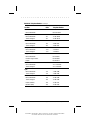
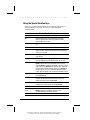
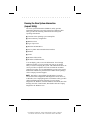
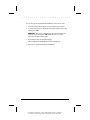
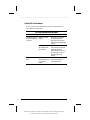
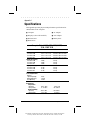
Solving Display Screen Problems
Some common causes and solutions for display screen problems
are listed in the following table.
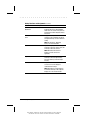
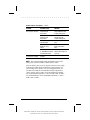
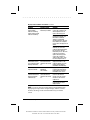
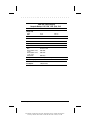
Display Screen Problems and Solutions
Problem
Possible Cause
Solution
Characters are dim.
Brightness/Contrast
controls not properly set.
Press hotkeys Fn+F9 to
adjust brightness. On
models with a passive
matrix display, you can
also press Fn+F8 to adjust
contrast.
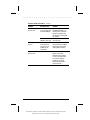
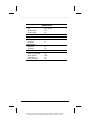
Computer screen is in
direct light.
Tilt display or move
computer.
You may have a screen
blanking utility installed.
Press any key and/or enter
your password.
If an STN display is used,
brightness/contrast
needs adjusting.
Use the hotkeys to adjust
the brightness/contrast.
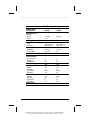
Screen has overheated.
If computer is in direct sunlight, move it and allow it to
cool off.
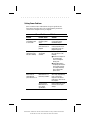
System is in Standby
(Suspend).
Press the power button to exit
Standby.
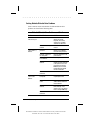
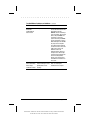
Screen is blank.
Screen is blank and
the power/standby
indicator is blinking.
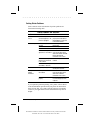
NOTE: On models with
color TFT displays, contrast
is not applicable.
System is in Standby and Exit Standby and enter your
QuickLock/QuickBlank has power-on password.
initiated.
Continued
Troubleshooting
Part Number: 262446-001 Writer: Dianne Fielden Saved by: Johnnie Abercrombie
Saved Date: 09/17/96 07:49 AM File Name: CH11.DOC
11-15