Download Ambient Technologies RCSITEA Operating instructions
Transcript
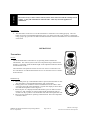
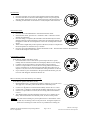
Manual Mode: 1. 2. 3. Press the ON button once to turn on the appliance with max flame height. Press the OFF button to decrease flame height. The first two pressing will decrease flame height to lower level. The third pressing will turn fireplace off. If holding on OFF button for more than 3 second, fireplace will be shut off. Thermostatic Mode: 1. 2. 3. 4. 5. Press the AUTO/FLAME button to enter the thermostatic mode. In thermostatic mode, press the ON / Δ button or OFF / ∇ button to set the desired set temperature. Once the setting is completed, the transmitter will automatically turn on the fireplace when the room temperature is below the set temperature and turn off the appliance when the room temperature is above the set temperature within 1 degree. There will be a slight delay in the response of the unit (on/off) to a temperature. Room temperature is monitored every 3 minutes. Press the AUTO/FLAME button to exit the thermostatic mode. The transmitter will be in the manual off mode and the fireplace will be shut off. 3-Speed Bower Control: Note: Blower operates with flame on only 1. Press FAN button once to enter blower speed setup mode at low speed initially and one of the three blade icon will display darken on LCD display. 2. Continue to press FAN button to set up the blower speed you desire. 3. If there is no input within 3 seconds, the new setting will be transmitted to receiver. If fireplace is on, the blower speed will take effect right away; if fireplace is off, the receiver will remember this setting and blower is still off. 4. If you continue to press FAN button to the position that all blade is gone, the FAN icon will disappear and turn the blower off. Blower On Delay Time and Off Delay Time Setting: Note: Blower operates with flame on only 1. Hold FAN button for 5 second and two numbers will show up in LCD screen. The upper one is On Delay Time and the bottom is Off Delay Time. 2. 3. 4. 5. NOTE Use the ON / Δ button to set the desired On Delay Time from 0 to 15 min. Use the OFF / ∇ button to set the desired Off Delay Time from 0 to 15 min. If there is no input within 3 seconds, the new setting will be transmitted to receiver. The default settings for both transmitter and receiver are 5 minutes for On Delay Time and 8 minutes for Off Delay Time, as shown in this picture. The most efficient setting for your fireplace blower is when blower comes on and off, it is blowing warm air only not hot air. Giving the fireplace as much time to discharge as much warm air as possible before turning off. 50D0111 RCSITEA Installation & Operating Manual Rel 1.0 April 2009 Page 7 of 10 Ambient Technologies A Division Of Monessen Hearth Systems