1
Epson AcuLaser CX37 Series
Printer/Copier/Scanner User’s Guide
Status, Error, and Service Messages
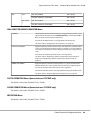
Status, error, and service messages are displayed in the message window. They provide information
about your machine and help you locate many problems. When the condition associated with a
displayed message has changed, the message is cleared from the window.
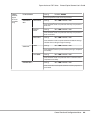
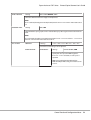
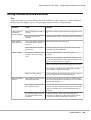
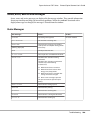
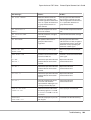
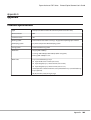
Status Messages
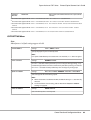
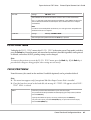
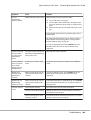
This message...
means...
Do this...
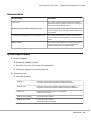
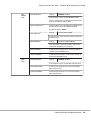
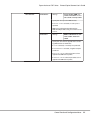
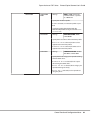
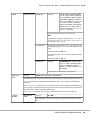
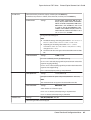
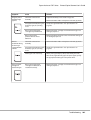
ACCEPTED
The settings were applied.
No action needed.
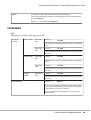
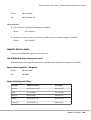
DATA RECEIVING
This machine is receiving data.
SLEEP MODE
(Nothing displayed)
The machine is in Energy Save mode to
reduce power consumption during periods
of inactivity.
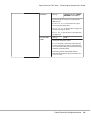
NONE
The object does not exist.
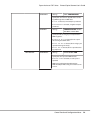
PC SCAN CANCEL
The scan job was canceled from the driver.
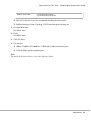
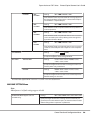
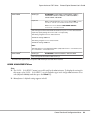
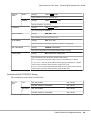
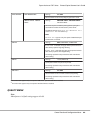
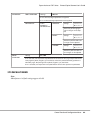
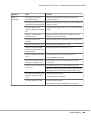
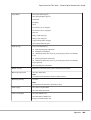
PLEASE WAIT!
The AIDC color calibration is being
performed.
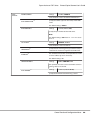
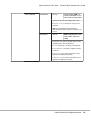
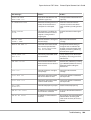
The AIDC color calibration is performed
automatically in the following
circumstances.
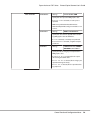
❏
When the machine is turned on
❏
When the machine recovers from
Energy Save (Sleep) mode
❏
When the machine is restarted after
settings have been changed
❏
After a toner cartridge is replaced
This process maintains optimum print
quality.
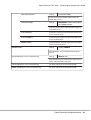
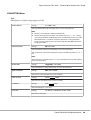
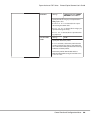
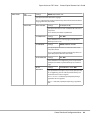
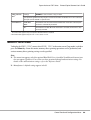
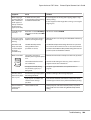
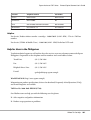
PRINT WAITING
The machine is waiting to print.
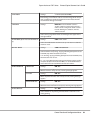
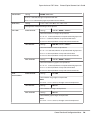
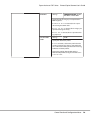
PRINTING
The machine is printing.
SEARCHING
The machine is searching data.
SCANNING
The machine is scanning the document.
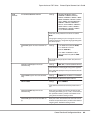
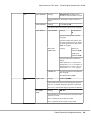
Warming Up
The machine is warming up.
Troubleshooting
230