1
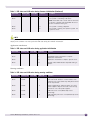
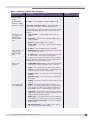
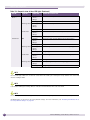
Table 1: LED states and SSD codes during firmware initialization (Continued)
Active LED
Warning LED
Error LED
SSD Codes
Condition
Green
5
The system is formatting memory.
Green
6
The system is initializing load device.
Note: If the SSD code is stuck at 6 for more than
a minute, it implies that the Network Processor
Card is installed in wrong slot.
Green
9
The system is loading subsystem.
Green
b
The system is starting the operation system. The
system is active.
NOTE
Although the Active LED will be lit Green during the firmware initialization, this LED state is irrelevant to the SSD
display or the condition. You must ignore the LED state during the firmware initialization.
Application initialization:
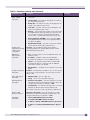
Table 2: LED states and SSD codes during application initialization
Active LED
Warning LED
Error LED
SSD Code
Condition
Green
0
Application initialization started.
Green
1
Forwarding Engine initialization complete.
Application initialization.
Green
A
Application initialization complete. System active.
Green
H
System halted. Administrator requested halting of
system.
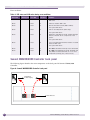
Warning conditions:
Table 3: LED states and SSD codes during warning conditions
Active LED
Warning LED
SSD Code
Condition
Green
Yellow
Error LED
1
High temperature reached.
Green
Yellow
2
Fan unit failure. Rotation counter indicates zero
speed for one of the lateral trays. May be the result
of fan tray removal.
Green
Yellow
3
Power supply failure. Failed to detect one of the
power supplies. May be the result of the fan tray
removal of one of the power supplies.
Green
Yellow
4
FDD low sector count (40 backup sectors
remaining).
Green
Yellow
5
FDD extremely low sector count (20 backup sectors
remaining)
Summit WM Getting Started Guide, Software Version 5.1
21