1
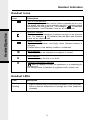
Handset Indicators
Handset Icons
Description
Icon
Line In Use indicator
On steady with no number next to it when a parallel set is in use.
On steady with one or more numbers next to it, indicating which
extensions are using the line. For example,
12 indicates
that Handset 1 and Handset 2 are on an outside call.
Handset Operation
Intercom indicator
On steady with the extension numbers currently on an intercom
call. For example,
02 indicates that the Base and Handset
2 are on an intercom call.
Battery indicator
Cycles (Low, Medium, and High) when Handset battery is
charging.
Flashes when a low battery condition is detected.
M
Mute indicator
On steady when the Handset microphone is muted.
H
Hold indicator
On steady when the line is on hold.
R
Handset Registration indicator
FFF when a Handset is either not registered, or is searching for
a Base unit.
On steady when a Handset is registered with a base unit.
Handset LEDs
LED
Description
Message
Waiting
• Light to indicate that you have new messages in your voicemail.
Service must be subscribed to through your local telephone
company.
8