1
The Sleep timer buttons determine how long the panel will be inactive before it enters
Sleep mode, when the screen goes dark to save power. The time can be changed from 0
to 50,000 seconds (in 10‑second increments). The time that is currently selected is shown
above the buttons.
The screen may need a high level of backlighting for readability when ambient lighting is
high. With low ambient lighting, the backlighting should be low.
Auto Backlight provides a suitable amount of backlighting that is automatically calculated
from the amount of ambient light detected by the light detector.
When Auto Backlight is set to Off, the Backlight buttons allow the backlighting to be set
manually from 0 to 100 percent.
NOTE: When Auto Backlight is set to On, the value of Backlight can be changed but
this does not affect the amount of backlighting until Auto Backlight is inactivated.
Wake on Motion activates the panel from Sleep mode when motion is detected near the
unit. Use the on-screen buttons to toggle the Auto Backlight or Wake on Motion options
between Off and On.
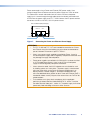
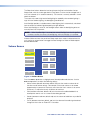
Volume Screen
Main
Volume
Time
Master: 120
Down
Up
Click: 120
Down
Up
Network
Sounds: 120
Video
Down
Up
Line In: 120
Exit
Down
Up
Figure 14.Volume Screen
Press the Down or Up buttons to highlight one of the adjustable audio features. Use the
Down and Up buttons to adjust the following settings.
•
Master volume (between 0 and 255; default 120) sets the maximum volume for all
the other sound volume settings. For example, if the master volume is set to 200
(approximately 80 percent of maximum), even when the Line In volume is set to 255
(maximum), it is equivalent to only 80 percent of maximum.
•
Click (between 0 and 255; default 120) sets the volume for audible feedback that
accompanies events such as a screen button being pressed.
•
Sounds (between 0 and 255; default 120) sets the volume of audio from any audio file
playback.
•
Line In (between 0 and 255; default 120) sets the volume of the audio signal received
through the line in from an Extron MTP transmitter.
TLP 710MV and TLP 710TV • Initial Calibration
15