1
BASIC OPERATION (Continued)
Sound Volume
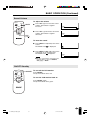
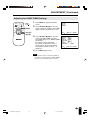
To adjust the volume
ON/OFF
MUTE
MUTE
MENU
AV INPUT
SELECT
VOL
| Press VOL (+) to increase the sound
volume. The indicator segment
increases.
VOLUME
50
| Press VOL (–) to decrease the sound
volume. The indicator segment
decreases.
VOLUME
10
VOL
SELECT
VOL
(+)/( )
LCD MONITOR
To mute the sound
| Press MUTE to temporarily turn off the
sound.
is displayed.
The MUTE mark
| Press MUTE or VOL (+)/(–) to turn the
sound back to the previous level.
disappears.
The MUTE mark
Note:
■ MUTE is automatically cleared when the
following button is pressed: ON/OFF,
VOL (+)/(–) or MUTE.
VOLUME
30
ON/OFF Standby
ON/OFF
ON/OFF
MUTE
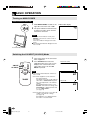
Press ON/OFF.
The power indicator turns red.
MENU
AV INPUT
To turn off the LCD monitor
SELECT
To turn the LCD monitor back on
VOL
VOL
Press ON/OFF again.
The power indicator turns green.
SELECT
LCD MONITOR
13
LC-15M4U(09-14)Eng.p65
13
01.7.24, 5:20 PM