1
ADJUSTMENT (Continued)
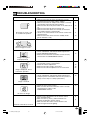
Adjusting the SET UP Settings
The SET UP items can be set by the user.
ON/OFF
MUTE
VOL
(+)/( )
MENU
AV INPUT
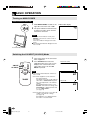
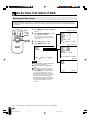
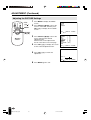
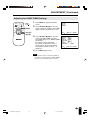
Press MENU to display the MENU
screen.
2
Press SELECT (])/([) to move the
cursor to SET UP.
MENU
SELECT
VOL
1
MENU
PICTURE
SET UP
LANGUAGE
VOL
SELECT
SELECT
(])/([)
LCD MONITOR
Selected item
SELECT:
3
Press VOL (+)/(–) to display the SET
UP screen.
4
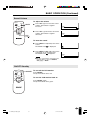
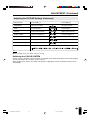
Check the factory setting of each item
on the SET UP screen.
The user can change the settings with
SELECT (])/([) and VOL (+)/(–).
5
Press MENU again to exit.
Factory setting
Maximum brightness
SET UP
BRIGHTNESS
UPSIDE
RIGHT/LEFT
BLUE SCREEN
AV1
AV2 IN/OUT
SLEEP TIMER
SELECT:
ENTER: –VOL+
EXIT: MENU
[BRIGHT ]
[NORMAL]
[NORMAL]
[OFF
]
[NORMAL]
[IN
]
[ – – – REMAIN]
ADJUST: –VOL+ EXIT: MENU
Setting change
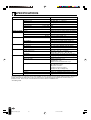
[NORMAL] Brightness 60% → Suitable for viewing in well-lit areas.
Saves energy.
[DARK]
Brightness 20% → Sufficiently bright when viewing in
dim areas.
BRIGHTNESS
[BRIGHT]
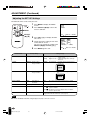
UPSIDE
[NORMAL] Normal vertical
image orientation
[DOWN]
RIGHT/LEFT
[NORMAL] Normal horizontal
image orientation
[MIRROR] Mirror image → To display mirror images for special
uses.
Inverted image → To display images upside down for
special uses.
ABC
CBA
This feature is
inactivated.
[ON]
The screen is turned blue when there is no signal.
BLUE SCREEN
[OFF]
AV1
[NORMAL]
[COMPONENT]
AV2 IN/OUT
[IN]
[OUT
[OUT
SLEEP TIMER
[ – – – REMAIN]
] Line Output is selected, Output volume is fixed, Speaker
output is available.
] Line Output is selected, Output volume is variable,
Speaker output is Mute.
The setting can be specified in increments of 30 minutes and in a
range between 30 and 120 minutes. (see page 19)
Note:
■ In BLUE SCREEN, PICTURE setting displayed in purple cannot be selected.
18
LC-15M4U(15-19)Eng.p65
18
01.7.24, 5:19 PM