1
VEC-103 User Guide.qxd:User guide
12/11/09
16:56
Page 8
---
FAQs
!
WARNING: to reduce the risk of personal injury, unplug the vacuum cleaner
before performing maintenance/troubleshooting checks.
Is there an accessory missing?
• Check the ‘Parts Overview’ page in this
guide to make sure the part is definitely
included in your unit.
• If it is missing, we’re here to help. Simply call
us on 0844 412 8455
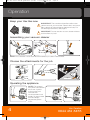
Accessory blockages: remove accessory
from handle/tube. Carefully remove blockage
and re-attach to the vacuum cleaner.
• The accessory may be faulty. Simply call us
on 0844 412 8455 for assistance.
Why will the vacuum cleaner not run?
Why won’t the vacuum cleaner pick up?
• The filter may be clogged; refer to
‘Maintenance: Cleaning the filters’ on page 6.
• It may not be plugged into the electrical
outlet correctly; ensure that the plug is
pushed in securely.
• The dust bag may be full or blocked; refer to
‘Maintenance: Removing the dust bag’ on
page 6.
• The electrical outlet may not be working
properly; check the fuse or breaker, or consult
an electrician.
Why is dust escaping from the vacuum?
• The motor thermostat may have tripped;
switch off and unplug the vacuum cleaner,
and leave for one hour before switching the
cleaner back on.
• The filter may be clogged; refer to
‘Maintenance: Cleaning the filters’ on page 6.
• The filter may not be installed correctly; refer
to ‘Maintenance: Cleaning the filters’ on page
6.
• The dust bag may be incorectly installed;
refer to ‘Maintenance: Removing the dust
bag’ on page 6.
What do I do if the unit/an accessory
becomes damaged or broken?
• We’re here to help. Simply call 0844 412
8455 or visit vax.co.uk
Why won’t the accessories pick up
properly?
Hose blockages: remove the flexible hose
from the unit. Carefully remove any blockages
found and reconnect hose securely.
8
Vax Careline
0844 412 8455