1
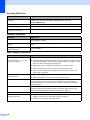
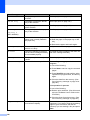
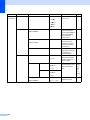
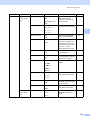
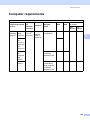
Main Menu
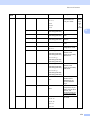
Submenu
Menu Selections
Options
Descriptions
2.Fax
0.Miscellaneous
1.Compatibility
High*
Adjusts the equalization
for transmission
difficulties.
(continued)
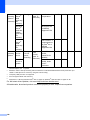
3.Copy
Normal
1.Quality
Page
127
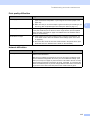
Basic(for VoIP)
VoIP service providers
offer fax support using
various standards. If you
regularly experience fax
transmission errors,
choose
Basic(for VoIP).
2.BT Call Sign
On
Used with BT Call Sign.
54
(U.K. only)
Off*
—
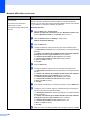
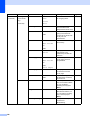
Text
You can choose the Copy
resolution for your type of
document.
81
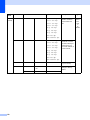
Adjust the brightness for
copies.
81
Adjust the contrast for
copies.
81
Chooses the emulation
mode.
See
Software
User’s
Guide
on
the
CD-ROM.
Photo
Auto*
2.Brightness
—
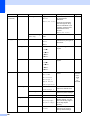
-nnnno+
-nnnon+
-nnonn+*
-nonnn+
-onnnn+
3.Contrast
—
-nnnno+
-nnnon+
-nnonn+*
-nonnn+
-onnnn+
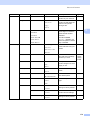
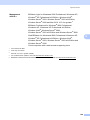
4.Printer
1.Emulation
—
Auto(EPSON)*
Auto(IBM)
HP LaserJet
BR-Script 3
Epson FX-850
IBM Proprinter
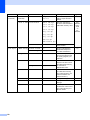
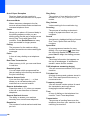
2.Print Options
1.Internal Font
1.HP LaserJet
2.BR-Script 3
3.Duplex
2.Configuration
—
3.Test Print
—
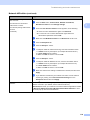
Prints a test page.
—
Off*
Enables or disables
duplex printing. You can
also choose long edge or
short edge duplex
printing.
On(Long Edge)
On(Short Edge)
4.Reset Printer
—
1.Reset
2.Exit
168
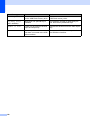
Prints a list of the
machine’s internal fonts.
Prints a list of the
machine’s printer settings.
Restores the printer
settings to the original
factory default settings.