1
System requirements
1
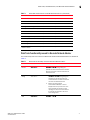
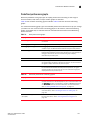
Brocade has certified and tested Web Tools on the platforms shown in Table 3.
TABLE 3
Certified and tested platforms
Operating System
Browser
Windows Server 2008 R2 Standard (64-bit)
Internet Explorer 8.0
Windows Server 2008 Standard
Internet Explorer 7.0
Windows Vista Business
Internet Explorer 7.0
Red Hat Enterprise Server 5 Advanced
Platform
Internet Explorer 7.0
SUSE Linux Enterprise Server 10
Internet Explorer 7.0
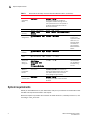
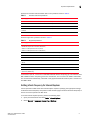
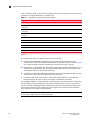
Brocade supports the platforms shown in Table 4.
TABLE 4
Supported platforms
Operating System
Browser
Red Hat AS 4.0 (x86 32-bit)
Red Hat Enterprise Linux 5.4 Adv (x86 32-bit)
SUSE Linux Enterprise Server 10 (32-bit)
SUSE Linux Enterprise Server 11 (x86 32-bit)
Firefox 2.0
Windows 2000
Firefox 2.0, Internet Explorer 6.0
Windows 2003 Server, SP2
Firefox 2.0, Internet Explorer 7.0/8.0
Windows XP Pro SP3 (x86 32-bit)
Firefox 2.0, Internet Explorer 7.0/8.0
Windows Server 2003 Standard SP2 (x86
32-bit)
Firefox 2.0, Internet Explorer 7.0/8.0
Windows Server 2008 Standard
Firefox 2.0, Internet Explorer 7.0/8.0
Windows 7 Professional (x86)
Firefox 2.0
Solaris 9 (SPARC only)
Solaris 10 (SPARC only)
Firefox 2.0
For Windows systems, a minimum of 256 MB of RAM for fabrics comprising up to 15 switches, 512
MB of RAM for fabrics comprising more than 15 switches, and a minimum of 8 MB of video RAM
are recommended. Additionally, a DCX with a fully populated FC8-64 blade requires a minimum of
512 MB of RAM.
Setting refresh frequency for Internet Explorer
Correct operation of Web Tools with Internet Explorer requires specifying the appropriate settings
for browser refresh frequency and process model. Browser pages should be refreshed frequently to
ensure the correct operation of Web Tools.
To set the Internet Explorer options, perform the following steps.
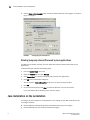
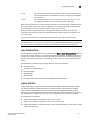
1. Open your web browser and select Tools > Internet Options.
2. Select General > Temporary Internet Files > Settings.
Web Tools Adminstrator’s Guide
53-1002152-01
5