1
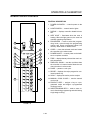
OPERATION & CALIBRATION
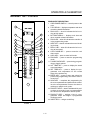
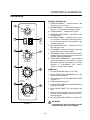
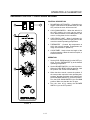
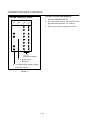
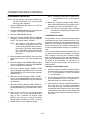
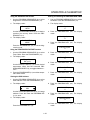
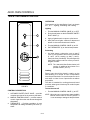
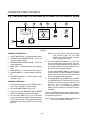
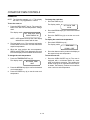
PROGRAMMING THE MANUAL KEY DEFAULT
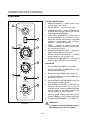
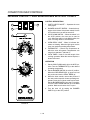
PROGRAMMING THE PRODUCT KEYS
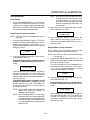
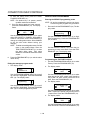
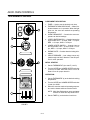
1. Turn the SELECTOR SWITCH (1) to the desired
position.
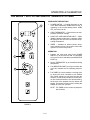
1. Turn the SELECTOR SWITCH (1) to the desired
position.
2. Press the MANUAL KEY (12). The manual and
fan key LEDs light.
2. Press the desired PRODUCT KEY (11). The
product and fan key LEDs light.
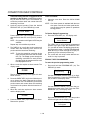
3. Press the TIME ARROW KEYS (3) to enter the
cook time.
3. Press and hold the PROGRAM KEY (14) until the
corresponding LED flashes, approximately five
seconds.
4. Press the TEMPERATURE ARROW KEYS (7) to
enter the cook temperature.
5. For Cook and Hold - Press and hold the HOLD
KEY (8). At the same time use the TEMPERAĆ
TURE ARROW KEYS (7) to enter the hold temĆ
perature. The hold key LED lights. Press the hold
key again to exit the hold mode.
For Cook with Pulse - Press the FAN KEY (10).
Use the TIME ARROW KEYS (3) to enter the
pulse time. If no pulse is required, leave the pulse
time at 0:00. The fan key LED flashes. Press the
fan key again to exit the fan mode.
6. Press the PROGRAM KEY (14) to save the proĆ
gram settings.
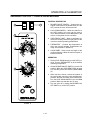
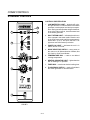
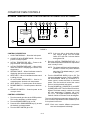
MANUAL KEY DEFAULT OPERATION
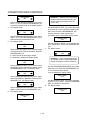
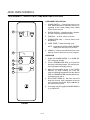
1. Turn the SELECTOR SWITCH (1) to the desired
position.
2. Press the MANUAL KEY (12). The applicable
LEDs light.
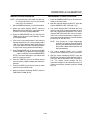
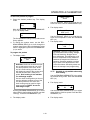
3. Press the START KEY (13). The TIME DISPLAY (2)
counts down. The manual key LED flashes.
NOTE: In Cook with Pulse the fan LED flashes.
NOTE: Press the arrow keys to change the cook
time and temperature at any point during
manual key operation.
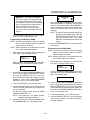
4. Press the TIME ARROW KEYS (3) to enter the
cook time.
5. Press the TEMPERATURE ARROW KEYS (7) to
enter the cook temperature.
6. For Cook and Hold - Press and hold the HOLD
KEY (8). Use the TEMPERATURE ARROW KEYS
(7) to enter the hold temperature. The hold key
LED lights. Press the hold key again to exit the
hold mode.
For Cook with Pulse - Press the FAN KEY (10).
Use the TIME ARROW KEYS (3) to enter the
pulse time. If no pulse is required, leave the pulse
time at 0:00. The fan key LED flashes. Press the
fan key again to exit the fan mode.
7. Press the PROGRAM KEY (14) to save the proĆ
gram settings.
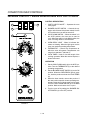
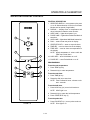
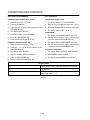
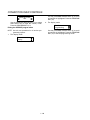
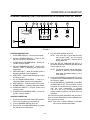
PRODUCT KEY OPERATION
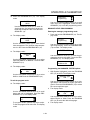
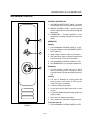
1. Turn the SELECTOR SWITCH (1) to the desired
position.
2. Press the desired PRODUCT KEY (11). The apĆ
plicable LEDs light.
3. Press the START KEY (13). The TIME DISPLAY (2)
counts down. The product key LED flashes.
NOTE: In Cook with Pulse the fan LED flashes.
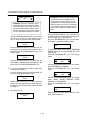
4. When the cook time expires the applicable LEDs
and both displays flash and an audible alarm
sounds.
4. When the cook or pulse time expires the applicaĆ
ble LEDs and both displays flash and an audible
alarm sounds.
5. Press the STOP KEY (15) to silence the alarm.
5. Press the STOP KEY (15) to silence the alarm.
NOTE: In Cook & Hold the alarm self cancels.
The oven cools to the hold temperature
and the time display counts up.
NOTE: In Cook and Hold the alarm self cancels.
The oven cools to the hold temperature
and the time display counts up.
6. Remove the product.
6. Remove the product.
7. Turn the SELECTOR SWITCH (1) to OFF to shut
down the oven.
7. Turn the SELECTOR SWITCH (1) to OFF to shut
down the oven.
1-25