1
9345_book_1ATT
6/5/01
11:34 AM
Page 15
CALLER ID OPERATION
Store a Call History Record in Memory
1
2
Locate the record in call history you want to store in memory.
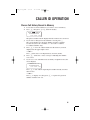
Press s, then press < or > until PGM flashes.
DIAL PGM ERASE
973-555-0123
5/01 5:40PM
3
4
5
6
28
OLD
The phone number will be displayed in the format it was received.
If you wish to change how the number is stored, press #.
The screen displays any alternate dialing sequences available
for this call (area code + number; 1 + area code + number;
1+ number; number only).
Press s to store the call information in the memory location
displayed in the upper right corner
— OR —
Press <, then enter a two-digit memory location (01-20).
Press s. You’ll hear a series of beeps confirming the number
was stored.
If you try to store information in an already occupied location, the
screen displays
OVERWRITE? NO
973-555-0123
5/01 5:40PM
28
OLD
Press s to exit without replacing the number already stored in
that location
— OR —
Press > to display YES, then press s to replace the previous
number with the new one.
15