1
Listening to multi channel
sound
— MULTI CH IN
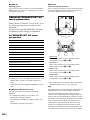
Press MULTI CH IN 1/2 repeatedly to select
the multi channel audio source (“MULTI CH
1 DIRECT” or “MULTI CH 2 DIRECT”).
You can listen to FM and AM broadcasts
through the built-in tuner. Before operation,
make sure you have connected the FM and AM
antennas to the receiver (see page 15).
Tip
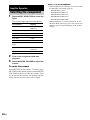
The tuning scale for direct tuning differs depending on
the area code as shown in the following table. For
details on area codes, see page 3.
Area code
FM
AM
U, CA
100 kHz
10 kHz*
CEL, TW
50 kHz
9 kHz
Amplifier Operation
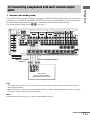
You can select the audio directly from the
components connected to the MULTI
CHANNEL INPUT jacks. This enables you to
enjoy high quality analog inputs like DVD or
Super Audio CD.
Surround effects are not activated when using
this input.
Listening to FM/AM radio
* The AM tuning scale can be changed (see page 61).
The selected audio source is output.
When a center speaker or sub
woofer is not connected
If you have set the center speaker to “NO”, or set
the sub woofer to “NO” in the SPEAKER SET
UP menu (page 19), and you activate the
MULTI CH IN function, the analog center or
sub woofer audio will be output from the front
left and right speakers.
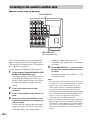
Automatic tuning
1
2
3
Rotate INPUT SELECTOR to select
tuner (“FM” or “AM”).
Press FM/AM to select “FM” or “AM”.
Press TUNING + or TUNING –.
Press TUNING + to scan from low to high;
press TUNING – to scan from high to low.
The receiver stops scanning whenever a
station is received.
In case of poor FM stereo
reception
If the FM stereo reception is poor and
“STEREO” flashes in the display, select
monaural audio so that the sound will be less
distorted.
1
2
3
Rotate MAIN MENU to select “TUNER”.
Rotate MENU to select “FM MODE”.
Rotate –/+ to select “MONO”.
The FM reception switches to monaural.
continued
25GB