1
Programs
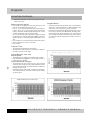
PROGRAMS - QUICK START
Beginning the Program
Stop or Reset the Program
• Press “START” key to begin the program
• The console will start a 3 second count down
• Begin workout
• To Stop this program, press “STOP” key once. The console will
Stop the program. At this time, all the data window will show the
end of workout information, the Speed will return to 0 MPH and
Elevation will return to 0%.
• To Reset this program, press “STOP” key after the program stops.
The console will reset to “idle mode” and be ready for entering
any new program.
Program Time
• The Time window will display the workout time
• The default time of this program is 30 minutes
During Workout, user may
Adjust Speed
• The Speed window is displaying the default speed: 0.5 MPH.
• Press UP/DOWN Arrow (▲▼) key, under the speed window, to
adjust the speed, up to 10MPH.
Adjust Elevation
• The Elevation window is displaying the default elevation: 0%.
• Press UP/DOWN Arrow (▲▼) key, under the elevation window,
to adjust elevation, up to 10%.
Program Notes
• This program will Stop after 30 minutes. The console will reset to
“idle mode”. The Speed will return to 0 MPH and Elevation will
return to 0%. User may select any program at this time.
• Program may be interrupted by disengaging the safety cord from
the console. At this time, the TIME window will display “ERR”
and the CAL/PULSE window will display “03”. The Speed will
return to 0 MPH and Elevation will remain at the previous setting.
To re-start this treadmill, simply place the safety cord back on
the console.
MANUAL PROGRAM
12
Beginning the Program
Program Notes
• Press UP/DOWN Arrow (▲▼) key, under the speed window, to
select the desired speed, up to 10MPH
• Press UP/DOWN Arrow (▲▼) key, under the elevation window,
to select the desired elevation, up to 10%
• Press “START” key to accept the setting and begin the program
• The console will start a 3 second count down
• Begin workout
• This program will Stop after 30 minutes. The console will reset to
“idle mode”. The Speed will return to 0 MPH and Elevation will
return to 0%. User may select any program at this time.
• Program may be interrupted by disengaging the safety cord from
the console. At this time, the TIME window will display “ERR”
and the CAL/PULSE window will display “03”. The Speed will
return to 0 MPH and Elevation will remain at the previous setting.
To re-start this treadmill, simply place the safety cord back on
the console.
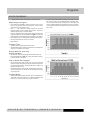
Program Time
• The Time window will display the workout time
• The default time of this program is 30 minutes and is divided into
15 stages, 2 minutes for each stage.
During Workout, user may
Adjust Elevation
• The Elevation window is displaying the default elevation: 0%.
• Press UP/DOWN Arrow (▲▼) key, under the elevation window,
to adjust elevation, up to 10%.
Stop or Reset the Program
• To Stop this program, press “STOP” key once. The console will
Stop the program. At this time, all the data window will show the
end of workout information, the Speed will return to 0 MPH and
Elevation will return to 0%.
• To Reset this program, press “STOP” key after the program stops.
The console will reset to “idle mode” and be ready for entering
any new program.
600 SERIES TREADMILL
O W N E R’ S M A N U A L