1
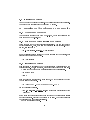
display, "0x00000201" which means that it is the right display, "0x00000300"
which means that it is the top display and "0x00000301" which means that it is
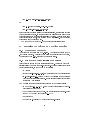
the bottom display. Also you have to dene options "HSync2" and "VRefresh2",
which are refered to the second monitor (You can skip this since you will need
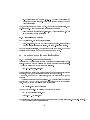
to dene 2 monitor sections). Also if you want to set an overlapping area for
the two screens set option "ScreenOverlap", to the number of pixels you want
this area to be. 0 to disable it.
(See the Device sections in the sample XF86Cong)
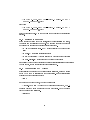
Then you have to congure your monitors. You will need 2 Monitor sections,
with the appropriate modelines and the appropriate settings for your 2 monitors.
Be sure that you follow the manufacture's specs if you don't want to burn your
monitors! The driver will use the same modeline for both screens and it will
select it according to the lower spec monitor. So if you have a 640x480 capable
monitor and a 1600x1200 one, big desktop will use a 2x(640)x480.
(See the Monitor sections in the sample XF86Cong)
You will also need to dene as always a Screen section, with the desired
resolutions and depth of colors. The resolutions you will enter should be each
screen's resolutions, not the resolution of both. For example a 1280x1024 resolution will give you a 2560x1024 desktop. Up to drivers 3.7.0, 16 bit color is not
supported. Also don't use a bigger virtual resolution, since Big Desktop doesn't
support panning and scrolling. Also for R200 family (Radeon 8500-9000 Pro,
Fire GL 8700/8800/E1) the maximum OpenGL resolution is 2048x2048 and
for R300 family (Radeon 9500-9700 Pro, Fire GL X1/Z1) 2560x2560, for both
screens.
(See the Screen sections in the sample XF86Cong)
13.2.3 Problems
1. You won't be able to maximize an application only on one monitor since
fglrx driver with Big Desktop mode doesn't support Xinerama extensions,
in order to make aware the window manager that you have one desktop
across 2 monitors. Also ring up a 3D application, will always display it
on your left monitor, or the top monitor, according to your conguration,
which is the display with 0,0 coordinates. But a 3D application can make
use of your whole desktop!
2. Vidix driver from xine and mplayer can only be used on the primary
monitor. Xv should work for both monitors.
3. You may have problems with some games going to fullscreen.
4. If you enable any of the NoAccel and NoDRI options, tha Xserver will
crash.
13.3 Clone conguration
This is about Clone option, where the contents of your primary screen are
displayed on the second one. This can be used for demonstration or presentation
21