1
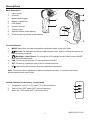
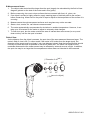
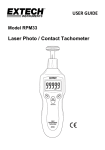
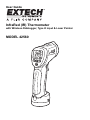
Descriptions Meter Description 1 2 1. Laser pointer 2. IR sensor 3. Measurement trigger 4. Battery compartment 5. LCD display 6. Function buttons* 7. Thermocouple 8. Optical interface (meter bottom) 9. Thermocouple input jacks (meter bottom) 3 4 8 9 *Function Buttons MODE: Select from 9 modes of operation explained in detail in this user guide. Arrows: For setting the emissivity, high/low alarm limits, and for scrolling through the 20 internal memory locations Backlight / Laser Pointer: For turning the LCD backlight and the Laser pointer ON/OFF while taking measurements USB: For turning the wireless PC communications ON/OFF SET: For storing a reading to one of the 20 internal memories. ATE: Used during the Automatic Emissivity Adjustment procedure. Note: The function button explanations above are simple overviews. For precise instructions, please read the entire User Guide. Internal Switches (inside battery compartment) o o o 1. Temperature units ( C or F) switch ( C is the left position) 1 2. Test lock ON / OFF switch (OFF is the left position) 2 3. Alarm ON / OFF switch (OFF is the left position) 3 3 42560-EU-EN-V5.1-9/11