1
Workstations
An Artist Series controller can control applications running on a second computer, referred to in this guide as a workstation. The
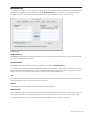
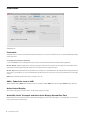
Workstations tab establishes the list of workstations that the WORKSTATION key cycles through. Any workstation running
EuControl software can be in this list, including those controlled by the System 5-MC, MC Pro, and Artist Control.
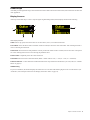
Workstations tab
All Workstations
All Workstations lists all EUCON-enabled workstations on the network. If the workstation is already in the My Workstations list,
it is shown in gray and cannot be selected.
My Workstations
My Workstations lists the workstations that can be attached to by pressing the WORKSTATION key.
It is possible to put a workstation in the My Workstations list that is already attached to another instance of EuControl running on
another computer. It cannot be attached here until it is unattached from the other instance of EuControl. This was done to allow
multiple users to share workstations without having to frequently edit their My Workstation list.
Add
Click Add to add the selected workstation from the All Workstations list to the My Workstations list. If the workstation is already
in the My Workstations list, it is grayed out and cannot be selected.
Remove
Click Remove to remove the selected workstation from the My Workstations list.
Attach/Detach
Select a workstation in the My Workstations list and click Attach. A check mark appears in the Attach column next to that workstation. This workstation is now communicating with the Artist media controller(s) connected to your instance of EuControl.
If the selected workstation is already attached, the button displays Detach. Click it to detach the workstation.
Chapter 5: EuControl 29