1
Creating a RAID 0 set (Striped)
To create a RAID set:
1.
2.
3.
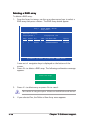
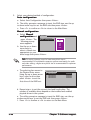
From the Silicon Image
configuration utility
main menu, select
Create RAID set
then press <Enter> to
display an option menu.
Select R A I D 0 then
press <Enter> to
display the following.
MAIN MENU
Create RAID set
Delete RAID set
Rebuild Raid1 set
Resolve Conflicts
Low Level Format
Logical Drive Info
RAID0
RAID1
RAID5
RAID10
SPARE DRIVE
JBOD
MAIN MENU
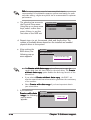
Auto configuration
Manual configuration
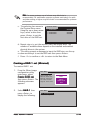
Select your desired method of configuration.
Auto configuration
a. Select Auto Configuration the press <Enter>.
b. The utility prompts a message to input the RAID size, use the up
or down arrow keys to set the RAID size then press <Enter>.
c. Press <Y> to confirm or <N> to return to the Main Menu.
By default, Auto configuration sets the stripe size to 64K and sets the
logical drives based on the physical drives installed.
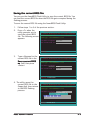
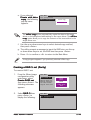
Manual configuration
a. Select M a n u a l
c o n f i g u r a t i o n and
press <Enter>. The
following pop-up
menu appears.
b. Use the up or down
arrow keys to
select a chunk size
appropriate to your
drive usage then
press <Enter>.
5-42
MAIN MENU
Auto configuration
Manual configuration
chunk size
4K
8K
16K
32K
64K
128K
Chapter 5: Software support