1
2850ST
INTERACTIVE APPLICATIONS
LANGUAGE OPTIONS
Interactive applications give you access to social networking,
gaming, information, or other sources of entertainment. The
options available depend on your broadcaster, but your receiver
has all the potential you need to enjoy a full range of interactive
services.
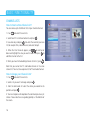
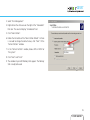
The Language Options screen (Menu – Your Preferences –
Language Options) allows you to select options concerning
preferred languages.
On-screen Language – specifies the language in which all the
menus and screens are displayed.
If there is an interactive service or function available on the channel
Primary Audio – specifies the first choice of language you would
icon will be displayed in the Channel
you are watching, the
like to use for your audio soundtracks.
Banner. To see a full list of interactive services on all your channels,
button.
press the
Secondary Audio – specifies the second choice of language you
would like to use for your audio soundtracks (when the Primary
By default, some interactive services start automatically, such as
Audio is NOT available).
voting, when you tune to a channel. If you do not want these
processes to run automatically, set the Application AutoSTART Subtitles – specifies whether subtitles are displayed (if available).
option (go to Menu then Your Preferences then Display Options)
Primary Subtitles – specifies the first choice of language you
to No.
would like to use for your subtitles.
ELECTRONIC PROGRAM GUIDE
Secondary Subtitles – specifies the second choice of language
The Electronic Program Guide (EPG) provides you with an on- you would like to use for your subtitles (when the Primary Subtitles
screen TV schedule and information about current program are NOT available).
content. Please bear in mind that this information is available only
if provided by the broadcaster.
key on your
To access the Electronic Program Guide press
remote control. Use the
buttons to navigate through the
days of the week and the
buttons to scroll through the
program list for a particular day.
19
USER GUIDE