1
Q-DL-2100 Operatorʼs Manual
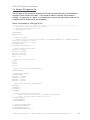
DAC?= ?? * ?.???
- Map Dac? value, e.g. 'Dac3= T1 * 0.1'. Active only if
DACMappingOn=1.
Relays= ?
- Which of 4 Relays activated: e.g. 'Relays= 15', all relays
activated
Pwr5VOn= ?
- Turns OFF/ON regulated 5V Power Output
Pwr12VOn= ?
- Turns OFF/ON regulated 12V Power Output
PwrNPMOn= ?
- Turns OFF/ON Neutron Pulse Modules
Conserve5VPwr= ?
- Turns OFF/ON 5V Regulated Power Conservation, 0 or 1
Conserve12VPwr= ?
- Turns OFF/ON 12V Regulated Power Conservation, 0 or 1
ConserveNPMPwr= ?
- Turns OFF/ON NPM Power Conservation, 0 or 1
BatteryThresholdsOn= ? - Turns OFF/ON Battery Thresholding, 0 or 1
LowBatteryThresh= ?
- Battery voltage at which logger enters power saving mode
ChargedBatteryThresh= ?- Battery voltage at which logger exits power saving mode
DailyPwrConserveOn= ? - Turns OFF/ON Scheduled Power Conservation, 0 or 1
DailyPowerUpHHMM= ?
- Sets Power Up Time for each day (leaving Power
Conservation Mode)
DailyPowerDownHHMM= ? - Sets Power Down Time for each day (entering Power
Conservation Mode)
UseRS232= ?
- Turns OFF/ON Use of external RS232 ports, 0 or 1
RS232BaudRate= ?
- Baud Rate for External RS232 Ports (best if 19200 or
above)
UseSatModem= ?
- Turns OFF/ON Use of Iridium Sat Modem, 0 or 1
RecordsPerSatTrans= ? - Number of RecordPeriods before Sat Transmission Attempted
MaxRapidSatSigQueries=?- Number of Sat Sig Strength Queries before Sat Siq Query
aborted
SatRetryPeriodMinutes=?- Number of Minutes to wait for subsequent Trans attempts
after failures
SatTransPersistence=? - Num of Sat Trans Retries Before Sat Trans Aborted, 1 to 4
UpdateTimeViaSat=?
- Turns OFF/ON Updating of Time Via Sat Network Time, 0 or 1
NPMHistSatSend=?
- Turns OFF/ON Sending of NPM Histograms via Sat, 0 or 1
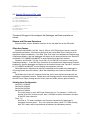
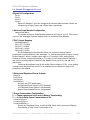
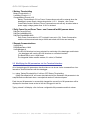
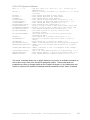
The ʻmenuʼ command allows one to quickly display the current list of available commands as
well as allow one to look at the current INI parameter options. These commands and
parameters are likely to change slightly as the Firmware changes so it is probably best and
easiest to reference the available commands and INI parameters via the ʻmenuʼ command.
Quaesta Instruments, LLC (520) 449-3806 • Email: [email protected]
19