1
Q-DL-2100 Operatorʼs Manual
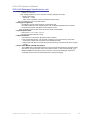
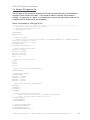
Step 6. Configuring the Serial Port parameters.
Select Setup->Serial Port from the main menu.
a.
b.
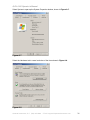
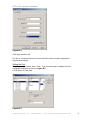
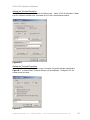
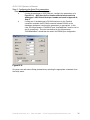
If using the dataloggerʼs USB COM port, configure the parameters as in
Figure B-14. *Note that the Port number selected must match the
dataloggerʼs USB Virtual Serial port number as found in Appendix A,
Step 3.
If using one of the dataloggerʼs RS-232 interfaces for the Terminal
connection available via the RJ45 connector labeled RS-232 on the
datalogger backpanel, configure the parameters as appropriate. In this
case, the INI parameters “UseRS232” and “UseSatModem” must be set to 1
and 0, respectively. The baud rate defined by the INI parameter
“RS232BaudRate” should then be used in the RS232 port configuration.
Figure B-14.
One may save and restore Setup parameters by selecting the appropriate commands from
the Setup menu.
Quaesta Instruments, LLC (520) 449-3806 • Email: [email protected]
36