1
24
Pramati Server 3.5 Installation & Configuration Guide
from value 1. Make sure that the number parameters are in serial order without any missing
numbers.
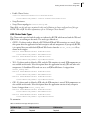
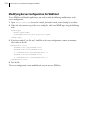
To set the JVM Heap Size values, set values for the following parameters in the configuration files:
# Initial Java Heap Size (in MB) equivalent to -Xms
wrapper.java.initmemory=16
# Maximum Java Heap Size (in MB) equivalent to -Xmx
wrapper.java.maxmemory=64
Configuring Classpath Parameters
You can add additional JAR files or directories containing class files to the Server classpath. To add a
JAR file, append the list below with a similar entry. Note that the entries below follow a pattern as
explained in the previous section. Ensure that the number parameters are in serial order without any
missing numbers. Wild card characters such as “*”, “?” can also be used.
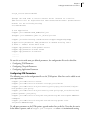
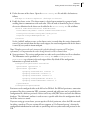
# Java Classpath (include wrapper.jar) Add class path elements as needed
starting from 1
wrapper.java.classpath.1=%ps_root%/services/bin/wrapper.jar
wrapper.java.classpath.2=%ps_root%/server/lib/pramati/server_patch.jar
wrapper.java.classpath.3=%ps_root%/server/lib/pramati/classpath.jar
wrapper.java.classpath.4=%JAVA_HOME%/lib/tools.jar
wrapper.java.classpath.5=%JAVA_HOME%/jre/lib/rt.jar
Troubleshooting Tips
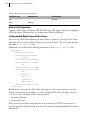
If anything goes wrong while installing the service, use the logs in the directory of the node which is
configured. The Wrapper.log tells us if anything has gone wrong while installing the service. Set
the debug environment variable to true at the end of the configuration file
pramati_server_<node_name>.conf. The entry in the file is:
#wrapper.debug=TRUE