1
DYMO® Portable Digital USB Shipping Scale
Your new DYMO® Portable Digital USB Shipping Scale has a no-skid platform surface and a
detachable display for hand-held viewing or mounting. This User Guide provides instructions
for using the scale.
! When moving the scale, lift the scale by the handles located on the sides of the scale.
Do not lift the scale by the display.
Visit www.dymo.com/register to register your scale.
Setting Up the Scale
The scale is powered through the included power adapter. Optionally, the scale can be
powered through a USB port on your computer or by three AAA batteries.
To set up the scale
1. Unpack the scale.
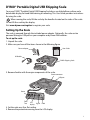
2. Make sure you have all the items shown in the following figure.
Power adapter
User Guide
USB cable
DYMO Shipping Scale
3. Become familiar with the major components of the scale.
Power connector
USB port
Power
Zero/
Tare
LCD
display
Kg/Lb
Hold
4. Set the scale on a firm, flat surface.
5. Remove the protective covering from the LCD display.
1