1
FX - 850/1050 DOT - MATRIX PRINTER
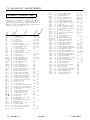
Epson Extended Graphics Character Table
Humidity:
Operation: 10% to 80% (without
condensation)
Storage: 5% to 85% (without condensation)
Shock:
Operation: Up to 1 G within 1 ms
Storage: Up to 2 G within 7 ms
Vibration:
I
Operation: Up to 0.25 G at up to 55 Hz
Storage: up to 0.50 G at up to 55 Hz
SelecType 1
I
You can use the SelecType control panel to choose fonts, pitches, and
condensed printing. The settings you select using the SelecType panel
remain valid even after the printer is turned off. reset, or initialized.
However, commands from your software application program
temporarily override the SelecType settings.
Character fonts
The FX-850 and FX-1050 have three built-in character fonts:
L
Italic Character Table
ROMAN
!“P#$%&‘()*+,-./0123456789:;<=>?@ABCDEFGHIJK
UlNOPQRSTUVWXYZC\l^-‘abcdefghijklmnopqrstuv
wxyzt: tWe've just seen your excellent ad for
miniature zebras in a recent back issue of
Trader Times. What is the price of these
items for quantities of more than one gross?
SANS SERIF
!“#~~%&‘0~+,-./012345t789:;<=>~~~BCDEFG~IJK
LMNOPORSTUVWXVZ[\]-_‘ a b c d e f g h i j k l m n o p q r s t u v
w x y z c : >’
We’ve just Seen your excellent ad for
miniature zebras in a recent back issue of
What is the price of these
items far quantities of more than one gross?
Interface timing
The figure below shows the timing for the parallel interface.
Default Settings
LWSY 4 +-&
ACKNL c i,
The table below shows the default conditions that become valid when
the printer is initialized.
Initialization
There are three ways that the printer can be initialized (returned to a
fixed set of conditions).
Hardware
initialization
Software initialization
FX - 850/1050 - 2
l
When the power is turned on
l
When the printer receives an INIT signal at
the parallel interface (pin 31 goes LOW).
l
Software sends the ESC @ (initialize the
printer) command.
12/12/88
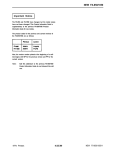
In addition, the data buffer is cleared when the printer is initialized by
turning on the power or by an INIT signal.
Note: The user-defined character set is not cleared when the printer is
initialized.
9 - Pin Printers