1
[04]ETERNALVIEWS.fm 1 ページ
2004年11月12日 金曜日 午後2時23分
[4] EXTERNAL VIEWS AND INTERNAL STRUCTURES
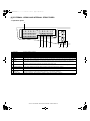
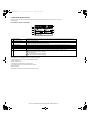
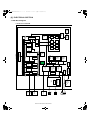
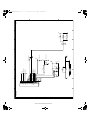
1. Operation panel
1
26
27
28
29
41
30
42
43
44
45
COPY
A
31
B
32
F
36
G
37
K
C
33
H
38
L
D
34
I
39
M
E
J
40
N
P
46
35
Q
47
U
R
V
SHIFT
T
49
W
SPEAKER REDIAL/PAUSE
O
S
48
50
XYZ
SP
SPEED
COMM. SETTING
SYMBOL
SPACE/–
ON LINE DATA
PRINT
SCAN
LINE
DATA
FAX
9
1
2
3
4
5
6
7
Page pallet
Display
[BACK] key
[FAX STATUS] key
[OK] key
Numeric keys
[C] key
8 [CA] key
9 [SPEAKER/SHIFT]
key
10 [REDIAL/PAUSE] key
11 [SPEED/SYMBOL]
key
12 [COMM. SETTING/
SPACE/-] key
13 Information lamp
10
11
12
13
14
15
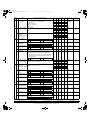
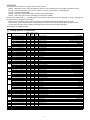
These are used in fax mode.
This key displays the base screen and the function setting screen.
In a setting or programming screen, this key is used to move back to the previous screen.
This is used to cancel a fax transmission or a stored fax transmission.
This key is used to enter a setting that has been selected with the arrow or other keys.
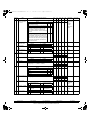
These are used to enter fax numbers, sub-addresses, passcodes, and numerical settings.
This is used to clear a mistake when entering fax numbers, sub-addresses, passcodes, and numerical settings. One digit
is cleared each time the key is pressed.When an original is being scanned, this key can also be used to cancel scanning.
This is used to cancel a transmission or programming operation. When pressed during an operation, the operation is
canceled and the display returns to the base screen described on page *4 - 3*.This key is also used to cancel a resolution,
paper size, or special function setting that was selected when sending a fax.
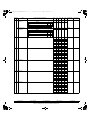
This is used to dial without lifting the handset and to shift between upper and lower case when entering characters.
This is used to redial the last number dialed, and enter a pause when entering a fax number.
This is used to dial by Speed dialing and to enter a symbol when entering characters.
This is used to switch between memory transmission and direct transmission, and to switch between automatic reception
and manual reception. It is also used to enter a space or "-" when entering characters.
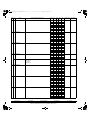
Information lamp blinks, when facsimile is received, or when the paper remains in the tray.
AR-FX11 EXTERNAL VIEWS AND INTERNAL STRUCTURES 4-1