1
Kindle User’s Guide
Welcome
10
Congratulations!
Kindle is a revolutionary device, and we’re excited that you have joined the millions of people
around the world who read on Kindle.
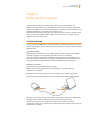
If you haven’t done so already, please follow the Getting Started instructions that came
with your Kindle and plug your Kindle into a power source to charge the battery. The charge
indicator light on the bottom edge of your Kindle turns yellow and a lightning bolt appears
on the battery icon at the top of the display. Charging the battery fully should take less than
three hours and you can continue reading while it charges.
Tip: The charge indicator light will turn green when the battery is fully charged.
If you prefer to read the Kindle User’s Guide side-by-side with the device, you can download and
print a PDF copy at www.kindle.com/support.
You can also download the .AZW version of this guide and read it on any supported device (for
example, Kindle for iPhone or Kindle for PC). For a complete list of supported devices, visit the Kindle
Store on the Amazon website.
Some features and functionality may not be available based on such factors as your country of residence or location.
Getting Around
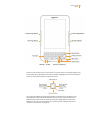
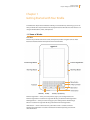
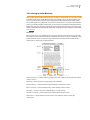
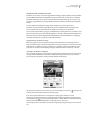
You navigate Kindle using the 5-way controller; the Home, Menu, Back, and Next/Previous Page buttons; and the keyboard: