1
Installation
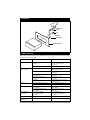
Remove Transportation Screws
Before installing the unit, remove the two
screws shown in the illustration below.
Mounting Surface
Mounting
Location
Remove Transportation
Screws Before
Installation
Mounting
Holes
Note: If this unit is to be installed in a boat or
a spa, you should use the two pieces of plastic
film (30 mm X 20 mm) supplied to seal the two
holes after removing the screws.
3. Use the glue paper to stick the two mounting
brackets to the back of the mounting surface.
The screw holes of the brackets must respectively aim at the mounting holes in order to fix
the unit to the mounting surface.
4. Open the two pieces of rubber cover on the unit
Mounting
Brackets
Mounting
Surface
Installing the Unit
1. Using the mounting paper template supplied
with the unit, determine the mounting location
and then stick the template on the location.
Mounting Surface
Template
to display the four screw holes then using four
screws (M4X30) to mount the unit to the dashboard.
Mounting Surface
Rubber
Cover
2. Cut and remove the hatching area on the template. Then drill four 1/8" mounting holes in the
exact position according to the mounting paper.
Screws
Rubber Cover
10