1
Registering the handset to the base
The handset must be registered to the base station in order to make and receive
calls.
To register the handset:
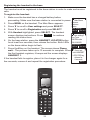
1. Make sure the handset has a charged battery before
proceeding. Make sure the base station is connected to power.
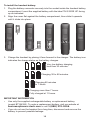
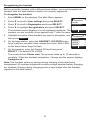
2. Press MENU on the handset. The Main Menu appears.
3. Press q to scroll to User settings and press SELECT.
4. Press q to scroll to Registration and press SELECT.
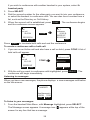
5. With Handset highlighted, press SELECT. The handset
screen displays instructions. Press NEXT to continue
reading the instructions.
6. On the base station, press the HANDSET LOCATOR button
for at least four seconds, then release the button. Both LEDs
on the base station begin to flash.
Main Menu
Intercom
Features
Status
User settings
BACK ENTER
User settings
Key Tone
Edit PIN code
Edit VLAN ID
Registration
BACK ENTER
7. Press the # key on the handset. The screen shows Please
wait... The process takes up to 10 seconds to complete. When
Press and
hold HANDSET
the first handset registers, it beeps and the screen displays
LOCATOR key
HANDSET 1.
If the handset fails to register, place it in the charger again for a
few seconds, remove it and repeat the registration procedure.
HANDSET
1
11:26PM 01/01
LINE
MENU
21
at base for
4 seconds
NEXT