1
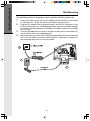
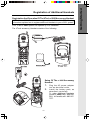
The Wall Mount bracket is designed for use on standard Wall Mount plates only.
1.
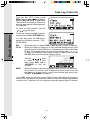
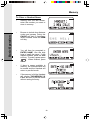
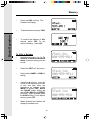
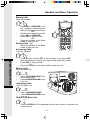
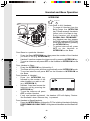
Line up the tabs on the wall mount adapter with the holes on the bottom
of the base unit. Snap the wall mount bracket firmly in place.
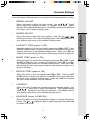
Plug the AC adapter into an electrical outlet, and the DC connector to the
bottom of the base unit. If the handset battery pack has not been charged
previously, place the handset in the base unit cradle, and allow it to charge
for 12 hours.
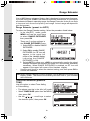
Connect the telephone line cord to the jack on the bottom of the base unit,
and the other end to the telephone jack.
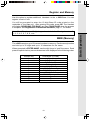
Mount the base unit on the wall. Position the base unit so the mounting studs
will fit into the holes on the wall mount bracket. Slide base unit down on
the mounting studs until it locks into place.
2.
3.
4.
CORDLESS TELEPHONE
3
VTECH TELECOMMUNICATIONS LTD.
DC 9V 500mA
CLASS 2 POWER SOURCE ONLY
Getting Started
Wall Mounting
2
1
10