1
USER’S GUIDE
DCP-120C
®
Version B
If you need to call Customer Service
Please complete the following information for future
reference:
Model Number: DCP-120C
Serial Number:*
Date of Purchase:
Place of Purchase:
* The serial number is on the back of the unit. Retain this
User’s Guide with your sales receipt as a permanent
record of your purchase, in the event of theft, fire or
warranty service.
Register your product on-line at
http://www.brother.com/registration/
By registering your product with Brother International
Corporation, you will be recorded as the original owner of the
product. Your registration with Brother:
■ may serve as confirmation of the purchase date of your
product should you lose your receipt;
■ may support an insurance claim by you in the event of
product loss covered by insurance; and,
■ will help us notify you of enhancements to your product and
special offers.
The most convenient and efficient way to register your new
product is on-line at http://www.brother.com/registration/
©1996-2005 Brother Industries, Ltd.
Brother numbers
IMPORTANT
For technical help, you must call the country where you bought the
machine. Calls must be made from within that country.
Register your product
By registering your product with Brother International Corporation, you will be
recorded as the original owner of the product. Your registration with Brother:
■ may serve as confirmation of the purchase date of your product
should you lose your receipt;
■ may support an insurance claim by you in the event of product
loss covered by insurance; and,
■ will help us notify you of enhancements to your product and
special offers.
Please complete and fax the Brother Warranty Registration And Test Sheet
or, for your convenience and most efficient way to register your new
product, register on-line at
http://www.brother.com/registration/
Frequently asked questions (FAQs)
The Brother Solutions Center is our one-stop resource for all your Fax
Machine/Multi-Function Center needs. You can download the latest
software and utilities, read FAQs and troubleshooting tips to learn how to
get the most from your Brother product.
http://solutions.brother.com
You can check here for Brother driver updates.
For Customer Service
In USA:
1-800-284-4329 (voice)
1-901-379-1215 (fax)
1-800-284-3238 (TTY service for the hearing-impaired)
In Canada: 1-877-BROTHER (voice)
(514) 685-4898 (fax)
Service Center Locator (USA only)
For the location of a Brother authorized service center, call 1-800-284-4357.
Service Center Locations (Canada only)
For the location of a Brother authorized service center, call 1-877-BROTHER.
i
Brother fax back system (USA only)
Brother has installed an easy-to-use fax back system, so you can get
instant answers to common technical questions and product information for
all Brother products. This system is available 24 hours a day, 7 days a
week. You can use the system to receive faxed instructions and an Index of
fax back subjects.
In USA only:
1-800-521-2846
Ordering accessories and supplies
For best quality results use only genuine Brother accessories, which are
available at most Brother retailers. If you cannot find the accessory you
need and you have a Visa, MasterCard, Discover, or American Express
credit card, you can order accessories directly from Brother. (In the USA,
you can visit us online for a complete selection of the Brother accessories
and supplies that are available for purchase.)
In USA:
1-888-879-3232 (voice)
1-800-947-1445 (fax)
http://www.brothermall.com
In Canada: 1-877-BROTHER (voice)
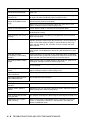
Description
Ink Cartridge <black>
Item
LC41BK (Prints up to 500 pages)
Ink Cartridge <cyan> (blue)
LC41C (Prints up to 400 pages)
Ink Cartridge <magenta> (red)
LC41M (Prints up to 400 pages)
Ink Cartridge <yellow>
LC41Y (Prints up to 400 pages)
Premium Glossy Photo Paper
(Letter size / 20 sheets)
BP60 GLL
Matte Inkjet Paper
(Letter size / 25 sheets)
BP60 ML
Inkjet Plain Paper
(Letter size / 250 sheets)
BP60 PL
User’s Guide
LP0254001 (English for USA and Canada)
LP0254002 (French For Canada)
ii
Notice - Disclaimer of Warranties
(USA and Canada)
BROTHER’S LICENSOR(S), AND THEIR DIRECTORS, OFFICERS,
EMPLOYEES OR AGENTS (COLLECTIVELY BROTHER’S
LICENSOR) MAKE NO WARRANTIES, EXPRESS OR IMPLIED,
INCLUDING WITHOUT LIMITATION THE IMPLIED WARRANTIES OF
MERCHANTABILITY AND FITNESS FOR A PARTICULAR PURPOSE,
REGARDING THE SOFTWARE. BROTHER’S LICENSOR(S) DOES
NOT WARRANT, GUARANTEE OR MAKE ANY REPRESENTATIONS
REGARDING THE USE OR THE RESULTS OF THE USE OF THE
SOFTWARE IN TERMS OF ITS CORRECTNESS, ACCURACY,
RELIABILITY, CURRENTNESS OR OTHERWISE. THE ENTIRE RISK
AS TO THE RESULTS AND PERFORMANCE OF THE SOFTWARE IS
ASSUMED BY YOU. THE EXCLUSION OF IMPLIED WARRANTIES IS
NOT PERMITTED BY SOME STATES IN THE USA AND SOME
PROVINCES IN CANADA. THE ABOVE EXCLUSION MAY NOT
APPLY TO YOU.
IN NO EVENT WILL BROTHER’S LICENSOR(S) BE LIABLE TO YOU
FOR ANY CONSEQUENTIAL, INCIDENTAL OR INDIRECT DAMAGES
(INCLUDING DAMAGES FOR LOSS OF BUSINESS PROFITS,
BUSINESS INTERRUPTION, LOSS OF BUSINESS INFORMATION,
AND THE LIKE) ARISING OUT OF THE USE OR INABILITY TO USE
THE SOFTWARE EVEN IF BROTHER’S LICENSOR HAS BEEN
ADVISED OF THE POSSIBILITY OF SUCH DAMAGES. BECAUSE
SOME STATES IN THE USA AND SOME PROVINCES IN CANADA
DO NOT ALLOW THE EXCLUSION OR LIMITATION OF LIABILITY
FOR CONSEQUENTIAL OR INCIDENTAL DAMAGES, THE ABOVE
LIMITATIONS MAY NOT APPLY TO YOU. IN ANY EVENT
BROTHER’S LICENSOR’S LIABILITY TO YOU FOR ACTUAL
DAMAGES FROM ANY CAUSE WHATSOEVER, AND REGARDLESS
OF THE FORM OF THE ACTION (WHETHER IN CONTRACT, TORT
(INCLUDING NEGLIGENCE), PRODUCT LIABILITY OR
OTHERWISE), WILL BE LIMITED TO $50.
Compilation and Publication Notice
Under the supervision of Brother Industries Ltd., this manual has been
compiled and published, covering the latest product descriptions and
specifications.
The contents of this manual and the specifications of this product are
subject to change without notice.
Brother reserves the right to make changes without notice in the
specifications and materials contained herein and shall not be
responsible for any damages (including consequential) caused by
reliance on the materials presented, including but not limited to
typographical and other errors relating to the publication.
iii
Brother® One Year Limited Warranty and Replacement Service
(USA only)
Who is covered:
• This limited warranty (“warranty”) is given
only to the original end-use/retail
purchaser (referred to in this warranty as
“Original Purchaser”) of the accompanying
product, consumables and accessories
(collectively referred to in this warranty as
“this Product”).
• If you purchased a product from someone
other than an authorized Brother reseller in
the United States or if the product was
used (including but not limited to floor
models or refurbished product), prior to
your purchase you are not the Original
Purchaser and the product that you
purchased is not covered by this warranty.
What is covered:
• This Product includes a Machine and
Consumable and Accessory Items.
Consumable and Accessory Items include
but are not limited to print heads, toner,
drums, ink cartridges, print cartridges, refill
ribbons, therma PLUS paper and thermal
paper.
• Except as otherwise provided herein,
Brother warrants that the Machine and the
accompanying
Consumable
and
Accessory Items will be free from defects
in materials and workmanship, when used
under normal conditions.
• This warranty applies only to products
purchased and used in the United States.
For products purchased in, but used
outside, the United States, this warranty
covers only warranty service within the
United States (and does not include
shipping outside the United States).
What is the length of the Warranty Periods:
• Machines: one year from the original
purchase date.
• Accompanying
Consumable
and
Accessory Items: 90 days from the original
purchase date or the rated life of
consumable, whichever comes first.
What is NOT covered:
This warranty does not cover:
(1) Physical damage to this Product;
(2) Damage caused by improper installation,
improper or abnormal use, misuse,
neglect or accident (including but not
limited to transporting this Product
without the proper preparation and/or
packaging);
(3) Damage caused by another device or
software used with this Product (including
iv
but not limited to damage resulting from
use of non Brother®-brand parts and
Consumable and Accessory Items);
(4) Consumable and Accessory Items that
expired in accordance with a rated life;
and,
(5) Problems arising from other than defects
in materials or workmanship.
(6) Normal Periodic Maintenance Items,
such as Paper Feeding Kit, Fuser and
Laser Units.
This limited warranty is VOID if this Product
has been altered or modified in any way
(including but not limited to attempted
warranty repair without authorization from
Brother and/or alteration/removal of the
serial number).
What to do if you think your Product is
eligible for warranty service:
Report your issue to either our Customer
Service Hotline at 1-800-284-4329 for Fax,
MFC and DCP and 1-800-276-7746 for
Printers, or to a Brother Authorized Service
Center within the applicable warranty
period. Supply Brother or the Brother
Authorized Service Center with a copy of
your dated bill of sale showing that this
Product was purchased within the U.S. For
the name of local Brother Authorized
Service Center(s), call 1-800-521-2846.
What Brother will ask you to do:
After contacting Brother or a Brother
Authorized Service Center, you may be
required to deliver (by hand if you prefer) or
send the Product properly packaged, freight
prepaid, to the Authorized Service Center
together with a photocopy of your bill of sale.
You are responsible for the cost of
shipping,
packing
product,
and
insurance (if you desire). You are also
responsible for loss or damage to this
Product in shipping.
What Brother will do:
If the problem reported concerning your
Machine and/or accompanying Consumable
and Accessory Items is covered by this
warranty and if you first reported the problem
to Brother or an Authorized Service Center
within the applicable warranty period, Brother
or its Authorized Service Center will repair or
replace the Machine and/or accompanying
Consumable and Accessory Items at no
charge to you for parts or labor. The decision
as to whether to repair or replace the Machine
and/or accompanying Consumable and
Accessory Items is made
Brother® One Year Limited Warranty and Replacement Service
(USA only)
by Brother in its sole discretion. Brother
product; or (iv) the warranty period on your
reserves the right to supply a refurbished or
original Product has expired or has not been
remanufactured replacement Machine and/or
sufficiently validated with a copy of the proof of
accompanying Consumable and Accessory
purchase (bill of sale). The replacement
Items and use refurbished parts provided
Machine you receive (even if refurbished or
such replacement products conform to the
remanufactured) will be covered by the
manufacturer’s specifications for new
balance of the limited warranty period
product/parts. The repaired or replacement
remaining on the original Product, plus an
Machine and/or accompanying Consumable
additional thirty (30) days. You will keep the
and Accessory Items will be returned to you
replacement Machine that is sent to you and
freight prepaid or made available for you to
your original Machine shall become the
pick up at a conveniently located Authorized
property of Brother. Retain your original
Accessory Items and a copy of the return
Service Center.
freight bill, signed by the courier.
If the Machine and/or accompanying
Consumable and Accessory Items are not
Limitations:
covered by this warranty (either stage), you
Brother is not responsible for damage to or
will be charged for shipping the Machine
loss of any equipment, media, programs or
and/or accompanying Consumable and
data related to the use of this Product. Except
Accessory Items back to you and charged for
for that repair or replacement as described
any
service
and/or
replacement
above, Brother shall not be liable for any
parts/products at Brother’s then current
direct, indirect, incidental or consequential
published rates.
damages or specific relief. Because some
The foregoing are your sole (i.e., only) and
states do not allow the exclusion or limitation
of consequential or incidental damages, the
exclusive remedies under this warranty.
above limitation may not apply to you.
What happens when Brother elects to
replace your Machine:
THIS WARRANTY IS GIVEN IN LIEU OF ALL
OTHER WARRANTIES, WRITTEN OR
When a replacement Machine is authorized by
ORAL,
WHETHER
EXPRESSED
BY
Brother, and you have delivered the Machine to
AFFIRMATION, PROMISE, DESCRIPTION,
an Authorized Service Center, the Authorized
DRAWING, MODEL OR SAMPLE. ANY AND
Service Center will provide you with a
ALL WARRANTIES OTHER THAN THIS
replacement Machine after receiving one from
ONE, WHETHER EXPRESS OR IMPLIED,
Brother. If you are dealing directly with Brother,
INCLUDING IMPLIED WARRANTIES OF
Brother will send to you a replacement Machine
MERCHANTABILITY AND FITNESS FOR A
with the understanding that you will, after
PARTICULAR PURPOSE, ARE HEREBY
receipt of the replacement Machine, supply the
DISCLAIMED.
required proof of purchase information,
together with the Machine that Brother agreed
• This Limited Warranty is the only warranty
to replace. You are then expected to pack the
that Brother is giving for this Product. It is the
Machine that Brother agreed to replace in the
final expression and the exclusive and only
package from the replacement Machine and
statement of Brother’s obligations to you. It
return it to Brother using the pre-paid freight bill
replaces all other agreements and
supplied by Brother in accordance with the
understandings that you may have with
instructions provided by Brother. Since you will
Brother or its representatives.
be in possession of two machines, Brother will
• This warranty gives you certain rights and
require that you provide a valid major credit
you may also have other rights that may vary
card number. Brother will issue a hold against
from state to state.
the credit card account number that you
• This Limited Warranty (and Brother’s
provide until Brother receives your original
obligation to you) may not be changed in any
Product and determines that your original
way unless you and Brother sign the same
Product is entitled to warranty coverage. Your
piece of paper in which we (1) refer to this
credit card will be charged up to the cost of a
Product and your bill of sale date, (2)
new Product only if: (i) you do not return your
describe the change to this warranty and (3)
original Product to Brother within five (5)
agree to make that change.
business days; (ii) the problems with your
Important: We recommend that you keep
original Product are not covered by the limited
all original packing materials, in the event
warranty; (iii) the proper packaging instructions
that you ship this Product.
are not followed and has caused damage to the
© 2003 Brother International Corporation
v
BROTHER MULTIFUNCTION CENTER/FACSIMILE MACHINE
LIMITED WARRANTY
(Canada only)
Pursuant to this limited warranty of 1 year from the date of purchase for labour and parts,
Brother International Corporation (Canada) Ltd. (“Brother”), or its Authorized Service
Centers, will repair this MFC/Facsimile machine free of charge if defective in material or
workmanship. This Limited Warranty does not include cleaning, consumables
(including, without limitation, print cartridges, print head, toner and drum) or damage
caused by accident, neglect, misuse or improper installation or operation, any damage
caused from service, maintenance, modifications, or tampering by anyone other than a
Brother Authorized Service Representative, or from the use of supplies or consumable
items that are non-Brother products. Operation of the MFC/Facsimile machine in excess
of the specifications or with the Serial Number or Rating Label removed shall be deemed
abuse and all repairs thereafter shall be the sole liability of the end-user/purchaser. In
order to obtain warranty service, the DCP/Facsimile machine must be delivered or
shipped freight prepaid by the end user/purchaser to a “Brother” Authorized Service
Center, together with your Proof of Purchase in the form of a Sales Receipt.
For laser products: Failure to remove the Toner Cartridge (and Toner Drum Unit on
applicable models) during shipping will cause severe damage to the MFC/Facsimile and
will VOID the Warranty. (Refer to your User’s Guide for proper packaging.)
For ink-jet products: Do not remove the ink cartridges during shipping. Damage to your
print head resulting from packing without the ink cartridges will VOID your warranty.
(Refer to your User’s Guide for proper packaging.)
BROTHER DISCLAIMS ALL OTHER WARRANTIES EXPRESSED OR IMPLIED
INCLUDING, WITHOUT LIMITATION, ANY IMPLIED WARRANTIES OF
MERCHANTABILITY OR FITNESS FOR A PARTICULAR PURPOSE, EXCEPT TO
THE EXTENT THAT ANY WARRANTIES IMPLIED BY LAW CANNOT BE VALIDLY
WAIVED.
No oral or written information, advice or representation provided by Brother, its
Authorized Service Centers, Distributors, Dealers, Agents or employees, shall create
another warranty or modify this warranty. This warranty states Brother’s entire liability
and your exclusive remedy against Brother for any failure of the MFC/Facsimile machine
to operate properly.
Neither Brother nor anyone else involved in the development, production, or delivery of
this MFC/Facsimile machine shall be liable for any indirect, incidental, special,
consequential, exemplary, or punitive damages, including lost profits, arising from the
use of or inability to use the product, even if advised by the end user/purchaser of the
possibility of such damages. Since some Provinces do not allow the above limitation of
liability, such limitation may not apply to you.
This Limited Warranty gives you specific legal rights and you may also have other rights
which vary from Providence to Providence.
Warranty Service is available at Brother Authorized Service Centers throughout
Canada. For Technical Support or for the name and location of your nearest Authorized
Service Center call 1-877-BROTHER.
Internet support: [email protected] or browse
Brother’s Web Site: www.brother.com
Brother International Corporation (Canada) Ltd.
1 Rue Hôtel de Ville
Dollard-Des-Ormeaux, QC H9B 3H6
vi
Safety precautions
To use the machine safely
Please refer to these instructions for later reference and before
attempting any maintenance.
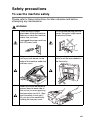
WARNING
There are high voltage
electrodes inside the machine.
Before you clean the machine,
make sure you have
unplugged the power cord from
the AC power outlet
Do not handle the plug with wet
hands. Doing this might cause
an electrical shock.
To prevent injuries, be careful
not to put your hands on the
edge of the machine under the
scanner cover.
To prevent injuries, be careful
not to touch the area shaded in
the illustration.
When you move the machine,
place a hand at each side of
the unit so you are supporting
the base when you lift it. (See
the illustration on the right.)
Do not carry the machine by
holding the scanner cover.
vii
WARNING
This product must be installed near an AC power outlet that is easily
accessible. In case of emergencies, you must disconnect the power
cord from the AC power outlet to shut off power completely.
Caution
To maintain the best print quality, we recommend that you use the
On/Off key to turn off your machine. Do not unplug the power cord
from the AC power outlet, unless moving the machine or performing
maintenance. If you need to disconnect your machine from the
power, you will need to set the date and time again. (See Quick
Setup Guide.)
viii
Choosing a location
Place your machine on a flat, stable surface that is free of vibration
and shocks, such as a desk. Put the machine near a standard, AC
power outlet. Choose a location where the temperature remains
between 50°F and 95°F (10° and 35°C).
Caution
■ Avoid placing your machine in a high-traffic area.
■ Avoid placing your machine on the carpet.
■ Do not place near heaters, air conditioners, water, chemicals, or
refrigerators.
■ Do not expose the machine to direct sunlight, excessive heat,
moisture, or dust.
■ Do not connect your machine to electrical outlets controlled by
wall switches or automatic timers.
■ Disruption of power can wipe out information in the machine’s
memory.
■ Do not connect your machine to electrical outlets on the same
circuit as large appliances or other equipment that might disrupt
the power supply.
ix
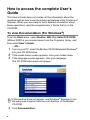
How to access the complete User’s
Guide
This User’s Guide does not contain all the information about the
machine such as how to use the advanced features of the Printer and
Scanner. When you are ready to learn detailed information about
these operations, read the complete User’s Guide that is on the
CD-ROM.
To view Documentation (For Windows®)
From the Start menu, select Brother, MFL Pro Suite DCP-XXXX
(Where XXXX is your model name) from the Programs Group, and
then select User’s Guide.
—OR—
1 Turn on your PC. Insert the Brother CD-ROM labeled Windows®
into your CD-ROM drive.
2 If the model name screen appears, click your model name.
3 If the language screen appears, click your language.
The CD-ROM main menu will appear.
If this window does not appear, use Windows® Explorer to run
the setup.exe program from the root directory of the Brother
CD-ROM.
4
x
Click Documentation.
5
Click the documentation you want to read.
■ Quick Setup Guide: Setup and Software Installation
Instructions
■ User’s Guide (2 manuals): User’s Guide for Stand-alone
operations and Software User’s Guide
■ PaperPort® Users Guide: Document Management
Software
How to find Scanning instructions
There are several ways you can scan documents. You can find the
instructions as follows:
Software User’s Guide:
■ Scanning on page 2-1
(For Windows® 98/98SE/Me/2000 Professional and
Windows® XP)
■ ControlCenter2 on page 3-1
(For Windows® 98/98SE/Me/2000 Professional and
Windows® XP)
PaperPort® User’s Guide
■ Instructions for scanning directly from ScanSoft® PaperPort®
xi
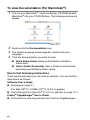
To view Documentation (For Macintosh®)
1
Turn on your Macintosh®. Insert the Brother CD-ROM labeled
Macintosh® into your CD-ROM drive. The following window will
appear.
(Mac OS® X)
2
3
4
Double-click the Documentation icon.
The select Language screen appears, double-click your
language.
Click the documentation you want to read.
■ Quick Setup Guide: Setup and Software Installation
Instructions
■ User’s Guide (2 manuals): User’s Guide for stand-alone
operations and Software User’s guide
How to find Scanning instructions
There are several ways you can scan documents. You can find the
instructions as follows:
Software User’s Guide:
■ Scanning on page 9-1
(For Mac OS® 9.1-9.2/Mac OS® X 10.2.4 or greater)
■ ControlCenter2 (For Mac OS® X 10.2.4 or greater) on page 10-1
Presto!® PageManager® User’s Guide
■ Instructions for scanning directly from Presto!® PageManager®
xii
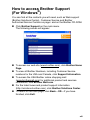
How to access Brother Support
(For Windows®)
You can find all the contacts you will need, such as Web support
(Brother Solutions Center), Customer Service and Brother
Authorized Service Centers on page i and on the Brother CD-ROM.
■ Click Brother Support on the main menu.
The following screen will appear:
■ To access our web site (www.brother.com), click Brother Home
Page.
■ To view all Brother Numbers, including Customer Service
numbers for the USA and Canada, click Support Information.
■ To access the USA Brother online shopping mall
(www.brothermall.com) for additional product and services
information, click Brother Mall.com.
■ For the latest news and product support information
(http://solutions.brother.com), click Brother Solutions Center.
■ To return to the main page, click Back—OR—If you have
finished, click Exit.
xiii
Table of Contents
1
2
xiv
Introduction .......................................................................... 1-1
Using this Guide ............................................................... 1-1
Finding information ..................................................... 1-1
Symbols used in this Guide ........................................ 1-1
Control panel overview ..................................................... 1-2
Warning LED indications ............................................ 1-4
Load documents ............................................................... 1-5
Using the ADF (automatic document feeder) ............ 1-5
Using the scanner glass ............................................. 1-7
About paper ...................................................................... 1-8
Recommended Paper................................................. 1-8
Handling and using special paper............................... 1-9
Paper type and size for each operation................ 1-10
Paper weight, thickness and capacity .................. 1-11
Paper capacity of the output paper tray ...............1-11
Printable area ....................................................... 1-12
How to load paper, envelopes and post cards.......... 1-13
To load paper or other media ............................... 1-13
To load envelopes ................................................1-15
To load post cards ................................................1-16
Making copies ...................................................................... 2-1
Using the machine as a copier ......................................... 2-1
Making a single copy ..................................................2-1
Making multiple copies ............................................... 2-1
Stop copying ............................................................... 2-1
Using the Copy keys ........................................................2-2
Setting copy quality..................................................... 2-3
Enlarging or reducing the copied image ..................... 2-4
Using the Copy Options key ....................................... 2-6
Setting paper type ..................................................2-7
Setting paper size................................................... 2-7
Adjusting brightness ............................................... 2-8
Sorting copies using the ADF ................................. 2-8
Making N in 1 copies or a poster (Page Layout)......... 2-9
Changing the default copy settings................................. 2-12
Setting Paper Type ................................................... 2-12
Setting Paper Size .................................................... 2-13
Setting copy quality................................................... 2-13
Adjusting brightness ................................................. 2-14
Adjusting contrast ..................................................... 2-14
Adjusting Color saturation ........................................ 2-15
Legal limitations .............................................................. 2-16
3
4
5
6
Walk-Up PhotoCapture Center™ ......................................... 3-1
Introduction....................................................................... 3-1
PhotoCapture Center™ requirements ..................... 3-2
Getting started .................................................................. 3-3
Printing the Index (Thumbnails)........................................ 3-5
Printing images ................................................................. 3-6
DPOF printing............................................................. 3-8
Changing the default settings ........................................... 3-9
Setting print quality ..................................................... 3-9
Setting paper and size................................................ 3-9
Adjusting brightness ................................................. 3-10
Adjusting contrast ..................................................... 3-10
Color enhancement (True2Life®).............................. 3-11
Cropping ................................................................... 3-12
Borderless ................................................................ 3-13
Scan to Card................................................................... 3-13
Changing the default quality ..................................... 3-14
Changing the default black & white file format ......... 3-15
Changing the default color file format....................... 3-15
Understanding the Error Messages ................................ 3-16
Using PhotoCapture Center™ from your PC................... 3-16
Software features ................................................................. 4-1
Important information ......................................................... 5-1
Federal Communications Commission
(FCC) Declaration of Conformity (USA only).......... 5-1
Important ................................................................ 5-2
Industry Canada Compliance Statement
(Canada only) ......................................................... 5-2
International ENERGY STAR®
Compliance Statement ........................................... 5-2
Important safety instructions....................................... 5-3
Trademarks ................................................................ 5-5
Troubleshooting and routine maintenance ....................... 6-1
Troubleshooting ................................................................ 6-1
Error messages .......................................................... 6-1
Document jams........................................................... 6-3
Document is jammed in the top of the ADF unit. .... 6-3
Document is jammed inside the ADF unit. ............. 6-3
xv
Printer jam or paper jam ............................................. 6-4
Paper is jammed inside the paper tray ................... 6-4
Paper is jammed inside the machine...................... 6-5
If you are having difficulty with your machine ............. 6-7
How to change LCD language.................................. 6-10
How to improve the LCD viewing.............................. 6-10
Setting the Beeper Volume....................................... 6-10
How to improve print quality ........................................... 6-11
Cleaning the print head............................................. 6-11
Checking the print quality .........................................6-12
Checking the printing alignment ............................... 6-14
Checking the ink volume................................................. 6-15
Packing and shipping the machine ................................. 6-16
Routine maintenance......................................................6-19
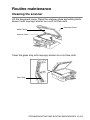
Cleaning the scanner................................................6-19
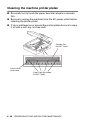
Cleaning the machine printer platen ......................... 6-20
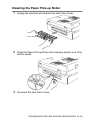
Cleaning the Paper Pick-up Roller............................6-21
Replacing the ink cartridges ..................................... 6-22
A
S
7
xvi
Appendix .............................................................................. A-1
On-screen programming.................................................. A-1
Menu table ................................................................. A-1
Printing reports .......................................................... A-1
Menu keys ....................................................................... A-2
Specifications ...................................................................... S-1
Product description .......................................................... S-1
General ............................................................................ S-1
Print media....................................................................... S-2
Copy ................................................................................ S-2
PhotoCapture Center™ .................................................... S-3
Scanner ........................................................................... S-4
Printer .............................................................................. S-5
Interfaces ......................................................................... S-5
Computer requirements ......................................... S-6
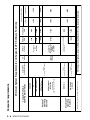
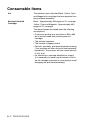
Consumable items ........................................................... S-7
Index ....................................................................................... I-1
1
Introduction
Using this Guide
Thank you for buying a Brother Digital Copier/Printer (DCP). Your
machine is simple to use, with LCD screen instructions to guide you
through programming it. You can make the most of your machine by
reading through this Guide.
Finding information
All the chapter headings and subheadings are listed in the Table of
Contents. You will be able to find information about a specific feature
or operation by checking the Index at the back of this Guide.
Symbols used in this Guide
Throughout this Guide you will see special symbols alerting you to
important warnings, notes and actions. To make things clearer and
to help you press the correct keys, we used special fonts and added
some of the messages that will appear in the LCD.
Bold
Bold typeface identifies specific keys on the machine
control panel.
Italics
Italicized typeface emphasizes an important point or
refers you to a related topic.
Courier New Courier New type face identifies the messages on the
LCD of the machine.
Warnings inform you what to do to avoid possible personal
injury.
Cautions specify procedures you must follow or avoid to
prevent possible damage to the machine or other objects.
Notes tell you how you should respond to a situation that may
arise or give tips about how the operation works with other
features.
Improper Setup alerts you to devices and operations that are
not compatible with the machine.
INTRODUCTION 1 - 1
Control panel overview
11
10
1
1 Copy keys
(Temporary settings):
Copy Options
You can quickly and easily select
temporary settings for copying.
Enlarge/Reduce
Lets you enlarge or reduce copies
depending on the ratio you select.
Copy Quality
Use this key to temporarily change
the quality for copying.
Number of Copies
Use this key to make multiple
copies.
1 - 2 INTRODUCTION
9
2
8
3
7
4
6
5
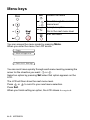
2 Menu keys:
Menu
Lets you access the Menu to
program.
-
+ or
Press to scroll through the menus
and options.
Also you can use these keys to
enter the number.
Set
Lets you store your settings in the
machine.
3
Stop/Exit
7
Stops an operation or exits from the
menu.
4
5
8
On/Off
You can turn the machine on or off.
If you turn the machine off, it will still
periodically clean the print head to
maintain print quality.
Scan
Lets you access Scan mode.
See the Software User’s Guide on
the CD-ROM.
9
PhotoCapture
Lets you access the PhotoCapture
Center™.
Color Start
Lets you start making copies in full
color.
Also, lets you start a scanning
operation (in color or black,
depending on the scanning setting
in the ControlCenter software).
6
Lets you clean the print head, check
the print quality, and check the
available ink volume.
Black Start
Lets you start making copies in
black and white.
Also, lets you start a scanning
operation (in color or black,
depending on the scanning setting
in the ControlCenter software).
Ink
0 Liquid Crystal Display (LCD)
Displays messages on the screen to
help you set up and use your
machine.
A
Warning LED
Turns red when the LCD displays an
error or an important status
message.
INTRODUCTION 1 - 3
Warning LED indications
The Warning LED lights when there is a problem with your machine.
You should check the LCD display for more details about the
problem.
LED
Machine status
Description
Ready
The machine is ready for use.
Cover is Open
The cover is open. Close the cover. (See Error
messages on page 6-1.)
Ink Empty
Replace the Ink cartridge with a new one. (See
Replacing the ink cartridges on page 6-22.)
Paper Error
Put paper in the tray or clear the paper jam.
Check the LCD message. (See Troubleshooting
and routine maintenance on page 6-1.)
Other Messages
Check the LCD message. (See Troubleshooting
and routine maintenance on page 6-1.)
Off
Red
1 - 4 INTRODUCTION
Load documents
You can make copies and scan from the ADF (automatic document
feeder) or from the scanner glass.
Using the ADF (automatic document feeder)
The ADF can hold up to 10 pages and feeds each sheet individually.
Use standard [20 lb (80 g/m2)] paper and always fan the pages
before putting them in the ADF.
DO NOT use paper that is curled, wrinkled, folded, ripped,
stapled, paper clipped, pasted or taped.
DO NOT use cardboard, newspaper or fabric. (To copy or scan
this kind of document, see Using the scanner glass on page 1-7.)
■ Make sure documents written with ink are completely dry.
■ Documents must be from 5.8 to 8.5 inches (147 to 216 mm) wide
and 5.8 to 14 inches (147 to 356 mm) long.
INTRODUCTION 1 - 5
1
2
3
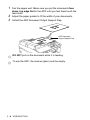
Fan the pages well. Make sure you put the documents face
down, top edge first in the ADF until you feel them touch the
feed roller.
Adjust the paper guides to fit the width of your documents.
Unfold the ADF Document Output Support Flap.
ADF Document
Output Support Flap
DO NOT pull on the document while it is feeding.
To use the ADF, the scanner glass must be empty.
1 - 6 INTRODUCTION
Using the scanner glass
You can use the scanner glass to copy or scan pages of a book or
one page at a time. Documents can be up to 8.5 in. (216 mm) wide
and 11 in. (297 mm) long.
To use the scanner glass, the ADF must be empty.
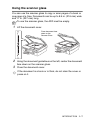
1
Lift the document cover.
Place document face
down on the
Scanner Glass
2
3
Using the document guidelines on the left, center the document
face down on the scanner glass.
Close the document cover.
If the document is a book or is thick, do not slam the cover or
press on it.
INTRODUCTION 1 - 7
About paper
The print quality can be affected by the type of paper you use in the
machine.
To get the best print quality for the settings you’ve chosen, always
set the Paper Type to match the type of paper you load.
You can use plain paper, inkjet paper (coated paper), glossy paper,
transparencies and envelopes.
We recommend testing various paper types before purchasing large
quantities.
For best results, use the recommended paper.
■ When you print on inkjet paper (coated paper),
transparencies and glossy paper, be sure to select the
proper media in the “Basic” tab of the printer driver or in the
Paper Type setting of the menu.
■ When you print on Brother glossy paper, load the instruction
sheet included with the glossy paper in the paper tray first,
and then place the glossy paper on the instruction sheet.
■ When you use transparencies or glossy paper, remove each
sheet immediately to prevent smudging or paper jams.
■ Avoid touching the printed surface of the paper immediately
after printing. The surface may not be completely dry and
may stain your fingers.
Recommended Paper
To get the best print quality, we suggest using Brother paper.
(See table below.)
We recommend using “3M Transparency Film” when you print on
transparencies.
Brother Paper
Paper Type
Item
Letter Plain
BP60 PL
Letter Glossy
BP60 GLL
Letter Inkjet (Photo Matte)
BP60 ML
1 - 8 INTRODUCTION
Handling and using special paper
■ Store paper in its original packaging, and keep it sealed. Keep the
paper flat and away from moisture, direct sunlight and heat.
■ The coated side of glossy paper is shiny. Avoid touching the
shiny (coated) side. Load glossy paper with the shiny side facing
down.
■ Avoid touching either side of transparencie because they absorb
water and perspiration easily, and this may cause decreased
output quality. Transparencies designed for laser printers/copiers
may stain your next document. Use only transparencies
recommended for inkjet printing.
Do not use paper:
■ that is damaged, curled, wrinkled, or irregularly shaped
0.08 in.
(2 mm)
or longer
0.08 in.
(2 mm)
or longer
■
■
■
■
that is extremely shiny or highly textured
that was previously printed by a printer
that cannot be arranged uniformly when stacked
that is made with a short grain
INTRODUCTION 1 - 9
1 - 10 INTRODUCTION
Transparencies
Envelopes
Cards
8.3" x 11.7" (210 x 297 mm)
4.1" x 9.3" (105 x 235 mm)
JE4 Envelope
A4
3 7/8" x 7 1/2" (98 x 191 mm)
Monarch
8 1/2" x 11" (216 x 279 mm)
4 1/8" x 9 1/2" (105 x 241 mm)
COM-10
Letter
4.3" x 8.7" (110 x 220 mm)
Post Card 2
(Double)
6.4" x 9" (162 x 229 mm)
Post Card 1
DL Envelope
3.9" x 5.8" (100 x 148 mm)
5.8" x 7.9" (148 x 200 mm)
Index Card
C5 Envelope
5" x 7" (127 x 178 mm)
5" x 8" (127 x 203 mm)
Photo 2L
4" x 6" (102 x 152 mm)
3 1/2" x 5" (89 x 127 mm)
4.1" x 5.8" (105 x 148 mm)
A6
Photo
5.8" x 8.3" (148 x 210 mm)
A5
Photo L
7 1/4" x 10 1/2" (184 x 267 mm)
Legal
7.2" x 10.1" (182 x 257 mm)
8 1/2" x 14" (216 x 356 mm)
A4
JIS B5
8.3" x 11.7" (210 x 297 mm)
Letter
Cut Sheet
Executive
8 1/2" x 11" (216 x 279 mm)
Paper Size
Paper Type
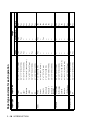
Paper type and size for each operation
Yes
Yes
—
—
—
—
—
—
—
—
—
—
Yes
—
Yes
—
—
Yes
Yes
Yes
Copy
Usage
—
—
—
—
—
—
—
—
—
—
Yes
—
Yes
—
—
—
—
—
Yes
Yes
PhotoCapture
Printer
Yes
Yes
Yes
Yes
Yes
Yes
Yes
Yes
Yes
Yes
Yes
Yes
Yes
Yes
Yes
Yes
Yes
Yes
Yes
Yes
Paper weight, thickness and capacity
Paper Type
Weight
Thickness
No. of sheets
Plain Paper
17 to 32 lb
(64 to 120 g/m2)
0.003" to 0.006"
(0.08 to 0.15 mm)
100*
Inkjet Paper
17 to 53 lb
(64 to 200 g/m2)
0.003" to 0.01"
(0.08 to 0.25 mm)
20
Glossy Paper
Up to 58 lb
(Up to 220 g/m2)
Up to 0.01"
(Up to 0.25 mm)
20
Photo Card
Up to 64 lb
(Up to 240 g/m2)
Up to 0.01"
(Up to 0.28 mm)
20
Index Card
Up to 32 lb
(Up to 120 g/m2)
Up to 0.006"
(Up to 0.15 mm)
30
Post Card
Up to 53 lb
(Up to 200 g/m2)
Up to 0.01"
(Up to 0.23 mm)
30
Envelopes
20 to 25 lb
(75 to 95 g/m2)
Up to 0.02"
(Up to 0.52 mm)
10
Transparencies
—
—
10
Cut Paper
Cards
* Up to 50 sheets for Legal size paper 20 lb (75 g/m2).
* Up to 100 sheets of 20 lb (75 g/m2).
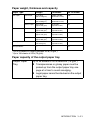
Paper capacity of the output paper tray
Output Paper
Tray
Up to 25 sheets of 20 lb Letter/A4 (75 g/m2)
■ Transparencies or glossy paper must be
picked up from the output paper tray one
page at a time to avoid smudging.
■ Legal paper cannot be stacked on the output
paper tray.
INTRODUCTION 1 - 11
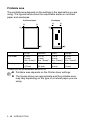
Printable area
The printable area depends on the settings in the application you are
using. The figures below show the unprintable areas on cut sheet
paper and envelopes.
Cut Sheet Paper
3
Envelopes
3
4
1
4
1
2
2
■ unprintable area
1Top
2Bottom
3Left
4Right
Cut Sheet
0.12 in.
0.12 in.
0.12 in.
0.12 in.
(3 mm)
(3 mm)
(3 mm)
(3 mm)
(0 in. / 0 mm)*1 (0 in. / 0 mm)*1 (0 in. / 0 mm)*1 (0 in. / 0 mm)*1
Envelopes
0.47 in.
(12 mm)
0.94 in.
(24 mm)
0.12 in.
(3 mm)
0.12 in.
(3 mm)
*1 When you set the Borderless feature to On.
■ Printable area depends on the Printer driver settings.
■ The figures above are approximate and the printable area
may vary depending on the type of cut sheet paper you are
using.
1 - 12 INTRODUCTION
How to load paper, envelopes and post cards
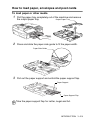
To load paper or other media
1
Pull the paper tray completely out of the machine and remove
the output paper tray.
Output Paper Tray
2
Press and slide the paper side guide to fit the paper width.
Paper Side Guide
3
Pull out the paper support and unfold the paper support flap.
Paper Support
Paper Support Flap
Use the paper support flap for Letter, Legal and A4.
INTRODUCTION 1 - 13
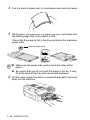
4
Fan the stack of paper well to avoid paper jams and mis-feeds.
5
Gently insert the paper into the paper tray print side down and
the leading edge (top of the paper) in first.
Check that the paper is flat in the tray and below the maximum
paper mark.
Maximum Paper Mark
■ Make sure the paper side guides touch the sides of the
paper.
■ Be careful that you do not push the paper in too far; it may
lift at the back of the tray and cause feed problems.
6
Put the output paper tray back on and push the paper tray firmly
back into the machine.
1 - 14 INTRODUCTION
To load envelopes
■ Use envelopes that weigh from 20 - 25 lb (75 - 90 g/m2).
■ Some envelopes require margin settings in the application. Make
sure you do a test print first.
To prevent possible damage to the feeding mechanism, do not
use the types of envelopes shown below.
DO NOT USE ENVELOPES:
■
■
■
■
■
that are of a baggy construction
that are embossed (have raised writing on them)
that have clasps on them
that are not sharply creased
that are preprinted on the inside
■ Glue
■ Rounded
flap
■ Double flap ■ Triangular
flap
How to load envelopes
1 Before loading, press the corners and sides of the envelopes to
make them as flat as possible.
If the envelopes are ‘double-feeding’, put one envelope in the
paper tray at a time.
INTRODUCTION 1 - 15
2
Insert the envelopes into the paper tray with the address side
down and the leading edge (top of the envelopes) in first. Slide
the paper side guide to fit the width of the envelopes.
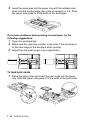
If you have problems when printing on envelopes, try the
following suggestions:
1 Open the envelope flap.
2 Make sure the open flap is either to the side of the envelope or
to the back edge of the envelope when printing.
3 Adjust the size and margin in your application.
To load post cards
1
Raise the paper stop and insert the post cards into the paper
tray. Slide the paper side guide to fit the width of the post cards.
1 - 16 INTRODUCTION
2
Making copies
Using the machine as a copier
You can use your machine as a copier, making up to 99 copies at a
time.
Making a single copy
1
2
Load your document.
Press Black Start or Color Start.
To stop copying, press Stop/Exit.
Making multiple copies
1
2
Load your document.
Press Number of Copies repeatedly until the number of
copies you want appears (up to 99).
—OR—
Press
to increase the number of copies.
Press
to decrease the number of copies.
The number of copies can also be increased/decreased by
holding down
or
.
3
Press Black Start or Color Start.
To sort the copies, press the Copy Options key. (See Using
the Copy Options key on page 2-6).
Stop copying
To stop copying, press Stop/Exit.
MAKING COPIES 2 - 1
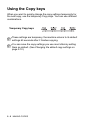
Using the Copy keys
When you want to quickly change the copy settings temporarily for
the next copy, use the temporary Copy keys. You can use different
combinations.
Temporary Copy keys
These settings are temporary, the machine returns to its default
settings 60 seconds after it finishes copying.
You can save the copy settings you use most often by setting
them as default. (See Changing the default copy settings on
page 2-12.)
2 - 2 MAKING COPIES
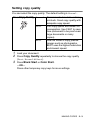
Setting copy quality
You can select the copy quality. The default setting is Normal.
Press Copy Quality Normal
1
2
3
Recommended mode for ordinary
printouts. Good copy quality with
adequate copy speed.
Fast
Fast copy speed and lowest ink
consumption. Use FAST to save
time (document to be proof-read,
large documents or many
copies).
Best
Use this mode to copy precise
images such as photographs.
BEST uses the highest resolution
and slowest speed.
Load your document.
Press Copy Quality repeatedly to choose the copy quality
(Fast, Normal or Best).
Press Black Start or Color Start.
—OR—
Press other temporary copy keys for more settings.
MAKING COPIES 2 - 3
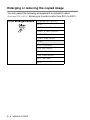
Enlarging or reducing the copied image
You can select the following enlargement or reduction ratios.
Custom(25-400%) allows you to enter a ratio from 25% to 400%.
Press Enlarge/Reduce
Custom(25-400%)
200%
198% 4"x6"→A4
186% 4"x6"→LTR
142% A5→A4
104% EXE→LTR
100%
97% LTR→A4
93% A4→LTR
83% LGL→A4
78% LGL→LTR
69% A4→A5
50%
2 - 4 MAKING COPIES
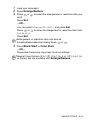
1
2
3
Load your document.
Press Enlarge/Reduce.
Press
or
to select the enlargement or reduction ratio you
want.
Press Set.
—OR—
You can select Custom(25-400%) and press Set.
Press
or
to enter an enlargement or reduction ratio from
25% to 400%.
Press Set.
Enlargement or reduction ratio can also be
increased/decreased by holding down
or
4
.
Press Black Start or Color Start.
—OR—
Press other temporary copy keys for more settings.
Special Copy Options (2 in 1 (P), 2 in 1 (L), 4 in 1 (P), 4 in 1 (L)
or Poster) are not available with Enlarge/Reduce.
MAKING COPIES 2 - 5
Using the Copy Options key
Use the Copy Options key to quickly set the following copy
settings temporarily for the next copy.
Press Copy
Options
Menu Selections
Options
Select & Set
Factory
Setting
Page
Select & Set
Paper Type
Plain/
Inkjet/
Glossy/
Transprncy
Plain
2-7
Paper Size
Letter/
Legal/
A4/
A5/
4”(W)x 6”(H)
Letter
2-7
Brightness
-
-
2-8
+
+
Stack/Sort
Stack/Sort
Stack
2-8
Page Layout
Off(1 in 1)/
2 in 1 (P)/
2 in 1 (L)/
4 in 1 (P)/
4 in 1 (L)/
Poster(3 x 3)
Off
(1 in 1)
2-9
After you choose your settings by pressing Set, the LCD shows
Set temporarily and then returns to Menu selections.
Press Black Start or Color Start if you’re finished choosing
settings.
—OR—
Press
or
to select more settings.
2 - 6 MAKING COPIES
Setting paper type
If copying on paper other than plain paper, select the type of paper
that you are using to get the best print quality.
1 Load your document.
2 Press Copy Options and or to select Paper Type.
Press Set.
3 Press or to select the type of paper you are using
(Plain, Inkjet, Glossy or Transprncy).
Press Set.
4 Press Black Start or Color Start.
—OR—
Press
or
for more settings.
Setting paper size
If copying on paper other than Letter size, you will need to change
the paper size setting.
You can copy on Letter, Legal, A4, A5 or
Photo Card (4"(W) x 6"(H)) paper.
1
2
3
4
Load your document.
Press Copy Options and
or
to select Paper Size.
Press Set.
Press
or
to select the size of paper you are using
(Letter, Legal, A4, A5 or 4”(W)x 6”(H)).
Press Set.
Press Black Start or Color Start.
—OR—
Press
or
for more settings.
MAKING COPIES 2 - 7
Adjusting brightness
You can adjust the copy brightness to make copies darker or lighter.
1 Load your document.
2 Press Copy Options and or to select Brightness.
Press Set.
+
3 Press to make a lighter copy.
—OR—
Press
to make a darker copy.
Press Set.
4 Press Black Start or Color Start.
—OR—
Press
or
for more settings.
Sorting copies using the ADF
You can sort multiple copies. Pages will be stacked in the order 321,
321, 321, and so on.
1 Load your document.
2 Press Copy Options and or to select Stack/Sort.
Press Set.
3 Press or to select Sort.
Press Set.
4 Press Black Start or Color Start.
2 - 8 MAKING COPIES
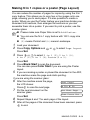
Making N in 1 copies or a poster (Page Layout)
You can reduce the number of pages for copies by using the N in 1
copy feature. This allows you to copy two or four pages onto one
page, allowing you to save paper. It is also possible to create a
poster. When you use the Poster feature your machine divides your
document into sections, then enlarges the sections so you can
assemble them into a poster. If you want to print a poster, use the
scanner glass.
■ Please make sure Paper Size is set to A4 or Letter.
■ You can use the N in 1 copy feature with 100% copy size
only.
■ (P) means Portrait and (L) means Landscape.
1
2
Load your document.
Press Copy Options and
or
to select Page Layout.
Press Set.
3 Press or to select 2 in 1 (P), 2 in 1 (L),
4 in 1 (P), 4 in 1 (L), Poster(3 x 3).
Press Set.
4 Press Black Start to scan the document.
You can also press Color Start if you are using the Poster
layout.
5 If you are making a poster or placed the document in the ADF,
the machine scans the page and starts printing.
If you are using the scanner glass:
6 After the machine scans the page,
Next Page?
the LCD shows:
▲ Yes ▼ No
Press
to scan the next page.
7 Put the next document on the
Set Next Page
scanner glass.
Then Press Set
Press Set.
8 Repeat Steps 6 and 7 for each page of the layout.
9 After all the pages of the document have been scanned, press
to end.
MAKING COPIES 2 - 9
If Glossy has been selected in the Paper Type setting for N in
1 copies, the machine will print the images as if Normal paper
had been selected.
■ N in 1 color copies are not available.
■ For Poster copies, you cannot make more than one copy.
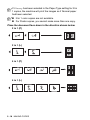
Place the document face down in the direction shown below.
2 in 1 (P)
2 in 1 (L)
4 in 1 (P)
4 in 1 (L)
2 - 10 MAKING COPIES
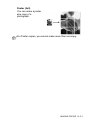
Poster (3x3)
You can make a poster
size copy of a
photograph.
For Poster copies, you cannot make more than one copy.
MAKING COPIES 2 - 11
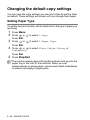
Changing the default copy settings
You can save the copy settings you use most often by setting them
as default. These settings will remain until you change them again.
Setting Paper Type
To get the best print quality, set the machine for the type of paper you
are using.
1 Press Menu.
2 Press or to select 1.Copy.
Press Set.
3 Press or to select 1.Paper Type.
Press Set.
4 Press or to select Plain, Inkjet, Glossy or
Transprncy.
Press Set.
5 Press Stop/Exit.
The machine ejects paper with printed surfaces face up onto the
paper tray in the front of the machine. When you use
transparencies or glossy paper, remove each sheet immediately
to prevent smudging or paper jams.
2 - 12 MAKING COPIES
Setting Paper Size
You can use five sizes of paper for printing your copies: Letter, Legal,
A4, A5 and Photo Card (4" x 6"). When you change the type of paper
you load in the machine, you will need to change the setting for
Paper Size at the same time so your machine can fit the copy on the
page.
1 Press Menu.
2 Press or to select 1.Copy.
Press Set.
3 Press or to select 2.Paper Size.
Press Set.
4 Press or to select Letter, Legal, A4, A5 or 4"x 6".
Press Set.
5 Press Stop/Exit.
Setting copy quality
1
2
3
4
5
Press Menu.
Press
or
to select 1.Copy.
Press Set.
Press
or
to select 3.Quality.
Press Set.
Press
or
to select Fast, Normal or Best.
Press Set.
Press Stop/Exit.
MAKING COPIES 2 - 13
Adjusting brightness
1
2
3
4
5
Press Menu.
Press
or
to select 1.Copy.
Press Set.
Press
or
to select 4.Brightness.
Press Set.
Press
to make a lighter copy.
—OR—
Press
to make a darker copy.
Press Set.
Press Stop/Exit.
Adjusting contrast
You can change the contrast to help an image look sharper and more
vivid.
1 Press Menu.
2 Press or to select 1.Copy.
Press Set.
3 Press or to select 5.Contrast.
Press Set.
4 Press to increase the contrast.
—OR—
Press
to decrease the contrast.
Press Set.
5 Press Stop/Exit.
2 - 14 MAKING COPIES
Adjusting Color saturation
Color saturation can only be changed through the default setting.
1 Press Menu.
2 Press or to select 1.Copy.
Press Set.
3 Press or to select 6.Color Adjust.
Press Set.
4 Press or to select Red, Green or Blue.
Press Set.
5 Press to increase the color saturation.
—OR—
Press
to decrease the color saturation.
Press Set.
6 Return to Step 4 to select the next color.
—OR—
Press Stop/Exit.
MAKING COPIES 2 - 15
Legal limitations
Color reproductions of certain documents are illegal and may result
in either criminal or civil liability. This memorandum is intended to be
a guide rather than a complete listing of every possible prohibition. In
case of doubt, we suggest that you check with relevant counsel as to
any particular questionable documents.
The following are examples of documents which should not be
copied:
The following documents issued by the United States/Canadian
Government or any of its Agencies may not be copied:
■ Money
■ Bonds or other certificates of indebtedness
■ Certificates of Deposit
■ Internal Revenue Stamps (canceled or uncanceled)
■ Selective Service or draft papers
■ Passports
■ United States/Canadian Postage Stamps (canceled or
uncanceled)
■ Food Stamps
■ Immigration Papers
■ Checks or drafts drawn by Governmental agencies
■ Identifying badges or insignias
Copyrighted works cannot be copied. Sections of a copyrighted work
can be copied for ‘fair use.’ Multiple copies would indicate improper
use.
Works of art should be considered the equivalent of copyrighted
works.
Licenses and Certificates of Title to motor vehicles may not be
copied under certain state/provincial laws.
2 - 16 MAKING COPIES
3
Walk-Up PhotoCapture
Center™
Introduction
Even if your machine is not connected to your computer, you can
print photos directly from your digital camera media. Your Brother
machine includes five media drives (slots) for use with popular digital
camera media: CompactFlash®, SmartMedia®, Memory Stick®,
Memory Stick Pro™, SecureDigital™ (SD Card),MultiMediaCard™
and xD-Picture Card™.
CompactFlash®
(Type I only)
SmartMedia®
Memory Stick®
Memory Stick Pro™
SecureDigital™
MultiMediaCard™
xD-Picture Card™
The PhotoCapture Center™ feature lets you print digital photos from
your digital camera at high resolution to get photo quality printing.
■ miniSD™ can be used with miniSD™ adapter.
■ Memory Stick Duo™ can be used with Memory Stick Duo™
adapter.
■ Memory Stick Pro Duo™ can be used with Memory Stick Pro
Duo™ adapter.
■ Adapters are not included with the machine. Contact a third
party supplier for adapters.
WALK-UP PHOTOCAPTURE CENTER™ 3 - 1
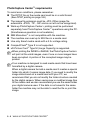
PhotoCapture Center™ requirements
To avoid error conditions, please remember:
■ The DPOF file on the media card must be in a valid format.
(See DPOF printing on page 3-8.)
■ The image file extension must be .JPG (Other image file
extensions .JPEG, .TIF, .GIF and so on will not be recognized).
■ Walk-up PhotoCapture Center™ printing must be performed
separately from PhotoCapture Center™ operations using the PC.
(Simultaneous operation is not available.)
■ IBM Microdrive™ is not compatible with the machine.
■ The machine can read up to 999 files in a media card.
■ Use only Smart media cards with a 3.3v voltage rating.
■ CompactFlash® Type II is not supported.
■ xD-Picture Card™ Type M (Large Capacity) is supported.
When printing the INDEX or IMAGE, the PhotoCapture Center™
will print all the valid images, even if one or more images have
been corrupted. A portion of the corrupted image may be
printed.
Your machine is designed to read media cards that have been
formatted by a digital camera.
When a digital camera formats a media card it creates a special
folder into which it copies image data. If you need to modify the
image data stored on a media card with your PC, we
recommend that you do not modify the folder structure created
by the digital camera. When saving new or modified image files
to the media card we also recommend you use the same folder
your digital camera uses. If the data is not saved to the same
folder the machine may not be able to read the file or print the
image.
3 - 2 WALK-UP PHOTOCAPTURE CENTER™
Getting started
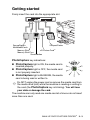
Firmly insert the card into the appropriate slot.
SecureDigital™
MultiMediaCard™
CompactFlash®
™
xD-Picture Card
Memory Stick®
Memory Stick Pro™
SmartMedia®
PhotoCapture key indications:
■ PhotoCapture light is ON, the media card is
inserted properly.
■ PhotoCapture light is OFF, the media card
is not properly inserted.
■ PhotoCapture light is BLINKING, the media
card is being read or written to.
Do NOT unplug the power cord or remove the media card from
the media drive (slot) while the machine is reading or writing to
the card (the PhotoCapture key is blinking). You will lose
your data or damage the card.
The machine can only read one media card at a time so do not insert
more than one card.
WALK-UP PHOTOCAPTURE CENTER™ 3 - 3
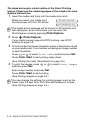
The steps below give a brief outline of the Direct Printing
feature. Please see the remaining pages of this chapter for more
detailed instructions.
1 Insert the media card firmly into the media drive (slot).
When you insert your media card
C.Flash Active
into the proper slot, the LCD shows:
Press PhotoCapture key...
The media active message will be shown for 60 seconds and
then disappear. Even in that case, you can enter the
PhotoCapture mode by pressing PhotoCapture.
2
3
4
Press
(PhotoCapture).
If your digital camera supports DPOF printing, see DPOF
printing on page 3-8.
Print the index that shows thumbnail views of the photos stored
on your media card. Your machine will assign an image number
to each thumbnail.
Press
or
to select Print Index and then press Set.
Press Color Start to start printing index sheet.
(See Printing the Index (Thumbnails) on page 3-5.)
To print the images, press
or
to select Print Images
and then press Set.
Enter image number and press Set.
Press Color Start to start printing.
(See Printing images on page 3-6.)
You can change the settings for printing images, such as the
Paper Type & Paper Size, Print Size and Number of Copies.
(See Printing images on page 3-6.)
3 - 4 WALK-UP PHOTOCAPTURE CENTER™
Printing the Index (Thumbnails)
The PhotoCapture Center™ assigns numbers for images (such as
No.1, No.2, No.3, and so on).
It does not recognize any other numbers or file names that your
digital camera or PC have used to identify the pictures. You can print
a thumbnail page (Index page with 6 or 5 images per line). This will
show all the pictures on the media card.
1 Make sure you have inserted the media card.
Press
(PhotoCapture). (See page 3-3.)
2 Press or to select
Print Index
Print Index.
Press Set.
3 Press or to select
6 Images/Line
6 Images/Line or
5 Images/Line.
Press Set.
4
Index
Index
5 Images/Line
6 Images/Line
Press Color Start to start printing.
Print time for 5 Images/Line will be slower than 6 Images/Line,
but the quality is better. To print an image, see Printing images
on page 3-6.
WALK-UP PHOTOCAPTURE CENTER™ 3 - 5
Printing images
Before you can print an individual image, you have to know the
image number.
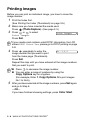
1
2
3
Print the Index first.
(See Printing the Index (Thumbnails) on page 3-5.)
Make sure you have inserted the media card.
Press
(PhotoCapture). (See page 3-3.)
Press
or
to select
Print Images
Print Images.
Press Set.
If your media card contains valid DPOF information, the LCD
shows DPOF Print:Yes, please go to DPOF printing on page
3-8.
4
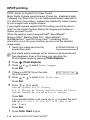
Press
repeatedly to enter the
No.:1,3,6
image number that you want to print
from the Index page (Thumbnails).
Press Set.
Repeat this step until you have entered all the image numbers
that you want to print.
■ Press
to decrease the image number.
■ You can enter a range of numbers by using the
Copy Options key for a hyphen.
(For example, Enter 1, Copy Options, 5 to print images
No.1 to No.5).
5
After you have selected all the image numbers, press Set again,
and go to Step 6.
—OR—
If you have finished choosing settings, press Color Start.
3 - 6 WALK-UP PHOTOCAPTURE CENTER™
Paper Type & Paper Size
6 Press or to select the type of paper you are using
(Letter Glossy, 4"x 6" Glossy, 5"x 7" Glossy,
A4 Glossy, Letter Plain, A4 Plain, Letter Inkjet,
A4 Inkjet or 4"x 6" Inkjet).
Press Set.
If you selected A4 or Letter, go to Step 7.
If you selected another size, go to Step 8.
—OR—
If you have finished choosing settings, press Color Start.
Print Size
7 If you selected A4 or Letter, press or to select the print
size (4"x 3", 5"x 3.5", 6"x 4", 7"x 5", 8"x 6"or
Max. Size).
Press Set, and go to Step 8.
—OR—
If you have finished choosing settings, press Color Start.
Printed Position for Letter paper
1
4”x3”
2
3
5”x 3.5” 6”x 4”
4
7”x 5”
5
8”x 6”
6
Max. Size
(Letter/A4)
Number of Copies
8 Press to enter the number of copies you want.
Press Set.
Press
9
to decrease the number of copies.
Press Color Start to print.
Your temporary settings will be kept until you take out the media
card from the drive (slot), print images or press Stop/Exit.
WALK-UP PHOTOCAPTURE CENTER™ 3 - 7
DPOF printing
DPOF stands for Digital Print Order Format.
Major Digital Camera manufacturers (Canon Inc., Eastman Kodak
Company, Fuji Photo Film Co. Ltd., Matsushita Electric Industrial Co.
Ltd. and Sony Corporation.) created this standard to make it easier
to print images from a digital camera.
If your digital camera supports DPOF printing, you will be able to
select on the Digital Camera display the images and number of
copies you want to print.
When the memory card (CompactFlash®, SmartMedia®,
Memory Stick®, Memory Stick Pro™, SecureDigital™ ,
MultiMediaCard™ and xD-Picture Card™) containing DPOF
information is put into your machine, you can print the selected
image easily.
1 Insert your media card into the
C.Flash Active
proper drive (slot).
The media active message will be shown for 60 seconds and
then disappear. Even in that case, you can enter the
PhotoCapture mode by pressing PhotoCapture.
2
3
4
5
6
7
Press
(PhotoCapture).
Press
or
to select Print Images.
Press Set.
If there is a DPOF file on the card,
DPOF Print:Yes
the LCD shows:
Press
or
to select DPOF Print:Yes.
Press Set.
Press
or
to select
Letter Glossy, 4"x 6" Glossy
5"x 7" Glossy, A4 Glossy, Letter Plain, A4 Plain,
Letter Inkjet, A4 Inkjet or 4"x 6" Inkjet.
Press Set.
If you selected Letter or A4, press
or
to select the print
size (4"x 3", 5"x 3.5", 6"x 4", 7"x 5", 8"x 6" or
Max. Size).
Press Set.
Press Color Start to print.
3 - 8 WALK-UP PHOTOCAPTURE CENTER™
Changing the default settings
You can save the PhotoCapture Center™ settings you use most often
by setting them as default. These settings will remain until you
change them again.
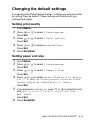
Setting print quality
1
2
3
4
5
Press Menu.
Press
or
to select 2.PhotoCapture.
Press Set.
Press
or
to select 1.Print Quality.
Press Set.
Press
or
to select Normal or Photo.
Press Set.
Press Stop/Exit.
Setting paper and size
1
2
3
4
5
6
Press Menu.
Press
or
to select 2.PhotoCapture.
Press Set.
Press
or
to select 2.Paper & Size.
Press Set.
Press
or
to select Letter Glossy, 4"x 6" Glossy,
5"x 7" Glossy, A4 Glossy, Letter Plain, A4 Plain,
Letter Inkjet, A4 Inkjet or 4"x 6" Inkjet.
Press Set.
If you selected A4 or Letter, press
or
to select the print
size (4"x 3", 5"x 3.5", 6"x 4", 7"x 5", 8"x 6"or
Max. Size).
Press Set.
Press Stop/Exit.
WALK-UP PHOTOCAPTURE CENTER™ 3 - 9
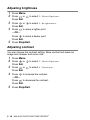
Adjusting brightness
1
2
3
4
5
Press Menu.
Press
or
to select 2.PhotoCapture.
Press Set.
Press
or
to select 3.Brightness.
Press Set.
Press
to make a lighter print.
—OR—
Press
to make a darker print.
Press Set.
Press Stop/Exit.
Adjusting contrast
You can choose the contrast setting. More contrast will make an
image look sharper and more vivid.
1 Press Menu.
2 Press or to select 2.PhotoCapture.
Press Set.
3 Press or to select 4.Contrast.
Press Set.
4 Press to increase the contrast.
—OR—
Press
to decrease the contrast.
Press Set.
5 Press Stop/Exit.
3 - 10 WALK-UP PHOTOCAPTURE CENTER™
Color enhancement (True2Life®)
You can turn on the color enhancement (True2Life® ) feature to print
more vivid images. Printing time will be slower.
1 Press Menu.
2 Press or to select 2.PhotoCapture.
Press Set.
3 Press or to select 5.True2Life.
Press Set.
4 Press or to select On.
Press Set.
—OR—
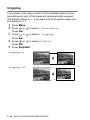
Select Off and press Set, then go to Step 7.
If you select On, you can customize the White Balance,
Sharpness or Color Density.
5
Press
or
to select 1.White Balance, 2.Sharpness
or 3.Color Density.
Press Set.
6 Press or to adjust the degree of setting.
Press Set.
7 Press Stop/Exit.
■ White Balance
This setting adjusts the hue of the white areas of an image.
Lighting, camera settings and other influences will effect the
appearance of white. The white areas of a picture may be slightly
pink, yellow or some other color. By using this adjustment you
can correct this effect and bring the white areas back to pure
white.
■ Sharpness
This setting enhances the detail of an image. It is similar to
adjusting the fine focus on a camera. If the image is not in true
focus and you cannot see the fine details of the picture, then
adjust the sharpness.
■ Color Density
This setting adjusts the total amount of color in the image. You
can increase or decrease the amount of color in an image to
improve a washed out or weak picture.
WALK-UP PHOTOCAPTURE CENTER™ 3 - 11
Cropping
If your photo is too long or wide to fit the available space on your
selected layout, part of the image will be automatically cropped.
The default setting is On. If you want to print the whole image, turn
this setting to Off.
1 Press Menu.
2 Press or to select 2.PhotoCapture.
Press Set.
3 Press or to select 6.Cropping.
Press Set.
4 Press or to select Off (or On).
Press Set.
5 Press Stop/Exit.
Cropping:On
Cropping:Off
3 - 12 WALK-UP PHOTOCAPTURE CENTER™
Borderless
This feature expands the printable area to the edges of the paper.
Printing time will be slightly slower.
1 Press Menu.
2 Press or to select 2.PhotoCapture.
Press Set.
3 Press or to select 7.Borderless.
Press Set.
4 Press or to select Off (or On).
Press Set.
5 Press Stop/Exit.
Scan to Card
You can scan black and white and color documents into a media
card. Black and white documents will be stored in PDF (*.PDF) or
TIFF file formats (*.TIF). Color documents may be stored in PDF
(*.PDF) or JPEG (*.JPG) file formats. The default setting is Color
150 dpi and the default file format is PDF. File names default to the
current date that you set in the Menu table using the control panel
keys. (For details, see Setting the Date and Time in the Quick Setup
Guide.) For example, the fifth image scanned on July 1, 2005 would
be named 07010505.PDF. You can change the color, and quality as
you want.
Quality
Selectable File Format
Default File Format
B/W 200x100 dpi
TIFF / PDF
TIFF
B/W 200 dpi
TIFF / PDF
TIFF
Color 150 dpi
JPEG / PDF
PDF
Color 300 dpi
JPEG / PDF
PDF
Color 600 dpi
JPEG / PDF
PDF
You can choose the default file format for Black & White or color
files. (See Changing the default black & white file format on
page 3-15 and Changing the default color file format on page
3-15.)
WALK-UP PHOTOCAPTURE CENTER™ 3 - 13
1
Insert a SmartMedia®, CompactFlash®, Memory Stick®,
Memory Stick Pro™, SecureDigital™, MultiMediaCard™ or
xD-Picture Card™ into your machine.
Do not take out the media card while PhotoCapture is blinking
to avoid damaging the card or data stored on the card.
2
3
4
5
6
Load your document.
Press
(Scan).
Press
or
to select Scan to Card.
To change quality, press Set and go to Step 5.
—OR—
Press Black Start or Color Start to start scanning without
changing any settings.
Press
or
to select the quality you want.
To change the file type, press Set and go to Step 6.
—OR—
To start scanning, press Black Start or Color Start.
Press
or
to select the file type you want.
Press Black Start or Color Start start scanning.
Changing the default quality
1
2
3
4
5
6
Press Menu.
Press
or
to select 2.PhotoCapture.
Press Set.
Press
or
to select 8.Scan to Card.
Press Set.
Press
or
to select 1.Quality.
Press Set.
Press
or
to select B/W 200x100 dpi, B/W 200 dpi,
Color 150 dpi, Color 300 dpi or Color 600 dpi.
Press Set.
Press Stop/Exit.
3 - 14 WALK-UP PHOTOCAPTURE CENTER™
Changing the default black & white file format
1
2
3
4
5
6
Press Menu.
Press
or
to select 2.PhotoCapture.
Press Set.
Press
or
to select 8.Scan to Card.
Press Set.
Press
or
to select 2.B/W File Type.
Press Set.
Press
or
to select TIFF or PDF.
Press Set.
Press Stop/Exit.
Changing the default color file format
1
2
3
4
5
6
Press Menu.
Press
or
to select 2.PhotoCapture.
Press Set.
Press
or
to select 8.Scan to Card.
Press Set.
Press
or
to select 3.ColorFile Type.
Press Set.
Press
or
to select PDF or JPEG.
Press Set.
Press Stop/Exit.
WALK-UP PHOTOCAPTURE CENTER™ 3 - 15
Understanding the Error Messages
Once you are familiar with the types of errors that can occur while
you’re using the PhotoCapture Center™, you can easily identify and
troubleshoot any difficulties.
When an error message appears on the LCD, the machine will beep
to get your attention.
Media Error—This message will appear if you insert a media card
that is either bad or not formatted, or when there is a problem with
the media drive. To clear this error, take out the media card.
No File—This message will appear if you try to access a media
card in the drive (slot) that does not contain a .JPG file.
Out of Memory—This message will appear if you are working with
images that are too large for the machine’s memory.
Using PhotoCapture Center™ from
your PC
You can access the media card that is in the media drive (slot) of the
machine from your PC.
(For Windows® users, see PhotoCapture Center™ on page 7-1 in the
Software User’s Guide on the CD-ROM and for Macintosh® users,
see PhotoCapture Center™ on page 12-2 in the Software User’s
Guide on the CD-ROM.)
3 - 16 WALK-UP PHOTOCAPTURE CENTER™
4
Software features
The User’s Guide on the CD-ROM includes the Software User’s
Guide for features available when connected to a computer (for
example, Printing and Scanning).
■ Printing
(For Windows®, see Chapter 1 in the Software User’s Guide on
the CD-ROM.)
(For Macintosh®, see Chapter 8 in the Software User’s Guide on
the CD-ROM.)
■ Scanning
(For Windows®, see Chapter 2 in the Software User’s Guide on
the CD-ROM.)
(For Macintosh®, see Chapter 9 in the Software User’s Guide on
the CD-ROM.)
■ ControlCenter2
(For Windows®, see Chapter 3 in the Software User’s Guide on
the CD-ROM.)
(For Macintosh®, see Chapter 10 in the Software User’s Guide on
the CD-ROM.)
■ PhotoCapture Center™
(For Windows®, see Chapter 7 in the Software User’s Guide on
the CD-ROM.)
(For Macintosh®, see Chapter 12 in the Software User’s Guide on
the CD-ROM.)
See How to access the complete User’s Guide on page x.
SOFTWARE FEATURES 4 - 1
5
Important information
Federal Communications Commission (FCC)
Declaration of Conformity (USA only)
Responsible Party: Brother International Corporation
100 Somerset Corporate Boulevard
Bridgewater, NJ 08807-0911 USA
TEL: (908) 704-1700
declares, that the products
Product Name: DCP-120C
comply with Part 15 of the FCC Rules. Operation is subject to the
following two conditions: (1) This device may not cause harmful
interference, and (2) this device must accept any interference
received, including interference that may cause undesired operation.
This equipment has been tested and found to comply with the limits
for a Class B digital device, pursuant to Part 15 of the FCC Rules.
These limits are designed to provide reasonable protection against
harmful interference in a residential installation. This equipment
generates, uses, and can radiate radio frequency energy and, if not
installed and used in accordance with the instructions, may cause
harmful interference to radio communications. However, there is no
guarantee that interference will not occur in a particular installation.
If this equipment does cause harmful interference to radio or
television reception, which can be determined by turning the
equipment off and on, the user is encouraged to try to correct the
interference by one or more of the following measures:
■ Reorient or relocate the receiving antenna.
■ Increase the separation between the equipment and receiver.
■ Connect the equipment into an outlet on a circuit different from
that to which the receiver is connected.
■ Call the dealer or an experienced radio/TV technician for help.
5 - 1 IMPORTANT INFORMATION
WARNING
■ This machine has been certified to comply with FCC standards,
which are applied to the USA only.
■ For protection against the risk of electrical shock, always
disconnect all cables from the wall outlet before servicing,
modifying or installing the equipment.
■ Brother cannot accept any financial or other responsibilities that
may be the result of your use of this information, including direct,
special or consequential damages. There are no warranties
extended or granted by this document.
Important
Changes or modifications not expressly approved by Brother
Industries, Ltd. could void the user’s authority to operate the equipment.
Industry Canada Compliance Statement
(Canada only)
This Class B digital apparatus complies with Canadian ICES-003.
Cet appareil numérique de la classe B est conforme à la norme
NMB-003 du Canada.
International ENERGY STAR® Compliance Statement
The purpose of the International ENERGY STAR® Program is to
promote the development and popularization of energy-efficient
office equipment.
As an ENERGY STAR® Partner, Brother Industries, Ltd. has determined that
this product meets the ENERGY STAR® guidelines for energy efficiency.
IMPORTANT INFORMATION 5 - 2
Important safety instructions
1
2
3
4
5
6
7
8
9
10
11
12
13
Read all of these instructions.
Save them for later reference.
Follow all warnings and instructions marked on the product.
Unplug this product from the AC power outlet before cleaning.
Do not use liquid or aerosol cleaners. Use a damp cloth for
cleaning.
Do not use this product near water.
Do not place this product on an unstable cart, stand, or table.
The product may fall, causing serious damage to the product.
Slots and openings in the cabinet and the back or bottom are
provided for ventilation; to ensure reliable operation of the
product and to protect it from overheating, these openings must
not be blocked or covered. The openings should never be
blocked by placing the product on a bed, sofa, rug, or other
similar surface. This product should never be placed near or
over a radiator or heater. This product should never be placed
in a built-in installation unless proper ventilation is provided.
This product should be operated from the type of power source
indicated on the label. If you are not sure of the type of power
available, call your dealer or local power company.
Use only the power cord supplied with this machine.
Do not allow anything to rest on the power cord. Do not place
this product where people can walk on the cord.
If an extension cord is used with this product, make sure that the
total ampere ratings on the products plugged into the extension
cord do not exceed the extension cord ampere rating. Also,
make sure that the total of all products plugged into the AC
power outlet does not exceed 15 amperes (USA only).
Do not place anything in front of the machine that will block
printing. Do not place anything in the path of printing.
Wait until pages have exited the machine before picking them
up.
Never push objects of any kind into this product through cabinet
slots, since they may touch dangerous voltage points or short
out parts resulting in the risk of fire or electric shock. Never spill
5 - 3 IMPORTANT INFORMATION
14
15
liquid of any kind on the product. Do not attempt to service this
product yourself because opening or removing covers may
expose you to dangerous voltage points and other risks and
may void your warranty. Refer all servicing to a Brother
Authorized Service Center. For the location of your nearest
Brother Authorized Service Center, please call
In USA: 1-800-284-4357 or In Canada: 1-877-BROTHER.
(See Brother numbers on page i.)
Unplug this product from the AC power outlet and refer servicing
to Authorized Service Personnel under the following conditions:
■ When the power cord is damaged or frayed.
■ If liquid has been spilled into the product.
■ If the product has been exposed to rain or water.
■ If the product does not operate normally when the operating
instructions are followed. Adjust only those controls that are
covered by the operating instructions. Improper adjustment
of other controls may result in damage and will often require
extensive work by a qualified technician to restore the
product to normal operation.
■ If the product has been dropped or the cabinet has been
damaged.
■ If the product exhibits a distinct change in performance,
indicating a need for service.
To protect your product against power surges, we recommend
the use of a power protection device (Surge Protector).
IMPORTANT INFORMATION 5 - 4
Trademarks
The Brother logo is a registered trademark of Brother Industries, Ltd.
Brother is a registered trademark of Brother Industries, Ltd.
Multi-Function Link is a registered trademark of Brother International
Corporation.
© 2005 Brother Industries, Ltd. All rights reserved.
Windows and Microsoft are registered trademarks of Microsoft in the
U.S. and other countries.
Macintosh and TrueType are registered trademarks of Apple
Computer, Inc.
PaperPort and OmniPage OCR are registered trademarks of
ScanSoft, Inc.
Presto! PageManager is a registered trademark of NewSoft
Technology Corporation.
Microdrive is a trademark of International Business Machine
Corporation.
SmartMedia is a registered trademark of Toshiba Corporation.
CompactFlash is a registered trademark of SanDisk Corporation.
Memory Stick is a registered trademark of Sony Corporation.
SecureDigital is a trademark of Matsushita Electric Industrial Co.Ltd.,
SanDisk Corporation and Toshiba Corporation.
SanDisk is a licensee of the SD and miniSD trademarks.
Memory Stick Pro, Memory Stick Pro Duo, MultiMediaCard is a
trademark of Infineon Technologies and licensed to the
MultiMediaCard Association.
xD-Picture Card is a trademark of Fuji Film Co. Ltd., Olympus Optical
Co. Ltd and Toshiba Corporation.
Memory Stick Duo and MagicGate are trademarks of Sony
Corporation.
Each company whose software title is mentioned in this manual has
a Software License Agreement specific to its proprietary programs.
All other brand and product names mentioned in this User’s
Guide and the Software User’s Guide are registered trademarks
of their respective companies.
5 - 5 IMPORTANT INFORMATION
6
Troubleshooting and routine
maintenance
Troubleshooting
Error messages
As with any sophisticated office product, errors may occur. If this
happens, your machine identifies the problem and displays an error
message. The most common error messages are shown below.
You can correct most problems by yourself. If you need additional
help, the Brother Solutions Center offers latest FAQs and
troubleshooting tips.
Visit us at http://solutions.brother.com
ERROR MESSAGES
ERROR
MESSAGE
CAUSE
ACTION
Cover is Open
The scanner cover is not closed completely.
Lift the scanner cover and then
close it again.
Data Remaining
Print data remains in the machine’s memory.
Re-start printing from your
computer.
Print data remains in the machine’s memory.
The USB cable was unplugged while the
computer was sending the data to the
machine.
Press Stop/Exit. The machine will
cancel the job and eject the page
that is being printed.
Document Jam
The document was not inserted or fed
properly, or the document fed from the ADF
was too long.
See Using the ADF (automatic
document feeder) on page 1-5.
The document is jammed in the machine.
See Document jams on page 6-3.
High Temperature
The print head is too warm.
Allow the machine to cool down.
Ink Empty
One or more of the ink cartridges is empty.
The machine will stop all print operations.
Replace the ink cartridges.
(See Replacing the ink cartridges on
page 6-22.)
Low Temperature
The print head is too cold.
Allow the machine to warm up.
Media Error
The media card is either corrupted,
improperly formatted, or there is a problem
with the media drive.
Re-insert the card firmly into the slot
to make sure it is in the proper
position. If the error remains, check
the media drive by inserting another
media card that you know is
working.
TROUBLESHOOTING AND ROUTINE MAINTENANCE 6 - 1
ERROR MESSAGES
ERROR
MESSAGE
CAUSE
ACTION
Near Empty
One or more of the ink cartridges are running
out of ink.
Order a new ink cartridge.
No Cartridge
An ink cartridge is not properly installed.
Take out the ink cartridge and put it
in again seating it properly.
(See Replacing the ink cartridges on
page 6-22.)
No File
The media card in the media drive does not
contain a .JPG file.
Reinsert the correct media card.
No Paper Fed
The machine is out of paper.
Add paper, and then press Black
Start or Color Start.
The paper is jammed in the machine.
See Printer jam or paper jam on
page 6-4.
Out of Memory
The machine’s memory is full.
(Copy operation in process)
Press Stop/Exit and wait until the
other operations in progress finish
and then try again.
Paper Jam
Paper is jammed in the machine.
See Printer jam or paper jam on
page 6-4.
Unable to Change
Unable to Clean
Unable to Init.
Unable to Print
Unable to Scan
The machine has a mechanical problem.
—OR—
A foreign obstacle such as a clip or ripped
paper is in the machine.
Open the scanner cover and remove
any foreign obstacles inside the
machine. If the error message
continues, disconnect the machine
from the power source for several
minutes then reconnect it.
6 - 2 TROUBLESHOOTING AND ROUTINE MAINTENANCE
Document jams
If the document is jammed, follow the steps below.
Document is jammed in the top of the ADF unit.
1
2
3
Take out any paper from the ADF that is not jammed.
Open the ADF cover.
Pull the jammed document out to the right or left.
4
Close the ADF cover.
Press Stop/Exit.
Document is jammed inside the ADF unit.
1
2
3
Take out any paper from the ADF that is not jammed.
Lift the document cover.
Pull the jammed document out to the left.
4
Close the document cover.
Press Stop/Exit.
TROUBLESHOOTING AND ROUTINE MAINTENANCE 6 - 3
Printer jam or paper jam
Remove the jammed paper depending on where it is jammed in the
machine.
Paper is jammed inside the paper tray
1
Pull the paper tray out of the machine.
Paper Tray
2
Pull out the jammed paper to remove it.
Jammed paper
6 - 4 TROUBLESHOOTING AND ROUTINE MAINTENANCE
Paper is jammed inside the machine
1
Remove the Jam Clear Cover. Pull the jammed paper out of the
machine.
Jam Clear Cover
2
3
4
Re-insert the Jam Clear Cover.
If you can not pull out the jammed paper, lift the scanner cover
from the right-hand side of the machine until it locks securely
into the open position.
Remove the jammed paper.
Scanner Cover
If the paper is jammed underneath the print head, disconnect
the machine from the power source so you can move the print
head and take out the paper.
TROUBLESHOOTING AND ROUTINE MAINTENANCE 6 - 5
5
Lift the scanner cover to release the lock. Gently push the
scanner cover support down and close the scanner cover.
6 - 6 TROUBLESHOOTING AND ROUTINE MAINTENANCE
If you are having difficulty with your machine
If you think there is a problem with your machine, check the chart
below and follow the troubleshooting tips.
The Brother Solutions Center offers latest FAQs and troubleshooting
tips.
Visit us at http://solutions.brother.com
DIFFICULTY
SUGGESTIONS
Printing Difficulties
No printout
Check the interface cable connection on both the machine and your
computer.
One or more ink cartridges are empty. (See Replacing the ink cartridges
on page 6-22.)
Check to see if the LCD is showing an error message. (See Error
messages on page 6-1.)
Check the print quality. (See Checking the print quality on page 6-12.)
Poor quality print.
Make sure the Printer Driver or Paper Type setting in the menu matches
the type of paper you are using. (For Windows® users, see Media Type
on page 1-5 or for Macintosh® users, see Media Type on page 8-3 in the
Software User’s Guide on the CD-ROM.)
Make sure your ink cartridges are fresh. Cartridges remain fresh for up
to two years if kept in their original packaging, after that the ink may
become clogged. Cartridge expiration dates are printed on the package.
Try using the recommended types of paper. (See About paper on page
1-8.)
The recommended environment for your machine is between 68°F to
91°F (20°C to 33°C).
White horizontal lines appear
in text or graphics.
Clean the print head. (See Cleaning the print head on page 6-11.)
Try using the recommended types of paper. (See About paper on page
1-8.)
If horizontal bands appear when using plain paper, use the ‘Enhanced
Normal Printing’ mode to help avoid banding on some types of plain
paper. In the printer driver ‘Basic’ tab, click ‘Settings’, and check
‘Enhanced Normal Printing’.
If you continue to have horizontal bands, change the Media Type
selection to ‘Slow Drying Paper’ in the printer driver ‘Basic’ tab to help
enhance the print quality.
The machine prints blank
pages.
Clean the print head. (See Cleaning the print head on page 6-11.)
Characters and lines are
stacked.
Check the printing alignment. (See Checking the printing alignment on
page 6-14.)
Printed text or images are
skewed.
Make sure the paper is loaded properly in the paper tray and the paper
side guide is adjusted correctly. (See How to load paper, envelopes and
post cards on page 1-13.)
TROUBLESHOOTING AND ROUTINE MAINTENANCE 6 - 7
DIFFICULTY
SUGGESTIONS
Smudged stain at the top
center of the printed page.
Make sure the paper is not too thick or not curled. (See About paper on
page 1-8.)
Printing appears dirty or ink
seems to run.
Make sure you are using the proper types of paper. (See About paper
on page 1-8.) Don’t handle the paper until the ink is dry.
Stains appear on the reverse
side or at the bottom of the
page.
Make sure the Printer Platen is not dirty with ink. (See Cleaning the
machine printer platen on page 6-20.)
There are some dense lines.
Check ‘Reverse Order’ in the Basic tab of the printer driver.
The printouts are wrinkled.
In the printer driver ‘Basic’ tab, click the ‘Settings’, and uncheck the
‘Bi-Directional Printing’.
Cannot perform ‘2 in 1 or 4 in 1’
printing.
Check that the paper size setting in the application and in the printer
driver are the same.
Print speed is too slow.
Changing the printer driver setting may improve the print speed.
Highest resolution needs longer data processing, transfer and printing
time. Try the other settings of quality in the printer driver ‘Basic’ tab.
Also, click the ‘Settings’ tab, and make sure you uncheck the Color
Enhancement.
Make sure you are using the paper support flap. (See How to load
paper, envelopes and post cards on page 1-13.)
Borderless printing is slower than normal printing. If you want to print
more quickly, set the Borderless feature off. (See Borderless on page
3-13.)
Color Enhancement
(True2Life®) is not working
properly.
If the image data is not full color in your application (Such as 256 color),
color Enhancement (True2Life®) will not work. Please use at least 24 bit
color data with the Color Enhancement (True2Life®) feature.
The machine feeds multiple
pages
Make sure the paper is loaded properly in the paper tray. (See How to
load paper, envelopes and post cards on page 1-13.)
Check that more than two types of paper are not loaded in the paper tray
at any one time.
Printed pages are not stacked
neatly.
Make sure you are using the paper support flap. (See How to load
paper, envelopes and post cards on page 1-13.)
The machine does not print
from Paint Brush.
Try setting the Display setting to ‘256 colors.’
The machine does not print
from Adobe Illustrator.
Try to reduce the print resolution.
Copying Difficulties
Poor copy results when using
the ADF.
Try using the scanner glass. (See Using the scanner glass on page 1-7.)
Vertical streaks appear in
copies.
Sometimes you may see vertical streaks on copies. Clean the scanner.
(See Cleaning the scanner on page 6-19.)
Scanning Difficulties
Poor scanning results when
using the ADF.
Try using the scanner glass. (See Using the scanner glass on page 1-7.)
TWAIN/WIA errors appear
while scanning.
Make sure the Brother TWAIN/WIA driver is selected as the primary
source. In PaperPort®, click Scan in the File menu and select the
Brother TWAIN/WIA driver.
6 - 8 TROUBLESHOOTING AND ROUTINE MAINTENANCE
DIFFICULTY
SUGGESTIONS
Software Difficulties
Cannot install software or print
Run the Repair MFL-Pro Suite program on the CD-ROM. This program
will repair and reinstall the software.
‘Device Busy’
Make sure the machine is not showing an error message on the LCD.
PhotoCapture
Center™
Difficulties
Removable Disk does not
work properly.
a) Have you installed the Windows® 2000 update?
If not, do the following:
1. Disconnect the USB cable.
2. Install the Windows® 2000 update. Please see the Quick Setup
Guide. After the installation the PC will be automatically restarted.
3. Wait about 1 minute after you reboot the PC, and then connect the
USB cable.
b) Take out the media card and put it back in again.
c) If you have tried “Eject" from within Windows®, you must take out the
media card before you continue.
d) If an error message appears when you try to eject the media card, it
means the card is being accessed.
Wait a while and then try again.
e) If all of the above do not work, please turn off your PC and machine,
and then turn them on again.
(You will have to unplug the power cord of the machine to turn it off.)
Cannot access Removable
Disk from Desktop icon.
Make sure you have inserted the media card into the media slot.
Other Difficulties
Incorrect LCD language
See How to change LCD language on page 6-10.
TROUBLESHOOTING AND ROUTINE MAINTENANCE 6 - 9
How to change LCD language
You can change the LCD language.
1
2
3
4
5
Press Menu.
Press
or
to select 0.Initial Setup.
Press Set.
Press
or
to select 0.Local Language.
Press Set.
Press
or
to select your language.
Press Set.
Press Stop/Exit.
How to improve the LCD viewing
You can adjust the LCD contrast for a sharper and more vivid
display. If you are having difficulty seeing the LCD from your position,
try to change the contrast settings for improved viewing.
1 Press Menu.
2 Press or to select 0.Initial Setup.
Press Set.
3 Press or to select 2.LCD Contrast.
Press Set.
4 Press or to select Dark (or Light).
Press Set.
5 Press Stop/Exit.
Setting the Beeper Volume
You can change the beeper volume. The default (factory) setting is
Low. When the beeper is on, the machine will beep when you press
a key or make a mistake.
1 Press Menu.
2 Press or to select 0.Initial Setup.
Press Set.
3 Press or to select 3.Volume.
Press Set.
4 Press or to select your option.
(Low, Med, High or Off)
Press Set.
5 Press Stop/Exit.
6 - 10 TROUBLESHOOTING AND ROUTINE MAINTENANCE
How to improve print quality
Cleaning the print head
To ensure good print quality, the machine will regularly clean the
print head. You can start the cleaning process manually if needed.
Clean the print head and ink cartridges if you get a horizontal line in
the text or graphics on your printed pages. You can clean Black only
or three colors at a time (Cyan/Yellow/Magenta), or all four colors at
once.
Cleaning the print head consumes ink. Cleaning too often uses ink
unnecessarily.
Caution
Do NOT touch the print head. Touching the print head may cause
permanent damage and may void the print head’s warranty.
1 Press (Ink).
2 Press or to select Cleaning.
Press Set.
3 Press or to select Black, Color or All.
Press Set.
The machine will clean the print head. When cleaning is
finished, the machine will go back to standby mode
automatically.
If you clean the print head at least five times and the print has
not improved, call Brother Customer Service (See Brother
numbers on page i).
TROUBLESHOOTING AND ROUTINE MAINTENANCE 6 - 11
Checking the print quality
If faded or streaked colors and text appears on your output, some of
the nozzles may be clogged. You can check this by printing the Print
Quality Check Sheet and looking at the nozzle check pattern.
1 Press (Ink).
2 Press or to select Test Print.
Press Set.
3 Press or to select Print Quality.
Press Set.
4 Press Color Start.
The machine begins printing the Print Quality Check Sheet.
5 Follow the instructions given on the sheet to see if the quality is
OK.
Color block quality check
The LCD shows:
6
7
Is Quality OK?
▲
Yes
▼
No
Check the quality of the four color
blocks on the sheet.
If all lines are clear and visible, press
(Yes) and go to
Step 10.
—OR—
If you can see missing short lines as shown below,
press
(No).
OK
Poor
The LCD will ask you if the print
quality is OK for black and three
colors.
Black OK?
▲
Yes
6 - 12 TROUBLESHOOTING AND ROUTINE MAINTENANCE
▼
No
8
9
10
Press
(No) for black or three
Start Cleaning?
colors with a problem.
▲ Yes ▼ No
The LCD shows:
Press
(Yes). The machine will start cleaning the print head.
After cleaning is finished, press Color Start. The machine will
start printing the Print Quality Check Sheet again and then
return to Step 5.
Press Stop/Exit.
If you still see missing ink in this Print Quality Check Sheet, repeat
the cleaning and test print procedures at least five times. If ink is still
missing after the fifth cleaning and test print, replace the ink cartridge
for the clogged color. (Perhaps the ink cartridge was in your machine
over six months or the expiration date written on the cartridge
package has passed. Or, the ink may not have been stored properly
before use.)
After replacing the ink cartridge, check it by printing another Print
Quality Check Sheet. If the problem still exists, repeat the cleaning
and test print procedures at least five times for the new ink cartridge.
If ink is still missing, call Brother Customer Service (See Brother
numbers on page i).
Caution
Do NOT touch the print head. Touching the print head may cause
permanent damage and may void the print head’s warranty.
When a print head nozzle is
clogged the printed sample
looks like this.
When the print head nozzle
is cleaned, the horizontal
lines are gone.
TROUBLESHOOTING AND ROUTINE MAINTENANCE 6 - 13
Checking the printing alignment
You should rarely need to adjust the printing alignment however, if
after transporting the machine your printed text becomes blurred or
images become faded then adjustment may need to be made.
1 Press (Ink).
2 Press or to select Test Print.
Press Set.
3 Press or to select Alignment.
Press Set.
4 Press Black Start or Color Start.
The machine begins printing the Alignment Check Sheet.
The LCD shows:
Is Alignment OK?
▲
5
6
7
8
Yes
▼
No
Check the 600 dpi and 1200 dpi test
prints to see if Number 5 most closely matches Number 0. If the
Number 5 sample of both the 600 dpi and 1200 dpi are the best
matches, press
(Yes) to finish the Alignment Check and go
to Step 8.
—OR—
If another test print number is a better match for either 600 dpi
or 1200 dpi, press
(No) to select it.
For 600 dpi, press
or
to
600dpi Adjust
select the number of the test print
Select Best #5
that most closely matches the
Number 0 sample (1-8).
Press Set.
For 1200 dpi, press
or
to
1200dpi Adjust
select the number of the test print
Select Best #5
that most closely matches the
Number 0 sample (1-8).
Press Set.
Press Stop/Exit.
6 - 14 TROUBLESHOOTING AND ROUTINE MAINTENANCE
Checking the ink volume
You can check the ink that is left in the cartridge.
1 Press (Ink).
2 Press or to select
Ink Volume
Ink Volume.
Press Set.
3 Press or to select the color you want to check.
The LCD shows the ink volume.
Bk:+
4 Press Stop/Exit.
You can check the ink volume from your computer. (For
Windows® users, see Status Monitor on page 1-3 in Software
User’s Guide on the CD-ROM and for Macintosh® users, see
Status Monitor on page 8-2 in Software User’s Guide on the
CD-ROM.)
TROUBLESHOOTING AND ROUTINE MAINTENANCE 6 - 15
Packing and shipping the machine
Whenever you transport the machine, use the packing materials that
came with your machine. If you do not pack the machine properly,
you could void your warranty.
Caution
It is important to allow the machine to ‘park’ the print head after a
print job. Listen carefully to the machine before disconnecting it from
the power source to ensure that all mechanical noise has stopped.
Not allowing the machine to complete this parking process may lead
to print problems and possible damage to the print head.
1
2
Lift the scanner cover from the right-hand side of the machine
until it locks securely into the open position.
Remove all the ink cartridges and attach the protective parts.
(See Replacing the ink cartridges on page 6-22.)
When attaching the protective parts,
make sure they clip into place as shown in the diagram.
Caution
If you are not able to find the protective parts, do NOT remove the ink
cartridges before shipping. It is essential that the machine be
shipped with the protective parts or the ink cartridge in position.
Shipping without them will cause damage to your machine and may
void your warranty.
6 - 16 TROUBLESHOOTING AND ROUTINE MAINTENANCE
3
Lift the scanner cover to release the lock. Gently push the
scanner cover support down and close the scanner cover.
4
5
6
Unplug the machine from the AC power outlet.
Unplug the USB cable from the machine, if it is connected.
Wrap the machine in the bag and place it in the original carton
with the original packing material.
TROUBLESHOOTING AND ROUTINE MAINTENANCE 6 - 17
7
Pack the printed materials in the original carton as shown below.
Do not pack the used ink cartridges in the carton.
8
Close the carton.
6 - 18 TROUBLESHOOTING AND ROUTINE MAINTENANCE
Routine maintenance
Cleaning the scanner
Lift the document cover. Clean the scanner glass and white plastic
above it with isopropyl alcohol on a soft lint-free cloth.
Document Cover
White Plastic
Scanner Cover
Clean the glass strip with isopropyl alcohol on a lint-free cloth.
Glass Strip
TROUBLESHOOTING AND ROUTINE MAINTENANCE 6 - 19
Cleaning the machine printer platen
■ Be careful not to touch the paper feed star wheels or encoder
film.
■ Be sure to unplug the machine from the AC power outlet before
cleaning the printer platen.
■ If ink is scattered on or around the printer platen be sure to wipe
it off with a soft, dry, lint-free cloth.
Encoder Film
Do NOT Touch!
Printer Platen
Clean Here
Paper Feed Star Wheel
Do NOT Touch!
6 - 20 TROUBLESHOOTING AND ROUTINE MAINTENANCE
Cleaning the Paper Pick-up Roller
1
Unplug the machine and remove the Jam Clear Cover.
2
Clean the Paper Pick-up Roller with isopropyl alcohol on a Q-tip
(cotton swab).
3
Re-insert the Jam Clear Cover.
TROUBLESHOOTING AND ROUTINE MAINTENANCE 6 - 21
Replacing the ink cartridges
Your machine is equipped with an ink dot counter. The ink dot
counter automatically monitors the level of ink in each of the four
cartridges. When the machine detects an ink cartridge is running out
of ink, the machine will notify you with a message on the LCD.
The LCD will inform you which ink cartridge is low or needs replacing.
Be sure to follow the LCD prompts to replace the ink cartridges in the
correct order.
Even though the machine informs you that an ink cartridge is empty,
there will be a small amount of ink remaining in the ink cartridge. It is
necessary to keep some ink in the ink cartridge to prevent air from
drying out and damaging the print head assembly.
1 Lift the scanner cover from the right-hand side of the machine
until it locks securely into the open position.
If one or more ink cartridges are empty, for example Black, the
LCD shows Ink Empty Black and Replace Ink.
2 Pull the ink cartridge hook toward you and remove the ink
cartridge for the color shown on the LCD.
Ink Cartridge
Hook
3
Empty
Ink Cartridge
Open the new ink cartridge bag for the color shown on the LCD,
and then take out the ink cartridge.
6 - 22 TROUBLESHOOTING AND ROUTINE MAINTENANCE
4
Remove the protective yellow caps.
Protective Yellow Cap
DO NOT TOUCH
Do not touch the area shown in the illustration above.
If the protective yellow cap comes off when you open the bag
the cartridge will not be damaged.
5
Each color has its own correct position. Keep the ink cartridge
in an upright position when you insert it into slot. Press down
firmly on the ink cartridge until the hook snaps over it.
New Ink Cartridge
Ink Cartridge Hook
6
7
Lift the scanner cover to release the lock. Gently push the
scanner cover support down and close the scanner cover.
If you replaced an ink cartridge while Near Empty was
displayed on the LCD, the LCD may ask you to verify that it was
a brand new one. Example: Did You Change Blck? ▲ Yes
▼ No. For each new cartridge you installed, press
(Yes) to
automatically reset the ink dot counter for that color. If the ink
cartridge you installed is not a brand new one, please be sure to
select
(No).
If you wait until Ink Empty message is displayed on the LCD,
the machine will automatically reset the ink dot counter.
TROUBLESHOOTING AND ROUTINE MAINTENANCE 6 - 23
If the Install message is on the display after you have
installed ink cartridges, check that the ink cartridges are
installed properly.
WARNING
If ink gets in your eyes, irrigate them with water immediately and call
a doctor if you are concerned.
Caution
■ Do not remove ink cartridges if you do not need to replace them.
If you do so, it may reduce the ink quantity and the machine will
not know the quantity of ink left in the cartridge.
■ Do not touch the cartridge insertion slots. If you do so, the ink
may stain your skin.
■ If ink stains your skin or clothing, wash with soap or detergent
immediately.
■ If you install an ink cartridge in the wrong color position, you must
clean the print head several times before you start printing (after
correcting the cartridge installation) because the colors were
mixed.
■ Once you open an ink cartridge, install it in the machine and use
it up within six months of installation. Use unopened ink
cartridges by the expiration date written on the cartridge
package.
■ Do not dismantle or tamper with the ink cartridge, this can cause
the ink to leak out of the cartridge.
■ Brother strongly recommends that you do not refill the ink
cartridges provided with your machine. We also strongly
recommend that you continue to use only Genuine Brother Brand
replacement ink cartridges. Using or attempting to use potentially
incompatible inks and/or cartridges in your machine may cause
damage to the machine itself and/or it may result in unsatisfactory
print quality. Our warranty coverage does not apply to any
problem that was caused by the use of unauthorized third party
ink and/or cartridges. To protect your investment and guarantee
your print quality please continue to replace consumed ink
cartridges with only Genuine Brother Branded Supplies.
6 - 24 TROUBLESHOOTING AND ROUTINE MAINTENANCE
A Appendix
On-screen programming
Your machine is designed to be easy to use with LCD on-screen
programming. User-friendly programming helps you take full
advantage of all the menu selections your machine has to offer.
Since your programming is done on the LCD, we have created
step-by-step on-screen instructions to help you program your
machine. All you need to do is follow the instructions as they guide
you through the menu selections and programming options.
Menu table
You can probably program your machine without the User’s Guide if
you use the Menu table that begins on page A-3. These pages will
help you understand the menu selections and options that are found
in the machine’s programs.
Printing reports
The following reports are available.
1.Help List
Prints the Help List so you can see at-a-glance how to
quickly program your machine.
2.User Settings
Lists your settings.
1
2
3
4
Press Menu.
Press
or
to select Print Reports.
Press Set.
Press
or
to select the report you want.
Press Set.
Press Black Start.
APPENDIX A - 1
Menu keys
Access the menu
+
Set
Scroll through the current
menu level
Accept an option
Go to the next menu level
Exit the menu
You can access the menu mode by pressing Menu.
When you enter the menu, the LCD scrolls.
1.Copy
....
2.PhotoCapture
0.Initial Setup
You can scroll more quickly through each menu level by pressing the
arrow for the direction you want:
or
.
Select an option by pressing Set when that option appears on the
LCD.
The LCD will then show the next menu level.
Press
or
to scroll to your next menu selection.
Press Set.
When you finish setting an option, the LCD shows Accepted.
A - 2 APPENDIX
Select
Set
to
exit
to
accept
Select
Main Menu
Submenu
Menu
Selections
Options
Descriptions
Page
1.Copy
1.Paper Type
—
Plain
Inkjet
Glossy
Transprncy
Sets the type of
paper in the paper
tray.
2-12
2.Paper Size
—
Letter
Legal
A4
A5
4"x6"
Sets the size of the
paper in the paper
tray.
2-13
3.Quality
—
Best
Normal
Fast
Selects the Copy
resolution for your
type of document.
2-13
4.Brightness
—
-
+
+
+
+
+
Adjusts the
brightness.
2-14
5.Contrast
—
-
+
+
+
+
+
Adjusts the contrast
for copies.
2-14
The factory settings are shown in Bold.
APPENDIX A - 3
Main Menu
Submenu
Menu
Selections
Options
1.Copy
(Continued)
6.Color
Adjust
1.Red
R:R:R:R:R:-
2.Green
2.PhotoCapture
Descriptions
Page
+
+
+
+
+
Adjusts the amount
of Red in copies.
2-15
G:G:G:G:G:-
+
+
+
+
+
Adjusts the amount
of Green in copies.
3.Blue
B:B:B:B:B:-
+
+
+
+
+
Adjusts the amount
of Blue in copies.
1.Print
Quality
—
Normal
Photo
Selects the print
quality.
3-9
2.Paper &
Size
—
Letter Glossy
4"x 6" Glossy
5"x 7" Glossy
A4 Glossy
Letter Plain
A4 Plain
Letter Inkjet
A4 Inkjet
4"x 6" Inkjet
Selects the paper
and print size.
3-9
3.Brightness
—
-
+
+
+
+
+
Adjusts the
brightness.
3-10
4.Contrast
—
-
+
+
+
+
+
Adjusts the contrast.
3-10
The factory settings are shown in Bold.
A - 4 APPENDIX
Main Menu
Submenu
Menu
Selections
Options
Descriptions
Page
2.PhotoCapture
(Continued)
5.True2Life
True2Life:On
True2Life:Off
1.White
Balance
+
+
+
+
+
Adjusts the hue of the
white areas.
3-11
2.Sharpness
+
+
+
+
+
Enhances the detail
of the image.
3.Color
Density
+
+
+
+
+
Adjusts the total
amount of color in the
image.
3.Print
Reports
6.Cropping
—
On
Off
Crops the image
around the margin to
fit the paper size or
print size. Turn this
feature Off if you
want to print whole
images or prevent
unwanted cropping.
3-12
7.Borderless
—
On
Off
Expands the
printable area to the
edges of the paper.
3-13
8.Scan to
Card
1.Quality
B/W 200x100 dpi
B/W 200 dpi
Color 150 dpi
Color 300 dpi
Color 600 dpi
Selects the Scan
resolution for your
type of document.
3-13
2.B/W File
Type
TIFF
PDF
Selects the default
file format for black
and white scanning.
3.ColorFile
Type
PDF
JPEG
Selects the default
file format for color
scanning.
1.Help List
—
—
2.User
Settings
—
—
You can print these
lists and reports.
A-1
The factory settings are shown in Bold.
APPENDIX A - 5
Main Menu
Submenu
Menu
Selections
Options
Descriptions
Page
0.Initial
Setup
1.Date/Time
—
—
Puts the date and
time in your machine.
See
Quick
Setup
Guide
2.LCD
Contrast
—
Light
Dark
Adjusts the contrast
of the LCD.
6-10
3.Volume
—
High
Med
Low
Off
Adjusts the volume
level of the beeper.
6-10
0.Local
Language
—
English
French
Allows you to change
the LCD Language
for your country.
See
Quick
Setup
Guide
The factory settings are shown in Bold.
A - 6 APPENDIX
2
S
Specifications
Product description
General
Memory Capacity
8 MB
Automatic Document
Feeder (ADF)
Up to 10 pages
Paper Tray
100 Sheets 20 lb (75 g/m2)
Printer Type
Ink Jet
Print Method
Piezo with 74 x 5 nozzles
LCD (Liquid Crystal
Display)
16 characters x 1 line
Power Source
100 - 120V AC 50/60Hz
Power Consumption
Off Mode:
Standby:
Operating:
Dimensions
Average 3 w
Average 8 w
Average 20 w
14.7 inch (375 mm)
6.5 inch
(165 mm)
6.9 inch
(174 mm)
14.2 inch (361 mm)
14.7 inch (373 mm)
15.8 inch (402 mm)
13.7 inch (347 mm)
12.7 inch (322 mm)
13.6 inch (345 mm)
17.9 inch (455 mm)
Weight
13.2 lb (6.0 kg)
Noise
Operating:
42.5 to 51 dB*
* It depends on printing conditions
Temperature
Humidity
S - 1 SPECIFICATIONS
Operating:
Best Print
Quality:
Operating:
Best Print
Quality:
50°F -95°F (10 - 35°C)
68°F -91°F (20 - 33°C)
20 to 80% (without condensation)
20 to 80% (without condensation)
Print media
Paper Input
Paper Output
Paper Tray
■ Paper type:
Plain paper, inkjet paper (coated paper), glossy
paper2, transparencies1 2 and envelopes
■ Paper size:
Letter, Legal3, Executive, A4, A5, A6, JIS_B5,
envelopes (commercial No.10, DL, C5,
Monarch, JE4), Photo card, Index card, Post
Card.4
For more details, see Paper type and size for
each operation on page 1-10.
■ Maximum paper tray capacity: Approx. 100
sheets of 20 lb plain paper
Up to 25 sheets of Letter (A4) plain paper (Face up
print delivery to the output paper tray)2
1
2
3
4
Use only transparencies recommended for inkjet printing.
For glossy paper and transparencies, we recommend removing
printed pages from the output paper tray immediately after they
exit the machine to avoid smudging.
Legal paper cannot be stacked on the output paper tray.
See Paper type and size for each operation on page 1-10.
Copy
Color/Black
Copy Speed
Color/Black
Black
Up to 17 pages/minute (Letter paper)1
Color
Up to 11 pages/minute (Letter paper)1
1
Multiple Copies
Enlarge/Reduce
Resolution
Document Size
Scanning Width
Does not include the time it takes to feed the paper.
Based on Brother standard pattern. (Fast mode)
Copy speeds vary with the complexity of the document.
Stack up to 99 pages
Sorts up to 99 pages
25% to 400% (in increments of 1%)
Plain, inkjet or glossy paper:
Scans up to 600 x 600 dpi
Prints up to 1200 x 1200 dpi (Black & White)
Prints up to 600 x 1200 dpi (Color)
OHP/transparency:
Scans up to 600 x 600 dpi
Prints up to 1200 x 1200 dpi
ADF Width : 5.8" to 8.5" (147 mm to 216 mm)
ADF Height : 5.8" to 14" (147 mm to 356 mm)
Scanner Glass Width: Max. 8.5" (Max. 216 mm)
Scanner Glass Height: Max. 11.7" (Max. 297 mm)
8.26 in. (210 mm)
SPECIFICATIONS S - 2
PhotoCapture Center™
Available Media
CompactFlash®
(Type I only)
(Microdrive™ is not compatible)
(Compact I/O card such as Compact LAN card
and Compact Modem card are not supported.)
SmartMedia® (3.3V)
(Not available for use with ID)
Memory Stick®
Memory Stick Pro™
(Not available for music data with MagicGate™)
SecureDigital™
MultiMediaCard™
xD-Picture Card™1
1 xD-Picture Card™ Type M support.
File Extension
(Media Format)
(Image Format)
DPOF, EXIF, DCF
Photo Print: JPEG2
Scan to Card: JPEG, PDF (Color)
TIFF, PDF (Black)
2
Progressive JPEG format is not supported.
Number of Files
Up to 999 files in the media card
Folder
Files must be in the 3rd folder level of the media
card.
Borderless
A4, Letter, Photo Card3
3
S - 3 SPECIFICATIONS
See Paper type and size for each operation on page 1-10.
Scanner
Color/Monochrome
Yes/Yes
TWAIN Compliant
Yes (Windows® 98/98SE/Me/2000 Professional/XP)
Mac OS® 9.1 - 9.2/Mac OS® X 10.2.4 or greater
WIA Compliant
Yes (Windows® XP)
Color Depth
36 bit color processing (Input)
24 bit color processing (Output)
Resolution
Up to 19200 × 19200 dpi (interpolated)
Up to 600 × 2400 dpi (optical)
Scanning Speed
Color: up to 5.58 sec.
Black: up to 3.54 sec.
(Letter size in 100 × 100 dpi)
Document Size
ADF Width : 5.8" to 8.5" (147 mm to 216 mm)
ADF Height : 5.8" to 14" (147 mm to 356 mm)
Scanner Glass Width:
Scanner Glass Height:
Scanning Width
8.26 in. (210 mm)
Gray Scale
256 levels
Max. 8.5" (216 mm)
Max. 11.7" (297 mm)
SPECIFICATIONS S - 4
Printer
Printer Driver
Windows® 98/98SE/Me/2000 Professional and XP
driver supporting Brother Native Compression
mode and bi-directional capability
Brother Ink Driver
For Mac OS® 9.1-9.2/Mac OS® X 10.2.4 or greater
Resolution
Up to 1200 x 6000 dots per inch (dpi)1
1200 x 1200 dots per inch (dpi)
600 x 600 dots per inch (dpi)
600 x 150 dots per inch (dpi)
1
Print Speed
Output image quality varies based upon many factors including
but not limited to input image resolution and quality and print
media.
up to 20 pages/minute (Black)2
up to 15 pages/minute (Color)2
2 Based on Brother standard pattern.
Letter size in draft mode.
Does not include the time it takes to feed the paper.
Printing Width
8.03 in. (8.5 in.)3 / 204 mm (216 mm)3
3
When you set the Borderless feature to On.
Disk-Based Fonts
35 TrueType
Borderless
Letter, A4, A6, Photo Card, Index Card, Post Card,
Enrelop4
4
See Paper type and size for each operation on page 1-10.
Interfaces
USB
A USB 2.0 cable that is no longer than 2.0 m.1
1 Your machine has a Full-Speed USB 2.0 interface. This
interface is compatible with Hi-Speed USB 2.0; however, the
maximum data transfer rate will be 12 Mbits/s. The machine can
also be connected to a computer that has a USB 1.1 interface.
S - 5 SPECIFICATIONS
S - 6 SPECIFICATIONS
1
Printing,
Scanning, Removable Disk
OS X 10.2.4
or greater
USB 2.0
Full Speed
PC
Interface
256MB
128MB
64MB
32MB
Minimum
RAM
128MB
All base models meet minimum
requirements.
Athlon® 64
Opteron Xeon® &
Pentium® 4
including
Intel EM64T
Pentium® II
or
equivalent
Minimum
Processor
160MB
64MB
512MB
256MB
128MB
64MB
Recommended
RAM
80MB
150MB
150MB
90MB
for Drivers
200MB
220MB
220MB
130MB
for Applications
Available Hard Disk Space
For the latest driver updates, access the Brother Solutions Center at http://solutions.brother.com
Printing,
Scanning1, Removable Disk
Printing,
Scanning, Removable Disk
Supported PC
Software Functions
OS 9.1-9.2
Download from
http://solutions.brother.com
XP Professional
x64 Edition
XP Home
XP Professional
Dedicated Scan to key not available for Mac OS® 9.1-9.2.
Macintosh®
Operating
Systems
Windows®
Operating
Systems1
2000 Professional
Me
98, 98SE
Computer Platform &
Operating System Version
Minimum System Requirements and Supported PC Software Functions
Computer requirements
Consumable items
Ink
The machine uses individual Black, Yellow, Cyan
and Magenta ink cartridges that are separate from
the print head assembly.
Service Life of Ink
Cartridge
Black - Approximately 500 pages at 5% coverage
Yellow, Cyan and Magenta - Approximately 400
pages at 5% coverage
The above figures are based upon the following
assumptions:
• Continuous printing at a resolution of 600 x 600
dpi in normal mode after installing new ink
cartridge;
• The printing frequency;
• The number of pages printed;
• Periodic, automatic, print head assembly cleaning
(Your machine will clean the print head assembly
periodically. This process will use a small amount
of ink); and,
• Ink remaining in cartridge identified as “empty”
(It is necessary to leave a small amount of ink in
the ink cartridge to prevent air from drying out and
damaging the print head assembly).
S - 7 SPECIFICATIONS
Index
A
Accessories and supplies .......ii
ADF (automatic document
feeder) ............................... 1-5
B
Brother
accessories and supplies .....ii
Brother numbers .................. i
Customer Service ................. i
FAQs (frequently asked
questions) ........................... i
fax back system ...................ii
product support .................... i
warranties ...................iii, iv, vi
C
Cleaning
paper pick-up roller ........ 6-21
print head ....................... 6-11
printer platen .................. 6-20
scanner .......................... 6-19
Computer requirements ......S-6
Consumable items ..............S-7
Control Center
See Software User’s Guide on
the CD-ROM.
Control panel overview ....... 1-2
Copy
brightness ......................... 2-8
color adjustment ............. 2-15
contrast .......................... 2-14
Copy Quality key .............. 2-3
default settings ............... 2-12
Enlarge/Reduce key ......... 2-4
keys .................................. 2-2
multiple copies ................. 2-1
Number of Copies key ......2-1
page layout .......................2-9
paper size .........................2-7
paper type .........................2-7
quality .............................2-13
single copy ........................2-1
temporary settings ............2-2
E
Envelopes ..........................1-12
Error messages on LCD ......6-1
Ink Empty ..........................6-1
No Paper Fed ...................6-2
Out of Memory ..................6-2
Unable to Change .............6-2
Unable to Clean ................6-2
Unable to Init. ...................6-2
Unable to Print ..................6-2
Unable to Scan .................6-2
G
Gray scale .......................... S-4
H
HELP
Help List ........................... A-1
Menu Table
using menu keys ........... A-2
I
Ink cartridges
checking ink volume .......6-15
ink dot counter ................6-22
replacing .........................6-22
L
LCD
improve viewing ..............6-10
INDEX I - 1
M
R
Macintosh
See Software User’s Guide on
the CD-ROM.
Maintenance, routine ........ 6-19
Menu table .......................... A-1
Reducing
copies ............................... 2-4
Reports
Help List ...........................A-1
how to print ......................A-1
Network Configuration .....A-1
User Settings ...................A-1
Resolution
copy .................................S-2
print ..................................S-5
scan .................................S-4
®
P
Paper ........................... 1-8, S-2
size ................................ 2-13
size of document ............. 1-5
type ................................ 2-12
PhotoCapture Center™
borderless ...................... 3-13
color enhancement ........ 3-11
CompactFlash® ................ 3-1
cropping ......................... 3-12
default settings ................ 3-9
DPOF printing .................. 3-8
from PC
See Software User’s Guide
on the CD-ROM.
Memory Stick® ................. 3-1
MultiMediaCard™ ............ 3-1
paper and size ........ 3-9, 3-15
PhotoCapture key ............ 3-3
printing images ................ 3-6
printing Index ................... 3-5
quality ..................... 3-9, 3-14
scan to card ................... 3-13
SecureDigital™ ................ 3-1
SmartMedia® ................... 3-1
specifications ................... S-3
xD-Picture Card™ ........... 3-1
Print
alignment check ............. 6-14
area ............................... 1-12
difficulties ......................... 6-7
drivers .............................. S-5
improving quality ............ 6-11
paper jams ................ 6-3, 6-4
quality check .................. 6-12
resolution ......................... S-5
specifications ................... S-5
I - 2 INDEX
S
Safety Instructions .........vii, 5-3
Scanning
See Software User’s Guide on
the CD-ROM.
Shipping the machine ....... 6-16
T
Temporary copy settings .... 2-2
Troubleshooting .................. 6-1
checking ink volume ....... 6-15
document jams ................. 6-3
error messages on LCD ... 6-1
if you are having difficulty
copying .......................... 6-8
PhotoCapture Center™ .... 6-9
printing .......................... 6-7
scanning ........................ 6-8
software ......................... 6-9
paper jam .................. 6-3, 6-4
print quality ..................... 6-11
W
Warranties ............................. iii
Canada ...............................vi
Notice-Disclaimer ................ iii
USA .....................................iv
Windows®
See Software User’s Guide on
the CD-ROM.
World Wide Web ..................... i
EQUIPMENT ATTACHMENT LIMITATIONS
(Canada only)
NOTICE
This product meets the applicable Industry Canada technical
specifications.
Brother International Corporation
100 Somerset Corporate Boulevard
P.O. Box 6911
Bridgewater, NJ 08807–0911 USA
Brother International Corporation (Canada) Ltd.
1 rue Hôtel de Ville,
Dollard-des-Ormeaux, QC, CANADA H9B 3H6
®
Visit us on the World Wide Web
http://www.brother.com
These machines are made for use in the USA and Canada only. We cannot recommend
using them overseas because the power requirement of your Digital Copier/Printer may not
be compatible with the power available in foreign countries. Using USA or Canada
models overseas is at your own risk and may void your warranty.
USA/CAN