1
FPC 5000
Matrix 12800 Switcher Front Panel Controller
68-556-05 Rev. A
Printed in the USA
05 03
Precautions
Safety Instructions • English
This symbol is intended to alert the user of important operating and maintenance
(servicing) instructions in the literature provided with the equipment.
This symbol is intended to alert the user of the presence of uninsulated dangerous
voltage within the product's enclosure that may present a risk of electric shock.
Warning
Power sources • This equipment should be operated only from the power source indicated on the
product. This equipment is intended to be used with a main power system with a grounded
(neutral) conductor. The third (grounding) pin is a safety feature, do not attempt to bypass or
disable it.
Caution
Power disconnection • To remove power from the equipment safely, remove all power cords from
the rear of the equipment, or the desktop power module (if detachable), or from the power
source receptacle (wall plug).
Read Instructions • Read and understand all safety and operating instructions before using the
equipment.
Power cord protection • Power cords should be routed so that they are not likely to be stepped on or
pinched by items placed upon or against them.
Retain Instructions • The safety instructions should be kept for future reference.
Servicing • Refer all servicing to qualified service personnel. There are no user-serviceable parts
inside. To prevent the risk of shock, do not attempt to service this equipment yourself because
opening or removing covers may expose you to dangerous voltage or other hazards.
Follow Warnings • Follow all warnings and instructions marked on the equipment or in the user
information.
Avoid Attachments • Do not use tools or attachments that are not recommended by the equipment
manufacturer because they may be hazardous.
Slots and openings • If the equipment has slots or holes in the enclosure, these are provided to
prevent overheating of sensitive components inside. These openings must never be blocked by
other objects.
Lithium battery • There is a danger of explosion if battery is incorrectly replaced. Replace it only
with the same or equivalent type recommended by the manufacturer. Dispose of used batteries
according to the manufacturer's instructions.
Consignes de Sécurité • Français
Avertissement
Ce symbole sert à avertir l’utilisateur que la documentation fournie avec le matériel
contient des instructions importantes concernant l’exploitation et la maintenance
(réparation).
Alimentations• Ne faire fonctionner ce matériel qu’avec la source d’alimentation indiquée sur
l’appareil. Ce matériel doit être utilisé avec une alimentation principale comportant un fil de
terre (neutre). Le troisième contact (de mise à la terre) constitue un dispositif de sécurité :
n’essayez pas de la contourner ni de la désactiver.
Ce symbole sert à avertir l’utilisateur de la présence dans le boîtier de l’appareil de
tensions dangereuses non isolées posant des risques d’électrocution.
Déconnexion de l’alimentation• Pour mettre le matériel hors tension sans danger, déconnectez tous
les cordons d’alimentation de l’arrière de l’appareil ou du module d’alimentation de bureau (s’il
est amovible) ou encore de la prise secteur.
Attention
Lire les instructions• Prendre connaissance de toutes les consignes de sécurité et d’exploitation avant
d’utiliser le matériel.
Conserver les instructions• Ranger les consignes de sécurité afin de pouvoir les consulter à l’avenir.
Respecter les avertissements • Observer tous les avertissements et consignes marqués sur le matériel ou
présentés dans la documentation utilisateur.
Eviter les pièces de fixation • Ne pas utiliser de pièces de fixation ni d’outils non recommandés par le
fabricant du matériel car cela risquerait de poser certains dangers.
Protection du cordon d’alimentation • Acheminer les cordons d’alimentation de manière à ce que
personne ne risque de marcher dessus et à ce qu’ils ne soient pas écrasés ou pincés par des
objets.
Réparation-maintenance • Faire exécuter toutes les interventions de réparation-maintenance par un
technicien qualifié. Aucun des éléments internes ne peut être réparé par l’utilisateur. Afin
d’éviter tout danger d’électrocution, l’utilisateur ne doit pas essayer de procéder lui-même à ces
opérations car l’ouverture ou le retrait des couvercles risquent de l’exposer à de hautes tensions
et autres dangers.
Fentes et orifices • Si le boîtier de l’appareil comporte des fentes ou des orifices, ceux-ci servent à
empêcher les composants internes sensibles de surchauffer. Ces ouvertures ne doivent jamais
être bloquées par des objets.
Lithium Batterie • Il a danger d'explosion s'll y a remplacment incorrect de la batterie. Remplacer
uniquement avec une batterie du meme type ou d'un ype equivalent recommande par le
constructeur. Mettre au reut les batteries usagees conformement aux instructions du fabricant.
Sicherheitsanleitungen • Deutsch
Vorsicht
Dieses Symbol soll dem Benutzer in der im Lieferumfang enthaltenen
Dokumentation besonders wichtige Hinweise zur Bedienung und Wartung
(Instandhaltung) geben.
Stromquellen • Dieses Gerät sollte nur über die auf dem Produkt angegebene Stromquelle betrieben
werden. Dieses Gerät wurde für eine Verwendung mit einer Hauptstromleitung mit einem
geerdeten (neutralen) Leiter konzipiert. Der dritte Kontakt ist für einen Erdanschluß, und stellt
eine Sicherheitsfunktion dar. Diese sollte nicht umgangen oder außer Betrieb gesetzt werden.
Dieses Symbol soll den Benutzer darauf aufmerksam machen, daß im Inneren des
Gehäuses dieses Produktes gefährliche Spannungen, die nicht isoliert sind und
die einen elektrischen Schock verursachen können, herrschen.
Stromunterbrechung • Um das Gerät auf sichere Weise vom Netz zu trennen, sollten Sie alle
Netzkabel aus der Rückseite des Gerätes, aus der externen Stomversorgung (falls dies möglich
ist) oder aus der Wandsteckdose ziehen.
Achtung
Lesen der Anleitungen • Bevor Sie das Gerät zum ersten Mal verwenden, sollten Sie alle Sicherheits-und
Bedienungsanleitungen genau durchlesen und verstehen.
Aufbewahren der Anleitungen • Die Hinweise zur elektrischen Sicherheit des Produktes sollten Sie
aufbewahren, damit Sie im Bedarfsfall darauf zurückgreifen können.
Befolgen der Warnhinweise • Befolgen Sie alle Warnhinweise und Anleitungen auf dem Gerät oder in
der Benutzerdokumentation.
Keine Zusatzgeräte • Verwenden Sie keine Werkzeuge oder Zusatzgeräte, die nicht ausdrücklich vom
Hersteller empfohlen wurden, da diese eine Gefahrenquelle darstellen können.
Instrucciones de seguridad • Español
Schutz des Netzkabels • Netzkabel sollten stets so verlegt werden, daß sie nicht im Weg liegen und
niemand darauf treten kann oder Objekte darauf- oder unmittelbar dagegengestellt werden
können.
Wartung • Alle Wartungsmaßnahmen sollten nur von qualifiziertem Servicepersonal durchgeführt
werden. Die internen Komponenten des Gerätes sind wartungsfrei. Zur Vermeidung eines
elektrischen Schocks versuchen Sie in keinem Fall, dieses Gerät selbst öffnen, da beim Entfernen
der Abdeckungen die Gefahr eines elektrischen Schlags und/oder andere Gefahren bestehen.
Schlitze und Öffnungen • Wenn das Gerät Schlitze oder Löcher im Gehäuse aufweist, dienen diese
zur Vermeidung einer Überhitzung der empfindlichen Teile im Inneren. Diese Öffnungen dürfen
niemals von anderen Objekten blockiert werden.
Litium-Batterie • Explosionsgefahr, falls die Batterie nicht richtig ersetzt wird. Ersetzen Sie
verbrauchte Batterien nur durch den gleichen oder einen vergleichbaren Batterietyp, der auch
vom Hersteller empfohlen wird. Entsorgen Sie verbrauchte Batterien bitte gemäß den
Herstelleranweisungen.
Advertencia
Este símbolo se utiliza para advertir al usuario sobre instrucciones importantes de
operación y mantenimiento (o cambio de partes) que se desean destacar en el
contenido de la documentación suministrada con los equipos.
Alimentación eléctrica • Este equipo debe conectarse únicamente a la fuente/tipo de alimentación
eléctrica indicada en el mismo. La alimentación eléctrica de este equipo debe provenir de un
sistema de distribución general con conductor neutro a tierra. La tercera pata (puesta a tierra) es
una medida de seguridad, no puentearia ni eliminaria.
Este símbolo se utiliza para advertir al usuario sobre la presencia de elementos con
voltaje peligroso sin protección aislante, que puedan encontrarse dentro de la caja
o alojamiento del producto, y que puedan representar riesgo de electrocución.
Desconexión de alimentación eléctrica • Para desconectar con seguridad la acometida de
alimentación eléctrica al equipo, desenchufar todos los cables de alimentación en el panel trasero
del equipo, o desenchufar el módulo de alimentación (si fuera independiente), o desenchufar el
cable del receptáculo de la pared.
Precaucion
Leer las instrucciones • Leer y analizar todas las instrucciones de operación y seguridad, antes de usar
el equipo.
Conservar las instrucciones • Conservar las instrucciones de seguridad para futura consulta.
Obedecer las advertencias • Todas las advertencias e instrucciones marcadas en el equipo o en la
documentación del usuario, deben ser obedecidas.
Evitar el uso de accesorios • No usar herramientas o accesorios que no sean especificamente
recomendados por el fabricante, ya que podrian implicar riesgos.
Protección del cables de alimentación • Los cables de alimentación eléctrica se deben instalar en
lugares donde no sean pisados ni apretados por objetos que se puedan apoyar sobre ellos.
Reparaciones/mantenimiento • Solicitar siempre los servicios técnicos de personal calificado. En el
interior no hay partes a las que el usuario deba acceder. Para evitar riesgo de electrocución, no
intentar personalmente la reparación/mantenimiento de este equipo, ya que al abrir o extraer las
tapas puede quedar expuesto a voltajes peligrosos u otros riesgos.
Ranuras y aberturas • Si el equipo posee ranuras o orificios en su caja/alojamiento, es para evitar el
sobrecalientamiento de componentes internos sensibles. Estas aberturas nunca se deben obstruir
con otros objetos.
Batería de litio • Existe riesgo de explosión si esta batería se coloca en la posición incorrecta. Cambiar
esta batería únicamente con el mismo tipo (o su equivalente) recomendado por el fabricante.
Desachar las baterías usadas siguiendo las instrucciones del fabricante.
Table of Contents
Chapter 1 • Introduction ....................................................................................................... 1-1
About the Front Panel Controller ............................................................................... 1-2
About the Matrix 12800 System ................................................................................. 1-3
Definitions of Matrix Switcher Terms ...................................................................... 1-4
Chapter 2 • FPC Installation and Operation ............................................................. 2-1
Installation Overview ....................................................................................................... 2-2
Unpacking and Assembling the Front Panel Controller .................................. 2-2
Rack Mounting the FPC Assembly .............................................................................. 2-5
Rear Panel Connections ................................................................................................... 2-5
Cabling and RJ-45 connector wiring ................................................................................. 2-8
Front Panel Features and Operation ......................................................................... 2-9
Upgrading the Software ............................................................................................... 2-10
Chapter 3 • Matrix 12800 Operation ............................................................................. 3-1
Introduction ........................................................................................................................... 3-2
Operating the Touch Panel ............................................................................................. 3-2
Using the keyboards .......................................................................................................... 3-2
Using the keypads .............................................................................................................. 3-3
Using the on-screen scroll boxes ....................................................................................... 3-3
Starting Up the Controller and Logging In and Out ......................................... 3-4
Demo Mode ........................................................................................................................... 3-7
Navigating the Screens .................................................................................................... 3-7
User Screens ......................................................................................................................... 3-10
I/O screens ........................................................................................................................ 3-10
Viewing ties ................................................................................................................ 3-10
Viewing inputs tied to a specified output ........................................................... 3-12
Viewing outputs tied to a specific input .................................................................. 3-13
Viewing all ties ........................................................................................................... 3-13
Creating ties ............................................................................................................... 3-14
Creating ties using the Make Ties: dual keypad screen ........................................ 3-15
Creating ties using the Make Ties: alternate view screen ....................................... 3-16
Preset screens ................................................................................................................... 3-17
Save, recall, or delete a global preset ......................................................................... 3-17
Save, recall, or delete a room preset .......................................................................... 3-19
Name a global or room preset .................................................................................... 3-19
Mute screen ...................................................................................................................... 3-20
DSVP screen ...................................................................................................................... 3-21
FPC 5000 Front Panel Controller • Table of Contents
i
Table of Contents, cont’d
Admin Screens .................................................................................................................... 3-22
Status screens ................................................................................................................... 3-22
Status screen, System area .......................................................................................... 3-22
Status screen, BME area .............................................................................................. 3-23
Remotes screen ................................................................................................................ 3-23
TCP/IP screen .................................................................................................................... 3-24
Password fields ........................................................................................................... 3-25
Date field .................................................................................................................... 3-25
Time (GMT) field ......................................................................................................... 3-25
Matrix Name field ....................................................................................................... 3-25
Hardware Address field .............................................................................................. 3-25
Matrix IP Address field ................................................................................................ 3-25
Gateway IP Address field ............................................................................................ 3-25
Subnet mask field ....................................................................................................... 3-26
FPC IP Address field .................................................................................................... 3-26
E-Mail screen .................................................................................................................... 3-26
Mail Server IP Address field ........................................................................................ 3-27
Mail Server E-Mail User Name field ............................................................................ 3-27
Mail Server Password field .......................................................................................... 3-27
E-mail Addressee fields ............................................................................................... 3-27
Miscellaneous screen ....................................................................................................... 3-28
File Manager screen ................................................................................................... 3-29
Function Keys screen .................................................................................................. 3-30
I/O Physical Connectors screen .................................................................................... 3-32
Naming inputs and outputs ................................................................................. 3-33
Calibrate TouchScreen button .................................................................................... 3-33
Re-Install FPC Software button ................................................................................... 3-33
Setup Screens ...................................................................................................................... 3-33
Delay screen ..................................................................................................................... 3-34
Audio screen .................................................................................................................... 3-35
Reset screen ...................................................................................................................... 3-36
Blank button .................................................................................................................... 3-36
Subnetting — A Primer .................................................................................................. 3-37
68-556-05 Rev. A
Printed in the USA
05 03
All trademarks mentioned in this manual are the properties of their respective owners.
ii
FPC 5000 Front Panel Controller • Table of Contents
FPC 5000 Front Panel Controller
1
Chapter One
Introduction
About the Front Panel Controller
About the Matrix 12800 System
Definitions of Matrix Switcher Terms
Introduction, cont’d
Introduction
About the Front Panel Controller
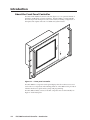
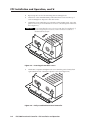
The Extron FPC 5000 Front Panel Controller (figure 1-1) is an optional element of
the Matrix 12800 family of matrix switchers. The FPC 5000 is a rack-mountable
device that provides front panel control of the matrix, including configuration of
the inputs and outputs and control of additional system features.
000
C5
FP
R
PW
D
HD
T/R
T
SE
RE
TR
MA
IX
SW
E
ICH
RC
ON
OL
TR
LE
R
Figure 1-1 — Front panel controller
The FPC 5000 has a large LCD touch-panel display that allows direct access and
total control over all presets and switching functions. FPC 5000 screens provide an
intuitive interface for quick and easy setup and programming.
The FPC 5000 assembly consists of the FPC computer and a rack-mountable, 7U
high, 19” wide metal panel.
1-2
FPC 5000 Front Panel Controller • Introduction
About the Matrix 12800 System
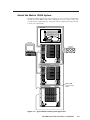
The Matrix 12800 system (figure 1-2) is made up of a series of matrix switcher basic
module enclosures (BMEs). The family of BMEs allows you to create a video and/
or audio matrix system with up to 128 inputs and 128 outputs specifically tailored
to meet your requirements.
EXT. FDD
K/B
MOUSE
NET
FPC 5000
PRN
COM4
COM3
COM2
COM1
VGA
DIO
I
o
AC 100V-230V
INPUT
Computer
Matrix 12800 Wideband Video
INPUTS
OUTPUTS
17
33
49
1
17
33
49
65
81
97
113
65
81
97
113
2
18
34
50
2
18
34
50
66
82
98
114
66
82
98
114
3
19
35
51
3
19
35
51
67
83
99
115
67
83
99
115
4
20
36
52
4
20
36
52
68
84
100
116
68
84
100
116
5
21
37
53
5
21
37
53
69
85
101
117
69
85
101
117
6
22
38
54
6
22
38
54
70
86
102
118
70
86
102
118
7
23
8
24
39
55
40
7
56
23
8
24
39
40
55
71
56
87
72
88
103
104
119
120
71
87
72
88
103
119
104
120
41
57
9
25
41
57
73
89
105
121
73
89
105
121
42
58
10
26
42
58
74
90
106
122
74
90
106
122
11
27
43
59
11
27
43
59
75
91
107
123
75
91
107
123
12
28
44
60
12
28
44
60
76
92
108
124
76
92
108
124
13
29
45
61
13
29
45
61
77
93
109
125
77
93
109
125
14
30
46
62
14
30
46
62
78
94
110
126
78
94
110
126
15
31
47
63
15
31
47
63
79
95
111
127
79
95
111
127
16
32
48
64
16
32
48
64
80
96
112
128
80
96
112
128
Tx
Tx
BME
Rx
25
26
Rx
9
10
Projector
R
G
B
H
V
CPU STATUS
PRIMARY
OUT
FPC COMM
PRIMARY
ETHERNET
Rx
Tx
LISTED
1T23
I.T.E.
CAUTION
For protection against risk of
fire, replace only with same
type and rating of fuse.
SECONDARY
MADE IN USA
MCP/MKP COMM
5.0A MAX 50/60Hz FUSE 250V 5.0A T
100-240V
ANAHEIM, CA
A B C D E
5.0A MAX 50/60Hz FUSE 250V 5.0A T
100-240V
DISCONNECT BOTH POWER CORDS BEFORE SERVICING.
Tx
REDUNDANT AC
POWER INPUT
Rx
REDUNDANT
Rx
OUT
PRIMARY
Tx
POWER SUPPLIES
+V -V
PRIMARY AC
POWER INPUT
RS 232/422
SYNC
Rx
BME COMM
REDUNDANT
ADDRESS
Tx
+
IN
RS 232/422
-
4
IN
R
G
B
OUTPUTS
1
Matrix 12800 Sync
INPUTS
OUTPUTS
33
49
1
17
33
49
65
81
97
113
65
81
97
113
18
34
50
2
18
34
50
66
82
98
114
66
82
98
114
3
19
35
51
3
19
35
51
67
83
99
115
67
83
99
115
4
20
36
52
4
20
36
52
68
84
100
116
68
84
100
116
5
21
37
53
5
21
37
53
69
85
101
117
69
85
101
117
6
22
38
54
6
22
38
54
70
86
102
118
70
86
102
118
7
23
39
55
7
23
39
55
71
87
103
119
71
87
103
119
8
24
40
56
8
24
40
56
72
88
104
120
72
88
104
9
25
41
57
9
25
41
57
73
89
105
121
73
89
105
121
10
26
42
58
10
26
42
58
74
90
106
122
74
90
106
122
11
27
43
59
11
27
43
59
75
91
107
123
75
91
107
123
12
28
44
60
12
28
44
60
76
92
108
124
76
92
108
124
13
29
45
61
13
29
45
61
77
93
109
125
77
93
109
125
14
30
46
62
14
30
46
62
78
94
110
126
78
94
110
126
15
31
47
63
15
31
47
63
79
95
111
127
79
95
111
127
16
32
48
64
16
32
48
64
80
96
112
128
80
96
112
128
120
Rx
BME
Tx
Tx
Rx
17
2
CPU STATUS
PRIMARY
Tx
Rx
PRIMARY
ETHERNET
Rx
Tx
LISTED
1T23
I.T.E.
CAUTION
For protection against risk of
fire, replace only with same
type and rating of fuse.
SECONDARY
MADE IN USA
MCP/MKP COMM
5.0A MAX 50/60Hz FUSE 250V 5.0A T
100-240V
ANAHEIM, CA
A B C D E
5.0A MAX 50/60Hz FUSE 250V 5.0A T
100-240V
DISCONNECT BOTH POWER CORDS BEFORE SERVICING.
Tx
REDUNDANT AC
POWER INPUT
Rx
REDUNDANT
RS 232/422
OUT
PRIMARY
Rx
+V -V
PRIMARY AC
POWER INPUT
Tx
SYNC
POWER SUPPLIES
RS 232/422
BME COMM
REDUNDANT
ADDRESS
OUT
+
IN
FPC COMM
-
4
IN
H
V
OUTPUTS
1
Matrix 12800 Audio
BME COMM
Interconnecting
Cable
INPUTS
Audio
1-8
9-16
17-24
25-32
33-40
41-48
49-56
57-64
65-72
73-80
81-88
89-96
97-104
105-112 113-120 121-128
Rx
Tx
Tx
OUTPUTS
BME
Rx
Audio
CPU STATUS
-
Tx
Rx
Tx
Rx
Tx
RS 232/422
PRIMARY
ETHERNET
Rx
Tx
LISTED
1T23
I.T.E.
CAUTION
MCP/MKP COMM
5.0A MAX 50/60Hz FUSE 250V 5.0A T
100-240V
MADE IN USA
For protection against risk of
fire, replace only with same
type and rating of fuse.
A B C D E
5.0A MAX 50/60Hz FUSE 250V 5.0A T
100-240V
DISCONNECT BOTH POWER CORDS BEFORE SERVICING.
ANAHEIM, CA
SECONDARY
REDUNDANT AC
POWER INPUT
Rx
REDUNDANT
PRIMARY AC
POWER INPUT
RS 232/422
PRIMARY
OUT
BME COMM
REDUNDANT
POWER SUPPLIES
+V -V
IN
+
FPC COMM
PRIMARY
4
ADDRESS
Figure 1-2 — Typical Matrix 12800 system application
FPC 5000 Front Panel Controller • Introduction
1-3
Introduction, cont’d
The Matrix 12800 Series includes:
•
Wideband video switcher BME — A rack-mountable 10U switcher that
routes video (red (R), green (G), and blue (B) video planes, component video,
S-video, and composite video) from any input to any one or more outputs.
•
Sync switcher BME — A rack-mountable 10U switcher that routes horizontal
(H) and vertical (V) or composite sync from any input to any one or more
outputs.
•
Audio switcher BME — A rack-mountable 10U switcher that routes balanced
or unbalanced stereo or mono audio from any input to any one or more
outputs.
•
FPC 5000 Front Panel Controller — A rack-mountable 7U device that permits
front panel configuration of the inputs and outputs and control of additional
system features.
The front panel controller interfaces with the master BME (BME 0) of a Matrix
12800 system via the BME’s Ethernet port, either directly or as part of an Ethernet
local area network (LAN).
Definitions of Matrix Switcher Terms
The following terms apply to Extron matrix switchers, and are used throughout
this manual:
Tie — An input-to-output connection.
Set of ties — An input tied to two or more outputs. (An output can never be
tied to more than one input.)
Configuration — One tie or one or more sets of ties.
Current configuration — The configuration that is currently being used (also
called configuration 0).
Global memory preset — A configuration that has been stored. The
Matrix 12800 can support up to 64 global presets. When a global preset is
retrieved from memory, it becomes the current configuration.
Room — A room consists of a smaller subset of virtual outputs that are
logically related to each other, as determined by the operator. The
Matrix 12800 supports up to 32 rooms, each of which consists of from 1 to 16
virtual outputs. Each room can have up to 10 presets.
Room memory preset — A configuration consisting of virtual outputs in a
single room that has been stored. When a room preset is retrieved from
memory, it becomes the current configuration.
BME 0 — The BME that has been configured as master in a multiple-BME
Matrix 12800 system.
1-4
FPC 5000 Front Panel Controller • Introduction
FPC 5000 Front Panel Controller
2
Chapter Two
FPC Installation and Operation
Installation Overview
Unpacking and Assembling the Front Panel Controller
Rack Mounting the FPC Assembly
Rear Panel Connections
Front Panel Features and Operation
Upgrading the Software
FPC Installation
andand
Operation,
cont’d
FPC
Installation
Operation
Installation Overview
The FPC 5000 assembly consists of the FPC computer and a rack-mountable, 7U
high, 19” wide metal panel.
As part of a complete Matrix 12800 system, the FPC 5000 can be installed in a rack
or a cabinet with the rest of the system BMEs. The controller is connected to the
Ethernet port of a switching BME. In a system with more than one switching BME,
the FPC must be connected to the BME that is designated as BME 0 in the system
(refer to the Matrix 12800 Wideband, Sync, or Audio Switchers User’s Manual, part
#68-556-01). If the BMEs are rack- or cabinet-mounted, they can be mounted in any
order.
Plan carefully before installing the equipment in a room. Poor planning can cause
problems. The number of cables involved can result in a cluttered appearance.
Power and ventilation requirements must be adequate. Although not noisy, the
background noise generated by a rack of Matrix 12800 switcher BMEs could be
distracting.
To install and set up the FPC 5000 for operation with a Matrix 12800 system,
perform the following steps:
1
Disconnect power from all of the BMEs.
2
Secure the FPC computer to the FPC mounting panel. See Unpacking and
Assembling the Front Panel Controller in this chapter.
3
Rack mount the front panel controller. See Rack Mounting the FPC Assembly in
this chapter.
4
Connect an Ethernet cable from the FPC to BME 0 of the Matrix 12800 system
or to the Ethernet LAN on which the Matrix 12800 system resides.
5
Connect the AC power cable to the FPC.
6
If not already accomplished, complete the installation and virtualization of
the rest of the Matrix 12800 system (refer to the Matrix 12800 Wideband, Sync,
or Audio Switchers User’s Manual, part #68-556-01).
7
Turn on the FPC 5000 and observe the FPC computer’s startup display.
Unpacking and Assembling the Front Panel Controller
The FPC 5000 is shipped unassembled to prevent damage to the mounting
hardware in shipment. Before the FPC assembly can be rack mounted, the FPC
computer must be mounted to the panel. The mounting hardware is included with
the controller. Assemble the controller as follows:
1.
Open the FPC 5000 shipping carton and remove all of the protective foam
from the top and sides of the computer and rack-mountable panel.
CAUTION
2-2
Hold the computer and the panel together at the top and bottom when
removing the computer and panel from the shipping carton (figure 2-1).
The computer is loosely nested in the panel and could drop if it is not
properly supported.
FPC 5000 Front Panel Controller • FPC Installation and Operation
2.
Remove the computer and the panel from the shipping carton. Support the
FPC computer as shown in figure 2-1.
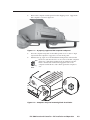
Figure 2-1 — A properly supported FPC computer and panel
3.
Place the computer and panel on the tabletop with a book or other 1”-high
object under the computer to support it as it nests in the panel.
4.
With the tabs up, angle one of the included mounting blocks and insert the
block’s two tabs into the slots on one corner of the FPC computer
Tabs (figure 2-2). Slide the mounting block up and then lower the
block so that the tabs in the block engage the sides of the
computer and the block’s side is flush against the computer’s
Mounting
case.
Block
Figure 2-2 — Computer and panel mounting block installation
FPC 5000 Front Panel Controller • FPC Installation and Operation
2-3
FPC Installation and Operation, cont’d
5.
Repeat step 4 for each of the remaining three mounting blocks.
6.
Thread one of the included 60 mm panhead machine screws into the top of
each mounting block. Repeat for the other screws.
7.
Tighten the screws until they just contact the rack-mounting panel. Move the
panel as necessary to ensure that the four screws contact the panel in the inset
holes (figure 2-3).
CAUTION
Do not overtighten the screws. The screws may bend if overtightened. If
you are using a torque screwdriver, set the screwdriver to release at a
minimal amount of torque.
Figure 2-3 — Inserting the machine screws
8.
Lift the FPC computer and tighten each screw until the panel is firmly flush
against the back side of the FPC computer’s LCD panel (figure 2-4).
Figure 2-4 — Fully assembled Front Panel Controller
2-4
FPC 5000 Front Panel Controller • FPC Installation and Operation
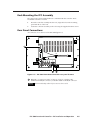
Rack Mounting the FPC Assembly
The appropriate rack mounting hardware is included with the controller. Rack
mount the controller as follows:
1.
Insert the controller assembly into the rack, align the holes in the mounting
panel with those of the rack.
2.
Secure the controller assembly to the rack using the supplied machine screws.
Rear Panel Connections
NET
All connectors are on the rear of the FPC 5000 (figure 2-5).
EXT. FDD
K/B
MOUSE
1
PRN
COM4
COM3
COM2
COM1
VGA
DIO
I
o
AC 100V-230V
INPUT
2
3
Figure 2-5 — FPC 5000 Front Panel Controller rear panel features
1
Net port — Connect one end of a Category (CAT) 5e or higher cable,
terminated with RJ-45 connectors, to the FPC 5000 via this RJ-45 connector.
The FPC 5000 ships with a 10-foot crossover CAT 5e cable.
FPC 5000 Front Panel Controller • FPC Installation and Operation
2-5
FPC Installation and Operation, cont’d
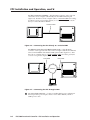
For direct connection to BME 0 — Plug the RJ-45 connector on the opposite
end of the CAT 5e or higher cable directly into the BME 0 Ethernet port
(figure 2-6). Wire the CAT 5e or higher cable as a crossover cable (See Cabling
and RJ-45 connector wiring in this chapter). For a multi-BME system, ensure
that you connect the FPC to BME 0.
Crossover Cable
FPC 5000
PWR
HDD
T/R
RESET
MATRIX SWICHER CONTROLLER
FPC 5000
MATRIX 12800
WIDEBAND VIDEO
Matrix 12800
Figure 2-6 — Connecting the FPC directly to a switcher BME
For Ethernet connection to the Matrix 12800 system — Plug the RJ-45
connector on the opposite end of the CAT 5e or higher cable into the Ethernet
LAN on which BME 0 of the Matrix 12800 system resides (figure 2-7). Wire
the CAT 5e or higher cable as a patch (straight) cable (See Cabling and RJ-45
connector wiring in this chapter).
Patch Cable
Patch Cable
FPC 5000
PWR
HDD
Ethernet
T/R
RESET
MATRIX SWICHER CONTROLLER
FPC 5000
MATRIX 12800
WIDEBAND VIDEO
Matrix 12800
Laptop
Figure 2-7 — Connecting the FPC through a LAN
2
2-6
AC power input connector — Connect a standard IEC power cord between
the rear panel AC power input connector and a 100 to 240VAC, 50 Hz or
60 Hz power source.
FPC 5000 Front Panel Controller • FPC Installation and Operation
3
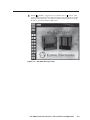
Power ( / )switch — Toggle the power switch to the on ( ) position. After
approximately 2 minutes, observe that the LCD touch panel displays the FPC
start-up screen (figure 2-8). See chapter 3, Matrix 12800 Operation, for using
the FPC to operate the Matrix 12800 system.
Figure 2-8 — FPC 5000 Start-up screen
FPC 5000 Front Panel Controller • FPC Installation and Operation
2-7
FPC Installation and Operation, cont’d
Cabling and RJ-45 connector wiring
It is vital that your cable between the FPC 5000 and the Matrix 12800 BME 0 or
LAN be the correct cable, and that it be properly terminated with the correct
pinout. This FPC link requires CAT 5e or CAT 6, unshielded twisted pair (UTP) or
shielded twisted pair (STP) cables, terminated with RJ-45 connectors. The cable
length is limited to 328’ (100 m).
Do not use standard telephone cables. Telephone cables will not support the
FPC-Matrix 12800 link.
Do not stretch or bend cables. Transmission errors can occur.
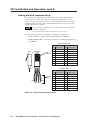
The cable must be properly terminated for your application (figure 2-9):
•
Crossover cable — Direct connection between the FPC and BME 0.
•
Patch (straight) cable — Connection of the FPC to an Ethernet LAN that also
hosts BME 0.
Patch (straight) cable
Side 1
Wire color
Pin
Side
Clip Down
Pins 1 2 3 4 5 6 7 8
RJ-45
connector
Pin
Side 2
Wire color
1
White-orange
1
White-orange
2
Orange
2
Orange
3
White-green
3
White-green
4
Blue
4
Blue
5
White-blue
5
White-blue
Green
6
Green
6
7
White-brown
7
White-brown
8
Brown
8
Brown
12345678
Crossover cable
Side 1
Wire color
Pin
Twisted
Pairs
1&2
7&8
3&6 4&5
Side 2
Wire color
1
White-orange
1
White-green
2
Orange
2
Green
3
White-green
3
White-orange
4
Blue
4
Blue
5
White-blue
5
White-blue
Orange
6
Green
6
7
White-brown
7
White-brown
8
Brown
8
Brown
Figure 2-9 — RJ-45 connector pinout tables
2-8
Pin
FPC 5000 Front Panel Controller • FPC Installation and Operation
Front Panel Features and Operation
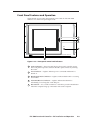
Other than the power switch, the remaining control and all of the FPC 5000
indicators are on the front panel (figure 2-10).
FPC 5000
2
PWR
3
HDD
T/R
4
RESET
5
MATRIX SWICHER CONTROLLER
1
Figure 2-10 — Front panel control and indicators
1
LCD touch panel — The LCD panel displays front panel controller screens.
The touch panel responds to selections that the operator makes by touching
the screen.
2
Power indicator — Lights to indicate power is connected and the FPC is
turned on.
3
H(ard) D(isk) D(rive) indicator — Lights to indicate that the FPC is accessing
its hard disk.
4
T(ransmit)/R(eceive) indicator — Lights to indicate that the FPC is
transmitting or receiving data on the Net port.
5
Reset button — Use a small screwdriver or tweeker to press the Reset button
if the FPC computer hangs up. This button reboots the computer.
FPC 5000 Front Panel Controller • FPC Installation and Operation
2-9
FPC Installation and Operation, cont’d
Upgrading the Software
The Front Panel Controller software is factory installed on the FPC computer’s hard
drive and it is also included on a CD-ROM. Extron sends any needed software
upgrades on a CD-ROM.
Upgrade the FPC software as follows:
1.
If necessary, log the FPC 5000 on to the Matrix 12800 system as an
administrator. See Starting Up the Controller and Logging In and Out in
chapter 3, Matrix 12800 Operation.
2.
On the front panel LCD, touch the blue Admin button.
3.
On the front panel LCD, touch the purple Misc button.
4.
On the front panel LCD, touch the gray Re-Install FPC Software button. The
FPC prompts you to insert the CD-ROM containing the FPC software into the
CD tray. To exit without installing the software, touch on the gray Cancel
button.
5.
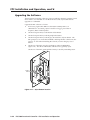
On the rear of the FPC, press the eject button on the CD-ROM drive
(figure 2-11). The drive’s LED flashes and the CD tray partially ejects.
K/B
MOUSE
NET
On the rear of the FPC, gently pull the CD tray to its fully extended position.
EXT. FDD
CD Eject
Button
C
PR
N
DIO
Figure 2-11 — Eject button location
2-10
FPC 5000 Front Panel Controller • FPC Installation and Operation
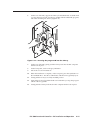
On the rear of the FPC, support the CD tray from behind with one hand while
you snap the program CD onto the tray spindle with the unlabeled (program)
side of the CD facing into the tray (figure 2-12).
EXT. FDD
K/B
MOUSE
NET
6.
CO
C
PR
M3
CO
M2
CO
4
OM
N
DIO
-2
100V
AC T
INPU
30V
Figure 2-12 — Inserting the program CD into the CD tray
7.
On the rear of the FPC, gently push the CD tray back into the FPC computer
until it locks in place.
8.
On the front panel, touch on the gray OK button.
9.
Follow the on-screen instructions.
10.
When the installation is complete, on the rear panel, press the eject button on
the CD-ROM drive. The drive’s LED flashes and the CD tray partially ejects.
11.
Gently pull the CD tray to its fully extended position.
12.
Support the CD tray from behind with one hand while you snap the program
CD off of the tray spindle.
13.
Gently push the CD tray back into the FPC computer until it locks in place.
FPC 5000 Front Panel Controller • FPC Installation and Operation
2-11
FPC Installation and Operation, cont’d
2-12
FPC 5000 Front Panel Controller • FPC Installation and Operation
FPC 5000 Front Panel Controller
3
Chapter Three
Matrix 12800 Operation
Introduction
Operating the Touch Panel
Starting Up the Controller and Logging In and Out
Demo Mode
Navigating the Screens
User Screens
Admin Screens
Setup Screens
Subnetting — A Primer
Matrix 12800
Operation,
cont’d
Matrix
12800
Operation
Introduction
This chapter details operation of a Matrix 12800 system using an FPC 5000 front
panel controller. The chapter assumes that the Matrix 12800 is properly installed,
virtualized, and operating correctly.
The FPC 5000 software runs in an FPC computer that communicates with the
matrix switcher via a Category (CAT) 5e or higher cable, terminated with RJ-45
connectors, between the FPCs Net port and either the Ethernet port on the switcher
BME (BME 0 in multiple BME systems) or an Ethernet LAN on which the
Matrix 12800 also resides.
Control of the matrix switcher via the FPC can be password protected. There are
two levels of password protection: administrator and user. Personnel logged on as
an administrator have full access to all Matrix 12800 switching capabilities and
editing functions. Personnel logged on as a user can create ties, create and recall
presets, set RGB and audio mutes, and view all settings with the exception of
passwords. If the same passwords or no password is required for logging on, all
personnel log on with administrator privileges. Fields and functions that exceed
user privileges are inaccessible to users from the FPC.
Operating the Touch Panel
Several of the FPC front panel operations require data entry and/or input and
output selection. These operations are performed using an on-screen keyboard, onscreen keypads, or on-screen scroll boxes.
Using the keyboards
When you take a step that requires that you enter alphanumeric characters, an onscreen keyboard appears (figure 3-1).
Figure 3-1 — Typical on-screen keyboard
3-2
•
Clear the field in which you need to enter data by touching the Clear Field key
or by repeatedly touching the backspace (
) key.
•
Touch the correct characters on the keyboard just as you would on a physical
keyboard.
•
and Insert CR
keys are only used when editing
The Insert ESC
Simple Instruction Set™ (SIS™) commands while programming User
Function keys (see Function Keys screen in this chapter). The keyboard does
not display these keys for other functions.
•
To enter capital letters or the alternate characters on the numeric keys, touch
the Shift key
or Caps Lock key
. Either key locks the keyboard to
capitals only, just like the Caps Lock key on a physical keyboard. Touch the
desired letter or number keys and then touch the Caps Lock key again to
return to lower case.
•
To enter the typed in characters and dismiss the on-screen keyboard,
touch the Enter key.
FPC 5000 Front Panel Controller • Matrix 12800 Operation
•
To dismiss the on-screen keyboard without entering the typed in characters,
touch the Cancel key.
Using the keypads
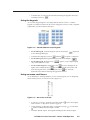
An on-screen keypad (figure 3-2) is integrated into the I/O screens. A similar
keypad is available from the TCP/IP screens and appears when you take a step that
requires that you enter numeric characters.
I/O Keypad
TCP/IP Keypad
Figure 3-2 — I/O and TCP/IP on-screen keypads
, if present,
•
For the I/O keypad, touch the keypad's yellow Clear button
to clear the keypad display.
•
Touch the blue digit keys (such as
•
For the I/O keypad, the keypad field displays the entered digits.
•
For the I/O keypad, the blue All key
only on the Make Ties screen.
•
For the TCP/IP keypad, touching the Delete
key clears the digits from
key enters the typed in characters and
right to left, touching the Enter
key clears the
clears the keypad screen, and touching the Cancel
keyboard screen without entering the typed in characters.
and then
for input or output 65).
appears on the output keypad
Using on-screen scroll boxes
As an alternative to entering numbers on an on-screen keypad, you can frequently
select an entry from an on-screen scroll box (figure 3-3).
Figure 3-3 — On-screen scroll box
•
To activate a scroll box, touch the scroll down button ( ) next to the Output
Video window. A drop down scroll box appears.
•
Touch and drag on either the slider or touch the scroll up ( ) or scroll down
( ) buttons until the desired output is visible.
•
Touch the desired output. The keypad field displays the selected output.
FPC 5000 Front Panel Controller • Matrix 12800 Operation
3-3
Matrix 12800 Operation, cont’d
Starting Up the Controller and Logging In and Out
Use the FPC to control the matrix as follows:
1.
Ensure that all BMEs that are part of the system have been connected to each
other and their BME numbers have been set correctly (refer to the Matrix
12800 Wideband, Sync, or Audio Switchers User’s Manual, part #68-556-01).
2.
If necessary, on the rear of the FPC, toggle the Power switch to the on ( )
position. After approximately 2 minutes, the LCD touch panel displays the
FPC startup screen (figure 3-4). Observe the message **NOT Logged On** in
the upper right corner of the blue field.
Figure 3-4 — Startup screen
The FPC 5000 LCD has an optional screen saver function that blanks the
screen after 5 minutes. Touch on the screen to wake up the controller. See
Miscellaneous screen, in this chapter, to disable the screen saver.
3.
Touch the Log On button.
The IP Connection screen appears (figure 3-5).
Figure 3-5 — Address and password entry
4.
3-4
Decide whether you need to edit the FPC 5000’s IP Address and Subnet Mask
fields (see the guidelines below). If you need to edit the fields, proceed to
step 5. If you do not need to need to edit the fields, proceed to step 6.
FPC 5000 Front Panel Controller • Matrix 12800 Operation
To log on to the Matrix 12800, the FPC 5000’s IP address and Subnet Mask
fields must be set to values that identify them as being on the same subnet as
the Matrix 12800 BME 0. See Subnetting — A Primer at the end of this chapter.
•
•
In general, you probably do not need to edit these fields if:
°
the FPC is connected directly to the Matrix 12800 via a crossover cable
or you have already successfully logged on to the Matrix 12800, either
directly or via an Ethernet LAN, and
°
no changes have been made to the FPC’s and the Matrix 12800’s IP
addresses and subnet masks.
In general, you may need to edit these fields if:
°
°
5.
the FPC is connected to the Matrix 12800 via an Ethernet LAN, and
you have not already successfully logged on to the Matrix 12800.
Change the FPC’s IP address and Subnet Mask field as follows:
a.
Touch the Touch to change FPC’s IP address/network config banner in the IP
Connection screen (figure 3-5). The FPC 5000 TCP/IP Properties screen
appears (figure 3-6).
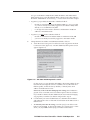
Figure 3-6 — FPC 5000 TCP/IP Properties screen
On this screen, you can direct the FPC 5000 to obtain its IP address from a
Dynamic Host Configuration Protocol (DHCP) server (if the network is
DHCP capable), reenter the factory defaults, or directly enter an IP
address and subnet mask value.
Before any of the of the FPC 5000 properties change, the OK button is
grayed out (not available) and a Close button replaces the Cancel button.
If you decide to dismiss the FPC 5000 TCP/IP screen without changing
any properties, touch the Close button and proceed to step 6.
b.
Consult with your network administrator to determine the IP address
and subnet mask values or if the FPC should obtain its IP address from a
DHCP server.
c.
To manually enter FPC IP settings, see if the Specify an IP address radio
button is selected ( ). To change the setting, use a pencil eraser or other
small, soft, object to touch the Specify an IP address radio button.
FPC 5000 Front Panel Controller • Matrix 12800 Operation
3-5
Matrix 12800 Operation, cont’d
If the local system administrators have not changed the value, the factoryspecified default, 192.168.254.253, is the correct value for this field.
d.
If you want to use the factory defaults, touch the Use Factory Defaults
button and proceed to step 5l.
e.
Touch the IP Address field. The on-screen numeric keypad appears
(figure 3-2).
f.
Enter the IP address. Invalid IP addresses are displayed in red.
g.
Touch the numeric keypad's Enter key
dismiss the keypad from the display.
h.
Touch the Subnet Mask field. The on-screen numeric keypad appears
(figure 3-2).
i.
Enter the subnet mask value. Invalid subnet mask values are displayed
in red.
j.
Touch the numeric keypad's Enter key
to accept the subnet mask
value and dismiss the keypad from the display.
k.
To obtain the IP address from a DHCP server, look to see if the Obtain an
IP address from a DHCP server radio button is selected ( ). To change the
setting, use a pencil eraser or other small, soft, object to touch the radio
button.
l.
Touch the OK button to accept the change and exit the screen or touch the
Cancel button to exit the screen without changing the option or IP values.
If you touch the Cancel button, proceed to step 6.
to accept the address and
m. If you touched the OK button in step 5l, a reboot warning screen appears.
If you touch the OK button, the FPC computer will reboot.
Touch the OK button to force the FPC computer to reboot to make the
to abandon the
changes you entered or touch the Cancel button
changes and return to the TCP/IP Properties screen.
n.
6.
If you touched on the OK button in step 5m, the FPC computer reboots.
After the reboot is complete, perform step 3 (log on) and then proceed to
step 6.
Examine the Matrix IP Address field in the IP connection screen. The field
displays the last Matrix IP address entered. If the IP address is correct,
proceed to step 7.
If the local system administrators have not changed the value, the factoryspecified default, 192.168.254.254, is the correct value for this field.
7.
a.
Touch the scroll down button ( ) to access the recently-used-addresses
scroll box or touch the Matrix IP Address field to access the on-screen
keyboard (figure 3-1).
b.
If you selected the on-screen keypad, enter the IP address.
c.
Touch the on-screen keyboard's Enter key to accept the address
and dismiss the keypad from the display if applicable.
If the switcher is not password protected, proceed to step 8.
a.
Touch the Password field. The on-screen keyboard appears.
b.
Enter the administrator or user password by touching the correct
characters on the keyboard.
Passwords are case sensitive.
3-6
FPC 5000 Front Panel Controller • Matrix 12800 Operation
c.
Touch the on-screen keyboard's Enter key to accept the password
and dismiss the keyboard from the display.
The FPC software looks for the
Touch the Connect button.
Matrix 12800 system and reads its hardware configuration: the type and size
of each BME. The software then reads all of the current settings, such as the
ties, presets, and virtual map. Observe the message LoggedOn as
ADMINISTRATOR (or USER) in the upper right corner of the blue field.
8.
If you logged on using the administrator password, the FPC connects you to
the Matrix 12800 with all of the administrator rights and privileges.
If you logged on using the user password, the FPC connects you to the
Matrix 12800 with only user capabilities.
If an incorrect IP address or password was entered, the controller beeps and
displays either FPC 5000 was unable to connect to IP address: or Password rejected!
Please try again. Touch the gray OK button
to return to the IP
Connection screen.
As desired, create ties, work with presets, edit IP parameters, or perform other
FPC 5000 operations. See User Screens, Admin Screens, or Setup Screens on the
following pages.
9.
Logging the FPC 5000 off after completing Matrix 12800 tasks prevents
unauthorized use.
10.
When you are ready to log off, from any FPC screen touch the Log Off button.
The IP Connection screen appears. Touch the Disconnect button.
Observe the message **NOT LoggedOn** in the screen’s upper right corner.
Demo Mode
Demo mode has two functions:
•
When the FPC is connected and logged on to a Matrix 12800 system, demo
mode expands the configuration of the system as viewed from the FPC 5000.
Demo mode adds dummy BMEs and capabilities to the unused portions of
the actual matrix. This allows users to see all of the capabilities of the
switcher, even though their matrix may not be large enough or complex
enough to have all of the capabilities.
•
When the FPC is not logged on to, or even connected to a Matrix 12800
system, demo mode allows the user to use the FPC as if it were connected to
a switcher. This is useful for training or demonstration purposes.
Enter or exit demo mode by touching the yellow or green Demo Mode button
on the startup screen. The Demo Mode button is yellow when demo mode
is off. When demo mode is on, the Demo Mode button is green and the FPC displays
the message DEMO-MODE! in the screen’s upper right corner.
Navigating the Screens
When you log on (see Starting Up the Controller and Logging In and Out on page 3-4)
the FPC displays the startup screen. Only the demo mode, log on, and help
functions are available on this screen. To access the active functions, touch one of
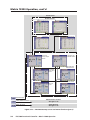
the blue (User, Admin, or Setup) buttons (figure 3-7). Each of these buttons calls up a
screen with its own set of buttons. Those buttons can call up other screens within
the same family, each unique to a function. For example, touching the blue User
button calls up the View Ties screen (the default I/O function). The View Ties
screen includes the amber I/O, Preset, Mute, and DSVP buttons. The amber I/O
button already indicates that it is depressed because the View Ties screen is an I/O
function.
FPC 5000 Front Panel Controller • Matrix 12800 Operation
3-7
Matrix 12800 Operation, cont’d
User Screens
Preset Screens
Global Preset Screen
Room Preset Screen
DSVP Screen
Mute Screen
View and Make Ties Screens
View Input
Ties by Output
Screen
View Input Ties
Alternate Screen
View Output Ties
Alternate Screen
View Output
Ties by Input
Screen
Make Ties
Alternate Screen
Make Ties
Screen
User Screens
Adminstration Screens
Setup Screens
Administration Screens
See figure 3-7b
Setup Screens
See figure 3-7b
Figure 3-7a — FPC 5000 Startup screen and menu flowchart (part 1)
3-8
FPC 5000 Front Panel Controller • Matrix 12800 Operation
User Screens
See figure 3-7a
Administration Screens
TCP/IP Screen
E-mail Screen
User Screens
Adminstration Screens
Status
Screen
Miscellaneous
Screen
Setup Screens
Setup Screens
Audio Screen
Reset Screen
Delay
Screen
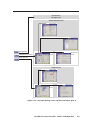
Figure 3-7b — FPC 5000 Startup screen and menu flowchart (part 2)
FPC 5000 Front Panel Controller • Matrix 12800 Operation
3-9
Matrix 12800 Operation, cont’d
In the following procedures, access to a specific screen is described by assuming
you are beginning at the startup screen and listing the color of the buttons and their
displayed message, in order, separated by a > symbol. For example, to access the
Make Ties screen, touch the blue User > amber I/O > green Make Ties buttons.
The button progression lists all buttons that may be necessary to access a
specific screen. You will frequently find that you do not need to touch one of
the buttons listed, either because it is selected by default or it is selected
because you are already in that family of functions and screens. You can omit
touching those buttons, but there is no effect if you do touch them.
User Screens
The User family of screens include the I/O screens (four View Ties and two Make
Ties screens — the most-recently-viewed I/O View Ties screen is the default
screen), the Preset screens (Global Preset and Room Preset), the Mute screen, and
the DSVP screen.
I/O screens
There are six I/O screens: four for viewing ties and two for making ties. When you
touch the amber I/O button, the FPC displays one of the View Ties screens by
default. The green Make Ties button on the screen changes when touched; it is
labeled Make Ties on the View Ties screen and View Ties on the Make Ties screen. To
toggle between the two screens, touch the green Make Ties/View Ties button.
Each screen has a Signal Type field that indicates in green those signal types for
which the Matrix 12800 has been virtualized. If the switcher is not configured for a
given signal type, that indicator remains white.
Each I/O screen automatically updates every few seconds to ensure that the
configuration that is displayed reflects ties created from other control points (such
as other FPCs, the Windows Matrix 12800/6400/3200 Virtualization/Control
software, or an RS-232 connection).
Viewing ties
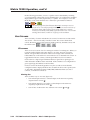
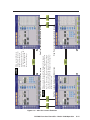
There are three ways to view ties (figure 3-8):
3-10
•
View which input is tied to a selected output on the View Ties: input-byoutput-selection screen ( 1 ).
•
View which output(s) is/are tied to a selected input on the View Ties:
outputs-by-input selection screen ( 2 ).
•
View all ties on either View Ties: alternate view screen (
FPC 5000 Front Panel Controller • Matrix 12800 Operation
3
and
4
).
Figure 3-8 — View ties screens flowchart
FPC 5000 Front Panel Controller • Matrix 12800 Operation
3-11
2
ViewTies: outputs-by-input selection screen
3
ViewTies: input-by-output alternate screen
4
ViewTies: outputs-by-input alternate screen
When you touch the green View Outputs/View Inputs
selection button on the screen, the FPC toggles between the
two View Ties screens. The green selection button changes
when touched; it is labeled View Inputs on the outputs-byinput-selection screen and View Outputs on the input-byoutput-selection screen.
ViewTies: input-by-output selection screen
1
When you touch the green
Change View button, the
output area of the screen
toggles between the all-ties
view and the one-tie-at-a-time
view. The Change View
button does not change.
Matrix 12800 Operation, cont’d
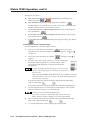
View the ties as follows:
1a.
From any screen other than the Make Ties Screen, touch the blue User >
amber I/O buttons.
1b.
From the Make Ties screen, touch the green View Ties button.
The FPC displays one of the View Ties screens. The screen view that the FPC
displays is the last View Ties screen that was active.
2.
To select the View Ties: input-by-output-selection screen, touch the green
View Inputs button.
3.
To select the View Ties: outputs-by-input-selection screen, touch the green
View Outputs button.
4.
To select the View Ties: alternate screen, touch the green Change View button.
Viewing inputs tied to a specified output
View the input tied to a selected output as follows:
1.
If necessary, touch the View Inputs button.
The most recently
selected View Ties: input-by-output-selection screen appears. See 1 and
on figure 3-8.
to display screen
2.
If necessary, touch the Change View button
figure 3-8.
3.
Select the video and/or audio format(s) to view by touching the
desired blue Signal Type button(s). The first virtual output
among the selected signal types is displayed in the Virtual
Output field.
1
3
on
Available signal types are indicated by a green circle next to the
buttons. Selected signal types are indicated by a red ring around
the green circle.
Video signal types (RGBHV, RGBS, RGsB, YUV, YC, and Video) include the
audio plane (if there is one in your system). The Audio Only signal type does
not include any video planes.
If an input is tied to that output, the input is displayed in the Input Video
(and/or Audio) field.
If no input is tied to that output, the Input Video and Audio fields display 0.
4.
Use the output keypad or scroll through the valid outputs to select another
output for which you desire to view the tied input.
Leading zeroes are not required for keypad entry.
If you enter a number for a virtual output that does not exist in the
Matrix 12800, the number is displayed in red in the keypad display.
3-12
5.
Observe that the input tied to the selected output is displayed in the Input
Video and/or Input Audio field.
6.
To view the input tied to another output, repeat steps 4 and 5.
FPC 5000 Front Panel Controller • Matrix 12800 Operation
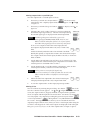
Viewing outputs tied to a specified input
View the output tied to a selected input as follows:
1.
If necessary, touch the View Outputs button.
The most recently
selected View Ties: output-by-input-selection screen appears. See 2 and
on figure 3-8.
to display screen
2.
If necessary, touch the Change View button
figure 3-8.
3.
Select the video and/or audio format(s) to view by touching the
desired blue Signal Type button(s). The first virtual input among
the selected signal types is displayed in the Virtual Input field.
2
4
on
Available signal types are indicated by a green circle.
Video signal types (RGBHV, RGBS, RGsB, YUV, YC, and
Video) include the audio plane (if there is one in your system).
The Audio Only signal type does not include any video planes.
If one or more outputs is tied to that virtual input, the first
tied output is displayed in the Video Out (and/or Audio Out)
field.
Text blocks directly under the Video Out and Audio Out fields
identify the quantity of outputs that are tied to the selected virtual input.
If no output is tied to that virtual input, the Video Out and/or Audio Out
fields are blank.
4.
Use the Video Out and Audio Out scroll boxes to see a listing of all of the
outputs tied to the selected virtual input. Outputs that are not tied to that
virtual input are not included in the scroll box.
5.
Use the input keypad or scroll through the valid inputs to select another
virtual input for which you desire to view the tied outputs.
Leading zeroes are not required for keypad entry.
If you enter a number for a virtual input that does not exist in the
Matrix 12800, the number is displayed in red in the keypad
display.
6.
Observe that the first output tied to the selected virtual input
is displayed in the Input Video and/or Input Audio field.
7.
To view the outputs tied to another input, repeat steps 5 and 6.
Viewing all ties
View all of the ties by touching the green Change View button.
One of the
View Ties: alternate screens appears. See 3 and 4 on figure 3-8. On the alternate
screen, the output scroll bars, keypad, and fields are replaced with a grid that
shows all outputs and the inputs that are tied to them. You can choose whether the
view is by-inputs or by-outputs by touching the green View Inputs button
or View Outputs button
, although there is very little difference between the
two screens. The biggest difference is that if you have selected the View Ties:
outputs-by-input-selection screen, when you select a virtual input (either using the
scroll bars or the keypad) all of the virtual outputs are displayed in red in the grid.
This gives you an easy way to see all of the outputs tied to an input at a glance.
FPC 5000 Front Panel Controller • Matrix 12800 Operation
3-13
Matrix 12800 Operation, cont’d
Creating ties
There are two ways to make ties (figure 3-9):
•
You can select an input and an individual output on the Make Ties: dual
keypad screen ( 5 ).
•
You can select and input and then select one or a group of outputs on the
Make Ties: alternate view screen ( 6 ).
You can make ties or groups of ties individually, on the fly, or create a series (queue)
of potential ties or groups of ties to switch all at once.
5
Make Ties: dual keypad screen
When you touch the green Change View button, the
output area of the screen toggles between the all-ties view
and the one-tie-at-a-time view. The Change View button
does not change.
Make Ties: alternate view screen
6
Figure 3-9 — Make ties screens flowchart
3-14
FPC 5000 Front Panel Controller • Matrix 12800 Operation
Tie an input to an output as follows:
1.
Touch the blue User > amber I/O > green Make Ties buttons.
The FPC displays one of the I/O Make Ties screen (figure 3-9). The screen
view that the FPC displays is the last Make Ties screen that was active.
2.
Select the video and/or audio format(s) to tie by touching the
desired Signal Type button(s). On the dual-keypad screen, the
first virtual output among the selected signal types is displayed
in the Virtual Output field.
Available signal types are indicated by a green circle. Selected
signal types are indicated by a red ring around the green circle.
Video signal types (RGBHV, RGBS, RGsB, YUV, YC, and Video) include the
audio plane (if there is one in your system). The Audio Only signal type does
not include any video planes.
If an input is tied to that output, the input is displayed in the Input Video
(and/or Audio) field.
3.
If desired, touch the green Change View button
to toggle between the
Make Ties: dual keypad screen and the Make Ties: alternate view screen.
Creating ties using the Make Ties: dual keypad screen
See 5 on figure 3-8.
1.
Use the input keypad or scroll through the valid inputs to select an input to
tie.
Leading zeroes are not required.
If you enter a number for a virtual input that does not exist in the
Matrix 12800, the number is displayed in red in the keypad display.
2.
For systems with both audio and video BMEs, select the video, audio, or both
to tie by touching the yellow Breakaway/Follow button, as necessary, to turn the
desired selection(s) green.
The Breakaway/Follow button does not appear in video-only or audio-only
systems.
3.
Use the output keypad or scroll through the valid outputs to select an output
to tie one input
to tie to the selected input, or touch the blue All key
to all outputs. The Queue, Cancel, and Take buttons appear on the bottom of
the screen.
Leading zeroes are not required.
If you enter a number for a virtual output that does not exist in the
Matrix 12800, the number is displayed in red in the keypad display.
Changes do not take affect until you press the Take button.
4.
For an immediate tie, proceed to step 7.
FPC 5000 Front Panel Controller • Matrix 12800 Operation
3-15
Matrix 12800 Operation, cont’d
5.
To add the potential tie that you have just created to a queue of tie
commands that take affect all at once, touch the green Queue button.
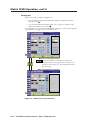
The FPC displays the equivalent SIS commands in the Pending Tie
commands field.
The example above shows a queue of SIS commands for tieing input 11 to
output 11, input 2 to output 2, input 3 to output 4, and input 4 to output 3.
For more information about SIS commands, refer to the Matrix 12800
Wideband, Sync, or Audio Switchers User’s Manual, part #68-556-01.
6.
To add another potential tie to the queue, repeat steps 1 through 3.
Only one input can be tied to given output. If a queue of tie commands
attempts to assign multiple inputs to an output, the Matrix 12800 makes each
of the ties in turn and the last switch in the queue is the tie that remains at the
end of the sequence.
7.
To switch an immediate tie or to switch all of the ties in the queue, touch the
green Take button.
Creating ties using the Make Ties: alternate view screen
See 6 on figure 3-8.
1.
Use the input keypad or scroll through the valid inputs to select an input to
tie.
Leading zeroes are not required.
If you enter a number for a virtual input that does not exist in the
Matrix 12800, the number is displayed in red in the keypad display.
2.
For systems with both audio and video BMEs, select the video, audio, or both
to tie by touching the yellow Breakaway/Follow button, as necessary, to turn the
desired selection(s) green.
The Breakaway/Follow button does not appear in video-only or audio-only
systems.
3.
in the
Use a pencil eraser or other small, soft, object to touch the boxes
output grid. The existing input number displayed in the touched boxes turn
red to indicated that a potential tie or potential set of ties have been selected
to replace the current configuration. The Queue, Cancel, and Take buttons
appear on the screen.
Changes do not take affect until you press the Take button.
4.
3-16
For an immediate tie, proceed to step 7.
FPC 5000 Front Panel Controller • Matrix 12800 Operation
5.
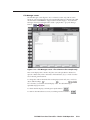
To add the potential tie or set of ties that you have just created to a queue of
tie commands that take affect all at once, touch the green Queue button.
The FPC displays the equivalent SIS commands in the Pending Tie
commands field.
To add more potential ties to the queue, repeat steps 1 through 3.
6.
Only one input can be tied to given output. If a queue of tie commands
attempts to assign multiple inputs to an output, the Matrix 12800 makes each
of the ties in turn and the last switch in the queue is the tie that remains at the
end of the sequence.
To switch an immediate tie or to switch all of the ties in the queue, touch the
green Take button.
7.
Preset screens
After you have created all of the ties that will be needed for a specific task, the
configuration can be saved as either a global or room preset. The Matrix 12800 can
support up to 64 global presets and up to 10 room presets in each of up to 32
rooms.
To create room presets, you must have already created rooms and assigned
outputs to the rooms when you virtualized the system, refer to the Matrix
12800 Wideband, Sync, or Audio Switchers User’s Manual,
part #68-556-01.
You cannot create rooms or assign outputs to the room using the FPC 5000.
When you touch the amber Preset button
Preset screen by default ( 7 on figure 3-10).
, the FPC displays the Global
Working with either global or room presets are similar operations with the
exception of selecting the room presets or global presets button and selecting a
room if required.
Save, recall, or delete a global preset
See
7
on figure 3-10. Save, recall, or delete a global preset as follows:
1a.
From any screen other than the Room Preset Screen, touch the blue User >
amber Preset buttons.
.
1b.
From the Room Preset screen, touch the green Global button.
The FPC displays the Global Preset screen.
2.
Select the desired global preset number by touching the appropriate preset
button.
The Delete, Save, and Recall buttons appear.
If this global preset has not been used before, only the Save button appears.
FPC 5000 Front Panel Controller • Matrix 12800 Operation
3-17
Matrix 12800 Operation, cont’d
3.
Touch the green Save, Recall, or Delete button.
stores the current configuration in memory. If the global preset you
selected was previously unassigned, the name in the preset button changes to
“Preset nnn”.
retrieves the configuration to be the current configuration.
clears the configuration information and clears the preset name.
7
Global Presets screen
On the Gobal Preset screen, this button reads
Room and selects the Room Preset screen when
touched.
On the Room Preset screen, this button reads
Global and selects the Global Preset screen.
Room Presets screen
8
Figure 3-10 — Preset screens flowchart
3-18
FPC 5000 Front Panel Controller • Matrix 12800 Operation
Save, recall, or delete a room preset
See
8
on figure 3-10. Save, recall, or delete a room preset as follows:
Touch the blue User > amber Preset > green Room buttons.
1.
The FPC displays the Room Preset screen.
2.
Select the room to which the desired preset is or will be assigned by touching
the desired room button.
3.
Select the desired room preset number by touching the appropriate preset
button.
The Delete, Save, and Recall buttons appear.
If this room preset has not been used before, only the Save button appears.
Touch the green Save, Recall, or Delete button.
4.
stores the current configuration in memory. If the room preset you
selected was previously unassigned, the name in the preset button changes to
“Rm nnn Pre nnn”.
retrieves the configuration to be the current configuration.
clears the configuration information and clears the preset name.
Name a global or room preset
Presets that are [unassigned] cannot be named.
Only personnel logged in as administrators can name presets.
See
1.
7
and
8
on figure 3-10. Name a global or room preset as follows:
If necessary, for global presets:
From any screen other than the Room Preset Screen, touch the blue User >
amber Preset buttons.
From the Room Preset screen, touch the green Global button.
The FPC displays the Global Preset screen (
2.
7
, figure 3-10). Proceed to step 4.
If necessary, for room presets:
Touch the blue User > amber Preset > green Room buttons.
The FPC displays the Room Preset screen (
8
, figure 3-10).
3.
For room presets only, select the room to which the desired room preset is
assigned by touching the desired room button.
4.
Touch a preset button to select the preset to name.
5.
Touch the green Name button.
6.
Touch the keyboard's Clear Field key
characters).
7.
Touch the on-screen keyboard’s Enter key to accept the name and
dismiss the keyboard from the display.
The on-screen keyboard appears.
and then enter a name (up to 12
Or, touch the on-screen keyboard’s Cancel key
keyboard without accepting the name change.
to dismiss the
FPC 5000 Front Panel Controller • Matrix 12800 Operation
3-19
Matrix 12800 Operation, cont’d
Mute screen
The Mute screen (figure 3-11) lets you mute the audio or RGBHV or RGBS video
(black screen) for an individual virtual output or all virtual outputs. Access the
Mute screen by touching the blue User > amber Mute buttons.
Figure 3-11 — Mute screen
Touch the RGB or Audio box
for an output in order to toggle the video or
audio mute for that virtual output on or off. Or, touch the green Mute All Video,
Unmute All Video, Mute all Audio, or Unmute All Audio button
to toggle all video or audio mutes on
or off. When an output is muted, the RGB or audio box turns green. When mute is
off, the box turns white. Scroll up or down or touch the Page Up or Page Down
button to display virtual outputs that are outside the range of outputs displayed.
RGB mute works in video formats with a separate sync BME. Component
video, S-video, and composite video do not use a sync BME, so RGB mute is
not available for these formats. RGB mute buttons that are not available are
marked by “n/a”
.
3-20
FPC 5000 Front Panel Controller • Matrix 12800 Operation
DSVP screen
You can monitor each RGBHV and RGBS input to see if active sync signal(s) are
present on the DSVP™ (Digital Sync Validation Processing™) screen (figure 3-12).
Access the DSVP screen by touching the blue User > amber DSVP buttons.
Figure 3-12 — DSVP screen
Where an input has active sync present, the DSVP screen reports a snapshot in time
of the frequencies in the horizontal and vertical frequency fields. Where no active
sync signals are present, the DSVP screen shows —— in the horizontal and vertical
frequency fields. Inputs that have not been virtualized (refer to the Matrix 12800
Wideband, Sync, or Audio Switchers User’s Manual, part #68-556-01) or for which there
is not a sync BME are marked by “n/a” in the horizontal and vertical frequency
fields
. Update the DSVP screen to display fresh frequency readings by
touching the green Update button.
FPC 5000 Front Panel Controller • Matrix 12800 Operation
3-21
Matrix 12800 Operation, cont’d
Admin Screens
The Admin family of screens include the functions that are typically reserved for or
applicable to maintenance personnel only. The family consists of the Status screen
(the default), the TCP/IP screen, the E-mail screen, and the Miscellaneous screen.
Status screen
The Status screen (figure 3-13) provides a snapshot in time of the status of the
complete Matrix switcher system, encompassing all BMEs and their active
replaceable components. Access the Status screen by touching the blue Admin >
purple Status buttons.
Status is the default Admin screen, so if
you come from a different family of screens, you will not need to touch the Status
button. Update the Status screen to display the latest status by touching the green
Update button.
Figure 3-13 — Status screen
Status screen, System area
The System area, in the top half of the Status screen, displays how the Matrix 12800
system has been virtualized, including the virtual size of the entire matrix, and
provides an overview of the status of each Matrix 12800 BME. For each BME the
System area shows the status of the primary and redundant power supplies, the
primary and redundant controllers, the fans, the input cards, and the output cards.
• Components that are operating properly are indicated
in green.
• Failures are indicated in red.
• Components that are not installed are indicated in white.
If a component fails or is removed, the display shows the change in status the next
time you update it.
3-22
FPC 5000 Front Panel Controller • Matrix 12800 Operation
Status screen, BME area
The BME area of the Status screen shows more detailed status for a specific,
selected, BME. BME 0 is the default display. To select another BME for display,
touch the gray BME button in the System area.
Selecting another BME
does not update the System status area, it only changes the focus of the BME area.
The BME area provides additional information for that BME, including the physical
size of the selected BME and the number of and status of individual input cards,
output cards, power supplies, controllers, and fans.
Remotes screen
The Remotes screen (figure 3-14) is a reference screen only, with no active functions.
The screen shows the status of all possible MKP 1200 Remote Keypads.
Information displayed includes: address, mode, parameter, model and firmware
version.
Figure 3-14 — Remotes screen
Access the Remotes screen by touching the blue Admin > purple Status > green
Remotes buttons.
Update the Remotes screen to display
the latest remote keypad configuration by touching the green Update button.
Return to the Status screen by touching the green Return button.
FPC 5000 Front Panel Controller • Matrix 12800 Operation
3-23
Matrix 12800 Operation, cont’d
TCP/IP screen
The TCP/IP screen (figure 3-15) consists of fields from which administrators can
observe and edit IP administration and system settings.
Figure 3-15 — TCP/IP screen
There are two levels of FPC 5000 password protection: administrator and user.
Administrators have full access to all Matrix 12800 editing functions. Users cannot
change any settings on the TCP/IP screen.
Editing many of the TCP/IP settings while connected via the FPC 5000 can
immediately disconnect the user from the Matrix 12800. Extron recommends
editing these fields using the switcher’s RS-232/422 link (refer to the Matrix
12800 Wideband, Sync, or Audio Switchers User’s Manual, part
#68-556-01) and protecting the FPC access to this screen by assigning an
Administrator’s password to qualified and knowledgeable personnel only.
Personnel logged in as users can edit the Date and Time (GMT) fields. All
other fields are reserved for administrators only. The Hardware (BME 0)
Address field and FPC IP Address field are hardcoded and cannot be changed.
Edit TCP/IP fields as follows:
1.
Touch the blue Admin > purple TCP/IP buttons.
screen appears.
2.
Touch the field you want to edit. Depending on the field you touch, either the
on-screen alphanumeric keyboard (figure 3-1) or an on-screen numeric
keypad (figure 3-2) appears.
3.
Enter the desired parameter using the keyboard or keypad.
4.
Touch the green Take button to accept the changes
green Cancel button
3-24
to reject the changes.
FPC 5000 Front Panel Controller • Matrix 12800 Operation
The TCP/IP
or touch the
Password fields
Only personnel logged in as administrators can set and read passwords.
The two Password fields on the TCP/IP screen are for entering administrator
and/or user passwords. Passwords are case sensitive and are limited to 12 upper
case and/or lower case alphanumeric characters. When logged on as a user,
characters in these fields are masked by asterisks (*****) and are not editable. If you
do not want to password protect an access level, leave the associated Password
field blank. After entering the desired password in one of the fields, touch the Take
button.
Date field
The Date field displays the current date in the Greenwich Mean Time zone. If
necessary, adjust the date. When you touch the field, a set date field appears with
the date in the format (M)M/(D)D/YYYY
. Leading zeroes are not
displayed and are not required for entry (5 or 05 are both acceptable entries for May).
Time (GMT) field
The Time field displays the current time in the Greenwich Mean Time zone. If
necessary, adjust the time. When you touch the Time field, a set time field appears
with the time in the 24-hour format HH/MM/SS (00:00:00 to 23:59:59)
.
Leading zeroes are displayed in the set time field but are not required for entry.
Matrix Name field
Only personnel logged in as administrators can edit the Matrix Name field.
The Matrix Name field contains the name used as the “from” information when the
Matrix 12800 e-mails notification of its failed or repaired status. This name field
can be changed to any valid name, up to 12 alphanumeric characters.
Hardware Address field
The Hardware Address field is factory programmed on the primary controller
board in the Matrix 12800 BME 0 and cannot be changed.
Matrix IP Address field
Only personnel logged in as administrators can edit the Matrix IP Address
field.
The Matrix IP Address field contains the IP address of the connected Matrix 12800
BME 0. This value is encoded in the flash memory on the primary and redundant
BME controller circuit boards.
Valid IP addresses consist of four 1-, 2-, or 3-digit numeric subfields separated by
dots (periods). Each field can be numbered from 000 through 255. Leading zeroes,
up to 3 digits total per field, are optional. Values of 256 and above are invalid.
The default address is 192.168.254.254, but if this conflicts with other equipment at
your installation, you can change the IP address to any valid value.
Gateway IP Address field
Only personnel logged in as administrators can edit the Gateway IP Address
field.
The Gateway IP Address field identifies the address of the gateway the
Matrix 12800 uses to access the mail server if the Matrix 12800 and the mail server
are not on the same subnet.
The Gateway IP Address field has the same validity rules as the Matrix IP address.
FPC 5000 Front Panel Controller • Matrix 12800 Operation
3-25
Matrix 12800 Operation, cont’d
Subnet Mask field
Only personnel logged in as administrators can edit the Subnet Mask field.
The Subnet Mask field is used to determine whether the Matrix 12800 is on the
same subnet as the mail server when you are subnetting. See Subnetting — A
Primer, at the end of this chapter, for more information on the Subnet Mask field
and its contents.
FPC IP Address field
The FPC IP Address field contains the IP address of the FPC computer. The FPC IP
address cannot be changed from this screen. See Starting Up the Controller and
Logging In and Out, steps 3, 4, and 5, beginning on page 3-4 to change this field.
E-Mail screen
Only personnel logged in as administrators can make changes to the E-Mail
screen.
The E-Mail screen (figure 3-16) consists of fields in which you can observe and edit
the Matrix 12800 e-mail notification settings.
Figure 3-16 — E-Mail screen
There are two levels of FPC 5000 password protection: administrator and user.
Administrators have full access to all Matrix 12800 editing functions. Users cannot
change any settings on the e-mail screen.
Edit e-mail fields and select notification options as follows:
3-26
1.
Touch the blue Admin > purple E-Mail buttons.
screen appears.
2.
To edit a field, touch the field you want to edit. The on-screen alphanumeric
keyboard (figure 3-1) appears.
3.
Enter the desired parameter using the keyboard.
FPC 5000 Front Panel Controller • Matrix 12800 Operation
The E-Mail
4.
To change the e-mail notification settings, use a pencil eraser or other small,
soft, object to touch the round radio buttons and square check boxes.
A
5.
or
appears when an item is selected.
Touch the green Take button
Cancel button
to accept the changes or touch the green
to reject the changes.
Mail Server IP Address field
Only personnel logged in as administrators can edit the Mail Server IP
Address field.
The Mail Server IP Address field displays the IP address of the mail server that
handles the e-mail for the facility in which the Matrix 12800 is installed.
Valid IP addresses consist of four 1-, 2-, or 3-digit numeric subfields separated by
dots (periods). Each field can be numbered from 000 through 255. Leading zeroes,
up to 3 digits total per field, are optional. Values of 256 and above are invalid.
Mail Server E-Mail User Name field
Only personnel logged in as administrators can edit the Mail Server E-Mail
User Name field.
The Mail Server E-Mail User Name field displays the name that the Matrix 12800
uses to log on to the e-mail server. Standard e-mail address conventions (such as
[email protected]) apply.
Mail Server Password field
Only personnel logged in as administrators can edit the Mail Server Password
field.
The Mail Server Password field displays the password that the Matrix 12800 uses to
log on to the e-mail server. Passwords are case sensitive and are limited to 12
upper case and lower case alphanumeric characters.
E-mail Addressee fields
Only personnel logged in as administrators can edit the E-Mail Addressee
field.
The nine E-Mail Addressee fields permit the administrator to identify the e-mail
addresses of the personnel to whom the Matrix 12800 e-mails notification of its
failure and repair status. The radio buttons and check boxes associated with each
address field permit the administrator to specify specific e-mail requirements for
each recipient.
In the square check boxes associated with each addressee,
select the Matrix 12800 modules for which the addressee is to
be e-mailed.
In the round radio buttons associated with each addressee, select
whether the addressee is to be e-mailed notification of failures,
fixes, both, or not be notified. The None radio button is handy for
temporarily removing personnel from the e-mail list when they are
unavailable, such as on travel or vacation.
FPC 5000 Front Panel Controller • Matrix 12800 Operation
3-27
Matrix 12800 Operation, cont’d
Miscellaneous screen
The Miscellaneous screen (figure 3-17) provides the pathway to a series of functions
that are not easily categorized elsewhere, such as a file manager, function key
programming, the I/O connectors, the screen saver, touch screen calibration, and
updating the software. Access the Miscellaneous screen by touching the blue
Admin > purple Misc buttons.
Figure 3-17 — Miscellaneous screen
There are two levels of FPC 5000 password protection: administrator and user.
Administrators have full access to all Matrix 12800 editing functions. Users cannot
change any function key programming, calibrate the touch screen, or upgrade the
FPC software.
3-28
FPC 5000 Front Panel Controller • Matrix 12800 Operation
File Manager screen
The File Manager screen (figure 3-18) is a reference screen only, with no active
functions. The screen displays the user-supplied files that have been downloaded
into the Matrix 12800 BME 0 to support user-created web pages. Access the File
Manager screen by touching the blue Admin > purple Misc > gray File Manager
buttons.
Figure 3-18 — File Manager screen - files shown are for example only
This screen displays the contents only; files cannot be uploaded or deleted. To
upload or delete files, refer to the Matrix 12800 Wideband, Sync, or Audio Switchers
User’s Manual, part #68-556-01.
To change the order in which the files are displayed, touch File, Date, or File Size
(Bytes) table headings.
Two asterisks (**) mark the selected display order. The default listing is
alphabetically, by file name.
To refresh the file display, touch the green Update button.
To return to the Miscellaneous screen, touch the green Return button.
FPC 5000 Front Panel Controller • Matrix 12800 Operation
3-29
Matrix 12800 Operation, cont’d
Function Keys screen
Only personnel logged in as administrators can set User Function keys.
The Function Keys screen (figure 3-19) lets you program an SIS command or a
series of commands (a macro) to the 14 white/purple User Function buttons or to
edit the button assignment. The User Function buttons are always present on the
left side of the screen.
It is not the function of this manual to define the Matrix 12800 SIS commands. For
detailed information on these commands, refer to the Matrix 12800 Wideband, Sync,
or Audio Switchers User’s Manual, part #68-556-01.
Assign SIS commands to User Function buttons or edit the button assignment as
follows:
1.
Touch the blue Admin > purple Misc > gray Function Keys buttons.
The Function Keys screen appears (figure 3-19).
Figure 3-19 — Function Keys screen
3-30
2.
If necessary to reach the higher-numbered function keys, touch the green
Show 8 - 14 button.
3.
Touch the Name field for the button you want to program (Key 1 = User
Function button 1). The on-screen keyboard appears.
4.
Enter the desired function name using the on-screen keyboard.
FPC 5000 Front Panel Controller • Matrix 12800 Operation
5.
Use a pencil eraser or other small, soft, object to touch the None, Momentary, or
Toggle radio button to select that how the User Function button functions.
appears in the radio button when it is selected.
None — The User Function button is not active. The none function is helpful to
mask commands that you want available when needed but that you can
disable when not needed, such as a reset. To make a none function, you must
select momentary or toggle, enter the command, and then select none.
Momentary — The User Function button is defined as a momentary contact
“switch” and one or more SIS commands are programmed for that button in
the Activate field associated with that button. The FPC issues the command
to the Matrix 12800 when the button is touched. The User Function button
remains white. The momentary function is useful for a stand-alone Matrix
12800 command, such as recalling a preset.
Toggle — The User Function button is defined as a two-position “toggle switch”
and two separate SIS commands or SIS macros are defined to it, the first in the
associated Activate field and the second in the Deactivate field. The FPC
issues the first command to the Matrix 12800 when the button is touched to
toggle it on and issues the second command when the button is
touched to toggle it off. The User Function button indicates
purple when the switch is toggled on and indicates white when
toggled off, as shown at right. The toggle function is useful for
Matrix 12800 functions that you want to turn on and off, such
as a global mute.
6.
Touch the Activate field for the button you want to program. The on-screen
keyboard appears.
7.
Enter the desired SIS command using the keyboard. If needed, enter
characters using the
and
keys. These characters are
represented by <esc> and <cr> in the field.
8.
For toggled functions, touch the Deactivate field for the button you want to
program. The on-screen keyboard appears.
9.
For toggled functions, enter the desired SIS command using the keyboard.
10.
Touch the green Take button
to accept the changes or touch the
green Cancel button to reject the changes.
11.
Touch the green Return button
Esc
and
to return to the Miscellaneous screen.
FPC 5000 Front Panel Controller • Matrix 12800 Operation
3-31
Matrix 12800 Operation, cont’d
I/O Physical Connectors screen
The I/O Physical Connectors screen (figure 3-20) shows how the Matrix 12800
system is virtualized. The screen shows the virtual numbers, names, signal types,
video and audio planes, and physical connectors associated with the inputs and
outputs. The screen also provides the tools to name virtual input and outputs.
Figure 3-20 — I/O Physical Connectors screen
Access the I/O Physical Connectors screen by touching the blue Admin > purple
Misc > gray I/O Physical Connections buttons.
Touch the
green View Inputs or View Outputs button to select the desired connectors.
The field that identifies the physical connector for each plane is comprised of two
subfields: n/yyy. In this field, n is a single digit that identifies the BME number and
, 0/001 indicates that
yyy identifies the physical connector. In this example,
the physical output connector for plane 1 (red) is connector 001 on BME 0.
To return to the Miscellaneous screen, touch the green Return button.
3-32
FPC 5000 Front Panel Controller • Matrix 12800 Operation
Naming inputs and outputs
Only personnel logged in as administrators can name video and audio inputs
and outputs.
Change the input or output name from the I/O Physical Connectors screen as
follows:
1.
Use the slide bar to scroll through the valid inputs or outputs until the screen
displays the virtual input or virtual output you wish to name.
3.
Touch the Name field of the virtual input or output name that you wish to
edit. The on-screen keyboard appears.
4.
Touch the keyboard's Clear Field key
characters).
5.
Touch the on-screen keyboard's Enter key to accept the name and
dismiss the keyboard from the display.
and then enter a name (up to 12
Or, touch the on-screen keyboard's Cancel key
without accepting the name change.
to dismiss the keyboard
Calibrate TouchScreen button
Only personnel logged in as administrators can calibrate the touch panel.
The Calibrate TouchScreen button provides a tool for calibrating the touch panel.
Calibrate the touch panel by touching the blue Admin > purple Misc > gray
Calibrate TouchScreen buttons.
Follow the on-screen
directions in the Calibrate routine. This screen times out after 30 seconds of nonoperation and the FPC returns to the Miscellaneous screen.
Use a pencil eraser or other small, soft, object to touch the Calibrate routine’s
touch points. Touch each point directly in the center. If you miss the center,
the touch panel’s calibration will be offset and it will become more difficult to
touch the correct areas on the touch panel, especially small targets, such as
radio buttons.
Re-Install FPC Software button
Only personnel logged in as administrators can install FPC firmware.
The Re-Install FPC Software button provides a way to re-install or upgrade the FPC
software. Upgrade the software by touching the blue Admin > purple Misc > gray
and following the onRe-Install FPC Software buttons
screen directions. See Upgrading the Controller Software, in chapter 2, Installation and
Operation.
Setup Screens
The Setup family of screens include the functions that are typically done once when
initially setting up the Matrix 12800 system or are done to reset elements of the
system. The family consists of the Delay screen (the default), the Audio screen, and
The Delay screen, Audio screen, and
the Reset screen.
most of the resets are reserved to personnel logged on as administrators rather than
users. Users can view, but not change these settings.
FPC 5000 Front Panel Controller • Matrix 12800 Operation
3-33
Matrix 12800 Operation, cont’d
Delay screen
Only personnel logged in as administrators can set the RGB delay.
The Delay screen (figure 3-21) displays and provides controls to adjust the RGB
delay for RGBHV or RGBS video. With RGB delay, the Matrix 12800 switches to the
new sync signal before switching RGB (video) signals. This allows a brief delay for
the displays to adjust to the new sync timing before displaying the new picture,
which then appears without glitches. RGB delay is also known as Triple-Action
Switching™ or video mute switching.
Figure 3-21 — Delay screen
Access the Delay screen by touching the blue Setup > cyan Delay buttons.
The Seconds field displays the duration of the delay, in halfsecond increments,
or composite video.
, or is marked “n/a”
for component video, S-video,
•
To select a delay, touch in the graphic bar in the desired delay range.
•
To increase the RGB delay for a specific output, touch the associated +
button.
•
To decrease the RGB delay for a specific output, touch the associated button.
The graphic bar is inoperable and the + and - buttons are grayed out (not available)
when the video output format is component video, S-video, or composite video.
3-34
FPC 5000 Front Panel Controller • Matrix 12800 Operation
Audio screen
Only personnel logged in as administrators can set the audio level.
The audio level of each input can be displayed and adjusted through a range of
-24dB to +9dB to ensure that there is no noticeable volume difference among
sources. The Audio screen (figure 3-22) displays and provides controls to adjust
each input’s audio level.
Figure 3-22 — Audio screen
Access the Audio screen by touching the blue Setup > cyan Audio buttons.
The Gain field displays the level of gain or attenuation in 1dB
increments.
Inputs without audio indicate n/a in the Gain field.
•
To select an audio level, touch in the graphic bar in the desired range.
•
To increase the audio level (add gain) for a specific input,
touch the associated + button. Audio gain is indicated in
blue.
•
To decrease (attenuate) the audio level for a
specific input, touch the - button. Audio
attenuation is indicated in red.
•
An audio level of 0dB, no gain or attenuation, is indicated in magenta.
FPC 5000 Front Panel Controller • Matrix 12800 Operation
3-35
Matrix 12800 Operation, cont’d
Reset screen
Personnel logged in as users can reset all current ties and all mutes. All other
selections are reserved for administrators only.
The Reset screen (figure 3-23) provides several different Matrix 12800 reset
functions, that allow you to clear specific areas of the switcher.
Figure 3-23 — Reset screen
Access the Reset screen by touching the blue Setup > cyan Reset buttons.
Only the Current Ties button and Mute Settings button function for
personnel logged on as Users.
The following Matrix 12800 system resets are available:
Global presets — Resets (clears) all global presets.
Room presets — Resets (clears) all room presets.
Current ties — Resets (clears) all current ties.
Mute settings — Resets (unmutes) all video and audio mutes.
RGB delay — Resets (zeroes) all RGB delays.
Audio settings — Resets (clears) all audio gain and attenuation settings.
Factory defaults — Resets the switcher to factory defaults. Leaves virtualization
and room mapping intact.
Blank button
Reserved for future use.
3-36
FPC 5000 Front Panel Controller • Matrix 12800 Operation
Subnetting — A Primer
It is not the purpose of this manual to describe TCP/IP protocol in detail.
However, some understanding of TCP/IP subnetting (subset of a network) is
necessary in order to understand the interaction of the Matrix 12800 system
components (consisting of the Matrix 12800 and the FPC 5000) and the system’s
interaction with the mail server gateway. To understand subnetting at the level
required to install and operate the Matrix 12800 system, you must understand the
concepts of a local device, a remote device, and a gateway, as well as IP address
fields and subnet mask fields and subfields.
In order for the FPC 5000 and the Matrix 12800 BME to communicate using TCP/IP
protocol, these devices must be on the same subnet and communicate directly,
without going through a gateway.
The e-mail server that the switcher uses for e-mail notification can communicate
with the e-mail server directly (on the same subnet) or be routed via a gateway.
The local and remote devices are defined from the point of view of the function
being described. In this manual there are two areas in which subnetting is described:
•
Logging the FPC 5000 onto the Matrix 12800 (see Starting Up the Controller and
Logging In and Out), in which the FPC 5000 is the local device and the
Matrix 12800 BME 0 is the remote device.
•
Using the FPC 5000 to set TCP/IP and e-mail values in the Matrix 12800
BME 0 (see TCP/IP Screen), in which case the Matrix 12800 is the local device
and the e-mail server is the remote device.
Valid IP addresses consist of four 1-, 2-, or 3-digit numeric subfields separated by
dots (periods). Each subfield can be numbered from 000 through 255. Leading
zeroes, up to 3 digits total per subfield, are optional. Values of 256 and above are
invalid.
The subnet mask field is used to determine whether the local and remote devices
are on the same subnet or different subnets. The subnet mask consists of four
numeric subfields separated by dots. Each subfield can be numbered from 000
through 255. Leading zeroes, up to 3 digits total per subfield, are optional. Each
subfield typically contains either 255 or 0.
To determine the subnet, the local device’s IP address is compared to the remote
device’s IP address (figure 3-24). Each address’s subfields are compared or not
compared, depending on the value in the related subnet mask subfield.
•
If a subnet mask subfield contains the value 255, the related subfields of the
local device’s address and the remote device’s IP address are unmasked.
Unmasked subfields are compared (indicated by ? in figure 3-24).
•
If the subnet mask subfield contains the value 0, the related subfields of the
local device’s and remote device’s IP addresses are masked. Masked
subfields are not compared (indicated by X in figure 3-24).
If the unmasked subfields of the two IP addresses match (indicated by = in
figure 3-24) (example 1), the two addresses are on the same subnet. If the two
unmasked fields do not match (indicated by ≠) (example 2 and example 3), the
addresses are not on the same subnet.
Local IP Address:
Subnet Mask:
Remote IP Address:
Match?:
Example 1
192.168.254.254
255.255.0.0 (?.?.X.X)
192.168.2.25
=.=.X.X — Match
(Same subnet)
Example 2
192.168.254.254
255.255.0.0 (?.?.X.X)
190.190.2.25
≠.≠.X.X — No match
(Different subnet)
Example 3
192.168.254.254
255.255.0.0 (?.?.X.X)
192.190.2.25
=.≠.X.X — No match
(Different subnet)
Figure 3-24 — Comparing the IP addresses
FPC 5000 Front Panel Controller • Matrix 12800 Operation
3-37
Matrix 12800 Operation, cont’d
3-38
FPC 5000 Front Panel Controller • Matrix 12800 Operation
Extron’s Warranty
Extron Electronics warrants this product against defects in materials and workmanship for a period
of three years from the date of purchase. In the event of malfunction during the warranty period
attributable directly to faulty workmanship and/or materials, Extron Electronics will, at its option,
repair or replace said products or components, to whatever extent it shall deem necessary to restore
said product to proper operating condition, provided that it is returned within the warranty period,
with proof of purchase and description of malfunction to:
USA, Canada, South America,
and Central America:
Europe, Africa, and the Middle East:
Extron Electronics
1230 South Lewis Street
Anaheim, CA 92805, USA
Extron Electronics, Europe
Beeldschermweg 6C
3821 AH Amersfoort
The Netherlands
Asia:
Japan:
Extron Electronics, Asia
135 Joo Seng Road, #04-01
PM Industrial Bldg.
Singapore 368363
Extron Electronics, Japan
Daisan DMJ Bldg. 6F,
3-9-1 Kudan Minami
Chiyoda-ku, Tokyo 102-0074
Japan
This Limited Warranty does not apply if the fault has been caused by misuse, improper handling
care, electrical or mechanical abuse, abnormal operating conditions or non-Extron authorized
modification to the product.
If it has been determined that the product is defective, please call Extron and ask for an Applications
Engineer at (714) 491-1500 (USA), 31.33.453.4040 (Europe), 65.6383.4400 (Asia), or 81.3.3511.7655 (Japan)
to receive an RA# (Return Authorization number). This will begin the repair process as quickly as
possible.
Units must be returned insured, with shipping charges prepaid. If not insured, you assume the risk
of loss or damage during shipment. Returned units must include the serial number and a
description of the problem, as well as the name of the person to contact in case there are any
questions.
Extron Electronics makes no further warranties either expressed or implied with respect to the
product and its quality, performance, merchantability, or fitness for any particular use. In no event
will Extron Electronics be liable for direct, indirect, or consequential damages resulting from any
defect in this product even if Extron Electronics has been advised of such damage.
Please note that laws vary from state to state and country to country, and that some provisions of
this warranty may not apply to you.
www.extron.com
Extron Electronics, USA
Extron Electronics, Europe
Extron Electronics, Asia
Extron Electronics, Japan
1230 South Lewis Street
Anaheim, CA 92805
USA
714.491.1500
Fax 714.491.1517
Beeldschermweg 6C
3821 AH Amersfoort
The Netherlands
+31.33.453.4040
Fax +31.33.453.4050
135 Joo Seng Road, #04-01
PM Industrial Building
Singapore 368363
+65.6383.4400
Fax +65.6383.4664
Daisan DMJ Building 6F
3-9-1 Kudan Minami
Chiyoda-ku, Tokyo 102-0074 Japan
+81.3.3511.7655
Fax +81.3.3511.7656
© 2003 Extron Electronics. All rights reserved.