1
IMPORTANT SAFETY INSTRUCTIONS
When using electrical appliances, basic safety precautions should be followed, including the following:
WARNING-To reduce the risk of burns, electric shock, fire, injury to persons or exposure to excessive
microwave energy:
cord, or shut off power at the fuse or circuit breaker
panel.
d) Do not use the cavity for storage purposes. Do not
leave paper products, cooking utensils, or food in
the cavity when not in use.
1. Read all instructions before using the appliance.
2. Read and follow the specific “PRECAUTIONS TO
AVOID POSSIBLE EXPOSURE TO EXCESSIVE
MICROWAVE ENERGY” found on page 1.
3. This appliance must be grounded. Connect only to
properly grounded outlet. See “GROUNDING
INSTRUCTIONS” found on page 3.
17. Liquids, such as water, coffee, or tea are able to be
overheated beyond the boiling point without appearing
to be boiling due to surface tension of the liquid. Visible
bubbling or boiling when the container is removed from
the microwave oven is not always present. THIS
COULD RESULT IN VERY HOT LIQUIDS
SUDDENLY BOILING OVER WHEN A SPOON OR
OTHER UTENSIL IS INSERTED INTO THE LIQUID.
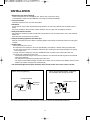
4. Install or locate this appliance only in accordance with
the provided installation instructions.
5. Some products such as whole eggs and sealed
containers - for example, closed glass jars are able to
explode and should not be heated in this oven.
6. Use this appliance only for its intended use as
described in this manual. Do not use corrosive
chemicals or vapors in this appliance. This type of
oven is specifically designed to heat, cook, or dry food.
It is not designed for industrial or laboratory use.
To reduce the risk of injury to persons:
a) Do not overheat the liquid.
b) Stir the liquid both before and halfway through
heating it.
c) Do not use straight-sided containers with narrow
necks.
d) After heating, allow the container to stand in the
microwave oven for a short time before removing
the container.
e) Use extreme care when inserting a spoon or other
utensil into the container.
18. Do not use this microwave oven to heat corrosive
chemicals (for example, sulfides and chlorides).
Vapors from such corrosive chemicals may interact
with the contact and springs of the safety interlock
switches thereby rendering them inoperable.
7. As with the appliance, close supervision is necessary
when used by children.
8. Do not operate this appliance if it has a damaged cord
or plug, if it is not working properly, or if it has been
damaged or dropped.
9. This appliance should be serviced only by qualified
service personnel.
Contact nearest authorized service facility for
examination, repair or adjustment.
10. Do not cover or block any openings on the appliance.
11. Do not store this appliance outdoors. Do not use this
product near water — for example, near a kitchen sink,
in a wet basement, near a swimming pool, or similar
locations.
19. Keep the waveguide cover clean at all times.
Wipe the oven interior with a soft damp cloth after each
use. If you leave grease or fat anywhere in the cavity it
may overheat, smoke or even catch fire when next
using the oven.
12. Do not immerse cord or plug in water.
20. Never heat oil or fat for deep frying as you cannot
control the temperature and doing so may lead to
overheating and fire.
13. Keep cord away from heated surfaces.
14. Do not let cord hang over edge of table or counter.
15. When cleaning surfaces of door and oven that comes
together on closing the door, use only mild, nonabrasive soaps or detergents applied with a sponge or
soft cloth.
21. Do not operate the oven without the glass tray in place.
Be sure it is properly sitting on the rotating base.
22. Risk of electric shock. Non-removable fasteners are
provided because of internal high voltages. Do not
remove fasteners.
16. To reduce the risk of fire in the oven cavity:
a) Do not overcook food. Carefully attend appliance
when paper, plastic, or other combustible materials
are placed inside the oven to facilitate cooking.
b) Remove wire twist-ties from paper or plastic bags
before placing bag in oven.
c) If materials inside the oven ignite, keep oven door
closed, turn oven off, and disconnect the power
SAVE THESE INSTRUCTIONS
2