1
User manual
Welcome
Thank you for choosing a AETHRA® SpA. Product.
Inside you will find useful information to help you get the most out of the Aethra
product.
The information contained in this document is the property of Aethra SpA., it is
subject to change without notice and it shall in no way be binding for Aethra SpA
©
Copyright Aethra Telecomunicazioni SpA 2007.
MS, Microsoft and NetMeeting are registered trade marks of Microsoft Corporation.
Windows is a trade mark of Microsoft Corporation.
All rights reserved.
Cod. 074111021GB Rev. 0 – January 2008.
2
Index
INDEX.......................................................................................................................................... 3
SAFETY RULES......................................................................................................................... 7
INSTALLATION WARNING FOR RACK MOUNT USAGE ..................................................................... 8
ENVIRONMENTAL SAFETY ........................................................................................................... 8
STATE OF CALIFORNIA PROP 65 WARNING .................................................................................. 8
SAFETY RULES FOR BATTERIES .................................................................................................... 8
WARNINGS ................................................................................................................................. 9
CLEANING .................................................................................................................................. 9
REGIONAL REQUIREMENTS ......................................................................................................... 9
CE MARK................................................................................................................................... 9
EN 55022 CLASS A COMPLIANCE .............................................................................................. 9
FCC 15 CLASS A COMPLIANCE .................................................................................................. 9
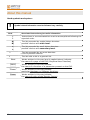
ABOUT THIS MANUAL ......................................................................................................... 10
ABOUT GRAPHIC USER INTERFACE (GUI) .................................................................... 11
ABOUT AVC8500 AND AVC500 CODECS........................................................................... 12
PRELIMINARY ........................................................................................................................... 12
GENERAL INTRODUCTION .......................................................................................................... 12
FEATURES AT A GLANCE ........................................................................................................... 13
CODEC COMPONENTS ................................................................................................................ 13
REMOTE CONTROL .............................................................................................................. 14
Remote control ............................................................................................................ 14
Remote control keys .................................................................................................... 15
Remote control alpha-numeric symbols to keys association........................................ 17
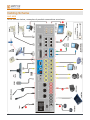
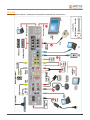
CABLING SCHEME ................................................................................................................ 18
AVC 8500.................................................................................................................... 18
AVC 500...................................................................................................................... 19
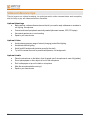
VIDEOCONFERENCE TIPS .................................................................................................. 20
SYSTEM POSITIONING AND INSTALLATION................................................................ 21
“MODE” connector ..................................................................................................... 21
CONNECTING THE AETHRA POD............................................................................................... 22
OPTICAL HEAD - OPTIONAL ....................................................................................................... 23
CAMERA OPTIONS..................................................................................................................... 23
CASCADING CAMERA OPTION ................................................................................................... 23
OPERATION AND USE .......................................................................................................... 24
3
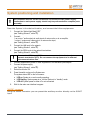
FIRST TIME EQUIPMENT IS SWITCHED ON .................................................................................... 24
Licence code insertion ......................................................................................................... 24
Location parameters setting................................................................................................. 25
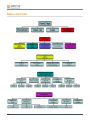
MENU STRUCTURE .................................................................................................................... 26
HOME PAGE .............................................................................................................................. 28
HOW TO MAKE A CALL .............................................................................................................. 29
HOW TO MAKE A CALL FROM PHONEBOOK................................................................................. 30
AUDIO-VIDEO CALLS ................................................................................................................. 31
TO RESELECT AN INCOMING OR OUTGOING CALL...................................................................... 32
TCS-4 MODE VIDEO CALL ....................................................................................................... 32
AUDIO CALL ............................................................................................................................. 33
SECURE CONNECTIONS ............................................................................................................. 33
HOW TO RECEIVE A CALL .......................................................................................................... 33
DUAL VIDEO MODE (OPTION) ................................................................................................... 34
Dual Video Connection ....................................................................................................... 34
Dual Video Disconnection................................................................................................... 35
PHONEBOOK ............................................................................................................................. 36
Entering Names in the Phonebook....................................................................................... 36
Modifying and Erasing Phonebook Entries ......................................................................... 37
Connecting to a global Remote Phonebook......................................................................... 37
VIDEO INPUT MANAGEMENT ..................................................................................................... 38
VIDEO PRIVACY ........................................................................................................................ 39
CONTROLLING AUDIO................................................................................................................ 39
VIDEO CAMERA PRESETS ........................................................................................................... 39
SYSTEM CONFIGURATION - SETTINGS.......................................................................... 40
USER PREFERENCES .................................................................................................................. 40
Control panel ....................................................................................................................... 41
General ............................................................................................................................ 41
Screensaver...................................................................................................................... 41
Remote control ................................................................................................................ 42
Call-Answer mode............................................................................................................... 43
General ............................................................................................................................ 43
H.323 ............................................................................................................................... 43
H.320 ............................................................................................................................... 44
Broadcast ......................................................................................................................... 44
Display Status Bar and Transparency .................................................................................. 45
Customize colors ................................................................................................................. 45
AUDIO – VIDEO – DATA ........................................................................................................... 46
Audio................................................................................................................................... 47
Inputs............................................................................................................................... 47
Processing........................................................................................................................ 47
4
Outputs ............................................................................................................................ 47
Video Quality ...................................................................................................................... 48
Cameras............................................................................................................................... 49
Settings ............................................................................................................................ 49
Customize........................................................................................................................ 49
Driver .............................................................................................................................. 49
Monitors .............................................................................................................................. 50
Settings ............................................................................................................................ 50
PIP-PaP............................................................................................................................ 53
Plasma/LCD .................................................................................................................... 55
Viewing modes............................................................................................................ 55
Data Channels...................................................................................................................... 60
INSTALLATION .......................................................................................................................... 61
Terminal Settings................................................................................................................. 61
Network interfaces............................................................................................................... 62
IP configuration ............................................................................................................... 62
IP Configuration .......................................................................................................... 62
H323 Settings .............................................................................................................. 65
SIP Settings ................................................................................................................. 65
Services (Web-Telnet, SNMP, Streaming) .................................................................. 66
PPPoE.......................................................................................................................... 70
ISDN network interface (option) ..................................................................................... 71
Access Configuration – ISDN BRI Euro ..................................................................... 72
Access configuration – ISDN BRI National ................................................................ 72
Access configuration – ISDN PRI Euro ...................................................................... 73
Access configuration – ISDN PRI National................................................................. 74
NIC network interface (option)........................................................................................ 75
G.703 interface configuration (option whit license) .................................................... 75
NIC (V.35/RS449/RS530/X21) Interface Configuration (Licence Required—see
“Licences” for more information)................................................................................ 76
Enable network................................................................................................................ 76
Location............................................................................................................................... 77
Load default settings............................................................................................................ 78
Licenses............................................................................................................................... 78
Available options, under licence:..................................................................................... 78
Encryption ........................................................................................................................... 79
Password.............................................................................................................................. 80
PRESENTATIONS........................................................................................................................ 81
Slides storage....................................................................................................................... 82
Slides recall via WEB client ................................................................................................ 82
Saving slides on a PC .......................................................................................................... 82
INTEGRATED MULTI CONFERENCE UNIT – MCU – (OPTION).................................................... 83
5
MCU Technical Specifications............................................................................................ 83
Multiconference Setup......................................................................................................... 84
How to start a multiconference............................................................................................ 85
Multiconference Management ............................................................................................. 88
MCU control panel icons................................................................................................. 88
Terminals status during a MCU....................................................................................... 91
Ending a Multiconference ................................................................................................... 91
Dual Video in MCU ............................................................................................................ 92
SYSTEM DIAGNOSTICS .............................................................................................................. 93
Terminal test........................................................................................................................ 93
Interfaces ............................................................................................................................. 93
Connection Status................................................................................................................ 94
Hardware ............................................................................................................................. 94
Software Versions ............................................................................................................... 94
CONNECTING A PERSONAL COMPUTER ....................................................................... 95
CONNECTING A PC TO THE SYSTEM WITHOUT LAN .................................................................. 95
CONNECTING TO THE SYSTEM VIA A PC IN A LAN .................................................................... 95
REMOTE MANAGEMENT .................................................................................................... 96
ACCESS TO THE WEB PAGE ........................................................................................................ 96
Live Video Streaming.......................................................................................................... 96
TOOLS Section ................................................................................................................... 97
CHAT Section ..................................................................................................................... 97
UPDATING SOFTWARE ........................................................................................................ 98
DATA CONFERENCE WITH MICROSOFT NETMEETING 3.XX ................................. 99
DOWNLOAD DATA CONFERENCE............................................................................................... 99
Managing the DataConference software.............................................................................100
APPENDICES ..........................................................................................................................101
IP NETWORK REQUIREMENTS FOR VIDEOCOMMUNICATION ......................................................101
NAT – FIREWALL INTEROPERABILITY .................................................................................101
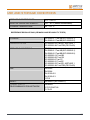
TECHNICAL SPECIFICS – AVC8500 ..........................................................................................105
TECHNICAL SPECIFICS – AVC500 ............................................................................................106
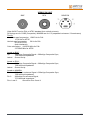
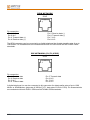
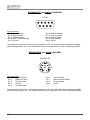
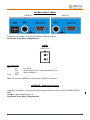
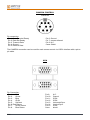
ELECTRICAL FEATURES OF CONNECTORS .................................................................................107
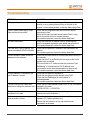
TROUBLESHOOTING...........................................................................................................115
GLOSSARY..............................................................................................................................116
USE AND STORAGE CONDITIONS....................................................................................117
6
SAFETY RULES
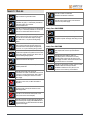
DEVICE IN CLASS I
Always connect to a grounded socket.
CAUTION: connect the ISDN port to a network
termination only (NT1). It is absolutely forbidden to
connect the system to an outdoor
telecommunication line.
CAUTION: connect the LAN port to an internal LAN
circuit only. It is absolutely forbidden to connect the
system to an outdoor telecommunication line.
CAUTION: the microphone POD cable provided
with the system must be used only with this system
and must not be routed under carpets, through
walls, within risers, or as part of building wiring
systems.
CAUTION: the ETHERNET cable provided with the
system must be used only with this system and
must not be routed under carpets, through walls,
within risers, or as part of building wiring systems.
CAUTION: the ISDN cable provided with the system
must be used only with this system and must not be
routed under carpets, through walls, within risers, or
as part of building wiring systems.
CAUTION: the PAN & TILT connector provides a
Limited Power Sources DC output.
CAUTION: This equipment will be inoperable when
the mains power fails.
CAUTION: contact an authorized
technician/consultant for assistance.
CAUTION: when making repairs, disconnect the
device from the power supply.
Only for AVC8500
CAUTION: double pole / neutral fusing.
CAUTION: for continued protection against risk of
fire, replace only with same type and rating of fuses.
Only for AVC500
CAUTION: for the operator's safety, only use the
mains adapter that has been provided with the
device.
CAUTION: the mains cable is used as a
disconnecting device, use therefore an easily
accessible outlet located near the device for the
power supply connection. Never remove the mains
plug while the device is connected.
CAUTION: for the operator’s safety, make sure that
the Network interface is always inserted.
If the Network Interface is not in place, do not
remove the cover under any circumstances.
CAUTION: the change from cold to hot
environments can cause condensate to form inside
the device. To avoid malfunctioning, wait at least 2
hours before connecting the device to the main
power supply.
CAUTION: in case of fire, do NOT use water to
extinguish it.
CAUTION: RISK OF ELECTRIC SHOCK
The power supply used by this device involves
lethal voltage levels.
CAUTION: do not touch the internal parts of the
device (and/or of the mains adapter).
CAUTION: if objects or liquids leak into the device,
disconnect the power supply cable IMMEDIATELY.
Have it checked by an authorized technician before
using the device again.
7
Installation warning for rack mount
usage
1. Tmra – The manufacturer’s maximum
recommended ambient temperature is 40 °C.
2. Elevated Operating Ambient Temperature – If
installed in a closed or multi-unit rack assembly, the
operating ambient temperature of the rack
environment may be greater than room ambient.
Therefore consideration should be given to installing
the equipment in an environment compatible with
the manufacturer’s maximum rated ambient
temperature (Tmra).
3. Reduce Air Flow – Installation of equipment in a
rack should be such that the amount of air flow
required for safe operation of the equipment is not
compromised.
4. Mechanical Loading – Mounting of the
equipment in the rack should be such that a
hazardous condition is not achieved due to uneven
mechanical loading.
5. Circuit Overloading – Consideration should be
given to the connection of the equipment to the
supply circuit and the effect that overloading of
circuits might have on overcurrent protection and
supply wiring. Appropriate consideration of
equipment nameplate ratings should be used when
addressing this concern.
6. Reliable earthing – Reliable earthing of rackmounted equipment should be maintained.
Particular attention should be given to supply
connection other than direct connection to the
branch circuit (e.g., use of power strips).
Environmental safety
This equipment must not be treated as household
waste and should instead be handed over to the
applicable collection point for the recycling of
electrical and electronic equipment. With the correct
disposal of this equipment, you will help prevent any
potential negative consequences for the
environment and human health, which could
otherwise be caused by inappropriate handling of
this product. For more detailed information about
recycling this product, please contact your local city
office, your household waste disposal company or
the dealer where you purchased this product.
State of California Prop 65 warning
WARNING : This product contains chemicals known
to the State of California to cause cancer and/or
birth defects or other reproductive harm. Wash
hands after handling.
8
Safety rules for batteries
• Risk of explosion if batteries are replaced by
an incorrect battery type. Dispose of used
batteries following the user instructions.
• The batteries of this equipment must be
disposed of by either a recycling company or a
company qualified for the disposal of dangerous
materials. The battery may also be disposed of in
special recycling containers specifically for worn
out battery (this may vary form country to
country).
• Only use the same type of battery that was
originally provided with the equipment.
• Replace the batteries when the remaining
power charge significantly low. Do not recharge.
• Do not use any damaged batteries.
• Do not to use the batteries for different
reasons from those prescribed.
• Do not short circuit the batteries (direct
contact between + and – poles of the battery).
This can happen accidentally during the
maintenance of the equipment or the replacement
of the worn out batteries.
• Do not put the batteries close to flames,
sparks, radiators, microwave ovens, fireplaces,
direct sun light or other sources of heat. Do not
throw the batteries into the fire.
• Do not weld directly on the battery terminals.
• Do not install the batteries with the polarity
upside down. Please refer to the installation
instructions for battery installation.
• Do not damage the batteries in any way. Do
not try to open or to pierce the batteries.
• Avoid any accidental collision as it could
cause the batteries to rupture and leak corrosive
liquids or irritable vapours. In such case
disconnect the power immediately from the
equipment and batteries.
• In case the battery liquids comes into contact
with your skin or garments, wash the area
immediately with water. If it comes into contact
with your eyes, wash immediately with plenty of
water and contact either a doctor or the nearest
first aid office immediately.
• Keep away from the children’s reach.
Warnings
Many of the components used in this device are
sensitive to electrostatic charge.
When handling the connection cables, disconnect
the power supply and avoid direct contact with the
connector terminals.
When handling electronic components, touch a
grounded surface to eliminate any static electricity.
If possible, wear a grounding arm band.
Failure to comply with these warnings could cause
permanent damage to this device.
CE Mark
Aethra S.p.A. hereby declares that this device
complies with essential requirements and other
relevant notes of R&TTE Directive 1999/5/EC.
The declaration of conformity maybe obtained
from:
Aethra S.p.A. - Via Matteo Ricci, 10 60126 Ancona - Italy
www.aethra.com - [email protected]
EN 55022 Class A Compliance
This is a Class A product. In a residential
environment this product may cause radio
interference. In such case the user may need to
take adequate measures.
Cleaning
To clean the device use a dry soft cloth (or with a
little bit of gentle detergent). Never use solvents,
such as alcohol or gasoline, to avoid damaging the
finish.
Regional Requirements
Laitte on liitettävä suojamaadoituskoskettimilla
varustettuun pistorasiaan.
Apparatet må tilkoples jordet stikkontakt.
Apparaten skall anslutas till jordat uttag.
FCC 15 Class A Compliance
This equipment has been tested and found to
comply with the limits for a Class A digital device,
pursuant to part 15 of the FCC Rules. These limits
are designed to provide reasonable protection
against harmful interference when the equipment
is operated in a commercial environment. This
equipment generates, uses and can radiate radio
frequency energy and, if not installed and used in
accordance with the instructions manual, may
cause harmful interference to radio
communications. Operation of this equipment in a
residential area is likely to cause harmful
interference in which case the user will be
required to correct the interference at his own
expense.
9
About this manual
Used symbols and syntax:
!
Symbol related information must be followed very carefully.
Nota
_ Associated instructions give useful information.
1.
2.
_ Instructions in a enumerated list must be accomplished following the
reported order.
A)
B)
_ The list preceded by capital letters denotes:
possible choices at a main level.
a)
b)
_ The list preceded by small letters denotes:
possible choices at a secondary level.
_ The list preceded by an arrow denotes:
a list of possible choices.
•
10
_ The list with a dot is a general list.
NAME
_ Words written in this way (and in capital letters) indicate:
the name of a page of the GUI (Graphical User Interface)
Name
_ Words written in this way indicate:
the name of a function or a parameter present on the GUI.
“Name”
_ Words written in this way indicate:
particular Hardware or Software functions.
Name
_ Words written in this way indicate:
the name of a Key of the Remote Control.
About graphic user interface (GUI)
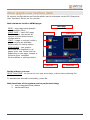
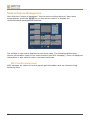
All system configurations and functionalities can be activated inside GUI (Graphical
User Interface) shown on the monitor.
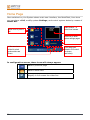
Main elements inside a MENU page:
PAGE – any page inside graphic
user interface (GUI).
HOME PAGE – main GUI page;
from here you can access all
system functionalities and/or
configurations.
ICON – image or symbol inside a
page, showing an available
functionality or setting status.
STATUS BAR – the graphic
horizontal bar displayed in all
pages lower end. Inside the bar,
depending on the page, images or
symbols show available
functionalities or settings status.
Home page
Icons
Video window
Status Bar
Active icon
Inside a Menu you can:
SELECT AN ICON – to choose an icon use arrow keys, yellow frame showing the
selection.
To activate the desired functionality, press OK.
Main functions of the system can be performed using:
icons in the graphical user interface.
remote control keys
11
About AVC8500 and AVC500 codecs
Preliminary
!
ATTENTION !!! You have to insert SW licence enabling code (AETHRA
SOFTWARE LICENCE KEY)
By pressing the “START” button, you’ll have 12 hours working time (switched on
system time): at the end system will stop, waiting for the enabling code (see
“Licences” §)
The System supports the complete functionality and all associated configurations that
are described in this manual.
Some functionalities, being optional, need to be activated by a licence.
General introduction
AVC8500 and AVC500 are scalable cutting-edge rack-mount codecs that provide the
highest quality videoconferencing for customized deployment in rooms of all sizes.
Deliver rich media collaboration with the possibility of connecting to various types of
devices (video projectors, PCs, amplification systems, cameras).
Mixed Multipoint
Built-in MCU connects ut to 9 remote sites with Continuous Presence function in mix
mode ISDN and IP.
Support multiple connectivity
Available in several versions: for connections up to 768 kbps over ISDN BRI and 4
Mbps over IP; as well as connections up to 2 Mbps over ISDN PRI or over leased lines
(X.21, V.35, RS366, RS449, RS530, G.703).
Dual-Stream Video
Convenient XGA input and output ports provide one-step PC plug-in for simultaneous
dual-stream video and live PC presentations with enhanced images.
Easy to configure
Flexible, simple architecture enables easy re-configuration of the system. Ready to
upgrade simply by adding different cards. Change the channel aggregator card and
upgrade from BRI to PRI in one easy step!
Customizable Graphic User Interface
The user is able to choose layouts and colours from a variety of alternatives.
12
Features at a Glance
Funzioni
AVC8500
AVC500
XGA/DVI input and output ports
Option
Dual-stream video.
Option
Support for three monitors.
Supports ISDN, IP-H323,IP-SIP, PPPoE, leased networks.
Option
Option
Mixed mode MCU with dial-out/dial-in configuration.
Option
Option
Embedded PowerPoint® presentations.
Support for PTZ camera and document camera.
Supports AMXTM and CrestronTM protocols for keyboards and
control panels.
T.120 for multimedia.
Full-duplex audio with echo cancellation.
Automatic Noise Suppression.
Remote diagnostics and management.
Wireless LAN support.
Web streaming function.
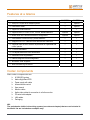
Codec components
Main codec components are:
H.320/H323 system
Aethra High-Band POD
Power supply with cable
Infrared remote control
User manual
Monitor cables
Audio-video cables for connection to a further monitor
PC serial cable adapter
LAN cables.
Packaging
NB:
The peripherals visible in the wiring system (see relevant chapter) that are not included in
the above list are included as examples only.
13
Remote control
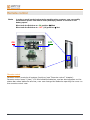
Note
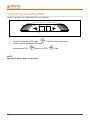
In order to avoid un-desired controls reaching other systems, user can modify
transmission power from 2mt to 20mt (default) by means of a switch in the
battery space:
Move both the Switches to- ON position
20mt
Move both the Switches to - OFF (1,2) position
2mt
ON
2
OFF
1
Remote control
Remote control controls all system functions (see “Remote control” chapter)
Remote control uses 2 (two) 1.5V AAA alkaline batteries, and an alert appears on the
status bar when batteries are low; user can change the batteries opening the cover on
the remote control rear.
14
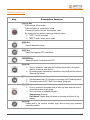
Remote control keys
Key
Description function
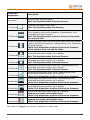
ON/OFF Key
It turns on and off the system.
It puts the system in “screen saver” mode.
It restarts the system from the “screen saver” mode.
By pressing the key results in opening a window of notice:
YES - Turn off the system.
NO - To enter “screen saver” mode.
SEND Key
It sends slides/still pictures.
SLIDE Key
Opens the integrated PPT presentation.
FAR/NEAR Key
Select the remote o local camera for PTZ.
DUAL Key
Once in connection, it activates the DualVideo functionality: the system
asks for the second video source.
By pressing again the same key is possible to stop the DualVideo, without
disconnecting the call.
PIP Key
Activates/deactivates PiP (left upper corner being the PiP default position).
If enabled, moves the PiP ( See “Control panel” paragraph).
PRIVACY Key
Once in connection the system does no send any more video live but the
customizable video privacy image.
Not in connection activates/deactivates:
Video privacy: As above.
Don't disturb: System does not answer to incoming calls (busy for the
remote).
Back Key
Comes back to the previous interface page, without storing any parameter
eventually modified.
15
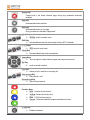
HOME Key
Comes back to the Home interface page, saving any parameter eventually
modified.
SELF Key
Activates/deactivates selfview.
HELP Key
Activates/deactivates on line help.
During connections activates “Diagnostics”.
(- / +) Keys
ZOOM: sets the camera zoom.
Auto Key
Activates/deactivates the autotracking function (NOT available).
(- / +) Keys
VOL: sets the audio level.
Mute Key
Activates/deactivates audio transmission.
Arrow Keys
allow navigation inside interface pages and camera movements.
OK Key
confirms actual selection.
Call Key
Allows to call or receive an incoming call.
Disconnect Key
Disconnects a call.
Phonebook Key
Opens the phonebook.
Function Keys
Red - Camera choice shortcut.
Yellow -Camera choice shortcut.
Blue - H.243 function shortcut.
Green - Received slides/still images visualization shortcut.
C-DEL Key
Deletes characters.
16
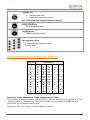
CAMERA Key
Selects a video input.
Usable as camera choice shortcut.
(see “Audio-Video-Data chapter/Customize cameras”)
MEMO-PRESET Key
Saves the camera presets.
SEL-PRESET Key
Selects the camera presets.
Alphanumeric Keys
It allows letters and numbers insertion.
(See the chart)
Remote control alpha-numeric symbols to keys association
KEY
SYMBOLS
1
1
2
2
a
b
c
3
3
d
e
f
4
4
g
h
i
5
5
j
k
l
6
6
m
n
o
7
7
p
q
r
8
8
t
u
v
9
9
w
x
y
z
0
0
└─┘
s
*
.
*
=
–
+
#
#
@
:
/
\
Insertion of the characters in the alphanumeric fields
For numbers or letters insertion it is possible to use the alphanumeric keyboard of the
remote control or, alternatively, the virtual keyboard by pressing the OK key once
positioned on the alphanumeric field.
Select the “Esc” key in the virtual keyboard to close it.
17
Cabling Scheme
AVC 8500
In the scheme below, examples of possible connections are shown.
18
AVC 500
In the scheme below, examples of possible connections are shown.
19
Videoconference tips
Tips to improve a virtual meeting, to optimize audio-video transmission and reception,
and to fully enjoy all videoconference benefits.
Optimal Meetings
•
•
•
•
Before starting a videoconference be sure that all you need is ready: addresses or numbers to
call, lighting, microphones.
Connect and test all peripherals eventually needed (document camera, VCR, PC/Laptop)
Use natural gestures as in a real meeting
Speak in your normal voice
Optimal Video
•
•
•
•
Avoid contemporaneous usage of natural (changing) and artificial lighting
Avoid direct artificial lighting
Avoid “mobile” backgrounds (curtains moved by the wind)
Try to fill the screen as much as possible with persons, not backgrounds
Optimal Audio
•
•
•
•
•
20
Place the microphone on the table in front of people (use 2 microphones in case of big tables)
Do not place papers or other objects in front of the microphone
Don’t rustle papers or tap on the table or microphone
Mute the microphone before moving it.
Speak in your normal voice
System positioning and installation
!
All operations must be carried out without connection to main power supply.
Connection to main power supply should only be performed after complete parts
assembly.
Place the System in the desired location, and connect the follow equipments:
1.
Connect the “Aethra High Band POD”
(see “Cabling Scheme”, cable 1).
2.
Connect:
“LINE OUTPUT” audio outputs to audio inputs of main monitor or to an amplifier,
“VGA/DVI-I” system main video output to main monitor input,
(see “Cabling Scheme”, cable 2).
3.
Connect the LAN input to the network.
(see “Cabling Scheme”, cable 3).
4.
Connect the ISDN inputs to the network terminations.
(see “Cabling Scheme”, cable 4).
!
Connect the ISDN input (ISDN connector or network interface) only to a
network termination (NT1). Do not connect the equipment to an external
telecommunications line.
5.
6.
Connect supplementary audio or video equipments to the available inputs/outputs.
Connect the power supply.
(see “Cabling Scheme”, cable 5).
7.
8.
Switch the monitor ON.
Press the switch on key on the System rear.
The system status LED on the front means:
• LED on: System is on and normally operating.
• LED flashing: System power is on, but the System is in “standby” mode.
• LED off: System power is either off or not connected.
Wait for the main user interface to appear.
9.
“MODE” connector
Using the MODE connector you can preset the auxiliary monitor directly on the SCART
input.
21
Connecting the Aethra POD
How to connect, the High Band Pod microphone.
High Band POD
1.
2.
Connect the High Band POD output
In case a second High Band POD is used:
connect second POD
output to first POD
NOTE
Max two (2) Aethra Pods can be used.
22
to the rear panel of the System.
input.
Optical head - Optional
As a room camera, you can use an optical head. Compatible optical heads are the
ZeusD100 and ZeusD30.
For installation information, please see the “Cabling Scheme” section.
For configuration information, please see the “Audio-Video Data” – “Cameras” –
“Driver” section.
Camera Options
In addition to (or in place of) the optical head, you can use several external moveable
cameras, either as room cameras or auxiliary input cameras. You will need to:
1.
2.
Connect the camera to the desired input.
Connect a Visca (pin-to-pin) cable from the Codec’s “Ctrl Video 1” connector to the camera’s
Visca input.
Select as “Room” camera the correct driver from the drop-down menu.
Compatible cameras are:
•
CanonVC-C3
•
CanonVC-C4
•
Sony D30
•
Sony D100
For configuration information, please see the “Audio-Video Data” – “Cameras” –
“Driver” section.
Cascading Camera Option
You can create a cascade of moveable cameras connected to the Codec:
1.
2.
3.
4.
Connect cameras to the desired video inputs
Connect a pin-to-pin Visca cable from the “CTRL Video1” output of the Codec to the Visca input
of the first camera
Connect a crossed Visca cable from the Visca output of the first camera to the Visca input of the
second camera
Repeat the previous step for all cameras, up to the maximum number of video inputs supported
by the Codec
For configuration information, please see the “Audio-Video Data” – “Cameras” –
“Driver” section.
!
For cascading cameras, the cascade must begin at input one.
For example:
Out video camera id.1->”V.Input1 Codec”,
Out video camera id.2->”V.Input2 Codec”,
For the “V.input1” – “V.Input XX” inputs you can select only one driver, so all
cascading moveable cameras must be the same type (ex. all CanonVC-C3, or all
Sony D30)
In the same page, enable camera movements by checking the “Move” option.
23
Operation and use
This section of the manual explains the basic functionality of the System.
It is assumed that the system is correctly installed.
First time equipment is switched on
!
ATTENTION !!! You have to insert SW licence enabling code (AETHRA
SOFTWARE LICENCE KEY)
First time the system is switched on, you need to:
1.
2.
insert the licence code;
Set some Location parameters .
Licence code insertion
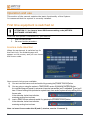
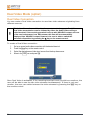
When the equipment is switched on for
the first time, the LICENCES page will
appear on the screen, and you can insert
the licence code.
Now several choices are available:
A)
B)
C)
You can insert the licence code and enable it by pressing the Enable licence button.
You can going on using the system in TEMPORARY version by pressing the Start button;
LOCALIZATION page will appear to set several important parameters (see “Localization” §) and you’ll
have 12 hours working time (switched on system time); once ended, system will stop waiting for the
licence code.
In the status bar, below time indication,
remaining working time is shown.
insert a DEMO licence code and enable it by pressing the Enable licence button.
In the status bar, below time indication,
remaining working time is shown.
Note: to insert licence code after B) and C) choices, see the “Licences” §.
24
Location parameters setting
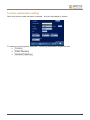
Once the license code has been inserted, the LOCATION page is shown.
To ensure correct system operation, following parameters should be set:
Country ;
Video Standard ;
Cameras Frequency .
25
Menu structure
26
27
Home Page
Once switched on, the System shows main user interface, the HOME PAGE; from here
you can place a Call, modify system Settings, and control system status by means of
Status Bar.
Video window - to
control local camera
Active icons to place a
call.
Active icon to enter
system settings pages
In this area icons
related to actual
system status are
shown.
In this area icons
related to GUI control
are shown.
(see below).
In configuration menus, these icons will always appear:
Back to previous page
Back to HOME PAGE.
Magnify in full screen the video live.
28
How to make a call
Once the System is on, the main user interface will display the HOME PAGE.
A call can be made in three different ways:
From the Phonebook – see § “How to make a call from Phonebook”.
Audio/Video – see § “Audio-video calls”.
Audio Only – see § “Audio call”.
!
To make an IP call, the address of called IP terminal must be inserted following
this syntax: xxx.xxx.xxx.xxx
29
How to make a call from Phonebook
To enable the quick selection of a number to call, a phonebook is available to store
data about terminals that are frequently called. To call one of these numbers, users
need only select the entry in a list.
From the HOME PAGE, using the arrow keys on the remote control device, move the
pointer over the Phonebook icon and press OK.
The following image will appear:
Note:
The remote control has a dedicated key to directly open the phone book. See the “Remote
Control” section.
To make a call:
1.
2.
3.
4.
5.
30
Use Search field for an alphanumeric search.
Select the name and press OK to confirm.
Move to the CALL icon and press OK to make the call.
The same function can be achieved by pressing the CALL remote control key.
In order to end the call, use the DISCONNECT remote control key. The system will ask you to
confirm disconnection.
Audio-video calls
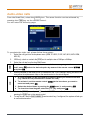
From the HOME PAGE, select the VIDEO icon. The same function can be achieved by
pressing the CALL key on the remote control.
You will enter the following page:
To complete the video call, please follow these steps:
1.
2.
3.
!
4.
Select the call type from the dropdown menu (ISDN, IP-H323, IP-SIP, NIC, MCU, MCU ISDN,
MCU IP).
ISDN only: check or uncheck the 56K box for multiple rates of 56Kbps or 64Kbps.
Select the call rate from the drop-down menu.
To select an option from a drop-down menu, it is necessary to go to the menu
itself, press OK, select the desired option by means of the remote control arrows
and press OK.
Enter the number or user alias (the H.323 Name from the “H.323 Settings” menu) you want to call
using either the alphanumeric keys on the remote control or the virtual keypad.
1. A virtual keypad can be activated for situations where you need to enter text
(e.g. names for the phonebook or aliases for calls).
!
2. To activate it, set the remote control cursor in the box where you want to
enter text and press OK.
3. Select the desired letter by moving the cursor over it, and pressing OK.
4. To close the virtual keypad, select the ESC key and press OK
5.
6.
Move to the CALL icon and press OK to make the call. The same function can be achieved by
pressing the CALL key on the remote control.
To end the call, use the DISCONNECT remote control key; if configured, the system will ask you
to confirm disconnection.
31
To Reselect an Incoming or Outgoing Call
Incoming calls are indicated with a green arrow while outgoing ones are indicated
with a red one.
A cyclic buffer of 60 numbers is available to store calls.
To reselect a called number press the CALL remote control key twice. A list will
appear, and numbers can be selected and modified.
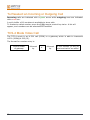
TCS-4 Mode Video Call
The TCS-4 mode is an H.320 call (ISDN) to a gateway which is able to transcode
H.320 (ISDN)/H.323 (IP).
The format for number entry is:
ISDN number
of gateway
32
followed
by
#
followed
by
H.323 number (E.164) of
the terminal to be called
Audio call
If you would like to make an audio-only call (using the System like a normal
telephone), select the AUDIO icon from the HOME PAGE.
To complete the audio call, follow these steps:
1) Select the type of call (ISDN, IP-H323, IP-SIP, NIC) from the drop-down
menu.
2) Enter the number or the alias (IP) you want to call using the keys on the
remote control or the virtual keypad.
3)
Move to the CALL icon and press OK to make the call, or press the CALL
remote control key.
To end communication, use the DISCONNECT remote control key: if enabled, the
system will ask you to confirm disconnection.
Secure Connections
The System can manage secure videoconference sessions via encrypted connections,
in both point-to-point and multipoint sessions. To do this, the encryption function
must be enabled: for more information, refer to the “Encryption” section of this
manual.
Once encryption is properly configured, you can make a secure call by following the
same procedure described for a standard call.
Useful information:
The encryption status can be checked on the status bar.
If the encryption is enabled and configured, an icon showing a padlock is displayed on
the status bar.
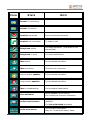
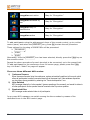
When in a conference call session, the padlock icon meanings are:
Encryption has been enabled but the function is not active.
Encryption is active.
Encryption is activated only in transmission.
How to receive a call
If you are in the HOME PAGE and receive a call, a notification will be displayed in a
window showing the caller’s number. If the automatic answer function (described in a
later section) is not enabled, you will be asked whether or not to accept the call. If you
are in a different page, you will be asked to accept or reject the call whether or not
the automatic answer function is enabled.
33
Dual Video Mode (option)
Dual Video Connection
You can create a Dual Video connection to send two video streams originating from
different sources.
!
This is feasible on the condition that the remote terminal supports Dual Video.
Dual Video transmissions can be initiated by either the Audio-Video calling or
called terminal. If the receiving terminal is set up with XGA/DVI-I output, and one
of the received streams is an XGA stream, this one will be automatically
displayed into XGA/DVI-I output. However, the user is able to switch the
automatic disposition by pressing the C key on the remote control.
To create a Dual Video connection:
1.
2.
3.
4.
Set up a normal audio-video connection with the desired terminal.
Press the Dual key on the remote control.
Select the desired second video input source from the drop-down menu.
Move to the YES icon and press OK.
Once Dual Video is activated, if the receiving terminal is set up with two monitors, the
user will be able to see the two video streams simultaneously. If there is only one
monitor, the user can switch between the video streams by pressing the SELF key on
the remote control.
34
Dual Video Disconnection
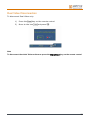
To disconnect Dual Video only:
1)
Press the Dual key on the remote control.
2)
Move to the icon Yes and press OK.
Note
To disconnect the whole Videoconference press the Disconnect key on the remote control.
35
Phonebook
System allows use of either a “local” phonebook or a phone book on a “remote
server” (LDAP H.350 protocol).
You can select desired phonebook by means of drop-down menu:
Local
for local phonebook
Remote server identifier
for remote server phonebook
Entering Names in the Phonebook
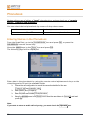
From the HOME PAGE, go to the PHONEBOOK icon and press OK, or press the
PHONEBOOK remote control key.
Move the arrow keys to the Enter icon and press OK.
The following page will be displayed:
Enter data in the phonebook by using the remote control alphanumeric keys or the
virtual keypad to fill out the available fields.
Choose the call configuration to record the connection details for this user
( Type of call and transfer rate )
Enter Name and Company
Enter the prefix and number Code/Number
Using the arrows move to the Save icon to save the new data or to Cancel to exit and
press OK
Note:
If you want to store an audio call only entry, you must check the Speech box.
36
Modifying and Erasing Phonebook Entries
To modify a phonebook entry:
1.
2.
3.
Select the desired entry and press OK
Move to the Modify icon and press OK again
Enter modifications and save them
To erase an entry in the phonebook:
1.
2.
Select the desired entry and press OK.
Move to the Cancel icon and press OK (the system will ask you to confirm deletion).
Connecting to a global Remote Phonebook
Phone book on a remote server (LDAP H.350 protocol).
To use remote server phonebook, you need to previously configure the remote server
(Server Configuration icon).
Note
To correctly configure remote server connection parameters, please contact your network
administrator.
To connect to the remote server, from PHONEBOOK page move to the drop down menu
and select the desired server IP address.
To activate the connection select the Connect icon and press OK.
The phonebook will now operate as described above.
37
Video Input Management
It is possible to manage different video inputs by selecting them using the remote
control keys Camera. The function keys Red – Yellow - Camera, can be configured to
be associated with any available video input. Possible choices include:
Room camera
XGA/DVI-I video input
Whatever video peripheral with composite signal (e.g. camera or VCR)
Note: The desired video source must be connected to the System inputs on the back of the
equipment beforehand. For a correct setup of the function keys, see the chapter “AudioVideo-Data”, section “Camera”.
During a connection it is also possible to control not only the local video camera’s
zoom and panning functions but also those of the remote camera (if enabled). Use the
remote control key Far/Near to select remote or local camera.
Field of View and Zoom
You can control field of view and zoom in two ways:
•
•
From the HOME PAGE, using the remote control, go to the “video window” and press OK. Adjust
the video camera’s field of view with the arrow keys and press OK on the remote control.
From the HOME PAGE, go to the Magnifier icon on the status bar and press OK. You will see
a full screen display with the camera under your control. To release camera control, press OK.
Using the XGA/DVI-I IN/OUT
In the system rear panel there are an XGA/DVI-I input to connect a personal
computer. For a correct cabling, see the “cabling scheme”.
Correct use of the XGA/DVI-I implies that the video PC configuration has been set
(setting: screen→ properties) with one of the following picture frequency limits (or
refresh frequencies).
38
Resolution
Refresh Frequency (Hz)
640 x 480
60, 70, 72, 75, 85
800 x 600
60, 70, 72, 75, 85
1024 x 768
60, 70, 72, 75, 85
1280 x 1024
60, 70, 75
Video Privacy
In connection
To activate the Video Privacy function, press the PRIVACY key on the remote
control. Local video will no longer be transmitted.
will appear in the video window indicating that the remote terminal
The icon
is no longer receiving video from local terminal.
Not in connection
Activates/Deactivates:
– Video privacy as above.
– Do Not disturb System does not answer to incoming calls (busy for the remote)
Controlling audio
The VOLUME (+ and
-) keys allow you to adjust the level of received audio.
By pressing MUTE key you can activate the mute function, that is local audio will no
longer be transmitted. On both the local and remote displays, the icon
appear, indicating that the mute function is active.
will
Video camera presets
The Preset function allows the user to save camera positions (up to a maximum of 122
positions) in order to enable quick selection of a certain camera frame.
To save a preset:
1.
2.
Set the desired camera position and adjust the video zoom.
Press the MEMO key on the remote control and choose a memory location (maximum two
characters)
To recall a memory location:
1.
2.
Press the SEL remote control key
Using the remote control key, enter the memory location number corresponding to the desired
preset.
Note: The preset includes both the selected camera and its position, so recalling a preset
can change the current video camera. Besides, from remote, the protocol of control of the
camera allows to recall only the first 16 memorized presets.
39
System Configuration - Settings
This section describes the procedures to properly configure the System.
Note that some configuration parameters can be modified only when no
connection is active.
User preferences
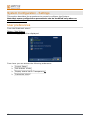
From the HOME PAGE select:
SETTINGS / USER SETTINGS.
The following page will be displayed:
From here you can access the following submenus:
Control Panel .
Call-Answer mode .
Display status bar & Transparency .
Customize colors .
40
Control panel
In these pages you can configure some system parameters.
General
Screensaver
Remote control .
General
Show Local Info :
If activated, shows information such as terminal name, ISDN number, and IP address on the
monitor in graphical form.
Show warnings :
If activated, allows visualization of “Bonding Recovery” messages.
Show logo when in a call :
Enables/disables logo display during a call. Logo is customizable—default is Aethra S.p.A.
Disable still picture :
disable transmission/receiving of “still images”.
Send received still to TFTP server
Disable or enable and configure TFTP server (to obtain server IP address , please contact
your network administrator). If enabled, still images can be sent and stored in a TFTP (Trivial
File Transfer Protocol) server. These still images will be available for future use.
Enable startup jingle
If activated, allow the jingle to every reboot of the system.
Show video name
If activated, allows visualization of the remote terminal “Name”.
Screensaver
Automatic screensaver :
to enable/disable the automatic screensaver function, and to set its timeout.
XGA on screensaver :
Enable/disable XGA loop function: “XGA IN” signal sent to “XGA OUT.”
Two possible cases:
•
•
Active “XGA IN” signal: monitor shows XGA signal.
Inactive “XGA IN” signal: no signals on monitor (“Stand By” mode).
41
Remote control
Numeric only remote control :
Enable\Disable alphabetical digits only on the remote control.
ID code (1-99) :
In order to control more systems with only one remote control, you can assign to each system a
numeric code (01 to 99), and then consequently set the remote control.
A) To configure the system:
1. Select the code box.
2. Enter the code.
Select (with arrows on remote control) the
icon.
The system will ask for confirmation.
If confirmed, a window will appear and ask you to configure the remote control with
the new code.
6. Configure the remote control and press OK.
To configure the remote control:
1. Press the RED and GREEN keys at the same time.
2. Wait for Stand by key stopping blinking.
3. Insert the numeric code (01 to 99)
3.
4.
5.
B)
Note:
codes from 1 to 9 must be composed of two digits (e.g. 03).
42
Call-Answer mode
General
This menu contains the following configuration settings:
Mute :
selected, at the start-up and after each disconnection system will not transmit audio, an icon will
be displayed in the local and remote terminals.
Do Not Disturb :
selected, at the start-up and after each disconnection system will not accept incoming calls, an
icon will be displayed in the local terminal.
Video Privacy :
• Once in connection.
To activate the Video Privacy function, press the video PRIVACY key on the remote control.
Local video will no longer be transmitted.
The
icon will appear in the video window indicating that the remote
terminal is no longer receiving video from local terminal.
Not in connection.
Activates/Deactivates:
Video privacy as above.
Do Not disturb System does not answer to incoming calls (busy for the remote).
Enable Tones :
Enable/disable tones in phase of call.
Confirm disconnection :
Enable/disable confirmation requests for call disconnection.
Automatic answer :
Enable/disable the automatic answer function, after the selected number of rings.
•
H.323
In this menu you can to select the dialing number format mode.
43
H.320
This menu contains the following configuration settings:
Audio Number = Video Number :
In a non-aggregated ISDN call, the audio number may be different from the video number. If this
checkbox is not selected, the System will request the video number and offer by default the
same number as the one used by audio.
Additional Calls :
Select automatic or manual configuration of additional calls
Mode :
Allows you to set the call mode to 64K or 56K .
TCS4 Delimiter :
definition of TCS4 calls delimiter: “#” or “*”.
TCS4 is a special routing method for direct video call when a Gateway is present on the network
(ISDN network to IP network).
To place a call using a TCS4 extension, do the following:
1. Obtain the following information:
Gateway number, delimiter and TCS4 extension.
2. Dial the Gateway number, the delimiter and the TCS4 extension.
Example: ISDN Gateway number
#
TCS4_extension.
Broadcast
This menu contains the following configuration settings.
This option allows you to set a transmission as Broadcast (without capabilities
exchange).
You will be prompted for a password.
Note:
In order to make a Broadcast call, the two terminals must have the same audio, video, rate
and Data (LSD) configurations.
44
Display Status Bar and Transparency
•
ENABLE STATUS BAR :
Allows you to personalize the System graphical interface, choosing whether
you want the status bar to be present and, if so, what information should be
displayed on it.
Status bar information:
Date & Time, Selected camera, Channel status, Charges, and Data channel.
•
TRASPARENCY :
Allows you to add transparency to graphical pages where the video window is
not reduced in size.
This transparency can be set to four different preset levels (high=75%
transparency, medium=50%, low=25%, opaque=0%).
Transparency can be used in different ways:
a.
Automatic: (default) Only the diagnostic pages of the
“Connection state” use transparency with a selectable initial
level (default medium). The transparency level can be changed
dynamically.
b.
Variable: All pages where no video is present use a selectable
initial transparency level (default medium). The transparency
level can be changed dynamically.
c.
Fixed: All pages where no video is present use a selectable
initial transparency level (default medium). The transparency
level cannot be changed dynamically.
d.
Off: Transparency is always deactivated.
Dynamic change of transparency level is achieved by pressing the remote
control key C. The transparency is always deactivated when a page is
superimposed with a message page to improve legibility.
Customize colors
Customize colors allows personalization of the graphical interface colours of the System.
45
Audio – Video – Data
From the HOME PAGE select:
SETTINGS / AUDIO VIDEO DATA
The following page will be displayed:
You can access the following submenus:
Audio .
Video Quality .
Cameras .
Monitor .
Data channel .
46
Audio
You can access the following submenus:
Inputs .
Processing .
Outputs .
and adjust the ringing and sound volume.
Volume for Ringing and Sound.
For adjust the ringing and sound volume, follow these steps:
1.
Select AUDIO or RINGING from the Volume dropdown menu.
2.
Use the remote control arrow keys to move the Volume slider control.
3.
Choose the desired value, using the remote control arrow keys.
Inputs
Allows for the adjustment of each audio input to the System.
Move to the desired input and press OK, a window will appear where you can:
•
•
•
Set the Gain value for the input
Enable/disable the input audio stream
Enable/disable the Echo Canceller
Recommended inputs for video or DVD:
We strongly recommend using “VCR” inputs for signals directly coming from
video-recorders or DVD, because the echo cancellation is disabled on these
inputs.
Recommended inputs for external audio Mixers:
We strongly recommend using the “Line” input for signals directly coming from
an external audio mixer, because echo cancellation can be enabled on this input.
The icon Load default values restore factory values of the audio inputs enabling all the
audio inputs.
Processing
In this menu you can enable/disable the Echo Canceller functions:
•
AGC .
•
Noise Reduction .
Outputs
In this page you can configure audio flows sent to the System Audio outputs.
You can first select Audio outputs from drop down menu, and then select the audio
flow you want to send to the desired output.
To restore factory values click on Load default values icon.
47
Video Quality
From the HOME PAGE select:
SETTINGS / AUDIO VIDEO DATA / VIDEO QUALITY.
This allows the configuration of the following parameters:
•
Video Quality-Speed:
•
Aethra Error Strategy:
To balance between sharpness and dynamic nature of video images.
Set the number of allowed line errors before video is frozen:
“Min Fluency”: stop video at the first occurred error,
“Max Fluency”: never stop video and allow errors through.
•
48
Audio Delay Automatic:
You can also synchronize audio with video. The audio delay represents the
value in milliseconds by which received audio is delayed.
In order to have perfect synchronization between audio and video, it is
necessary to adjust these parameters according to the connection type.
By selecting the check box (strongly recommended option), you allow this
operation to be performed automatically by the system. Alternatively, you
can make manual adjustments by moving the slider along the bar until you
obtain the best synchronization.
Cameras
This menu allows you to:
Settings .
Customize .
Driver .
Settings
•
•
•
•
•
Enable/disable the remote control of the local camera.
Enable/disable the Bring Back to place button
of the local camera. The last position of the Main camera, in case of stand-by of the set top, will
be memorized for being restored to wake up again.
Select, from dropdown menu, the video input.
Set the values for contrast, brightness and colour in order to obtain a better video image.
A preview window allows the immediate control of changes.
Auto Adjust button
AutoIris setup of the Main camera.
Customize
Each input could be enabled\disabled (that is, inserted in a selection list), associated
to a Name, associated to a shortcut (RED, YELLOW, Camera keys on remote control)
for a quick choice.
To choose a shortcut, select the related icon and press OK.
For the XGA/DVI-I input from the dropdown menu you can chose:
•
•
•
Analogical (analogical DVI signal input enable)
Digital (digital DVI signal input enable)
Automatic (default; analogical and digital DVI signal input enable)
(For XGA/DVI-I input, see cabling scheme)
Note:
DVI-I interface includes digital and analog signals (VGA, XGA, etc.)
Driver
Advanced (Administrator Password Required)
Select driver for Room Camera and other Video Input, and enable the PTZ function
(check MOVE) for all video inputs.
49
Monitors
In this page is possible to configure system video outputs.
You can access three menus:
Settings .
PIP-PaP .
Plasma/Lcd .
Settings
In this page you can set following system parameters:
Monitors Number
Monitor Menu
Video outputs
Dropdown Menu Monitors Number (default setting: Automatic).
Following table shows all available configurations:
Dropdown menu
Monitors Number
Connected monitors
Automatic
System automatically recognizes connected monitors
TV1
One analogical monitor.
HDTV
One XGA/DVI-I monitor.
TV1
+ TV2
Two analogical monitors.
TV1
+ HDTV
One analogical monitor and one XGA/DVI-I monitor.
HDTV
+ HDTV AUX
Two XGA/DVI-I monitors.
TV1
+ TV2 + HDTV
Two analogical monitors and one XGA/DVI-I monitor.
TV1
+ HDTV + HDTV AUX
One analogical monitor and two XGA/DVI-I monitors.
HDTV
+ TV1
One XGA/DVI-I monitor and one analogical monitor.
HDTV
+ HDTV AUX
Two XGA/DVI-I monitors.
HDTV
+ HDTV AUX + TV1
Two XGA/DVI-I monitors and one analogical monitor.
50
Dropdown Menu Monitor Menu (default setting: Automatic).
In case the TV1+ HighDefTV configuration has been chosen, so to have two
monitors connected to the system, is possible to choose where to see GUI
(Graphical user interface). Available configurations are:
Automatic
GUI set by the system
TV1
GUI always on TV1
TV2
GUI always on TV2
HDTV
GUI always on XGA/DVI-I
HDTV AUX
GUI always on XGA/DVI-I
Video outputs
Referring to the selected (or automatically recognized by the system)
Monitors number, in the lower area of the page the active video outputs are
highlighted, and you can select:
•
•
•
16:9 check box,
XGA/DVI resolution ,
DigitalDVI check box (for High Definition monitors only).
TV1:
connect a monitor or an analogical TV to TV1 video output
(point 2 of “Cabling Scheme” - RCA or Y/C connector, symbol
or
).
16:9 check box (use only with 16:9 monitors). If you select 16:9 check
box, the system adds vertical side banners in order to scale full screen
video image from 4:3 to 16:9.
TV2:
(point
connect a monitor or an analogical TV to TV1 video output
2 of “Cabling Scheme”
- Y/C connector, symbol
).
16:9 check box (use only with 16:9 monitors). If you select 16:9 check
box, the system adds vertical side banners in order to scale full screen
video image from 4:3 to 16:9.
HDTV
: connect a monitor with a DVI-I connector to XGA/DVI-I video
output, or a monitor with a XGA connector through DVI-I/XGA adapter
(“OUTPUT” DVI-I connector, see “Cabling Scheme”)
use in dropdown menu the correct Resolution for used monitor.
16:9 check box (use only with 16:9 monitors). If you select 16:9 check
box, the system adds vertical side banners in order to scale fullscreen video
image from 4:3 to 16:9.
51
If you use a High-Definition digital monitor you have to select Digital DVI
check box.
Available XGA/DVI-I output resolutions are:
XGA resolutions
HDTV resolutions
1280x768
720p
1024x768
576p
800x600
480p
640x480
Note:
DVI-I interface includes digital and analog signals (VGA, XGA, etc.)
The following example show the adjustment of 4:3 video in 16:9 video.
52
PIP-PaP
In this page is possible to select “Multi Imagine” system functionalities:
A)
PIP: Picture In Picture
Allows to see two overlapped images in one monitor, that is remote image in
full-screen format, an local image in a smaller overlapped window.
By means of remote control Self key you can switch windows content.
Is possible to choose:
•
PIP position (one of four monitor corners)
•
PIP movements (clockwise or counterclockwise) by means of remote
control PIP key.
B)
PaP: Picture and Picture
Allows to see in one monitor two windows side by side, with local and remote
images.
By means of remote control Self key you can switch windows content.
53
Multi Image Type .
!
a.
By selecting AUTO a mixed PIP and PaP function is enabled.
By means of remote control “PIP” key you can switch between PIP
and PaP.
b.
By selecting PIP , PIP function is enabled.
c.
By selecting PaP , PaP function is enabled.
Multi image type must be enabled separately for TV and HighDefTV monitor.
Multi Image Mode .
!
a.
By selecting AUTO PIP and PaP functions are enabled only when
needed, that is when number of video flows is greater than available
monitors number, and automatically place video flows (with
precedence to remote ones).
b.
By selecting ON PIP and PaP functions are enabled if at least two
video flows are available (in case of unique video flow you have a
full screen image, e.g. when system is not connected)
c.
By selecting OFF PIP and PaP functions are disabled.
Multi image mode must be enabled separately for TV and HighDefTV monitor.
Multi Image: remote control Self key and monitor info.
Remote control Self key allows to show video flows in different available monitors, choosing
among different combinations.
In the lower right corner of monitor containing GUI, an icon appears with four white monitors
showing available configurations, active configuration being in red.
The icon is hidden when default configuration is active.
54
Plasma/LCD
Select plasma, type of monitor and viewing modality.
Note: The follows instructions refers to “Pioneer” monitors.
!
Please carefully check XGA, Y/C and RS232C/DEBUG (null modem cable)
connections between plasma and System.
a) In the Type field, set the plasma model
b) In the Number of monitors field, select the number of connected plasma monitors
c) In the Mode field, select the default viewing mode from the pop-up menu.
!
First time “Plasma type” is selected (usually factory done), a particular
operations sequence must be followed:
1. Do not connect the system and the monitor by means of serial cable.
2. Select plasma type.
3. Once completed all initializations, switch off the system, connect the
system and the monitor by means of serial cable, switch on the
system: now is ready.
Viewing modes
Different viewing modes may change depending on used monitor characteristics .
Following viewing modes with corresponding short explanations refer to Pioneer
systems.
A)
B)
C)
Automatic MultiScreen .
Fixed MultiScreen .
Automatic BigLittleScreen .
55
A)
Automatic MultiScreen .
Selecting this mode, the system shows two side-by-side equal-sized pictures:
graphics relating to system management will appear on the right, whereas motion
video will appear on the left.
Once connected, an XGA remote signal automatically changes the viewing mode
to BigLittleScreen mode; once in this mode, surfing inside menus will let back
again to the MultiScreen viewing mode.
To see a local XGA image select full-screen visualization, then you can switch to
BigLittleScreen mode by pressing the C key on the remote control.
Exiting from the FullScreen mode, the system immediately comes back to the
MultiScreen viewing mode.
a) Disconnected system.
b) Connected system (with 50” Pioneer plasma, you’ll obtain two 27” images, 4:3 ).
56
c) Connected system that receives a remote XGA image (with 50” Pioneer plasma,
you’ll obtain two 4:3 images, a big one (42”) with 1024 x 768 XGA resolution image
and a small one (11”)).
d) Connected system with remote XGA image, while local user looks at the menu.
e) Connected system with remote XGA image, in DualVideo XGA mode.
The larger pane displays the XGA image, while the smaller one displays the remote
vide stream.
57
B)
Fixed MultiScreen .
Selecting this mode causes the system to display two side-by-side, equally-sized frames. Graphics
relating to system management will appear on the right, while remote video (or XGA) appears on the
left.
C)
Automatic BigLittleScreen .
If this mode is selected, the system will show two video outputs in different-sized frames.
The larger frame on the left will show the graphics relating to system management, while the video
stream will appear in the smaller frame on the right.
During an active connection, the system automatically selects which video stream to place in the
larger frame. The initial viewing mode can be restored only via the menu.
a) Disconnected system.
b) Connected system.
58
c) Connected system that receives an XGA image.
d) Connected system while user browses the menu.
e) Connected system that receive an XGA image on Dual Video XGA mode.
59
Data Channels
From the HOME PAGE select:
SETTINGS / AUDIO–VIDEO–DATA / DATA CHANNELS
In this menu you can:
Enable or disable Data transmission.
Select the Serial Rate .
Enable or disable Modem function (if activated allows AT commands usage).
• Activate/deactivate the RS232 control .
Choose the max data channel rate (H.320 only).
High
Max data, no audio, no video.
Data channel optimization to the
detriment of both audio and video
Medium
Max data, audio, no video.
Data channel optimization to the
detriment of audio (video still active)
Norm
Max data, audio, video.
Data channel optimization, with both
audio and video active.
Auto
Data, audio, video.
Data channel rate optimization to
RS232 rate and connection speed.
Select
Rate
User can choose the data channel rate.
Choose MLP data transfer protocol
60
Installation
From the HOME PAGE select:
SETTINGS / INSTALLATION
You will be prompted for a password.
The password is required to avoid accidental modifications and changes to settings.
Terminal Settings
From the HOME PAGE select:
SETTINGS / INSTALLATION / TERMINAL SETTINGS
In this section you can configure terminal settings for various network interfaces.
For each interface it is possible to set, if present:
•
The maximum data Rate for a call (excluding NIC).
•
Audio coding.
•
Video coding.
•
Bonding.
Determine if channels are to be bonded or not (ISDN only).
Note: With audio and video encoder/decoder settings set to <Auto> the system choose the
encoder/decoder based on the connection bit rate.
Moreover you can explicitly enable/disable some functionalities, in order to have the
system being compatible with old systems.
61
Network interfaces
From the HOME PAGE select:
SETTINGS / INSTALLATION / NETWORK INTERFACES
In this section you can choose and configure the system’s network interfaces.
For each interface, it is possible to set some parameters.
IP configuration
From the HOME PAGE select:
SETTINGS / INSTALLATION / NETWORK INTERFACES / IP
The following page will be displayed:
The five available options are:
IP Configuration .
H.323 settings .
SIP settings .
Services .
PPPoE .
IP Configuration
This menu is for Integrated LAN configurations; select IP Configuration and select the
type of the desired LAN Network:
62
•
Select IP Configuration
(Integrated LAN)
•
Select IP Wireless Configuration
(Wireless LAN)
•
Select the Priority between Fixed Network and Wireless Network, for
outgoing calls.
IP Configuration (Integrated LAN)
In this menu, you can enable/disable automatic assignment of an IP address:
•
IP address;
•
Subnet mask;
•
Gateway IP address;
•
DNS server IP address.
Is possible to configure Ethernet port either for what concerns connection LAN speed
(10Mbps / 100Mbps), or Duplex Mode (Half / Full), in order to optimally operate with
HUB/Switch that do not support automatic configuration.
Default configuration is <Auto> for both settings.
!
For configuration information, please contact your network administrator.
By selecting Advanced, you can enter a page to set:
A)
B)
C)
The range of Dynamic Ports of TCP and UDP (*).
Use NAT :
a)
NAT Type should be set to “Others”
b)
Public IP address must be the public IP address of the NAT
The Quality of service policy to be applied:
a)
IP Precedence/TOS
b)
Differentiated service. You can choose audio and video values in a 0 to 63 range
By selecting the BANDWIDTH icon is possible to enable and set maximum
bandwidth usage limits (in Kbps). These limits can be different in transmission
and reception, a very useful function on ADSL networks.
Firewalls
All Aethra videoconference systems have been tested with:
Cisco PIX Firewall (Firewall H.323 compatible - release 6.1 or later).
Cisco MCM Proxy (NAT H.323 compatible - IOS release 12.2 or later).
Note (*)
When a firewall is crossed, the firewall administrator must open a range of dynamic TCP
and UDP ports, as configured in the system, to allow bidirectional IP traffic. Moreover, once
the ports have been opened, the protocols (TCP 1720 (Q.931), TCP 1503 (T.120), UDP 1719,
and 1718 (RAS)) involved in a call must be taken into account.
63
IP configuration “Wireless” (Optional)
In this menu, you can enable automatic IP configuration, or enter the following data
manually:
•
IP address;
•
Subnet mask;
•
Gateway IP address;
•
DNS server IP address corresponding to a wireless network.
!
For configuration information, please contact your network administrator.
By selecting Advanced, you can enter a page to set:
•
•
•
•
SSID : wireless network identification.
MODE :
Ad-Hoc : all terminals in the network communicate with each other,
and not with a dedicated access point.
Managed : all terminals present in the network communicate
with an access point.
ENCRIPTION MODE : enable/disable encryption and allow user to set the desired key length.
ACTIVE KEY : select one of four alternative keys.
By selecting the BANDWIDTH icon it is possible to enable and set maximum
bandwidth usage limits (in Kbps). These limits can be different for transmission and
reception, a very useful feature on ADSL networks.
Note: This manual contains a section on “Recommended Wireless Network Interface
Cards”.
64
H323 Settings
This section contains the configuration options necessary to use the system with the
H.323 protocol:
•
Name H.323: (H.323 ID) the name used by the terminal for registration with
the gatekeeper.
•
Number H.323: (E.164) identifying number used by the terminal for
registration with the gatekeeper
•
Gatekeeper use and address
Gatekeeper automatic IP address
Gatekeeper static IP address
Advanced: Automatic registration to Gatekeeper, allows the user to
change registration timings
•
!
Using NetMeeting: If a T.120 connection is available, a data conference using
NetMeeting can be started by entering the IP address of the application host
server. To enable this function:
-
Check the box next to Use NetMeeting
-
Enter a server IP address where the application is hosted.
For configuration information, please contact your network administrator.
SIP Settings
This section contains the configuration options for use of the system with the SIP
protocol:
•
Terminal Name
•
Terminal Password
•
Use registrar: run terminal registration at a SIP Registrar Server.
•
Use Proxy: use a Sip Proxy Server.
Server: Enter SIP Registrar Server IP address.
Server: Enter Sip Proxy Server IP address.
!
•
TCP - UDP: use the appropriate protocol.
•
Port: Port for server signaling (Default is 5060).
For configuration information, please contact your network administrator.
65
Services (Web-Telnet, SNMP, Streaming)
The System allows for the configuration of various parameters associated with web
management, SNMP management and streaming management.
A)
Web-Telnet management .
In this section you can:
a)
b)
c)
d)
e)
f)
B)
Enable/disable System access from the Web using Telnet by means of IP, ISDN connections.
Enable/disable phonebook management from the Web.
Enable/disable phonebook management from the Web via ISDN (default: enabled).
Limit access to a single IP address or any IP address in a specified network.
Change the Web/Telnet access password (default: Username Aethra, Password 1234).
Enable/disable https service, that is the “Secure Socket Layer” function.
SNMP Management .
In this section you can:
a)
b)
c)
d)
e)
Enable/disable SNMP use.
Enter Administrator name.
Enter Location.
Limit editing of settings to one IP address, or any IP address on a specified network.
Limit reading of settings to one IP address, or any IP address on a specified network.
!
For configuration information, please contact your network administrator.
C)
Streaming Management .
In this menu the System can be configured to use streaming. This technology allows
viewing of and listening to live or recorded events by a large number of users
connected to the IP network without the need for a large file to be downloaded. It is
based on the continuous transmission of data compressed by particular programs
(systems) from a server, then decoded at the client side by an appropriate player that
works even during data buffering, thereby avoiding long delays.
The System is able to transmit to networks in either unicast or multicast. If the
streaming is unicast, only one client at a time is allowed to connect to the stream. If it
is multicast, there is no theoretical limit to the number of connected clients.
In case of pre-recorded event streaming, replay a recording of the event using a VCR
or DVD player connected to the System video input available for this purpose, select
this input and begin the streaming.
Note that the system does not act as a distribution server, rather as a simple system.
It does not provide connections using RTSP (Real Time Streaming Protocol), nor can it
provide unicast streaming to multiple clients, or offer other services typical of
distribution servers.
Streaming is supported by RTP (Real-time Transport Protocol). Video packets are
encoded in H.261, while audio packets are encoded in G.711.
66
Menu options are Streaming Management, Enable Streaming and Activation.
a)
Streaming Management .
This option permits that the parameters Announcements, Video , Rate,
Address, Port and TTL can be modified by an external application (e.g. from
the Web).
If this option is not selected and a unicast IP address is present in the
Address, then only the system identified by that IP address would be able to
view the stream.
•
•
•
b)
Enable/Disable Enable all addresses .
If enabled allows la above parameters modification from every external system.
If not enabled, you can define which system or sub-network is enabled to perform such an
operation.
If in the Address mask the value is 255.255.255.255, a system is selected; if the value
is 255.255.255.0 the sub-network is selected.
Likewise, if in the Address field a unicast type IP address has been set up, the limitation
also effects the visualization of the streaming.
Password: allows password protection of streaming management
Enable Streaming .
This option permits the parameters Announcements, Video, Rate, Address,
Port and TTL to be changed.
Allows stream viewing according to the limitations imposed by the parameters
“Streaming Management” and “Enable all addresses.” If this option is not
selected, streaming will never be activated.
Announcements. This drop-down menu allows you to choose how the
System will notify the user that an external system has requested streaming
activation.
Options:
•
Activation: The System will display a dialogue box containing a warning
and a video camera icon that will stay in place as a reminder for as long
as streaming is active.
•
Status: Only the video camera icon will be displayed during streaming.
•
Confirmation request: A dialogue box will appear to request
confirmation of streaming activation. This option offers an extra level of
protection.
Video. This drop-down menu allows you to choose which video signal is
transmitted when streaming is active.
If the Automatic option is selected, the streaming content will be determined
by the status of the terminal: if the terminal is connected (in either a pointto-point or multipoint session), video coming from the remote site will be
streamed. If the terminal is disconnected, local video will be streamed.
If the Local option is selected, the system will always stream local video.
67
Rate. This drop-down menu allows you to choose the bandwidth occupied by
audio and video streaming. Note that if a rate of 64K has been selected, the
video will not be transmitted, because all the bandwidth will be occupied by
audio.
Address. This parameter contains the IP address for the stream. If this field
contains a unicast IP address, it will be automatically overwritten by the IP
address of the system that has requested to view the stream from an HTML
page supplied by an internal web server. By pressing the Active key on the
configuration page, you can activate streaming: the system will start the
transmission of audio and video packets to the selected IP address.
If the IP address is multicast, streaming will be sent to a multicast group
identified directly by the IP address, enabling viewing by a large number of
users (theoretically unlimited).
Port. This parameter contains the number of the UDP port where audio
packets are to be sent. Since the streaming content is RTP, data are sent to
four different ports: one port for audio, one port for video and two ports for
the RTP information corresponding to both streams. Therefore, starting with
an audio port number, it is implied that the audio data will be sent to this port
number, video data will be sent to the audio port number plus two, and the
odd port numbers before and after the video port will be used for RTP data.
For example, if the audio port number is 554, the port number for video will
be 556, and the port numbers for RTP data on both streams will be 555 and
557.
TTL/Hops. This parameter contains the value for the Time to Live associated
with multicast packets.
c)
Activate
Streaming activation/deactivation request.
68
Viewing methods
Viewing with a plug-in
The integrated Web Server provides the simplest method.
Connect to the System via the Web and from the server homepage click on the
image that looks like video—this will give you access to the page produced by
streaming. This page has been designed to use Quick Time, which must have been
previously installed to view the video stream. Accessing the page automatically
activates audio-video streaming. The user can choose the video signal to be
displayed (Local or Automatic), which must be compatible with configured settings.
The System provides a direct link to streaming page, using the address:
http://aaa.bbb.ccc.ddd/ streamviewen.asp, where aaa.bbb.ccc.ddd is the IP
address of the System.
Viewing using an external player
Another way of viewing streaming is to use an external player. The only tested
players are QuickTime 6.0 and VIC (supplied by the University of California
Berkeley), but this does not exclude the possibility of compatibility with other
players that accept RTP streams.
The first operation necessary is to activate streaming. This can be achieved by
simply entering the IP address of the system in the “Address” field on the
streaming configuration page of the system where the player is located, or the
multicast address of the group to whom the stream is being sent. Pressing the
Activate key will enable the machine to begin the transmission of audio-video
packets to the player.
If you use QuickTime as a player, you can simply select “File” from the menu, then
“Open URL in new player” and enter http://aaa.bbb.ccc.ddd/stream.sdp where
aaa.bbb.ccc.ddd is the IP address of the System that is to send the stream.
Viewing using a Distribution Server
Distribution servers offer a range of services for stream management that the
System cannot offer directly. If users would like to make use of a distribution
server for streaming transmission sent from a System, they can do so in
accordance with the server’s characteristics.
Using a Proxy
Multicast streaming transmissions require an appropriate network configuration,
with limitations imposed by the presence of any Firewall or Proxy. To offer good
protection, these must block IP packets directed to unknown ports, such as the
UDP ports used for audio and video streams. If the stream has to pass through
such equipment, the equipment must be configured for any eventual multicast and
have the appropriate ports enabled for streaming.
If the stream is sent over an internal network, problems can still arise if it is
necessary to pass through a firewall in order to gain external access.
Deactivate Streaming
In order to stop streaming, go to the Deactivate key on the streaming
configuration page and press OK, or simply close the browser.
69
PPPoE
(Point-to-Point Protocol over Ethernet)
PPPoE is used to allow Internet Service Providers (ISPs) to use their existing Radius (∗)
authentication systems from dialup services on broadband/Ethernet-based services.
Automatic IP address: If selected, an automatic IP address will be assigned.
•
IP address: Enter static IP address provided by the ISP
•
Subnet Mask: Enter subnet mask provided by the ISP.
•
DNS Server IP address: Enter DNS server address provided by the ISP.
Advanced
This section contains configuration parameters, assigned by the ISP.
Once PPPoE active is selected, enter following data:
•
User name: user name assigned by the ISP.
•
Password: password assigned by the ISP.
•
Server name: ISP server name.
•
Service Name: Default (field empty).
Alphanumeric string for remote control of equipment connected with PPPoE
server (ex. modem).
•
Connection mode
Two different WAN connection modes are available:
•
Always connected
•
On call
Bandwidth
By selecting the BANDWIDTH icon, it is possible to enable and set maximum
bandwidth usage limits (in Kbps). These limits can be different in transmission and
reception, a very useful function for ADSL networks.
On the PPPoE configuration page there is a PPPoE status LED:
White: service not enabled
Red: service enabled, but not active
Green: service enabled and active
∗
Radius: Remote Authentication Dial-In User Service
70
ISDN network interface (option)
In this section you can:
Activate/deactivate:
•
CLIR (Calling Line Identity Restriction): if enabled, system will not transmit its
number when establishing a call.
•
COLR (Connected Line Identity Restriction): if enabled, system will not transmit its
number while receiving a call.
Activate or deactivate the Downspeed function that is automatically called when one or more
lines are dropped during a call.
Activate the FALLBACK function in order to allow a phone call when the remote system is a
basic telephone.
Enable/disable the Bonding Recovery function in order to cope with a situation in which
network errors (such as network SLIP errors) occur during a bonding connection.
In
o
o
o
o
o
o
o
a call, following messages could appear:
Corrupted video received. Please wait...
Video received Ok.
Corrupted data received. Please wait...
Data received Ok.
Network error recovery: re-establishing call...
Call established. Please wait...
Down-speed, connection rate.
Select the Euro or National Network.
•
Activate or deactivate the 5ESS protocol (for National ISDN only).
•
Select the 64K or 56K mode ((for National ISDN only).).
•
Activate or deactivate the 1TR6 function (for Euro ISDN only, allows you to change the
protocol level 3 from ETS1 to 1TR6).
•
Activate or deactivate the QSIG protocol (for Euro ISDN only, ISDN signaling protocol).
In the Access Configuration section select BRI or PRI and configure all the ISDN lines
you need.
It is advisable to disable any unused ISDN lines.
Changing from one kind of network to the another will require a system restart.
71
Access Configuration – ISDN BRI Euro
Select the icon with the number of the access to configure and press OK.
From this menu, you can:
Choose to Enable Accesses .
Specify the Number to be associated with the access.
Specify the Subaddress , if present.
Choose to enable the Multinumber function by checking the appropriate box.
Select TEI , either Automatic (default) or Fixed.
The TEI is an identifying number that allows the ISDN exchange to distinguish between different
terminals connected to a common access point. If TEI Fixed is selected, then you must manually
enter the TEI number. Conversely, by not selecting it, the parameter will be set as TEI
Automatic. In this case, the TEI number will be automatically assigned by the exchange and no
further operations in this menu are necessary.
Note:
Normally, the TEI is left as AUTO because an incorrect setting could create
connection problems
Access configuration – ISDN BRI National
Select the icon with the number of the access to configure and press OK.
From this menu you can:
Choose to Enable Accesses .
Specify the Number to be associated with the access.
Specify the SPID , if present.
Select TEI , either Automatic (default) or Fixed.
Enable any eventual SPID2 and enter the appropriate numbers.
72
Access configuration – ISDN PRI Euro
This interface can be used by means of the “XLNA” external module
(see “X LINE NETWORK ADAPTER” §).
A)
Move to the desired access configuration (icon 1 ) and press OK.
In this page you can:
B)
Choose to Enable Accesses .
Specify the Number to be associated with the Primary Rate Interface.
Specify the Subaddress , if present.
Choose to enable the Multinumber function by checking the appropriate box.
Move to the Advanced icon, and press OK.
In this page you can:
Choose Enable CRC4 depending on the connected network.
B-channel selection (Time slot)
• Choose Terminal to select the channel in use for a call or let Network to choose.
• For request from Terminal:
> Choose Channel interval to be used for a connection. You can select an interval by
defining First and Last channel.
> Channel search from starting from First or Last defined B channels.
Note: It is appropriate here to stress that unless you have special needs, it is advisable to
leave the “network” option selected, since incorrect configuration could create connection
problems. For special configurations, please contact your service provider.
73
Access configuration – ISDN PRI National
This interface can be used by means of the “XLNA” external module
(see “X LINE NETWORK ADAPTER” §).
A)
Move to the desired access configuration (icon 1 ) and press OK.
In this menu you can:
B)
Choose to Enable Accesses .
Specify the Number to be associated with the Primary Rate Interface.
Specify the SPID , if present.
Move to the Advanced icon and press OK.
In this menu you can:
B-channel selection (Time slot)
•
•
•
Choose Terminal to select the channel in use for a call or let Network to choose.
For request from Terminal:
> Choose Channel interval to be used for a connection. You can select an interval by
defining First and Last channel.
> Channel search from starting from First or Last defined B channels
Select Cable length . From the drop-down menu, you can also select the length of the
cable connecting the System to the Primary Rate access socket used.
Note: It is appropriate here to stress that unless you have special needs, it is advisable to
leave the “network” option selected, since incorrect configuration could create connection
problems. For special configurations, contact your service provider.
74
NIC network interface (option)
This interface can be used by means of the “XLNA” external module
(see “X LINE NETWORK ADAPTER” §).
G.703 interface configuration (option whit license)
In order to use G.703, it is necessary to have a licence (see section on licensing for
more information).
In this menu you can:
Choose either the E1 or T1 protocol
If the system has already been configured to support a PRI interface (either
Euro or National), the E1/T1 option is not available and the system is
automatically set to the appropriate mode:
Euro Primary Access
G.703 E1;
National Primary Access
G.703 T1.
Choose the Rate .
Set the Network speed ( 64K or 56K ).
Enable/Disable Automatic call .
To make an automatic call:
1. Enter Audio-Video call page.
2. Select NIC in Type of call drop-down menu.
3. Wait for few seconds, and the System will automatically start the call.
Enable/Disable Use Ch16 .
Enable/Disable CRC4 (E1 only).
Enable/Disable the Enabled Alarms option.
Configure the System to be either Master or Slave in calls.
G.703 advanced settings (T1 only).
Select Cable length, from the drop-down menu, you can select the length of
the G.703 cable.
Note:
If the system is configured with PRI lines, Euro or National, the System automatically
selects the net in the following way:
Primary Rate Euro Access → G.703 E1;
Primary Rate National Access → G.703 T1.
Note:
If “Automatic call” option is enabled, System will start the call as soon as it notices the
presence of a line.
75
NIC (V.35/RS449/RS530/X21) Interface Configuration (Licence Required—see
“Licences” for more information)
This section allows you to customize the NIC interface. The network type (X.21, V.35,
RS449, RS530) is automatically recognized by the system.
Available options:
Select the maximum Rate from the drop-down menu.
Select Automatic Call to make the call if network alarms are not present.
Select Use RS366 to allow the use of the RS366 interface (leased interfaces are not switched,
but they will be switched when combined with RS366).
Select RS366 Advanced in the NIC menu to configure some signals:
ON indicates that the signal is managed.
OFF indicates that the signal is not managed.
Select Termination to insert terminations on the interface signals.
Select CLOCK RX=TX for identical bit rates in transmission and reception.
Select Terminal Timing to transmit data with System clock.
Select Advanced in order to display the following advanced settings:
ON indicates that the signal is managed (OFF indicates that the signal is not
managed).
For all signals: ON indicates normal management of the signal,
while OFF sets the value of the signal to active.
Selecting ON/OFF/ON in the DTR box activates the Resync pulse.
Selecting RING in the CD box indicates the signal is used for announcing an
incoming call.
Note:
To use the NIC interface licence is needed, as well as a cable corresponding to the desired
interface.
Enable network
It is possible to enable/disable any calling protocol.
Once explicitly disabled, a protocol will no longer appear in the “combo-box” for call
selection.
An incoming call will be always accepted, even if the incoming protocol is disabled.
76
Location
From the HOME PAGE select:
SETTINGS / INSTALLATION / LOCATION.
The following page will be displayed:
This section contains regional data about the terminal:
Terminal Name: Enter a name for the terminal
Country Name: Select the country. An international country code will be
automatically provided.
Language: Select the desired language.
PBX: Enter the PBX access number for an outgoing call.
Audio Coding: Select the type of audio encoding in “Transmission.”
Video Standard: Select the video standard (PAL/NTSC), depending on the
peripheral connected to Video Out.
Selection Tone: Select the desired tone.
Camera Frequency: <Auto> or 50Hz (NTSC).
Date and time settings
By means of arrow keys select time on the control bar, and press OK: insert date
and time.
77
Load default settings
From the HOME PAGE select:
SETTINGS / INSTALLATION
From here, the default System configuration can be reloaded. There are two options:
•
•
User settings only .
Factory Defaults .
Once selected the desired option from the dropdown menu, move to the LOAD
DEFAULT VALUES icon and press OK. Read all instructions carefully.
If the FACTORY SETTINGS option has been chosen, users will be asked, as a
precaution, for confirmation. An affirmative answer will result in the factory settings
being reloaded. All user settings and data will be lost, including call history,
phonebook numbers and static IP addresses.
Licenses
From the HOME PAGE select:
SETTINGS / INSTALLATION / LICENSES
This page is dedicated to supplementary functions not offered by default. In order to
obtain information on the activation of these functions, please contact your system
supplier.
To insert a licence key by means of the remote control:
1.
2.
Enter the licence key.
Press the Enable Licence icon.
Available options, under licence:
a.
b.
c.
d.
e.
f.
g.
78
Up to 4Mbps IP connections
Up to 768Kbps ISDN connections
PRI connections
NIC (X.21, V.35, RS.449, RS.530, RS.366) connections
G.703 connections
MCU
Dual Video
Encryption
From the HOME PAGE select:
SETTINGS / INSTALLATION / ENCRYPTION
The configuration menu will be displayed; here you can set the following parameters:
Enable Encryption:
If encryption is activated, the System will use encryption in either H.323 or
H.320. It is also possible to enable/disable the encryption from the toolbar:
select the padlock icon, and press OK.
-
For IP calls:
If encryption has been activated, the data protection procedure is active from
the beginning of a videoconference.
Encryption is active from start (ISDN):
-
If this option is selected, the System executes the encryption procedure from
the beginning of the ISDN connection.
If this option is not selected, the ISDN connection starts in unencrypted mode.
Encryption can be activated later at any time during the connection. To do
this, select the yellow padlock on the status bar and press OK.
Unprotected calls
From this drop-down menu you can choose the policy the System will apply if the
remote terminal is not able to support protected calls.
• Disconnect – The System will not allow connection with a remote terminal
that does not support encryption, and therefore automatically disconnects.
• Ask Confirmation – During the session negotiation phase, the System will
ask you to confirm that you want to establish an unprotected call.
• Inform – The System will inform you that you are about to establish an
unprotected connection by displaying a visual warning message.
• State – The System will notify you that you are about to establish an
unprotected call, and once the connection is established an open padlock symbol
will be displayed on the status bar.
Length of AES Key (ISDN only)
From this drop-down menu you can choose (for ISDN connections only) three
AES key lengths:
• 128 bits
• 192 bits
• 256 bits
• <Auto> (allows optimal choice according to the characteristics of the
terminals negotiating the videoconference session.)
Note
For an IP connection, the key length is always 128 bits.
79
Length of Prime DH Number (ISDN Only)
The encryption protocol requires the simultaneous exchange of a prime number
and an AES private key between terminals.
For H.320 calls you can choose between two prime number lengths:
• High Security (length 1024 bits)
• Very High Security (length 1536 bits)
Note
For IP calls, the System always uses the High Security option with a 1024-bit length.
Most common video communication terminals normally use the High Security prime
number length and the 128-bit AES private key.
Password
There are three different kinds of passwords:
Administrator password: Always active. Can be modified by pressing the EDIT
icon.
User password: Must be activated. Can be modified by pressing the EDIT icon.
You can access SETTINGS page only.
Phonebook password: Must be activated. Can be modified by pressing the
EDIT icon.
Note: The Default password value is “1234”.
80
Presentations
During a call, the system allows to send slides or still images in Jpeg format that have
been previously loaded on the system using a PC.
•
To load files onto the system, a PC with the AePPtManager program installed must be used.
The program can be downloaded by entering the System WEB interface and selecting the
TOOLS icon.
1. Download the AePPTManager.exe software
2. Start AePPTManager.exe
3. For a correct operation, files must be extract to a PC folder.
4. The self-extracting file includes AePPTManager.exe and AePPTManager.ini.
•
Executing the program will display the following:
1.
2.
3.
4.
The program requests you to enter the system’s IP address and to choose the
presentation to transfer.
By pressing the SLIDE key on the remote control, you will enter the presentation
manager page.
Selecting the DISPLAY PRESENTATIONS icon and pressing OK will cause the
first nine slides of the presentation being displayed on video.
You can select a slide by moving the remote control arrows and pressing OK. The
slide will be locally displayed at full-screen and sent to the remote system.
81
5.
The presentation can be managed using the remote control arrows or using the
icons that appear in the lower area of the screen.
Go back to previous slide.
Go to next slide.
Show slides sequence.
To leave the presentation, press the HOME key on the remote control.
Slides storage
During a call, the system automatically stores slides or Jpeg images received from the
remote system. Up to 50 images will be stored in a circular buffer, till the connection
is terminated.
Slides recall via WEB client
Enter the System WEB interface, select Camera and Video Control and in the dialog
box labeled Photo click Photo Download.
A list will be opened, containing slides named SnapshotXX.jpg.
Saving slides on a PC
When a file is selected, the image will be uploaded to the PC and shown by the
browser. Do not forget to save it on the PC.
82
Integrated Multi Conference Unit – MCU – (option)
This section is dedicated to the functional description of the MCU (Multipoint Control
Unit) integrated in the System. The MCU, if not enabled by default, must be enabled
by entering an enabling code supplied by the manufacturer.
For an easier reading of this document, MCU stays for multiconference session.
Colored keys functions:
Red: associated camera activation
Yellow: associated camera activation
Blue: H.243 activation
Green: still picture display
MCU Technical Specifications
Number Participants:
"9 participants @ 256"
"6 participants @ 384"
"5 participants @ 512"
"4 participants @ 768"
"3 participants @ 1152"
Supported Standard:
• ITU-T H.320 ISDN, leased networks.
• ITU-T H.323 IP networks.
• IETF - SIP (RFC3261) IP networks.
• PPPoE.
• Video Coding H.261, H.263++, H.264
Video:
• Frame rate:
15 fps @ 56 -128 kbps,
30 fps @ up to 168 kbps.
• Video Resolution: 4CIF 704 x 576 pixel,
FCIF 352 x 288 pixel, QCIF 176 x 144 pixel,
4CIF 704 x 576 pixel for still images (Annex D:
H.261),
Up to 1024 x 768 over XGA in H.263.
H.264 coding MCU (see note):
"5 participants @ 128"
"4 participants @ 256"
"3 participants @ 384"
• Audio Coding G.711, G.722, G.722.1,G.728.
• LDAP H.350.
• Compliant MCU H.243, H.231.
• Compatible with analog and mobile networks.
• Chair Control H.243.
• Dial In/ Dial Out capabilities.
• Continuous Presence.
• Encryption.
• H.239 Dual-Video from any site.
Encryption:
• AES Encryption standard H.233, H.234, H.235.
Web management.
Note:
If the conference is managed in automatic mode, once reached the maximum available
number of H.264 remote terminals, system will degrade all new participants to H.263.
If the conference is explicitly set to use H.264 video, limitation on terminal numbers are
known at the conference start-up
83
Multiconference Setup
Before activating a multiconference session, configuration is required.
From the HOME PAGE select:
SETTINGS / MULTICONFERENCE
The following will be displayed:
In this menu you can set:
Network Type: IP , ISDN or Mixed .
Conference Type : allows you to select the number of participants and the desired rate
(example: for an MCU IP you select 7@128 from the drop-down menu, which means that the
MCU will allow the System to manage a multiconference with a maximum of 7 terminals
(including itself), via IP, with a maximum rate of 128K for each connection).
Preferred Audio Coding
Preferred Video Coding
Go to the corresponding drop-down menu, press OK, with the aid of the arrow
keys on the remote control make your selection and press OK again to confirm.
<Auto> is the default setting.
In addition, you can select the following options:
Dual Video H.239
G.722.1
H.264
Auto adjust rates and Auto adjust coding
If automatic adaptation is enabled, the System will automatically adapt the multiconference to
the audio/video encoding and bit rate of the lowest quality connection within the conference,
without excluding any participant.
Tx Continuous Presence
Enable/Disable transmission of Continuous presence: for multiconferences (at least two
participants) all participating sites receive the signals simultaneously from all participating
terminals.
Ask to save scenario
At the close of the multiconference, the system asks whether save in the phonebook all
information needed to repeat it, with an editable “conference name”.
84
Mode (only for MCU ISDN or Mixed)
Multiple of 64K
Multiple of 56K.
Cascade Role , Master or Slave
This option allows you to set up cascaded MCUs in a two-level hierarchy tree.
Corresponding to the base node of the cascade there is the Master System,
with Slave Systems for the child nodes.
Note
In a mixed-mode MCU session, the user can choose to substitute NIC protocol for ISDN.
So in a multiconference with an active NIC connection, no ISDN connections are allowed,
and in a multiconference with an active ISDN connection, no NIC connections are allowed.
How to start a multiconference
To establish a multiconference:
1.
From the HOME PAGE, select the VIDEO icon, or press the Call key on the
remote control. You will enter the AUDIO AND VIDEO CALL page.
2.
Choose desired MultiConference type: MCU IP, MCU ISDN, MCU (mixed
mode).
Chose the desired rate and number of participants.
If the MCU has not been configured, it is possible to enter the configuration
menu previously described by selecting the CONFIGURE MCU icon and
pressing OK.
3.
4.
5.
If the MCU has already been configured, go to the Active Conference icon
and press OK to start the multiconference. The same can be obtained by
pressing the CALL key on the remote control.
6.
Local video will be displayed at full screen.
7.
To add participants, press the remote control CALL key
8.
To disconnect participants, press the remote control DISCONNECT key.
85
H.243 function
From the full screen page of MCU manager or a participant terminal is possible to get
MCU control, conforming to H.243 protocol, by pressing the BLUE key.
A page will appear, where is possible to:
Request Chair control .
•
Close conference .
Send local on air .
For each terminal in the list.
•
Information : connected users.
•
See .
•
Send on air .
•
Disconnect .
Remote terminals disposition and visualization
“Terminals disposition” icon
“Video Zoom +” icon
“Video Zoom -” icon
With MCU on and various connected terminals, is possible to choose disposition and
how many video flows should be displayed. From the full screen page of the manager,
press right or left keys to select the “terminals disposition” icon, and press OK.
Once the window is opened:
1.
2.
By means of up and down keys choose the visualization mode, and then confirm selection
with OK key.
Close the window by means of the OK icon, or with the X icon to discard selection.
Note
If Continuous Presence transmission is enabled in configuration (see Multiconference setup
chapter), “terminal disposition” is sent to all terminals
86
Terminals
disposition
Automatic
Description
Always shows all participants.
! Note: This disposition enables Continuous Presence.
Show active speaker video flow.
1 Terminal
2 Terminals
2 Terminals
3 Terminals
3 Terminals
4 Terminals
7 Terminals
8 terminals
8 terminals
9 terminals
9 terminals
! Note: This disposition enables Voce Switching.
Shows (horizontally tiled) two terminals video flows only,
active speaker and previous speaker, independently from
connected terminals number.
! Note: This disposition enables Continuous Presence Active speaker
does not see its video.
Shows (vertically tiled) two terminals video flows only, active
speaker and previous speaker, independently from connected
terminals number.
! Note: This disposition enables Continuous Presence
Active speaker does not see its video.
Shows three terminals video flows only, independently from
connected terminals number, as in picture.
! Note: This disposition enables Continuous Presence.
Shows three terminals video flows only, independently from
connected terminals number, as in picture.
! Note: This disposition enables Continuous Presence.
Shows four terminals video flows only, independently from
connected terminals number, as in picture.
! Note: This disposition enables Continuous Presence.
Shows seven terminals video flows, independently from
connected terminals number, as in picture.
! Note: This disposition enables Continuous Presence.
Shows eight terminals video flows, independently from
connected terminals number, as in picture.
! Note: This disposition enables Continuous Presence.
Shows eight terminals video flows, independently from
connected terminals number, as in picture.
! Note: This disposition enables Continuous Presence.
Shows nine terminals video flows, as in picture.
Squares are used in horizontal order.
! Note: This disposition enables Continuous Presence.
Shows nine terminals video flows, as in picture.
Squares are used in horizontal order.
! Note: This disposition enables Continuous Presence.
By means of Cancel key choose if visualize the status bar.
87
Multiconference Management
Once the first 6 steps of paragraph “How to start a multiconference” have been
accomplished, press the HOME key on the remote control to display the
multiconference management interface.
The window in the centre displays current local video. The following table shows
various information icons for the local terminal (the MCU manager). Some of displayed
information is also valid for other connected terminals.
MCU control panel icons
MCU manager by means of control panels get information and can interact using
following icons.
88
ICON
STATE
NOTE
Channel is connecting
Channel connected
Terminal connected
For terminal disconnection
Terminal not connected
To make a call
Microphone active
For Mute activation (The audio is not
transmitted)
Microphone in MUTE
For Mute deactivation
Video active
For broadcast activation
Video not active
Terminal not connected
Previous active speaker
For broadcast activation
Current active speaker
For broadcast activation
Video in broadcasting
For broadcast deactivation
Voice switched
Active speaker in full screen
For Continuous Presence activation
Continuous Presence
All participants are on the screen
(default).
For Voice Switched activation
Conference status
For terminal information
Stay for “conference status” table
89
Encryption not active
Stay for “Encryption”
Encryption disabled by
user
Stay for “Encryption”
Encryption only in
transmission
Stay for “Encryption”
Encryption active
Stay for “Encryption”
To add participants using the alphanumeric keys of the remote control, go to a video
control panel, and select the HANDSET icon; press OK to start the call procedure.
Three options for choosing a remote user will be presented:
Phonebook
Video
Audio
Alternately, once the HANDSET icon has been selected, directly press the CALL key on
the remote control.
Repeat the above procedure for each terminal to be connected, up to the preset limit.
To add participants to the conference from full screen page, please press the CALL
key: the AUDIO – VIDEO CALL page will appear.
There are three different MCU modes:
A)
B)
C)
Continuous Presence
When the second terminal joins the conference, system automatically switches to this mode, which
allows all participants to see all connected terminals at the same time. Video windows disposition
can be chosen among available by selecting the “Terminals disposition” icon.
Voice Switched
MCU manager detects the “active speaker” (person speaking at the moment), and sends his video to
all other participants. Active speaker terminal receives video of previous speaker.
Broadcasted Video
MCU manager sends selected video to all participants.
In any case MCU manager can switch among the three modes by means of the
dedicated icons in the MCU control page.
90
Terminals status during a MCU
A.
Status of MCU manager
By selecting the Conference Status icon a window will appear, with information
about connection settings of local terminal.
It’s moreover possible to:
Select Duration icon to access MCU timing management page
B.
•
It’s possible to select No time limits or a time for MCU conclusion
•
Close Now will immediately close the MCU
•
OK to confirm choices
•
Cancel to discard changes
Status of MCU “Terminal n.”
By selecting the Conference Status icon a window will appear, with information
about connection settings of terminal, number of connected remote terminals,
kind of call (outgoing/incoming), terminal number.
It’s moreover possible to:
Select the
i icon, with connected terminals only, to visualize connection diagnostics
Choose between Always accept or Refuse incoming IP or ISDN calls, with disconnected
terminals only.
Choose Control Number for ISDN, to insert the only number allowed to join the conference
for that terminal.
The OK icon closes the page.
Ending a Multiconference
There are two ways to end a multiconference:
A)
B)
From the full-screen video page, press the remote control DISCONNECT key
•
The Cancel icon closes the page without performing any operation
•
By means of arrow keys UP and DOWN you can select and disconnect a
participant
•
Close Now icon will immediately close the whole MCU (disconnection of
all terminals)
From the multiconference management interface, select the Menu icon on the status bar and press
OK.
In both cases the System shows:
•
A message asking confirmation for the multiconference end
•
A message asking whether to save in the Phonebook all information needed
to repeat the multiconference, with an editable Conference name
91
Dual Video in MCU
Dual Video functionality, based on H.239 standard, is available for multiconference
calls, even in mixed mode (only SIP participants will not see the dual stream).
To start a Dual Video session in a multiconference:
1. Start a multiconference (see the “How to Start a Multiconference” section)
2. Connect all desired terminals
3. From the terminal (manager included) that want to send the second video,
press remote control Dual key
4.
Select the V.Input for the DualVideo and press OK
5. Press YES icon
Note
One other icon (camera or XGA) present in the status bar means active Dualvideo
92
System Diagnostics
The System’s diagnostics menu allows you to perform tests and checks to verify that
the system is properly working.
From the HOME PAGE select:
SETTINGS / DIAGNOSTICS
The following page will be displayed:
Terminal test
This option performs an internal test of the system.
The test can be useful to diagnose audio/video problems encountered during a call.
The test uses encoded local audio and video to simulate a connection.
Press any keys to stop the test.
Interfaces
This option performs an internal test of the following interfaces:
•
•
•
“AUDIO”.
For each input and output, peak values, noise and status can be visualized by means of
graphical view-meters; in addition, the transmission and reception streams can be seen.
Finally, it is possible to generate a tone (Tone Loc.) to test the speaker volume, and the selection of
“Tx Tone” during a connection will generate an audible tone at the remote system.
“VIDEO”.
In this section you can view information on the active video input type and the video standard in
use.
“NETWORK”.
In this menu you can view information about the detected interfaces
For ISDN accesses an LED status indicator is available:
Red –
access is disabled or in error.
Yellow –
access is functioning, but Level 1 is not active.
Green –
Level 1 is active.
93
Connection Status
This section contains information about call status, including parameters such as
incoming and outgoing audio and video bandwidth, incoming and outgoing video
frame rates, and protocols in use.
The CONNECTION STATUS page is displayed in a window overlaid on the current video.
The CANCEL key on the remote control can be used to change the transparency. To
move within the table, press the OK key, then use the up and down arrows keys to
navigate. To exit the page, press the left arrow keys.
ISDN
In an ISDN call, you can check certain data about the connection: rate, audio
encoding, video encoding, frames/sec., and status of data channels.
In addition, by going to the Accesses icon and pressing OK, you can enter a page of
advanced diagnostics, used to monitor in greater detail the state of individual ISDN
accesses.
For each access you can see whether it is configured or not, whether it is active or
not, and for each single access channel you can gain information such as the state,
the number, cause of disconnection, “Error H.221” messages, and the delay.
IP
For IP calls, you can check certain data related to the Audio and Video IP connection:
bit rate, audio and video encoding types, frames/packets (for audio), frames/sec. (for
video), and number of lost packets.
NIC
For NIC calls you can check a series the following data about the connection: bit rate,
audio and video encoding types, frames/sec., and DATA channel status.
Hardware
This section contains basic hardware information such as internal temperature and
MAC address. Information about the processor and audio/video system can also be
found in the Audio and Video submenus.
Software Versions
This section shows contains information about the software modules installed on the
system, including versions, build dates, etc.
94
Connecting a personal computer
The System can be connected to a personal computer either directly or via a network
(LAN) in order to update software, change remote settings or perform diagnostic tests.
Connecting a PC to the System without LAN
To connect the System to a personal computer not connected to a LAN:
1.
2.
3.
Connect an Ethernet cable to the System connector and to the network interface card of your
PC.
From the HOME PAGE, navigate through the following menus:
HOME PAGE / SETTINGS / INSTALLATION / NETWORK INTERFACES / IP / IP CONFIGURATION / IP
CONFIGURATION
Ensure that the System belongs to the same subnet as the PC, but has a different address. If
this is not true, change the System’s IP address and restart the system.
Start the browser on your PC. In the address bar, enter the System’s IP address. The web page
manager will appear.
Connecting to the System via a PC in a LAN
To connect to the System from a PC in a LAN:
1.
2.
3.
4.
5.
6.
Ensure that a LAN cable connects the System’s rear connector to your LAN. The PC can be
connected to a LAN node or to the LAN OUT connector at the rear of the System.
Switch on the System.
Navigate through the following menus:
HOME PAGE / SETTINGS / INSTALLATION / NETWORK INTERFACES / IP / IP CONFIGURATION / IP
CONFIGURATION
If your LAN does not use a DHCP server, leave the Automatic IP Address box unchecked and
enter the IP Address, the SubNet mask, Gateway IP Address and the DNS Server IP Address
supplied by the network administrator, then restart the System.
On the PC, start Internet Explorer. Enter the System’s IP address in the address bar of the
browser.
The web page manager will appear.
95
Remote management
The System incorporates an integrated network server that allows management of the
unit from a remote PC. Through this interface it is possible to:
Change System settings.
Execute diagnostic tests.
To use a web chat for communications between: PC for remote control, local terminal and
remote terminal.
Access to the web page
Start a web browser on your PC. Enter the System’s IP address in the address bar of
the browser.
A request to enter the system password will be displayed. Always enter “Aethra” in
the User Name field. The password can be changed from the default of “1234” in the
system configuration menu (see chapter “Installation-Password” in this manual).
For correct web page viewing in Windows Server 2003 you will need to activate script
execution in Internet Explorer by selecting:
TOOLS / INTERNET OPTIONS / SECURITY / CUSTOM LEVEL / SCRIPTING / ACTIVE SCRIPTING / ENABLE.
A page very similar to the System user interface HOME PAGE (GUI) will be displayed.
From here, you can make a call in the way previously described. The arrangement of
the menus for configuration and diagnostics is also the same (GUI).
In addition to the normal menus, a “Tools” section and a “Chat” section they have
been added.
The language of the web interface can be toggled between English and Italian by
clicking on the flag displayed at the top centre of the HOME PAGE.
When using the web-based management features, use the
pages to save changes.
icon present on all
Live Video Streaming
By clicking on the Live Video Streaming window, you can access the STREAMING page
where you can see and control Local or Remote video.
When in a call, the transmitted video is the Remote one; during the call, from the V.
Input section you can select the video that will be shown in the window:
LOCAL – switches from Remote to Local
AUTOMATIC - switches from Local to Remote
96
TOOLS Section
From the WEB HOME PAGE, click on TOOLS icon to access these options.
Where the following downloads are proposed:
The program DataConf.exe enables you to use NetMeeting 3.xx with ISDN, IP, or NIC calls for
multimedia activities (data channels T.120). See section “Managing the Data Conference
Software”.
The program AePPTManager.exe enables you to load a PowerPoint presentation in the System.
The file NoteB.dat enables you to save all the phonebook data (MCU excluded), and can also be
used to transfer the data between systems.
Finally, a module is present that enables you to update the System phonebook data, using files
that are compatible with Aethra’s proprietary phonebook format.
CHAT Section
The Web Chat allows sending brief and immediate communications in text format from
the remote PC (T.140 protocol):
To only the local terminal
To only the remote terminal
To both the terminals
The message sent will be shown as a text overlay on the system monitor.
From the WEB HOME PAGE, click on Chat icon to access the follow options:
Flag Local, Remote or Local + Remote: It allows deciding which terminal
must receive the message.
Flag enable/disable Single Char: there are two modality for send a message.
“Single Char” mode. Single Digit, each digit it's sent directly to the
video window and shown in scrolling text mode.
“Max 40 Char” mode. Max 40 digits type the message with
maximum 40 digits and press "enter".
Text field. Field for digit the messages.
Text History field. Field for read the old messages.
Alert icon. It allows sending the label of the terminal and the text. The
message sent will be shown as a text overlay with red color on the system
monitor.
97
Updating software
!
98
1.
2.
Download the update to a folder on a connected PC.
When executed, the program will display the following:
3.
Enter the IP address of the system to be updated in the field labeled
Host IP Address.
4.
Press Start to begin the download.
Attention: During this procedure, follow the instructions displayed on the monitor.
The download process requires a few minutes to complete. When the download
has finished, the system will restart automatically.
Data Conference with Microsoft NetMeeting 3.xx
The Data Conference software that has been introduced is compatible with version
3.xx of Microsoft NetMeeting and allows you to connect via a LAN the System to a PC
hosting NetMeeting.
This enables a user on a local network to exploit the System as a kind of bridge in
order to manage T.120 videoconference data traffic on ISDN, LAN or NIC.
Download Data Conference
The file DataConf.exe is available for download on System web page, in the TOOLS
section described above.
It is important to download the file DataConf.ini as well. This enables automatic
configuration of the previous program and must be installed in the same folder
where the DataConf.exe file was saved.
!
1.
2.
3.
4.
Download the software DataConf.exe;
Will be downloaded dc.exe file, start the file.
Download the software DataConf.ini
Start DataConf.exe.
Use of Data Conference
In order to use the System as a bridge for data transfer, navigate through the system
menus as shown:
HOME PAGE / SETTINGS / AUDIO – VIDEO – DATA / DATA CHANNEL
Configure this section as illustrated:
A)
Data Channel: YES
B)
Modem: NO
C)
MLP: T.120
D) Serial Rate: 115200
For uses over LAN, go to the following sections:
HOME PAGE / SETTINGS / INSTALLATION / NETWORK INTERFACE / IP / H.323 SETTINGS
At this stage:
1.
Check the box Use NetMeeting
2.
Enter the IP address of the PC hosting NetMeeting.
99
Managing the DataConference software
Data Conference is typically used when two ISDN or LAN connected users decide to
start a conference using T.120 communication.
Start the DataConf.exe program.
The program creates an automatic connection between the System and the PC. At this
point, several items of information concerning the connection are displayed:
•
The System IP address.
•
The network interface used for video calls.
•
The type of call: incoming or outgoing.
•
The T.120 data channel active.
•
The status of the NetMeeting connection between the two users.
Once the connection has been established, NetMeeting 3.xx is displayed in the
foreground and you can perform all data conference management operations.
If you desire to change the IP address of the System, you have to disconnect, press
the key Configure and enter the new address to use.
100
Appendices
IP Network Requirements for Videocommunication
The network requirements for point-point connections between IP videoconferencing
terminals are as follows.
The complete network path connecting two IP terminals must have a constant
available bandwidth for the whole duration of the connection. The effective bandwidth
used on LAN/WAN Full-Duplex network connections is equal to the sum of the Audio
Rate and Video Rate, plus approximately 20% for TCP/IP overhead.
In the case of Half-Duplex LAN/WAN networks, the aforementioned bandwidth is
doubled. For example, if it is necessary to guarantee a 384K connection for the video
and a 64K for the audio, the bandwidth allocated must be at least (384+64) *1.2 ≈
540K for each Half-Duplex connection. In case of dial-up WAN links, it should be
underlined that their efficiency in terms of “useful” bandwidth is approximately half
the total available bandwidth.
It is always preferable to use mechanisms such as QoS for WANs because they take
into account the total bandwidth required for a videoconference, rather than relying
exclusively on over-dimensioning the network. This is necessary for the handling of
increasing numbers of simultaneous connections or a network that is already loaded.
The network needs to be set up so that latency and jitter are as low as possible.
Extended times for latency and variable jitter can create serious problems, especially
in video quality.
It is always preferable for IP terminals to be connected to switched type LAN
connections to avoid the traffic generated by terminals being superposed on the
normal traffic present on the network.
It is preferable to avoid using NAT-type protocols on router interfaces that route IP
packets, since NAT protocols often do not allow the correct routing of connections.
If NAT, firewall or access list implementations are to be used, they must be IP
compatible.
NAT – FIREWALL Interoperability
Introduction
There are many strategic advantages for companies that succeed in making all traffic
converge from voice applications, video and data to one IP network infrastructure.
Unfortunately, the drive to concentrate all IP communications onto one single network
has reduced. The connection between a company’s corporate network and the Internet
world is accomplished with firewalls and devices using NAT (Network Address
Translation), which block voice and video calls via IP. Firewalls block IP traffic for
video and voice by preventing any unsolicited communication from the outside.
Devices implementing NAT block IP traffic because all equipment on the internal
network uses private IP addresses, and can therefore not be contacted from outside
the local domain.
There are several solutions to the problem of getting IP communications past NAT and
firewalls: bypassing the firewall or NAT device, upgrading the network infrastructure
with an Application Level Gateway (ALG), and going out through the firewall or NAT
using semi-tunneling connections.
101
Going around the firewall or NAT device is not the best solution for most companies.
Removing the firewall or placing videoconferencing equipment on an unshielded
section of the network could seriously compromise the network’s security.
Using these devices is very expensive and besides this an access policy for Firewalls
and NATs would be needed. These devices should be located along the communication
path at every point where a NAT and Firewall are present.
A second solution is the improvement of the network by the introduction of an ALG,
but this is intrusive and potentially expensive. ALGs are software packages
specifically designed for firewalls from various producers that examine every packet
attempting to pass through the firewall in order to determine whether it concerns a
known protocol like H.323 or SIP. If the packet contains a known protocol, the
Firewall allows it through. However, like Proxies and MCUs that go around firewalls,
ALGs also need an access policy for firewalls and every firewall or NAT device needs
up-to-date ALG software. Because new protocols are continually being developed,
ALG software must be updated frequently.
IP Voice and Video Crossing NAT and Firewall
The use of existing network infrastructures for the transmission of voice, video and
data promises interesting strategic advantages for companies of all sizes. Commonly
known as “rich media communications” or “Internet Protocol (IP) communications”
these technologies for converging networks offer new opportunities to communicate,
coordinate and collaborate with customers, suppliers, commercial partners and others
all over the world.
Unfortunately, the protocols used for IP communications conflict with most of the
security mechanisms for networks (such as Firewalls and NAT), resulting in protracted
or late implementation times for IP video and voice applications.
Firewalls and NATs – How they work
In an IP network, every device is assigned a unique IP address. All computers,
telephones, and videoconference terminals have at their disposal approximately
65,000 ports for the purpose of establishing communication channels to transmit data
to other devices on the network.
Messages between IP network devices are composed of packets that contain the
following information:
•
•
•
the IP address of the terminal that has generated the message, the port number from which the
message has been sent.
the IP address of the destination terminal, the port number at the destination.
the data being sent.
Firewalls
Companies that allow connection to the Internet by their employees typically install a
firewall in order to prevent external access of or tampering with internal data.
The firewall examines the destination IP address and port number of every packet
received from outside. Usually, firewalls are configured in such a way that if a
computer from inside the firewall requests data from a computer outside the firewall,
the response packets will be allowed through from the external computer, but only if
they are sent to the IP address and port of the internal computer that generated the
request.
102
If the Firewall receives a packet destined for a computer that is located internally and
determines that the destination computer has not initiated any communication, the
firewall discards the incoming packet.
Firewalls are nearly always configured to block all incoming traffic that has not been
explicitly requested. Internal web servers are the exception: they must be accessible
from the outside. To allow this, the network administrator configures the Firewall to let
through packets destined for port 80 of the IP address of the web server. This
operation allows external users to send requests to connect to the company’s web
server in order to access data on that server.
NAT (Network Address Translation)
Network Address Translation is an Internet standard that allows a LAN (Local Area
Network) to use a set of IP addresses for internal traffic and another address (or set of
addresses) to connect to services on an external network (the internet, for example).
Devices that implement NAT are located at boundaries between the LAN and the
external network, and their purpose is to provide translation of IP addresses for all
packets that are destined for the external network. Many organizations use NAT as a
security mechanism because it masks the internal IP addresses—if hackers do not
know the IP address of a machine, they cannot attack it and cause disruptions. NAT
also allows a company to use more IP addresses than they might otherwise be
allocated. Since these addresses are only used internally, there is no problem with IP
address conflicts with other organizations.
Problems with Video and Voice Communications on NAT/Firewall Protected
Networks
The IP based voice and video protocols like H.323 require that terminals be capable of
establishing audio-video communication channels using IP addresses and data ports.
In this situation, a problem arises: terminals must “listen” for incoming calls to
establish IP connections, but the firewall is generally configured in such a way as not
to allow packets past that are not expressly requested. Even if the network
administrator left a port open for the terminal to receive notification of a call (port
1720, designated as a “well-known TCP port”) the video and voice communication
protocols for IP necessitate the opening of other ports in order to receive control
messages and open audio and video channels.
The identities of these additional ports are determined dynamically, not in advance,
meaning that the network administrator would have to open all the firewall ports to
allow video and voice communication, thus virtually disabling the firewall. Network
administrators are unlikely to do this (and wisely so), since it effectively eliminates
network security policies. NAT also creates an obstacle for voice and video
communications over IP. NAT allows an organization to assign private IP addresses to
machines on the local network, but routers that control the flow of data towards the
Internet can handle only packets with routable addresses or public IP addresses.
A terminal located behind the NAT device on the LAN can initiate communication with
any other terminal in the same LAN because the IP addresses within the LAN are
routable, meaning that it is possible to have subnets in a company managed by an
internal router. This allows the establishment of audio-video communications on
different branches of the subnet.
103
Because they have private addresses, and are therefore not accessible from outside
the NAT, terminals on the LAN cannot be reached by externally originating calls. Even
if they initiate calls to external terminals, a problem still arises. When the call is
initiated, the IP address of the calling terminal is contained in the payload of the
packet sent. The destination terminal receives call setup packets, examines them and
starts to transmit audio and video towards the terminal from which the call was
received, and from which the IP address was obtained by examining the contents of
the received packets.
If this IP address is private, the router for Internet access discards the audio and
video packets sent from the terminal external to NAT towards the internal terminal
because the packets sent were non-routable. The connection between two terminals
appears to be successful but in reality the NAT-internal terminal never receives the
audio or video from the external terminal.
Solution for the NAT/Firewall Problem
The only equipment that does not create any of the problems described above is a
NAT/firewall H.323-compatible device. Such a firewall does not block the TCP 1720
port and allows access to the other, dynamically-determined H.323 ports.
Videoconferencing systems usually have private IP addresses that are not accessible
from external routers. To allow calls to function properly, the network administrator
can define static NAT (a permanent association between a private IP address and a
public IP address reserved for H.323 videoconferences) for every terminal that must
be accessible from an external connection.
The NAT device substitutes the static IP address in the payload and header setup
packet sent from the internal terminal to the external terminal. The destination
terminal uses that address for addressing the reply packets, which are routed through
the NAT device to the internal terminal.
Firewall ALG
Application Level Gateways (ALGs) are firewalls programmed to recognize specific IP
protocols like H.323. Instead of looking only at the information contained in packet
headers to determine whether to transmit or block packets, ALGs analyze in detail the
data contained in the payload packet. The H.323 protocol inserts important control
information such as audio and video port identification in the payload packets. The
terminal expects to receive audio and video connections from the remote calling
terminal on these ports. By analyzing which port the terminal expects to use, the ALG
dynamically opens only those ports, leaving the others closed to preserve network
security. An example of a firewall ALG follows.
The Aethra Application Level Gateway is present in the Aethra Stargate xDSL Router
and allows any videoconferencing terminal, independent of its manufacturer, resolve
the NAT/firewall problem. The Stargate router is capable of checking every incoming
and outgoing H.323 call and dynamically opening only the ports being used for the
H.323 videoconference.
The Stargate router also supports NAT functionality and is therefore capable of
substituting the public NAT address for the private IP address automatically inserted in
the H.323 payload packets by the internal terminal. When the Aethra ALG functionality
is used with an Aethra videoconferencing system, the “Aethra NAT” function of the
videoconferencing system must be disabled because the network equipment is H.323
compatible.
104
Technical specifics – AVC8500
Supported Standards
• ITU-T H.320: ISDN, leased networks
• ITU-T H.323: IP networks
• IETF-SIP (RFC3261): IP networks
• PPPoE
• Video : H.261, H.263++, H.264, H.239, H.241
• Audio : G.711, G.728, G.722, G.722.1,
G.722.1 Annex C (v11), MPEG4 AAC-LD
• Data: T.120
• LDAP: H.350
• MCU compatibility: H.243, H.231
Transmission
• Bit rate: 56 kbps ÷ 384 kbps over ISDN BRI
56 kbps ÷ 768 kbps over ISDN BRI
56 kbps ÷ 2 Mbps over ISDN PRI *
64 kbps ÷ 4 Mbps over IP (H323/SIP),
Asymmetric rates
56 kbps ÷ 2 Mbps over V35/ leased
* In North America ISDN PRI/T1 at 1544 kbps
(ANSI T1 recommendations)
• Simultaneous video motion coding and PC
presentations from the XGA input.
Video
• Frame rate: 15 fps @ 56 kbps - 128 kbps
30 fps @ 168 kbps - 4 Mbps
• Video resolution:
4CIF 704 x 576 pixel
FCIF 352 x 288 pixel
QCIF 176 x 144 pixel
4CIF 704 x 576 pixel for still
images (H.261 Annex D)
4SIF 704 x 480 pixel
SIF 352 x 240 pixel
QSIF 176 x 120 pixel
4SIF 704 x 480 pixel for still
images (H.261 Annex D)
Up to 1024 x 768 pixelsover XGA
in H.263
• Remote camera control:
H.281 (H.320 - H.323)
Audio
Audio
Band
Bit rate:
G.711
300 ÷ 3400 Hz
48/56/64 kbps
G.728
50 ÷ 3400 Hz
16 kbps
G.722
50 ÷ 7000 Hz
48/56/64 kbps
G.722.1
50 ÷ 7000 Hz
24/32 kbps
G.722.1 AnnexC 50 ÷ 14000 Hz 24/32/48 kbps
AAC-LD
50 ÷ 14000 Hz
48/56/64 kbps
• Echo cancellation
Full-duplex
• Adaptive post filtering
• Automatic Gain Control (AGC)
• Automatic Noise Suppression
Hi-Band Digital Microphone Pod
• Range
360°
• Response
50 ÷14000 Hz
• Microphones
3
• Mute button
• Up to 2 pods in a daisy-chain configuration
Supported Monitor
• Format
PAL, NTSC, HighDef
• Single, Dual monitor, HighDef
• PIP and PAP function
• 16:9
• Dual Monitor Emulation
Network Interfaces
• ISDN
3 BRI with integrated
channel aggregator
3 RJ-45
6 BRI with integrated
channel aggregator (option)
6 RJ-45
1 E1/T1 PRI with integrated
channel aggregator (option)
1 RJ-45
• Ethernet
2-Port 10/100BASE-T full-duplex with
integrated switch Ethernet
2 RJ-45
• Leased networks
X.21/V.35/RS366/RS449 (option) 44pin Hi/Den
G.703 (option)
1 RJ-45
Network Protocols
• TELNET, HTTP, SNMP, DNS, DHCP,
RTP/RTCP, TCP/UDP, ARP, STUN SNTP
Network Features
• Differentiated Service (DIFFSERV),
IP Precedence, IP Type of Service (ToS),
Auto Gatekeeper Discovery,
Clever Packets Management (AeCPM)
Firewall Traversal
• Auto NAT discover HTTP and STUN
• H.460.18 H.460.19
• “Keep Alive Packet” time configurable
Audio/Video Interfaces
• Video inputs
Main camera S-video (Mini-DIN) dedicated
3xcamera
S-video (Mini-DIN)
3xcamera
Composite (BNC)
XGA in
DVI-I
• Video outputs
Monitor 1
Composite (BNC)
S-video (Mini-DIN)
Monitor 2
Composite (BNC)
S-video (Mini-DIN)
Monitor 3
Composite (BNC)
S-video (Mini-DIN)
XGA out
DVI-I
• Audio inputs
Connection
Level
Connector
2x Pod mic 360º Dig
RJ-11 6/6
3x Mic
Mic
XLR
3xAudio In
Line
RCA
• Audio outputs
Connection
Level
Connector
4xAudio Out Line
RCA
HighDef (XGA)
• Input
VGA, SVGA, XGA, WXGA, SXGA
• Output
VGA, SVGA, XGA, WXGA
Auxiliary Interfaces
• Data RS232 DB9
• Diagnostics
DB9
• VISCA RS232
Mini-DIN 8-pin
• PAN&TILT
DB9
• Infrared extension
Stereo jack 3.5 mm
• PC card
1 PCMCIA, type II
for Wi-Fi card
Closed Captioning/Text Chat
• T.140 text chat, available from Web
User Interface
• Multilingual on-screen graphic user interface
• User selectable languages:
Italian, English, French, Spanish, German,
Portuguese, Czechoslovakian, Norwegian,
Swedish, Russian, Hungarian, Polish, Finnish,
Simplified Chinese, Traditional Chinese,
Japanese, Korean
• Infrared remote control for full function control
• Contextual help
• Diagnostics and management functions
• Call progress monitoring
• Supports AMX™ or Crestron™
• Customizable Graphic User Interface
• Web streaming function: UNICAST and
MULTICAST compatible with QuickTime™
Multipoint Function (option)
• Integrated MCU
H.320, H.323 and
SIP mixed mode
up to 8 participants
up to 9 participants (v11)
• Compatible with analog and mobile networks
• Video coding H.261, H.263++, H.264 (v11)
• Audio coding G.711, G.722, G.722.1, G.728
• Chair control H.243
• Dial-In/Dial-Out capabilities
• Continuous Presence
10 Layouts
• Encryption
• H.239 Dual-video from any site
Encryption
• AES encryption standard H.233, H.234, H.235,
H.235 Annex D
• NIST (National Instute of Standards &
Technology) certified
Web management
All the configuration, call, diagnostics and
management functions are accessible using the
following web browsers: Microsoft® Internet
ExplorerTM, Netscape NavigatorTM.
Remote Diagnostics and Management
Local Web Browser SNMP
Self test
Yes
Yes
Yes
Diagnostics Yes
Yes
Yes
Configuration Yes
Yes
Yes
Call
Yes
Yes
Error tracking Yes
Yes
Yes
Integrated Presentation
• Supported applications
Microsoft® PowerPoint®
• Multimedia support
T.120
Power Supply
• 100-240 Vac 50-60 Hz 1.4-0.7 A
Dimensions
• AVC8500
19” 2U rack
Width
44 cm (17.5”)
Height
9 cm (3.6”)
Depth
25 cm (10”)
105
Technical specifics – AVC500
Supported Standards
• ITU-T H.320: ISDN, leased networks
• ITU-T H.323: IP networks
• IETF-SIP (RFC3261): IP networks
• PPPoE
• Video : H.261, H.263++, H.264, H.239, H.241
• Audio : G.711, G.728, G.722, G.722.1,
G.722.1 Annex C (v11), MPEG4 AAC-LD
• Data: T.120
• LDAP: H.350
• MCU compatibility: H.243, H.231
Transmission
• Bit rate: 56 kbps ÷ 768 kbps over ISDN BRI1
56 kbps ÷ 2 Mbps over ISDN PRI **2
64 kbps ÷ 4 Mbps over IP (H323/SIP),
Asymmetric rates
56 kbps ÷ 2 Mbps over V35/ leased2
1 Up to 384 kbps with sw option, up to 768 kbps
with hw option
2 With hw option
** In North America ISDN PRI/T1 at 1544 kbps (
ANSI T1 recommendations)
• Simultaneous video motion coding and PC
presentations from the XGA input.
Video
• Frame rate: 15 fps @ 56 kbps - 128 kbps
30 fps @ 168 kbps - 4 Mbps
• Video resolution:
4CIF 704 x 576 pixel
FCIF 352 x 288 pixel
QCIF 176 x 144 pixel
4CIF 704 x 576 pixel for still
images (H.261 Annex D)
4SIF 704 x 480 pixel
SIF 352 x 240 pixel
QSIF 176 x 120 pixel
4SIF 704 x 480 pixel for still
images (H.261 Annex D)
Up to 1024 x 768 pixelsover XGA
in H.263
• Remote camera control:
H.281 (H.320 - H.323)
Audio
Audio
Band
Bit rate:
G.711
300 ÷ 3400 Hz
48/56/64 kbps
G.728
50 ÷ 3400 Hz
16 kbps
G.722
50 ÷ 7000 Hz
48/56/64 kbps
G.722.1
50 ÷ 7000 Hz
24/32 kbps
G.722.1 AnnexC 50 ÷ 14000 Hz 24/32/48 kbps
AAC-LD
50 ÷ 14000 Hz
48/56/64 kbps
• Echo cancellation
Full-duplex
• Adaptive post filtering
• Automatic Gain Control (AGC)
• Automatic Noise Suppression
Hi-Band Digital Microphone Pod
• Range
360°
• Response
50 ÷14000 Hz
• Microphones
3
• Mute button
• Up to 2 pods in a daisy-chain configuration
106
Supported Monitor
• Format
PAL, NTSC, HighDef
• Single, Dual monitor, HighDef
• PIP and PAP function
• 16:9
• Dual Monitor Emulation
Network Interfaces
• Basic version
Ethernet
2-Port 10/100BASE-T full-duplex with
integrated switch Ethernet
2 RJ-45
• Option
ISDN
1/6 BRI with integrated
channel aggregator
1/6 RJ-45
or 1 PRI E1/T1 with integrated
channel aggregator
1 RJ-45
or leased networks
X.21/V.35/RS366/RS449
44pin Hi/Den
Or G.703
1 RJ-45
Network Protocols
• TELNET, HTTP, SNMP, DNS, DHCP,
RTP/RTCP, TCP/UDP, ARP, STUN SNTP
Network Features
• Differentiated Service (DIFFSERV),
IP Precedence, IP Type of Service (ToS),
Auto Gatekeeper Discovery,
Clever Packets Management (AeCPM)
Audio/Video Interfaces
• Video inputs
Main camera S-video (Mini-DIN) dedicated
2xcamera
S-video (Mini-DIN)
2xcamera
Composite (RCA)
XGA in
DVI-I
• Video outputs
Monitor 1
Composite (RCA)
S-video (Mini-DIN)
Monitor 2
S-video (Mini-DIN)
with monitor detected
Video Out
Composite (RCA)
XGA out
DVI-I
• Audio inputs
Connection
Level
Connector
2x Pod mic 360º Dig
RJ-11 6/6
Aux Mic
Mic
Stereo Jack 3.5 mm
2xAudio In
Line
RCA
• Audio outputs
Connection
Level
Connector
2xAudio Out Line
RCA
HighDef (XGA)
• Input
VGA, SVGA, XGA, WXGA, SXGA
• Output
VGA, SVGA, XGA, WXGA, SXGA
Auxiliary Interfaces
• Data RS232 DB9
• Diagnostics
DB9
• VISCA RS232
Mini-DIN 8-pin
• PAN&TILT
DB9
• Infrared extension
Stereo Jack 3.5 mm
• PC card
1 PCMCIA, type II
for Wi-Fi card
Closed Captioning/Text Chat
• T.140 text chat, available from Web
User Interface
• Multilingual on-screen graphic user interface
• User selectable languages:
Italian, English, French, Spanish, German,
Portuguese, Czechoslovakian, Norwegian,
Swedish, Russian, Hungarian, Polish, Finnish,
Simplified Chinese, Traditional Chinese,
Japanese, Korean
• Infrared remote control for full function control
• Contextual help
• Diagnostics and management functions
• Call progress monitoring
• Supports AMX™ or Crestron™
• Customizable Graphic User Interface
• Web streaming function: UNICAST and
MULTICAST compatible with QuickTime™
Multipoint Function (option)
• Integrated MCU
H.320, H.323 and
SIP mixed mode
up to 8 participants
up to 9 participants (v11)
• Compatible with analog and mobile networks
• Video coding H.261, H.263++, H.264 (v11)
• Audio coding G.711, G.722, G.722.1, G.728
• Chair control H.243
• Dial-In/Dial-Out capabilities
• Continuous Presence
• Encryption
• H.239 Dual-video from any site
Encryption
• AES encryption standard H.233, H.234, H.235
• NIST (National Instute of Standards &
Technology) certified
Web management
All the configuration, call, diagnostics and
management functions are accessible using the
following web browsers: Microsoft® Internet
ExplorerTM, Netscape NavigatorTM.
Remote Diagnostics and Management
Local Web Browser SNMP
Self test
Yes
Yes
Yes
Diagnostics Yes
Yes
Yes
Configuration Yes
Yes
Yes
Call
Yes
Yes
Error tracking Yes
Yes
Yes
Integrated Presentation
• Supported applications
Microsoft® PowerPoint®
• Multimedia support
T.120
Power Supply
• 100-240 Vac 50-60 Hz 2.5 A Max
Dimensions
• AVC500
19” 2U rack
Width
44 cm (17.5”)
Height
5.7 cm (2.28”)
Depth
21 cm (8.26”)
Electrical Features of Connectors
DIGITAL MICROPHONE POD
Proprietary connector – use only with AETHRA microphone pod. Do not use in configurations other
than those expressly described.
LINE IN/OUT
RCA
Pin Connection:
Tip: Unbalanced signal
Jacket: Ground
Nominal Input/Output Level (RCA):
Nominal Input Impedance (RCA):
Nominal Output Impedance (RCA):
Maximum Input Level (RCA):
Maximum Output Level (RCA):
Nominal Dynamic Range:
-14 dB (150 mV rms. standard LINE level)
Zout = 10 KΩ
Zout = 100 Ω
+8 dB (2 V rms.)
+2,11 dB (1 V rms.)
> 50 dB
107
MICROPHONE
XLR
Pin Connection :
Pin 1: Ground
Pin 2: Balanced Signal (+) *
Pin 3: Balanced Signal (-) *
Nominal Input Impedance
Nominal Input Level Sensitivity
: Zin = 560 Ω
: -72 dBV / µbar ( 250 µV / µbar )
-52 dBV / Pa ( 2,5 mV / Pa )
Nominal Input Saturation Level before clipping (Nominal Input Level Sensitivity):
G722 encoding
: +22 dB
G711 , G728 encoding
: +17 dB
Nominal Input Dynamic Range
: > 50 dB
* Pin 2 and pin 3 are normally internally pulled to a value of +24V DC with 2 1200Ω resistors
for Phantom Power Supply. This function can be disabled by a software setting on each
input.
LAN SWITCH 10/100 BASE T
RJ45
Pin connection (LAN IN):
Pin 1: Transmit data (+)
Pin 2: Transmit data (-)
Pin 3: Receive data (+)
Pin 4: N.C.
Pin 5: N.C.
Pin 6: Receive data (-)
Pin 7: N.C.
Pin 8: N.C.
Pin connection (LAN OUT / direct PC connection):
Pin 5: N.C.
Pin 1: Receive data (+)
Pin 6: Transmit data (-)
Pin 2: Receive data (-)
Pin 7: N.C.
Pin 3: Transmit data (+)
Pin 8: N.C.
Pin 4: N.C.
LAN IN can be directly connected to a 10/100Mb LAN using a standard CAT5 cable. The LAN
switch supports MDI/MDI-X auto-sense crossover cables. Pin characteristics are consistent with
10/100baseT LAN standards.
108
VIDEO IN/OUT
BNC
RCA
MINIDIN
Video IN/OUT can be PAL or NTSC standard (but not both at once).
RCA plugs are for CVBS (Composite). MINIDIN are for Y/C (separate Luminance / Chrominance)
Timing:
Horizontal scan frequencies: 15625 Hz for PAL
15734 Hz for NTSC
Vertical scan frequencies:
50 Hz for PAL
60 Hz for NTSC
(both interlaced)
Color subcarriers: 4.433619 MHz for PAL
3.579545 MHz for NTSC
Levels on BNC:
Tip:
700mVpp Composite Signal + 300mVpp Composite Sync,
75Ω Nominal Impedance
Jacket: Ground for tip
Levels on RCA:
Tip:
700mVpp Composite Signal + 300mVpp Composite Sync,
75Ω Nominal Impedance
Jacket: Ground for tip
Levels on MINIDIN:
Pin 4:
700mVpp Luminance Signal + 300mVpp Composite Sync,
75Ω Nominal Impedance
Pin 3:
300mVpp Chrominance Signal,
75 Ω Nominal Impedance
Pins 1 and 2:
Ground for Pins 3 and 4
109
ISDN NETWORK
RJ45
Pin connection:
Pin 1: N.C.
Pin 2: N.C.
Pin 3: Transmit data (+)
Pin 4: Receive data (+)
Pin 5: Receive data (-)
Pin 6: Transmit data (-)
Pin 7: N.C.
Pin 8: N.C.
The ISDN connector can be connected to a digital telephone line for data transfer rates of up to
128 Kb/sec. Pin characteristics are consistent with both to EURO-ISDN and NATIONAL-ISDN
standards.
PRI NETWORK (E1/T1,G703)
RJ45
Pin connection:
Pin 1: Receive data
Pin 2: Receive data
Pin 3: N.C.
Pin 4: Transmit data
Pin 5: Transmit data
Pin 6: N.C.
Pin 7: N.C.
Pin 8: N.C.
A digital telephone line can be connected to this connector for data transfer rates of up to 1920
Kb/sec or 2048Kbit/sec (data rate of 30B for E1/T1, data rate of 31B for G703). Pin characteristics
are consistent with both EURO- ISDN and NATIONAL-ISDN standards.
110
LEASED NETWORK
RS366,RS449,RS530,X21,V35
D-SUB HIGH DENSITY
The optional network card provides a wide variety of interfaces. Pin-out and connections are
described below:
44-pin female
connector
1
2
3
4
5
6
7
8
9
10
11
12
13
14
15
16
17
18
19
20
21
22
23
24
25
26
27
28
29
30
31
32
33
34
35
36
37
38
39
40
41
42
43
44
Signal
Name
NB2
DLO
DSC
TT(B+)
TCLK(B+)
TX(B+)
RX(A-)
RCLK(A-)
CDV35
DSR449(A-)
CTS449(B+)
RING449(A-)
RING449(B+)
RTS449(B+)
GND
NB1
NB8
DPR
PWI
TT(A-)
TCLK(A-)
TX(A-)
RX(B+)
RCLK(B+)
DSRV35
DSR449(B+)
CD449(A-)
SELNET2
RTS449(A-)
GND
NB4
PND
CRQ
SELNET0
ACR
RTSV35
CTSV35
DTRV35
RINGV35
CTS449(A-)
CD449(B+)
SELNET1
DTR449(B+)
DTR449(A-)
RS366
25 M pins
15
22
13
[C113]
[C114]
[C103]
[C104]
[C115]
[C109]
[C107]
[C106]
[C125]
[C125]
[C105]
[C102]
7
14
17
2
6
[C113]
[C114]
[C103]
[C104]
[C115]
[C107]
[C107]
[C109]
[C105]
[C102]
7
16
5
4
RS449
37 M pins
RS530
25 M pins
X21
15 M pins
V35
34 M pins
35
23
22
6
8
24
12
14
3
17
14
9
4
6
W
AA
S
R
V
F
13
27
15
TO GND
25
19
6
13
19
7
8
B
17
5
4
24
26
11
15
2
16
9
7
2
11
13
U
Y
P
T
X
E
31
11
TO GND
7
19
22
8
TO GND
4
7
TO GND
TO GND
8
B
TO GND
TO GND
OPEN
OPEN
3
[C105]
[C106]
[C108]
[C125]
[C106]
[C109]
[C108]
[C108]
C
D
H
J
9
29
TO GND
30
12
5
10
OPEN
23
20
OPEN
TO GND
111
DIAGNOSTIC and DATA (AVC8500)
D-SUB
Pin connection:
Pin 1: Carrier Detect
Pin 2: Receive Data
Pin 3: Transmit Data
Pin 4: Data Terminal Ready
Pin 5: Ground
Pin 6: Data Set Ready
Pin 7: Ready to Send
Pin 8: Clear to Send
Pin 9: Ring Indicator
Case: Shield
The diagnostic connection is normally connected to a PC for control of codec operations (calling ,
codec configurations, etc.). Pin characteristics are consistent with USA RS 232 standard (DCE)
DIAGNOSTIC and DATA (AVC500)
MINIDIN 8P
7
8
5
2
Pin connection:
Pin 1
Clear To Send
Pin 2
Ready To Send
Pin 3
Receive Data
Pin 4
Ground
Pin 5
Transmit Data
6
3
4
1
Pin 6
Pin 7
Pin 8
case
Carrier Detect
Data Terminal Ready
Ring Indicator
shield
The diagnostic connection is normally connected to a PC for control of system operations (calling ,
system configurations, etc.). Pin characteristics are consistent with USA RS 232 standard (DCE).
112
AETHRA AUDIO TRACK
AVC8500
AVC500
Proprietary Connection—use only with Aethra Tracking Camera.
Do not use in any other configurations.
MODE
MOLEX 2P
Pin connection:
Pin 1:
0V
+6V
+12V
Pin 2:
GND
– not active
– active, Mode 16:9 (if supported from the TV)
– active, Mode 4:3
Mode TV used as AVMODE function select on SCART connector.
AVC8500 - External Infrared
Proprietary Connector—use only with Aethra infrared control extension, cod. 526000642 GR IR
8000.
Maximum cable length tested: 2 m.
Do not use in any other configurations.
113
CAMERA CONTROL
MINIDIN
Pin connection:
Pin 1: Data Terminal Ready
Pin 2: Data Set Ready
Pin 3: Transmit Data
Pin 4: Ground
Pin 5: Receive Data
Pin 6: Ground
Pin 7: camera infrared
Pin 8: N.C.
Case: Shield
The CAMERA connection can be used for main camera control via VISCA interface with a pin-topin cable.
XGA
Pin Connection:
Pin 1:
Red
Pin 2:
Green
Pin 3:
Blue
Pin 4:
ID Bit
Pin 5:
Self-test
Pin 6: Red Return
Pin 7:
Green Return
Pin 8:
Blue Return
114
Pin 9:
Pin 10:
Pin 11:
Pin 12:
Pin 13:
Pin 14:
Pin 15:
Case:
N.C.
Ground
ID Bit
ID Bit
Horizontal Sync
Vertical Sync
ID Bit
shield
Troubleshooting
PROBLEM
SOLUTION
Nothing displayed on monitor.
Check that the System is switched on. Check that the System
monitor is on by pushing the on/off key at the front of the
monitor. If the problem persists, contact the Aethra Help Desk.
I see no video camera signal in Self
View and the picture is dark.
Check that the integrated video camera has no objects
obscuring the lens.
Select as the input the video camera called “Room” using
either the remote control or the web interface.
If the problem persists, contact the Aethra Help Desk.
No audio transmitted.
Check that there are no objects close to the microphone.
Use the integrated diagnostics (see related manual section).
If the problem persists, contact the Aethra Help Desk.
The LAN lamp (LED) is flashing, but I
cannot successfully PING the system.
Check that the system’s IP address is not duplicated in the
network.
If the problem persists, contact the Aethra Help Desk.
I cannot establish a data connection
between the two systems.
Check that the data channel is enabled (see related section in
this manual).
Check that the IP of the DataConf is the same as that of the
system to be connected.
If the connection is IP, make sure that the check box “Use
NetMeeting” is checked and the PC IP address to be
connected is correct (see relevant section in this manual).
If the problem persists, contact the Aethra Help Desk.
I cannot make an IP connection and
my IP address is correct.
Check that the system is switched on.
Check that the system can be reached using PING.
Check that the Gatekeeper for both systems is
enabled/disabled.
If the problem persists, contact the Aethra Help Desk.
The Self View picture is black and
white and is rolling from bottom to top.
Check that the video-standard used (NTSC or PAL) is correctly
selected in the menu:
INSTALLATION → LOCATION
The picture transmitted from my
equipment is too dark.
Ensure that the video camera is not pointing at a luminous
source (neon light, window etc.).
Audio received is unclear and you only
hear the audio in bursts.
Place the integrated microphone farther away from any
speakers (TV, system speakers etc.).
Ensure that the volume is not too high and that echo
cancellation is activated.
115
Glossary
AACLD Advanced Audio Coding Low
Delay
AES Advanced Encryption Standard
AGC: Automatic Gain Control.
BRI Basic Rate Interface
CD Collision Detection
CE Communitee European
CIF Common Intermediate Format
CLIR Calling Line Identity Restriction
CODEC Coder/Decoder
COLR Connected Line Identity Restriction
CRC Cyclic Redundancy Checking
CSU Channel Service Unit
CTS Clear To Send
DHCP Dynamic Host Configuration
Protocol
DTR Data Transfer Rate
DVI (-I) Digital Video Interface
(integrated)
IEC International Electrotechnical
Commission
IP Address Internet Protocol Address
ISDN Integrate Services Digital Network
ISP Internet Service Provider
LAN Local Area Network
MCU Multi-point Control Unit
MIC Microphone
MSN Multiple Subscriber Number
NAT Network Address translation
NR Noise Reduction
NSF Non Standard Facility
NT Network Termination
NTSC National Television Systems
Committee
PABX Private Automatic Branch
Exchange
116
PAL Phase Alternation Line
PBX Private Branch Exchange
PC Personal Computer
PiP Picture-In-Picture
PRI Primary Rate Interface
QCIF Quarter Common Intermediate
Format
QoS Quality of Service
Router A device that attaches two or
more network devices and forwards data
accordingly.
RTS Ready To Send
SIF Source Input Format
SNMP Simple Network Management
Protocol
SPID Service Provider Identification
SQCIF Sub-Quarter Common
Intermediate Format
SVGA Super Video Graphics Array
TCP/IP Trasmission Control
Protocol/Internet Protocol
TCS Terminal Control String
TOS Type Of Service
TTL Time To Live
UDP User Datagram Protocol
UL Underwriters Laboratories
VCR Video Cassette Recorder
VGA Video Graphics Array
VISCA Video System Control
Architecture
VNC Virtual Network Computing
WAN Wide Area Network
XGA Extended Graphics Array
USE AND STORAGE CONDITIONS
OPERATING TEMPERATURE
+0°C ÷ +40 °C
RELATIVE OPERATING HUMIDITY
10% ÷ 93 % (without condensation)
STORAGE TEMPERATURE
-40 ÷ +70 °C
REFERENCE REGULATIONS (CE MARK AND RELIABILITY TESTS)
STORAGE
EN 60068-2-1 Test AB (IEC 60068-2-1)
EN 60068-2-2 Test BB (IEC 60068-2-2)
TRANSPORTATION
IEC 60068-2-32 Test ED - METHOD 1
IEC 60068-2-64 Test FDB (CEI 50-6/9)
OPERATING CONDITIONS
CEI 50-3
EN 60068-2-1 Test AB (IEC 60068-2-1)
EN 60068-2-2 Test BB (IEC 60068-2-2)
IEC 60068-2-14 Test NB
IEC 60068-2-56 Test CB
IEC 60068-2-6 Test FC
IEC 60068-2-31 Test EC
IEC 60068-2-32 Test ED - METHOD 1
IEC 60068-2-64 Test FDB (CEI 50-6/9)
EMC
EN 55022
EN 55024
EN 61000-3-2
EN 61000-3-3
FCC15
SAFETY
EN 60950-1 (IEC 60950-1)
CONNECTION TO
TELECOMMUNICATION NETWORK
TIA-968-A
47 CFR PART 68
IC CS-03
117
118
Tel: +39.071.218981
Fax: +39.071.887077
Video: +39.071.2189701
Email: [email protected]
www.aethra.com
Cod. 074111021GB
Via Matteo Ricci, 10
60126 Ancona (Italy)