1
Enter the 4 WEP keys in the Key 1, Key 2, Key 3 and Key 4 entry filed. Select one
WEP key as an active key before enabling use of encryption
NOTE
The WEP key must be set up exactly the same on the Wireless Access Points
as they are on the wireless client stations. If you use Key 1 on the Wireless LAN Access
Point, the same value must be assigned to Key 1 for all client stations.
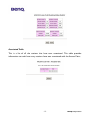
Access Control
The Access Control Table enables you to restrict wireless stations accessing the
Wireless Access Points by identifying the MAC address of the wireless devices.
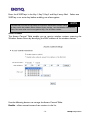
Use the following buttons to manage the Access Control Table:
Enable – allow network access from stations in the list
-14-
BENQ Corporation