1
Winmate M700D Tablet PC
User Guide
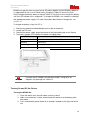
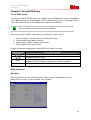
Our Tablet PC support one set of AC adapter and power cord by country area, please
contact your dealer for appropriate power cord based on country area.
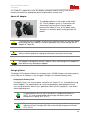
About AC Adaptor
The adapter operates in the range of 100~240 V
AC. The AC adapter serves as a converter from
Alternating Current to Direct Current power
because the Tablet PC runs on DC power input
(however, an electrical outlet usually provides AC
power)
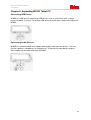
To disconnect the AC adapter, disconnect the electrical outlet first and then follow
by the plug from the Tablet PC. Reverse procedure may cause damage the AC
adapter or Tablet PC
Always hold the plug when unplug the connector. Never pull out the cord
AC adapter is designed to use with Tablet PC only, connecting the AC adapter to
other devices may damage the adapter
Charging Status
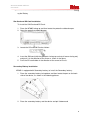
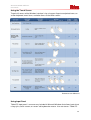
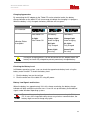
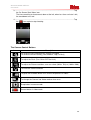
The battery LED Indicator indicates the charging status, M700D charges one battery pack at
a time. After the first battery is fully charged, it charges the secondary battery pack.
Charging the Battery Pack
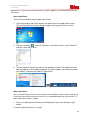
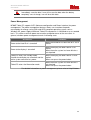
The battery Pack is the internal power source for the Tablet PC. It is rechargeable using
the AC adapter. The operating time of a fully charged battery pack depends on how
users using the device. When users’ applications often access peripherals, it will lead a
shorter operating time
Charging process will not start if the battery’s temperature below 0oC
(32oF). It is also recommended not to charge the battery when the
temperature is above 45oC (113oF).
To prevent damage, the charging process may stop and the battery charge
indicator will flash red light when the environmental temperature exceed
55oC (131oF)
20