1
Introduction
About this Manual
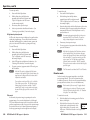
User preset recall — User presets save color, tint, contrast,
brightness, detail, sizing, and centering settings on the
ISS 506. Up to three presets can be saved on each input. You
can recall a preset that was saved to an input button on the
ISS by pressing the equivalent Preview input button on the
RCP.
Logos — The RCP can enable logos that have been created and
assigned on the ISS 506 to be displayed on the output screen.
Auto Image — Auto Image automatically sizes and centers the
selected preview input to fill the screen.
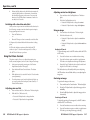
Gooseneck lamp — The provided Littlite® flexible gooseneck
lamp can be connected to the XLR lamp socket on the RCP
top panel for low-intensity illumination of the control panel in
low-light environments.
This manual contains information about the Extron RCP 2000
Remote Control Panel with ISS 506 Support, and describes how
to connect and operate it.
About the RCP 2000 with ISS 506 Support
The Extron RCP 2000 remote control panel with ISS 506 support
provides complete remote control of the ISS 506 seamless
switcher. The RCP controls the input selection, transition effect
(cut, dissolve, wipe, PIP [picture-in-picture], or title), transition
duration (automatic or T-bar manual control), and picture
controls (color, tint, contrast, brightness, sizing, and centering)
that are available on the ISS 506 switcher.
The RCP 2000 offers bi-directional Ethernet and RS-232
communication with the ISS 506. It allows full control from
either the RCP or the seamless switcher.
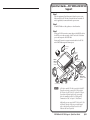
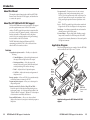
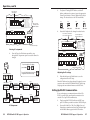
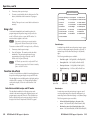
Application Diagram
The following diagram shows an example of how the RCP 2000
can be connected to the ISS 506 in an A/V system.
Features
Comprehensive picture controls — Enable you to adjust the
following:
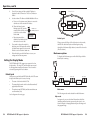
LCD Display
(preview)
• Contrast/Brightness — Adjusts the light intensity and
the range of dark and light values of the output.
LCD Display
(program)
• Centering and sizing — Allow the output to be
centered on the screen or sized, both horizontally and
vertically, including a PIP window and image.
• Detail — Adjusts the level of picture sharpness.
• Color/Tint — Adjusts the intensity and appearance of
the picture colors.
Remote operation — Allows an ISS 506 to be operated remotely
via Ethernet (Internet or intranet) or RS-232.
Program and preview inputs — Allow you to select inputs for
the upcoming switch.
Transition controls (Cut, Dissolve, Wipe, PIP, and Title) —
Control the type of switch that occurs between the preview
and program outputs. See “Selecting the Display Mode” and
“Transition Effects” in chapter 3, “Operation,” for descriptions
of the transitions controlled by these buttons.
Freeze and Black buttons — Allow you to freeze or blank
(display a black screen for) any input on either the program or
the preview.
1-2
RCP 2000 with ISS 506 Support • Introduction
Projector
T
TPU
D OU
RTE
VID
Extron
ISS 506
Y
/
B-Y
B
NVE
N CO
SCA C
Y/
G
Control System
with RS-232
/
R-Y
R
RS2
W
VIE B-Y
PRE , Y,
/R-Y
RGB
, Y,
/R-Y
RGB
M
GRA
B/
B-Y
PRO
G
/Y
Seamless
Switcher
VID
V
VID
/Y
5
B-Y
/C
1
V
-240
0 Hz
X
100
50/6MA
2A
I
N
P
U
T
S
2
G/Y
VID
4
R/
R-Y
V
L
V
HV/
L
B/C
B-Y
G/Y
VID
L
2
3
R
L
M
H
GRA
PRO
L
D
L
VIE
PRE
V
BLE
VARIA
R
R
FIXE
R-Y
H
L
6
R
LS
RO
NT
L
4
O
U
T
P
U
T
S
22
V
V
HV/
B/C
B-Y
HV/
B/C
B-Y
G/Y
VID
R/
R-Y
6
YC
V
HV/
B/C
B-Y
G/Y
VID
R/
R-Y
3
V
32/4
ET
RES
W
S
R
R-Y
SDI
LAN
B-Y
5
RE
R
M
ME
RA
OG
PR
R
CK
3
2
1
4
5
BLA
2
EZE
CK
1
TV Tuner
PC
DVD/VCR
Sound System
6
3
7
4
8
10
5
9
7
6
11
8
12
9
11
10
E
OLVE
DISS
12
IEW
EV
PR
ION
ICAT
MUNTx
Rx
BLA
EZE
FRE
Codec
E
WIP
FAD
R
FRE
Document Camera
OR
COL
TINT
CUT
R
DIM
1
T
CON HT
BRIG
IL
DETA
SIZE
TER
CEN
R/
R-Y
L
CO
TU
PIC
R
R
COM
Extron
RCP 2000
Remote Control
Panel
Camera
Application diagram for RCP 2000 with ISS 506
support
RCP 2000 with ISS 506 Support • Introduction
1-3