1
Chapter 2 – Installation
Windows 2000
Part A: Preparing the Setup
CAUTION! DO NOT connect the MultiModem to the PC at this point. Follow the steps below in
sequence. Premature connection of the USB cable will cause the installation to fail.
If you have already plugged in the USB cable prematurely, cancel out of the installation wizard and
follow the instructions below.
1.
Insert the MultiModem Product CD into your CDROM drive. Insertion of the product CD
triggers the Autorun feature.
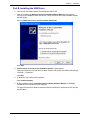
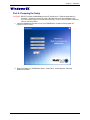
2. After a brief delay, the “MultiModem Setup – Welcome to” screen appears. Close the
Welcome to screen.
Multi-Tech Systems, Inc. MultiModem® GPRS with USB User Guide
21