1
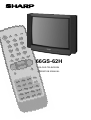
66GS-62H
COLOUR TELEVISION
OPERATION MANUAL
TERMS OF GUARANTEE
Subject to the conditions listed below Sharp Electronics (U.K.) Ltd. (Hereinafter called
«the Company») guarantee to provide for the repair of, or at its option replace the
Sharp Equipment, or any component thereof, (other than Batteries), which is faulty or
below standard, as a result of inferior workmanship or materials.
The conditions of the guarantee are:
1. This guarantee shall only apply to defects or faults which are notified to the Company, or its approved Service Facility within one year from the date of purchase of
the equipment.
2. This guarantee covers equipment intended for private domestic use only.
This guarantee does not apply to equipment used in the course of a business, trade
or profession.
3. This guarantee does not cover any faults or defects caused by accident, misuse,
fair wear and tear, neglect, tampering with the equipment, or any attempt at adjustment or repair other than by an approved Service Facility.
4. In the unlikely event of that your equipment should require repair, please contact
the dealer or supplier from whom it was purchased.
5. The cost of carriage to and from the Dealer, Supplier or Sharp approved Service
Facility shall be borne by the purchaser.
6. No person has any authority to vary the terms or conditions of this guarantee.
7. This guarantee is offered as an additional benefit to the consumer’s
statutory rights and does not affect rights in any way.
In the unlikely event of this equipment requiring repair during the guarantee period,
you will need to provide proof of date of purchase to the repairing company.
Please Keep your invoice or receipt, which is supplied at the time of purchase.
1
Safety precautions
This equipment complies with the requirements of Directives 89/336/EEC and 73/23/EEC as amended by 93/68/EEC.
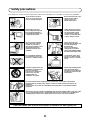
To prevent fire or electrical
shock, do not use the TV set
in an excessively damp place.
Never remove the back of the
cabinet, as there is high
voltage in the TV set.
Please call for service.
Position the TV set out of
direct sunlight and away from
heat, as high temperatures
can damage the cabinet, CRT,
or other electronic parts.
Unplug the power cord from
the wall outlet immediately if
the TV set begins to make
unusual noises or give off
smoke or an odd smell, then
call your dealer for service.
Do not cover the ventilation
holes at the back of the TV
set, this can cause fire or
other serious problems. Leave
an adequate open space
behind the TV set for good
ventilation.
Always disconnect your
television from the mains and
the aerial cable during
thunderstorms.
Even if your television is
switched off, it can still be
damaged by lightning striking
the mains and/or aerial cable.
Do not install this equipment
in a confined space such as a
bookcase or a built-in cabinet.
To prevent fire, never place
any type of candle or naked
flames on the top or near the
TV set.
Television equipment and cart
combination should be moved
with care. Quick stops,
excessive force and uneven
surfaces may cause the
equipment and cart
combination to overturn.
Wall or shelf mounting should
follow the manufacturer’s
instructions, and should use a
mounting kit approved by the
manufacturer.
Do not place this television equipment on an unstable cart, stand or table. The television
equipment may fall, causing serious injury to a child or an adult, and serious damage to the
equipment.
Use only with a cart or stand recommended by the manufacturer, or sold with the television
equipment.
Never insert or drop any metallic or inflammable objects into the ventilation holes of the TV set, this
can cause fire, electrical shock or electrical failure. Do not place a flower vase or anything else
containing liquid on the TV set, as liquid spilt on the TV set can cause serious problems.
CAUTION: Make sure that the main power is switched off when going out.
2
Contents
Audio Adjustments .........................................................17
On Timer and Off Timer...................................................19
Child Lock (Channel Block) ............................................20
POSTCODE and VCR Mode ...........................................22
TV/VIDEO Selector .........................................................23
Sub-titles .........................................................................23
Headphone Jack ............................................................23
Teletext Mode ................................................................24
21-pin Euro-SCART and 21-pin Audio/Video ................27
Typical connections .......................................................28
Troubleshooting .............................................................29
General Specifications for Television Receiver ..............30
Index ...............................................................................31
Terms of guarantee ..........................................................1
Safety precautions ...........................................................2
Contents ...........................................................................3
Accessories .......................................................................3
Remote Control Battery Installation .................................3
Controls & Terminals ........................................................5
Aerial Connections ............................................................6
Auto Installation ........................................................7 to 8
Switching on .....................................................................9
Menu Structures..............................................................10
TV Channel Setting .........................................................11
TV operation (Channel selection) ....................................15
Picture Adjustments .......................................................16
Dear SHARP Customer
Congratulations! You are now the proud owner of a SHARP Colour Television Receiver. To ensure proper operation,
please read this manual carefully. After reading, keep this manual in a safe place for future reference.
Accessories
66GS-62H
COLOUR TELEVISION
OPERATION MANUAL
Please read this operation manual carefully
before using the colour television.
If you require any advice or assistance
regarding your Sharp product, please visit
our web-site www.sharp.co.uk/support.
Customers without Internet access may
telephone 08705 274277 during office hours
(or (01) 676 0648 if telephoning from Ireland.
Printed on recycled paper
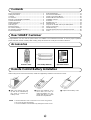
Remote control
Size-AA Dry Batteries
Operation Manual
Remote Control Battery Installation
Before using the TV set for the first time, install the supplied dry batteries in the remote control.
With your thumb nail, pull
up the slit as indicated by
the arrow to remove the
battery cover.
NOTE
•
•
•
Insert two batteries 1,5 V
(size «AA»). Be sure to
match the battery A/D terminals with the A/D marks
inside the compartment.
Remove batteries if weak or if the unit is not in use for long periods.
Do not mix old and new batteries.
Incorrect installation of the batteries may damage the remote control.
3
Replace the battery cover.
Remote Control
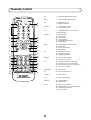
1.
19.
2.
20.
3.
4.
5.
21.
22.
6.
23.
TV
1. Stand-by ON/OFF switch (TV)
Video
2. Power ON/OFF switch (VCR)
TV
3. Digit buttons 0~9
4. Flashback button
Teletext
5. Colour button (green)
6. Colour button (red)
TV
7. Volume Down/Cursor control left
8. Menu button
Teletext
9.
10.
11.
12.
13.
14.
Reveal button
List selector
Store button
Cancel button
Top/Bottom/Full button
Reset button
Video
15.
16.
17.
18.
Rewind/picture search/reverse
Play button
Pause / Still button
Stop button
TV
19. TV/VIDEO selector
20. Channel call button
21. Single/Double entry
Teletext
22. Colour button (yellow)
23. Colour button (cyan)
TV
24.
25.
26.
27.
TV/Teletext
28. Time button
TV
29. Sound mode selector
Teletext
30. Hold button
TV
31. Sound Mute button
Teletext
32. Text/Mix button
33. Index button
Video
34.
35.
36.
37.
24.
7.
25.
26.
8.
9.
10.
11.
27.
28.
29.
30.
12.
31.
13.
14.
32.
33.
15.
34.
16.
35.
36.
17.
18.
37.
4
Channel Up/Cursor control Up
Volume Up/Cursor control Right
Channel Down/Cursor control Down
TV button / Subtitle
Channel Up selector
Fast forward/picture search/forward
Channel Down selector
Record button
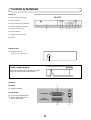
Controls & Terminals
FRONT TV
1. Main Power On/Off Switch
2. Power Indicator
3. Program Selector (UP/DOWN)
4. Volume Buttons (UP/DOWN)
7
8
5. Remote Control Sensor
6
5
4
3
6. Sound Indicator
7. Remote Control Indicator
8. DOOR
Behind the door
9. Headphone Socket
(3,5 mm Ø 16 ~ 600 ohms)
n
VIDEO
L/S/G/I
R/S/G/I
AUDIO
9
HOW TO OPEN THE DOOR
Press the top of the door, opening it slightly.
Hook your finger inside and pull open.
REAR TV
3
RF Input
1. Antenna terminal
21-pin In/Out
2. 21-pin Euro SCART (RGB)
3. 21-pin Audio/Video (AV-1)
With S-Video Input
2
5
1
2
1
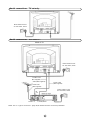
Aerial connections - TV set only -
Mains Outlet Socket
AC 220~240V, 50 HZ
Aerial connections - VCR and TV REAR OF TV
Mains Outlet Socket
AC 220~240V, 50 HZ
SCART Lead
(Not supplied)
Aerial (Not supplied)
Aerial Cable
(Not supplied)
Aerial Lead
(Not supplied)
Mains Outlet Socket
AC 220~240V, 50 HZ
RF
out
Aerial in
Audio/Video
NOTE: See on - Typical connections - (page 28) for details of further connection possibilities.
6
Auto Installation
Auto Installation System
Your television set is provided with an Automatic Installation System
which makes installation easier.
This new system is activated when you turn on the TV for the first time.
Procedure:
1. Connect the antenna jack in the antenna input terminal on the rear side
of your TV-set. Then connect the TV power cable to a 220 ~ 240V a.c.
system.
2. Press the main power button (®), on the right hand side of the TV set,
and the AUTO INSTALLATION message will appear on the screen.
3. Put batteries into the remote control and follow the instructions on
the screen.
The TV will go through the following steps Automatically and sequentially:
Power Indicator
Main power button
SHARP
AUTO INSTALLATION
Be sure the antenna cable ...
Automatic Channel Sorting System (ASS): The TV set SEARCHES FOR
FREQUENCIES, memorises the channels found, and sorts them (according to technical criteria) from Pr-01 of the TV, to a maximum of 99 programmes.
This tuning system may take several minutes to perform.
Press any button in
the handset to start.
Editing: When the AUTOMATIC SEARCH has been completed, the list of
memorised programmes appears. In this menu, you can change the order
of the channels and change or give the channels a four letter name.
Pr 01
NOTE: You may not have to follow this procedure if it has already been
done for you at the establishment where you purchased your TV. If this is
the case, please go on to the section entitled «Switching ON» (page 9).
If you need to repeat the AUTO INSTALLATION, read on.
01 %
TO REPEAT THE AUTO INSTALLATION
1. Press the MENU button to see the Main Menu.
2. Press the BLUE button
to see the «TUNING Menu».
3. Press the Cursor UP button CH
to select AUTO-TUNE.
4. Press the MENU button to start the AUTO INSTALLATION.
Searching,
please wait.
3.
2.
Stored programmes
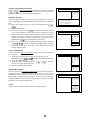
When the TV has finished the automatic search, the «Stored
programmes» menu will appear on screen with a list of the channels
which have been memorised with the available options:
a) Select programme to be edited CH
b) Edit this program Red button
c) Go to sorting mode Green buton
d) Delete this program Yellow button
e) Exit this menu Blue button
/
CH
With these options, you will be able to organise the real channels (CH **)
memorised in the TV programmes (Pr 01 … Pr 99) and put them into your
own preferred order.
1., 4.
Stored programmes:
Pr 01
Pr 02
Pr 03
Pr 04
Pr 05
Pr 06
Pr 07
Pr 08
Pr 09
Pr 10
The following is a detailed explanation of options a), b),c), d) and e), on
page 8.
(red) Edit this program
(green) Go to sorting mode
(yellow) Delete this program
(blue) Exit this menu
7
CH21
CH31
CH41
CH51
CH61
––––
––––
––––
––––
––––
BBC1
BBC2
ITV
CH4
CNN
––––
––––
––––
––––
––––
a) Select a programme to be edited
Use this option to select a programme from the list. Each time you press
CH
/ CH
the memorised channel will be viewed and will remain
selected on the list by means of a white background.
b) Edit this program
Use this option for giving a name made up of four digits to the channels
or for changing the one which appears on some channels, in the following
way:
b.1. Select the channel using the Cursor UP/DOWN buttons CH
/
CH
.
b.2. Press the RED button.
b.3. Press the Cursor UP button CH
to change the first letter. Letters
A to Z of the alphabet, a blank space and the numbers 0 to 9 will
appear sequentially. Some of the broadcasting stations names such
as BBC1 or ITV are already incorporated in the TV and appear
among the alphabet to make this task easier. Press the Cursor
DOWN button CH
to go backwards in the sequence.
b.4. Press the
buttons for changing the position of the cursor and
the CH
/ CH
. buttons for changing the letters. When you have
finished the fourth letter, press the cursor
button to quit the
Change of Name option.
c) Go to sorting mode
Use this option for sorting the channels (CH) into the desired programme
(Pr), as follows:
c.1. Select the programme (Pr) you wish to change using Cursor
UP/DOWN buttons CH
/ CH
(marked with white background).
c.2. Press the GREEN button.
c.3. Press the Cursor UP/DOWN buttons CH
/ CH
to move the
channel (CH) to the required position.
c.4. Press the GREEN button to finish.
d) Delete this program
Use this option for cancelling programmes which are badly tuned or
repeated. When the YELLOW button is pressed, the TV will ask for
confirmation that you wish to cancel, and you must press the yellow
button again. The channels that follow it on the list will automatically
rearrange themselves by moving up one programme (Pr) place, to restore
the space of the canceled channel (CH).
e) Exit
Use this option to quit the menu by pressing the BLUE button.
8
Stored programmes:
Pr 01
Pr 02
Pr 03
Pr 04
Pr 05
Pr 06
Pr 07
Pr 08
Pr 09
Pr 10
CH21
CH31
CH41
CH51
CH61
––––
––––
––––
––––
––––
BBC1
BBC2
ITV
CH4
CNN
––––
––––
––––
––––
––––
CH21
CH31
CH41
CH51
CH61
––––
––––
––––
––––
––––
BBC1
BBC2
ITV
CH4
CNN
––––
––––
––––
––––
––––
(red) Edit this program
(green) Go to sorting mode
(yellow) Delete this program
(blue) Exit this menu
Stored programmes:
Pr 01
Pr 02
Pr 03
Pr 04
Pr 05
Pr 06
Pr 07
Pr 08
Pr 09
Pr 10
Press the MENU
button to exit.
Stored programmes:
Pr 01
Pr 02
Pr 03
Pr 04
Pr 05
Pr 06
Pr 07
Pr 08
Pr 09
Pr 10
CH21
CH31
CH41
CH51
CH61
––––
––––
––––
––––
––––
BBC1
BBC2
ITV
CH4
CNN
––––
––––
––––
––––
––––
Insert the marked
programme in the
position you wish.
Press green button to
finish.
Stored programmes:
Pr 01
Pr 02
Pr 03
Pr 04
Pr 05
Pr 06
Pr 07
Pr 08
Pr 09
Pr 10
CH21
CH31
CH41
CH51
CH61
––––
––––
––––
––––
––––
BBC1
BBC2
ITV
CH4
CNN
––––
––––
––––
––––
––––
WARNING!
This programme
will be erased.
Press yellow button
again to confirm.
or press any other
button to cancel.
Switching on
Power supply on/off button
This TV memorizes the Mode last used when it was switched off. When the
main power button (®) is pressed to turn on the set, the power indicator
will light and the set will resume in either the Stand-by mode or Programme
mode, depending upon its condition when it was switched off.
Power Indicator
Main power button
On-Off/Stand-by button
When the TV is in Stand-by mode, to turn ON the TV press the Stand-by button (æ TV) on
the remote control, or one of the four buttons on the TV ( Va/\, VCH/\ ). The TV will change from Stand-by mode to Program mode, the sound indicator will light a few moments and
an image will appear on the screen. Press the Stand-by button (æ TV) again and the TV will
return to Stand-by mode.
Blue background off timer
If weak signal conditions in TV or VCR mode, the screen will turn blue. The blue background off-timer is then engaged,
unless a good signal is received, the set will automatically switch to standby mode afer 15 minutes.
9
Menu Structures
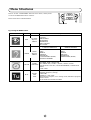
This TV set has: a MAIN MENU with four basic menus, which permit
access to the different functions of the TV.
These menus are as indicated below.
MENU Button
By pressing the MENU Button:
Main Menu
Button
RED
Menu
PICTURE
ADJUSTMENTS
Functions / Options
CONTRAST
COLOUR
BRIGHTNESS
SHARPNESS
NORMALISE
TINT CONTROL
ECO MODE
LOUDSPEAKERS
GREEN
YELLOW
BLUE
AUDIO
ADJUSTMENTS
OTHER
FUNCTIONS
INSTALL
AND
TUNE
VOLUME
BASS
TREBLE
BALANCE
NORMALISE
LOUDSPEAKERS (MODE)
SPATIAL EXPANDER
HEADPHONES
VOLUME
BASS
TREBLE
BALANCE
NORMALISE
HEADPHONES (MODE)
ON TIMER: TIME / SWITCH ON
OFF TIMER: OFF / 120 Min. / 90 Min. / 60 Min. / 30 Min.
CHILD LOCK: LOCK ALL / LOCK PROGRAMME / CLEAR LOCK
DEMO
POST CODE
CHANNEL: CH (Aerial) / CC (Cable)
SEARCH (Frequency Tuning)
FINE TUNE
MODE: TV / VCR / SKIP
EDIT: Edit this program / Go to sorting mode / Delete this program/
Exit this menu
AUTO-TUNE: AUTO INSTALLATION
10