1
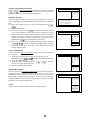
a) Select a programme to be edited
Use this option to select a programme from the list. Each time you press
CH
/ CH
the memorised channel will be viewed and will remain
selected on the list by means of a white background.
b) Edit this program
Use this option for giving a name made up of four digits to the channels
or for changing the one which appears on some channels, in the following
way:
b.1. Select the channel using the Cursor UP/DOWN buttons CH
/
CH
.
b.2. Press the RED button.
b.3. Press the Cursor UP button CH
to change the first letter. Letters
A to Z of the alphabet, a blank space and the numbers 0 to 9 will
appear sequentially. Some of the broadcasting stations names such
as BBC1 or ITV are already incorporated in the TV and appear
among the alphabet to make this task easier. Press the Cursor
DOWN button CH
to go backwards in the sequence.
b.4. Press the
buttons for changing the position of the cursor and
the CH
/ CH
. buttons for changing the letters. When you have
finished the fourth letter, press the cursor
button to quit the
Change of Name option.
c) Go to sorting mode
Use this option for sorting the channels (CH) into the desired programme
(Pr), as follows:
c.1. Select the programme (Pr) you wish to change using Cursor
UP/DOWN buttons CH
/ CH
(marked with white background).
c.2. Press the GREEN button.
c.3. Press the Cursor UP/DOWN buttons CH
/ CH
to move the
channel (CH) to the required position.
c.4. Press the GREEN button to finish.
d) Delete this program
Use this option for cancelling programmes which are badly tuned or
repeated. When the YELLOW button is pressed, the TV will ask for
confirmation that you wish to cancel, and you must press the yellow
button again. The channels that follow it on the list will automatically
rearrange themselves by moving up one programme (Pr) place, to restore
the space of the canceled channel (CH).
e) Exit
Use this option to quit the menu by pressing the BLUE button.
8
Stored programmes:
Pr 01
Pr 02
Pr 03
Pr 04
Pr 05
Pr 06
Pr 07
Pr 08
Pr 09
Pr 10
CH21
CH31
CH41
CH51
CH61
––––
––––
––––
––––
––––
BBC1
BBC2
ITV
CH4
CNN
––––
––––
––––
––––
––––
CH21
CH31
CH41
CH51
CH61
––––
––––
––––
––––
––––
BBC1
BBC2
ITV
CH4
CNN
––––
––––
––––
––––
––––
(red) Edit this program
(green) Go to sorting mode
(yellow) Delete this program
(blue) Exit this menu
Stored programmes:
Pr 01
Pr 02
Pr 03
Pr 04
Pr 05
Pr 06
Pr 07
Pr 08
Pr 09
Pr 10
Press the MENU
button to exit.
Stored programmes:
Pr 01
Pr 02
Pr 03
Pr 04
Pr 05
Pr 06
Pr 07
Pr 08
Pr 09
Pr 10
CH21
CH31
CH41
CH51
CH61
––––
––––
––––
––––
––––
BBC1
BBC2
ITV
CH4
CNN
––––
––––
––––
––––
––––
Insert the marked
programme in the
position you wish.
Press green button to
finish.
Stored programmes:
Pr 01
Pr 02
Pr 03
Pr 04
Pr 05
Pr 06
Pr 07
Pr 08
Pr 09
Pr 10
CH21
CH31
CH41
CH51
CH61
––––
––––
––––
––––
––––
BBC1
BBC2
ITV
CH4
CNN
––––
––––
––––
––––
––––
WARNING!
This programme
will be erased.
Press yellow button
again to confirm.
or press any other
button to cancel.