1
Switching on
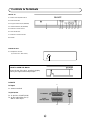
Power supply on/off button
This TV memorizes the Mode last used when it was switched off. When the
main power button (®) is pressed to turn on the set, the power indicator
will light and the set will resume in either the Stand-by mode or Programme
mode, depending upon its condition when it was switched off.
Power Indicator
Main power button
On-Off/Stand-by button
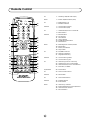
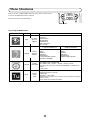
When the TV is in Stand-by mode, to turn ON the TV press the Stand-by button (æ TV) on
the remote control, or one of the four buttons on the TV ( Va/\, VCH/\ ). The TV will change from Stand-by mode to Program mode, the sound indicator will light a few moments and
an image will appear on the screen. Press the Stand-by button (æ TV) again and the TV will
return to Stand-by mode.
Blue background off timer
If weak signal conditions in TV or VCR mode, the screen will turn blue. The blue background off-timer is then engaged,
unless a good signal is received, the set will automatically switch to standby mode afer 15 minutes.
9