1
CD OPERATION
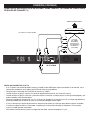
PLAYBACK OF A CD
2
OPEN/CLOSE
REPEAT
ANGLE
AUDIO
HOME
Y
D IS
U
SLOW STOP
PREV
4
PL
PAUSE
POWER
PLAY
OPEN/CLOSE
REW
F.F
NEXT
B
PIP
C
PREV
PO
P
PO
P
N
PLAY
REW
F.F
P
R
1
Y
P
M
EN
D IS
U
PL
PAUSE
PLAY
REW
F.F
NEXT
OPEN/CLOSE
VOL
SEARCH MUTE
REPEAT
A
C
SUBTITLE
6
D
AUDIO
HOME
USB
2ND
AUDIO
U
EN
M
RE
TU
B
C
D
2ND
USB
AUDIO
CLEAR
B
SETUP
ZOOM
PIP
VOL
ANGLE
ANGLE
BD PLAYER
SUBTITLE
CLEAR
AUDIO
HOME
R
ENTER
-U
P
U
EN
M
RE
TU
R
N
PO
P
N
PO
P
-U
POWER
Y
PAUSE
SEARCH MUTE
P
-U
USB
RE
TU
DI
NEXT
PIP
2ND
U
EN
M
PREV
A
T
5
DE
HOM
SLOW STOP
ZOOM SPL SETUP
SLOW STOP
A
BAUDIOC
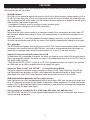
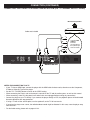
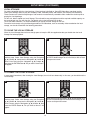
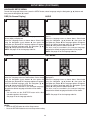
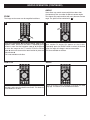
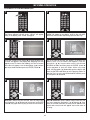
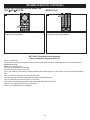
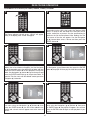
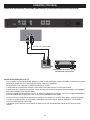
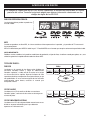
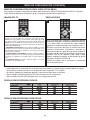
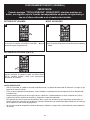
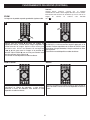
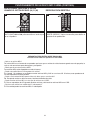
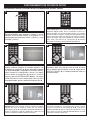
Use the Navigation (π,†) buttons 1 to select a different
track, then press the ENTER button 2 to begin playback.
R
ENTER OPEN/CLOSE
PREV
VOL
CLEAR
A
T
RE
TU
POWER
NU
F.F
ENTER
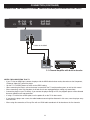
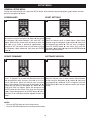
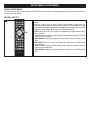
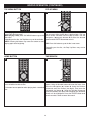
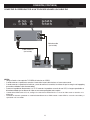
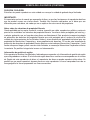
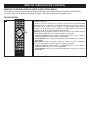
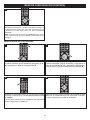
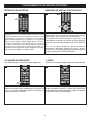
Press the OPEN/CLOSE button to close the disc tray.
“CLOSE” will appear in the display and “Detecting Disc” will
appear on the TV screen. After loading, the Title List
screen of the disc should appear and Track 1 will
automatically start playing.
U
EN
M
P
REW
NEXT
2BD PLAYER
HOME
O
O
PLAY
N
AUDIO
BD PLAYER
M
REPEAT
E
PAUSE
AUDIO
CLEAR
P
D IS
U
PIP
USB
ANGLE
-U
EN
SLOW STOP
AUDIO
SUBTITLE
SETUP
PL
ZOOM
M
A
SUBTITLE
D
2ND
O
REPEAT
P
SEARCH MUTE
ANGLE
SETUP
REPEATMUTE
ZOOM VOL
SEARCH
A
R
OPEN/CLOSE
ENTER
A
EN
RE
TU
N
M
HOME
U
EN
M
P
T
T
3
P
-U
POWER
ENTER
O
AUDIO
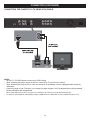
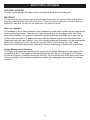
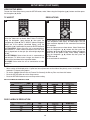
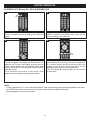
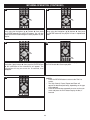
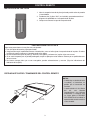
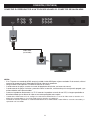
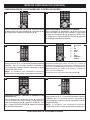
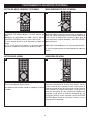
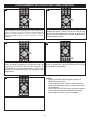
Press the OPEN/CLOSE button to open the disc tray,
“OPEN” will appear in the display. Insert a music CD with
the label side facing up on the disc tray.
R
PO
P
RE
TU
N
PO
P
U
EN
M
P
CLEAR
SUBTITLE
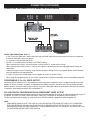
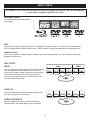
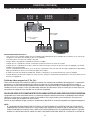
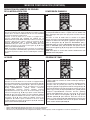
Press the POWER/STANDBY button to turn on the unit.
The Power indicator light will go on. “HELLO” will appear
briefly in the display, then “LOAD” will appear.
-U
SETUP
ZOOM
ANGLE
CLEAR
SUBTITLE
OPEN/CLOSE
REPEAT
SETUP
ZOOM
POWER
Y
POWER
A
1
BD PLAYER
ENTER
SLOW STOP
PREV
O
1
PAUSE
PLAY
NEXT
REW
F.F
2
P
PREV
PIP
B
C
2ND
EN
D IS
U
NEXT
PL
PAUSE
PLAY
REW
F.F
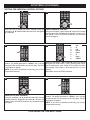
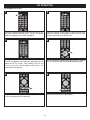
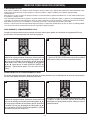
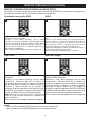
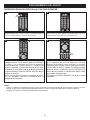
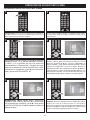
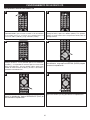
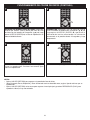
Press the STOP button to stop playback.
Press the PAUSE/Step button 1 to pause playback. Press
the PLAY button 2 to resume playback.
A
M
SLOW STOP
VOL
SEARCH MUTE
Y
L
T
SP
DI
EN
U
A
M
A
Y
T
OP
VOL
SEARCH MUTE
D
A
B
C
D
USB
AUDIO
PIP
2ND
USB
AUDIO
BD PLAYER
BD PLAYER
35