1
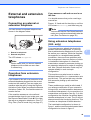
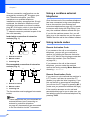
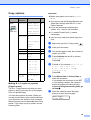
Chapter 6 Using receive modes 6 External TAD External TAD mode lets an external answering device manage your incoming calls. Incoming calls will be dealt with in one of the following ways: Some receive modes answer automatically (Fax Only and Fax/Tel). You may want to change the ring delay before using these modes. (See Ring Delay on page 37.) Faxes will be automatically received. Fax only 6 Fax only mode will automatically answer every call. If the call is a fax your machine will receive it. Fax/Tel (For more information see Connecting an external TAD (telephone answering device) on page 43.) 6 Fax/Tel mode helps you automatically manage incoming calls, by recognising whether they are fax or voice calls and dealing with them in one of the following ways: Faxes will be automatically received. Voice calls will start the F/T ring to tell you to pick up the line. The F/T ring is a fast double ring made by your machine. (Also see F/T Ring Time (Fax/Tel mode only) on page 37 and Ring Delay on page 37.) Manual Manual mode turns off all automatic answering functions unless you are using the BT Call sign feature. To receive a fax in manual mode lift the handset of an external telephone. When you hear fax tones (short repeating beeps), press Mono Start or Colour Start, and choose 2.Receive. You can also use the Fax Detect feature to receive faxes by lifting a handset on the same line as the machine. (Also see Fax Detect on page 38.) 36 Voice callers can record a message on the external TAD. 6 6