1
Questions?
Use this
problem
solver
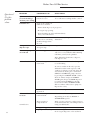
PROBLEM
POSSIBLE CAUSE
WHAT TO DO
Spots and filming on
glasses and flatware
Extremely hard
water
• Use a rinse agent to remove spots
and prevent new film build-up.
Low inlet water
temperature
• To remove stubborn spots from glassware:
Overloading the dishwasher
1 Remove all metal utensils from the
dishwasher.
Improper loading
2 Do not add detergent.
Old or damp powder
detergent
3 Select the NORMAL WASH cycle
and HEATED DRY option.
Rinse agent dispenser
empty
4 Start the dishwasher and allow to run
until the main wash.
Too little detergent
5 Open the door and pour 2 cups
(500 ml)of white vinegar into the
bottom of the dishwasher.
6 Close the door and allow to complete
the cycle. If vinegar rinse doesn’t
work: Repeat as above, except use
1/4 cup (60 ml) of citric acid crystals
instead of vinegar.
Combination of soft
water and too much
detergent
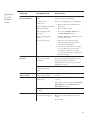
• This is called etching and is permanent.
To prevent this from happening, use less
detergent if you have soft water.
Wash glassware in the shortest cycle that
will get them clean.
Extended exposure
to high temperature
water
• Lower the water heater temperature.
Black or gray
marks on dishes
Aluminum utensils have
rubbed against dishes
• Remove marks with a mild, abrasive
cleaner.
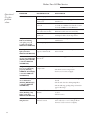
Dishes don’t dry
Low inlet water
temperature
• Make sure inlet water temperature is
correct.
Cloudiness on
glassware
• Depending on your model select BOOST &
HEATED DRY or WATER TEMP and
HEATED DRY options.
Dishwasher won’t run
Rinse agent dispenser
is empty
• Check the rinse agent dispenser.
Fuse is blown, or the
circuit breaker tripped
• Replace fuse or reset circuit breaker.
Remove any other appliances from the
circuit.
•Try resetting.
21