1
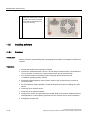
SIMATIC PC
Panel PC 870 V2
Computer Unit
Operating Instructions
Edition 03/2004
Preface
1
Safety information and
general notes
2
Description
3
Planning use
4
Installation
5
Connecting
6
Commissioning
7
Operation
8
Integration
9
Functions
10
Maintenance and servicing
11
Alarm, error and system
messages
12
Troubleshooting and FAQs
13
Specifications
14
Detailed descriptions
15
Appendix
16
Safety Guidelines
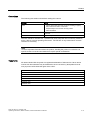
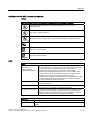
This manual contains notices which you should observe to ensure your own personal safety as well as to avoid
property damage. The notices referring to your personal safety are highlighted in the manual by a safety alert
symbol, notices referring to property damage only have no safety alert symbol.
Danger
indicates an imminently hazardous situation which, if not avoided, will result in death or serious injury.
Warning
indicates a potentially hazardous situation which, if not avoided, could result in death or serious injury.
Caution
used with the safety alert symbol indicates a potentially hazardous situation which, if not avoided, may
result in minor or moderate injury.
Caution
used without safety alert symbol indicates a potentially hazardous situation which, if not avoided, may
result in property damage.
Notice
used without the safety alert symbol indicates a potential situation which, if not avoided, may result in
an undesirable result or state.
Wehn several danger levels apply, the notices of the highest level (lower number) are always displayed. If a
notice refers to personal damages with the safety alert symbol, then another notice may be added warning of
property damage.
Qualified Personnel
The device/system may only be set up and operated in conjunction with this documentation. Only qualified
personnel should be allowed to install and work on the equipment. Qualified persons are defined as persons who
are authorized to commission, to earth, and to tag circuits, equipment and systems in accordance with
established safety practices and standards.
Intended Use
Please note the following:
Warning
This device and its components may only be used for the applications described in the catalog or
technical description, and only in connection with devices or components from other manufacturers
approved or recommended by Siemens.
This product can only function correctly and safely if it is transported, stored, set up and installed
correctly, and operated and maintained as recommended.
Trademarks
All designations marked with ® are registered trademarks of Siemens AG. Other designations in this
documentation might be trademarks which, if used by third parties for their purposes, might infringe upon the
rights of the proprietors.
Copyright Siemens AG ,2004.All rights reserved
Reproduction, transmission or use of this document or its contents is not permitted without
express written authority. Offenders will be liable for damages. All rights, including rights
created by patent grant or registration of a utility model or design, are reserved.
Disclaimer of Liability
We have checked the contents of this manual for agreement with the hardware and
software described. Since deviations cannot be precluded entirely, we cannot guarantee
full agreement. However, the data in the manual are reviewed regularly, and any
necessary corrections will be included in subsequent editions. Suggestions for
improvement are welcomed.
Siemens AG
Automation and Drives Group
P.O. Box 4848, D-90327 Nuremberg (Germany)
Siemens AG 2004
Technical data subject to change
Siemens Aktiengesellschaft
Order No. CD Documentation and Drivers
Table of contents
1
2
3
4
5
6
7
Preface ................................................................................................................................................... 1-1
1.1
This manual................................................................................................................................ 1-1
1.2
Further Support.......................................................................................................................... 1-4
Safety information and general notes ..................................................................................................... 2-1
2.1
Safety information ...................................................................................................................... 2-1
2.2
General notes............................................................................................................................. 2-3
Description.............................................................................................................................................. 3-1
3.1
Design ........................................................................................................................................ 3-1
3.2
Function ..................................................................................................................................... 3-1
3.3
Features ..................................................................................................................................... 3-2
Planning use........................................................................................................................................... 4-1
4.1
Overview .................................................................................................................................... 4-1
4.2
Unpacking and checking the delivery unit ................................................................................. 4-2
4.3
Guidelines for Handling Electrostatic Sensitive Devices (EMC)................................................ 4-2
4.4
4.4.1
4.4.2
Mounting positions and fastening .............................................................................................. 4-3
Installation guidelines................................................................................................................. 4-3
Permitted mounting positions..................................................................................................... 4-5
Installation .............................................................................................................................................. 5-1
5.1
Installing the device ................................................................................................................... 5-1
5.2
Dimensions ................................................................................................................................ 5-2
Connecting ............................................................................................................................................. 6-1
6.1
Overview .................................................................................................................................... 6-1
6.2
Interfaces ................................................................................................................................... 6-2
6.3
Equipotential bonding ................................................................................................................ 6-4
6.4
Connect the equipotential bonding ............................................................................................ 6-5
6.5
6.5.1
6.5.2
Connecting I/O modules ............................................................................................................ 6-6
Overview .................................................................................................................................... 6-6
Connect USB devices ................................................................................................................ 6-6
6.6
Connect the 120 AC 230 V power supply.................................................................................. 6-7
6.7
Connect the DC 24 V power supply........................................................................................... 6-9
Commissioning ....................................................................................................................................... 7-1
7.1
Overview .................................................................................................................................... 7-1
7.2
BIOS settings ............................................................................................................................. 7-1
Panel PC 870 V2, Computer Unit
Operating Instructions, Edition 03/2004, CD Documentation and Drivers
iii
Table of contents
8
9
10
11
12
13
iv
7.3
7.3.1
7.3.2
7.3.3
Microsoft Windows operating system ........................................................................................ 7-2
Releases .................................................................................................................................... 7-2
Windows 2000............................................................................................................................ 7-2
Windows XP............................................................................................................................... 7-3
7.4
USB ............................................................................................................................................ 7-3
Operation................................................................................................................................................ 8-1
8.1
Operator controls ....................................................................................................................... 8-1
8.2
Floppy drive................................................................................................................................ 8-2
Integration............................................................................................................................................... 9-1
9.1
Overview .................................................................................................................................... 9-1
9.2
9.2.1
9.2.2
Device in SIMATIC S7 network.................................................................................................. 9-1
PROFIBUS/MPI/DP network...................................................................................................... 9-1
Connecting an S7 automation system ....................................................................................... 9-2
9.3
Networking via Industrial Ethernet ............................................................................................. 9-3
9.4
Establishing a data connection .................................................................................................. 9-3
Functions .............................................................................................................................................. 10-1
10.1
Overview .................................................................................................................................. 10-1
10.2
Temperature monitoring........................................................................................................... 10-1
10.3
Watchdog (WD)........................................................................................................................ 10-2
10.4
Fan monitoring ......................................................................................................................... 10-2
10.5
Safecard on Motherboard (SOM)............................................................................................. 10-3
Maintenance and servicing ................................................................................................................... 11-1
11.1
11.1.1
11.1.2
11.1.3
11.1.4
11.1.5
11.1.6
11.1.7
Installing and removing hardware components ....................................................................... 11-1
Repairs ..................................................................................................................................... 11-1
Open the device ....................................................................................................................... 11-2
Installing memory modules ...................................................................................................... 11-3
Installing PCI / AT cards........................................................................................................... 11-5
Disk drives................................................................................................................................ 11-7
Replacing the backup battery ................................................................................................ 11-13
Installing and removing the power supply.............................................................................. 11-14
11.2
11.2.1
11.2.2
11.2.3
11.2.4
11.2.5
11.2.6
11.2.7
11.2.8
11.2.9
11.2.10
11.2.11
Installing software .................................................................................................................. 11-16
Overview ................................................................................................................................ 11-16
Supplied software CDs........................................................................................................... 11-17
Partitioning under Windows 2000/XP Professional ............................................................... 11-17
Compatibility of the Restore CD............................................................................................. 11-19
Restoring the software to factory state by means of the Restore CD.................................... 11-19
Installing Microsoft Windows operating systems ................................................................... 11-20
Installing individual drivers ..................................................................................................... 11-24
Operating with two hard disk drives ....................................................................................... 11-24
Installing Raid controller software .......................................................................................... 11-25
Installing burner/DVD software .............................................................................................. 11-26
Backing up the hard disk........................................................................................................ 11-26
Alarm, error and system messages ...................................................................................................... 12-1
12.1
Boot error messages................................................................................................................ 12-1
12.2
BIOS beep codes ..................................................................................................................... 12-2
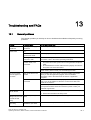
Troubleshooting and FAQs ................................................................................................................... 13-1
Panel PC 870 V2, Computer Unit
Operating Instructions, Edition 03/2004, CD Documentation and Drivers
Table of contents
14
15
16
13.1
General problems .................................................................................................................... 13-1
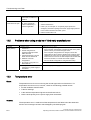
13.2
Problems when using modules of third-party manufacturers .................................................. 13-2
13.3
Temperature error.................................................................................................................... 13-2
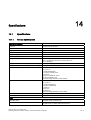
Specifications ....................................................................................................................................... 14-1
14.1
14.1.1
14.1.2
14.1.3
14.1.4
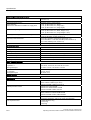
Specifications ........................................................................................................................... 14-1
General specifications.............................................................................................................. 14-1
Power requirements of the components .................................................................................. 14-4
AC power supply...................................................................................................................... 14-5
DC power supply...................................................................................................................... 14-6
14.2
14.2.1
14.2.2
Dimensional drawings.............................................................................................................. 14-7
Dimensional drawing of the device .......................................................................................... 14-7
Dimensional drawings for the installation of expansion modules ............................................ 14-9
Detailed descriptions ............................................................................................................................ 15-1
15.1
15.1.1
15.1.2
15.1.3
15.1.4
15.1.5
Motherboard............................................................................................................................. 15-1
Technical features of the motherboard .................................................................................... 15-1
Position of the ports on the motherboard................................................................................. 15-2
External ports ........................................................................................................................... 15-3
Front interfaces ........................................................................................................................ 15-8
Internal interfaces .................................................................................................................. 15-12
15.2
15.2.1
15.2.2
15.2.3
15.2.4
Bus board............................................................................................................................... 15-16
Layout and principle of operation........................................................................................... 15-16
Assignment of the PCI IRQ channels to the PCI slots........................................................... 15-17
Exclusive PCI hardware interrupt........................................................................................... 15-17
Interface to motherboard........................................................................................................ 15-18
15.3
Cables .................................................................................................................................... 15-22
15.4
15.4.1
15.4.2
System resources .................................................................................................................. 15-22
Currently allocated system resources.................................................................................... 15-22
System resources used by the BIOS/DOS ............................................................................ 15-22
15.5
15.5.1
15.5.2
15.5.3
15.5.4
15.5.5
15.5.6
15.5.7
15.5.8
15.5.9
15.5.10
15.5.11
BIOS Setup ............................................................................................................................ 15-27
Overview ................................................................................................................................ 15-27
Starting BIOS Setup............................................................................................................... 15-27
BIOS Setup menus ................................................................................................................ 15-28
Main menu ............................................................................................................................. 15-29
Advanced menu ..................................................................................................................... 15-37
Security menu ........................................................................................................................ 15-42
Power menu ........................................................................................................................... 15-43
Boot menu.............................................................................................................................. 15-44
Version menu ......................................................................................................................... 15-45
Exit menu ............................................................................................................................... 15-46
Default BIOS Setup entries.................................................................................................... 15-46
Appendix............................................................................................................................................... 16-1
16.1
16.1.1
16.1.2
16.1.3
16.1.4
16.1.5
Certificates and guidelines....................................................................................................... 16-1
Guidelines and declarations..................................................................................................... 16-1
Certificates and approvals ....................................................................................................... 16-2
ESD guideline .......................................................................................................................... 16-4
Electrostatic discharge from persons....................................................................................... 16-5
Permitted ordering variants...................................................................................................... 16-6
16.2
Abbreviations ........................................................................................................................... 16-7
16.3
Glossary ................................................................................................................................... 16-8
Panel PC 870 V2, Computer Unit
Operating Instructions, Edition 03/2004, CD Documentation and Drivers
v
Panel PC 870 V2, Computer Unit
Operating Instructions, Edition 03/2004, CD Documentation and Drivers
1
Preface
1.1
This manual
Purpose of the manual
This manual provides information based on the requirements defined by DIN 8418 regarding
mechanical engineering documentation. This information relates to the device, its place of
use, transport, storage, installation, use and maintenance.
This manual is intended for the following target group:
• User
• Commissioning engineer
• Service technicians
• Maintenence technicians
Please read carefully the section "Safety information and general notes".
Basic knowledge required
A solid background in personal computers and Microsoft operating systems is required to
understand this manual. General knowledge in the field automation control engineering is
recommended.
Where is this manual valid?
This manual applies to devices with the order numbers 6AV774… and 6AV775….
Changes in comparison to the previous version 11/02
The layout of the document has been made more uniform: Header and numbering of the
main section describe the main tasks in their order of occurance.
Panel PC 870 V2, Computer Unit
Operating Instructions, Edition 03/2004, CD Documentation and Drivers
1-1
Preface
1.1 This manual
Incorporation into the communications environment
The documentation for the Panel PC includes the following sections:
• SIMATIC Panel PC 670 V2 Commissioning,
SIMATIC Panel PC 870 V2, QuickStart with the following information:
– Commissioning
– Legal information
• SIMATIC Panel PC 670 V2 Device Manual for Operator Unit,
SIMATIC Panel PC 870 V2, Operating Instructions for the Operator Unit with the following
information:
– Operation
– Error diagnostics
– Hardware
Refered to as "operating instructions for the operator unit" in the following.
• SIMATIC Panel PC 670 V2 Device Manual for Computer Unit,
SIMATIC Panel PC 870 V2, Operating Instructions for the Computer Unit with the
following information:
– Expansion options
– Configuration
– Error diagnostics
– Hardware
Refered to as "operating instructions for the computer unit" in the following.
The documentation is supplied with the Panel PC in electronic form as a PDF file on the
"Documentation & Drivers" CD. QuickStart for the Panel PC 870 V2 is also supplied in
printed form. The documentation is available in German, English, French, Italian and
Spanish.
Additional information about the Windows operating system is available in the Internet at the
Microsoft hompage, "www.Microsoft.com".
Online availability
The following links will bring you directly to the technical documentation collection for
SIMATIC products and systems in the languages German, English, French, Italian and
Spanish.
• SIMATIC guide to technical documentation in German:
http://www.ad.siemens.de/simatic/portal/html_00/techdoku.htm
• SIMATIC guide to technical documentation in English:
http://www.ad.siemens.de/simatic/portal/html_76/techdoku.htm
1-2
Panel PC 870 V2, Computer Unit
Operating Instructions, Edition 03/2004, CD Documentation and Drivers
Preface
1.1 This manual
Conventions
The following text notation will faciliate reading this manual:
Format
Scope
"File"
•
•
•
Terms used in the GUI such as names of dialogs, registry
tabs, buttons and menu commands.
Required input such as limits and tag values.
Path information
"File > Edit"
Operation sequences such as menu command, context menu
command.
<F1>, <Shift>+<F1>
Keys and key comibinations
The term "Panel PC 670/870 V2", "operator unit" and "computer unit" is uniformly refered to
as the "device" in these operating instructions . The full term is only used when a concrete
reference is necessary.
Note
A note is important information about the product, handling the product or a reference to
specific sections of the documentation that require special consideration.
Trademarks
All names labeled with ® symbol are registered trademarks of Siemens AG. Other names
used in this documentation may be trademarks, the use of which by third parties for their
own purposes could violate the rights of the owner.
HMI®
SIMATIC®
SIMATIC HMI®
SIMATIC ProTool®
SIMATIC WinCC®
Panel PC 670®
Panel PC 870®
Panel PC 870 V2, Computer Unit
Operating Instructions, Edition 03/2004, CD Documentation and Drivers
1-3
Preface
1.2 Further Support
1.2
Further Support
Representatives and offices
Please consult your Siemens representative at the office nearest you for any other questions
regarding the use of the products described in the manual.
Locate your representative at:
http://www.siemens.com/automation/partner
Training Centers
Siemens offers a number of training courses to familiarize you with the automation system.
Please contact your regional training center or our central training center in 90327
Nuremberg, Germany for details:
Telephone: +49 (911) 895-3200.
Internet: http://www.sitrain.com/
Service & Support on the Internet
Extensive additional information concerning the SIMATIC products is available to you
through online services at "http://www.siemens.com/automation/service&support."
• The newsletter with continuously updated information about your products.
• Numerous documents available through search in Service & Support.
• A bulletin board, where users and experts from all over the world exchange their
experiences.
• Current product information, FAQs and downloads.
• Your local representative for Automation & Drives.
• Infomation about local service, repairs, replacement parts and much more under the
heading "Services."
1-4
Panel PC 870 V2, Computer Unit
Operating Instructions, Edition 03/2004, CD Documentation and Drivers
Preface
1.2 Further Support
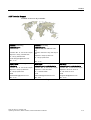
A&D Technical Support
Available 24 hours a day worldwide:
Worldwide (Nuremberg)
Worldwide(Nuremberg)
Technical Support
(Free Contact)
Technical Support
(subject to fees, with SIMATIC Card
only)
Local time: Mo - Fr 7:00 am to 5:00 pm
Local time: 24 hours a day / 365 days a
year:
Telephone: +49 (0) 180 5050-222
Fax: +49 (0) 180 5050-223
E-mail: [email protected]
GMT: +1:00
Telephone: +49 (911) 895-7777
Fax: +49 (911) 895-7001
GMT: +1:00
Europe / Africa (Nuremberg)
United States(Johnson City)
Asia/Pacific(Beijing)
Authorization
Technical Support and Authorization
Technical Support and Authorization
Local time: Mo - Fr 7:00 am to 5:00 pm
Local time: Mo - Fr 8:00 am to 7:00 pm
Local time: Mo - Fr 8:30 am to 5:00 pm
Telephone: +49 (911) 895-7200
Telephone: +1 423 461-2522
Telephone: +86 10 64 75 75 75
Fax: +49 (911) 895-7201
Fax: +1 423 461-2289
Fax: +86 10 64 74 74 74
E-Mail:
[email protected]
E-mail:
[email protected]
E-mail:
[email protected]
GMT: +1:00
GMT: -5:00
GMT: +8:00
Information available in German and English.
Panel PC 870 V2, Computer Unit
Operating Instructions, Edition 03/2004, CD Documentation and Drivers
1-5
Panel PC 870 V2, Computer Unit
Operating Instructions, Edition 03/2004, CD Documentation and Drivers
Safety information and general notes
2.1
2
Safety information
Caution
Please follow the safety instructions on the back of the coverpage in this documentation.
You should not expand your device unless you have read the relevant safety instructions.
This device is compliant with the relevant safety measures to IEC, EN, VDE, UL, and CSA. If
you have questions about the admissibility of the installation in the designated environment,
please contact your service representative.
Repairs
Only authorized personnel are permitted to repair the device.
Warning
Unauthorized opening and improper repairs on the device may result in substantial damage
to equipment or endanger the user.
System expansions
Install only system expansion devices designed for this computer. If you install other
expansion devices, you may damage the system or violate the safety requirements and
regulations on RF suppression. Contact your technical support team or where you
purchased your PC to find out which system expansion devices may safely be installed.
Caution
The warranty becomes void if you damage your device by installing or replacing system
expansions.
Panel PC 870 V2, Computer Unit
Operating Instructions, Edition 03/2004, CD Documentation and Drivers
2-1
Safety information and general notes
2.1 Safety information
Battery
This device is equipped with a backup battery. Batteries may only be exchanged by qualified
personnel.
Caution
There is the risk of an explosion if the battery is not exchanged as directed.. Replace only
with the same type or with an equivalent type recommended by the manufacturer. Dispose
of used batteries in accordance with local regulations.
Warning
Risk of explosion and release of harmful substances!
Hence, do not throw Lithium batteries into an open fire, do not solder or open the cell body,
do not short-circuit or reverse polarity, do not heat up above 100 °C, dispose as regulated
and protected against direct exposure to sunlight, humidity and dewing.
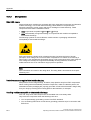
Guidelines for Handling Electrostatic Sensitive Devices (ESD)
Modules containing electrostatically sensitive devices (ESDs) can be identified by the
following label:
Strictly follow the guidelines mentioned below when handling modules which are sensitive to
ESD:
• Always discharge your body before handling modules which are sensitive to ESD (for
example, by touching a grounded object).
• All devices and tools must be free of static charge.
• Always pull the power plug and disconnect the battery before you install or remove
modules which are sensitive to ESD.
• Handle modules ESD-sensitive modules only at their edges.
• Do not touch any wiring posts or conductors on a module with ESD.
2-2
Panel PC 870 V2, Computer Unit
Operating Instructions, Edition 03/2004, CD Documentation and Drivers
Safety information and general notes
2.2 General notes
2.2
General notes
Overview
Caution
The device is approved for operation in closed rooms only.
Notice
The guarantee is void if these stipulations are ignored.
Avoid extreme environmental operating conditions. Protect your device against dust,
moisture and heat. For additional information, refer to the specifications.
Do not place the device in direct sunlight.
Transport
Unpack the device at the its installation location. Transport the device only in the original
packaging. Do not transport the device when it is mounted.
Notice
Adhere to these stipulations each time the device is transported, otherwise the guarantee is
void.
Caution
Condensation
When transporting the device in low temperatures, ensure that no moisture gets on or in the
device. This also applies when the device is subjected to extreme changes in temperature.
Commissioning
Allow the device to slowly adjust to room temperature before commissioning the device. Do
no place the device near heat radiation. If moisture condensation occurs, wait at least about
12 hours before you switch on the device.
Vibration
CD/DVD drives are sensitive to vibration. Vibrations during operation may result in loss of
data or damage to the drive or data medium.
Before transporting the device, wait at least 20 seconds to allow the drive to stop completely.
Updates
Regularly check if hotfixes for your device are available at the Siemens Internet site.
Panel PC 870 V2, Computer Unit
Operating Instructions, Edition 03/2004, CD Documentation and Drivers
2-3
Panel PC 870 V2, Computer Unit
Operating Instructions, Edition 03/2004, CD Documentation and Drivers
3
Description
3.1
Design
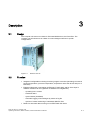
The computer unit serves as a base for PC-based HMI devices, the Panel PCs. The
computer unit is furthermore as a base for custom designed devices in special
configurations.
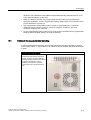
Figure 3-1
3.2
Panel PC 870 V2
Function
• Integrated configurable monitoring functions (program execution (watchdog) for internal
housing temperature, processor temperaturs, temperaturs at the disk drives and rpm of
both fans)
• Enhanced diagnostic / messaging via Ethernet, E-mail, SMS, and for direct input in
SIMATIC software via OPC (optional via SIMATIC PC DiagMonitor):
– Operating hours counter
– Hard disk status
– System status (heartbeat)
– Automatic logging of all messages by means of log file
– Options of central monitoring of networked SIMATIC PCs
• RAID1 for automatic data mirroring on two EIDE hard disk drives
Panel PC 870 V2, Computer Unit
Operating Instructions, Edition 03/2004, CD Documentation and Drivers
3-1
Description
3.3 Features
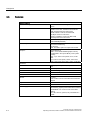
3.3
Features
General features
Installation design
Central and distributed configuration, built-in
device
Processor
Design: mPGA478
-Pentium 4 2.4 GHz, 533 MHz Front Side Bus
FSB, 512 Kbyte Second Level Cache
-Intel® Celeron 2.0 GHz, 400 MHz FSB,
128 Kbyte Second Level Cache
-Pentium 4 Mobile 2.2 GHz, 400 MHz FSB,
512 Kbyte Second Level Cache
RAM
128 MB SDRAM (DDR266); expandable up to
3 GB SDRAM (DDR266)
Slots for expansions
- 2x PCI long
-2x PCI/ISA shared long
-1x ISA long
Note: The RAID1 option occupies one PCI slot
Graphics
VIA ProSavage 8
with 8, 16 or 32 MB SDRAM graphic memory
(configurable in the system BIOS), uses system
memory
CRT: -up to 1600 x 1200 pixels, 60 Hz, 16-bit
color
-up to 1280 x 1024 pixels, 100Hz, 32-bit color
LCD: LVDS or DVI up to 1280 x 1024 / 18-bit TFT
Interfacen
3-2
PROFIBUS / MPI
12 Mbps (isolated potential, compatible to CP
5611
Ethernet
10/100 Mbps, RJ45
USB
2x USB 2.0, high current
Serial
COM1 V.24, COM2 V.24
Parallel
LPT1
Monitor
1 x DVI-I
VGA monitors can be connected with a DVI/VGA
adapter.
Keyboard
PS/2
Mouse
PS/2
Power supply
- 120 / 240 V AC, 360 VA; wide range; with shortterm buffering against power failure in accordance
with NAMUR: max. 20 ms at 0.85 of the rated
voltage
-24 V DC, 265 VA, optional, only with Pentium 4
Mobile
Panel PC 870 V2, Computer Unit
Operating Instructions, Edition 03/2004, CD Documentation and Drivers
Description
3.3 Features
Standard versions
Processor
-Celeron 2.0 GHz, 400 MHz FSB, 128 K Second
Level Cache
RAM expansion
128 MB SDRAM DDR266, PC2100
3 sockets for up to 3 GB
Power supply
AC 120/230V
Floppy disk drive
1.44 MB
Hard disk drives
= 40 GB EIDE; 3.5“
Operating system
none
PROFIBUS / MPI
On-board, compatible with CP5611
Optional accessories
Processor
-Pentium 4 2.4 GHz, 400 MHz FSB, 512 K Second
Level Cache
-Pentium 4 Mobile 2.2 GHz, 533 FSB, 512 K
Second Level Cache
RAM expansion
Up to 3 GB
Disk drive
CD-ROM or CD-R/W/DVD drive
Hard disk drives
-1 x 3.5" hard disk drive 80 GB
-2 x 2.5" hard disk drives 30 GB or RAID1 system
Power supply
24 V DC
Operating system
Preinstalled, also factory installed on the Restore
CD and Microsoft Recovery CD -Windows 2000
Professional MUI*
-Windows XP Professional MUI*
*MUI: Multi-lingual user interface; German,
English, French, Italian, Spanish, Japanese,
Korean, Chinese simplified and Chinese
traditional
Accessories
SIMATIC PC
DiagMonitor SW
Software tool for monitoring local and remote
SIMATIC PCs:
-Watchdog
-Temperature
-Fan speed
-Hard disk monitoring, SMART
-System monitoring, Ethernet monitoring:
Heartbeat
Communication:
-Ethernet interface, SNMP protocol
-OPC for the integration in SIMATIC Software
- Client/server architecture
-Structure of log files
SIMATIC PC
Image Creator SW
Panel PC 870 V2, Computer Unit
Operating Instructions, Edition 03/2004, CD Documentation and Drivers
Software tool for local data backup
3-3
Panel PC 870 V2, Computer Unit
Operating Instructions, Edition 03/2004, CD Documentation and Drivers
Planning use
4.1
4
Overview
Introduction
This section describes the first steps after unpackaging, the permitted mounting positions
and the fixation. This section describes the necessary considerations for EMC.
Notice
Take note of the corresponding information in the operating instructions for the computer unit
and the operator unit.
Field of application
The SIMATIC Panel PC is an industry-standard PC platform for demanding tasks in the field
of PC-based automation. The Panel PC is designed for on-site use on the machine, installed
for example in:
• Control cabinets and consoles
• 19" racks
• Swivel arms (booms)
Note
In the following, the term "control cabinet" also refers to rack, mounting rack,
switchboard, operator panel and console. The term "device" represents the Panel PC and
its variants.
Panel PC 870 V2, Computer Unit
Operating Instructions, Edition 03/2004, CD Documentation and Drivers
4-1
Planning use
4.2 Unpacking and checking the delivery unit
4.2
Unpacking and checking the delivery unit
Procedure
1. Upon delivery, check the packaging for damage incurred during transport.
2. If any transport damage is present at the time of delivery, lodge a complaint at the
shipping company in charge. Have the shipper confirm the transport damage
immediately.
3. Unpack the device.
4. Keep the packaging material in case you have to transport the unit again.
Notice
The packaging protects the device during transport and storage. Therefore, never
dispose of the original packaging material!
5. Please keep the enclosed documentation in a safe place. You will need the
documentation when you start up the device for the first time.
6. Check the package contents for completeness and any visible transport damage. Check
for completeness using the enclosed "Contents of Delivery" list.
7. Notify the delivery service in charge immediately if the packages contents are incomplete
or damaged.
Warning
Make sure that a damaged unit is not installed nor put into operation.
4.3
Guidelines for Handling Electrostatic Sensitive Devices (EMC)
Electromagnetic Compatibility
The device fulfills the requirements of the EMC law of the Federal Republic of Germany as
well as the EMC Guidelines of the Single European Market.
The device is designed as a built-in model with front-sided Protection Class IP 65. Ensure
compliance with the EN 61000-4-2 standard by installing the device in grounded metal
cabinets, e.g. MC cabinets, Siemens catalog NV21.
Note
Please refer to the appendix for for more information concerning the EMC requirements.
4-2
Panel PC 870 V2, Computer Unit
Operating Instructions, Edition 03/2004, CD Documentation and Drivers
Planning use
4.4 Mounting positions and fastening
Installing the device according to EMC guidelines
Principles of interference-free operation:
• Installing the controls according to EMC guidelines
• Using interference immune cable
Note
The instructions "Guidelines for the assembly of interference immune programmable logic
controllers" with the article ID 1064706 and the manual "PROFIBUS networks" with the
article ID 1971286, which also applies to the installation of the device, is located on the
"Documentation and Drivers" CD.
4.4
Mounting positions and fastening
4.4.1
Installation guidelines
Before installing the device, please observe the following information which applies both to
the centralized and decentralized designs.
Warning
Dangerous voltage
When opening the switch cabinet, beware of exposed live parts which are dangerous upon
contact.
Isolate the power supply to the switch cabinet before opening it. Make sure that the power to
the switch cabinet cannot be turned on accidentally.
Caution
The device is approved for use in closed areas only.
• Make sure that the protective contact socket of the building installation is easily
accessible, and that a central power disconnector exists in switch cabinet installations.
• Position the screen in an ergonomic position favorable to the user. Choose a suitable
installation height.
• Position the screen so that it is not subject to direct sunlight or other strong sources of
light.
• Shocks CD/DVD drives are susceptible to shocks. Shocks during operation can lead to
the loss of data or damage to the drive or data carrier. Burners and CD/DVD are not
suitable for long-term writing.
Panel PC 870 V2, Computer Unit
Operating Instructions, Edition 03/2004, CD Documentation and Drivers
4-3
Planning use
4.4 Mounting positions and fastening
• Applies to devices which are installed in swivel arm housings: Avoid rapid or jerky
movements of the swivel arm during operation. The ensuing forces could lead to possible
irreversible damage of the hard disk.
• The device with DC power supply is considered an open means of operation on the part
of the voltage supply. Therefore, make sure that the switch cabinet fulfills the the
requirements of a fire protection housing.
Note
The computer unit with AC power supply fulfills the requirements of a fire protection
housing according to EN60950. Therefore, no additional fire protection is necessary for
the installation.
• Provide adequate volume in the switch cabinet for air circulation and heat transport. Keep
a distance of at least 10 cm circumference between the device and switch cabinet.
• Do not allow the maximum air intake temperature to exceed 45 °C. Decisive is the
temperature measured at a distance of 10 cm from an air intake. The maxiumum air
intake temperature must be accounted for especially when sizing closed switch cabinets.
• The minimum distance between the device and the housing is 10 cm on the air output
side at the ventilator.
• Position the device so that the air vents of the housing are not covered up following
installation.
• Provide an extra 1 cm of space for air circulation for the decentralized design.
• Also provide enough free space to add on to the device.
• The connecting cable between the control unit and the computer unit is 20 meters
maximum.
• Equip the switch cabinet with struts for stabilizing the recessed mounting cut-out. Install
struts where necessary.
• Avoid extreme environmental conditions. Protect your device from dust, moisture and
heat.
• Install the device in such a way that it poses no danger, e.g. by falling over.
• During assembly, please comply with the approved installation positions.
Notice
If the device is installed in an unapproved position, the licenses expire in accordance with
UL 508 and EN 60950!
For additional information, refer to the dimension diagrams in the appendix.
4-4
Panel PC 870 V2, Computer Unit
Operating Instructions, Edition 03/2004, CD Documentation and Drivers
Planning use
4.4 Mounting positions and fastening
4.4.2
Permitted mounting positions
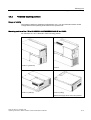
Range of validity
The following applies to distributed configurations only. You can information about central
configurations in the operating instructions for the operator unit.
Mounting position of the PC to UL60950/UL508/EN60950/CSA22.2 No. 60950
An inclination of ± 20° is allowed in each mounting position.
Position 1 (preferred)
Position 3 (desktop)
Position 2
Position 4 (ceiling)
CD/DVD and flopply drives cannot be operated.
Panel PC 870 V2, Computer Unit
Operating Instructions, Edition 03/2004, CD Documentation and Drivers
4-5
Planning use
4.4 Mounting positions and fastening
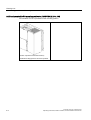
Additional permissible PC mounting position to UL508/CSA 22.2 No. 142
An inclination of ±15° is permitted in this mounting position.
Position 5 (interface towards the bottom)
CD/DVD and flopply drives cannot be operated.
4-6
Panel PC 870 V2, Computer Unit
Operating Instructions, Edition 03/2004, CD Documentation and Drivers
5
Installation
5.1
Installing the device
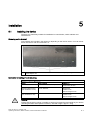
The device is particularly suitable for installation in control desks, switch cabinets and
switchboards
Screwing on the bracket
Two brackets are included in the shipment, depending on the device version. You can mount
these onto the PC with six screws M3 x 6.
(1)
Mount the bracket on the device, use the M3 screws included in your package, maximum
screw depth 5 mm.
Instruction for ceiling or wall mounting
Example of mounting methods
Stock
Bore diameter
Attachment
Concrete
8 mm diameter, 60 mm depth
Dowel: 8 mm, 50 mm
screws 4 mm, 50 mm
Gypsum plaster board
(min. thickness 13 mm)
14 mm diameter
Tilting dowel
diameter 4 mm
Minimum length 50 mm
Sheet metal
(min. thickness 2 mm)
5 mm diameter
Metal screws
diameter 4 mm
Minimum length 15 mm
Warning
Ensure that the wall or ceiling is capable of carrying four times the total weight of your device
(including brackets and expansion modules.) The toal weight is approx. 10 kg.
Panel PC 870 V2, Computer Unit
Operating Instructions, Edition 03/2004, CD Documentation and Drivers
5-1
Installation
5.2 Dimensions
5.2
Dimensions
The mounting depth increases by 21 mm when a CD-ROM or CD-RW-/DVD drive is installed
in the device.
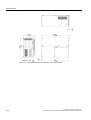
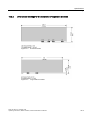
Refer to the dimension diagrams in the "Specifications" section for the exact measurements.
5-2
Panel PC 870 V2, Computer Unit
Operating Instructions, Edition 03/2004, CD Documentation and Drivers
6
Connecting
6.1
Overview
Introduction
Once you have mounted the device, connect it.
Warning
Do not touch power cables or communication cables during electrical storms and do not
connect any cables.
Unplug the power cable from the socket to be sure the electricity is disconnected.
Caution
Connection sequence
Follow the described sequence when connecting the device to avoid damaging it.
Commissioning
Allow the device to adjust to the room temperature before connecting the device. Do no
place the device near heat radiation. If moisture condensation occurs, wait at least about 12
hours before you switch on the device.
Risk of data loss!
Do not disconnect the power supply when the device is in operation. Disconnect the power
only after the device has been correctly shut down.
Requirements
• The device has been installed in conformity with EMC guidelines.
Procedure
• The device has been installed according to the information provided in these operation
instructions.
1. Connect the equipotential bonding.
2. Connect the peripherals:
– Connect the monitor
– Connect the PS/2 mouse
– Connect the serial mouse
– Connect the PS/2 keyboard
– Connect USB device such as a USB mouse
– Connect the printer
Panel PC 870 V2, Computer Unit
Operating Instructions, Edition 03/2004, CD Documentation and Drivers
6-1
Connecting
6.2 Interfaces
3. For distributed configuration only: Connect the cable between the computer unit and the
operator unit. For additional information, refer to the operating instructions for the
operator unit.
4. Connect the power cables.
6.2
Interfaces
Interfaces
Arrangement of the ports on the front of the device
6-2
Pos
Description
Description
(1)
COM 1
Serial port 1 (V.24), 25-pin sub-D socket
(2)
PROFIBUS/MPI/DP
MPI interface (RS485, isolated potential),
optional 9-pin d-Sub socket
(3)
ETHERNET
RJ 45 Ethernet connection 10/100 Mbps
(4)
USB 2.0
USB connector. Right USB port 1, left USB
port 2.
(5)
COM2
Serial port 1 (V.24), 9-pin d-Sub socket
(6)
KEYBOARD
Connection for a PS/2 keyboard.
(7)
MOUSE
Connection for a PS/2 mouse.
(8)
LPT1
Parallel interface, 25-pin
(9)
DVI/VGA
DVI/VGA connection for CRT or LCD monitor
with DVI interface, VGA via DVI/VGA adapter
(included in Box PC package)
Panel PC 870 V2, Computer Unit
Operating Instructions, Edition 03/2004, CD Documentation and Drivers
Connecting
6.2 Interfaces
Interfaces for connecting operator panels / displays
Arrangement of the ports
(1)
LVDS display interface
for TFT displays up to 1024 x
768 pixels
(2)
I/O interface for connecting
front panel components
(3)
Access to the interfaces on
operator panels (closed by a
screwed metal cover during
shipment of Box PC)
(4)
Mounting screw for the steel
sheet cover
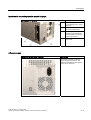
AC power supply
Position of the IEC power connector
Description
IEC power connector for the AC
power supply to the device. The
maximum permitted power range is
120 V AC to 240 V AC.
Panel PC 870 V2, Computer Unit
Operating Instructions, Edition 03/2004, CD Documentation and Drivers
6-3
Connecting
6.3 Equipotential bonding
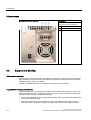
DC power supply
Position of the screw terminals
Description
Screw terminals for connecting the
DC power supply to the device
6.3
1
24 V DC
2
0 V DC
3
Protective conductor
Equipotential bonding
Differences in potential
Differences in potential arise between separated system parts, which in some cases leads to
high equalization currents. When cable shields are applied on both sides and are grounded
at different system parts, for example.
Causes of potential differences are different network feed-ins, for example.
Equipotential bonding requirements
Reduce the differences in potential by laying the equipotential bonding cables in such a way
that the affected electronic components function perfectly. Please comply with the following
guidelines when setting up equipotential bonding:
• The lower the impedance of the equipotential bonding cable, the greater the effectiveness
of the equipotential bonding.
• When two system parts are connected by means of a shielded signal cable, and their
shields are both connected to the ground or protected conductor, the following must be
6-4
Panel PC 870 V2, Computer Unit
Operating Instructions, Edition 03/2004, CD Documentation and Drivers
Connecting
6.4 Connect the equipotential bonding
observed: The impedance of the additonal equipotential bonding cable amounts to 10 %
of the shield impedance, at the most.
• Make sure that the diameter of the equipotential bonding cable is proportional to the
maximum equalization current. Equipotential bonding cables with a 16 mm diameter have
proven themselves in practice. 2.
• Use equipotential bonding cables made of copper or galvanized steel. Connect the
cables extensively with the ground or protective conductor. Protect the ground or
protective conductor from corrosion.
• Lay the equipotential bonding cable in such a way that the area between the equipotential
bonding cable and signal cables is as small as possible.
6.4
Connect the equipotential bonding
A low-impedance earth connection ensures that interference signals generated by external
power supply cables, or signal cables, or by cables to the I/O modules, are safely discharged
to earth.
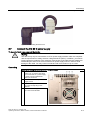
Equipotential bonding terminal
The equipotential bonding terminal on
the device (large surface, large-area
contact) must be connected with the
central grounding busbar of the cabinet
or plant in which the PC is to be
installed. The minimum conductor
cross-section may not be less than 5
mm2.
Panel PC 870 V2, Computer Unit
Operating Instructions, Edition 03/2004, CD Documentation and Drivers
6-5
Connecting
6.5 Connecting I/O modules
6.5
Connecting I/O modules
6.5.1
Overview
When connecting the device for the first time, connect a PS/2 keyboard and PS/2 mouse.
Connect any required USB components such as a USB hub.
Caution
Disconnect the device from mains before connecting peripherals.
Connect only peripherals approved for industrial applications according to EN 61000-62:2001. Using shielded cables and metal connectors for peripherals. Otherwise, the
specified norms and specifications declared by Siemens AG are no longer valid. Fix the
plugs of the interface cables to the PC housing with screws. This improves the electrical
shielding.
Mouse
Connect a PS/2, USB or serial mouse.
6.5.2
Connect USB devices
Note
Caution
Wait at least 10 seconds before disconnected and reconnecting USB devices. This also
applies to touch-screen front panels, especially touch panels. Short-circuits of the power on
USB front connectors results in resetting the device.
Notice
When using standard USB peripherals, please bear in mind that their EMC immunity level is
frequently designed for office applications only. These device may be used for
commissioning and servicing. However, only industry-standard devices are allowed for
industrial operation.
The USB peripherals are developed and marketed by individual vendors. The respective
manufacturers offer support for the peripherals. Moreover, the terms of liability of the
individual vendors or suppliers apply here. More information about connecting USB devices
is available in the "Commissioning" section.
6-6
Panel PC 870 V2, Computer Unit
Operating Instructions, Edition 03/2004, CD Documentation and Drivers
Connecting
6.6 Connect the 120 AC 230 V power supply
Procedure
1. Insert the USB cable into the USB port. The device is automatically detected by the Plug
and Play operating system. The operating system may prompt you to install a driver when
necessary.
Note
Do not connect devices, such as a printers, that do not have a USB port to the USB port.
6.6
Connect the 120 AC 230 V power supply
Principle
Connect the power supply as the final step.
You can optionally operate the device with automatic voltage switching on 120/230V AC or
24V DC. The Panel PC 870 V2 features a power switch.
Caution
Do not touch power lines or data transmission lines during electrical storms and do not
connect any cables.
Unplug the power cable from the socket to be sure the electricity is disconnected.
The device features a safety-certified power cable. Connect the device only to a grounded
outlet with a ground contact. Operate the device only on grounded power lines and not on
impedance earthing lines such as IT networks.
Do not exceed the nominal voltage for the device with the local power voltage.
Localized information
Outside of the USA and Canada, operation on a 230 V AC power supply
If you do not use the safety-certified power cable, use a flexible cable with the following
characteristics:
• At least 18 AWG conductor cross-section
• Grounded safety plug 15 A, 250 V.
Notice
Ensure that the cable set conforms to the respective national safety regulations and is
appropriately labeled.
Panel PC 870 V2, Computer Unit
Operating Instructions, Edition 03/2004, CD Documentation and Drivers
6-7
Connecting
6.6 Connect the 120 AC 230 V power supply
For USA and Canada:
A CSA or UL-listed power supply cable must be used in the United States and Canada USA.
Notice
Ensures that the plug conforms to the NEMA 5-15 regulation.
120V power supply
Use a flexible cable with the following characteristics:
• UL approval
• CSA label
• Type STJ with three conductors
• At least 18 AWG conductor cross-section
• Maximum 4.5 m length
• Parallel grounded safety plug 15 A, min. 125 V
230V power supply
Use a flexible cable with the following characteristics:
• UL approval
• CSA label
• Type STJ with three conductors
• At least 18 AWG conductor cross-section
• Maximum 4.5 m length
• Parallel grounded safety plug 15 A, min. 250 V
Procedure
1. Insert the supplied power cable into the AC/DC power socket of the computer unit.
2. Fasten the power plug with the locking device supplied in the package. This will prevent
unintentional detachment of the IEC power connector on the computer unit.
3. Only for Panel PC 670: To prevent emitted interference, connect the supplied ferrite core
. directly behind the device socket of the power supply cable. A ferrite core is supplied
with the product package.
When using a 105 W AC power supply, attach the ferrite core as diagrammed:
6-8
Panel PC 870 V2, Computer Unit
Operating Instructions, Edition 03/2004, CD Documentation and Drivers
Connecting
6.7 Connect the DC 24 V power supply
Figure 6-1
6.7
Attaching the ferrite core
Connect the DC 24 V power supply
To be noted before you connect the device
Warning
The device may only be connected to 24 V DC power supply networks which are compliant
with the requirements of safety extra low voltage directives (SELV); in addition, you need to
install a protective conductor. The conductor cross-section of the cable must be adapted for
withstanding the short-circuit current of the 24 DC power supply source in order to avoid
damage to the cable. You may connect conductors with cross-section of up to 5 mm2.
Connecting
Steps in connecting the device to the 24 V DC power supply
1.
Make sure that the ON / OFF
switch is in "0" position (Off) when
you connect the 24 V power supply
in order to avoid unintentional
startup of the device.
2.
Switch off the 24 V DC power
supply source
3.
Terminate the protective conductor
(3) at the correspnding screw
terminal.
4.
Connect +24 V DC (1) and 0 V DC
(2) to the screw terminals
Panel PC 870 V2, Computer Unit
Operating Instructions, Edition 03/2004, CD Documentation and Drivers
6-9
Panel PC 870 V2, Computer Unit
Operating Instructions, Edition 03/2004, CD Documentation and Drivers
Commissioning
7.1
7
Overview
Note
Refer to the operating instructions for the operator unit for information about commissioning,
operating and configuring the device. During commissioning, pay heed to the following
information and special considerations about the BIOS settings and the Microsoft Windows
operating systems.
Additional information about Microsoft Windows operating systems is available in the section
"Servicing and maintenance".
7.2
BIOS settings
"USB Boot" und "USB legacy Keyboard/Mouse" are deactivated by default ("DISABLED") in
the "Advanced" menu of the BIOS setup: A USB keyboard is not fully available before
Windows starts up. There are not restrictions to using a USB keyboard when editing the
BIOS. To be able to select an operating menu before Windows starts, however, connect a
PS/2 keyboard. You can also activate the "USB legacy Keyboard/Mouse" feature.
Caution
Activate the "USB legacy Keyboard/Mouse" feature only when a USB keyboard or mouse is
connected. When the "USB legacy Keyboard/Mouse" feature is activated ("ENABLED"), the
ISA bus is not available. Problems may occur with ISA/PCI expansion cards. In this case,
change the USB segment address in the "USB Segment Location" field.
Note
To edit the BIOS on the operator device with a touchscreen, connect a USB keyboard or an
external PS/2 keyboard.
Panel PC 870 V2, Computer Unit
Operating Instructions, Edition 03/2004, CD Documentation and Drivers
7-1
Commissioning
7.3 Microsoft Windows operating system
7.3
Microsoft Windows operating system
7.3.1
Releases
The device is released for the following operating systems:
Panel PC 870 V2
• Windows 2000 Professional Multi-Language, German, English, French, Italian, Spanish,
Japanese, Korean, Chinese simplified and Chinese traditional
• Windows XP Professional Multi-Language, German, English, French, Italian, Spanish,
Japanese, Korean, Chinese simplified and Chinese traditional
7.3.2
Windows 2000
Restrictions
Notice
If you have an external PS/2 keyboard and a USB keyboard connected at the same time, the
keyboard LEDs on the external keyboards may not be correctly refreshed in some
circumstances.
Service pack
After a new installation or recovery of Windows 2000, install at least Service Pack 4. Service
Pack 4 is supplied in the product package.
Note
If you are using SIMATIC WinCC, pay heed to the operating system releases. For additional
information, refer to the documentation of the SIMATIC WinCC.
Automatic logon
When automatic logon is used, a defined user is automatically logged on with a defined
password. No logon dialog appears when the operating system starts up. For additional
information, refer to the Windows help.
7-2
Panel PC 870 V2, Computer Unit
Operating Instructions, Edition 03/2004, CD Documentation and Drivers
Commissioning
7.4 USB
7.3.3
Windows XP
Restrictions
Note
If you have an external PS/2 keyboard and a USB keyboard connected at the same time, the
keyboard LEDs on the external keyboards may not be correctly refreshed in some
circumstances.
7.4
USB
Introduction
Readily available USB peripherals can be easily and flexibly connected via the USB port. For
example, you can connect a USB keyboard and a USB mouse. If a USB keyboard features a
USB port (USB hub) itself, you can connect other USB peripherals, such as a mouse,
directly to the keyboard.
USB port
There are several types of USB peripherals:
• Low power devices: maximum 100 mA power consumption, e.g. mouse and keyboard
• High power devices: maximum 500 mA power consumption, e.g. hard disk and floppy
drive
The general USB specifications apply to the USB ports on the computer unit.
Using USB peripherals
Notice
When installing a USB device for the first time, ensure you have the required device driver.
Before removing an intelligent USB device, deactivate the device in the operating system
using the dialog "Unplug or Eject Hardware". For additional information, refer to the
documentation of the operating system.
For distributed configuration only: When using a USB hub, make sure you do not exceed the
maximum cable length of 1.8 meters to the USB hub. Only connect additional USB devices
to the USB hub with maximum cable length of 1.8 meters. More information is available in
the simplified block diagram.
Panel PC 870 V2, Computer Unit
Operating Instructions, Edition 03/2004, CD Documentation and Drivers
7-3
Commissioning
7.4 USB
Simplified block diagram
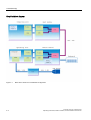
Figure 7-1
7-4
Basic device functions in a distributed configuration
Panel PC 870 V2, Computer Unit
Operating Instructions, Edition 03/2004, CD Documentation and Drivers
8
Operation
8.1
Operator controls
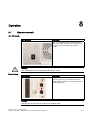
On / Off switch
On / Off switch
Description
The On / Off switch does not isolate the device
from mains. When the switch is in 0 position (Off),
the device is still connected to the auxiliary
voltage.
Warning
The On/Off switch does not isolate the device from mains!
Reset button
Reset button
Description
The reset button can be actuated with a pin or an
opened up paper clip, for example. The button
signal triggers a hardware reset. The PC performs
a restart (cold start.)
Caution
Data may be lost when the PC performs a hardware reset!
Panel PC 870 V2, Computer Unit
Operating Instructions, Edition 03/2004, CD Documentation and Drivers
8-1
Operation
8.2 Floppy drive
8.2
Floppy drive
Introduction
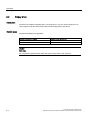
The device is standard equipped with a 3.5" floppy drive. You can use the floppy drive to
save programs and data and transfer data from the floppy disk to the device.
Diskette types
The follows diskettes are supported:
Double sided double density
Double sided high density
3.5 inch
3.5 inch
720 KB
1.44 MB, 135 TPI
Caution
Data loss!
Do not press the ejection button when the green access LED of the drive is lit.
8-2
Panel PC 870 V2, Computer Unit
Operating Instructions, Edition 03/2004, CD Documentation and Drivers
Integration
9.1
9
Overview
Introduction
The following options are available for integrating the device in existing or planned system
environments / networks:
Ethernet
The integrated Ethernet interface (10/100 Mbps) can be used for communication. and data
exchange to automation devices such as SIMATIC S7.
You require suitable software for this: STEP7, WinCC, ProTool, WinCC flexible, WinAC,
SIMATIC NET.
PROFIBUS / MPI
The optional potentially isolated Profibus interface, 12 Mbps, can be used to interconnect a
distributed configuration Field devices or to interconnect to SIMATIC S7.
You require suitable software for this: STEP7, WinCC, ProTool, WinCC flexible, WinAC,
SIMATIC NET.
Further information
For further information, refer to the catalog and to the online ordering system from Siemens
A&D.
Internet address: https://mall.ad.siemens.com
9.2
Device in SIMATIC S7 network
9.2.1
PROFIBUS/MPI/DP network
You can connect the device to an S7 automation system or a PROFIBUS DP network via the
MPI/DP interface. You can connected up to 32 PC, PG or AS devices to a network segment.
The use of repeaters allows you to interconnect to several MPI/PROFIBUS DP network
Panel PC 870 V2, Computer Unit
Operating Instructions, Edition 03/2004, CD Documentation and Drivers
9-1
Integration
9.2 Device in SIMATIC S7 network
segments. The complete MPI/PROFIBUS DP network consists of a maximum of 127
stations.
The device is physically connected to the MPI/PROFIBUS DP network via an isolated RS485
interface on the PC motherboard. The potential is isolated within the safety low voltage
circuit (SELV).
The transmission rate is limited to 187.5 Kbps with the 5 meter MPI cable for connecting to
the SIMATIC S7-CPU. To achieve baud rates over 1.5 Mbps, you require a 12 Mbps
PROFIBUS cable with the order number 6ES7901-4BD00-0XA0. In the PROFIBUS DP MPI
network, you can achieve data transmission rates of 9.6 Kbps to 12 Mbps.
9.2.2
Connecting an S7 automation system
Interconnection
The device is interconnected via the MPI/DP interface as follows:
• With MPI networks S7 200, S7 300 and S7 400
• PROFIBUS-DP networks with DP components
Hardware requirements
You can use the following components to interconnect or network, for example, with
PROFIBUS:
• RS 485 interface, MPI/DP interface, onboard
• Shielded two-wire cable: Bus cable or network cable
Note
Refer to the SIMATIC Network catalog IK PI for more information about SIMATIC
Network PC cards.
Procedure
1. Detach the device from mains.
Caution
Risk of damage to the device!
Before inserting the cables, neutralize the static charge of your body, the device and the
connecting cables. You can do this by briefly touching the metal housing.
2. Insert the bus cable or network cable into the MPI/DP socket.
3. Connect the device to the mains again.
9-2
Panel PC 870 V2, Computer Unit
Operating Instructions, Edition 03/2004, CD Documentation and Drivers
Integration
9.3 Networking via Industrial Ethernet
9.3
Networking via Industrial Ethernet
You can establish a network between the device and other computers using Industrial
Ethernet. The RJ45 Ethernet interface is a Twisted-Pair (TP) Interface for data transfer rates
of 10/100 Mbps. This on-board interface is compatible with Intel pro/100+ PCI adapters.
The Plug & Play interface is automatically recognized in Windows. Protocols are configured
in the Windows system control.
Notice
A Class 5 Ethernet cable is required for operation with 100 Mbps.
Refer to the SIMATIC Network catalog IK PI for more information about SIMATIC Network
PC cards.
9.4
Establishing a data connection
Windows supports point-to-point connections via the LPT or COM port. The cables are
standard, commercially available products. For additional information, refer to the Windows
help for the operating system.
Panel PC 870 V2, Computer Unit
Operating Instructions, Edition 03/2004, CD Documentation and Drivers
9-3
Panel PC 870 V2, Computer Unit
Operating Instructions, Edition 03/2004, CD Documentation and Drivers
10
Functions
10.1
Overview
The following individual functions are implemented:
• Temperature monitoring and over / under temperature indication
• Watchdog
• Fan monitoring
Messages can be output from the monitoring modules to the applications.
To enable these functions, the following features are available for the devices SOM software
(Safecard on Motherboard) and on the CD the DiagMonitor software (optional).
The DiagMonitor software CD contains the monitoring software, the software for the stations
to be monitored, and a library for creating user-specific applications.
The description of the driver and SOM program are available on the CD "Documentation and
Drivers" under Drivers & Updates\<device>\...
10.2
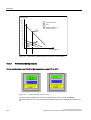
Temperature monitoring
Temperature monitoring
The temperature is recorded by means of three thermocouples. A sensor monitors the
processor temperature, another sensor monitors the temperature in the area of the
processor module and a third sensor monitors the temperature around the drive.
When the temperature is out of the range of one of the three set temperature thresholds, the
following error reactions are triggered:
Reaction
Option
Device and CPU fans for the maximum speed
None
SOM or DiagMonitor- software is activated
None
The temperature error is retained until the temperatures have fallen below the thresholds
and are reset by one of the following measures:
• Error acknowledgement in the SOM program (manually by means of the broom icon)
• Restart of the device.
Panel PC 870 V2, Computer Unit
Operating Instructions, Edition 03/2004, CD Documentation and Drivers
10-1
Functions
10.3 Watchdog (WD)
10.3
Watchdog (WD)
Function
The watchdog monitors the program execution and reports a program crash to the user by
means of various reactions.
The watchdog is idle when the PC is switched on or after a HW-RESET(cold restart), i.e., no
reaction of the WD is triggered.
WD reactions
If the WD is not triggered again within the set time (by driver or SOM program), the following
reactions are initiated:
Reaction
Option
WD acknowledgement
None
Trigger a PC reset
adjustable
SOM or DiagMonitor- software is activated
None
WD monitoring times TWD
The TWD are adjustable in increments of one second in a range from 3 to 255 seconds.
Note
If the watchdog time is changed after the watchdog was enabled (i.e., while the watchdog is
running), the watchdog is retriggered!
10.4
Fan monitoring
Device fan and processor fan operation are monitored. When a fan fails, the following
reactions are triggered:
Reaction
Option
SOM or DiagMonitor- software is activated
None
The temperature error is retained until the cause of the fan failure has been rectified and the
error is reset in one of the following ways:
• Acknowledgement of the error message by the SOM program.
• Restart of the device.
10-2
Panel PC 870 V2, Computer Unit
Operating Instructions, Edition 03/2004, CD Documentation and Drivers
Functions
10.5 Safecard on Motherboard (SOM)
10.5
Safecard on Motherboard (SOM)
This application is used to monitor PC hardware (temperature, watchdog and fans) and to
display the current measured values. The application can be configured on a GUI, and
temperature monitoring, the watchdog function and fan monitoring can be enabled.
Your SIMATIC PC is equipped with three thermocouples, which are automatically detected
by the application.
Figure 10-1
Safecard On Motherboard with three thermocouples
1
Temperature range:
You are here shown the current temperature and limit values. You can
toggle the temperature display mode to indicate either the current
temperature, or the min./max. values measured since the start of the
application. You can set a check box to enable polling or interrupt mode
for the temperature monitoring function.
2
Watchdog area:
Here, you can configure the watchdog function in your monitoring
application. You can specify the watchdog time, assign an interrupt,
activate a PC reset and activate / deactivate the watchdog.
3
Fan area:
In this area you can visualize the current speed of the fans.
The description of the driver and SOM program are available on the CD "Documentation and
Drivers" under Drivers & Updates\<device>\...
From the CD, run Install.bat and follow the instructions on your screen.
Panel PC 870 V2, Computer Unit
Operating Instructions, Edition 03/2004, CD Documentation and Drivers
10-3
Panel PC 870 V2, Computer Unit
Operating Instructions, Edition 03/2004, CD Documentation and Drivers
Maintenance and servicing
11.1
Installing and removing hardware components
11.1.1
Repairs
11
Carrying out repairs
Only authorized personnel are permitted to repair the device.
Warning
Unauthorized opening and improper repairs on the device may result in substantial damage
to equipment or endanger the user.
• Before you open the device, first switch it off and then disconnect the power plug.
• Install only system expansion devices designed for this computer. If you install other
expansion devices, you may damage the system or violate the safety requirements and
regulations on RF suppression. Contact your technical support team or where you
purchased your PC to find out which system expansion devices may safely be installed.
If you install or exchange system expansions and damage your device, the warranty
becomes void.
Notice
Note the EGB instructions.
Limitation of Liability
All technical specifications and licenses apply only to expansions approved by SIEMENS.
No liability can be accepted for impairment of functions caused by the use of devices and
components of other manufacturers.
Tools
You can preform all installation tasks on the device using Torx T6, Torx T10 and Torx T20
screwdrivers and a Philips screwdriver.
Panel PC 870 V2, Computer Unit
Operating Instructions, Edition 03/2004, CD Documentation and Drivers
11-1
Maintenance and servicing
11.1 Installing and removing hardware components
11.1.2
Open the device
Caution
Work on the open device may only be carried out by authorized and qualified personnel.
Within the warranty time, you are only allowed to install expansions for memory and PCB
modules.
Caution
The device contains electronic components which may be destroyed by electrostatic charge.
You therefore need to take precautionary measures before you open the device. Refer to the
(ESD) directives for handling components which are sensitive to electrostatic charge.
Tools
You can perform all installation tasks on the device using Torx T6, Torx T10 and Torx T20
screwdrivers and a Philips screwdriver.
Preparation
Isolate the device from mains.
Open the device
Steps in opening the device
1
11-2
Remove the five screws (1).
Panel PC 870 V2, Computer Unit
Operating Instructions, Edition 03/2004, CD Documentation and Drivers
Maintenance and servicing
11.1 Installing and removing hardware components
2
11.1.3
Swing the lid to the front and
remove it.
Installing memory modules
Memory expansion options
The motherboard is equipped with three slots for memory modules. 184 pin‑ DDR266 RAM
chips (PC2100), unbuffered, no ECC. This allows you to expand the memory capacity of
your PC to a maximum of 3 GB. Either one, two or three modules can be installed.
Preparation
Isolate the device from mains and disconnect all connecting cables.
Caution
The electronic components on the PCBS are highly sensitive to electrostatic discharge. It is
therefore vital to take precautionary measures when handling these components. Refer to
the directives for handling components which are sensitive to electrostatic charge.
Panel PC 870 V2, Computer Unit
Operating Instructions, Edition 03/2004, CD Documentation and Drivers
11-3
Maintenance and servicing
11.1 Installing and removing hardware components
Installing the memory module
How to install a memory module
1
Open the device
2
Note where the (polarized) cutout is
on the pin side of the RAM chip
before attempting to insert it.
3
Push the module carefully into the
slot until the interlocks engage
4
Close the device.
Removing a memory module
How to remove a memory module
1
Open the device
2
Unlock the left and right interlocks.
3
Pull the memory module out of the
slot
4
Close the device.
Display of the current memory configuration
The changed memory configuration is detected automatically. The allocation of the ”base
memory and extended memory” is automatically displayed when you switch on the device.
11-4
Panel PC 870 V2, Computer Unit
Operating Instructions, Edition 03/2004, CD Documentation and Drivers
Maintenance and servicing
11.1 Installing and removing hardware components
11.1.4
Installing PCI / AT cards
11.1.4.1
Notes on the modules
Notes on modules-Specifications
The device is designed for use with modules conforming to AT/PCI specifications. Operation
is possible with 5V and 3.3 V PCI modules. The permitted module dimensions are found in
the dimensional drawings.
Note about long PCI modules
Before long PCI cards can be inserted into the guide rails, they must be fitted with an
extender (this should form part of the scope of supply of long PCI boards).
11.1.4.2
Installing expansion modules
Preparation
Isolate the device from mains
Expansion module installation
How to install an expansion module (PCI / AT format):
1
Open the device
2
Loosen the two fastening
screws (1) and the module
bracket. (2) remove.
3
Remove the relevant steel slot
cover (3)
4
Insert the expansion module
(4) into the relevant slot.
5
Install the module bracket and
insert the slider.
6
Steel slot cover (3) screw
tighten the expansion module.
7
Close the device.
Panel PC 870 V2, Computer Unit
Operating Instructions, Edition 03/2004, CD Documentation and Drivers
11-5
Maintenance and servicing
11.1 Installing and removing hardware components
Inserting the slider
To insert the slider:
How to install a module bracket
1
Push the slider through the
guide slot until it is seated
firmly on the module. Insert
the module into the slot.
Caution
Do not apply any pressure on the module! Hence, do not apply excessive force on the slider
when you push it onto the module.
2
Cut off the rest of the slider
element: Use a knife to apply a
cut on the slider at the upper
edge of the bracket and then
break this section off. Cut off
the residual element using a
side cutter.
Notes on the allocation of resources
Due to the number of functions on the motherboard, there are no reserved interrupts for PCI
modules. If the new expansion module requires exclusive resources, you have to disable the
functions on the motherboard. For information on allocated resources, refer to the system
resources section. For information on how to disable motherboard functions, refer to the
BIOS Setup. Information on the assignment of PCI IRQs to the PCI slots is found in the
"Advanced Menu" or "Bus Board" sections.
11-6
Panel PC 870 V2, Computer Unit
Operating Instructions, Edition 03/2004, CD Documentation and Drivers
Maintenance and servicing
11.1 Installing and removing hardware components
11.1.5
Disk drives
11.1.5.1
Options of installing disk drives
Drive bay for DVD and hard disk drives
DVD drive above, hard disk drive below
Description
2 brackets in the illustration right,
above the ribbon cable
1 slot for 3.5'' hard disk
2 slots for 2.5'' hard disks
Drive bay for floppy drive
Floppy drive
Description
Bracket below in the middle of the
illustration
Panel PC 870 V2, Computer Unit
Operating Instructions, Edition 03/2004, CD Documentation and Drivers
11-7
Maintenance and servicing
11.1 Installing and removing hardware components
11.1.5.2
Example: Removing drive bays
Preparation
Isolate the device from mains and disconnect all connecting cables.
Remove the hard disk bay
How to remove the disk bay
11-8
1
Remove the four screws (1).
2
Remove the hard disk bay and
place it onto the device.
Panel PC 870 V2, Computer Unit
Operating Instructions, Edition 03/2004, CD Documentation and Drivers
Maintenance and servicing
11.1 Installing and removing hardware components
Removing the drive bay for the floppy / DVD drive
How to remove the disk bay
1
Remove the four screws (1).
2
Remove the HD bay and place it
onto the device.
Panel PC 870 V2, Computer Unit
Operating Instructions, Edition 03/2004, CD Documentation and Drivers
11-9
Maintenance and servicing
11.1 Installing and removing hardware components
11.1.5.3
3
Remove the data cable between
the floppy disk drive (1) and the
motherboard and its power
supply connector (2). Remove
the screw (3) and open the
bracket. Unplug the cable of the
DVD/CD drive.
4
Remove the three screws (1).
5
Lift the drive bay out.
Removing and installing a DVD-ROM drive
Procedure
1. Unscrew the 4 screws holding the drive and slide the drive out.
2. Loosen the 2 screws on the housing at the front of the drive.
11-10
Panel PC 870 V2, Computer Unit
Operating Instructions, Edition 03/2004, CD Documentation and Drivers
Maintenance and servicing
11.1 Installing and removing hardware components
Figure 11-1
DVD-ROM drive with housing
3. Flip up the housing cover (1) 90°.
Figure 11-2
DVD-ROM drive removed, housing flipped up
Panel PC 870 V2, Computer Unit
Operating Instructions, Edition 03/2004, CD Documentation and Drivers
11-11
Maintenance and servicing
11.1 Installing and removing hardware components
4. Remove the connector of the ribbon cable from the socket (2).
5. Loosen the 3 screws (3) with a TX6 key.
6. Remove the DVD-ROM drive from the bracket.
7. Loosen the 2 screws (5).
8. Remove the board (6).
Reverse the procedure to install the DVD-ROM drive.
11.1.5.4
Removing and installing a hard disk
Procedure
1. Unscrew the 4 screws holding the drive and slide the drive out. The hard disk is fixed to
the underside of the drive,
Figure 11-3
Removed hard disk
2. Loosen the 4 screws with which the hard disk is fixed to the housing.
3. Remove the hard disk from the bracket.
Reverse the procedure to install the hard disk.
11-12
Panel PC 870 V2, Computer Unit
Operating Instructions, Edition 03/2004, CD Documentation and Drivers
Maintenance and servicing
11.1 Installing and removing hardware components
11.1.6
Replacing the backup battery
Note
Batteries are wearing parts and should be replaced after five years in order to ensure proper
functioning of the PC.
To be noted before you replace the battery
Caution
Risk of damage!
The lithium battery may only be replaced with an identical battery, or with a type
recommended by the manufacturer (Order No.: W79084-E1003-B1).
Warning
Risk of explosion and release of harmful substances!
Hence, do not throw Lithium batteries into an open fire, do not solder or open the cell body,
do not short-circuit or reverse polarity, do not heat up above 100 °C, dispose as regulated
and protected against direct exposure to sunlight, humidity and dewing.
Disposal
Caution
Batteries must be disposed of in accordance with local regulations.
Preparation
Note
When you replace the battery, you delete the configuration data of the device.
1. Note down the current settings of the BIOS Setup.
A list in which you can note down this information is found in the BIOS manual
2. Isolate the device from mains and disconnect all connecting cables.
Panel PC 870 V2, Computer Unit
Operating Instructions, Edition 03/2004, CD Documentation and Drivers
11-13
Maintenance and servicing
11.1 Installing and removing hardware components
Replacing the battery
Procedure:
How to replace the battery
1
Open the device
2
Disconnect the plug (1) and take the
battery (2) out of the retainer.
3
Mount a new battery into the retainer
and reconnect the plug.
4
Close the device.
BIOS Setup readjustment
When a battery is exchanged the configuration data of the device is lost and must be
reentered in the BIOS setup.
11.1.7
Installing and removing the power supply
Warning
Only qualified personnel is authorized to exchange the power supply module.
Preparation
1. Isolate the device from mains and disconnect all connecting cables.
2. Open the device.
11-14
Panel PC 870 V2, Computer Unit
Operating Instructions, Edition 03/2004, CD Documentation and Drivers
Maintenance and servicing
11.1 Installing and removing hardware components
Removing the power supply module
How to remove the power supply module
1
Remove the hard disk drive bay.
2
Remove the six screws (1) and the
cover of the power supply module.
3
Disconnect the power supply
cables of all drives.
4
Remove the three Torx T10
mounting screws (1).
5
Disconnect the power supply
connector from the motherboard.
6
Pull the power supply module out
to the front.
Panel PC 870 V2, Computer Unit
Operating Instructions, Edition 03/2004, CD Documentation and Drivers
11-15
Maintenance and servicing
11.2 Installing software
7
Also remove the four screws
holding the steel bracket of the PS
and take it off. These are special
screws with imperial dimensions
(6-32x3/16''-St-G3E).
11.2
Installing software
11.2.1
Overview
Introduction
Restart the device systematically after exchanging the hard disk. Or reinstall the software as
required.
Procedure
1. Format and partition the hard disk as required.
2. Transfer the saved data back to drives C and D using the backup utility. Use the Restore
CD, for example, to transfer the original image back to the device's hard disk.
3. You can also restore the operating system using the Microsoft Recovery CD
or install an operating system yourself.
4. Install the required Windows Service Packs. Refer to the "Commissioning" section for
more information.
5. For new Windows 2000 installations, install the chipset driver before installing any other
drivers.
6. Install any other required drivers.
7. Install any other required software.
8. Configure the drivers and applications as needed. Refer to the section "Additional drivers
and applications" in the operating instructions for the operator unit for more information.
9. Defragment the hard disk.
11-16
Panel PC 870 V2, Computer Unit
Operating Instructions, Edition 03/2004, CD Documentation and Drivers
Maintenance and servicing
11.2 Installing software
Caution
Defragmenting a hard disk destroys all of the authorizations saved on the disk.
Therefore, transfer all authorizations for installed SIMATIC software on the disk to
another medium such as a floppy disk. For additional information, refer to the
documentation of the SIMATIC software.
10.Save the hard disk data to a CD.
Note
To verify that the data on the CD is in order, transfer the data on the CD back to an
empty hard disk and quickly test the device by switching it on.
11.2.2
Supplied software CDs
In case of software errors you can reinstall your software by means of the Recovery CD, the
Documentation and Drivers CD or the Restore CD.
Recovery CD:
Contains the tools for setting up the hard disk drives and the operating system.
Documentation and Drivers CD:
Contains the documentation and the hardware drivers.
Restore CD:
Contains a hard disk image file with the original software (operating system with installed
hardware drivers).
11.2.3
Partitioning under Windows 2000/XP Professional
After you have installed a new hard disk drive, or if partitions are faulty, or when you wish to
change the partitioning on your hard disk, you need to set up new partitions on the hard disk.
Caution
When you delete or create partitions or logical DOS partitions, you lose all data on the hard
disk. All partitions on the hard disk will be deleted.
Factory setup of the hard disk with Windows 2000 and Windows XP:
• One partition with a FAT16 file system
• One partition with a NTFS file system
To restore the partition to its factory state, proceed as follows:
Panel PC 870 V2, Computer Unit
Operating Instructions, Edition 03/2004, CD Documentation and Drivers
11-17
Maintenance and servicing
11.2 Installing software
Primary partition, FAT 32 files system
1. To boot from the Recovery CD, when the BIOS message appears press:
<F2> to enter SETUP or <ESC> to show the boot menu
. After initialization, a Boot Menu screen is displayed for selecting the boot device.
2. Select
CD-ROM drive
.
3. From the ”Microsoft Windows 98 Startup Menu” screen form, select
2. Boot for FDISK, FORMAT or Windows 2000 Setup
or
2. Boot for FDISK, FORMAT or Windows XP Professional Setup
.
4. Select
A:\>FDisk
the Microsoft Windows 98 hard disk configuration program (A: In the screen form, select
support for large disks.
Do you wish to enable large disk support (Y/N)...?
[ Y ] for yes.
5. Create a primary DOS partition with at least 4090 MB. When prompted
Do you want to use the maximum memory size available for the primary DOS partition and do you
want to activate this partition?
enter [N] for ”No” a and set the partition size to 10245 MB, for example.
6. To format the partition from the Recovery CD as described earlier in steps 1 to 3, restart
the computer, the select
A:\>Format C:
(A: is the CD drive).
to format format drive C:.
Caution
All the data of the relevant partition will be lost during formatting.
11-18
Panel PC 870 V2, Computer Unit
Operating Instructions, Edition 03/2004, CD Documentation and Drivers
Maintenance and servicing
11.2 Installing software
Setting up an extended FAT 32 partition
In order to create an extended partition, restart from the Recovery CD as described earlier in
steps 1 to 4.
Create an extended DOS partition with the remaining capacity of the hard disk.
The FAT 32 files system can be converted to a NTFS files system under
Windows 2000/XP with the
Format
command (total data loss), or by entering the command
CONVERT D: /FS:NTFS
without data loss.
11.2.4
Compatibility of the Restore CD
Caution
Use the supplied Restore CDs for the device. Verify that the order number of the Restore CD
matches that of the device. You can find the order number of the device on the rating label.
Do not used the supplied images for any other device. The chipsets and drivers differ.
11.2.5
Restoring the software to factory state by means of the Restore CD
The Restore CD (not included in all delivery versions) can be used to restore the factors
setting of the software. The CD contains the necessary images and tools for transferring the
factory software to the hard disk drive of your PC. You can restore the entire hard disk with
drive C: (system) and drive D: or only drive C:. at the command line input. This allows you to
retain any user data on drive D
Authorization or to retrieve the License Key from the hard disk.
• Check if you can retrieve your authorization or license key from the hard disk and perform
the procedure described below if this is possible.
• If it is not possible to backup your authorization, please contact the Customer Support
Hotline. There you can obtain information necessary for your software authorization.
Caution
When you select the "Restore system partition only" option, all data on drive C: (System)
will be deleted. All data, user settings and all authorizations or License Keys on drive C:
on drive C: will be lost in the process! All date on drive C: of your hard disk drive will be
deleted. Setup formats the hard disk partition and reinstalls the original factory software.
When you select the "Restore entire hard disk" option, ALL the data, user settings and
authorizations or License Keys will be lost on the hard disk.
Panel PC 870 V2, Computer Unit
Operating Instructions, Edition 03/2004, CD Documentation and Drivers
11-19
Maintenance and servicing
11.2 Installing software
Factory state restoring
To restore the factory state, proceed as follows:
• Insert the Restore CD in your drive and reboot the device. When the BIOS message
appears, press
<F2> to enter SETUP or <ESC> to show the boot menu
• . After initialization, a "Boot Menu" is displayed.
• Select ”CD-ROM Drive” with the cursor keys.
• Now follow the instructions on the screen.
Caution
All existing data, programs, user settings and authorizations or License Keyswill bedeleted
from the hard disk and are therefore lost.
For information on the functions, refer to the README.TXT file on the Restore CD.
11.2.6
Installing Microsoft Windows operating systems
11.2.6.1
Installation from the Recovery CD for Microsoft Windows 2000
This CD contains encrypted data that can only be transfered to a SIMATIC PC.
The data can be copied using the program OEMSETUP.EXE on the CD-ROM or after
booting from the CD with the Recovery function.
After the required data have been copied to the hard disk, you can run Windows 2000 Setup
to install the operating system.
Windows 2000 Setup sequence
If a Windows operating system is already installed or if the PC has been started with a user
bootdisk, the transfer of the data can be performed with the program OEMSETUP.EXE. To
do this, start the program OEMSETUP.EXE from the root directory of the recovery CD and
continue the sequence beginning with point 5.
If you have not installed an operating system yet, proceed as follows:
1. Insert the Recovery CD into the CD drive and reboot the system.
2. To boot from the CD, when the BIOS message appears press:
Press <F2> to enter SETUP or <ESC> to show the boot menu
. After initialization, a Boot Menu screen is displayed for selecting the boot device.
3. Select
CD-ROM drive
11-20
Panel PC 870 V2, Computer Unit
Operating Instructions, Edition 03/2004, CD Documentation and Drivers
Maintenance and servicing
11.2 Installing software
4. From the ”Microsoft Windows 98 Startup Menu” screen form, select
1. Boot for CD Recovery
If your hard disk is not set up yet, select
2. Boot for FDISK, FORMAT or Windows Setup
5. Confirm the
SIEMENS End User License Agreement
by pressing F8. Press ESC to decline the agreement and to abort setup.
6. In the next screen form, select which components you want to copy from the CD to your
hard disk. Minimum requirement for your Windows 2000 installation or setup is a copy of the
"I386" folder.
7. Select the destination drive for data transfer. The selected drive is not the installation drive
for Windows. Windows Setup requires approximately 500 MB of free hard disk space on
your Windows installation drive.
Note
Drive C: is the default destination for the data transfer (Recovery).
Please note that drive C: must provide approximately 500 MB of free hard disk space after
the selected recovery data have been copied.
8. Acknowledge the end message.
9. Run Windows Setup with
<<DRIVE>>:\I386\Winnt.exe /bist
<<DRIVE>> is the destination drive to which the Recovery were copied.
10. Now follow the instructions on the screen.
Selecting the language for Windows 2000
The Multilanguage User Interface (MUI) allows you to set up the Windows 2000 menus and
dialogs for another language.
To install the MUI, start
"MUI-german"
on your Recovery CD to run MUISETUP.EXE. Follow the instructions on the screen to install
the required languages.
To set the required languages for the Windows 2000 menus, dialogs and keyboard layout,
select
Panel PC 870 V2, Computer Unit
Operating Instructions, Edition 03/2004, CD Documentation and Drivers
11-21
Maintenance and servicing
11.2 Installing software
Start > Settings > Control Panel > Regional Options > tab General, field Setting for the current user
and field Language settings for the system and in the tab Input Locals, field Keyboard layout.
In addition to the menu and dialog language settings, you also need to set the regional
default by selecting Set Default... from the Regional Options dialog box.
The default language setting of your Windows 2000 installation is English, with a US
keyboard layout. To change to another language and keyboard layout, open the Control
Panel, select
Start > Settings > Control Panel > Regional Options > tab General, field Setting for current user and
field Language settings for the system and in the tabInput Locales, field Input language.
11.2.6.2
Installation from the Recovery CD for Microsoft Windows XP
This CD contains encrypted data that can only be transfered to a SIMATIC PC.
The data can be copied using the program OEMSETUP.EXE on the CD-ROM or after
booting from the CD with the Recovery function.
After the required data have been copied to the hard disk, you can run Windows XP
professional Setup to install the operating system.
Windows XP Professional Setup sequence
If a Windows operating system is already installed or if the PC has been started with a user
bootdisk, the transfer of the data can be performed with the program OEMSETUP.EXE. To
do this, start the program OEMSETUP.EXE from the root directory of the recovery CD and
continue the sequence beginning with point 5.
If you have not installed an operating system yet, proceed as follows:
1. Insert the Recovery CD into the CD drive and reboot the system.
2. To boot from the CD, when the BIOS message appears press:
<F2> to enter SETUP or <ESC> to show the boot menu
. After initialization, a Boot Menu screen is displayed for selecting the boot device.
3. Select
CD-ROM drive
4. From the ”Microsoft Windows 98 Startup Menu” screen form, select
1. Boot from CD Recovery
If your hard disk is not set up yet, select
2. Boot for FDISK, FORMAT or Windows Setup
5. Confirm the
SIEMENS End User License Agreement
11-22
Panel PC 870 V2, Computer Unit
Operating Instructions, Edition 03/2004, CD Documentation and Drivers
Maintenance and servicing
11.2 Installing software
by pressing F8. Press ESC to decline the agreement and to abort setup.
6. In the next screen form, select which components you want to copy from the CD to your
hard disk. Minimum requirement for your Windows XP installation or setup is a copy of the
"I386" folder.
7. Select the destination drive for data transfer. The selected drive is not the installation drive
for Windows. Windows Setup requires approximately 1500 MB of free hard disk space on
your Windows installation drive.
Note
Drive C: is the default destination for the data transfer (Recovery).
Please note that drive C: must provide approximately 1500 MB of free hard disk space after
the selected recovery data have been copied.
8. Confirm the end message.
9. Run Windows Setup with
<<DRIVE>>:\I386\Winnt.exe /bist
<<DRIVE>> is the destination drive to which the Recovery were copied.
10. Now follow the instructions on the screen.
Selecting the language for Windows XP Professional
The Multilanguage User Interface (MUI) allows you to set up the Windows XP Professional
menus and dialogs for another language.
To install the MUI, start
"MUI-german"
or “MUI Windows XP” in root folder of your Recovery CD to run MUISETUP.EXE. Follow the
instructions on the screen to install the required languages.
Default language of your Windows XP MUI installation is English, with US keyboard layout.
You change the language in the Control Panel. Select
Start > Control Panel > Date & Time, Language, and Regional Options > Add other languages tab
Languages, field Language used in menus and dialogs.
For the Date, Time, Language, and Regional Options, set the default as non-Unicode programs
under Advanced in addition to the language for menus and dialogs.
Panel PC 870 V2, Computer Unit
Operating Instructions, Edition 03/2004, CD Documentation and Drivers
11-23
Maintenance and servicing
11.2 Installing software
11.2.6.3
Operating system not installed
The device can be purchased without an operating system. If you want to install the
operating system yourself, read the information available about the Windows 2000 operating
system in the Internet at http://www.siemens.com/simatichmi.
Notice
You will need to integrate the required software components yourself when you install one of
the operating systems. Note the following in this regard:
— The device has features that a standard PC does not, for example, a touchscreen and
front panel function keys.
— Siemens AG can only guarantee the availability of these features for
operating systems that have been released.
— Siemens AG only provides support within a stictly defined framework.
— You cannot operate the device with an operating system that does not
provide USB support, such as MS DOS.
11.2.7
Installing individual drivers
Introduction
The "Documentation & Drivers" CD contains the required drivers for the device.
Procedure
1. Start "cdstart.exe" on the CD in the folder "InstallshieldPC670_870" and follow the
instructions that appear on the screen. The drivers are copied to the device's hard disk
into a "c:\drivers.xxx" folder where "xxx" represents the respective operating system:
2. Start "setup.exe" in the folder that corresponds to your operating system.
Note
For more information about newly installing drivers, refer to the Internet pages at
http://www.ad.siemens.de. Read the operating instructions for the operator unit for
information about how to configure the additional factory-installed drivers and
applications.
11.2.8
Operating with two hard disk drives
Two 2.5“ hard disks are installed depending on the device features. The slave hard disk
drive is not set up. This gives you the option of backing up you dat to this hard disk drive.
The two hard disk drives are operated as master or slave on the primary IDE controller of the
basic module. For information on hard disk drive capacities, refer to your order
documentation.
11-24
Panel PC 870 V2, Computer Unit
Operating Instructions, Edition 03/2004, CD Documentation and Drivers
Maintenance and servicing
11.2 Installing software
Booting from the slave drive
The master drive is the default boot drive. However, you may also boot the system from the
slave drive.
In order to allow booting from the second hard disk drive, you need to set it up as primary
boot device. Make the following settings in your BIOS Setup:
Select Boot > Hard Drive > <Drive name> e.g. FUJITSU MHT2030AT- (PS), then press the
”+” key to move it up in the boot order.
(PS) = Primary Slave, (PM) = Primary Master.
Notice
The drive letters for the partitions on bothe drives are asigned by the relevant operating
system. Yo can change these in the Control Panel as required.
Notice
A defective hard disk drive may block the IDE bus. To be able to continue working with the
functional hard disk drive, disconnect the defective drive from the IDE bus and change the
jumper settings on th drive as required (master setting, see the label on the drive.)
11.2.9
Installing Raid controller software
New software installation
To install new RAID software, first install the drivers and applications of the RAID system.
Create a special driver diskette before beginning the installation. The driver diskette will be
needed at a certain point for the Windows installation. Press the function key <F6>.
Procedure
1. Start the RAID application on the supplied "Documentation & Drivers" CD in the folder
"\Drivers\Raid\Promise".
2. Follow the instructions provided by the supplied documentation on the "Documentation &
Drivers" CD.
Note
Detailed documentation of the RAID system is currently in progress. Read the in the
supplement for the device.
Panel PC 870 V2, Computer Unit
Operating Instructions, Edition 03/2004, CD Documentation and Drivers
11-25
Maintenance and servicing
11.2 Installing software
11.2.10
Installing burner/DVD software
Notes on installing the burner/DVD software are available on the supplied CD-ROM.
11.2.11
Backing up the hard disk
The device's hard disk is divided into two partitions, volumes C and D. The operating system
is installed on volume C. Volume D can be used for user data.
Backup the complete hard disk regularly, for example, using "PC/PG Image Creator".
Caution
Date errors writing to CD-RW
The quality of raw disc differs considerably. Data errors cannot, therefore, be entirely
excluded. To be on the safe side, verify the data after writing it to disc.
Save the backup of the hard disk on specific types of disks. Hard disk backups are only
compatible for device generations the order numbers of which have the same origin, for
example, 6AV74… or 6AV75….
Recommission the device every time you upgrade to a new device generation.
11-26
Panel PC 870 V2, Computer Unit
Operating Instructions, Edition 03/2004, CD Documentation and Drivers
Alarm, error and system messages
12.1
12
Boot error messages
During startup (Boot sequence) the BIOS first performs a Power On Self Test (POST)
checks whether certain functional units of the PC are operating error-free. When an error
occurs within this phase, the BIOS outputs a tone sequence (beep code) based on the
current test result. The boot sequence is interrupted immediately if fatal errors occur.
If the POST does not return an error, the BIOS initializes and tests further functional units. In
this startup phase, the graphic controller is initialized and any error messages are output to
the screen.
The following lists the error message from the system BIOS. For information on error
messages output by the operating system or programs, refer to the corresponding manuals.
Error messages on the screen
On-screen error message
Meaning / suggestions
Address conflict
Plug and Play problem.
Contact your technical support team.
Combination not supported
Plug and Play problem.
Contact your technical support team.
IO device IRQ conflict
Plug and Play problem.
Contact your technical support team.
Invalid System Configuration
Data
Plug and Play Problem
• Set the RESET CONFIGURATION DATA option in the
"Advanced" menu of Setup.
• Contact your technical support team.
Allocation Error for ...
Plug and Play problem
• Please undo the last hardware change.
• Contact your technical support team.
System battery is dead.
Replace and run SETUP
The battery on the CPU module is defective or dead.
Contact your technical support team.
System CMOS checksum bad
Run SETUP
Call up SETUP, adjust settings and save. If this message appears
during each startup, contact your technical support team.
Incorrect Drive A type Run
SETUP
Check the SETUP entries for drive A.
Incorrect Drive B type Run
SETUP
Check the SETUP entries for drive B.
Diskette drive A error
Error accessing drive A.
Contact your technical support team.
Panel PC 870 V2, Computer Unit
Operating Instructions, Edition 03/2004, CD Documentation and Drivers
12-1
Alarm, error and system messages
12.2 BIOS beep codes
12.2
Diskette drive B error
Error accessing drive B.
Contact your technical support team.
Failure Fixed Disk
Error accessing the hard drive.
Check the SETUP settings.
Contact your technical support team.
Keyboard error
Check whether the keyboard is properly connected.
Key seizure
Check whether a key on the keyboard has seized.
System RAM Failed at offset:
Memory error.
Contact your technical support team.
Shadow RAM Failed at offset:
Memory error.
Contact your technical support team.
Extended RAM Failed at offset:
Memory error.
Contact your technical support team.
Failing Bits:
Memory error.
Contact your technical support team.
Operating system not found
Possible causes:
• No operating system present
• Wrong drive addressed (disk in drive A/B)
• Incorrect active boot partition
• Incorrect entries in SETUP for the BOOT drive
Previous boot incomplete
Default configuration used
Abort of the previous BOOT procedure, for example, due to a
power failure. Adjust the settings in SETUP.
System cache error Cache
disabled
Error in the CPU’s cache module.
Contact your technical support team.
Monitor type does not match
CMOS Run SETUP
The monitor does not match the SETUP entries.
Adapt the SETUP entries to the monitor.
System time-out
Hardware error.
Contact your technical support team.
Real-time clock error
Clock chip error.
Contact your technical support team.
Keyboard controller error
Keyboard error.
Contact your technical support team.
BIOS beep codes
The following lists the POST codes in the order of their appearance:
Meaning of the BEEP sequences:
For example 1-2 = Beep – Pause – Beep Beep
12-2
Panel PC 870 V2, Computer Unit
Operating Instructions, Edition 03/2004, CD Documentation and Drivers
Alarm, error and system messages
12.2 BIOS beep codes
Beep sequence
hex
Description
1-1-1-3
02
Test whether the CPU is in real mode
1-2-4-1
1C
Reset the interrupt controller
4-1-3-2
C9
Checksum test
1-2-1-3
12
Restore the controller register
1-2-1-4
13
PCI Bus Master Reset
1-4-2-3
36
Check shutdown code
1-3-2-1
24
Switch the ES to special mode
1-1-1-4
03
Switch off NMI
1-1-3-3
0A
Pre-initialization of the CPU
1-1-2-1
04
Determine the CPU type
3-3-4-3
AE
Edit boot flag
1-1-2-3
06
Initialize basic hardware
1-2-3-1
18
Initialize timers
1-1-3-1
08
Initialize the chip set
4-1-2-1
C4
Reset system error message
1-2-1-2
11
Initialize Registry
1-1-4-3
0E
Initialize IO
1-1-4-1
0C
Initialize cache
1-2-2-3
16
EPROM checksum test
1-2-2-4
17
Initialize external cache before autosizing memory
1-3-3-1
28
Determine RAM size
1-4-3-3
3A
Determine cache size
1-3-3-3
2A
Set 512 kB base RAM to 0
1-3-4-1
2C
Test address channels in basic RAM
1-3-4-3
2E
Check first 64 KB in basic RAM
1-3-4-4
2F
Initialize external cache before shadowing BIOS
1-4-3-1
38
BIOS shadow
1-3-1-1
20
Refresh circuit test
1-3-3-2
29
Initialize the POST memory manager
1-4-1-4
33
Initialize the dispatch manager
4-1-1-2
C1
Initialize the POST Error Manager
1-1-3-2
09
Start Power On Self Test
1-1-3-3
0A
Initialize CPU
1-1-3-4
0B
Switch on cache
1-1-4-4
0F
Initialize hard disk
1-2-1-1
10
Initialize power management
1-2-2-1
14
Initialize block 8742
1-2-3-3
1A
Initialize the DMA circuits
1-2-4-1
1C
Reset the interrupt controller
1-4-1-3
32
Determine the clock pulse speed
4-1-1-2
69
Initialize the handler for SMM
1-4-2-1
34
Test the CMOS RAM
Panel PC 870 V2, Computer Unit
Operating Instructions, Edition 03/2004, CD Documentation and Drivers
12-3
Alarm, error and system messages
12.2 BIOS beep codes
12-4
2-3-3-4
6B
Load user-defined Setup data to CMOS memory
1-4-4-1
3C
Configure the advanced chip set
1-4-4-2
3D
Load alternative registers with CMOS values
2-1-1-3
42
Initialize the interrupt vectors
2-1-2-3
46
Test the copyright
2-1-2-2
45
Initialize all motherboard devices
2-1-3-2
49
Initialize the PCI interface
2-1-3-1
48
Check the configuration
2-1-3-3
4A
Initialize the video interface
2-1-4-1
4C
Copy the video BIOS to RAM
1-3-2-1
24
Switch the ES to special mode
2-2-3-2
59
Initialize display fonts and language
2-2-2-2
55
Enable USB interfaces
1-3-1-3
22
Test block 8742
2-2-1-3
52
Keyboard available?
2-2-2-1
54
Switch the keyboard click on/off
2-4-2-3
76
Check the keyboard
2-2-3-1
58
Test for unexpected interrupts
2-1-3-4
4B
Output any Switch off boot messages
2-1-4-3
4E
Display the copyright note
2-2-1-1
50
Display the CPU type
2-2-3-3
5A
Display the F2 message for "SETUP"
2-2-3-4
5B
Switch off the cache if applicable (SETUP setting)
2-2-4-1
5C
Test the system memory
2-3-1-1
60
Test extended memory
2-3-1-3
62
Test the A20 address channel
2-3-2-1
64
Area for user-specific initializations
2-3-2-3
66
Determine and the cache size and enable it
2-3-3-1
68
Configure and test the cache
2-3-3-3
6A
Display the cache configuration
2-3-4-1
6C
Show the configuration and size of shadow RAM
2-3-4-3
6E
Display non-disposable segment
2-1-4-4
4F
Initialize MultiBoot
2-4-1-1
70
Display POST error
2-4-1-3
72
Check SETUP irregularities
2-4-4-1
7C
Set the IRQ vectors
2-4-4-3
7E
Check whether the CO processor is present
3-2-2-3
96
Switch the ES back
3-1-1-1
80
Disable IO circuits
3-1-2-4
87
Configure on-board devices
3-1-3-1
88
Diverse initialization routines
3-1-3-3
8A
Initialize the external BIOS data area
3-1-2-2
85
Determine the PCI circuits
Panel PC 870 V2, Computer Unit
Operating Instructions, Edition 03/2004, CD Documentation and Drivers
Alarm, error and system messages
12.2 BIOS beep codes
3-1-1-3
82
Determine the serial ports
3-1-2-1
84
Determine the parallel port
3-1-2-3
86
Re-enable the IO circuits
3-1-1-4
83
Configure the IDE controller
3-1-3-2
89
Enable NMI
3-1-4-1
8C
Initialize the floppy controller
3-2-1-1
90
Initialize the hard disk controller
3-1-3-4
8B
Test the internal mouse port
3-2-2-2
95
Test the CP
3-2-1-3
92
Area for user-specific initialization routines
3-2-3-1
98
Search for BIOS expansions
2-3-3-2
69
Initialize power management
3-2-4-2
9D
Security engine
3-2-4-3
9E
Enable the hardware IRQ
3-3-1-1
A0
Set the time and date
3-3-1-3
A2
Preset the keylock
3-3-2-1
A4
Configure the keyboard interface
4-1-1-3
C2
Stop the error manager
4-1-1-4
C3
Show any possible errors
3-3-3-1
A8
Delete the F2 message
3-3-3-3
AA
Was F2 pressed?
3-3-4-1
AC
Output any F1/F2 messages
3-3-4-3
AE
Cancel the self-test flag
3-4-1-1
B0
Check for errors
3-4-1-3
B2
End of the self-test
3-4-2-2
B5
Disable the <ESC> and <F2> keys
3-4-4-3
BE
Clear the screen
3-4-2-3
B6
Password prompt (option)
3-4-4-1
BC
Clear the parity flag
3-4-4-2
BD
Display the boot menu (optional)
3-4-4-4
BF
Check virus and backup reminders
3-1-4-4
8F
Determine the number of ATA disk drives
3-2-1-2
91
Configure the EIDE bus based on the connected drives
3-2-4-4
9F
Determine the number of ATA disk drives
3-4-3-2
B9
Prepare the boot sequence
4-1-1-1
C0
Boot via Interrupt 19
1-1-1-1
00
Message when startup is completed
When the INSERT key is pressed during the boot sequence, the BIOS outputs three short
beeps. This signal indicates that initialization of the special PC hardware has been skipped.
If your device does not power up properly, you can advise the hotline of the hex code of the
POST or BEEP sequence.
Panel PC 870 V2, Computer Unit
Operating Instructions, Edition 03/2004, CD Documentation and Drivers
12-5
Panel PC 870 V2, Computer Unit
Operating Instructions, Edition 03/2004, CD Documentation and Drivers
13
Troubleshooting and FAQs
13.1
General problems
This chapter provides you with tips on how to localize and troubleshoot frequently occurring
problems.
Problem
Possible cause
To correct or avoid error
The device is not
operational
Missing power supply to
the device
Check the power supply, the power cord or the power connector
The external monitor
remains dark
The monitor is switched
off.
Switch on the monitor.
The monitor is in
"powersave" mode.
Press any key on the keyboard.
The brightness button has Set the screen brightness button to obtain more light. For detailed
been set to dark.
information, refer to the monitor operating instructions.
The power cord, or the
monitor cable, is not
connected.
•
•
Check whether the power cord has been properly connected to
the monitor and to the system unit or to the grounded shockproof
outlet.
Check whether the monitor cable has been properly connected to
the system unit and to the monitor.
If the monitor screen still remains dark after you have performed
these checks, please contact your technical support team.
The mouse pointer
does not appear on
the screen
The mouse driver is not
loaded
Check whether the mouse driver is properly installed and present
when you start the application program. For more detailed
information, refer to the manuals for the mouse or application
programs.
The mouse is not
connected
Check whether the mouse cord is properly connected to the system
unit. If you use an adapter or extension on the mouse cable, also
check the connectors.
If the mouse pointer still does not appear on the screen after you
have performed these checks and measures, please contact your
technical support team.
Wrong time and/or
date on the PC
1. Press <F2> within the boot sequence to open the BIOS Setup.
2. Set the time and date in the setup menu.
Although the BIOS
setting is OK, the time
and data are still
wrong
The backup battery is
dead.
In this case, please contact your technical support team.
USB device not
responding
The USB ports are
disabled in your BIOS.
Use a different USB port, or enable the port.
Panel PC 870 V2, Computer Unit
Operating Instructions, Edition 03/2004, CD Documentation and Drivers
13-1
Troubleshooting and FAQs
13.2 Problems when using modules of third-party manufacturers
USB 2.0 device
Switch on USB 2.0.
connected, but USB 2.0 is
disabled.
DVD/CD: The front
loader does not open
The device is switched
off, or the open/close
button is disabled by a
software application
Emergency removal of the data medium:
1. Switch off the device
2. Insert a pin, for example, or an opened paper clip into the
emergency extraction opening of the drive. Apply slight pressure
to the contact until the front loader opens.
3. Pull the loader further out
13.2
Problems when using modules of third-party manufacturers
Problem
Possible cause
The PC crashes
during startup.
•
•
•
•
•
•
13.3
To correct or avoid error
Double assignment of I/O
addresses
Double assignment of
hardware interrupts and/or
DMA channels
Signal frequencies or signal
levels are not adhered to
Different connector
assignments
No “Reset Configuration” in
BIOS-SETUP
Check your computer configuration:
• If the computer configuration corresponds with factory state,
please contact your technical support team.
• If the computer configuration has changed, restore the
original factory setup. Remove all third-party modules, then
restart the PC. If the error no longer occurs, the third-party
module was the cause of the fault. Replace this module with
a Siemens module, or contact the module supplier.
• Force a “Reset Configuration” using the BIOS setup.
If the performance of the
external 24 V power supply is
insufficient
•
If the PC still crashes, contact your technical support team.
Use a larger power supply.
Temperature error
Cause
Temperature errors do not occur during the normal approved use of the device. If a
temperature error does occur, however, check for the following possible causes:
• Are the ventilation slots blocked?
• Is the fan working?
• Is the ambient temperature higher than the allowed value?
• Has the total capacity for the power supply been exceeded?
Remedy
The temperature error is retained until the temperatures have fallen below the thresholds
and the error message has been acknowledged by the SOM program.
13-2
Panel PC 870 V2, Computer Unit
Operating Instructions, Edition 03/2004, CD Documentation and Drivers
14
Specifications
14.1
Specifications
14.1.1
General specifications
General specifications
Order nos.
see the order documents
Dimensions
390x285x166 (WxHxD in mm)
Weight
Approximately 10 kg
Supply voltage (AC)
120 V to 230 V AC (85 to 264 V AC)
Supply voltage (DC)
24 V DC (20.4 to 28.8 V DC)*5
Line voltage frequency
50 - 60 Hz
Brief power failure to Namur
AC: min.20 ms (at 93 to 264 V AC)
(max. 10 events per hour; min. recovery time 1 s)
DC: no buffering
Max. power consumption AC (at 230 W secondary)
360 W (efficiency approx. 65%)
Max. power consumption DC (at 180 W secondary)
265 W primary (efficiency approx. 70%) *3
Max. current output (AC)
+5 V/25 A *
+3.3 V/10 A *
* 155 W total allowed
+12 V/12.2 A Peak 14.0A
–12 V/0.8 A
–5 V/0.5 A Limited to >0.8 A
+5 Vaux/2 A Peak 2.5 A
The total voltage amounts to max. 230W.
max. current output (DC)
+5 V/22 A *
+3.3 V/16 A *
* 140 W total allowed
+12 V/4.4 A Peak 8.0A
–12 V/0.5 A
–5 V/0.5 A
+5 Vaux/1 A
The total voltage amounts to max. 180W.
Noise emission
< 55 dB(A) to DIN 45635-1
Degree of protection
IP 20
Safety
Protection class
Protection class I to IEC 61140
Safety specifications
AC: EN 60950-1; UL60950; CSA C22.2 No 60950-01
DC: EN 61131-2; UL508; CSA C22.2 No 142
Panel PC 870 V2, Computer Unit
Operating Instructions, Edition 03/2004, CD Documentation and Drivers
14-1
Specifications
14.1 Specifications
Electromagnetic Compatibility (EMC)
Emitted interference (AC)
EN 55011 Class A, EN 61000-3-2 Class D
EN 61000-3-3;
Emitted interference (DC)
EN 55022 Class A, FCC Class A
Noise immunity:
Mains borne disturbance variables on supply lines
± 2 kV; (to IEC 61000–4–4; Burst)
± 1 kV; (to IEC 61000–4–5; Surge sym.)
± 2 kV; (to IEC 61000–4–5; Surge asym.)
Noise immunity on signal lines
± 1 kV;(to IEC 61000–4–4; Burst; length < 3 m)
± 2 kV; (to IEC 61000–4–4; Burst; length > 3 m)
± 2 kV; (to IEC 61000–4–5; surge; length > 30 m)
Immunity to discharges of static electricity
± 6 kV contact discharge; (to IEC 61000–4–2)
± 8 kV air discharge; (to IEC 61000–4–2)
Immunity to RF interference
10 V/m 80–1000 MHz, 80% AM (to IEC 61000–4–3)
10 V/m 900 MHz u. 1.89 GHz, 50% ED (to IEC 61000–4–3)
10 V 9 KHz-80MHz (to IEC 61000–4–6)
Magnetic field
30 A/m, 50 Hz (to IEC 61000–4–8)
Climatic Conditions
Temperature
tested to IEC 60068–2–1, IEC 60068–2–2, IEC 60068–2–14,
-In operation
+ 5 °C to + 45 °C
-Storage/transport
– 20 °C to +60 °C
-Gradient
max. 10°C/h in operation, 20°C/h storage, no condensation
Relative humidity
tested to IEC 60068–2–78, IEC 60068–2–30
-in operation
5 % to 80 % at 25 °C (no condensation)
-Storage/transport
5 % to 95 % at 25 °C (no condensation)
Mech. Ambient conditions
Vibration
tested to DIN IEC 60068–2–6
Operation *1 *2
Storage/transport
10 to 58 Hz: 0.075 mm, 58 to 500 Hz: 9.8 m/s2
5 to 9 Hz: 3.5 mm, 9 to 500 Hz: 9.8 m/s2
Shock resistance
-In operation
-Storage/transport
tested according to IEC 60068–2–27, IEC 60068–2–29
50 m/s2, 30 ms,
250 m/s2, 6 ms,
Special features
Quality assurance
to ISO 9001
Motherboard
Processor
Pentium IV 2.4GHz (up to 45°C)
Intel ® Celeron 2.0GHz (up to 45°C)
Pentium IV Mobile 2.2GHz (up to 45°C)
Internal processor cache
Pentium IV 2.4 GHz 512 KB
Pentium IV 2.0GHz Celeron 128 KB
Pentium IV Mobile 2:2GHz, 512 KB
Front Side Bus
Pentium IV 2.4GHz 533 MHz FSB
Intel ® Celeron IV 2.0GHz 400 MHz FSB
Pentium IV Mobile 2.2GHz, FSB 400 MHz
RAM
3 sockets, max. 3 GB SDRAM DDR266 (PC2100)
For memory expansion, refer to the order documentation
Free expansion slots
2 shared ISA/PCI, long
2 x PCI, long
1 ISA, long
14-2
Panel PC 870 V2, Computer Unit
Operating Instructions, Edition 03/2004, CD Documentation and Drivers
Specifications
14.1 Specifications
Max. permissible current input per ISA slot
5 V/ 2 A, 12 V/ 0.3 A, -12 V/ 0.05 A
Max. permissible current input per PCI slot
5 V/ 2 A or 3.3 V/ 2A, 12 V/ 0.3 A, -12 V/ 0.05 A
The total power consumption (all slots) may not exceed 50 W
Disk drives
Floppy drive*3
3.5” (1.44 MB) / 3.5”
Hard disk drive
3.5” EIDE, UDMA, for hard disk capacity, refer to the order
documentation
CD–ROM, DVD–ROM/CD–RW*2
EIDE, UDMA33, for information on features, refer to the order
documentation
Graphics
Graphic controller
VIA ProSavage8
Graphic controller memory
Graphic memory 8, 16 or 32 MB SDRAM, uses system memory
Resolutions/frequencies/color depth
CRT: up to 1600x1200 at 60 Hz / 16-bit colors
CRT: 1280 x 1024 at 100 Hz / 32-bit colors
LCD: 1280 x 1024 / 18-bit
Interfaces
COM1
Serial port 1, 25-pin D-sub connector
COM2
Serial port 2, 9-pin D-sub connector
LPT1
Parallel port (standard, EPP mode)
Connection for printer with parallel port
DVI
Port for external CRT / LCD monitor
Keyboard
PS/2 keyboard connection
Mouse
PS/2 mouse connection
USB 2.0
2 x external at the interface side
PROFIBUS / MPI interface potential isolated *
- Transmission rate
- Operating mode
- Physical interface
- Memory address area
- Interrupts
9-pin d-sub socket
- 9.6 Kbps to 12 Mbps, configurable per SW
- potential isolated:
Data lines A,B
Control lines RTS AS, RTS_PG
5 V power supply (max. 90 mA)
- grounded:
Shielding of the DP12 cable
- RS485, potential isolated
- configured automatically
- configured automatically
Ethernet
Ethernet interface (RJ45), VIA MAC. VT6103 PHy
Status displays on device
FD access (at the FD drive on the side of the housing)
CD-ROM access (at the CD drive, if installed)
1) Restriction for CD-ROM and DVD-ROM/CD-RW drives:
CD-ROM or DVD-ROM/CD-RW 10 to 58 Hz: 0.019 mm, 58 to 500 Hz: 2.5 m/s2
2) Restrictions for DVD-ROM/CD-RW: burner operation is only allowed without external
disruptions and at an ambient temperature between +5° C to +40°C
3) DC power supply only together with Pentium 4 Mobile 2.2 GHz processor
Panel PC 870 V2, Computer Unit
Operating Instructions, Edition 03/2004, CD Documentation and Drivers
14-3
Specifications
14.1 Specifications
14.1.2
Power requirements of the components
Standard system
Component
Voltage
Motherboard
+5 V
+3.3 V
+12 V
1.3 A
4.8 A
0.2 A
Pentium IV desktop or Celeron
processor with active heat sink
-5 V
-12 V
5 Vaux
0.03 A
0.3 A
0.5 A
0.25 A
0.25 A
5.8 A
Pentium IV Mobile processor with
active heat sink
7A
Disk drive
0.6 A
1 x 3.5`` hard disk drives
0.3 A
0.5 A
2 x 2.5`` hard disk drives
CD-ROM drive
0.7 A
DVD-ROM/CD-RW drive
0.9 A
0.8 A
Equipment fan
RAID Controller
0.5 A
ISA-PCI slots (sum)
10 A
1
1.5 A
Front panel port
2.5 A
0.9 A
4.2 A
Individual currents (max.
permitted) on DC power supply
22 A 2
16 A 2
4.4 A
0.5 A
0.5 A
1A
Individual currents (max.
permitted) on AC power supply
25 A 4
10 A 4
12.2 A
0.5 A
0.8 A
2A
Permitted accumulated power loss
on DC power supply
180 W
Permitted accumulated power loss
on AC power supply
230 W
1 The
14-4
0.2 A
3
ISA/PCI slots can be operated both 5 V and on 3.3 V, at the same power loss.
2
The max. permitted accumulated power of the +5 V and + 3.3 V is 140 W
3
Depending on the selected device configuration
4
The max. permitted accumulated power of the +5 V and + 3.3 V is 155 W
Panel PC 870 V2, Computer Unit
Operating Instructions, Edition 03/2004, CD Documentation and Drivers
Specifications
14.1 Specifications
14.1.3
AC power supply
Technical specifications
Input voltage
AC 120-230 V (AC 85-264 V)
Frequency
50 - 60 Hz
Power consumption
360 W
Power failure buffering
20 ms
Maximum continuous output power
230 W
Degree of protection
IP20 (in installed state)
Protection class
VDE 0106
Voltage
Max. current
+ 12 V
12.2 A Peak 14 A
Output voltages
- 12 V
0.8 A
+5V
25 A 1
-5V
0.5 A
+ 3.3 V
10 A 1
+ 5 Vaux
2 A Peak 2.5 A
1
The max. permitted accumulated power of the +5 V and + 3.3 V is 155 W
Power Good Signal of the AC power supply
Panel PC 870 V2, Computer Unit
Operating Instructions, Edition 03/2004, CD Documentation and Drivers
14-5
Specifications
14.1 Specifications
14.1.4
DC power supply
Technical specifications
Input voltage
24 V DC (20.4 to 28.8 V DC)
Power consumption
265 W
Power failure buffering
1 ms at the rated voltage
Maximum continuous output power
180 W
Degree of protection
IP20 (in installed state)
Protection class
VDE 0106
Voltage
Max. current
+ 12 V
4.4 A
- 12 V
0.5 A
+5V
22 A 1
-5V
0.5 A
+ 3.3 V
16 A 1
+ 5 Vaux
1A
Output voltages
1
The max. permitted accumulated power of the +5 V and + 3.3 V is 140 W
Power Good Signal of the DC power supply
14-6
Panel PC 870 V2, Computer Unit
Operating Instructions, Edition 03/2004, CD Documentation and Drivers
Specifications
14.2 Dimensional drawings
14.2
Dimensional drawings
14.2.1
Dimensional drawing of the device
Figure 14-1
Dimensional drawing for installation with angle bracket
Panel PC 870 V2, Computer Unit
Operating Instructions, Edition 03/2004, CD Documentation and Drivers
14-7
Specifications
14.2 Dimensional drawings
Figure 14-2
14-8
Dimensional drawing for installation without angle bracket
Panel PC 870 V2, Computer Unit
Operating Instructions, Edition 03/2004, CD Documentation and Drivers
Specifications
14.2 Dimensional drawings
14.2.2
Dimensional drawings for the installation of expansion modules
Figure 14-3
AT format module
Figure 14-4
Long format PCI module
Panel PC 870 V2, Computer Unit
Operating Instructions, Edition 03/2004, CD Documentation and Drivers
14-9
Panel PC 870 V2, Computer Unit
Operating Instructions, Edition 03/2004, CD Documentation and Drivers
15
Detailed descriptions
15.1
Motherboard
15.1.1
Technical features of the motherboard
Component /
interface
Description
Parameters
Chipset
Single chipset
VIA P4N266A (VT8703A and VT8235)
BIOS
Update by means of software
Phoenix NuBIOS V4, modified by Siemens
CPU
Pentium IV / Mobile P4 / Intel
® Celeron (design mPGA478)
Upgradable
- Multimedia support
- On-board L2-Cache with
512 K / 512 K / 128 K
Memory
3 DIMM module slots, max. 1
GB/DIMM
- Data length = 64 bit
- 3.3 V
- SDRAM DDR266 to PC2100 specification
- up to 512 Mb chip size on the moduls
- 66/100/133 MHz bus clock 3
- 128 MB to 3 GB/DIMM variable
Graphic controller
integrated in the chipset
Compatibel with S3 Pro Savage, graphic
memory 8, 16 oder 32 MB SDRAM, uses
system memory
- DVI intrerface (X303)
-CRT:
Up to 1600x1200 pixels, 60Hz, 16-bit colors.
Up to 1280x1024 pixels, 100Hz, 32-bit colors.
-LCD:
LVDS or DVI up to 1280x1024 / 18-bit TFT
Hard disk drive 4
[Primary EIDE port]
As master or slave on ATA
33/66/100 mode
- UDMA capable
CD-ROM4
Master on secondary EIDE
port
- DMA capable
DVD-ROM/CD-RW4
Floppy 4
FD- drive interface
- 1.44 MB
Keyboard
PS/2 keyboard port
- Standard
Mouse
PS/2 mouse port
- Standard
Serial
COM1/25-pin
COM2/9-pin
- V.24
Parallel
Standard, bidirectional, EPP
mode
- 25-pin subminiature connector
PROFIBUS/MPI 2
Communication port SIMATIC
S7
- potentially isolated DP12 1(CP5611compatible)
Panel PC 870 V2, Computer Unit
Operating Instructions, Edition 03/2004, CD Documentation and Drivers
15-1
Detailed descriptions
15.1 Motherboard
Component /
interface
Description
Parameters
USB
Universal Serial Bus
- high-current (500 mA) USB ports,
5 channels: 2 x external at the interface side,
3 x internal
Ethernet
10BaseT/100Base-TX
(compatible with VIA Rhein
family)
-10/100 Mbps, potentially isolated1
1
Electrically isolated within the safety extra-low voltage circuit (SELV)
2
Optional product feature
3Depending
4
15.1.2
on the CPU type
Depending on the selected device configuration
Position of the ports on the motherboard
Interfaces
The motherboard contains the following interfaces:
• Ports for the connection of external devices
• Ports for internal connections (drives, bus boards etc.)
The figure below shows the location of the internal and external interfaces on the
motherboard.
15-2
Panel PC 870 V2, Computer Unit
Operating Instructions, Edition 03/2004, CD Documentation and Drivers
Detailed descriptions
15.1 Motherboard
15.1.3
External ports
Interface
Positio
n
COM1
externa X30
l
25-pin socket, V.24/V.28
COM2
externa X31
l
9-pin, standard connector
LPT1
externa l
25-pin, standard socket
PS/2 mouse
externa X22
l
6-pin, miniature DIN socket
PS/2
keyboard
externa X23
l
6-pin, miniature DIN socket
USB 2.0
Connecto Description
r
X36
X36 first (X36 below) and second USB channel, (X36 above)
PROFIBUS /
MPI
externa X400
l
9-pin, standard socket, potentially isolated interface
Ethernet
externa X700
l
RJ45
DVI
externa X303
l
26-pin socket
Serial port COM1, X30
The serial port (COM 1) on the device has the following pinout:
Serial port COM 1 (socket)
PinNo.
Designation
Meaning
Input/output
1
–
Shielding
–
2
TxD (D1)
Serial transmit data
Output
3
RxD (D2)
Serial receive data
Input
4
RTS (S2)
Request to send
Output
5
CTS (M2)
Clear to send
Input
6
DSR (M1)
Data set ready
Input
7
GND (E2)
Functional ground (reference
potential)
–
8
DCD (M5)
Data carrier detect
Input
9
–
–
–
10–17
–
Unassigned
–
18
–
–
–
19
–
–
–
Panel PC 870 V2, Computer Unit
Operating Instructions, Edition 03/2004, CD Documentation and Drivers
15-3
Detailed descriptions
15.1 Motherboard
20
DTR (S1)
Data terminal ready
Output
21
–
–
–
22
RI (M3)
Incoming call
Input
23–25
–
Unassigned
–
COM 2 Serial Port (V24/Mouse), X31
The serial port (COM 2) has the following pinout:
COM 2 Serial Port (V24/Mouse)
PinNo.
Designation
Meaning
Input/output
1
DCD (M5)
Receiving signal level carrier
Input
2
RxD (D2)
Received data
Input
3
TxD (D1)
Transmitted data
Output
4
DTR (S1)
Data terminal ready
Output
5
GND (E2)
Functional ground (reference potential) –
6
DSR (M1)
Data set ready
Input
7
RTS (S2)
Request to send
Output
8
CTS (M2)
Clear to send
Input
9
RI (M3)
Incoming call
Input
Parallel port LPT1, X134
The parallel port (LPT 1) has the following pinout:
Parallel port LPT1
15-4
PinNo.
Designation
Meaning
Input/output
1
/ Strobe (CLK)
Data message
Output (open collector)
2
Data - Bit 0
Data channel 0
Output (TTL level)
3
Data - Bit 1
Data channel 1
Output (TTL level)
4
Data - Bit 2
Data channel 2
Output (TTL level)
5
Data - Bit 3
Data channel 3
Output (TTL level)
6
Data - Bit 4
Data channel 4
Output (TTL level)
Panel PC 870 V2, Computer Unit
Operating Instructions, Edition 03/2004, CD Documentation and Drivers
Detailed descriptions
15.1 Motherboard
7
Data - Bit 5
Data channel 5
Output (TTL level)
8
Data - Bit 6
Data channel 6
Output (TTL level)
9
Data - Bit 7
Data channel 7
Output (TTL level)
10
/ACK
Data acknowledge
Input (4.7 kΩ pull-up)
11
BUSY
Not ready
Input (4.7 kΩ pull-up)
12
PE (PAPER END)
Paper end
Input (4.7 kΩ pull-up)
13
SELECT
Device selection
Input (4.7 kΩ pull-up)
14
/ AUTO FEED
Automatically new line
Output (open collector)
15
/ ERROR
Device error
Input (4.7 kΩ pull-up)
16
/ INIT
Reset / Initialization
Output (open collector)
17
/ SELECT IN
Printer selection
Output (open collector)
Ground
–
18 – 25 GND
PS/2 mouse port, X22
Pin assignment of the port:
PS/2, X22
Pin no.
Designation
Meaning
Input/output
1
DAT
Data channel, mouse Input/output
2
–
Unassigned
–
3
GND
Ground
–
4
P5VFK
+ 5 V (fused)
Output
5
CLK
Clock channel,
mouse
Input/output
6
–
Unassigned
–
PS/2 keyboard port, X23
Pin assignment of the port:
PS/2, X23
Pin no. Designation
Meaning
1
DAT
Data channel, keyboard Input/output
2
–
Unassigned
–
3
GND
Ground
–
4
P5VFK
+ 5 V (fused)
Output
5
CLK
Clock channel,
keyboard
Input/output
6
–
Unassigned
–
Panel PC 870 V2, Computer Unit
Operating Instructions, Edition 03/2004, CD Documentation and Drivers
Input/output
15-5
Detailed descriptions
15.1 Motherboard
USB ports, X36
The Universal Serial Bus port has the following pinout:
USB port
Pin no.
Designation
Meaning
Input/output
1
VCC
+ 5 V (fused)
Output
2
– Data
Data channel
Input/output
3
+ Data
Data channel
Input/output
4
GND
Ground
–
The connectors are of type A.
The interface is rated as a high current USB (500mA).
PROFIBUS/MPI interface, X400
The PROFIBUS/MPI socket has the following pinout:
PROFIBUS/MPI interface 1)
PinNo.
Designation
Meaning
Input/output
1
–
Unassigned
–
2
–
Unassigned
–
3
LTG_B
Signal line B of MPI module
Input/output
4
RTS_AS
RTSAS, control signal for received data
stream. The signal is "1" active when the
directly connected PLC is sending.
Input
5
M5EXT
M5EXT return line (GND) of the 5 V power
supply. The current load caused by an external
consumer connected between P5EXT and
M5EXT must not exceed the maximum of 90
mA.
Output
6
P5 EXT
P5EXT power supply (+5 V) of the 5 V power
supply. The current load caused by an external
consumer connected between P5EXT and
M5EXT must not exceed the maximum of 90
mA.
Output
7
–
Unassigned
–
8
LTG_A
Signal line A of MPI module
Input/output
9
RTS_PG
RTS output signal of the MPI module. The
control signal is "1" when the PG is sending.
Output
Shielding
1
15-6
On connector casing
Optional product feature
Panel PC 870 V2, Computer Unit
Operating Instructions, Edition 03/2004, CD Documentation and Drivers
Detailed descriptions
15.1 Motherboard
RJ45 Ethernetconnection, X700
RJ45 Ethernetconnection
PinNo.
Designation
Meaning
Input/output
1
2
TD+
Transmitted data
Output
TD-
Transmitted data
Output
3
RD+
Received data
Input
4, 5 1
SYMR
Internal 75-Ohm terminating
resistor
–
6
RD-
Received data
Input
7, 8 1
SYMT
Internal 75-Ohm terminating
resistor
–
Shielding
–
LED yellow
Connection
–
LED green
Activity
–
S
1 is
not necessary for data transfer
DVI interface, X303
The DVI socket has the following pinout:
DVI interface
PinNo.
Designation
Meaning
Input/output
S
GND
Ground
–
S1
GND
Ground
–
C1
R
Red
Output
C2
G
Green
Output
C3
B
Blue
Output
C4
HSYNC
Horizontal synchronizing pulse
Output
C5
GND
Ground
–
CSA
GND
Ground
–
1
TX2N
TDMS data 2-
Output
2
TX2P
TDMS data 2+
Output
Panel PC 870 V2, Computer Unit
Operating Instructions, Edition 03/2004, CD Documentation and Drivers
15-7
Detailed descriptions
15.1 Motherboard
15.1.4
3
GND
Ground
–
4
NC
Unassigned
–
5
NC
Unassigned
–
6
DDC CLK
DDC clock
Input/output
7
DDC CLK
DDC data
Input/output
8
VSYNC
Vertical synchronizing pulse
Output
9
TX1N
TDMS data 1-
Output
10
TX1P
TDMS data 1+
Output
11
GND
Ground
–
12
NC
Unassigned
–
13
NC
Unassigned
–
14
+5 V
+5 V
Output
15
GND
Ground
–
16
MONDET
Hotplug detect
Input
17
TX0N
TDMS data 0-
Output
18
TX0P
TDMS data 0+
Output
19
GND
Ground
–
20
NC
Unassigned
–
21
NC
Unassigned
–
22
GND
Ground
–
23
TXCP
TDMS clock +
Output
24
TXCN
TDMS clock -
Output
Front interfaces
Overview
Interface
Position
Connector
Description
Display (LVDS)
Internal
X300
Connection of LCD displays with
LVDS interface (channel 1)
Display (LVDS)
Internal
X310
Connection of LCD displays with
LVDS interface (channel 2)
I/O front
Internal
X44
Interface for I/O front
COM2
Internal
X33
Internal COM2 port
USB
Internal
X2033
Internal USB 2.0 port (USB channel
5)
Display interfaces
This interface can be used to connect TFT displays with LVDS interface. You may connect
18-bit displays with a resolution up to 1024x768 pixels on X300 only (single-channel LVDS),
and of 1280 x 1024 pixels on X300 and X301 (dual-channel LVDS). X301 is also connected
to a +12VF at max. 2.x A power supply for backlight inverters for 17`` / dual-channel LVDS
displays. The permitted display clock rate is 20MHz to 66MHz. The display is selected
automatically based on the coding of the Display Select inputs.
15-8
Panel PC 870 V2, Computer Unit
Operating Instructions, Edition 03/2004, CD Documentation and Drivers
Detailed descriptions
15.1 Motherboard
The display power supply voltages (3.3V and 5V) are switched via the graphic controller,
independent of the requirements of the connected display units. The maximum cable length
is 50 cm at a transmissionrate of 455 MHz. Allowances must be made for the special
channels features of differential line pairs in accordance with LVDS specifications.
Display interface (1st LVDS channel), X300
Pin No.
Designation
Meaning
Input /Output
1
P5V_D_fused
+5V (fused) display VCC
Output
2
P5V_D_fused
+5V (fused) display VCC
Output
3
RXIN0-
LVDS output signal bit 0 (-)
Output
4
RXIN0+
LVDS output signal bit 0 (+)
Output
5
P3V3_D_fused
+3.3V (fused) display VCC
Output
6
P3V3_D_fused
+3.3V (fused) display VCC
Output
7
RXIN1-
LVDS output signal bit 1 (-)
Output
8
RXIN1+
LVDS output signal bit 1 (+)
Output
9
GND
Chassis ground
-
10
GND
Chassis ground
-
11
RXIN2-
LVDS output signal bit 2 (-)
Output
12
RXIN2+
LVDS output signal bit 2 (+)
Output
13
GND
Chassis ground
-
14
GND
Chassis ground
-
15
RXCLKIN-
LVDS cycle clock signal (-)
Output
16
RXCLKIN+
LVDS cycle clock signal (+)
Output
17
GND
Chassis ground
-
18
GND
Chassis ground
-
19
NC
Unassigned
-
20
NC
Unassigned
-
Display interface (2nd LVDS channel), X300
Pin No.
Designation
Meaning
Input /Output
1
GND
Chassis ground
-
2
GND
Chassis ground
-
3
RXIN10-
LVDS input signal bit 0 (-)
Output
4
RXIN10+
LVDS input signal bit 0 (+)
Output
5
GND
Chassis ground
Output
6
GND
Chassis ground
Output
7
RXIN11-
LVDS input signal bit 1 (-)
Output
8
RXIN11+
LVDS input signal bit 1 (+)
Output
9
GND
Chassis ground
-
10
GND
Chassis ground
-
11
RXIN12-
LVDS input signal bit 2 (-)
Output
Panel PC 870 V2, Computer Unit
Operating Instructions, Edition 03/2004, CD Documentation and Drivers
15-9
Detailed descriptions
15.1 Motherboard
12
RXIN12+
LVDS input signal bit 2 (+)
Output
13
GND
Chassis ground
-
14
GND
Chassis ground
-
15
RXCLKIN1-
LVDS cycle clock signal (-)
Output
16
RXCLKIN1+
LVDS cycle clock signal (+)
Output
17
GND
Chassis ground
-
18
P12VF
+12V fused
Output
19
P12VF
+12V fused
Output
20
P12VF
+12V fused
Output
Assignment of the display to the Display Select pins
The display –select inputs are used to confiure one of 15 possible displays automatically.
The display select inputs are connected to pull–up resistors, i.e. if these inputs are not
interconnected, they carry a hi signal. The input must be connected to GND iif a lo signal is
to be generated.
Pin No.
LCD_SEL3
LCD_SEL2
LCD_SEL1
LCD_SEL0
Display type
0
low
low
low
low
reserved
1
low
low
low
high
1280x1024 (SXGA), TFT, 2
x 18-bit, LVDS channel 1
and 2
2
low
low
high
low
DVI LCD 640 x 480
3
low
low
high
high
DVI LCD 800 x 600
4
low
high
low
low
640 x 480 (VGA), TFT, 18bit, LVDS channel 1
5
low
high
low
high
reserved
6
low
high
high
low
1024 x 768 (XGA), TFT, 18bit, LVDS channel 1
7
low
high
high
high
800 x 600 (SVGA), TFT,
18-bit, LVDS channel 1
8
high
low
low
low
reserved
9
high
low
low
high
reserved
10
high
low
high
low
reserved
11
high
low
high
high
reserved
12
high
high
low
low
Reserved 1024 x 768
(XGA), TFT, 2 x 18-bit,
LVDS channel 1 and 2
13
high
high
low
high
DVI LCD 1024 x 768
14
high
high
high
low
DVI LCD 1280 x 1024
15
high
high
high
high
No LVDS display or DVI
LCD with automatic DDC ID
15-10
Panel PC 870 V2, Computer Unit
Operating Instructions, Edition 03/2004, CD Documentation and Drivers
Detailed descriptions
15.1 Motherboard
I/O front interface for operator panels, X44
This interface carries all signals required in addition to the display and COM2 port for the
connection of operator panels. The maximum cable length is 50 cm at a USB data rate of 12
Mbps.
Pin No.
Designation
Meaning
Input /Output
1
GND
Chassis ground
-
2
P12V
Inverter power supply
Output
3
BL_ON
Backlight ON (5 V = ON)
Output
4
P5V_fused
+5 V fused
Output
5
GND
Chassis ground
-
6
P3V3_fused
+3.3 V VCC (fused)
Output
7
K_CLK
Clock channel, keyboard
Output
8
K_DATA
Data channel, keyboard
Input /Output
9
M_CLK
Clock channel, mouse
Output
10
K_DATA
Data channel, mouse
Input /Output
11
P5V_fused
+5 V fused
Output
12
USB_D1M
USB data- channel 1
Input /Output
13
USB_D1P
USB data+, channel 1
Input /Output
14
GND
Chassis ground
-
15
LCD_SEL0
Display type select signal 0
Input
16
LCD_SEL1
Display type select signal 1
Input
17
LCD_SEL2
Display type select signal 2
Input
18
LCD_SEL3
Display type select signal 3
Input
19
RESET_N
Reset signal (active low)
Input
20
Power Button
Power Button function front
Input
21
HD_LED
HD LED, anode with 1 kW in series on the
motherboard
Output
22
DP_LED
MPI/DP LED, anode via 1 KOhm in series on the
motherboard
Output
23
Ethernet_LED
Ethernet LED, anode with 1 kW in series on the
motherboard
Output
24
TEMP_ERR
Temperature error LED, anode with 1 kW in series
on the motherboard
Output
25
RUN_R
Watchdog error LED, anode with 1 kW in series on
the motherboard
Output
26
RUN_G
Watchdog OK LED, anode with 1 kW in series on
the motherboard
Output
Panel PC 870 V2, Computer Unit
Operating Instructions, Edition 03/2004, CD Documentation and Drivers
15-11
Detailed descriptions
15.1 Motherboard
15.1.5
Internal interfaces
Pin assignment of the internal interfaces
15-12
Interface
Position
Connecto Description
r
Memory
Internal
X3, X4,
X5
3 DIMM sockets, 64-Bit
Processor
Internal
X1
socket for FCPGA mobile processor
Bus expansion
Internal
X20
Socket for extended bus, assigned with
ISA and PCI bus signals
power supply
Internal
X50,
X5000
20-pin power supply connector
ATX 12 V expansion
Floppy
Internal
X26
One drive is possible (compatible with
82078)
360 K, 720 K, 1.2 MB, 1.44 MB 3F0h–
3F7h, 370h–377h, switched IRQ 6, edge
triggered
34-pin socket for standard FD drive
3.5" hard disk drive
Internal
X7
170h–177h, 1F0h-1F7h, switchable IRQ
14, IRQ 15, edge triggered
40-pin, 2.54mm male connector (3.5"
HD, primary), up to two drives can be
operated
CD-ROM, (back-packed)
Internal
X10
170h–177h, 1F0h–1F7h, switchable
IRQ14, IRQ15, edge triggered
44-pin, 2-mm male connector
CD-ROM, (integrated)
Internal
X12
170h–177h, 1F0h–1F7h, switchable
IRQ14, IRQ15, edge triggered
1 x 41-pin (Hirose DF9-41, CD-ROM,
Master)
PS connection for CPU fan
Internal
X41
Power supply for CPU fan, 3-pin male
connector
PS connection for equipment fan
Internal
X42
Power supply for equipment fan, 3-pin
male connector
Backup battery
Internal
X49
Power supply for backup battery, 2-pin
male connector
Power supply connection for 17"
front components with DC 12 V
power supply
Internal
X45
Additional power supply connector for
17" fronts
On / Off switch
Internal
X53
Switches off the power supply on the
secondary side, the AUX voltage is not
switched off.
LVDS channel 1
Internal
X300
LVDS display interface for 10 to 15"
fronts
LVDS channel 2
Internal
X310
Expansion of the LVDS display interface
X300 for dual-channel LVDS displays
(resolution 1024 x 768 or 1280 x 1024)
I/O interface for front components
Internal
X44
USB port
Internal
X2033
USB port for front components
Internal
X2034
USB port (front USB channels 3 and 5)
Panel PC 870 V2, Computer Unit
Operating Instructions, Edition 03/2004, CD Documentation and Drivers
Detailed descriptions
15.1 Motherboard
Connector for CD-ROM drive X 12
Pin No.
Designation
Meaning
Input /Output
1
Reserved
Reserved
-
2
Reserved
Reserved
-
3
Reserved
Reserved
-
4
GND
Chassis ground
-
5
Reset
Reset signal
Input /Output
6
D8
Data signal D8
Input /Output
7
D7
Data signal D7
Input /Output
8
D9
Data signal D9
Input /Output
9
D6
Data signal D6
Input /Output
10
D10
Data signal D10
Input /Output
11
D5
Data signal D5
Input /Output
12
D11
Data signal D11
Input /Output
13
D4
Data signal D4
Input /Output
14
D12
Data signal D12
Input /Output
15
D3
Data signal D3
Input /Output
16
D13
Data signal D13
Input /Output
17
D2
Data signal D2
Input /Output
18
D14
Data signal D14
Input /Output
19
D1
Data signal D1
Input /Output
20
D15
Data signal D15
Input /Output
21
D0
Data signal D0
Input /Output
22
DREQ
DMA request
Input
23
GND
Chassis ground
-
24
IOR_N
Read signal
Output
25
IOW_N
Write signal
Output
26
GND
Chassis ground
-
27
IORDY
Ready signal
Input
28
DACK_N
DMA acknowledgment
Output
29
IRQ15
Interrupt signal
Input
30
AD_1
Addess1
Output
31
AD_0
Addess 0
Output
32
AD_2
Addess 2
Output
33
CS_N
Chip select signal
Output
34
HDACT_N
Activity
Input
35
CS1_N
Chip select 1
-
36
CSEL
Chip select signal
-
37
GND
Chassis ground
-
38
P5V
+5 V voltage supply
Output
39
P5V
+5 V voltage supply
Output
40
P5V
+5 V voltage supply
Output
41
P5V
+5 V voltage supply
Output
Panel PC 870 V2, Computer Unit
Operating Instructions, Edition 03/2004, CD Documentation and Drivers
15-13
Detailed descriptions
15.1 Motherboard
Port to floppy disk drive, X26
This interface is designed for connecting a standard floppy drive. The maximum lengh of the
data cable should not exceed 40 cm.
Pin No.
Designation
Meaning
Input /Output
1
GND
Chassis ground
-
2
DENSEL
High density disk selection
Output
3
GND
Chassis ground
-
4
-
Unassigned
-
5
GND
Chassis ground
-
6
DRAME0
Data rate signal
Output
7
GND
Chassis ground
-
8
INDEX_N
Index hole recognition
Input
9
GND
Chassis ground
-
10
MOT_N0
Activate motor 0
Output
11
GND
Chassis ground
-
12
DS_N1
Drive 1 selection
-
13
GND
Chassis ground
-
14
DS_N0
Drive 0 selection
-
15
GND
Chassis ground
-
16
MOT_N0
Activate motor 1
Output
17
GND
Chassis ground
-
18
DIR_SL_N
Step motor direction
Output
19
GND
Chassis ground
-
20
STEP_N
Step motor pulse
-
21
GND
Chassis ground
-
22
WR_DAT_N
Write data signal
Output
23
GND
Chassis ground
-
24
WR_GAT_N
Enable data signal
Output
25
GND
Chassis ground
-
26
TRACK_N0
Track 0 signal
Input
27
GND
Chassis ground
-
28
WR_PRT_N
Write protection signal
Input
29
GND
Chassis ground
-
30
RD_DAT_N
Read data signal
Input
31
GND
Chassis ground
-
32
SIDE_1_N
Page selection
Output
33
MED_ID1
High density disk recognition
Input
34
DCHG_N
Disk change display
Input
15-14
Panel PC 870 V2, Computer Unit
Operating Instructions, Edition 03/2004, CD Documentation and Drivers
Detailed descriptions
15.1 Motherboard
Pin-out of the CPU fan power supply, X41
Pin No.
Designation
Meaning
Input /Output
1
GND
Chassis ground
-
2
+12 V
Switched power supply
Output
3
CPU FAN_CLK
Clock signal
Input
Pin-out of the main fan power supply, X42
Pin No.
Designation
Meaning
Input /Output
1
GND
Chassis ground
-
2
+12 V
Switched power supply
Output
3
PG1 FAN_CLK
Clock signal
Input
Additional power supply connector (12V) for devices with 17'' or 18'' front, X45.
Pin No.
Designation
Meaning
Input /Output
1
GND
Chassis ground
-
2
GND
Chassis ground
-
3
+12 V
12 V power supply
Input
4
-12 V
12 V power supply
Input
Connector for CMOS battery, X49
A battery for buffering the CMOS RAM is connected to this connector. This is a 3.6 V Lithium
battery with a capacity of 750 mAh.
Pin No.
Designation
Meaning
Input /Output
1
+
Plus pole
Input
2
-
Minus pole
-
On / Off switch connector, X53
Pin No.
Designation
Meaning
Input /Output
1
Power On
On signal
Input
2
GND
Chassis ground
-
Panel PC 870 V2, Computer Unit
Operating Instructions, Edition 03/2004, CD Documentation and Drivers
15-15
Detailed descriptions
15.2 Bus board
Pin assignment of the internal USB port connector, X2033
Pin No.
Designation
Meaning
1
VCC 3.3V
+3.3V, fused
Input /Output
2
VCC 5V
+ 5 V, fused
3
USB3
USB3_M
4
USB5
USB5_M
5
USB3
USB3_P
6
USB5
USB5_P
7
GND
Chassis ground
–
8
GND
Chassis ground
–
9
GND
Chassis ground
–
10
GND
Chassis ground
–
Meaning
Input /Output
Pin-out of the USB 2.0 port, X2034
Pin No.
Designation
1
VCC
+ 5 V, fused
2
USB5
USB5_M
3
USB5
USB5_P
4
GND
Chassis ground
S1
S
Shielding
S2
S1
Shielding
Note
For detailed information on the pin assignments of the interfaces, please contact Costumer
Support or the Repair Center.
15.2
Bus board
15.2.1
Layout and principle of operation
The bus board is designed as a link between the motherboard and the expansion modules. It
is mounted with two screws.
The bus board has two PCI expansion slots (1 x short, 1 x long), two long shared ISA/PCI
and one long ISA slot. Expansion boards (Rev. 3.1) and PCI specification (Rev. 2.0 for 5 V
and 3.3 V modules). All PCI slots are master–enabled. The expansion modules are supplied
with power via the bus board to motherboard connection.
15-16
Panel PC 870 V2, Computer Unit
Operating Instructions, Edition 03/2004, CD Documentation and Drivers
Detailed descriptions
15.2 Bus board
Figure 15-1
15.2.2
Bus board
Assignment of the PCI IRQ channels to the PCI slots.
Assignment of the PCI IRQ channels to the PCI slots.
PCI modules interrupt assignment (PCI IRQ) in:
Module interrupt (Pin Slot 1
No.)
Slot 2
Slot 3
Slot 4
INT – A (A6)
channel 1
channel 2
channel 3
channel 4
INT – B (B7)
channel 2
channel 3
channel 4
channel 1
INT – C (A7)
channel 3
channel 4
channel 1
channel 2
INT – D (B8)
channel 4
channel 1
channel 2
channel 3
Highlighted entries refer to master interrupts of the slot module
15.2.3
Exclusive PCI hardware interrupt
Applications demanding a high-performance interrupt require a high-speed hardware
interrupt reaction. In order to allow high-speed reaction of the hardware, the PCI HW
interrupt maybe used only by one resource. This can be forced by appropriate setting in the
system BIOS.
Setting up a reserved interrupt on the device
A reserved interrupt can only be set and used for PCI slots 2 and 4. Further reserved
interrupts for use on the slots are not available.
Panel PC 870 V2, Computer Unit
Operating Instructions, Edition 03/2004, CD Documentation and Drivers
15-17
Detailed descriptions
15.2 Bus board
An exclusive interrupt cannot be used on any of the PCI slots in the basic configuration. In
order to set up a reserved interrupt, you first need to disable the functions on the
motherboard*. This is possible for PCI slots 2 and 4.
In order to set up a reserved interrupt on PCI slot 2, you need to disable USB Controller B
(this is the external USB port at the top) in the BIOS.
In order to set up a reserved interrupt on PCI slot 4, you need to disable USB 2.0 Controller
(all USB ports are now operating in USB 1.1 mode) and (if installed on your device) the
PROFIBUS.
* For information on how to disable motherboard functions, refer to the chapter dealing with
the BIOS Setup.
Assigning a reserved interrupt in the BIOS Setup
With the factory setting of the system BIOS, the interrupts are automatically assigned to the
slots.
Depending on the system configuration, several slots may be assigned the same interrupt.
Here we refer to interrupt sharing.
The special feature of the BIOS is, that interrupts can be set selectively and assigned to the
interrupt channels of the slots. Here we refer to a reserved interrupt.
Specific interrupts can be assigned to slots in the Advanced menu of the BIOS setup.
To do so:
To enable the use of a reserved interrupt at PCI slot 2, assign PCI IRQ Line 2 the required
free interrupt, and all other PCI interrupt channels (channels 1, 3, 4) another interrupt.
To enable the use of a reserved interrupt at PCI slot 4, assign PCI IRQ Line 4 the required
free interrupt, and all other PCI interrupt channels (channels 1, 2, 3) another interrupt.
To do this, open the Advanced menu of the BIOS setup and then PCI Configuration. In this
menu you can assign the specific PCI IRQ channels to the respective interrupts.
You cannot assign interrupts that are already used by the system.
If you assign an interrupt which is already in use by the system or is reserved, the system
marks it with a yellow star.
? This means that it may not be used.
Interrupts not reserved by the system can be assigned twice.
15.2.4
Interface to motherboard
Overview
• ISA Slot
• PCI Slot
15-18
Panel PC 870 V2, Computer Unit
Operating Instructions, Edition 03/2004, CD Documentation and Drivers
Detailed descriptions
15.2 Bus board
ISA slot pin assignment
Pin No.
Designation
Type*
Pin No.
Designation
A1
IOCHCK#
A2
SD 07
A3
A4
A5
Type
I
B1
0V
GND
I/O
B2
RESET DRV
O
SD 06
I/O
B3
+ 5V
VCC
SD 05
I/O
B4
IRQ 9
I
SD 04
I/O
B5
- 5V
VCC
A6
SD 03
I/O
B6
Reserved
I
A7
SD 02
I/O
B7
- 12V
VCC
A8
SD 01
I/O
B8
Reserved
I
A9
SD 00
I/O
B9
+ 12V
VCC
A10
IOCHRDY
I
B10
0V
GND
A11
AEN
O
B11
SMEMW#
O
A12
SA 19
I/O
B12
SMEMR#
O
A13
SA 18
I/O
B13
IOW#
I/O
A14
SA 17
I/O
B14
IOR#
I/O
A15
SA 16
I/O
B15
DACK3#
O
A16
SA 15
I/O
B16
DRQ 3
I
A17
SA 14
I/O
B17
DACK1#
O
A18
SA 13
I/O
B18
DRQ 1
I
A19
SA 12
I/O
B19
REFRESH#
I/O
A20
SA 11
I/O
B20
CLK
O
A21
SA 10
I/O
B21
IRQ 7
I
A22
SA 09
I/O
B22
Reserved
I
A23
SA 08
I/O
B23
IRQ 5
I
A24
SA 07
I/O
B24
IRQ 4
I
A25
SA 06
I/O
B25
IRQ 3
I
A26
SA 05
I/O
B26
Reserved
O
A27
SA 04
I/O
B27
TC
O
A28
SA 03
I/O
B28
BALE
O
A29
SA 02
I/O
B29
+ 5V
VCC
A30
SA 01
I/O
B30
OSC
O
A31
SA 00
I/O
B31
0V
GND
*) I/O determines the direction of the signals for the CPU module.
# low active
Panel PC 870 V2, Computer Unit
Operating Instructions, Edition 03/2004, CD Documentation and Drivers
15-19
Detailed descriptions
15.2 Bus board
Pin No.
Designation
Type*
Pin No.
Designation
Type
C1
-SBHE
O
D1
-MEMCS16
I
C2
LA 23
I/O
D2
-IOCS16
I
C3
LA 22
I/O
D3
IRQ 10
I
C4
LA 21
I/O
D4
IRQ 11
I
C5
LA 20
I/O
D5
IRQ 12
I
C6
LA 19
I/O
D6
IRQ 13
I
C7
LA 18
I/O
D7
IRQ 14
I
C8
LA 17
I/O
D8
-DACK0
O
C9
-MEMR
I/O
D9
DRQ 0
I
C10
-MEMW
I/O
D10
-DACK5
O
C11
SD 08
I/O
D11
DRQ 5
I
C12
SD 09
I/O
D12
-DACK6
O
C13
SD 10
I/O
D13
DRQ 6
I
C14
SD 11
I/O
D14
-DACK7
O
C15
SD 12
I/O
D15
DRQ 7
I
C16
SD 13
I/O
D16
+ 5V
VCC
C17
SD 14
I/O
D17
-MASTER
I
C18
SD 15
I/O
D18
0V
GND
Under normal conditions, the signals -SBHE, LA17 - LA23, -MEMR and MEMW are operated
as outputs (sending from the CPU). Only CPU modules which are suitable for use as a
master CPU for system bus access send and receive these signals. A minus sign “-” in front
of the signal name shows that the signal is LOW active.
PCI slot pin assignment
5V System Environment
Side B Side A
15-20
1
-12V
TRST#
2
TCK
+12V
3
Ground
TMS
4
TDO
TDI
5
+5V
+5V
6
+5V
INTA#
7
INTB#
INTC#
8
INTD#
+5V
9
PRSNT1#
Reserved
10
Reserved
+5V (I/O)
11
PRSNT2#
Reserved
12
Ground
Ground
13
Ground
Ground
14
Reserved
Reserved
15
Ground
RST#
Panel PC 870 V2, Computer Unit
Operating Instructions, Edition 03/2004, CD Documentation and Drivers
Detailed descriptions
15.2 Bus board
5V System Environment
Side B Side A
16
CLK
+5V (I/O)
17
Ground
GNT#
18
REQ#
Ground
19
+5V (I/O)
Reserved
20
AD[31]
AD[30]
21
AD[29]
+3.3V
22
Ground
AD[28]
23
AD[27]
AD[26]
24
AD[25]
Ground
25
+3.3V
AD[24]
26
C/BE[3]#
IDSEL
27
AD[23]
+3.3V
28
Ground
AD[22]
29
AD[21]
AD[20]
30
AD[19]
Ground
31
+3.3V
AD[18]
32
AD[17]
AD[16]
33
C/BE[2]#
+3.3V
34
Ground
FRAME#
35
IRDY#
Ground
36
+3.3V
TRDY#
37
DEVSEL#
Ground
38
Ground
STOP#
39
LOCK#
+3.3V
40
PERR#
SDONE
41
+3.3V
SBO#
42
SERR#
Ground
43
+3.3V
PAR
44
C/BE[1]#
AD[15]
45
AD[14]
+3.3V
46
Ground
AD[13]
47
AD[12]
AD[11]
48
AD[10]
Ground
49
Ground
AD[09]
50
CONNECTOR KEY
51
CONNECTOR KEY
52
AD[08]
C/BE[0]#
53
AD[07]
+3.3V
54
+3.3V
AD[06]
55
AD[05]
AD[04]
56
AD[03]
Ground
Panel PC 870 V2, Computer Unit
Operating Instructions, Edition 03/2004, CD Documentation and Drivers
15-21
Detailed descriptions
15.3 Cables
5V System Environment
Side B Side A
15.3
57
Ground
AD[02]
58
AD[01]
AD[00]
59
+5V (I/O)
+5V (I/O)
60
ACK64#
REQ64#
61
+5V
+5V
62
+5V
+5V
Cables
SIMATIC S7 cable for MPI/DP
The 6ES7901-0BF00-0AA0 cable is used to connect the device to a SIMATIC S7 automation
device. Refer to the "Integration" section for more information.
15.4
System resources
15.4.1
Currently allocated system resources
The system resources (hardware address, memory configuration, IRQ, DMA channel) are
assigned dynamically by the Windows OS, depending on the hardware configuration, drivers
and connected peripheral devices. Dialogs show the current allocation of the system
resources or existing conflicts.
Note
For additional information, search for the terms "System information" and "Diagnostics" in
the Windows help.
15.4.2
System resources used by the BIOS/DOS
The following table describes the system resources for the factory state of the device.
15-22
Panel PC 870 V2, Computer Unit
Operating Instructions, Edition 03/2004, CD Documentation and Drivers
Detailed descriptions
15.4 System resources
15.4.2.1
I/O address allocation
I/O address (hex)
Size
(bytes)
Description of the basic function
from
to
0000
000F
16
DMA Controller
0010
001F
16
Motherboard resources
0020
0021
2
Programmable interrupt controller
0022
003F
30
Motherboard resources
0040
0043
4
System timer
0044
005F
28
Motherboard resources
0060
0060
1
Keyboard controller
0061
0061
1
System loudspeaker
0062
0063
2
Motherboard resources
0064
0064
1
Keyboard controller
0067
006F
9
Motherboard resources
0070
0075
6
System CMOS/real-time clock
0076
0080
138
Motherboard resources
0081
008F
15
DMA Controller
0090
009F
16
Motherboard resources
00A0
00A1
2
Programmable interrupt controller
00A2
00BF
30
Motherboard resources
00C0
00DF
32
DMA controller
00E0
00EF
16
Motherboard resources
00F0
00FE
15
Numeric Data Processor
0100
016F
112
unused
0170
0177
8
Secondary EIDE channel
0178
01EF
120
unused
01F0
01F7
8
Primary EIDE channel
01F8
01FF
116
unused
0200
0273
16
reserved for Game Port
0274
0277
4
ISA PNP Read Data Port
0279
0279
4
ISA PNP Read Data Port
027C
02E7
108
unused
02E8
02EF
8
Reserved
02F8
02FF
8
COM2
0300
031F
32
unused
0320
032F
16
unused
0330
033F
16
unused
0340
035F
32
unused
0360
0367
8
unused
0370
0371
2
SOM
Panel PC 870 V2, Computer Unit
Operating Instructions, Edition 03/2004, CD Documentation and Drivers
possible alternative
function
switchable in Setup, then
free
switchable in Setup, then
free
15-23
Detailed descriptions
15.4 System resources
I/O address (hex)
Size
(bytes)
Description of the basic function
0372
4
unused
0375
0376
0376
1
Secondary EIDE channel
0378
037F
8
LPT 1
0380
03AF
48
unused
03B0
03BB
12
S3 Graphics Pro Savage DDR
03BC
03BF
4
Reserved
possible alternative
function
switchable in Setup, then
free
03C0
03DF
16
S3 Graphics Pro Savage DDR
03E0
03E7
8
unused
03E8
03EF
6
Reserved
03F0
03F5
6
Standard floppy disk controller
03F6
03F6
1
primary EIDE channel
03F7
03F7
1
Standard floppy disk controller
03F8
03FF
8
COM1
switchable in Setup, then
free
Dynamic area; resources are managed via Plug and Play
0400
15-24
0777
888
unused
0778
077F
8
ECP LPT 1
0780
0CF7
1400
unused
0CF8
0CFB
4
PCI configuration index
fixed
fixed
0CFC
0CFF
4
PCI configuration data
0D00
0EFF
512
unused
0F00
0F4F
80
Super IO
0F50
0FFF
176
unused
1000
10FF
256
Internal allocation
1180
11FF
128
Internal allocation
1800
187F
128
Internal allocation
8870
8897
39
RAID controller (optional)
8898
FEFF
30311
unused
1880
886F
28655
unused
FF00
FF0F
16
EIDE bus master register
Panel PC 870 V2, Computer Unit
Operating Instructions, Edition 03/2004, CD Documentation and Drivers
Detailed descriptions
15.4 System resources
15.4.2.2
Interrupt assignment
Interrupt
Description
Comment
IRQ0
Timer output 0
fixed
IRQ1
Keyboard
fixed
IRQ2
Cascaded (IRQ9)
fixed
IRQ3
Serial port 2
2)
IRQ4
Serial port 1
2)
IRQ5
PCI, Plug and Play
1) Priority
IRQ6
FD controller
fixed
IRQ7
Parallel port 1
2)
IRQ8
Real-time clock (RTC)
fixed
IRQ9
PCI, Plug and Play
(Redirected IRQ2)
1) 2) Priority
IRQ10
PCI, Plug and Play
1) 2) Priority
IRQ11
PCI, Plug and Play
1)
IRQ12
PS/2 mouse
2)
IRQ13
Numeric processor
fixed
IRQ14
1. HD controller 1 (primary)
2)
IRQ15
2. HD controller 2 (secondary)
2)
PCI interrupt
channels
Description
Comment
A
USB controller A (USB channel 1)
fixed
Ethernet
2)
B
USB controller B (USB channels 2
and 3)
2)
C
USB controller C (USB channels 4
and 5)
2)
VGA
fixed
USB 2.0 controllers A, B, C
2)
PROFIBUS
2)
D
interrupt for VGA
interrupt for Ethernet and
RAID controller
interrupt for VGA
free in version without PROFIBUS
PCI boards and the on-board PCI devices require PCI interrupt channels. These interrupt
channels are sharable and plug and play compatible. This means several devices can share
the same interrupt. The IRQ is assigned automatically. PCI interrupt channels must be
derived from the ISA interrupt pool, which means that the PCI modules also use ISA
resources. This allocation is done automatically, too. Plug and play incompatible ISA cards
can be allocated to a free IRQ by setting the "IRQ Resource Exclusion" of the corresponding
interrupt to reserved in the BIOS Setup menu. Refer to the respective ISA module
documentation for the respective interrupt to be allocated.
1)
2) These
functions can be disabled in the Setup This releases allocated resources.
Panel PC 870 V2, Computer Unit
Operating Instructions, Edition 03/2004, CD Documentation and Drivers
15-25
Detailed descriptions
15.4 System resources
15.4.2.3
Memory address assignments
PCI VGA modules can be operated with an expansion ROM of a size up to 48 K.
Address
15-26
Size
Description of the basic
function
0007 FFFF
512K
Conventional system
memory
0008 0000
0009 8FFF
123 K
Conventional system
memory extended
0009 9C00
0009 FFFF
5K
XBDA, extended Bios Data
Area
000A 0000
000A FFFF
64K
VGA graphics refresh
memory
000B 0000
000B 7FFF
32K
Monochrome graphics/text
refresh memory
000B 8000
000B FFFF
32K
VGA graphics/text refresh
memory
000C 0000
000C BFFF
48K
VGA-BIOS expansion
000C C000
000C CFFF
4K
USB
from
to
0000 0000
possible alternative
function
shared SMM for power
management
000C D000
000C DFFF
4K
Optional PXE part,
000C D000
000C FFFF
12K
unused (device driver or ISA can be disabled in
hardware)
SETUP, via EMM High
DOS Memory
always occupied
000D 0000
000D 7FFF
32K
unused (device driver or ISA via EMM High DOS
hardware)
Memory
000D 8000
000D FFFF
32K
unused (device or ISA
hardware)
via EMM High DOS
Memory
000E 0000
000E 3FFF
16K
Legacy USB BIOS
extension , cannot be used
for ISA cards!
via EMM High DOS
Memory
000E 6000
000F FFFF
112K
System BIOS
via EMM High DOS
Memory
0010 0000
00EF FFFF
14M
System memory
00F0 0000
00FF FFFF
16M-15M=1M System memory or Memory
Hole
0100 0000
1FFF FFFF
Max. 3 GB 16 MB
2000 0000
FFF7 FFFF
PCI memory address space
Depends on memory
configuration
FFF8 0000
FFFF FFFF
Firmware HUB
For PCI expansion
cards
System memory, 512
via ISA memory setup
Kbytes of top of memory are (memory hole)
reserved for USB.
Panel PC 870 V2, Computer Unit
Operating Instructions, Edition 03/2004, CD Documentation and Drivers
Detailed descriptions
15.5 BIOS Setup
15.5
BIOS Setup
15.5.1
Overview
BIOS SETUPprogram
The BIOS SETUP program is stored in the ROM BIOS. Information about the system
configuration is stored in the battery-backed RAM of the device.
You can use SETUP to set the hardware configuration (for example, the hard disk type) and
define the system properties. You can also use SETUP to set the time-of-day and date.
Changing the device configuration
Your Rack PC device configuration is preset for working with the software supplied with the
unit. You should only change the preset values if you have modified your Rack PC in any
way, or if a fault occurs when the unit is powered up.
15.5.2
Starting BIOS Setup
Starting BIOS Setup
Start the setup program as follows:
Reset the device (warm or cold restart).
In the figures shown, the default settings differ based on the device versions. With the
default settings, for example, the following screen appears after booting:
Phoenix BIOS 4.0 Release 6.0 A5E000xxxxx-ES0x
Copyright 1985–2002 Phoenix Technologies Ltd. All Rights Reserved.
Siemens SIMATIC Box PC 840 V2 Profibus Vxx.xx.xx
CPU = Intel® Pentium®4 CPU X.XX GHz (X.XX depending on the processor)
640K System RAM Passed
127MB Extended RAM Passed
Mouse initialized
Press <F2> to enter SETUP or <ESC> to display the boot menu
2. On completion of the POST, the BIOS gives you the opportunity of starting the SETUP
program. The following message appears on the screen:
Press <F2> to enter SETUP or <ESC> to display the boot menu
3. Press the F2 key as long as the BIOS prompt appears on the screen.
Panel PC 870 V2, Computer Unit
Operating Instructions, Edition 03/2004, CD Documentation and Drivers
15-27
Detailed descriptions
15.5 BIOS Setup
15.5.3
BIOS Setup menus
The various menus and submenus are listed on the next pages. You can obtain information
on the selected SETUP item from the context-sensitive help in the respective menu.
Figure 15-2
SETUP Main Menu (Example)
(1) Header
(4) Help view
(2) Menu line
(5) Input line
(3) Selectable submenu
Menu layout
The screen is divided into four sections. In the top part (2), you can select the menu forms
[Main], [Advanced], [Security], [Power], [Boot Sequence], [Version], [Exit]. In the left of the
center section (3) you can select various settings or submenus. Brief help texts appear on
the right (4) for the currently selected menu entry. The bottom section contains information
for operator input.
The figures below represent examples of specific device configurations. The screen content
changes based on the supplied equipment configuration.
Yellow stars to the left of the interface designation (for example, Internal COM 1) indicate a
resource conflict between the interfaces managed by the BIOS. In this case you should
select the default settings (F9) or eliminate the conflict.
You can move between the menu forms using the cursor keys [?] left and [>] right.
15-28
Panel PC 870 V2, Computer Unit
Operating Instructions, Edition 03/2004, CD Documentation and Drivers
Detailed descriptions
15.5 BIOS Setup
15.5.4
Menu
Meaning
Main
System functions are set here
Advanced
An extended system configuration can be set here
Security
Security functions are set here, for example, a password
Power
Power-saving functions can be selected here
Boot
This is where the boot priority is specified.
Project
version
Information about the programming device (for example, release status) can be found
here
Exit
Used for terminating and saving
Main menu
Figure 15-3
SETUP Main Menu (Example)
(1) Selectable submenu
Panel PC 870 V2, Computer Unit
Operating Instructions, Edition 03/2004, CD Documentation and Drivers
15-29
Detailed descriptions
15.5 BIOS Setup
Settings in the main menu
In the main menu, you can move up and down to select the following system configuration
boxes by means of the [↑] up and [↓] down cursor keys:
Field
Meaning
System Time
For viewing and setting the current time
System Date
For viewing and setting the current date
Floppy disk A
Type of installed floppy disk drive
Memory Cache
Used for setting the cache options
by submenus
Primary Master
Type of installed disk drives
Primary Slave
Type of installed disk drives
Secondary Master
Type of installed disk drives
Secondary Slave
Type of installed disk drives
Boot options
Used for setting the boot options
Keyboard Features
Used for setting of keyboard interface (for instance, NUM-LOCK, auto report
rate)
Hardware Options
Used for setting the hardware options
System Time and system date (Time-of-day and date)
System Time and System Date indicate the current values. Once you have selected the
appropriate option, you can use the [+] and [-] keys to modify the time setting
Hour: Minute: Second
and for the date
Month/Day/Year
.
You can move between the entries in the date and time fields (for example, from hour to
minute) using the tab key.
Floppy disk A (Floppy disk drive)
The type of floppy drive installed in the PC is set here. The following entries are possible:
15-30
[Disabled]
if no disk drive is available.
[1.44 MB, 3 1/2"]
Default setting for an installed disk drive A
Panel PC 870 V2, Computer Unit
Operating Instructions, Edition 03/2004, CD Documentation and Drivers
Detailed descriptions
15.5 BIOS Setup
Primary Master, Primary Slave, Secondary Master, Secondary Slave.
The system jumps to the following submenu when you select this type of menu field:
Figure 15-4
"Type"
Field
Primary Master (Example)
The parameters which you can select here are usually saved on the respective IDE
drive. The 'Auto' setting in the 'Type' field means that these values are automatically
read from the drive and written to memory (Autodetect).
If Type is selected for a drive that cannot be detected, a time-out is triggered within
approximately 1 minute and the entries remain unchanged. You should always check
that the interfaces for which you select 'Auto' are in fact connected to drives.
Select “User” if you want to define the hard disk drive. You also need to configure the
other options, for example, Cylinder, Heads, Sectors/Track, or other properties of the
hard disk drive.
Select "None" if you have not connected a disk drive. This setting reduces the system
waiting time.
Option
“MultiSector
Transfers”
The number of sectors which are transmitted per interrupt are transferred in the option
“Multi-Sector Transfers.” The value depends on the drive and should be set only to
"Auto" in the "Type" option.
Disabled
2,4,8,16 sectors
Option
“Enabled” in the option “LBA Mode Control” (enabled, disabled) means that hard disk
"LBA Mode capacities greater than 528 MB are supported. The value depends on the drive and
Control"
should be set only to "Auto" in the "Type" option.
Panel PC 870 V2, Computer Unit
Operating Instructions, Edition 03/2004, CD Documentation and Drivers
15-31
Detailed descriptions
15.5 BIOS Setup
In the 32bit I/O
option,
the type of access to the drive is defined:
Disabled
16-bit access
Enabled
32-bit access
Option
The settings in these fields define the interface data transfer rate. The value depends on
"Transfer
the drive and should be set only to "Auto" in the "Type" field.
Mode" and You leave the submenu using the ESC key.
"Ultra DMA
Mode"
The "Memory Cache" field
The following context menu appears when you select the option “Memory cache” in the main
menu:
Figure 15-5
"Memory Cache" field
The cache is a high-speed memory buffer between the CPU and memory (DRAM).
Repeated memory access operations are executed in the fast cache, and not in the main
memory, provided the feature is enabled. In some cases it may be necessary to disable the
cache for certain hardware and software because intentional program runtimes or delay
times may be prevented by the fast cache.
15-32
[Disabled]
Cache is disabled
[Write Through]
Write access is not concluded until the entry has
been made in main memory
[Write Back]
Write access is concluded immediately, the entry
in main memory takes place in the background
(default)
Panel PC 870 V2, Computer Unit
Operating Instructions, Edition 03/2004, CD Documentation and Drivers
Detailed descriptions
15.5 BIOS Setup
The "Boot Options" field”
The following context menu appears when you select the option “Boot Options” in the main
menu:
Figure 15-6
"Boot Options" field
Quick Boot Mode
Some hardware tests are skipped to speed up the boot sequence.
SETUP prompt
During the system load phase, the message
Press <F2> to enter Setup or <Esc> to display the boot menu
is output on the bottom of the screen.
POST errors
The boot sequence is stopped if an error is detected; you must press F1 to
acknowledge. Enter "Disabled" to avoid the necessity of acknowledging errors,
for example, if no keyboard is connected.
Floppy check
The floppy head is stepped inward and then back to its original position during
the system run-up phase. This test is useful because it reinitializes the drive.
Summary screen
The most important system parameters are displayed when the system run-up
phase completes.
'Enabled' means that the feature is active. 'Disabled' means that the feature is inactive.
Example of a summary screen:
Figure 15-7
Summary Screen (Example)
The Summary screen appears when the system run-up phase completes.
Panel PC 870 V2, Computer Unit
Operating Instructions, Edition 03/2004, CD Documentation and Drivers
15-33
Detailed descriptions
15.5 BIOS Setup
The "Keyboard Features" field”
The following context menu appears when you select the option “Keyboard Features” in the
main menu:
Figure 15-8
"Keyboard Features" submenu (Example)
Numlock
Switches Numlock on or off following power on. If "Auto" is set, this
will be remembered the next time the device is switched on.
Key Click
A keystroke can be heard
Keyboard auto-repeat rate
Increase in automatic key repeat rate
Keyboard auto-repeat delay
On-delay of automatic keyboard repeat
The "Hardware Options" field”
The following context menu appears when you select the option “Hardware Options” in the
main menu:
15-34
Panel PC 870 V2, Computer Unit
Operating Instructions, Edition 03/2004, CD Documentation and Drivers
Detailed descriptions
15.5 BIOS Setup
Figure 15-9
"Hardware Options" submenu (Example)
The parameters of the interfaces present on the motherboard are set here.
Entry
Meaning
PCI-MPI/DP
On-board
Ethernet
Ethernet
Address
1) Optional
1
Enables the CP5611-compatible MPI/DP interface. The resources are managed by
the BIOS PCI Plug and Play mechanism.
[Enabled]
The Ethernet port on the motherboard is enabled.
[Disabled]
The Ethernet port on the motherboard is disabled.
Shows the individual Ethernet address.
product feature
Entry
Meaning
LAN Remote
Boot
[Enabled]
SafeCard
functions
Booting via a connected LAN is possible. The respective boot source
is displayed as Intel® Boot-Agent in the boot sequence menu.
[Disabled]
Booting via LAN is not possible.
[Enabled]
On-board monitoring functions are enabled.
[Disabled]
no monitoring functions.
The relevant driver and the application must be started for operation of the
monitoring functions.
CRT / LCD
selection
[CRT only]
A CRT monitor is addressed, or a DVI LCD monitor, if it is connected
to the DVI ports when the system boots up.
[LCD only]
The internal LVDS interface or the digital DVI interface is enabled, if
a valid display ID was read during the boot sequence; if not, the
procedure as for 'CRT only' applies.
Panel PC 870 V2, Computer Unit
Operating Instructions, Edition 03/2004, CD Documentation and Drivers
15-35
Detailed descriptions
15.5 BIOS Setup
[Simultan.
Auto]
The two interfaces, CRT and LVDS, are activated when a CRT
monitor is connected with valid display detection. The external
monitor is only enabled for operation if it is connected and detected
at the start of the boot sequence. Data are not output to an external
monitor which is not connected until after the boot sequence.
[Simultan.
Forced
CRT]
same as simultan auto, but in this case the CRT output is always
enabled, irrespective whether CRT is connected or not.
DVI LCD and LVDS displays can not be operated in parallel; LVDS takes priority
over DVI!
LCD screen
size
Fan Control
[Normal]
The presentation of text and the graphic modes are not expanded to
the full screen size.
[Expanded]
The text-based and graphic modes are expanded to the full screen
size.
[Enabled]
The fan speed is controlled based on the temperature.
[Disabled]
The fan always runs at full speed.
[Enabled]
The PS/2 port is enabled. The PS/2 mouse port is enabled. IRQ 12 is
assigned.
[Disabled]
The PS/2 port is disabled, IRQ12 is available.
[Auto
Detect]
The system automatically detects the mouse.
On-chip USB A
[Enabled]
On-chip USB A determines the function of USB ports 0 and 1. Onchip USB A occupies PCI IRQ Channel 1. On-chip USB A port 0 is
located on the front interface socket X44, port 1 on the bottom of the
device rear X36. Users can not edit this value.
OnChip USB B
[Enabled]
On-chip USB B determines the function of USB ports 2 and 3. Onchip USB B occupies PCI IRQ Channel 2. On-chip USB B port 3 is
located on internal X2033. Port 2 is located on the bottom of the
device rear X36.
[Disabled]
The interface is disabled, resources are released and can be used
otherwise.
[Enabled]
On-chip USB C occupies PCI IRQ channel 3. On-chip USB C Port 5
is located at the front interface socket X2034.
[Disabled]
The interface is disabled, resources are released and can be used
otherwise.
[Enabled]
USB 2.0 is enabled for ports 0 to 5. OnChip USB 2.0 is allocated to
PCI IRQ channel 4.
PS/2 Mouse
OnChip USB C
OnChip USB
2.0
Invariably, changes to this interface do not come into effect until the
PC is switched off and on again.
Accessible are only the the USB ports 1 and 2 on the top/bottom of
the rear panel of the device, or USB 5 on the front panel.
[Disabled]
15-36
The USB interfaces on port 0 to 5 support only USB 1.1 and occupy
resources as described earlier.
Panel PC 870 V2, Computer Unit
Operating Instructions, Edition 03/2004, CD Documentation and Drivers
Detailed descriptions
15.5 BIOS Setup
15.5.5
Advanced menu
Menu layout
Figure 15-10 Advanced Menu
Settings in the Advanced Menu
Installed O/S
Plug and Play means that all modules are automatically detected and installed,
providing they support the Plug and Play functionality.
[Other]
Reset
Configuration
Data
Local Bus IDE
adapter
BIOS handles the entire Plug and Play capability, default setting.
[Win95]
BIOS handles the entire Plug and Play capability
[Win98]
The operating system handles some of the Plug and Play
functions.
[WinMe]
The operating system handles the Plug and Play functions.
[WinMe/2000/
XP]
The operating system handles the Plug and Play functions.
[Yes]
All installations under Plug and Play are deleted and the
configuration is retriggered the next time the system boots. The
entry is then reset to [No]. System components that do not support
Plug and Play have to be entered manually.
[No]
The Plug and Play system components are initialized after the next
system start.
[Primary]
[Secondary]
One IDE interface for max. two drives.
[Primary &
Secondary]
Two IDE interfaces for max. four drives.
[Disabled]
No local IDE interface.
Large Disk
Access Mode
[DOS]
The drive tables are adapted for DOS access operations in
accordance with Enhanced IDE.
[OTHER]
The tables are not adapted.
USB Boot:
this function defines whether the system can be booted from an USB device.
Panel PC 870 V2, Computer Unit
Operating Instructions, Edition 03/2004, CD Documentation and Drivers
15-37
Detailed descriptions
15.5 BIOS Setup
Legacy USB
Support
Default Primary
Video Adapter
Frame Buffer
Size
[Disabled]
Disables Legacy Universal Serial Bus support
[Enabled]
this function determines whether a USB keyboard or mouse can
be used with software or tools on an MS-DOS platform (e.g.
SIMATIC PC ImageCreator). The ISA bus is disabled when this
option is set. The USB Boot function must be enabled to allow
booting from a USB device, or if the system is to be operated
without USB support with a USB keyboard or mouse.
The USB Legacy Keyboard/Mouse function also need to be
enabled in addition to USB Boot (Enable), if operating systems
without USB support are operated with a USB keyboard or mouse.
The "Post errors" function must be disabled in the Main menu ->
Boot options of the BIOS setup to enable operation only with USB
keyboard and USB mouse and automatic system startup.
[AGP]
BIOS messages are output via the onboard AGP interface.
[PCI]
BIOS messages are output via installed PCI cards.
[8Mb]
[16Mb]
[32MB]
[None]
The frame buffer size can be adapted to the graphics requirement
of your application.
Enable memory [Disabled]
gap
[Enabled]
The onboard RAM is fully available.
A 1 MB area of the RAM beginning at 15 MB (address F0 0000 FF FFFF) can be used by auxiliary ISA cards.
“COM/LPT configuration submenu”
Figure 15-11 COM/LPT configuration submenu
The resources used by an interface are released when you disable the interface in question.
The I/O addresses and interrupts are preassigned; it is advisable not to change these default
assignments.
15-38
Panel PC 870 V2, Computer Unit
Operating Instructions, Edition 03/2004, CD Documentation and Drivers
Detailed descriptions
15.5 BIOS Setup
Internal printer port LPT1
Mode:
Use this setting to set the operating mode of the printer port. Refer to the table below to
ensure that the setting matches the data output device you connected to the printer port.
Configurable mode
Features
Output Only
Standard Parallel Port uni-directional (SPP)
•
Bi–directional Standard
Parallel Port - bidirectional
as for SPP – uni-directional, however:
• Feedback of the output device is also possible via the 8 bit data
cables
EPP Enhanced Parallel
Port
•
•
•
•
Standard setting for the 8 bit parallel transfer according to IEEE1284
specifications
Feedback of the output device is only possible via the control cables
Enhanced parallel port (data transfer rate from 500 Kbps up to 2
Mbps)
Hardware handshake
different devices can be addressed
"PCI Configuration" Submenu”
Figure 15-12 PCI Configuration submenu (Example)
"PCI Devices" field”
If the PCI devices field is selected, the following submenu appears:
Panel PC 870 V2, Computer Unit
Operating Instructions, Edition 03/2004, CD Documentation and Drivers
15-39
Detailed descriptions
15.5 BIOS Setup
Figure 15-13 PCI Devices submenu, slot #1
ROM scan option:
Enable Master
Latency Timer
[Enabled]
the Option ROM of the PCI module (if present) is
enabled
[Disabled]
the Option ROM of a PCI module is disabled.
[Enabled]
this slot can be assigned master functions
[Disabled]
this slot can only operate as PCI slave.
[Default]
the number of active PCI clock cycles of the
master modules is determined by this module
[0020H to
00E0H]
with these settings, you set the maximum number
of active PCI clock cycles to the selected value.
You should only use a value different from the default if the module
or its application requires it.
IRQ Resource Exclusion submenu”
Figure 15-14 IRQ Resource Exclusion submenu (example)
15-40
Panel PC 870 V2, Computer Unit
Operating Instructions, Edition 03/2004, CD Documentation and Drivers
Detailed descriptions
15.5 BIOS Setup
Available means that the Plug and Play mechanism in BIOS can allocate the IRQ to Plug
and Play submodules or motherboard functions.
Use the 'Reserved' setting only if the interrupt has to be assigned specifically to submodules
with no Plug and Play capability.
The "PCI IRQ channel" field”
Figure 15-15 The PCI IRQ channel field
Disabled
No interrupt possible for this PCI IRQ channel
AutoSelect
Plug and Play mechanism in BIOS selects unassigned interrupts and allocates them
to the on-board PCI devices.
3 to 15
The selected PCI IRQ channel is assigned permanently to the selected interrupt. You
should only select this setting if this is specified in the documentation for your
application.
Assignment of the PCI IRQ channels to the PCI slots.
PCI modules interrupt assignment (PCI IRQ) in:
Module interrupt
(Pin No.)
Slot 1
Slot 2
Slot 3
Slot 4
INT - A (A6)
channel 1
channel 2
channel 3
channel 4
INT - B (B7)
channel 2
channel 3
channel 4
channel 1
INT - C (A7)
channel 3
channel 4
channel 1
channel 2
INT - D (B8)
channel 4
channel 1
channel 2
channel 3
Bold letters indicate the master interrupt of the slot module
Panel PC 870 V2, Computer Unit
Operating Instructions, Edition 03/2004, CD Documentation and Drivers
15-41
Detailed descriptions
15.5 BIOS Setup
15.5.6
Security menu
You can only edit the fields enclosed in square brackets. Two passwords can be assigned to
protect your PC from unauthorized use. The supervisor password can be used to prevent
access to the floppy disk drive for normal users and to restrict access to the hard disk drive.
Figure 15-16 Security Menu
User Password is
Disabled
The password is disabled.
Enabled
Certain Setup fields are thus configurable by the
user, including the user password.
The field resets automatically from [Disabled] to [Enabled] when
the password is entered.
Set Supervisor Password
This field opens the dialog box for entering a password. Once it
has been entered, the supervisor password can be changed or
deleted by pressing ”Return” and thus deactivated.
Set User Password
This field opens the dialog box for entering a password. Once it
has been entered correctly, the user password can be changed or
deleted by pressing ”Return” and thus deactivated.
Password on boot
[Disabled]
No password required for system boot.
[Enabled]
Supervisor or user password must be entered for
system boot.
[Normal]
All types of hard-disk access are permitted.
[Write
protect]
the user can not install an operating system. This is
a way of protecting against boot viruses.
Fixed disk boot sector
Floppy disk drive access
This mode of protection is not enabled unless "Password on boot "
is [enabled].
[Supervisor]
15-42
Diskette access is not possible unless the
supervisor password was entered during system
boot.
Panel PC 870 V2, Computer Unit
Operating Instructions, Edition 03/2004, CD Documentation and Drivers
Detailed descriptions
15.5 BIOS Setup
[User]
Virus check reminder
System backup reminder
15.5.7
Diskette access is not possible unless the user
password was entered during system boot.
Caution: This function can not be used under
Windows NT/2000, since this operating system
does not access the diskette via BIOS routines.
Please use the Windows NT/2000/XP system
programs for this purpose.
Outputs a virus check prompt when booting.
[Disabled]
No message during system
startup.
[Daily]
Daily
[Weekly]
each Monday
[Monthly]
every first of the month
Outputs a message when booting requesting a system backup.
[Disabled]
No message during system
startup.
[Daily]
daily
[Weekly]
each Monday
[Monthly]
every first of the month
Power menu
This menu has the following layout.
Figure 15-17 "Power" menu (Example)
Panel PC 870 V2, Computer Unit
Operating Instructions, Edition 03/2004, CD Documentation and Drivers
15-43
Detailed descriptions
15.5 BIOS Setup
The Power menu offers a number of power saver modes for environmentally friendly
computing:
Power Savings
Hard Disk Timeout
15.5.8
[Disabled]
no energy-saving functions
[Customized,
Maximum
Power
Savings,
Maximum
Performance]
freely selectable or default values for min./max. energy saving
functions. You can set the parameters for Standby Time-out
and Fixed Disk Timeout, or they are set automatically to their
defaults.
[Disabled]
The hard disk is not switched off
[6, 8, 10, 15]
minutes after the last access the hard disk drive is switched
off. The next time it is accessed, the hard disk starts spinning
again after a brief delay.
Boot menu
This menu allows you to assign a priority for the boot devices.
Figure 15-18 Boot Menu
1)Intel®
UNDI, PXE-2.0 is only displayed if, beforehand, the Wake on LAN boot function has
been set to "Enabled" in the hardware options menu.
This menu lists the boot devices in groups. The group with the highest priority is at the top.
To change the sequence:
Select the group using the ↑↓ keys, move to the required position with + or -.
Note
During startup the boot drive can be selected using the ESC key.
15-44
Panel PC 870 V2, Computer Unit
Operating Instructions, Edition 03/2004, CD Documentation and Drivers
Detailed descriptions
15.5 BIOS Setup
Groups marked + can contain more than one device. When you select a group marked in
this way, hit Enter to view the list of devices in the group.
Figure 15-19 Boot menu (Example)
This screen shows all possible boot devices. The device taking highest priority is listed in the
first line of the relevant group. Here again, you can change the order of appearance as
described above.
If a boot device is not available, the next device in the sequence is automatically checked to
ascertain whether or not it is bootable.
15.5.9
Version menu
This menu contains the information you will have to quote when you send us technical
questions about your system.
Figure 15-20 "Version" menu (Example)
Panel PC 870 V2, Computer Unit
Operating Instructions, Edition 03/2004, CD Documentation and Drivers
15-45
Detailed descriptions
15.5 BIOS Setup
15.5.10
Exit menu
The setup program is always closed from this menu.
Figure 15-21 Exit Menu
15.5.11
Save Changes & Exit
All changes are saved; a system restart is carried out with the new
parameters.
Discard Changes & Exit
All changes are discarded and the system performs a restart based on
the old parameters.
Get Default Values
All parameters are set to safe values.
Load Previous Values
The last saved values are reloaded.
Save Changes
Save all Setup settings.
Default BIOS Setup entries
Your device configuration document
If you have made any modifications to the default Setup settings, you can enter them in the
following table. You can then refer to these entries for any future hardware modifications.
Note
Print out the table below and keep the pages in a safe place once you made your entries.
15-46
Panel PC 870 V2, Computer Unit
Operating Instructions, Edition 03/2004, CD Documentation and Drivers
Detailed descriptions
15.5 BIOS Setup
BIOS Setup-Defaults
System parameters
Defaults
Own entries
Main
System Time
hh:mm:ss
System Date
MM/DD/YYYY
Floppy disk A
1.44 MB, 3½”
Primary Master
HDS722580-VLAT20 (PM)
Primary Slave
None
Secondary Master
None
Secondary Slave
None
Memory Cache
Write Back
Boot options
Quick Boot Mode
Enabled
SETUP prompt
Enabled
POST errors
Enabled
Floppy check
Disabled
Summary screen
Enabled
Keyboard Features
Num Lock
On
Key Click
Disabled
Keyboard auto-repeat rate
30/sec
Keyboard auto-repeat delay
½ sec
Hardware Options
PCI-MPI/DP:
Enabled
On-board Ethernet
Enabled
Ethernet address
08000624xxxx
CRT / LCD selection
Simultan. Auto
LCD screen size
Expanded
LAN Remote Boot
Disabled
SafeCard functions
Enabled
Fan Control
Enabled
PS/2 mouse
Auto Detect
On-chip USB A
Enabled
On-chip USB B
Enabled
On-chip USB C
Enabled
On-chip USB 2.0
Enabled
Advanced
Installed O/S
Other
Reset Configuration Data
No
Panel PC 870 V2, Computer Unit
Operating Instructions, Edition 03/2004, CD Documentation and Drivers
15-47
Detailed descriptions
15.5 BIOS Setup
I/O Device Configuration
Serial Port A
Enabled
Serial Port B
Enabled
Parallel port
Enabled
PCI configuration
PCI Device Slot 1
ROM scan option:
Enabled
Enable Master
Enabled
Latency timer
Default
PCI Device Slot 2
ROM scan option:
Enabled
Enable Master
Enabled
Latency timer
Default
PCI Device Slot 3
ROM scan option:
Enabled
Enable Master
Enabled
Latency timer
Default
PCI Device Slot 4
ROM scan option:
Enabled
Enable Master
Enabled
Latency timer
Default
IRQ exclusion
15-48
IRQ3
Available
IRQ4
Available
IRQ5
Available
IRQ7
Available
IRQ9
Available
IRQ10
Available
IRQ11
Reserved
IRQ12
Available
PCI IRQ channel 1
Auto Select
PCI IRQ channel 2
Auto Select
PCI IRQ channel 3
Auto Select
PCI IRQ channel 4
Auto Select
Local Bus IDE adapter
Primary & Secondary
Large Disk Access Mode
DOS
Legacy USB Support
Disabled
Default Primary Video Adapter
AGP
Frame Buffer Size
8 MB
Enable memory gap
Disabled
Panel PC 870 V2, Computer Unit
Operating Instructions, Edition 03/2004, CD Documentation and Drivers
Detailed descriptions
15.5 BIOS Setup
Security
Supervisor Password Is
Disabled
User Password is
Disabled
Set Supervisor Password
Enter
Set User Password
Enter
Password on boot
Disabled
Fixed disk boot sector
Standard
Diskette Access
Supervisor
Virus check reminder
Disabled
System backup reminder
Disabled
Power
Power Savings
Disabled
Hard Disk Timeout
Disabled
Boot
Removable Devices
Hard disk drive
CD/DVD-ROM Drive
Network boot
Intel® UNDI, PXE-2.0
Project version
SIMATIC
BIOS Version
BIOS Number
MPI/DP Firmware
CPU Type
Pentium®4
CPU ID
Code Revision
Panel PC 870 V2, Computer Unit
Operating Instructions, Edition 03/2004, CD Documentation and Drivers
15-49
Panel PC 870 V2, Computer Unit
Operating Instructions, Edition 03/2004, CD Documentation and Drivers
16
Appendix
16.1
Certificates and guidelines
16.1.1
Guidelines and declarations
Notes on the CE Label
The following applies to the SIMATIC product described in this documentation:
Guidelines for Handling Electrostatic Sensitive Devices (EMC)
AC voltage supply
This devices with AC power supply fulfill the requirements of the EC directive "89/336/EEC
Electromagnetic Compatibility", and the following fields of application apply according to this
CE label:
Field of Application
Requirement for
Emitted interference
Noise Immunity
Domestic housing, business and
trade areas and small companies.
EN 61000-6-3: 2001
EN 61000-6-1: 2001
Industry
EN 61000-6-4: 2001
EN 61000-6-2: 2001
The system is also compliant with the standards EN 61000-3-2:2000 (harmonic currents)
and EN 61000-3-3:1995 (voltage fluctuation and flicker.)
DC power supply
This devices with DC power supply fulfill the requirements of the EC directive "89/336/EEC
Electromagnetic Compatibility", and the following fields of application apply according to this
CE label:
Field of Application
Industry
Requirement for
Emitted interference
Noise Immunity
EN 61000-6-4: 2001
EN 61000-6-2: 2001
The system is also compliant with the standards EN 61000-3-2:2000 (harmonic currents)
and EN 61000-3-3:1995 (voltage fluctuation and flicker.)
Panel PC 870 V2, Computer Unit
Operating Instructions, Edition 03/2004, CD Documentation and Drivers
16-1
Appendix
16.1 Certificates and guidelines
Caution
This is Class A equipment. The equipment may cause radio interference in residential areas;
in such cases, the operator can be requested to take reasonable countermeasures.
Low-voltage directive
The devices with AC and DC power supply are compliant with the requirements of the EC
Directive 73/23/EEC "Low-Voltage Directive." Conformance with this standard has been
verified according to EN 60950.
Declaration of conformity
The EC declaration of conformity and the corresponding documentation are made available
to authorities in accordance with the EC directives stated above. Your sales representative
can provide these on request.
Observing the Installation Guidelines
The installation guidelines and safety instructions given in this documentation must be
observed during commissioning and operation.
Connecting peripherals
The requirements regarding noise immunity to EN 61000-6-2:2001 are met when you
connect a peripheral suitable for an industrial environment. Peripheral devices are only be
connected via shielded cables.
16.1.2
Certificates and approvals
DIN ISO 9001 certificate
The quality assurance system for the entire product process (development, production, and
marketing) at Siemens fulfills the requirements of ISO 9001 (corresponds to EN29001:
1987).
This has been certified by DQS (the German society for the certification of quality
management systems.)
EQ-Net certificate no.: 1323-01
Software License Agreement
The device is shipped with preinstalled software. Please observe the corresponding license
agreements.
16-2
Panel PC 870 V2, Computer Unit
Operating Instructions, Edition 03/2004, CD Documentation and Drivers
Appendix
16.1 Certificates and guidelines
Certification for the USA, Canada and Australia
Safety
One of the following markings on a device is indicative of the corresponding approval:
Underwriters Laboratories (UL) to UL 60950 Standard (I.T.E), or to UL508
(IND.CONT.EQ)
Underwriters Laboratories (UL) to Canadian Standard C22.2 No. 60950 (I.T.E), or to
C22.2 No. 142 (IND.CONT.EQ)
Underwriters Laboratories (UL) to Standard UL 60950, Report E11 5352 and Canadian
Standard C22.2 No. 60950 (I.T.E), or to UL508 and C22.2 No. 142 (IND.CONT.EQ)
UL recognition mark
Canadian Standard Association (CSA) to Standard C22.2 No. 60950 (LR 81690) or to
C22.2 No. 142 (LR 63533)
Canadian Standard Association (CSA) to the American Standard UL 60950 (LR 81690),
or to the UL 508 (LR 63533)
EMC
USA
Federal Communications
Commission
Radio Frequency
Interference Statement
This equipment has been tested and found to comply with the limits for a
Class A digital device, pursuant to Part 15 of the FCC Rules. These limits
are designed to provide reasonable protection against harmful
interference when the equipment is operated in a commercial
environment. This equipment generates, uses, and can radiate radio
frequency energy and, if not installed and used in accordance with the
instruction manual, may cause harmful interference to radio
communications. Operation of this equipment in a residential area is likely
to cause harmful interference in which case the user will be required to
correct the interference at his own expense.
Shielded Cables
Shielded cables must be used with this equipment to maintain compliance
with FCC regulations.
Modifications
Changes or modifications not expressly approved by the manufacturer
could void the user's authority to operate the equipment.
Conditions of Operations
This device complies with Part 15 of the FCC Rules. Operation is subject
to the following two conditions: (1) this device may not cause harmful
interference, and (2) this device must accept any interference received,
including interference that may cause undesired operation.
CANADA
Canadian Notice
This Class A digital apparatus complies with Canadian ICES-003.
Avis Canadian
Cet appareil numérique de la classe A est conforme à la norme NMB-003 du
Canada.
Panel PC 870 V2, Computer Unit
Operating Instructions, Edition 03/2004, CD Documentation and Drivers
16-3
Appendix
16.1 Certificates and guidelines
16.1.3
ESD guideline
What ESD means
Almost all electronic modules are equipped with highly integrated components and elements
in MOS technology. Due to their their technology, these electronic components are
extremely sensitive to power surges and also to discharges of static electricity. These
components are therefore marked as follows:
• ESD:components suceptible to ElectroStatic Discharge
• ESD: internationally recognized marking for components and modules susceptible to
electrostatic discharge
The following symbols on switch cabinets, module carriers or packaging indicate their
susceptibility to electrostatic discharge:
ESD components are destroyed by voltage and energy far below the limits of human
perception. Such voltage can occur even when components or modules are touched by a
person who is not charged with electrostatic energy. ESD components which were subject to
such voltage are usually not recognized immediately as being defective, because the
malfunction does not occur until after a longer period of operation.
Note
More information is located on the rating label. The rating label is described in the chapter
"Planning use."
Protective measures against electrostatic charging
Most plastics can be charged easily. Therefore, keep plastics away from ESD components!
When working with electrostatically sensitive components, make sure that the person, the
workstation and the packaging are properly grounded. Conduct the electrostaic charge away
from your body by touching the mounting plate for the interfaces, for example.
Handling modules susceptible to electrostatic discharge
As a rule: Only touch ESD components if unavoidable due to necessary tasks.
Only touch the components when the following holds true:
• You are permanently grounded by means of an ESD armband.
• You are wearing ESD shoes or ESD shoes grounding protective strips in connection with
ESD floors.
16-4
Panel PC 870 V2, Computer Unit
Operating Instructions, Edition 03/2004, CD Documentation and Drivers
Appendix
16.1 Certificates and guidelines
Discharge your body before touching ESD components. Touch a conductive object
immediately beforehand, e.g. a bare metal part of a switch cabinet or the water pipe.
Do not allow chargeable, highly insulated materials, e.g. plastic films, insulating tabletops,
synthetic clothing fibers, to come into contact with ESD components.
Place ESD components only on conductive surfaces (work surfaces with ESD surface,
conductive ESD foam, ESD packing bag, ESD transport container).
Do not expose ESD components to visual display units, monitors or televisions. Maintain a
distance of at least 10 cm to screens.
Handle flat components only by their edges. Do not touch component connectors or
conductors. This prevents charges from reaching and damaging sensitive components.
Measuring and changing ESD modules
Measure the ESD component under the following conditions only:
• The measuring device is grounded with a protective conductor, for example.
• The probe on the potential-free measuring device has been discharged, e.g. by touching
the bare metal of a part of the switch cabinet.
• Your body is discharged. To do so, touch a grounded metallic component.
Solder only with grounded soldering irons.
Shipping modules susceptible to electrostatic discharge
Always store or ship ESD components in conductive packaging, e.g. metallized plastic boxes
or metal cans. Leave the components and parts in their packaging until installation.
If the packaging is not conductive, wrap the ESD component in a conductive material, e.g.
rubber foam, ESD bag, household aluminum foil, or paper, before packing. Do not wrap the
ESD component in plastic bags or plastic film.
In ESD components containing installed batteries, make sure that the conductive packaging
does not touch the battery connectors or short circuit. Insulate the connectors with suitable
material.
16.1.4
Electrostatic discharge from persons
Anyone who is not connected to the electrical potential of their surroundings can be
electrostatically charged.
The figure below shows the maximum electrostatic voltages that can accumulate in a person
who is operating equipment when he/she comes into contact with the materials indicated.
These values correspond with specifications to IEC 801–2.
Panel PC 870 V2, Computer Unit
Operating Instructions, Edition 03/2004, CD Documentation and Drivers
16-5
Appendix
16.1 Certificates and guidelines
Voltage in kV
(kV)
16
15
14
13
12
11
10
9
8
7
6
5
4
3
2
1
1
synthetic material
2
wool
3
antistatic material, e.g.
wood or concrete
1
2
3
5 10 20 30 40 50 60 70 80 90 100
Figure 16-1
16.1.5
rel. humidity in %
Electrostatic voltages with which an operator can be charged.
Permitted ordering variants
Device configurations permitted for the temperature range 5°C to 45°C
Figure 16-2
For the temperature range 5 to 45°C
You may use Intel ® Celeron 2.0 GHz or P4 processors up to 2.4 GHz, and Mobile
processors with 2.2 GHz. The maximum permissible power loss of expansion modules is 50
W.
16-6
Panel PC 870 V2, Computer Unit
Operating Instructions, Edition 03/2004, CD Documentation and Drivers
Appendix
16.2 Abbreviations
16.2
Abbreviations
CPU
Central Processing Unit
CSV
Comma Separated Values
CTS
Clear To Send
DC
Direct Current
DCD
Data Carrier Detect
DP
Distributed I/Os
DSN
Data Source Name
DSR
Data Set Ready
DTR
Data Terminal Ready
ESD
Electrostatic Discharge, the components and modules endangered by such.
EMC
Electromagnetic Compatibility
EN
European standard
ES
Engineering System
ESD
Electrostatic Sensitive Device
GND
Ground
HF
High Frequency
HMI
Human Machine Interface
IEC
International Electronic Commission
IF
Interface
LED
Light Emitting Diode
MMC
Multi-Media Card
MOS
Metal Oxide Semiconductor
MPI
Multipoint Interface (SIMATIC S7)
MTBF
Mean Time Between Failures
n. c.
Not connected
OP
Operator Panel
PC
Personal Computer
PG
Programming device
PPI
Multipoint Interface (SIMATIC S7)
RAM
Random Access Memory
RTS
Request To Send
RxD
Receive Data
SELV
Safety Extra Low Voltage
SP
Service pack
PLC
Programmable Logic Controller
STN
Super Twisted Nematic
Sub-D
Subminiature D (plug)
TCP/IP
Transmission Control Protocol/Internet Protocol
TFT
Thin Film Transistor
TxD
Transmit Data
UL
Underwriter’s Laboratory
Panel PC 870 V2, Computer Unit
Operating Instructions, Edition 03/2004, CD Documentation and Drivers
16-7
Appendix
16.3 Glossary
16.3
Glossary
A
User program
The user program contains all instructions and declarations, as well as signal processing
data which can be controlled by the plant or the process. It is assigned to a programmable
module (Module, programmable) (e.g. CPU, FM) and can be granulated into smaller units
(blocks).
Application
An application is a program which builds directly on the MS-DOS / Windows operating
system. Applications on your PG or PC, for example, are STEP 7, STEP 7-Micro/WIN.
Main memory
This is a RAM area in the CPU which is accessed by the processor during user program
execution.
“ATAPI CD–ROM Drive”
AT-Bus Attachment Packet Interface (connected to AT bus) CD-ROM drive
Automation device (AG)
The programmable logical controllers (PLC) of the SIMATIC S5 systems consist of a central
controller, one or more CPUs, and various other modules (e.g. I/O modules).
Automation system (AS)
The programmable logical controllers (PLC) of the SIMATIC systems (S5 or S7) consist of a
central controller, one or more CPUs, and various I/O modules.
B
Backup
Duplicate of a program, data carrier or database, used either for archiving purposes or for
the protection of vital and non-replaceable data against loss when the working copy is
corrupted. Some applications automatically generate backup copies of data files, and
manage both the current and the previous versions on the hard disk.
16-8
Panel PC 870 V2, Computer Unit
Operating Instructions, Edition 03/2004, CD Documentation and Drivers
Appendix
16.3 Glossary
Baud
Physical unit for the step speed in signal transmission. Defines the number of transferred
signal states per second. With only two states, one baud is equivalent to a transmission rate
of 1 bps.
Module
Modules are plug-in units for PLCs, programming device or PCs. They are available as local
modules, expansion modules, interfaces or mass storage (Mass storage module).
BEEP code
If the BIOS detects a boot error, it outputs an audible warning based on the current test
result
Operating system
Summarizing term describing all functions for program execution, allocation of system
resources to the various user programs, and for controlling and monitoring consistency of the
operating mode in cooperation with the hardware (e.g. Windows Me).
Boot Diskette
A diskette that contains a boot sector and an initial loader for the operating system. This can
be used to load the operating system from the disk.
booting
Start or restart of the computer. Within the boot sequence, the operating system is
transferred from the system data carrier to RAM.
C
Cache
High-speed access buffer for interim storage (buffering) of requested data.
CE label
Communauté Européene (EC label of goods)
Chipset
Located on the motherboard, connects the processor with the RAM, graphic card, PCI bus
and external interfaces.
Panel PC 870 V2, Computer Unit
Operating Instructions, Edition 03/2004, CD Documentation and Drivers
16-9
Appendix
16.3 Glossary
COM port
A serial V.24 interface. The port is suitable for asynchronous data transfer.
Controller
Integrated hardware and software controllers that control the functions of certain internal or
peripheral devices (for example, the keyboard controller).
D
Disc at once
With this burning technique, data are written to a CD in a single session, and the CD is then
closed. Further write access is then no longer possible.
Drop-down menu
In programs supported by GUI, a menu bar is found on the top margin of the screen. The
menu titles contained in this line can be set either as drop-down or pull-down menus. Dropdown menus “roll” down as soon as the mouse pointer passes over a menu title. Pull-down
menus only “roll” down when the menu title is clicked on. Functions can then be selected
from the menus by moving the mouse cursor or by clicking a menu item.
E
ESD guideline
Directive for handling electrostatic sensitive devices.
Guidelines for Handling Electrostatic Sensitive Devices (EMC)
Directive concerning Electromagnetic Compatibility.
Energy options
The energy options can be used to reduce energy consumption of the computer, while
keeping it ready for immediate use. This can be configured in Windows by selecting Settings
> Control Panel > Energy options.
Energy management
The energy management functions of a modern PC allow individual control over the current
consumption of vital computer components (e.g. of the monitor, hard disk drive and CPU), by
restricting their activity based on the current system or component load. Energy
management is of particular importance for mobile PCs.
16-10
Panel PC 870 V2, Computer Unit
Operating Instructions, Edition 03/2004, CD Documentation and Drivers
Appendix
16.3 Glossary
Ethernet
Local network (bus structure) for text and data communication with a transfer rate of 10
Mbps.
F
Hard disk drives
Hard disk drives represent a form of magnetic disk storage medium (Winchester drives, hard
-disks) with integrated magnetic disks.
Formatting
Basic partitioning of memory space on a magnetic data carrier into track and segments.
Formatting deletes all data on a data carrier. All data carriers must be formatted prior to their
first use.
G
Gender Changer
Using the gender changer (25 pin / 25 pin), the COM1/V24/AG SIMATIC PC family port can
be converted to the usual 25-pin male connector.
Device configuration
The configuration of a programming device contains information on hardware and device
options, such as memory configuration, drive types, monitor, network address, etc. The data
are stored in a configuration file and enable the operating system to load the correct device
drivers and configure the correct device parameters. . If changes are made to the hardware
configuration, the user can change entries in the configuration file using the SETUP
program. .
Motherboard
The motherboard is the core of the computer. Here, data are processed and stored, and
interfaces and device I/Os are controlled and managed.
Base memory
The base memory is a part of the main memory. Its size is 640 K for all programming
devices. The size is entered in the SETUP menu under the entry “Base Memory” and is not
changed even if the memory is extended.
Panel PC 870 V2, Computer Unit
Operating Instructions, Edition 03/2004, CD Documentation and Drivers
16-11
Appendix
16.3 Glossary
H
RAM
The RAM is the total a read/write memory in a PG/PC.
Hub
A term in network technology. In a network, a device joining communication lines at a central
location, providing a common connection to all devices on the network.
I
Image
This is refers to the image, for example, of hard disk partitions saved to a file in order to
restore them when necessary .
Interface
see Interface
IT networks
Networks for Information technology
K
Cold start
A start sequence, starting when the computer is switched on. The system usually performs
some basic hardware checks within the cold start sequence, and then loads the operating
system from the hard disk to work memory. -> booting
Configuration files
These are files containing data which define the configuration after restart. Examples of such
files are CONFIG.SYS, AUTOEXEC.BAT and the registry .
Configuration software
The configuration software updates the device configuration when new modules are installed
. This is done either by copying the configuration files supplied with the module or by manual
configuration using the configuration utility.
16-12
Panel PC 870 V2, Computer Unit
Operating Instructions, Edition 03/2004, CD Documentation and Drivers
Appendix
16.3 Glossary
L
Legacy USB Support
Support of USB devices (e.g. mouse, keyboard) on the USB ports without driver.
License Key
The License Key represents the electronic license stamp of a license. Siemens provides the
license keys for protected software.
License Key Diskette
Die License Key diskette contains the authorizations or License Keys required to enable
protected SIMATIC software.
LPT port
The LPT1 port (Centronics port) is a parallel interface that can be used to connect a printer.
M
Main menu
Usually the main menu / initial menu of a program.
Memory Card
Memory Cards in credit card format. Memory for user programs and parameters, for
example, for programmable modules and CPs.
N
Restart
Warm start of a computer in operate state without switching off the power supply (Ctrl + Alt +
Del).
P
Packet writing
The CD-RW is used as a diskette medium The CD can then be read only by packet–writing
compatible software or has to be finalized. Finalization of a CD closes the CD within an
ISO9660 shell. You can still write to the CD-RW several times in spite of finalization. Not all
CDROM drives can read packet-written CDs . There are restrictions to using this method in
general data transfer.
Panel PC 870 V2, Computer Unit
Operating Instructions, Edition 03/2004, CD Documentation and Drivers
16-13
Appendix
16.3 Glossary
Password
Unique sequence of characters that is entered for user identification.
PC Card
Trademark of the Personal Computer Memory Card International Association (PCMCIA).
Designation for auxiliary cards that conform with PCMCIA specifications. The PC Card that
has roughly the size of a credit card can be plugged into a PCMCIA slot. Version 1 specifies
cards of Type I with a thickness of 3.3 millimeters, which is conceived mainly for use as
external memory. Version 2 of the PCMCIA specification also defines a card Type II with
thickness of 5 mm and a card of the Type III with a thickness of 10.5 mm. Type II cards can
realize devices such as modems, fax and network interface cards. Type III cards are
equipped with devices that require more space, for example wireless communication
modules or rotary storage media (hard disk drives, for example).
PCMCIA
Personal Computer Memory Card International Association Association consisting of approx.
450 member companies of computer industry. Their focus is set on providing worldwide
standards for miniaturization and flexible use of PC expansion cards, and thus to provide a
basic technology to the market.
Plug and Play
Generally, a reference to the ability of a computer to automatically configure the system for
communication with peripheral devices (for example monitors, modems or printers). The
user can plug in a peripheral and ”play” it at once without manually configuring the system. A
Plug and Play PC requires both a BIOS that supports Plug and Play and a Plug and Play
expansion card.
Pixel
PixElement (picture point). The pixel represents the smallest element that can be reproduced
on-screen or on a printer.
PROFIBUS / MPI
Process Field Bus (standard bus system for process applications)
R
Recovery CD
Contains the tools for setting up the hard disk drives and the Windows operating system.
Reset
Hardware Reset: Reset / restart of the PC by means of button / switch.
16-14
Panel PC 870 V2, Computer Unit
Operating Instructions, Edition 03/2004, CD Documentation and Drivers
Appendix
16.3 Glossary
Restore CD
The Restore CD is used to restore the system partition or the entire hard disk to factory state
if the system has crashed. The bootable CD contains all the necessary image files. You can
also create a boot disk allowing restoration via the network.
ROM
Read-Only Memory ROM is read-only memory in which every memory location can be
addressed individually. They contain factory set programs and data that are not lost in the
event of a power failure.
S
SCSI interface
Small Computer System Interface Interface for connecting SCSI devices (e.g. hard disk or
CD–ROM drives)
Interface
• An interface is the connection between individual hardware elements such as PLCs,
programming devices, printers or monitors via physical connections (cables).
• An interface is also the connection between different programs, to enable them to
interact.
Interface, MPI
MPI is the programming interface of SIMATIC S7/M7. Allows central access to
programmable modules, text-based displays and OPs. The MPI nodes can
intercommunicate.
Interface, parallel
Information is transmitted byte for byte via a parallel interface (port). This means that the
transmission rate is very fast. The PGs/PCs have one parallel interface (LPT1).
Serial interface
Data is transmitted one bit at a time via a serial port. They are used in all applications
requiring minimum wiring and data transfer across greater distances.
Session at once
In session at once, the CD can be written to both with an audio session and a data session.
The two sessions are written to at once (as in disc at once).
Panel PC 870 V2, Computer Unit
Operating Instructions, Edition 03/2004, CD Documentation and Drivers
16-15
Appendix
16.3 Glossary
SETUP (BIOS Setup)
A program in which information about the device configuration (that is, the configuration of
the hardware on the PC/PG) is defined. The device configuration of the PC/PG is preset with
defaults. Changes must therefore be entered in the SETUP if a memory extension, new
modules, or a new drive are added to the hardware configuration.
STEP 7
Programming software for the creation of user programs for SIMATIC S7 controllers.
T
Track at once
In track-at-once recording, a CD can be written to in bits in several sessions if the CD was
not closed.
Drivers
These are programs which are part of the operating system. They adapt user program data
to the specific formats required by I/O devices such as hard disk, printers, and monitors.
Troubleshooting
Error cause, cause analysis, remedy
V
V.24 interface
The V.24 interface is a standardized interface for data transmission. Printers, modems, and
other hardware modules can be connected to a V.24 interface.
W
Warm start
The restart of a computer after a program was aborted. The operating system is loaded and
restarted again. The keystroke CTRL+ ALT+ DEL can be used to perform a warm start.
Windows®
Microsoft Windows® is a multitasking graphical user interface. Windows provides a standard
graphical interface based on drop-down menus, windowed regions on the screen, and allows
operation with a pointer device such as a mouse.
16-16
Panel PC 870 V2, Computer Unit
Operating Instructions, Edition 03/2004, CD Documentation and Drivers
Index
/
/ displays
Interfaces, 6-3
A
AC power supply
Guidelines for Handling Electrostatic Sensitive
Devices (EMC), 16-1
Advanced, 15-29
Advanced Menu, 15-37
Allocation
External interfaces, 15-3
Interrupts, 15-25
Memory addresses, 15-26
PCI IRQ channels, 15-17
Resources, 11-5
Allocation
I/O addresses, 15-23
Allocation of resources, 11-6
Approvals
Certificates, 16-2
Attachment, 5-1
Authorization, 11-19
Automatic logon, 7-2
B
Battery, 2-2, 11-14
Replacing the Battery, 11-13
Battery replacement, 11-13
BEEP codes, 12-2
BIOS, 7-1
Advanced Menu, 15-37
Beep codes, 12-2
BIOS settings, 7-1
Defaults, 15-47
Main menu, 15-30
Menu layout, 15-28
Security Menu, 15-42
Setup, 15-27
BIOS Setup, 15-47
BIOS Setup, 11-14
BIOS SETUP, 15-27
BIOS SETUP menus, 15-28
Boot, 15-29
Boot Menu, 15-44
Boot options, 15-33
BIOS Setup, 15-27
Boot sequence, 12-1
Bus board
Design, 15-16
C
Cable, 15-22
Canada, 6-8
CD-R / CD-RW
Installing the burner or DVD software, 11-26
CD-RW, 14-3
CE label, 16-1
Certificates
Approvals, 16-2
Change, 16-5
Changing
ESD, 16-5
COM, 14-3
COM port
BIOS Setup, 15-38
Interfaces, 3-2, 6-2, 15-1, 15-3
COM/LPT configuration, 15-38
Commissioning, 2-3, 6-1, 6-6, 11-16
Communications environment, 1-2
Components susceptible to ElectroStatic
Discharge, 16-4
Computer, 9-3
Networking, 9-3
Networking via Industrial Ethernet, 9-3
Condensation, 2-3
Connect, 6-6, 6-7, 9-1
Device, 6-6, 9-1
Power supply, 6-7
S7 automation system, 9-1
USB device, 6-6
Connecting, 6-1, 6-4, 6-6
Equipotential bonding, 6-4
I/O modules, 16-2
Peripherals, 6-6
Panel PC 870 V2, Computer Unit
Operating Instructions, Edition 03/2004, CD Documentation and Drivers
Index-1
Index
Connecting elements, 6-2
Connecting peripherals, 16-2
Connection sequence, 6-1
Conventions, 1-3
D
Data exchange, 9-1
Date, 15-30
BIOS Setup, 15-30
DC power supply, 6-4
Guidelines for Handling Electrostatic Sensitive
Devices (EMC), 16-1
Declaration of conformity, 16-2
Default settings, 15-46
Defaults, 15-47
Degree of protection, 14-1
Design, 3-1, 4-3
Bus board, 15-16
EMC compliant design, 4-3
Device, 3-1, 4-3, 4-5, 6-6, 8-2, 9-1, 9-2, 9-3
Connect, 6-6, 9-1
Connecting an S7 automation system, 9-1
Disk drive, 8-2
installation, 4-5
Installing the device according to EMC
guidelines, 4-3
Interconnecting, 9-1, 9-2, 9-3
Interconnecting under Windows, 9-3
Interconnecting via MPI/PROFIBUS, 9-1
Networking, 9-3
Networking via Industrial Ethernet, 9-3
Open, 11-2
Side view port side, 3-1
USB device, 6-6
Device configuration, 15-46
DiagMonitor
Expansion, 3-3
Fan monitoring, 10-2
Temperature monitoring, 10-1
Diagnostics, 13-2
BIOS beep codes, 12-2
DiagMonitor, 10-1
Error messages, 12-1
SOM (Safecard On Motherboard), 10-1
Troubleshooting, 13-1
Differences in potential, 6-4
Dimension drawing, 14-7, 14-9
Dimensions, 5-2, 14-1
Disk drive, 3-3, 8-2
Floppy drive, 8-2
Disk drives, 14-3
Diskette drive, 14-3
Diskette types, 8-2
Index-2
Display
Interfaces, 15-8
distributed, 9-1
Documentation, 1-2
Drive bay
Removal, 11-8
Drivers, 11-24
Installing, 11-24
DVD ROM, 14-3
Installing the burner or DVD software, 11-26
DVD software, 11-26
DVI interface, 15-7
E
Electromagnetic Compatibility, 4-2
Electrostatic charge, 16-5
Electrostatic charging, 16-4
Protective measures, 16-4
EMC, 4-2, 4-3, 16-3
EMC compliant design, 4-3
Guideline, 4-2
Equipotential bonding, 6-4, 6-5
Connecting, 6-4
Difference in potential, 6-4
Requirements, 6-4
Equipotential bonding terminal, 6-5
Error, 13-2
Error messages, 12-1
BIOS beep codes, 12-2
on the screen, 12-1
Troubleshooting, 13-1
ESD, 16-4, 16-5
Changing, 16-5
Electrostatic charge, 16-5
Guideline, 16-4
Handling, 16-4
Measuring, 16-5
Shipping, 16-5
Ethernet, 9-1
BIOS Setup, 15-35
Interfaces, 3-2, 6-2
Exit, 15-29
Exit Menu, 15-46
Expansion
Memory, 3-3
Memory, 11-3
PCI / AT format PCBs, 11-5
Slots, 3-2
Expansion module, 11-5
Expansion slots, 14-2
External interfaces, 15-3
Panel PC 870 V2, Computer Unit
Operating Instructions, Edition 03/2004, CD Documentation and Drivers
Index
F
Windows XP Recovery CD, 11-22
Installation guidelines, 4-3
Factory state, 11-20
Installing, 4-3, 11-24
Fan
Drivers, 11-24
Monitoring, 10-2
Installing the device according to EMC
Fan monitoring, 10-2
guidelines, 4-3
FAQs, 13-2
Operating system, 11-24
Ferrite core, 6-8
Installing memory modules, 11-3
Field devices, 9-1
Integration, 9-1
Field of application, 4-1
Ethernet, 9-1
Floppy
PROFIBUS, 9-1
BIOS Setup, 15-30
Interconnecting, 9-1, 9-2, 9-3
Floppy disk A, 15-30
Device, 9-1, 9-2, 9-3
Floppy disk drive, 15-30
Interconnecting device via MPI/PROFIBUS, 9-1
BIOS Setup, 15-30
Interconnecting the device under Windows, 9-3
Floppy drive, 8-2
Interconnection, 9-3
Point-to-point connection, 9-3
G
Under Windows, 9-3
Interconnection to SIMATIC S7, 9-1
Graphics, 14-3
Interface, 3-2, 9-1, 9-3
Graphics
Industrial Ethernet, 9-3
Specifications, 14-3
MPI/DP interface, 9-1
Guidelines for Handling Electrostatic Sensitive Devices
Interfaces, 6-2, 15-2
(EMC)
Display, 15-8
AC power supply, 16-1
LVDS, 15-9
DC power supply, 16-1
Parallel, 15-4
Guidelines for Handling Electrostatic Sensitive Devices
Serial, 15-3
(EMC), 16-1
Interfaces
Ethernet, 3-2, 6-2, 15-2
H
Ethernet, 15-35
Keyboard, 3-2, 6-2
Hard disk drive, 11-24, 11-26, 14-3
Keyboard, 15-34
Save, 11-26
Mouse, 3-2, 6-2
Hardware interrupts
Mouse, 15-36
Reserved, 15-17
Parallel, 3-2, 6-2, 14-3
Hardware Options, 15-34
Profibus, 3-2
BIOS Setup, 15-34
PROFIBUS, 6-2
History, 1-1
PROFIBUS, 14-3
Operating instructions, 1-1
Serial, 3-2, 6-2
Serial, 14-3
I
USB, 3-2, 6-2, 14-3
VGA, 3-2, 6-2
I/O addresses
Interference immunity, 4-2, 4-3
Allocation, 15-23
EMC compliant design, 4-3
I/O front interface, 15-11
Guidelines for Handling Electrostatic Sensitive
I/O modules
Devices (EMC), 4-2
Connecting, 16-2
Internal interfaces, 15-12
IEC power connector, 6-3
Internal printer port LPT1, 15-39
Industrial Ethernet, 9-3
Interrupts, 15-25
installation, 4-5
Allocation, 15-25
Device, 4-5
IT communication, 9-1
Installation
Burner / DVD software, 11-26
Windows 2000 Recovery CD, 11-20
Panel PC 870 V2, Computer Unit
Operating Instructions, Edition 03/2004, CD Documentation and Drivers
Index-3
Index
K
Keyboard
BIOS Setup, 15-34
BIOS Setup, 15-34
Interfaces, 6-2
Interfaces, 3-2, 6-2
Keyboard Features, 15-34
L
Language localization, 11-23
Language localization, 11-21
Windows XP, 11-23
Language localization
Windows 2000, 11-21
License Key, 11-19
Lithium battery, 11-13
Localized information, 6-7
Low-voltage directive, 16-2
LPT port
BIOS Setup, 15-38
Interfaces, 6-2, 15-4
LPT1, 14-3
LVDS
Interfaces, 15-9
M
Main, 15-29
Measuring, 16-5
ESD, 16-5
Memory
Expansion, 11-3
Mounting, 11-4
Memory addresses
Allocation, 15-26
Memory configuration, 11-4
Menu layout, 15-28
messages
BIOS beep codes, 12-2
On-screen error messages, 12-1
Module bracket, 11-5
Modules, 11-5
Installing modules, 11-3
Modules susceptible to ElectroStatic Discharge, 16-4
Monitoring
DiagMonitor, 10-1
Fan, 10-2
SOM (Safecard On Motherboard), 10-3
Temperature, 10-1
Watchdog, 10-2
Monitoring functions, 3-1
Motherboard, 15-2
Index-4
Motherboard
External interfaces, 15-3
Internal interfaces, 15-12
Position of the interfaces, 15-2
Mounting
Memory modules, 11-3
Modules, 11-5
Mounting angle
Screw-mounting, 5-1
Mouse, 6-6
BIOS Setup, 15-36
Interfaces, 6-2
MPI network, 9-1
MPI/DP, 15-22
N
Networking, 9-3
Computer, 9-3
Device, 9-3
Networking the computer via Industrial Ethernet, 9-3
Networking the device via Industrial Ethernet, 9-3
Notation, 1-3
Note, 2-3, 4-3
General notes, 2-3
Installation guidelines, 4-3
O
On / Off switch, 8-1
Online ordering system, 9-1
Open
Open the device, 11-2
Open the device, 11-2
Operating system, 3-3, 11-24
Installing, 11-24
Windows 2000, 11-17, 11-20
Windows XP, 11-17, 11-22
Operating with two hard disk drives, 11-24
Operator panels
Interfaces, 6-3
Output voltage, 14-5, 14-6
P
Package contents, 4-2
Checking, 4-2
Packaging, 4-2
Check, 4-2
Removing, 4-2
Panel PC 870, 7-2
Release, 7-2
Parallel
BIOS Setup, 15-38
Panel PC 870 V2, Computer Unit
Operating Instructions, Edition 03/2004, CD Documentation and Drivers
Index
Interfaces, 6-2
Interfaces, 15-4
Parallel port, 15-4
Partitioning
Windows 2000, 11-17
Windows XP, 11-17
Password
Boot, 15-42
Supervisor, 15-42
User, 15-42
Password on boot, 15-42
PCI / AT format PCBs, 11-5
Assignment of PCI IRQ channels, 15-41
BIOS Setup, 15-39
Expansion, 11-5
Specifications, 14-3
PCI configuration, 15-39
PCI Devices, 15-39
PCI IRQ channel, 15-41
PCI IRQ channels
Allocation, 15-17
PCI/PNP ISA IRQ Resource Exclusion, 15-40
Peripherals, 6-6
Connecting, 6-6
Permitted mounting positions, 4-5
Pin assignment of the interfaces on the motherboard
ATX 12 V, 15-8, 15-12
ATX power supply, 15-8, 15-12
COM1, X30, 15-3
COM2 (X31), 15-4
DVI, 15-7
Ethernet, 15-7
Fan power supply (x41-43), 15-12
LPT1 (X134), 15-4
Operator panel, 15-12
PROFIBUS / MPI, 15-6
PS/2 (X22-23), 15-5
SCSI activity, 15-12
USB, 15-6
USB internal, 15-12
Point-to-point connection, 9-3
POST codes
BIOS beep codes, 12-2
Power, 15-29
Power consumption, 14-1
Power Good Signal, 14-5, 14-6
Power Menu, 15-43
BIOS Setup, 15-43
Power requirements, 14-4
power supply
AC power supply, 14-5
DC power supply, 14-6
Power requirements of the components, 14-4
Removing the power supply module, 11-15
Power supply, 3-2, 6-3, 6-7, 6-8
120 AC 230 V ..., 6-7
120V, 6-8
230V, 6-8
Canada, 6-8
Connect, 6-7
USA, 6-8
Power supply
Configuration, 6-3
IEC power connector, 6-3
Power supply module, 11-14
Power supply module
Removal, 11-14
Preface, 1-1
Previous version, 1-1
Primary Master, 15-31
BIOS Setup, 15-31
Primary Slave
BIOS Setup, 15-31
Processor, 3-3
Processor, 14-2
PROFIBUS, 9-1, 14-3
Integration, 9-1
Interfaces, 3-2, 15-1
Specifications, 14-3
PROFIBUS/MPI interface, 15-6
PROFIBUS-DP network, 9-1
Project version, 15-29
PS/2 keyboard port, 15-5
PS/2 mouse port, 15-5
PS/2 port
BIOS Setup, 15-36
Interfaces, 3-2, 6-2
Purpose of the manual, 1-1
R
RAM, 14-2
RAM expansion, 3-3
Ramp-up, 12-1
Range of validity, 1-1
Recovery CD
Windows 2000, 11-20
Windows XP, 11-22
Release, 7-2
Removal
Drive bay, 11-8
Removing
Memory, 11-4
Power supply module, 11-14
Removing a memory module, 11-4
Repairs, 11-1
Replacing the Battery
Battery, 11-13
Panel PC 870 V2, Computer Unit
Operating Instructions, Edition 03/2004, CD Documentation and Drivers
Index-5
Index
Reserved hardware interrupts, 15-17
Reset button, 8-1
Restarting, 11-16
Restore CD, 11-19
Restore CD, 11-19
RJ45 Ethernet, 15-7
S
Safety Information, 2-1
Save, 11-26
Hard disk drive, 11-26
Secondary Master
BIOS Setup, 15-31
Secondary Slave
BIOS Setup, 15-31
Security, 15-29
Security Menu, 15-42
BIOS Setup, 15-42
Serial
BIOS Setup, 15-38
Interfaces, 3-2, 6-2, 15-1
Serial port, 15-3
Service pack, 7-2
Shipping, 16-5
ESD, 16-5
SIMATIC S7, 9-1, 15-22
Integration, 9-1
Slots, 3-2
Software, 2-3, 11-19
SOM (Safecard On Motherboard), 10-3
Temperature monitoring, 10-3
Temperature monitoring, 10-3
Status displays, 14-3
Steel slot cover, 11-5
Supervisor Password, 15-42
Supply voltage, 14-1
System Date
BIOS Setup, 15-30
System Date, 15-30
System parameters, 15-47
System partition, 11-19
System resources, 15-22
Interrupt assignment, 15-25
System Time
BIOS Setup, 15-30
System Time, 15-30
Temperature error, 13-2
Temperature monitoring, 10-1
Third-party modules, 13-2
Time, 15-30
BIOS Setup, 15-30
Tools, 11-1
Trademark, 1-3
Transport, 2-3
Troubleshooting, 13-2
Troubleshooting / FAQs, 13-1
U
Updates, 2-3
USA, 6-8
USB, 7-3, 14-3
Interfaces, 3-2, 6-2, 15-2
Specifications, 14-3
USB ports, 15-6
User Password, 15-42
V
Version, 1-1
Versions Menu, 15-45
VGA
Interfaces, 3-2, 6-2
W
Warranty, 2-1
Watchdog, 10-2
Watchdog
Monitoring function, 10-2
WD monitoring times, 10-2
Weight, 14-1
Windows 2000
Installation, 11-20
Language localization, 11-21
Windows 2000
Partitioning the hard disk, 11-17
Windows XP
Installation, 11-22
Language localization, 11-23
Partitioning the hard disk, 11-17
T
Temp
Fan monitoring, 10-2
Temperature monitoring, 10-1
Temperature, 14-2
Index-6
Panel PC 870 V2, Computer Unit
Operating Instructions, Edition 03/2004, CD Documentation and Drivers