1
INT1100 Manual-5.0.qxd
1/29/04
12:09 AM
Page 8 Bob's Garage: New Backup: Clients:CoastlineCreative:Clients:Inte
Setting up the Phone
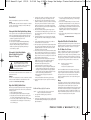
For maximum range:
• Keep the antenna free of
obstruction.
• When the handset is not
in use place the handset
in an upright position.
• Do not hold the handset
where you would block
the signal.
Do the following steps:
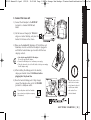
A. Choose the best location
B. Install the battery pack
C. Connect the base unit
D. Choose the dialing mode
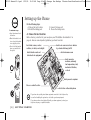
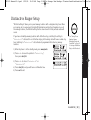
A. Choose the best location
Before choosing a location for your new phone, read “Installation Considerations” on
page 44. Here are some important guidelines you should consider:
Avoid heat sources, such as
radiators, air ducts, and sunlight
Avoid television sets and
other electronic equipment
Avoid noise sources such as a window
by a street with heavy traffic
Avoid microwave ovens
Avoid excessive
moisture, extremely
low temperatures, dust,
mechanical vibration,
or shock
Correct
Avoid personal computers
Choose a central location
Avoid other cordless telephones
Incorrect
[8]
If your home has specially wired alarm equipment connected to the telephone line,
be sure that installing the system does not disable your alarm equipment.
If you have questions about what will disable your alarm equipment, contact your
telephone company or a qualified installer.
G E T T I N G S TA R T E D