1
PLAYING AT HOME…
1.
2.
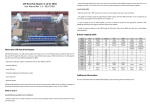
Attach Plexi Stand (included) for added stability
Ensure that the RDP is turned off before plugging in any cables or
inserting any cartridges
3. Connect your controller adapter (included) on to
the RDP DUO CONTROLLER PORT
4. Plug in 1-2 original or third party controllers
(sold separately)
5. Turn on the controller adapter
6.
7.
8.
9.
Plug the single end of the AV cable (included) into your RDP (AV OUT)
Connect the other end of the AV cable (Red/White/Yellow) into the
respective ports on the TV.
Insert your NES, SNES or GENESIS game
Turn on the RDP & TV