1
VEC1087CBD_Manual_050205
5/9/05
5:44 PM
Page 6
APPROXIMATE CHARGING TIMES
TROUBLESHOOTING
The 2/6/10 Amp 12 Volt Smart Battery Charger will automatically adjust the
charge rate as the battery becomes charged, and stop when the battery is fully
charged. Deep cycle batteries may require longer charging time.
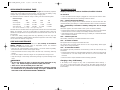
For estimates of the time it takes to charge a battery, refer to the following table.
Display Indications/Common Problems/Possible Solutions
Percent of charge
in battery
75%
50%
25%
0%
at 2 amp rate
7 HRS
14 HRS
NR*
at 6 amp rate
2.5 HRS
4.7 HRS
7 HRS
9.2 HRS
NR*
at 10 amp rate
1.4 HRS
2.8 HRS
4.2 HRS
5.5 HRS
*NR = Not recommended at 2 amps — use a higher charge rate.
The times shown in the table above are approximate and refer to a 50 Ah automotive
battery. For example, a 50 Ah (12 volt) battery is discharged (50%). How long
should it be charged at the 10 amp rate? See the chart above under “50%” and “at
10 amp rate.”
In most cases, battery charging times will vary depending on the size, age and
condition of the battery. Smaller batteries should be charged at a lower rate (2 amps)
and an extra hour added to charge time.
CARE AND MAINTENANCE
With proper care and minimal maintenance, the 2/6/10 Amp 12 Volt Smart
Battery Charger will provide years of dependable service. For maximum
performance, manufacturer recommends:
• After each use, clean the battery charger clamps — be sure to remove any battery
fluid that will cause corrosion of the copper clamps.
• Clean the outside case of the charger with a soft cloth and, if necessary, mild soap
solution.
• Do not allow liquid to enter the charger. Do not operate when charger is wet.
• Keep the charger cords loosely coiled during storage to prevent damage to the
cords.
WARNINGS
No Functions
• Check and make sure the charger is plugged into a live 110/120 volt AC outlet.
• Follow the steps outlined in the Operating Instructions section.
F01 — Internal Shorted Cell Battery
If the battery being charged has an internal shorted cell, the F01 will show. We
recommend taking your battery to a certified automotive service center for evaluation.
F02 — Bad Battery Connection or Battery Voltage Too Low to Accept
Charge
When F02 appears, the most common cause is poor connection to battery.
• Follow the steps outlined in “Important Safety Instructions” at the front of this manual
to disconnect AC cord and clamps, clean battery terminal and reconnect.
• If the situation persists, we recommend taking your battery to a certified automotive
service center for evaluation.
F03 — Internal Open Cell
Have battery checked by a certified automotive service center.
F04 — Overtime Condition
F04 appears when charging time exceeds 18 hours.
You may be using a charge current rate too low for a large battery. Select higher
charge rate to charge the battery.
F05 — Overheated Condition
The ventilation grill that prevents the air from flowing in and out of the charger may
be blocked.
• Follow the steps outlined in “Important Safety Instructions” at the front of this manual
to disconnect AC cord and clamps, allow the unit to cool for 30 minutes and
reconnect.
• Make sure there is ample ventilation before resuming operation.
Charging a Very Cold Battery
• Do not use charger if cords or clamps have been damaged in any
way — call Technical Support toll-free at (800) 618-5178.
• There are no user-serviceable parts in this unit.
• Do not open the unit. In the event of malfunction, it must be returned
to manufacturer for professional testing and repair. OPENING THE
UNIT WILL VOID THE MANUFACTURER’S WARRANTY.
If the battery to be charged is very cold (in temperatures below freezing —
0°C/ 32°F), it cannot accept a high rate of charge. The initial charge rate will be
low. The charge rate will increase as the battery warms. Never attempt to charge a
frozen battery.
6
7